2018 CADILLAC CT6 fuel
[x] Cancel search: fuelPage 167 of 445
Cadillac CT6 Owner Manual (GMNA-Localizing-U.S./Canada-11292458) -
2018 - crc - 2/14/17
166 INSTRUMENTS AND CONTROLS
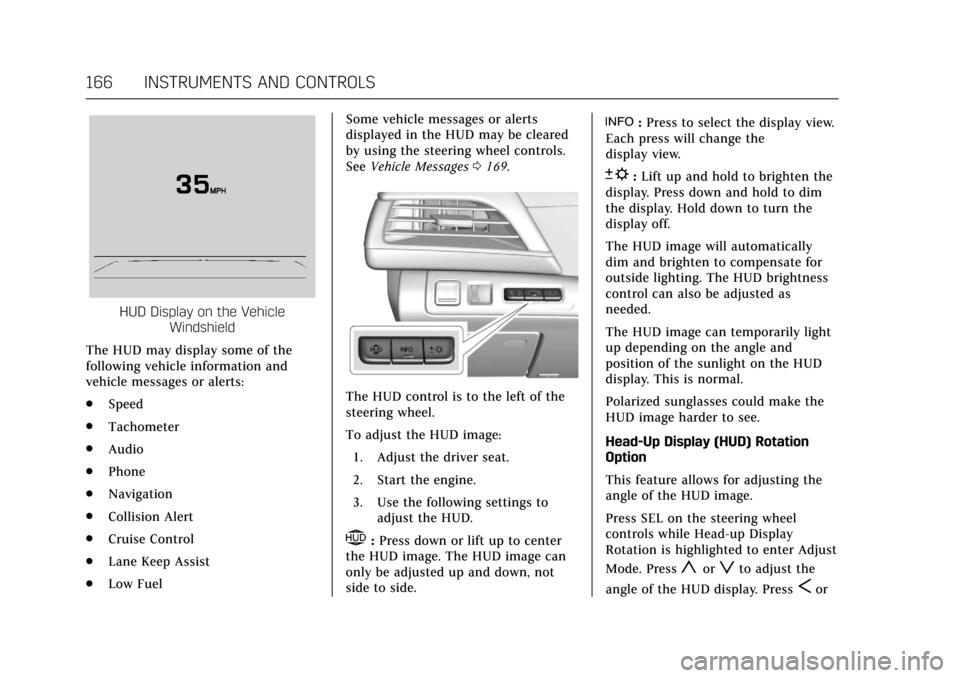
HUD Display on the VehicleWindshield
The HUD may display some of the
following vehicle information and
vehicle messages or alerts:
. Speed
. Tachometer
. Audio
. Phone
. Navigation
. Collision Alert
. Cruise Control
. Lane Keep Assist
. Low Fuel Some vehicle messages or alerts
displayed in the HUD may be cleared
by using the steering wheel controls.
See
Vehicle Messages 0169.
The HUD control is to the left of the
steering wheel.
To adjust the HUD image:
1. Adjust the driver seat.
2. Start the engine.
3. Use the following settings to adjust the HUD.
$:Press down or lift up to center
the HUD image. The HUD image can
only be adjusted up and down, not
side to side.
!: Press to select the display view.
Each press will change the
display view.
D: Lift up and hold to brighten the
display. Press down and hold to dim
the display. Hold down to turn the
display off.
The HUD image will automatically
dim and brighten to compensate for
outside lighting. The HUD brightness
control can also be adjusted as
needed.
The HUD image can temporarily light
up depending on the angle and
position of the sunlight on the HUD
display. This is normal.
Polarized sunglasses could make the
HUD image harder to see.
Head-Up Display (HUD) Rotation
Option
This feature allows for adjusting the
angle of the HUD image.
Press SEL on the steering wheel
controls while Head-up Display
Rotation is highlighted to enter Adjust
Mode. Press
yorzto adjust the
angle of the HUD display. Press
Sor
Page 194 of 445

Cadillac CT6 Owner Manual (GMNA-Localizing-U.S./Canada-11292458) -
2018 - crc - 2/14/17
CLIMATE CONTROLS 193
Climate Control Status Display
The climate control status display
appears briefly when the climate
control buttons on the center stack
are adjusted.
Automatic Operation
The system automatically controls the
fan speed, air delivery, air
conditioning, and recirculation in
order to heat or cool the vehicle to the
desired temperature.
When the indicator light is on or
AUTO is displayed on the climate
control display, the system is in full
automatic operation. If the air delivery
mode or fan setting is manuallyadjusted, the auto indicator turns off
and the display will show the selected
settings. Auto operation can be turned
off individually for climate settings.
For automatic operation:
1. Press AUTO.
2. Set the temperature. Allow the system time to stabilize. Then
adjust the temperature as needed
for best comfort.
To improve fuel efficiency and to cool
the vehicle faster, recirculation may be
automatically selected in warm
weather. The recirculation light will
not come on in AUTO mode. Press
@to select recirculation; press it
again to select outside air.
English units can be changed to
metric units through the instrument
cluster. See “Cluster Options Menu ”
under Instrument Cluster (Base Level)
0 127 orInstrument Cluster (Uplevel)
0 130.
OFF : Press to turn the fan on or off.
The temperature control and air
delivery mode can still be adjusted.
Q/R: The temperature can be
adjusted separately for the driver and
the passenger. Press up or down to
increase or decrease the temperature.
Press and hold up or down to rapidly
increase or decrease the temperature.
The driver and passenger
temperatures can also be adjusted by
touching the controls on the climate
control display.
SYNC : Touch SYNC on the climate
control display to link all climate zone
settings to the driver settings. When
all climate zone settings are linked,
the SYNC indicator will be lit. Adjust
the driver side temperature control to
change the linked temperature. When
the front or rear passenger settings
are adjusted, the SYNC indicator will
turn off.
Manual Operation
Q 9 R:Press or touch the fan
buttons on the center stack or climate
control display, to increase or decrease
the fan speed. Press and hold the
buttons to adjust speed more quickly.
The fan speed setting displays.
Pressing either button cancels
Page 199 of 445

Cadillac CT6 Owner Manual (GMNA-Localizing-U.S./Canada-11292458) -
2018 - crc - 2/14/17
198 CLIMATE CONTROLS
9. Ionizer Status Indicator (IfEquipped)
Climate Control Display
The fan, air delivery mode, air
conditioning, driver and passenger
temperatures, and SYNC settings can
be controlled by touching CLIMATE
on the infotainment Home Page or the
climate button in the climate control
display application tray. A selection
can then be made on the front climate
control page displayed. See the
infotainment manual.
Climate Control Status DisplayThe climate control status display
appears briefly when the climate
control buttons on the center stack
are adjusted.
Automatic Operation
The system automatically controls the
fan speed, air delivery, air
conditioning, and recirculation in
order to heat or cool the vehicle to the
desired temperature.
When the indicator light is on or
AUTO is displayed on the climate
control display, the system is in full
automatic operation. If the air delivery
mode or fan setting is manually
adjusted, the auto indicator turns off
and the display will show the selected
settings. Auto operation can be turned
off individually for climate settings.
For automatic operation: 1. Press AUTO.
2. Set the temperature. Allow the system time to stabilize. Then
adjust the temperature as needed
for best comfort. To improve fuel efficiency and to cool
the vehicle faster, recirculation may be
automatically selected in warm
weather. The recirculation light will
not come on in AUTO mode. Press
@to select recirculation; press it
again to select outside air.
English units can be changed to
metric units through the instrument
cluster. See “Cluster Options Menu ”or
“Cluster Menu ”under Instrument
Cluster (Base Level) 0127 or
Instrument Cluster (Uplevel) 0130.
OFF : Press to turn the fan on or off.
The temperature control and air
delivery mode can still be adjusted.
Q/R: The temperature can be
adjusted separately for the driver and
the passenger. Press to increase or
decrease the temperature. Press and
hold to rapidly increase or decrease
the temperature.
The driver and passenger
temperatures can also be adjusted by
touching the controls on the climate
control display.
Page 206 of 445

Cadillac CT6 Owner Manual (GMNA-Localizing-U.S./Canada-11292458) -
2018 - crc - 2/14/17
DRIVING AND OPERATING 205
Driving and
Operating
Driving Information
Distracted Driving . . . . . . . . . . . . . . . . 206
Defensive Driving . . . . . . . . . . . . . . . . 207
Drunk Driving . . . . . . . . . . . . . . . . . . . . 207
Control of a Vehicle . . . . . . . . . . . . . . 207
Braking (Gasoline Only) . . . . . . . . . . 207
Braking (PLUG-IN Only) . . . . . . . . . 208
Steering . . . . . . . . . . . . . . . . . . . . . . . . . . . 208
Off-Road Recovery . . . . . . . . . . . . . . . . 209
Loss of Control . . . . . . . . . . . . . . . . . . . 209
Driving on Wet Roads . . . . . . . . . . . 210
Hill and Mountain Roads . . . . . . . . 211
Winter Driving . . . . . . . . . . . . . . . . . . . . 211
If the Vehicle Is Stuck . . . . . . . . . . . 212
Vehicle Load Limits . . . . . . . . . . . . . . 213
Starting and Operating
New Vehicle Break-In (GasolineEngine Only) . . . . . . . . . . . . . . . . . . . . 216
Ignition Positions . . . . . . . . . . . . . . . . 217
Starting the Engine (PLUG-IN Only) . . . . . . . . . . . . . . . . . 218
Starting the Engine (Gasoline Only) . . . . . . . . . . . . . . . . . 221
Engine Heater . . . . . . . . . . . . . . . . . . . . 223 Retained Accessory
Power (RAP) . . . . . . . . . . . . . . . . . . . . 224
Shifting Into Park . . . . . . . . . . . . . . . . 224
Shifting out of Park . . . . . . . . . . . . . . 225
Parking over Things That Burn . . . . . . . . . . . . . . . . . . . . . . . 225
Extended Parking . . . . . . . . . . . . . . . . . 226
Electric Vehicle Operating
Modes
Driver Selected Operating Modes (PLUG-IN Only) . . . . . . . . . . . . . . . . . 226
Out of Fuel/Engine Unavailable . . . . . . . . . . . . . . . . . . . . . . 227
Maintenance Modes . . . . . . . . . . . . . . 228
Engine Exhaust
Engine Exhaust . . . . . . . . . . . . . . . . . . . 230
Running the Vehicle While Parked . . . . . . . . . . . . . . . . . . . . . . . . . . . 230
Automatic Transmission
Automatic Transmission . . . . . . . . . 231
Manual Mode (Gasoline Only) . . . 233
Drive Systems
All-Wheel Drive . . . . . . . . . . . . . . . . . . 234
Brakes
Antilock Brake System (ABS) . . . . 234
Electric Parking Brake . . . . . . . . . . . . 235
Brake Assist . . . . . . . . . . . . . . . . . . . . . . . 236 Hill Start Assist (HSA) . . . . . . . . . . . 237
Automatic Vehicle
Hold (AVH) . . . . . . . . . . . . . . . . . . . . . 237
Regenerative Braking (PLUG-IN Only) . . . . . . . . . . . . . . . . . 237
Ride Control Systems
Traction Control/Electronic
Stability Control . . . . . . . . . . . . . . . . 239
Driver Mode Control (Gasoline Only) . . . . . . . . . . . . . . . . . 241
Cruise Control
Cruise Control . . . . . . . . . . . . . . . . . . . . 242
Adaptive Cruise Control . . . . . . . . . 245
Driver Assistance Systems
Driver Assistance Systems . . . . . . . 253
Assistance Systems for Parkingor Backing . . . . . . . . . . . . . . . . . . . . . . . 254
Assistance Systems for Driving . . . . . . . . . . . . . . . . . . . . . . . . . . 260
Forward Collision Alert (FCA) System . . . . . . . . . . . . . . . . . . . . . . . . . . 260
Forward Automatic Braking (FAB) . . . . . . . . . . . . . . . . . . . 262
Front Pedestrian Braking (FPB) System . . . . . . . . . . . . . . . . . . . . . . . . . . 264
Night Vision System . . . . . . . . . . . . . 266
Side Blind Zone Alert (SBZA) . . . . 268
Lane Change Alert (LCA) . . . . . . . . 269
Page 207 of 445

Cadillac CT6 Owner Manual (GMNA-Localizing-U.S./Canada-11292458) -
2018 - crc - 2/14/17
206 DRIVING AND OPERATING
Lane DepartureWarning (LDW) . . . . . . . . . . . . . . . . . 270
Lane Keep Assist (LKA) . . . . . . . . . . 271
Surround Vision Recorder . . . . . . . 272
Charging
Plug-In Charging (PLUG-IN Only) . . . . . . . . . . . . . . . . . 274
Delayed Charging Override (PLUG-IN Only) . . . . . . . . . . . . . . . . . 275
Charging Status Feedback (PLUG-IN Only) . . . . . . . . . . . . . . . . . 275
Charge Cord (PLUG-IN Only) . . . . 279
Utility Interruption of Charging (PLUG-IN Only) . . . . . . . . . . . . . . . . . 284
Electrical Requirements for Battery Charging
(PLUG-IN Only) . . . . . . . . . . . . . . . . . 285
Fuel
Fuel . . . . . . . . . . . . . . . . . . . . . . . . . . . . . . . 286
California Fuel Requirements . . . . 287
Fuels in Foreign Countries . . . . . . . 287
Fuel Additives . . . . . . . . . . . . . . . . . . . . 287
Filling the Tank . . . . . . . . . . . . . . . . . . 288
Filling a Portable Fuel
Container . . . . . . . . . . . . . . . . . . . . . . . . 290
Trailer Towing
General Towing Information . . . . 290
Driving Characteristics andTowing Tips . . . . . . . . . . . . . . . . . . . . . 290 Trailer Towing
(PLUG-IN Only) . . . . . . . . . . . . . . . . . 293
Trailer Towing (Gasoline Only) . . . . . . . . . . . . . . . . . 293
Towing Equipment . . . . . . . . . . . . . . . 294
Conversions and Add-Ons
Add-On Electrical Equipment . . . 295
Driving Information
Distracted Driving
Distraction comes in many forms and
can take your focus from the task of
driving. Exercise good judgment and
do not let other activities divert your
attention away from the road. Many
local governments have enacted laws
regarding driver distraction. Become
familiar with the local laws in
your area.
To avoid distracted driving, keep your
eyes on the road, keep your hands on
the steering wheel, and focus your
attention on driving.
. Do not use a phone in demanding
driving situations. Use a
hands-free method to place or
receive necessary phone calls.
. Watch the road. Do not read, take
notes, or look up information on
phones or other electronic devices.
. Designate a front seat passenger
to handle potential distractions.
Page 213 of 445

Cadillac CT6 Owner Manual (GMNA-Localizing-U.S./Canada-11292458) -
2018 - crc - 2/14/17
212 DRIVING AND OPERATING
.Allow greater following distance
and watch for slippery spots. Icy
patches can occur on otherwise
clear roads in shaded areas. The
surface of a curve or an overpass
can remain icy when the
surrounding roads are clear. Avoid
sudden steering maneuvers and
braking while on ice.
. Turn off cruise control.
Blizzard Conditions
Stop the vehicle in a safe place and
signal for help. Stay with the vehicle
unless there is help nearby. If possible,
use Roadside Service. See Roadside
Service 0411. To get help and keep
everyone in the vehicle safe:
. Turn on the hazard warning
flashers.
. Tie a red cloth to an outside
mirror.
{Warning
Snow can trap engine exhaust
under the vehicle. This may cause
exhaust gases to get inside. Engine
exhaust contains carbon monoxide
(CO), which cannot be seen or
smelled. It can cause
unconsciousness and even death.
If the vehicle is stuck in snow:
. Clear snow from the base of
the vehicle, especially any
blocking the exhaust pipe.
. Open a window about 5 cm
(2 in) on the vehicle side that
is away from the wind, to
bring in fresh air.
. Fully open the air outlets on
or under the instrument
panel.
. Adjust the climate control
system to circulate the air
inside the vehicle and set the
fan speed to the highest
setting. See “Climate Control
Systems.”
(Continued)
Warning (Continued)
For more information about CO, see
Engine Exhaust0230.
To save fuel, run the engine for short
periods to warm the vehicle and then
shut the engine off and partially close
the window. Moving about to keep
warm also helps.
If it takes time for help to arrive,
when running the engine, push the
accelerator pedal slightly so the
engine runs faster than the idle speed.
This keeps the battery charged to
restart the vehicle and to signal for
help with the headlamps. Do this as
little as possible, to save fuel.
If the Vehicle Is Stuck
Slowly and cautiously spin the wheels
to free the vehicle when stuck in sand,
mud, ice, or snow.
If stuck too severely for the traction
system to free the vehicle, turn the
traction system off and use the
rocking method. See Traction Control/
Electronic Stability Control 0239.
Page 217 of 445

Cadillac CT6 Owner Manual (GMNA-Localizing-U.S./Canada-11292458) -
2018 - crc - 2/14/17
216 DRIVING AND OPERATING
weight of the driver, passengers,
and cargo should never exceed the
vehicle's capacity weight.
Certification Label
Label Example
A vehicle-specific Certification
label is attached to the vehicle's
center pillar (B-pillar). The label
may show the gross weight
capacity of the vehicle, called the
Gross Vehicle Weight Rating
(GVWR). The GVWR includes the
weight of the vehicle, all
occupants, fuel, and cargo.
{Warning
Things inside the vehicle can
strike and injure people in a
sudden stop or turn, or in a
crash.
.Put things in the cargo
area of the vehicle. In the
cargo area, put them as far
forward as possible. Try to
spread the weight evenly.
.Never stack heavier things,
like suitcases, inside the
vehicle so that some of
them are above the tops of
the seats.
.Do not leave an unsecured
child restraint in the
vehicle.
.Secure loose items in the
vehicle.
.Do not leave a seat folded
down unless needed.
Starting and Operating
New Vehicle Break-In
(Gasoline Engine Only)
Follow these recommended guidelines
during the first 2 400 km (1,500 mi) of
driving this vehicle. Parts have a
break-in period and performance will
be better in the long run.
For the first 2 400 km (1,500 mi):
. Avoid full throttle starts and
abrupt stops.
. Do not exceed 4000 engine rpm.
. Avoid driving at any one constant
speed, fast or slow.
. Avoid downshifting to brake or
slow the vehicle when the engine
speed will exceed 4000 rpm.
. Do not let the engine labor. Never
lug the engine in high gear at low
speeds.
. Do not participate in track events,
sport driving schools, or similar
activities during this break-in
period.
Page 218 of 445
Cadillac CT6 Owner Manual (GMNA-Localizing-U.S./Canada-11292458) -
2018 - crc - 2/14/17
DRIVING AND OPERATING 217
.Check engine oil with every
refueling and add if necessary. Oil
and fuel consumption may be
higher than normal during the
first 2 400 km (1,500 mi).
. To break in new tires, drive at
moderate speeds and avoid hard
cornering for the first
300 km (200 mi). New tires do not
have maximum traction and may
tend to slip.
. New brake linings also need a
break–in period. Avoid making
hard stops during the first
300 km (200 mi). This is
recommended every time brake
linings are replaced.Ignition Positions
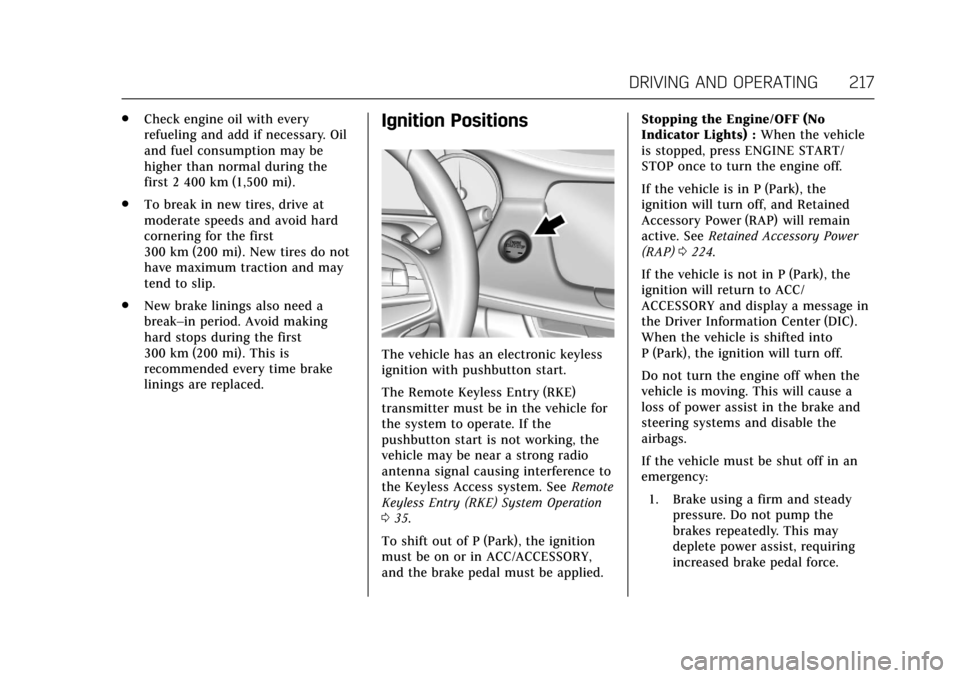
The vehicle has an electronic keyless
ignition with pushbutton start.
The Remote Keyless Entry (RKE)
transmitter must be in the vehicle for
the system to operate. If the
pushbutton start is not working, the
vehicle may be near a strong radio
antenna signal causing interference to
the Keyless Access system. See Remote
Keyless Entry (RKE) System Operation
0 35.
To shift out of P (Park), the ignition
must be on or in ACC/ACCESSORY,
and the brake pedal must be applied. Stopping the Engine/OFF (No
Indicator Lights) :
When the vehicle
is stopped, press ENGINE START/
STOP once to turn the engine off.
If the vehicle is in P (Park), the
ignition will turn off, and Retained
Accessory Power (RAP) will remain
active. See Retained Accessory Power
(RAP) 0224.
If the vehicle is not in P (Park), the
ignition will return to ACC/
ACCESSORY and display a message in
the Driver Information Center (DIC).
When the vehicle is shifted into
P (Park), the ignition will turn off.
Do not turn the engine off when the
vehicle is moving. This will cause a
loss of power assist in the brake and
steering systems and disable the
airbags.
If the vehicle must be shut off in an
emergency: 1. Brake using a firm and steady pressure. Do not pump the
brakes repeatedly. This may
deplete power assist, requiring
increased brake pedal force.