2018 CADILLAC CT6 Gas
[x] Cancel search: GasPage 145 of 445

Cadillac CT6 Owner Manual (GMNA-Localizing-U.S./Canada-11292458) -
2018 - crc - 2/14/17
144 INSTRUMENTS AND CONTROLS
If the light continues to flash, find a
safe place to park. Turn the vehicle off
and wait at least 10 seconds before
restarting the engine. If the light is
still flashing, follow the previous
guidelines and see your dealer for
service as soon as possible.
If the light is on steady :A
malfunction has been detected.
Diagnosis and service may be
required.
Check the following:
. If fuel has been added to the
vehicle using the capless fuel
funnel adapter, make sure that it
has been removed. See “Filling the
Tank with a Portable Gas Can ”
under Filling the Tank 0288. The
diagnostic system can detect if the
adapter has been left installed in
the vehicle, allowing fuel to
evaporate into the atmosphere.
A few driving trips with the
adapter removed may turn off the
light.
. Poor fuel quality can cause
inefficient engine operation and
poor driveability, which may go
away once the engine is warmed up. If this occurs, change the fuel
brand. It may require at least one
full tank of the proper fuel to turn
the light off. See
Fuel0286.
If the light remains on, see your
dealer.
Emissions Inspection and
Maintenance Programs
If the vehicle requires an Emissions
Inspection/Maintenance test, the test
equipment will likely connect to the
vehicle's Data Link Connector (DLC).
The DLC is under the instrument
panel to the left of the steering wheel.
Connecting devices that are not used
to perform an Emissions Inspection/
Maintenance test or to service the
vehicle may affect vehicle operation.
See Add-On Electrical Equipment 0295.
See your dealer if assistance is needed. The vehicle may not pass
inspection if:
.
The light is on when the engine is
running.
. The light does not come on when
the ignition is in Service Mode.
. Critical emission control systems
have not been completely
diagnosed. If this happens, the
vehicle would not be ready for
inspection and might require
several days of routine driving
before the system is ready for
inspection. This can happen if the
12-volt battery has recently been
replaced or run down, or if the
vehicle has been recently serviced.
See your dealer if the vehicle will not
pass or cannot be made ready for
the test.
Page 147 of 445

Cadillac CT6 Owner Manual (GMNA-Localizing-U.S./Canada-11292458) -
2018 - crc - 2/14/17
146 INSTRUMENTS AND CONTROLS
Service Electric Parking
Brake Light
On some vehicles the service electric
parking brake light should come on
briefly when the vehicle is started.
If it does not come on, have it fixed so
it will be ready to warn if there is a
problem. For vehicles with the
reconfigurable cluster, this light may
not come on when the vehicle is
started.
If this light stays on, the vehicle
should be taken to a dealer as soon as
possible. SeeElectric Parking Brake
0 235. A message may also display in
the Driver Information Center (DIC).
Antilock Brake System
(ABS) Warning Light
This light comes on briefly when the
engine is started.
If the light does not come on, have it
fixed so it will be ready to warn if
there is a problem.
If the light comes on while driving,
stop as soon as it is safely possible
and turn off the vehicle. Then start
the engine again to reset the system.
If the ABS light stays on, or comes on
again while driving, the vehicle needs
service. A chime may also sound when
the light comes on steady.
If the ABS light is the only light on,
the vehicle has regular brakes, but the
antilock brakes are not functioning.
If both the ABS and the brake system
warning light are on, the vehicle's
antilock brakes are not functioning and there is a problem with the
regular brakes. See your dealer for
service.
See
Brake System Warning Light 0145.
Sport Mode Light
This light comes on when Sport Mode
is selected. See Driver Mode Control
(Gasoline Only) 0241.
Winter Driving Mode Light
This light comes on when Snow/Ice
Mode is selected. See Driver Mode
Control (Gasoline Only) 0241.
Page 151 of 445

Cadillac CT6 Owner Manual (GMNA-Localizing-U.S./Canada-11292458) -
2018 - crc - 2/14/17
150 INSTRUMENTS AND CONTROLS
Caution (Continued)
vehicle serviced. Always follow the
maintenance schedule for changing
engine oil.
This light should come on briefly as
the engine is started. If it does not
come on, have the vehicle serviced by
your dealer.
If the light comes on and stays on, it
means that oil is not flowing through
the engine properly. The vehicle could
be low on oil and might have some
other system problem. See your dealer.
Low Fuel Warning Light
This light is near the fuel gauge and
comes on briefly when the ignition is
turned on as a check to show it is
working. For vehicles with a
reconfigurable cluster, this light is in
the display area and may not come on
when the ignition is turned on.
It also comes on when the fuel tank is
low on fuel. The light turns off when
fuel is added. If it does not, have the
vehicle serviced.
Auto Stop Mode (Uplevel
Cluster)
This light comes on when the engine
is in an Auto Stop.
SeeStarting the Engine (PLUG-IN Only)
0 218 orStarting the Engine (Gasoline
Only) 0221.
Security Light
On some vehicles the immobilizer
light should come on briefly as the
engine is started. If it does not come
on, have the vehicle serviced by your
dealer. If the system is working
normally, the indicator light turns off.
For vehicles with the reconfigurable
cluster, this light may not come on
when the engine is started.
If the light stays on and the engine
does not start, there could be a
problem with the theft-deterrent
system. See Immobilizer Operation
0 53.
Page 173 of 445

Cadillac CT6 Owner Manual (GMNA-Localizing-U.S./Canada-11292458) -
2018 - crc - 2/14/17
172 INSTRUMENTS AND CONTROLS
.Auto Defog
. Auto Rear Defog
. Ionizer
. Engine Assist Heat
. Engine Assist Heat Plugged In
Auto Fan Speed
This feature will set the auto fan
speed.
Select Low, Medium, or High.
Air Quality Sensor
This allows for selection of air quality
sensor operation at high or low
sensitivity.
Select Off, Low Sensitivity, or High
Sensitivity.
Auto Cooled Seats
When enabled, this feature will
automatically activate the cooled seats
at the level required by the interior
temperature. See Heated and Ventilated
Front Seats 072.
Select Off or On. Auto Heated Seats
When enabled, this feature will
automatically activate heated seats at
the level required by the interior
temperature. See
Heated and Ventilated
Front Seats 072.
If equipped with Auto Heated Steering
Wheel, this feature will turn on when
the Auto Heated Seats turn on.
Select Off or On.
Auto Defog
When set to On, the front defog will
automatically react to temperature
and humidity conditions that may
cause fogging.
Select Off or On.
Auto Rear Defog
If equipped, this allows the Auto Rear
Defog to be turned on or off. This
feature will automatically turn on the
rear window defogger when it is cold
outside.
Select Off or On. Ionizer
If equipped and on, this feature
purifies the air in the interior of the
vehicle.
See
Automatic Climate Control System
(Quad Zone - Gasoline Only) 0197 or
Automatic Climate Control System (Dual
Zone - Gasoline and PLUG-IN) 0191.
Select Off or On.
Engine Assist Heat
If equipped, this feature selects the
outside temperature level at which the
engine may run to assist heating in
Electric Mode. A change in selection
will not take effect until after the
vehicle is first powered down.
Select On for temperatures below
approximately 2 °C (35 °F), or select
Deferred for temperatures below
approximately −10 °C (15 °F).
Engine Assist Heat Plugged In
During remote start, this feature turns
on or off the ability for the engine to
run to help heat the vehicle when it is
plugged in. A change in setting will
not take effect until after the vehicle
is first powered down.
Page 192 of 445
Cadillac CT6 Owner Manual (GMNA-Localizing-U.S./Canada-11292458) -
2018 - crc - 2/14/17
CLIMATE CONTROLS 191
Climate Controls
Climate Control Systems
Automatic Climate ControlSystem (Dual Zone - Gasoline
and PLUG-IN) . . . . . . . . . . . . . . . . . . . 191
Automatic Climate Control System (Quad Zone -
Gasoline Only) . . . . . . . . . . . . . . . . . . 197
Air Vents
Air Vents . . . . . . . . . . . . . . . . . . . . . . . . . . 203
Maintenance
Passenger Compartment AirFilter . . . . . . . . . . . . . . . . . . . . . . . . . . . . . 204
Service . . . . . . . . . . . . . . . . . . . . . . . . . . . . 204
Climate Control Systems
Automatic Climate Control System (Dual Zone - Gasoline
and PLUG-IN)
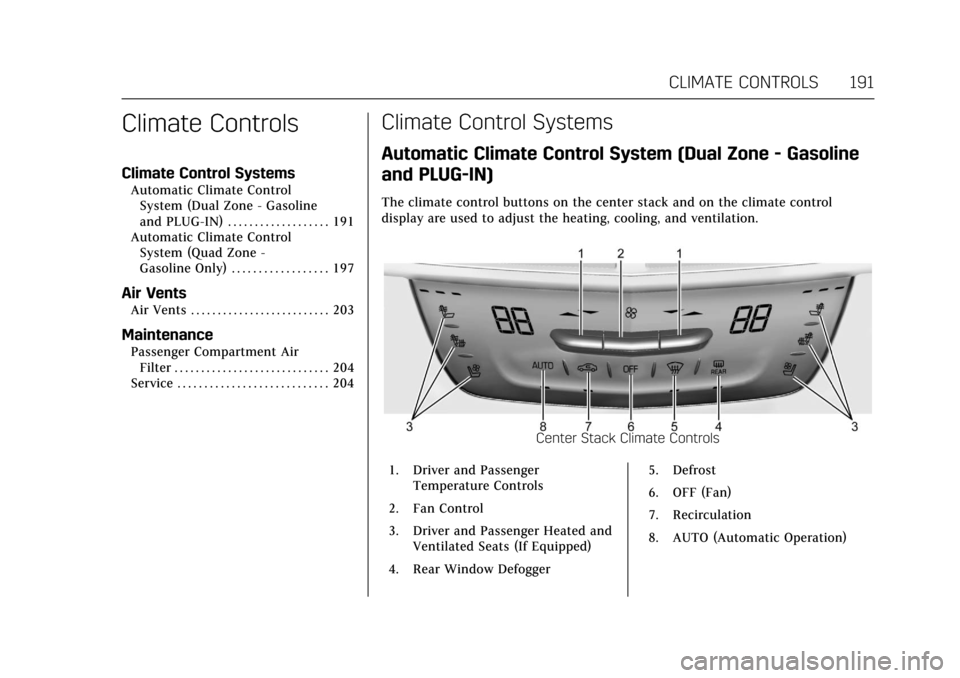
The climate control buttons on the center stack and on the climate control
display are used to adjust the heating, cooling, and ventilation.
Center Stack Climate Controls
1. Driver and Passenger Temperature Controls
2. Fan Control
3. Driver and Passenger Heated and Ventilated Seats (If Equipped)
4. Rear Window Defogger 5. Defrost
6. OFF (Fan)
7. Recirculation
8. AUTO (Automatic Operation)
Page 193 of 445

Cadillac CT6 Owner Manual (GMNA-Localizing-U.S./Canada-11292458) -
2018 - crc - 2/14/17
192 CLIMATE CONTROLS
Climate Control Display(Gasoline Only)
1. Outside Temperature Display
2. Driver and Passenger Temperature Controls
3. Fan Control
4. A/C (Air Conditioning)
5. Climate Control Selection (Application Tray Button)
6. SYNC (Synchronized Temperature)
7. Driver and Passenger Air Delivery Mode Controls
8. Defog 9. Ionizer Status Indicator (If
Equipped)
Climate Control Display (PLUG-IN Only)
1. Outside Temperature Display
2. Driver and Passenger Temperature Controls
3. Fan Control
4. Heater and A/C (Air Conditioning)
5. Climate Control Selection (Application Tray Button)
6. SYNC (Synchronized Temperature) 7. Driver and Passenger Air
Delivery Mode Controls
8. Defog
9. Ionizer Status Indicator (If Equipped)
Climate Control Display
The fan, air delivery mode, air
conditioning, driver and passenger
temperatures, and SYNC settings can
be controlled by touching CLIMATE
on the infotainment Home Page or the
climate button in the climate control
display application tray. A selection
can then be made on the front climate
control page displayed. See the
infotainment manual.
Page 198 of 445

Cadillac CT6 Owner Manual (GMNA-Localizing-U.S./Canada-11292458) -
2018 - crc - 2/14/17
CLIMATE CONTROLS 197
Automatic Climate Control System (Quad Zone -
Gasoline Only)
The climate control buttons on the center stack and on the climate control
display are used to adjust the heating, cooling, and ventilation.
Center Stack Climate Controls
1. Driver and Passenger Temperature Controls
2. Fan Control
3. Driver and Passenger Heated and Ventilated Seats (If Equipped)
4. Rear Window Defogger 5. Defrost
6. OFF (Fan)
7. Recirculation
8. AUTO (Automatic Operation)
Climate Control Display
1. Outside Temperature Display
2. Driver and Passenger Temperature Controls
3. Fan Control
4. A/C (Air Conditioning)
5. Climate Control Selection (Application Tray Button)
6. SYNC (Synchronized Temperature)
7. Driver and Passenger Air Delivery Mode Controls
8. Defog
Page 206 of 445

Cadillac CT6 Owner Manual (GMNA-Localizing-U.S./Canada-11292458) -
2018 - crc - 2/14/17
DRIVING AND OPERATING 205
Driving and
Operating
Driving Information
Distracted Driving . . . . . . . . . . . . . . . . 206
Defensive Driving . . . . . . . . . . . . . . . . 207
Drunk Driving . . . . . . . . . . . . . . . . . . . . 207
Control of a Vehicle . . . . . . . . . . . . . . 207
Braking (Gasoline Only) . . . . . . . . . . 207
Braking (PLUG-IN Only) . . . . . . . . . 208
Steering . . . . . . . . . . . . . . . . . . . . . . . . . . . 208
Off-Road Recovery . . . . . . . . . . . . . . . . 209
Loss of Control . . . . . . . . . . . . . . . . . . . 209
Driving on Wet Roads . . . . . . . . . . . 210
Hill and Mountain Roads . . . . . . . . 211
Winter Driving . . . . . . . . . . . . . . . . . . . . 211
If the Vehicle Is Stuck . . . . . . . . . . . 212
Vehicle Load Limits . . . . . . . . . . . . . . 213
Starting and Operating
New Vehicle Break-In (GasolineEngine Only) . . . . . . . . . . . . . . . . . . . . 216
Ignition Positions . . . . . . . . . . . . . . . . 217
Starting the Engine (PLUG-IN Only) . . . . . . . . . . . . . . . . . 218
Starting the Engine (Gasoline Only) . . . . . . . . . . . . . . . . . 221
Engine Heater . . . . . . . . . . . . . . . . . . . . 223 Retained Accessory
Power (RAP) . . . . . . . . . . . . . . . . . . . . 224
Shifting Into Park . . . . . . . . . . . . . . . . 224
Shifting out of Park . . . . . . . . . . . . . . 225
Parking over Things That Burn . . . . . . . . . . . . . . . . . . . . . . . 225
Extended Parking . . . . . . . . . . . . . . . . . 226
Electric Vehicle Operating
Modes
Driver Selected Operating Modes (PLUG-IN Only) . . . . . . . . . . . . . . . . . 226
Out of Fuel/Engine Unavailable . . . . . . . . . . . . . . . . . . . . . . 227
Maintenance Modes . . . . . . . . . . . . . . 228
Engine Exhaust
Engine Exhaust . . . . . . . . . . . . . . . . . . . 230
Running the Vehicle While Parked . . . . . . . . . . . . . . . . . . . . . . . . . . . 230
Automatic Transmission
Automatic Transmission . . . . . . . . . 231
Manual Mode (Gasoline Only) . . . 233
Drive Systems
All-Wheel Drive . . . . . . . . . . . . . . . . . . 234
Brakes
Antilock Brake System (ABS) . . . . 234
Electric Parking Brake . . . . . . . . . . . . 235
Brake Assist . . . . . . . . . . . . . . . . . . . . . . . 236 Hill Start Assist (HSA) . . . . . . . . . . . 237
Automatic Vehicle
Hold (AVH) . . . . . . . . . . . . . . . . . . . . . 237
Regenerative Braking (PLUG-IN Only) . . . . . . . . . . . . . . . . . 237
Ride Control Systems
Traction Control/Electronic
Stability Control . . . . . . . . . . . . . . . . 239
Driver Mode Control (Gasoline Only) . . . . . . . . . . . . . . . . . 241
Cruise Control
Cruise Control . . . . . . . . . . . . . . . . . . . . 242
Adaptive Cruise Control . . . . . . . . . 245
Driver Assistance Systems
Driver Assistance Systems . . . . . . . 253
Assistance Systems for Parkingor Backing . . . . . . . . . . . . . . . . . . . . . . . 254
Assistance Systems for Driving . . . . . . . . . . . . . . . . . . . . . . . . . . 260
Forward Collision Alert (FCA) System . . . . . . . . . . . . . . . . . . . . . . . . . . 260
Forward Automatic Braking (FAB) . . . . . . . . . . . . . . . . . . . 262
Front Pedestrian Braking (FPB) System . . . . . . . . . . . . . . . . . . . . . . . . . . 264
Night Vision System . . . . . . . . . . . . . 266
Side Blind Zone Alert (SBZA) . . . . 268
Lane Change Alert (LCA) . . . . . . . . 269