2018 CADILLAC ATS RAP
[x] Cancel search: RAPPage 188 of 376

Cadillac XTS Owner Manual (GMNA-Localizing-U.S./Canada-12032610) -
2019 - crc - 8/22/18
DRIVING AND OPERATING 187
thermostat in the plug end of the cord
will prevent engine heater operation
at temperatures above−18 °C (0 °F).
To Use the Engine Heater
1. Turn off the engine.
2. Open the hood and unwrap the
electrical cord.
The electrical cord is on the
driver side of the engine
compartment, between the
fender and the engine
compartment fuse block. Check the heater cord for
damage. If it is damaged, do not
use it. See your dealer for a
replacement. Inspect the cord for
damage yearly.
3. Plug it into a normal, grounded 110-volt AC outlet.
{Warning
Improper use of the heater cord or
an extension cord can damage the
cord and may result in overheating
and fire.
. Plug the cord into a
three-prong electrical utility
receptacle that is protected by
a ground fault detection
function. An ungrounded
outlet could cause an electric
shock.
. Use a weatherproof,
heavy-duty, 15 amp-rated
extension cord if needed.
Failure to use the
recommended extension cord
in good operating condition,
(Continued)
Warning (Continued)
or using a damaged heater or
extension cord, could make it
overheat and cause a fire,
property damage, electric
shock, and injury.
. Do not operate the vehicle
with the heater cord
permanently attached to the
vehicle. Possible heater cord
and thermostat damage could
occur.
. While in use, do not let the
heater cord touch vehicle
parts or sharp edges. Never
close the hood on the
heater cord.
. Before starting the vehicle,
unplug the cord, reattach the
cover to the plug, and
securely fasten the cord. Keep
the cord away from any
moving parts.
Page 189 of 376

Cadillac XTS Owner Manual (GMNA-Localizing-U.S./Canada-12032610) -
2019 - crc - 8/22/18
188 DRIVING AND OPERATING
4. Before starting the engine, besure to unplug and store the cord
as it was before to keep it away
from moving engine parts.
The length of time the heater should
remain plugged in depends on several
factors. Ask a dealer in the area where
you will be parking the vehicle for the
best advice on this.
Retained Accessory
Power (RAP)
Some vehicle accessories may be used
after the ignition is turned off.
The power windows and sunroof,
if equipped, will continue to work for
up to 10 minutes or until any door is
opened.
The infotainment system will continue
to work for 10 minutes, until the
driver door is opened, or until the
ignition is turned on or placed in
ACC/ACCESSORY.
Shifting Into Park
1. Hold the brake pedal down and apply the parking brake. See
Electric Parking Brake 0194.
2. Move the shift lever into P (Park) by pushing the lever all the way
toward the front of the vehicle.
3. Turn the ignition off.
Leaving the Vehicle with the
Engine Running
{Warning
It can be dangerous to leave the
vehicle with the engine running.
It could overheat and catch fire.
It is dangerous to get out of the
vehicle if the shift lever is not fully
in P (Park) with the parking brake
firmly set. The vehicle can roll.
Do not leave the vehicle when the
engine is running. If you have left
the engine running, the vehicle can
move suddenly. You or others could (Continued)
Warning (Continued)
be injured. To be sure the vehicle
will not move, even when you are
on fairly level ground, always set
the parking brake and move the
shift lever to P (Park). See Shifting
Into Park 0188. If you are towing a
trailer, see Driving Characteristics
and Towing Tips 0230.
If you have to leave the vehicle with
the engine running, be sure the
vehicle is in P (Park) and the parking
brake is firmly set before you leave it.
After you have moved the shift lever
into P (Park), hold down the regular
brake pedal. See if you can move the
shift lever away from P (Park) without
first pulling it toward you. If you can,
it means that the shift lever was not
fully locked into P (Park).
Torque Lock
Torque lock is when the weight of the
vehicle puts too much force on the
parking pawl in the transmission. This
happens when parking on a hill and
Page 193 of 376

Cadillac XTS Owner Manual (GMNA-Localizing-U.S./Canada-12032610) -
2019 - crc - 8/22/18
192 DRIVING AND OPERATING
lever button and move the shift lever
into another gear. SeeShifting out of
Park 0189.
R : Use this gear to back up.
Caution
Shifting to R (Reverse) while the
vehicle is moving forward could
damage the transmission. The
repairs would not be covered by the
vehicle warranty. Shift to
R (Reverse) only after the vehicle is
stopped.
To rock the vehicle back and forth to
get out of snow, ice, or sand without
damaging the transmission, see If the
Vehicle Is Stuck 0179.
N : In this position, the engine does
not connect with the wheels. To
restart the engine when the vehicle is
already moving, use N (Neutral) only.
{Warning
Shifting into a drive gear while the
engine is running at high speed is
dangerous. Unless your foot is
firmly on the brake pedal, the
vehicle could move very rapidly.
You could lose control and hit
people or objects. Do not shift into
a drive gear while the engine is
running at high speed.
Caution
Shifting out of P (Park) or
N (Neutral) with the engine running
at high speed may damage the
transmission. The repairs would not
be covered by the vehicle warranty.
Be sure the engine is not running at
high speed when shifting the
vehicle.
Caution
A transmission hot message may
display if the automatic
transmission fluid is too hot.
Driving under this condition can
damage the vehicle. Stop and idle
the engine to cool the automatic
transmission fluid. This message
clears when the transmission fluid
has cooled sufficiently.
D : This position is for normal driving.
If more power is needed for passing,
press the accelerator pedal down.
Caution
If the vehicle does not shift gears,
the transmission could be damaged.
Have the vehicle serviced
right away.
M : This position allows the driver to
select the range of gears appropriate
for current driving conditions.
Page 197 of 376

Cadillac XTS Owner Manual (GMNA-Localizing-U.S./Canada-12032610) -
2019 - crc - 8/22/18
196 DRIVING AND OPERATING
Automatic EPB Release
The EPB will automatically release if
the vehicle is running, placed into
gear, and an attempt is made to drive
away. Avoid rapid acceleration when
the EPB is applied, to preserve parking
brake lining life.
Brake Assist
This vehicle has a brake assist feature
designed to assist the driver in
stopping or decreasing vehicle speed
in emergency driving conditions. This
feature uses the stability system
hydraulic brake control module to
supplement the power brake system
under conditions where the driver has
quickly and forcefully applied the
brake pedal in an attempt to quickly
stop or slow down the vehicle. The
stability system hydraulic brake
control module increases brake
pressure at each corner of the vehicle
until the ABS activates. Minor brake
pedal pulsation or pedal movement
during this time is normal and the
driver should continue to apply the
brake pedal as the driving situation
dictates. The brake assist feature willautomatically disengage when the
brake pedal is released or brake pedal
pressure is quickly decreased.
Hill Start Assist (HSA)
This vehicle has a Hill Start Assist
(HSA) feature, which may be useful
when the vehicle is stopped on a
grade sufficient enough to activate
HSA. This feature is designed to
prevent the vehicle from rolling, either
forward or rearward, during vehicle
drive off. After the driver completely
stops and holds the vehicle in a
complete standstill on a grade, HSA
will be automatically activated. During
the transition period between when
the driver releases the brake pedal and
starts to accelerate to drive off on a
grade, HSA holds the braking pressure
for a maximum of two seconds to
ensure that there is no rolling. The
brakes will automatically release when
the accelerator pedal is applied within
the two-second window. It will not
activate if the vehicle is in a drive gear
and facing downhill, or if the vehicle
is facing uphill and in R (Reverse).
Ride Control Systems
Traction Control/Electronic
Stability Control
System Operation
The vehicle has a Traction Control
System (TCS) and StabiliTrak/
Electronic Stability Control (ESC).
These systems help limit wheel slip
and assist the driver in maintaining
control, especially on slippery road
conditions.
TCS activates if it senses that any of
the drive wheels are spinning or
beginning to lose traction. On an
All-Wheel-Drive (AWD) vehicle, the
system will operate if it senses that
any of the wheels are spinning or
beginning to lose traction. When this
happens, TCS applies the brakes to the
spinning wheels and reduces engine
power to limit wheel spin.
StabiliTrak/ESC activates when the
system senses a discrepancy between
the intended path and the direction
the vehicle is actually traveling.
StabiliTrak/ESC selectively applies
Page 206 of 376
Cadillac XTS Owner Manual (GMNA-Localizing-U.S./Canada-12032610) -
2019 - crc - 8/22/18
DRIVING AND OPERATING 205
.Press and hold SET– down until
the desired lower speed is reached,
then release it.
. To decrease the vehicle speed in
smaller increments, press SET–
down to the first detent. For each
press, the vehicle goes about
1 km/h (1 mph) slower.
. To decrease the vehicle speed in
larger increments, press SET–
down to the second detent. For
each press, the vehicle speed
decreases to the next 5 km/h
(5 mph) mark on the speedometer.
Selecting the Follow Distance Gap
When a slower moving vehicle is
detected ahead within the selected
following gap, ACC will adjust the
vehicle's speed and attempt to
maintain the follow distance gap
selected.
Press
[on the steering wheel to
adjust the following gap. Each press
cycles the gap button through three
settings: Far, Medium, or Near. When pressed, the current gap setting
displays briefly on the instrument
cluster and HUD. The gap setting will
be maintained until it is changed.
Since each gap setting corresponds to
a following time (Far, Medium,
or Near), the following distance will
vary based on vehicle speed. The
faster the vehicle speed, the further
back your vehicle will follow a vehicle
detected ahead. Consider traffic and
weather conditions when selecting the
following gap. The range of selectable
gaps may not be appropriate for all
drivers and driving conditions.
Changing the gap setting
automatically changes the alert timing
sensitivity (Far, Medium, or Near) for
the Forward Collision Alert (FCA)
feature. See
Forward Collision Alert
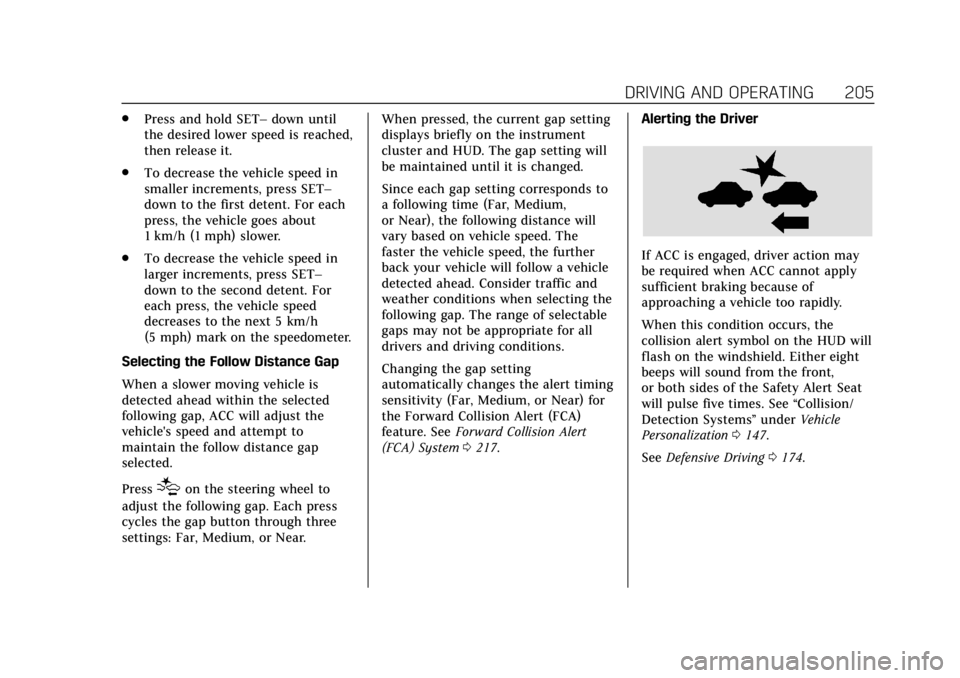
(FCA) System 0217. Alerting the Driver
If ACC is engaged, driver action may
be required when ACC cannot apply
sufficient braking because of
approaching a vehicle too rapidly.
When this condition occurs, the
collision alert symbol on the HUD will
flash on the windshield. Either eight
beeps will sound from the front,
or both sides of the Safety Alert Seat
will pulse five times. See
“Collision/
Detection Systems” underVehicle
Personalization 0147.
See Defensive Driving 0174.
Page 218 of 376

Cadillac XTS Owner Manual (GMNA-Localizing-U.S./Canada-12032610) -
2019 - crc - 8/22/18
DRIVING AND OPERATING 217
When the System Does Not Seem to
Work Properly
The APA system may require a short
period of driving along curves to
calibrate.
Assistance Systems for
Driving
If equipped, when driving the vehicle
in a forward gear, Forward Collision
Alert (FCA), Lane Departure Warning
(LDW), Lane Keep Assist (LKA), Side
Blind Zone Alert (SBZA), and/or
Forward Automatic Braking (FAB) can
help to avoid a crash or reduce crash
damage.
Forward Collision Alert
(FCA) System
If equipped, the FCA system may help
to avoid or reduce the harm caused by
front-end crashes. When approaching
a vehicle ahead too quickly, FCA
provides a red flashing alert on the
windshield and rapidly beeps or pulses
the driver seat. FCA also lights an
amber visual alert if following another
vehicle much too closely.FCA detects vehicles within a distance
of approximately 60 m (197 ft) and
operates at speeds above 8 km/h
(5 mph). If the vehicle has Adaptive
Cruise Control (ACC), it can detect
vehicles to distances of approximately
110 m (360 ft) and operates at all
speeds. See
Adaptive Cruise Control
0 202.
{Warning
FCA is a warning system and does
not apply the brakes. When
approaching a slower-moving or
stopped vehicle ahead too rapidly,
or when following a vehicle too
closely, FCA may not provide a
warning with enough time to help
avoid a crash. It also may not
provide any warning at all. FCA
does not warn of pedestrians,
animals, signs, guardrails, bridges,
construction barrels, or other
objects. Be ready to take action and
apply the brakes. See Defensive
Driving 0174. FCA can be disabled with either the
FCA steering wheel control or,
if equipped, through vehicle
personalization. See
“Collision/
Detection Systems” underVehicle
Personalization 0147.
Detecting the Vehicle Ahead
FCA warnings will not occur unless
the FCA system detects a vehicle
ahead. When a vehicle is detected, the
vehicle ahead indicator will display
green. Vehicles may not be detected
on curves, highway exit ramps,
or hills, due to poor visibility; or if a
vehicle ahead is partially blocked by
pedestrians or other objects. FCA will
not detect another vehicle ahead until
it is completely in the driving lane.
Page 219 of 376

Cadillac XTS Owner Manual (GMNA-Localizing-U.S./Canada-12032610) -
2019 - crc - 8/22/18
218 DRIVING AND OPERATING
{Warning
FCA does not provide a warning to
help avoid a crash, unless it detects
a vehicle. FCA may not detect a
vehicle ahead if the FCA sensor is
blocked by dirt, snow, or ice, or if
the windshield is damaged. It may
also not detect a vehicle on winding
or hilly roads, or in conditions that
can limit visibility such as fog, rain,
or snow, or if the headlamps or
windshield are not cleaned or in
proper condition. Keep the
windshield, headlamps, and FCA
sensors clean and in good repair.
Collision Alert
With Head-Up Display
Without Head-Up Display
When your vehicle approaches
another detected vehicle too rapidly,
the red FCA display will flash on the
windshield. Also, eight rapid
high-pitched beeps will sound from
the front, or both sides of the Safety
Alert Seat will pulse five times. When
this Collision Alert occurs, the brake
system may prepare for driver braking
to occur more rapidly which can cause
a brief, mild deceleration. Continue to
apply the brake pedal as needed.
Cruise control may be disengaged
when the Collision Alert occurs. Tailgating Alert
The vehicle ahead indicator will
display amber when you are following
a vehicle ahead much too closely.
Selecting the Alert Timing
The Collision Alert control is on the
steering wheel. Press
[to set the
FCA timing to Far, Medium, or Near,
Page 222 of 376

Cadillac XTS Owner Manual (GMNA-Localizing-U.S./Canada-12032610) -
2019 - crc - 8/22/18
DRIVING AND OPERATING 221
Warning (Continued)
Turn the system to Alert, or if the
vehicle has ACC to Off, when
towing a trailer.
A system unavailable message may
display if:
. The front of the vehicle or
windshield is not clean.
. Heavy rain or snow is interfering
with object detection.
. There is a problem with the
StabiliTrak/Electronic Stability
Control (ESC) system.
The FAB system does not need
service.
Side Blind Zone
Alert (SBZA)
If equipped, the SBZA system is a
lane-changing aid that assists drivers
with avoiding crashes that occur with
moving vehicles in the side blind zone
(or spot) areas. When the vehicle is in
a forward gear, the left or right side mirror display will light up if a moving
vehicle is detected in that blind zone.
If the turn signal is activated and a
vehicle is also detected on the same
side, the display will flash as an extra
warning not to change lanes. Since
this system is part of the Lane Change
Alert (LCA) system, read the entire
LCA section before using this feature.
Lane Change Alert (LCA)
If equipped, the LCA system is a
lane-changing aid that assists drivers
with avoiding lane change crashes
that occur with moving vehicles in the
side blind zone (or spot) areas or with
vehicles rapidly approaching these
areas from behind. The LCA warning
display will light up in the
corresponding outside side mirror and
will flash if the turn signal is on.
{Warning
LCA does not alert the driver to
vehicles outside of the system
detection zones, pedestrians,
(Continued)
Warning (Continued)
bicyclists, or animals. It may not
provide alerts when changing lanes
under all driving conditions. Failure
to use proper care when changing
lanes may result in injury, death,
or vehicle damage. Before making a
lane change, always check mirrors,
glance over your shoulder, and use
the turn signals.
LCA Detection Zones
1. SBZA Detection Zone
2. LCA Detection Zone
The LCA sensor covers a zone of
approximately one lane over from
both sides of the vehicle, or 3.5 m