2018 BUICK LACROSSE radio controls
[x] Cancel search: radio controlsPage 142 of 362
Buick LaCrosse Owner Manual (GMNA-Localizing-U.S./Canada-10999169) -
2018 - crc - 3/28/17
Instruments and Controls 141
Make sure the hand-held transmitter
has a new battery for quick and
accurate transmission of the
radio-frequency signal.
Programming the Universal
Remote System
For questions or help programming
the Universal Remote system, call
1-800-355-3515 or see
www.homelink.com.
Programming involves
time-sensitive actions, and may time
out causing the procedure to be
repeated.
To program up to three devices:1. Hold the end of the hand-held transmitter about 3 to 8 cm (1
to 3 in) away from the
Universal Remote system
buttons with the indicator light
in view. The hand-held
transmitter was supplied by the
manufacturer of the garage
door opener receiver.
2. At the same time, press and hold both the hand-held
transmitter button and one of
the three Universal Remote system buttons to be used to
operate the garage door. Do
not release either button until
the indicator light changes from
a slow to a rapid flash. Then
release both buttons.
Some garage door openers
may require substitution of
Step 2 with the procedure
under
“Radio Signals for
Canada and Some Gate
Operators” later in this section.
3. Press and hold the newly programmed Universal Remote
system button for five seconds
while watching the indicator
light and garage door
activation.
.If the indicator light stays on
continuously or the garage
door moves when the
button is pressed, then
programming is complete.
There is no need to
complete Steps 4–6.
. If the indicator light does
not come on or the garage
door does not move, a
second button press may be required. For a second
time, press and hold the
newly programmed button
for five seconds. If the light
stays on or the garage door
moves, programming is
complete.
. If the indicator light blinks
rapidly for two seconds,
then changes to a solid light
and the garage door does
not move, continue with
programming Steps 4–6.
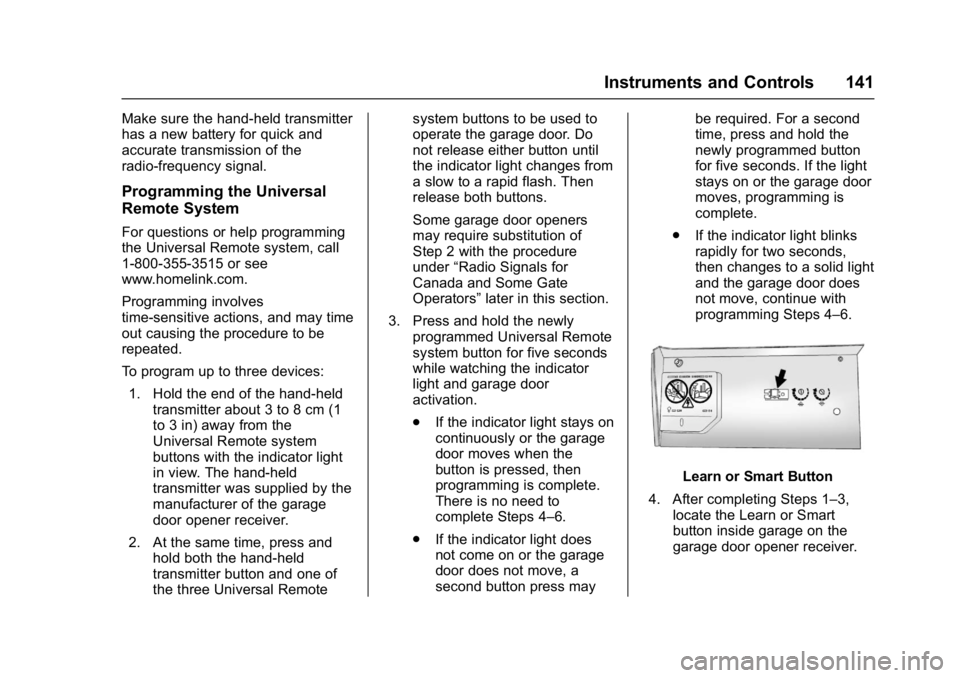
Learn or Smart Button
4. After completing Steps 1–3, locate the Learn or Smart
button inside garage on the
garage door opener receiver.
Page 143 of 362
Buick LaCrosse Owner Manual (GMNA-Localizing-U.S./Canada-10999169) -
2018 - crc - 3/28/17
142 Instruments and Controls
The name and color of the
button may vary by
manufacturer.
5. Press and release the Learn or Smart button. Step 6 must be
completed within 30 seconds of
pressing this button.
6. Inside the vehicle, press and hold the newly programmed
Universal Remote system
button for two seconds and
then release it. If the garage
door does not move or the
lamp on the garage door
opener receiver does not flash,
press and hold the same
button a second time for
two seconds, then release it.
Again, if the door does not
move or the garage door lamp
does not flash, press and hold
the same button a third time for
two seconds, then release it.
The Universal Remote system
should now activate the
garage door.
Repeat the process for
programming the two remaining
buttons.Radio Signals for Canada and
Some Gate Operators
For questions or programming help
call 1-800-355-3515 or see
www.homelink.com.
Canadian radio-frequency laws and
some U.S. gate operators require
transmitter signals to time out or quit
after several seconds of
transmission. This may not be long
enough for the Universal Remote
system to pick up the signal during
programming.
If the programming did not work,
replace Step 2 under “Programming
the Universal Remote System” with
the following:
Press and hold the Universal
Remote system button while
pressing and releasing the
hand-held transmitter button every
two seconds until the signal has
been successfully accepted by the
Universal Remote system. The
Universal Remote system indicator
light will flash slowly at first and then
rapidly. Proceed with Step 3 under
“Programming the Universal Remote
System” to complete.
Universal Remote System
Operation
Using the Universal Remote
System
Press and hold the appropriate
Universal Remote system button for
at least one-half second. The
indicator light will come on while the
signal is being transmitted.
Erasing Universal Remote
System Buttons
Erase all programmed buttons when
vehicle ownership is terminated.
To erase:
1. Press and hold the two outside buttons until the indicator light
begins to flash. This should
take about 10 seconds.
2. Release both buttons.
Page 157 of 362

Buick LaCrosse Owner Manual (GMNA-Localizing-U.S./Canada-10999169) -
2018 - crc - 3/28/17
156 Climate Controls
window fogging, it returns to normal
operation. For eAssist vehicles,
there may be shorter and less
frequent Auto Stops when auto
defog is in use.
To turn Auto Defog off or on, see
“Climate and Air Quality”under
Vehicle Personalization 0133.
Ionizer : If equipped with an ionizer,
this feature helps to clean the air
inside the vehicle and remove
contaminants; such as pollen,
odors, and dust. If the climate
control system is on and the ionizer
is enabled, the ionizer status
indicator will be lit on the climate
control display. To turn the ionizer
on or off, see “Climate and Air
Quality” underVehicle
Personalization 0133.
Rear Window Defogger
K:Press to turn the rear window
defogger on or off. An indicator light
on the control comes on to show
that the rear window defogger is on.
The rear window defogger only
works when the engine is running.
It turns off when the ignition is
turned off or in ACC/ACCESSORY. The rear window defogger can be
set to automatic operation. See
“Climate and Air Quality”
under
Vehicle Personalization 0133.
When Auto Rear Defog is selected,
the rear window defogger turns on
automatically when the interior
temperature is cold and the outside
temperature is about 4 °C (40 °F)
and below. The auto rear defogger
turns off automatically after about
10 minutes, or after five minutes if
the outside temperature is not
as cold.
For eAssist vehicles, auto rear
defog will only run during a remote
start and the feature is not available
in the Vehicle Personalization menu.
The upper gridlines on the rear
window are antenna lines and are
not intended to heat when the
defogger is activated.
If the vehicle is equipped with
heated outside mirrors, they turn on
when the rear window defogger
control is on and help to clear fog or
frost from the surface of the mirror.
See Heated Mirrors 045.
Caution
Do not try to clear frost or other
material from the inside of the
front windshield and rear window
with a razor blade or anything
else that is sharp. This may
damage the rear window
defogger grid and affect the
radio's ability to pick up stations
clearly. The repairs would not be
covered by the vehicle warranty.
Heated and Ventilated Seats
LorM:If equipped, pressLorMto heat the driver or passenger seat.
{orC:If equipped, press{orCto ventilate the driver or
passenger seat. See Heated and
Ventilated Seats 012.
Remote Start Climate Control
Operation : If equipped with remote
start, the climate control system
may run when the vehicle is started
remotely. If equipped with heated or
ventilated seats, they may come on
Page 272 of 362

Buick LaCrosse Owner Manual (GMNA-Localizing-U.S./Canada-10999169) -
2018 - crc - 3/28/17
Vehicle Care 271
.Operating electronic devices or
being near facilities using radio
wave frequencies similar to the
TPMS could cause the TPMS
sensors to malfunction.
If the TPMS is not functioning
properly it cannot detect or signal a
low tire pressure condition. See
your dealer for service if the TPMS
malfunction light and DIC message
comes on and stays on.
TPMS Sensor Matching
Process
Each TPMS sensor has a unique
identification code. The identification
code needs to be matched to a new
tire/wheel position after rotating the
vehicle’s tires or replacing one or
more of the TPMS sensors. The
TPMS sensor matching process
should also be performed after
replacing a spare tire with a road
tire containing the TPMS sensor.
The malfunction light and the DIC
message should go off at the next
ignition cycle. The sensors are
matched to the tire/wheel positions,
using a TPMS relearn tool, in the
following order: driver side front tire, passenger side front tire, passenger
side rear tire, and driver side rear.
See your dealer for service or to
purchase a relearn tool. A TPMS
relearn tool can also be purchased.
See Tire Pressure Monitor Sensor
Activation Tool at
www.gmtoolsandequipment.com or
call 1-800-GM TOOLS
(1-800-468-6657).
There are two minutes to match the
first tire/wheel position, and
five minutes overall to match all four
tire/wheel positions. If it takes
longer, the matching process stops
and must be restarted.
The TPMS sensor matching
process is:
1. Set the parking brake.
2. Place the vehicle in Service Mode. See Ignition Positions
0 170.
3. Make sure the Tire Pressure info page option is turned on.
The info pages on the DIC can
be turned on and off through
the Options menu. See Driver
Information Center (DIC) 0126. 4. Use the DIC controls on the
right side of the steering wheel
to scroll to the Tire Pressure
screen under the DIC
info page.
5. Press and hold
Vin the center
of the DIC controls.
The horn sounds twice to
signal the receiver is in relearn
mode and the TIRE
LEARNING ACTIVE message
displays on the DIC screen.
6. Start with the driver side front tire.
7. Place the relearn tool against the tire sidewall, near the valve
stem. Then press the button to
activate the TPMS sensor.
A horn chirp confirms that the
sensor identification code has
been matched to this tire and
wheel position.
8. Proceed to the passenger side front tire, and repeat the
procedure in Step 7.
9. Proceed to the passenger side rear tire, and repeat the
procedure in Step 7.
Page 354 of 362

Buick LaCrosse Owner Manual (GMNA-Localizing-U.S./Canada-10999169) -
2018 - crc - 3/28/17
Index 353
DrivingAssistance Systems . . . . . . . . . . 207
Characteristics and
Towing Tips . . . . . . . . . . . . . . . . . 221
Defensive . . . . . . . . . . . . . . . . . . . . . 161
Drunk . . . . . . . . . . . . . . . . . . . . . . . . . 161
For Better Fuel Economy . . . . . . . 26
Hill and Mountain Roads . . . . . . 164
If the Vehicle is Stuck . . . . . . . . . 166
Loss of Control . . . . . . . . . . . . . . . 163
Off-Road Recovery . . . . . . . . . . . 162
Vehicle Load Limits . . . . . . . . . . . 166
Wet Roads . . . . . . . . . . . . . . . . . . . 163
Winter . . . . . . . . . . . . . . . . . . . . . . . . 165
Dual Automatic Climate Control System . . . . . . . . . . . . . . . . 152
E
Electric Parking Brake . . . . . . . . . . 188
Electric Parking Brake Light . . . . 119
Electrical Equipment,
Add-On . . . . . . . . . . . . . . . . . . . . . . . 226
Electrical System Engine Compartment FuseBlock . . . . . . . . . . . . . . . . . . . . . . . . 254
Fuses and Circuit Breakers . . . 253
Instrument Panel Fuse
Block . . . . . . . . . . . . . . . . . . . . . . . . 257
Overload . . . . . . . . . . . . . . . . . . . . . 253 Emergency
OnStar . . . . . . . . . . . . . . . . . . . . . . . 340
Energy Information . . . . . . . . . . . . . 126
Engine Air Cleaner/Filter . . . . . . . . . . . . . 238
Check Light (MalfunctionIndicator) . . . . . . . . . . . . . . . . . . . . .117
Compartment Overview . . . . . . . 231
Coolant Temperature Gauge . . . . . . . . . . . . . . . . . . . . . . .114
Coolant Temperature
Warning Light . . . . . . . . . . . . . . . 122
Cooling System . . . . . . . . . . . . . . . 239
Drive Belt Routing . . . . . . . . . . . . 324
Exhaust . . . . . . . . . . . . . . . . . . . . . . 180
Heater . . . . . . . . . . . . . . . . . . . . . . . . 175
Oil Life System . . . . . . . . . . . . . . . 237
Oil Pressure Light . . . . . . . . . . . . 123
Overheated Protection Operating Mode . . . . . . . . . . . . . 244
Overheating . . . . . . . . . . . . . . . . . . 243
Power Messages . . . . . . . . . . . . . 132
Running While Parked . . . . . . . . 180
Starting . . . . . . . . . . . . . . . . . . . . . . . 172
Entry Lighting . . . . . . . . . . . . . . . . . . . 149
Equipment, Towing . . . . . . . . . . . . . 225
Event Data Recorders . . . . . . . . . . 337
Exit Lighting . . . . . . . . . . . . . . . . . . . . 149 Extended Parking . . . . . . . . . . . . . . . 179
Extender, Seat Belt . . . . . . . . . . . . . . 67
Exterior Lamp Controls . . . . . . . . . 144
Exterior Lamps Off Reminder . . . 145
Exterior Lighting Battery
Saver . . . . . . . . . . . . . . . . . . . . . . . . . 150
F
FeaturesMemory . . . . . . . . . . . . . . . . . . . . . . . . . 11
Filter, Engine Air Cleaner . . . . . . . . . . . 238
Flash-to-Pass . . . . . . . . . . . . . . . . . . . 145
Flashers, Hazard Warning . . . . . . 146
Flat Tire . . . . . . . . . . . . . . . . . . . . . . . . 279 Changing . . . . . . . . . . . . . . . . . . . . . 287
Floor Mats . . . . . . . . . . . . . . . . . . . . . . 308
Fluid
Automatic Transmission . . . . . . 238
Brakes . . . . . . . . . . . . . . . . . . . . . . . . 246
Washer . . . . . . . . . . . . . . . . . . . . . . . 245
Fog Lamps . . . . . . . . . . . . . . . . . . . . . 147
Folding Mirrors . . . . . . . . . . . . . . . . . . 45
Forward Automatic Braking . . . . . 210
Forward Collision Alert (FCA) System . . . . . . . . . . . . . . . . . 208
Frequency Statement Radio . . . . . . . . . . . . . . . . . . . . . . . . . 335