2018 AUDI TT ROADSTER key
[x] Cancel search: keyPage 67 of 310

Cl co .... N ,....
N ...... 0 ,....
Vl co
Inte rlock button
The in terlock button in the selector lever handle
prevents you from moving the selector lever in
advertently while in some selector lever posi
tions. The positions that require the interlock
button to be pressed are marked in color in the il
lustration
c:;, fig . 71.
A WARNING
Read and follow all WARNINGS . c;, .&. in Selec
tor lever positions on page 63.
@ Tips
-If the se lector lever does not engage, there
i s a malfunction. The engine is d isabled to
prevent the vehicle from driving off unin
tentiona lly . To allow the selector lever to
engage aga in , proceed as follows:
-Briefly press the brake pedal.
-If the vehicle does not move forward or in
reverse even thoug h a drive position is se
lected, proceed as follows:
-> If the veh icle does not move in the desired
direction, the system may not have engaged
the drive pos it ion correctly. Press the brake
pedal and select the drive position again.
->If the veh icle st ill does not move in the de
s ired direction, there is a system malfunc
tion. See an authorized Audi dea ler or au
thorized Audi Service Facility for assistance
to have the system checked .
Driving tips
The transmission shifts up and down automati
cally when in the driving gears.
F ig. 72 Sectio n of the cente r console: se lecto r leve r w ith
I nte rlock button
D rivi ng
Starting the engine
.,. The se lector lever must be in the P or t he N po
sition. At low temperatures (below 14 °F
(-10 °C)), the engine can on ly be started when
the selector lever is in the P position.
Starting from a stop
.,. Press and hold the brake pedal.
.,. Press and hold the interloc k butto n in these
lector lever hand le, select the desired selecto r
lever position s uch as " D"
c;, page 63 and re
lease the lock b utton.
.,. Wa it a moment until the transmission sh ifts.
You will notice a slight movement when the
gear engages .
.,. Release the brake pedal and press the accelera-
to r peda l
c;, _&..
Various convenience functions are available for
start ing o n hills
¢ page 62.
Stopping t emporarily
.,. Keep the vehicle stationary using the braking
pedal, for examp le at traffic lights.
.,. Do not press the acce lerator pedal when doing
this.
.,. To prevent the veh icle from rolling when you
s tart driv ing, set the parking brake when stop
ping on steep
hills¢ .&. and c;,0.
.,. The pa rking brake will release automat ica lly
and the vehicle will star t movi ng once yo u press
the acce le rator ped al.
Stopping /parking
If
the selector lever is not in the "P" pos ition
whe n you open the d river's door, the vehicle
c ou ld roll. In vehicles wi th a conven ien ce key*,
t h e message
Shift to P, otherwi se vehicle can
roll away. Door s do not lock if gearshift is not in
P appears. A warning tone wi ll also so und .
.,. Press and hold the brake peda l c;, _&. .
.,. Set the park ing br ake .
.,. Sele ct the "P" selector lever position.
U nder certain circumstances, such as d riving in
the mo unta ins, i t may be useful to switch tempo
rarily to the manual sh ift prog ram in order to
manua lly adjust the gears to the d riving condi-
t ions
c;, page 67. .,.
65
Page 77 of 310
Cl co .... N ,....
N
This message appears if you are not stee ring by
yourse lf . If this is th e case, active lane ass ist does
not switch off, but it is "not ready" to provide a
warning . The system can he lp you keep the veh i
cle in the lane. However, you are responsible for
driving the vehicle and must steer it yourself .
A WARNING
Note that messages may be delayed or not
displayed on vehicles with accessor ies mount
ed on the steer ing whee l, such as a stee ring
wheel sp inner knob. Always keep you r hands
on t he steering whee l.
Adjusting the steering time and vibration
warning
Appl ies to: vehicles with Audi act ive lane ass ist
You con adjust individual act ive lone assist set
tings in the Infotainment system.
Selec t in the Infotai nment system : I MENUI but
ton>
Vehicle > left con trol button > Driv er a ssis
tance > Audi acti ve lane assist
Steering time
1>
Early : in this setting, the correct ive steering hap
pens continuously to help keep the vehicle in the
center of the lane .
Late : in this setting, the system provides correc
tive steering just before a vehicle whee l touches a
detected lane ma rker line .
Vibration warning
You can switch the additional vibration warning
in the steering wheel o n or off.
(I) Tips
In certain markets: your settings are stored
automatically and assigned to the remote
cont rol key in use .
8 1l The co rrect ive stee rin g fu nctio n is not ava ilabl e in all mar ,..._
~ kets.
A ssi st a nce systems
Audi side assist
Description
Applies to: veh icles w ith Audi side assist
0, :;; 0
it m
Fig . 81 Senso r de tect io n range
Fi g. 82 Disp lay on t he ex te ri or m irro r
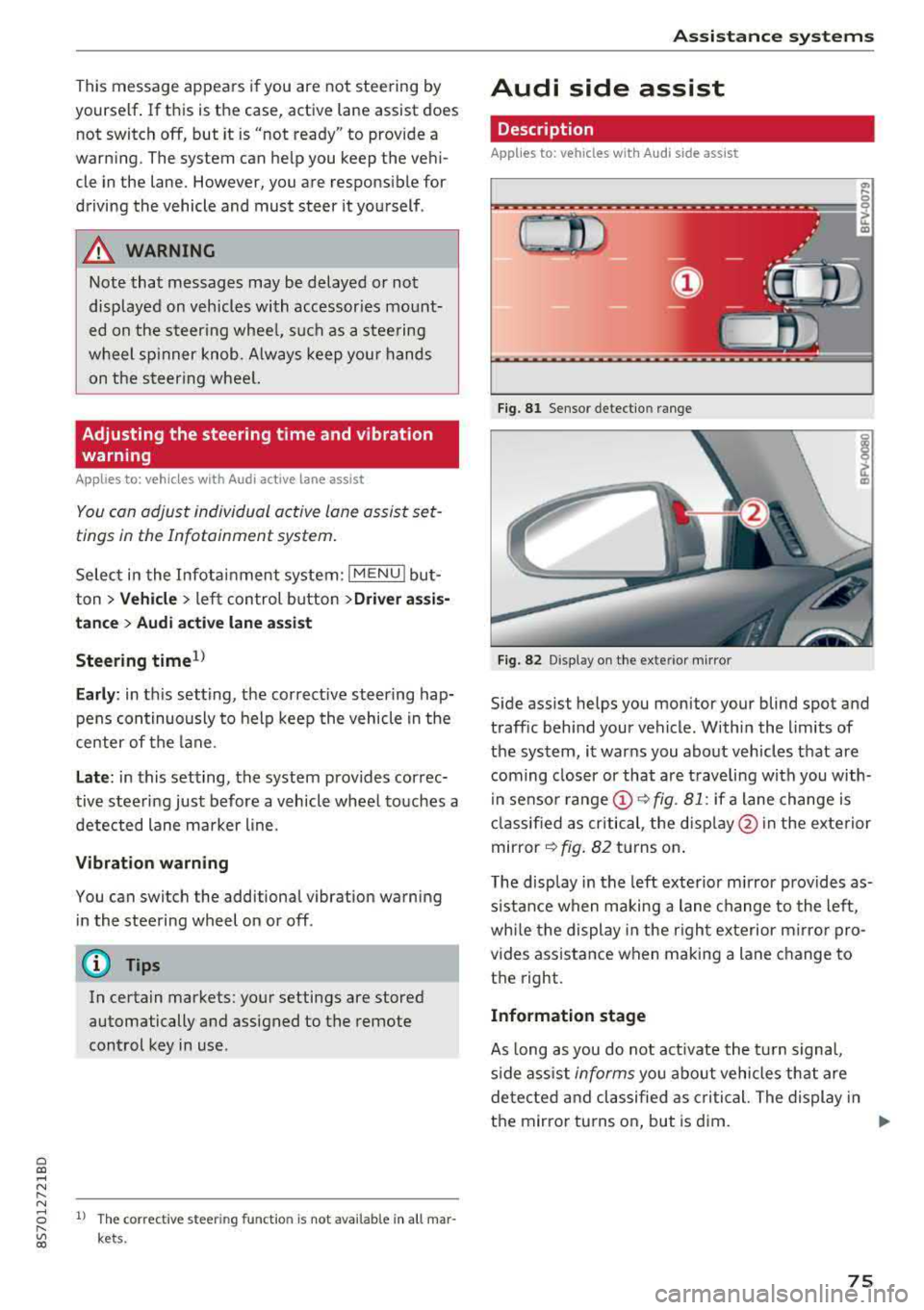
Side assist helps you monitor your blind spot and
traff ic beh ind your vehicle . Withi n the limits of
the system , it warns you abo ut vehicles that are
coming closer or that a re t raveling with you with
i n senso r
range @~ fig. 81: if a lane change is
cla ssified as critical , the disp lay @ in the e xte rior
mirror
~ fig . 82 turns on .
T he display in the left exterio r m irror p rovides as
s istance when making a lane change to the left,
whi le the display in the r ight exterior mirro r pro
vides ass istance when m aking a lane change to
the right.
Information stage
As long as you do not act ivate the tu rn s igna l,
s ide ass ist
informs you about vehicles tha t are
detec ted and classifie d as critical. The display in
t h e mirror tu rns on, but is d im.
75
Page 79 of 310

Cl 00 ... N r-N ... 0 r-Vl 00
system may have detected a vehicle in another
l ane that is
not adjacent to your current lane .
- If you are dr iving t hrough a curve . Side assist
may react to a vehicle that is one lane over
from the adjacent lane .
- If side assist reacts to other objects (such as
high or displaced guard rails) .
- In poor weat her condit ions . The side assist
functions a re limited.
D o no t cove r the radar
sensors ¢ fig. 84 wit h
sticke rs, deposits, bicycle whee ls o r othe r ob
jects , beca use they w ill impai r the f unct ion . For
information on cleaning,
see¢ page 266 .
A WARNING
-Always pay atte ntion to traffic and to the
area aro und yo ur vehicle. Side assist cannot
rep lace a dr ive r's attention. The dr ive r alone
is a lways responsib le for lane changes and
s imi lar driving maneuvers .
- In some situat ions, the system may not
function or its funct io n may be limited . For
example:
- If vehicles a re a ppro ac hi ng o r being le ft
behind very quickly. The display may not
tur n on in t ime .
- I n poo r weather cond itions s uch as heavy
rain, snow o r heavy mist .
- On very wide lanes, in t ight curves, o r if
there is a rise in the road s urface. Vehicles
in the adjacent lane may not be detected
beca use they are outs ide of the sensor
range.
{Ll) Note
The sensors can be disp laced by im pacts o r
damage to the bumpe r, whee l housing and
underbody. Th is can impa ir the system. Have
an authorized A udi dealer or autho rized Audi
Serv ice Facility c heck their fu nction.
(D Tips
- If the window g lass in the d river 's doo r or
front passenger 's doo r has been t inted, the
display in the exterior mirror may be i ncor
r ect .
-
Ass istance systems
- F or an exp lanat ion on co nf orm ity w it h t he
FCC regulat ions in the Un ite d States an d the
Indust ry Canada regulat ions, see
¢ page 293.
Switching on and off
App lies to : vehicles wi th Audi side ass ist
.. Select in the Infotainmen t system: I M ENU ! but
ton
> Vehicle > left control b utton > Driver a s
s istance > Audi side a ssist
If the system is activated, the disp lays in the ex
terior m irrors w ill turn on briefly when the igni
t ion is switched on .
Adjusting the display brightness
Applies to : vehicles wit h Audi s ide ass ist
The display brightness con be adjusted in the In
fotainment system .
.. Select in the Infotainment system: I MENU! but
ton
> Vehicle > left control button >Dri ver as
sistance > Audi side assist
The disp lay br ightness adjusts automatically to
the brightness of the surroundings, both in the
i nformation and in the wa rn ing stage. I n very
dark or very br ight surround ings, the automatic
adjustment w ill set the display to t he m inimum
o r max imum level. In such cases, yo u may notice
no ch ange when adj usting the br igh tne ss, or the
c h ange m ay only be noticeab le on ce t he sur
r oundings change.
Adjust the br ightness to a leve l w he re the d isplay
in th e i nfo rm atio n stage will not disrupt yo ur
v iew ahe ad. If yo u change the br igh tness , the d is
play in the exterio r mirror wi ll briefly show the
brightness leve l in the information stage . The
brig htness of th e warning stage is linked to the
brightness in the information stage and is adjust
ed along with the information stage.
(D Tips
- Side ass ist is not act ive while you are mak
ing the adjustment.
- Yo ur settings a re automat ica lly stored and
assigned to the remote control key be ing
used.
77
Page 81 of 310

Selecting the driving mode
App lies to: ve hicles with Audi drive select
You can choose between comfort, auto, dynamic
and individual .
Fig. 85 Center conso le: drive select button
.... 0 M 0
G'. al
.. Press the ~i~ button repeatedly until the de
sired drive mode is displayed in the instrument
cluster/Infotainment system display . Or
.. Se lect in the Infotainment system: !MENUI but
ton >
Vehicle > left contro l button >Audi drive
select.
Adjusting the Individual mode
Applies to: ve hicles with Audi drive select
Assistance systems
.. Select and confirm the desired settin g.
You can change the driv in g mode when the veh i
cl e is stationary or while driving.
If traffic per
mits, after ch anging modes, briefly ta ke your
foot off t he accelerator pedal so that the recently
se lected mode is also activated for the engine.
Comfort -res ults in a comfo rt-orien ted vehicle
calibration
Auto -provides an overa ll comfortab le yet dy
namic driving feel and is suited for everyday use.
Dynamic -gives the driver a sporty driving fee l
and is suited to a spo rty driving style .
Individual -¢ page 79.
A WARNING ...__ -
Pay attention to traffic w hen operating the
drive select to reduce the r isk of an accident .
You can adjust the vehicle settings to your personal preferences .
.. Press the button ~:/:er. > Individual > right con
tro l button, or
.. Se lect in the Infotainment system: !MENUI b ut
ton>
Vehicle > left contro l button> Audi drive
select> Individual >
right contro l button
After you have closed the sett ings, you will a uto
mat ica lly dr ive in the
Individual* mode.
Systems comfort
Engine/transmission
comfortable
Steering comfortable
Suspension control * comfortable
Engine sound* subtle
quattro * balanced
(D Tips
~ Your Individual* mode settings are automat i-
;:::: cally stored and assigned to the remote con-r--
~ trol key being used. 0 r-Vl 00
T he equipment in yo ur vehicle will determine
which settings you can adjust . The fo llowing ta
ble gives an overview of the characteristics.
auto dynamic
balanced sporty
balanced sporty
ba lanced sporty
balanced sporty
ba lanced sporty
79
Page 86 of 310

Parking systems
Switching off
~ Drive faster than 6 mph (10 km/h), or
~ Press the P"'il button, or
~ Switch the ignition off .
(D Tips
-The visual display in the left part of the dis
play should help you detect the critical vehi
cle areas .
- You can change the volume of the signals
and the display
¢page 84.
Perpendicular parking
Applies to: vehicles with rearview camera
This view may be used when parking in a garage
or in a parking space.
F ig. 92 Info ta in ment system: a im ing at a park ing space
Fig. 93 Infota inme nt system: aligning the vehicle
~ Turn the Infota inment system on and shift into
reverse gear.
~ The orange orientation lines (D show the vehi
cle's d irection of travel. Turn the steering wheel
until the orange or ientat ion lines appear in the
parking space
¢ fig. 92. Use the markings @to
help you estimate the distance to an obstacle.
Each marking represents app roximate ly 3 ft (1
m). The blue area represents an extension of
84
the vehicle 's out line by approximately 16 ft (5
meters) to the rear.
~ Wh ile driving in reverse gear, adjust the steer
ing wheel angle to fit the parking space using
the orange orientation lines for assistance
¢ .&. in General information on page 83, ¢(D
in General information on page 83. ® repre
sents the rear bumper. At the very latest, stop
the vehicle when the red or ientat ion
line @
borders an object.
Adjusting the display
and the warning tones
Applies to: vehicles with parking system plus
The display and warning tones can be adjusted in
the Infotainment.
~ Select in the Infotainment system : IMENU! but
ton
> Vehicle > left control button > Driver as
sistance> Parking aid.
Signal tones
Front volume -
volume for the front area
Rear volume -volume for the rear area
Entertainment fader -the volume of the audio/
video source is lowered when the parking system
i s turned on.
The new value is given briefly during the adjust ment.
{!) Tips
The settings are automat ically stored and as
signed to the remote control key that is in
use.
Error messages
App lies to: vehicles with rear park ing system/parking system
plus
Rear park assist: malfunction! Obstacles cannot
be detected
Park assist: malfunction! Obstacles cannot be
detected
There is a system malfunction if the LED in the
P'1
1 .ll button blin ks when switc hing on the system .
If the error is not corrected before you switch off Ill-
Page 192 of 310

Safe ty belts
-Never remove a safety be lt while the vehicle
is mov ing . Doing so will increase your r isk of
being injured or killed.
-Never wear belts twisted.
-Never wear belts over rigid or breakable ob -
jects in or on your cloth ing, such as eye
glasses , pens, keys, etc ., as these may cause
injury.
-Never allow safety be lts to become dam
aged by being caught in door or seat hard
ware .
-Do not wear the shoulder part of the belt
under your arm or otherwise out of position.
-Severa l layers of heavy clothing may inter
fere with correct positioning of belts and re duce the overall effectiveness of t he system.
-Always keep belt buckles free of anything
that may prevent the buckle from latching
securely .
-Never use comfort clips or devices that cre
ate slack in the shoulder belt. However, spe
c ial clips may be requ ired for the proper use
of some child restraint systems.
-Torn or frayed safety belts can tear and damaged belt hardware can break in an acc i
dent. Inspect belts regularly .
If webbing,
bind ings, buckles, or retrac to rs are dam
aged, have belts replaced by an auth orized
Audi dealer or quali fied workshop .
-Safety belts that have been wo rn and loaded
in an accident m ust be rep lace d wi th the
c orrect replacemen t sa fety be lt by an au
tho rized Aud i dea le r. Replacement may be
necessary even if damage cannot be clear ly
seen . Anchorages that were loaded m ust al
so be inspected.
-Never remove, modify, disassemble, or try
to repair the safety belts yourself .
- Always keep the belts clean . Di rty be lts may
not work proper ly and can impai r the f unc
t ion of the inertia ree l ¢
table Interior
cleaning on page 268.
190
Safety belts
Fastening safety belts
Safety first -everybody buckle up!
Fig. 1 57 Belt buck le a nd to ngue on t he drive r's seat
To p rovide m axim um pro tect ion , safety belts
must a lways be positioned correctly on the wear
er 's body .
.,. Adjust the fron t se at prope rly ¢ page 46 , Front
sea ts .
.,. Pull the safety belt evenly across the chest and
pe lvis
¢ fig. 157 , ¢ .&,.
.,. Insert the tongue into the correct buck le of
your seat until you hear it latch securely.
.,. Pull on the belt to m ake sure that it is sec urely
latched in the buckle .
Automatic safety belt ret ractors
Eve ry safety belt is equipped with an automatic
b elt ret ractor on th e shou lder belt . This feature
locks the belt when the belt is pulled out fast,
during hard brak ing and in an accident. The belt
may also lock when you dr ive up or down a steep
hill or through a sharp curve . During normal driv
i ng t he belt lets you move free ly .
Safety belt pretensioners
Safety be lts with pretensioners help to tighten
the safety belt and remove slack when the pre
te ns ioners are activated
¢ page 192 . The f u nc
tion of the p re tensioner is mon itored by a warn
i ng
li ght ¢ page 14 .
Convertible locking retractor
Every safety belt except the one on the driver
seat is equipped with a convertib le lock ing retrac-
tor that
must be used when t he safety be lt is .,..
Page 193 of 310

Cl co .... N ,....
N .... 0 ,....
Vl co
used to attach a child seat. Be sure to read the
important information about this feature
Qpage225.
.&_ WARNING
Improperly positioned safety belts can cause
serious injury in an accident
r=> page 191,
Safety belt position .
-Safety belts offer optimum protection only
when the seatback is upright and belts are
properly positioned on the body.
- Never attach the safety belt to the buckle
for another seat. Attaching the belt to the
wrong buckle will reduce safety belt effec
tiveness and can cause serious personal in
JUry.
-A passenger who is not properly restrained
can be seriously injured by the safety belt it
self when it
moves from the stronger parts
of the body into critical areas like the abdo
men .
- Always lock the convertible locking retractor
when you are securing a child seat in the ve
hicle
r=> page 226.
{D) Tips
For information on safety belt pretensioners,
refer to
q page 192.
Safety belt position
Correct belt position is the key to getting maxi
mum protection from safety belts.
....
"' ..... 9
I
Fig. 158 Safety belt positio n
Safety belts
.&_ WARNING
Improperly positioned safety belts can cause
serious personal injury in an accident.
- The shou lder belt should lie as close to the
center of the collar bone as possible and
should fit well on the body. Hold the belt
above the latch tongue and pull it evenly
across the chest so that it sits as low as pos
sible on the pelvis and there is no pressure
on the abdomen. The belt should always fit
snugly
¢ fig. 158. Pull on the belt to tighten
if necessary.
- A loose-fitting safety belt can cause serious
injuries by shifting its position on your body
from the strong bones to more vulnerable
I
soft tissue and cause serious injury .
- Always read and heed all WARNINGS and
other important information
q page 189.
Pregnant women must also be correctly
restrained
The best way to protect the fetus is to make sure
that expectant mothers always wear safety belts
correctly- throughout the pregnancy.
Fig. 159 Safety belt position during pregnancy
To provide maximum protect ion, safety belts
must always be positioned correctly on the wear
er's body
q page 191 .
"'Adjust the front seat properly ¢ page 46, Front
seats .
"' Pull the safety belt evenly across the chest so
that it sits as low as possible on the pelvis and
there is no pressure on the abdomen
q fig. 159, Q .&_ . ....
191
Page 295 of 310

Cl 00 ... N r-N ... 0 r-Vl 00
Technical Modifications
Our guidelines must be complied with when tech
nical modifications are made .
Always consult an authorized Audi dealer before
starting work on any mod ificat ions.
This will help ensure that vehicle function, per
formance and safety are not impaired
c> ,&.
Attempting to work on e lectronic components
and the software used with them can cause mal
functions. Because of the way electronic compo nents are interconnected with each other, such
malfunct ions can also have an adverse effect on
other systems that are not directly involved. This
means that you risk both a substantial reduct ion
in the operational safety of your veh icle and an
in creased wea r of ve hicle pa rts
c> ,& .
Author ized Audi dealers w ill perform this work in
a profess ional and competent manner or, in spe
cial cases, refer you to a professional company
that spec ializes in such modifications.
.&_ WARNING
Improper repairs and modifications can
change the way vehicle systems work and
cause damage to the vehicle and serious per
sonal injury.
{Q) Note
If emergency repa irs must be performed else
where, have the vehicle examined by an au
t horized A udi dealer as soon as possible.
Declaration of
compliance for telecom munications equipment
and electronic systems
The manufacturer is not liable for radio malfunc
tions that are caused by unauthorized changes to
the equipment.
Equipment
The following equipment comp lies w it h FCC sec
tion 15 and RSS-Gen:
Consumer Information
-Audi side assist*
- Remote control key
- Garage door opener (Homel ink)*
- Cell phone package*
- Tire pressure monitoring system*
FCC Part 15.19
This device complies with part 15 of the FCC
Rules . Operation is subject to the fo llowing two
condit ions: (1) This device may not cause harmful
interference, and (2) this device must accept any
interference received, includ ing interference that
may cause undesired operation.
FCC Part 15 .21
Changes or mod ificat ions not express ly approved
by the party responsible for compliance could
vo id the user's authority to operate the equ ip
ment .
RSS-Gen
This device complies with Industry Canada's li
cense-exempt RSSs. Operation is subject to the
following two conditions :
(1) This device may not cause interference; and
(2) This dev ice must accept any interference, in
cluding interfe rence that may cause undes ired
operation of the device.
CNR-Gen
Le present appare il est conforme aux CNR d'In
dustrie Canada applicables aux appare ils radio
exemp ts de licence . L'exploitation est autorisee
aux deux conditions s uivantes:
1) l'appareil ne doit pas produ ire de brouillage;
2) l'appareil do it accepter tout brouillage
radioe
lectrique subi, meme si le brouillage est suscept i
ble d'en compromettre le fonctionnement.
293