2018 AUDI TT ROADSTER mirror
[x] Cancel search: mirrorPage 77 of 310
Cl co .... N ,....
N
This message appears if you are not stee ring by
yourse lf . If this is th e case, active lane ass ist does
not switch off, but it is "not ready" to provide a
warning . The system can he lp you keep the veh i
cle in the lane. However, you are responsible for
driving the vehicle and must steer it yourself .
A WARNING
Note that messages may be delayed or not
displayed on vehicles with accessor ies mount
ed on the steer ing whee l, such as a stee ring
wheel sp inner knob. Always keep you r hands
on t he steering whee l.
Adjusting the steering time and vibration
warning
Appl ies to: vehicles with Audi act ive lane ass ist
You con adjust individual act ive lone assist set
tings in the Infotainment system.
Selec t in the Infotai nment system : I MENUI but
ton>
Vehicle > left con trol button > Driv er a ssis
tance > Audi acti ve lane assist
Steering time
1>
Early : in this setting, the correct ive steering hap
pens continuously to help keep the vehicle in the
center of the lane .
Late : in this setting, the system provides correc
tive steering just before a vehicle whee l touches a
detected lane ma rker line .
Vibration warning
You can switch the additional vibration warning
in the steering wheel o n or off.
(I) Tips
In certain markets: your settings are stored
automatically and assigned to the remote
cont rol key in use .
8 1l The co rrect ive stee rin g fu nctio n is not ava ilabl e in all mar ,..._
~ kets.
A ssi st a nce systems
Audi side assist
Description
Applies to: veh icles w ith Audi side assist
0, :;; 0
it m
Fig . 81 Senso r de tect io n range
Fi g. 82 Disp lay on t he ex te ri or m irro r
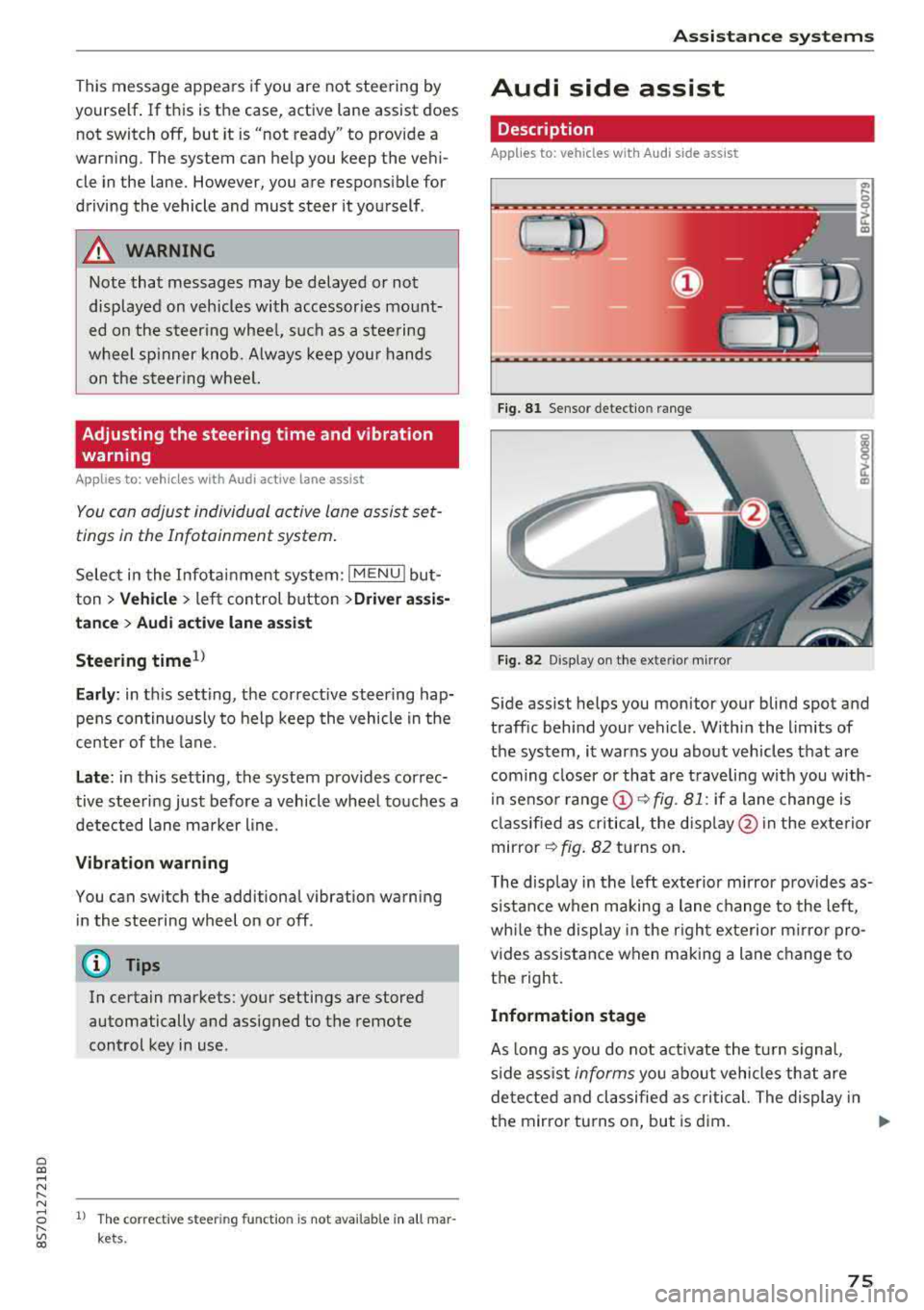
Side assist helps you monitor your blind spot and
traff ic beh ind your vehicle . Withi n the limits of
the system , it warns you abo ut vehicles that are
coming closer or that a re t raveling with you with
i n senso r
range @~ fig. 81: if a lane change is
cla ssified as critical , the disp lay @ in the e xte rior
mirror
~ fig . 82 turns on .
T he display in the left exterio r m irror p rovides as
s istance when making a lane change to the left,
whi le the display in the r ight exterior mirro r pro
vides ass istance when m aking a lane change to
the right.
Information stage
As long as you do not act ivate the tu rn s igna l,
s ide ass ist
informs you about vehicles tha t are
detec ted and classifie d as critical. The display in
t h e mirror tu rns on, but is d im.
75
Page 78 of 310

Assistance systems
The display remains dim in the information stage
so that your view toward the front is not distur
bed .
Warning stage
If you activate the turn signa l, side assist warns
you abou t veh icles that are detected and classi
fied as critical. The display in the respective mir
ror blinks brightly. If this happens, check traffic
by glancing in the exterior mirrors and over your
shoulder
c:> .& in General information on
page
77.
(D Tips
You can ad just the brightness on of the dis
play on the rearview mirror
c:> page 77.
General information
Applies to: vehicles with Audi side assist
®
Fig. 83 Driving situat ions
76
Fig. 84 Rear of the veh icle: pos it ion of the sensors (exam·
p le)
Side assist funct ions at speeds above approxi
mately 19 mph (30 km/h) .
(D Approaching vehicles
In certain cases, a vehicle w ill be class ified as
c ritical for a lane change even if it is still some
what far away. The faster a vehicle approaches,
the sooner the display in the exterior m irror will
turn on.
@ Vehicles traveling with you
Vehicles traveling with you are indica ted in the
exterior mirror if t hey are classified as critical for
a lan e change. A ll vehicles detected by side assist
are indicated by the time they enter your "blind
spot", at the latest.
@ Vehicles you are passing
If you slowly pass a vehicle that side assist has
detected (the difference in speed between the
vehicle and your vehicle is less than 9 mph (15 km/h)), the display in the exterior mirror turns
on as soon as the vehicle enters your blind spot.
The display wi ll not turn on if you quickly pass a
vehicle that side ass ist has detected (the differ
ence in speed is greater than 9 mph (15 km/h)).
Functional limitations
The radar sensors are designed to detect the left
and right adjacent lanes when the road lanes are
the norma l width . In some situations, the display
in the exterior mirror may turn on even though
there is no vehicle located in the area that is criti
cal for a lane change. For example:
-If the lanes are narrow or if you are driving on
the edge of your lane . If this is the case, the
.,,_
Page 79 of 310

Cl 00 ... N r-N ... 0 r-Vl 00
system may have detected a vehicle in another
l ane that is
not adjacent to your current lane .
- If you are dr iving t hrough a curve . Side assist
may react to a vehicle that is one lane over
from the adjacent lane .
- If side assist reacts to other objects (such as
high or displaced guard rails) .
- In poor weat her condit ions . The side assist
functions a re limited.
D o no t cove r the radar
sensors ¢ fig. 84 wit h
sticke rs, deposits, bicycle whee ls o r othe r ob
jects , beca use they w ill impai r the f unct ion . For
information on cleaning,
see¢ page 266 .
A WARNING
-Always pay atte ntion to traffic and to the
area aro und yo ur vehicle. Side assist cannot
rep lace a dr ive r's attention. The dr ive r alone
is a lways responsib le for lane changes and
s imi lar driving maneuvers .
- In some situat ions, the system may not
function or its funct io n may be limited . For
example:
- If vehicles a re a ppro ac hi ng o r being le ft
behind very quickly. The display may not
tur n on in t ime .
- I n poo r weather cond itions s uch as heavy
rain, snow o r heavy mist .
- On very wide lanes, in t ight curves, o r if
there is a rise in the road s urface. Vehicles
in the adjacent lane may not be detected
beca use they are outs ide of the sensor
range.
{Ll) Note
The sensors can be disp laced by im pacts o r
damage to the bumpe r, whee l housing and
underbody. Th is can impa ir the system. Have
an authorized A udi dealer or autho rized Audi
Serv ice Facility c heck their fu nction.
(D Tips
- If the window g lass in the d river 's doo r or
front passenger 's doo r has been t inted, the
display in the exterior mirror may be i ncor
r ect .
-
Ass istance systems
- F or an exp lanat ion on co nf orm ity w it h t he
FCC regulat ions in the Un ite d States an d the
Indust ry Canada regulat ions, see
¢ page 293.
Switching on and off
App lies to : vehicles wi th Audi side ass ist
.. Select in the Infotainmen t system: I M ENU ! but
ton
> Vehicle > left control b utton > Driver a s
s istance > Audi side a ssist
If the system is activated, the disp lays in the ex
terior m irrors w ill turn on briefly when the igni
t ion is switched on .
Adjusting the display brightness
Applies to : vehicles wit h Audi s ide ass ist
The display brightness con be adjusted in the In
fotainment system .
.. Select in the Infotainment system: I MENU! but
ton
> Vehicle > left control button >Dri ver as
sistance > Audi side assist
The disp lay br ightness adjusts automatically to
the brightness of the surroundings, both in the
i nformation and in the wa rn ing stage. I n very
dark or very br ight surround ings, the automatic
adjustment w ill set the display to t he m inimum
o r max imum level. In such cases, yo u may notice
no ch ange when adj usting the br igh tne ss, or the
c h ange m ay only be noticeab le on ce t he sur
r oundings change.
Adjust the br ightness to a leve l w he re the d isplay
in th e i nfo rm atio n stage will not disrupt yo ur
v iew ahe ad. If yo u change the br igh tness , the d is
play in the exterio r mirror wi ll briefly show the
brightness leve l in the information stage . The
brig htness of th e warning stage is linked to the
brightness in the information stage and is adjust
ed along with the information stage.
(D Tips
- Side ass ist is not act ive while you are mak
ing the adjustment.
- Yo ur settings a re automat ica lly stored and
assigned to the remote control key be ing
used.
77
Page 85 of 310
Cl co .... N ,....
N ...... 0 ,....
Vl co
General information
Applies to: ve hicles with rearview camera
Fig . 90 Area covered (!) and area not covered @ by the
rea rview camera.
:;,
~;..------: :.·~- ---~ _.,- ,.,,.--------g
(Jo00oD ~
Fig. 91 Luggag e compartment lid: locat ion of the rear
view camera
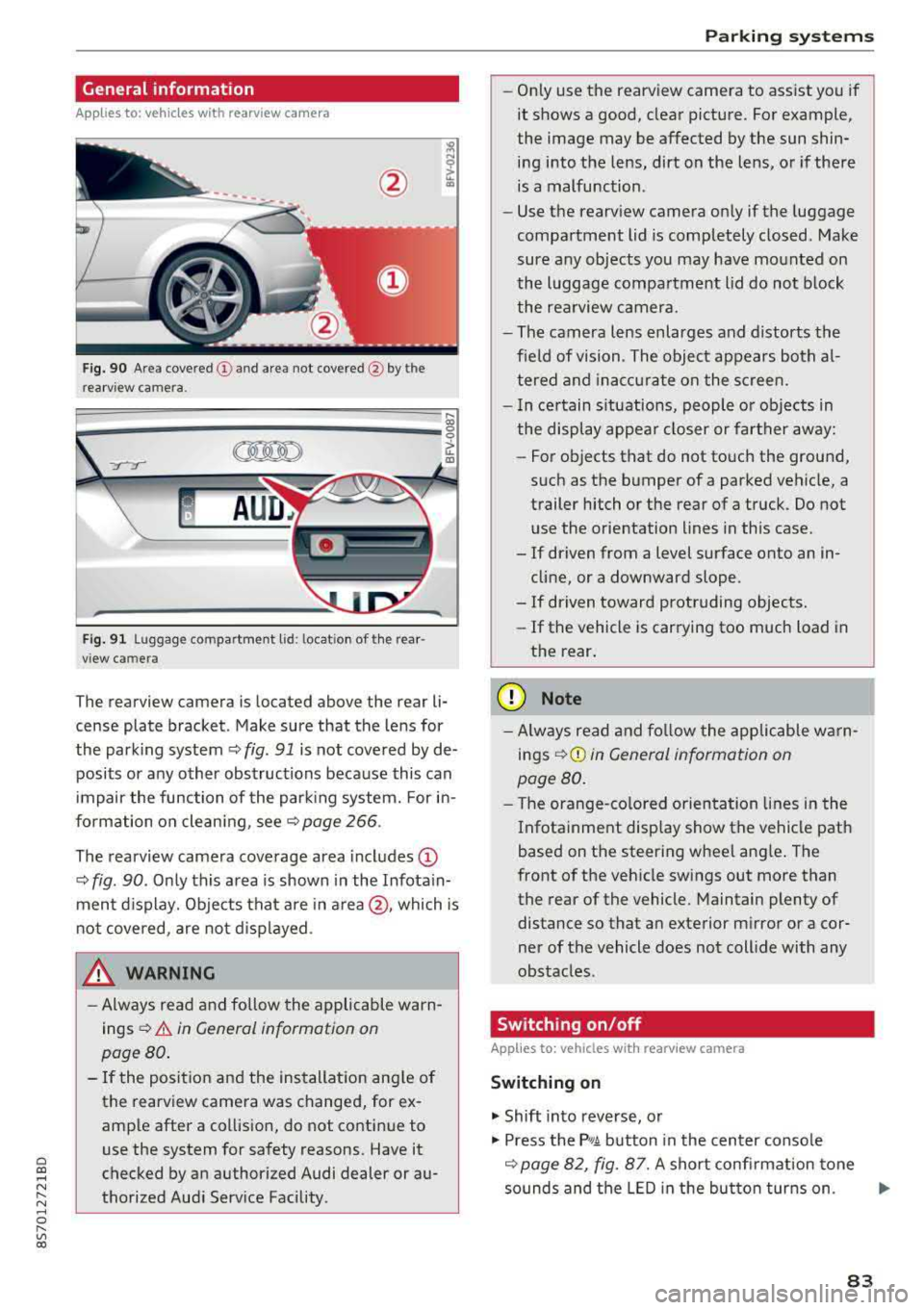
The rearview camera is located above the rear li
cense plate bracket. Make sure that the lens for
the parking system¢
fig. 91 is not covered by de
posits or any other obstructions because this can
impair the function of the parking system. For in
formation on cleaning, see¢
page 266 .
The rearview camera coverage area includes
(D
¢ fig. 90. Only this area is shown in the Infotain
ment display. Objects that are in
area @, which is
not covered, are not displayed.
A WARNING
-Always read and follow the applicable warn
ings ¢
A in General information on
page 80.
- If the position and the installation angle of
the rearv iew camera was changed, for ex
ample after a collision, do not continue to
use the system for safety reasons. Have it
checked by an authorized Audi dealer or au
thorized Audi Service Facility .
Parking systems
-Only use the rearview camera to assist you if
it shows a good, clear picture. For example,
the image may be affected by the sun shin
ing into the lens, dirt on the lens, or if there
is a malfunction.
- Use the rearview camera only if the luggage
compartment lid is completely closed. Make
sure any objects you may have mounted on
the luggage compartment lid do not block
the rearview camera.
- The camera lens enlarges and distorts the
field of vision. The object appears both al
tered and inaccurate on the screen.
- In certain situations, people or objects in
the display appear closer or farther away:
- For objects that do not touch the ground,
such as the bumper of a parked vehicle, a
trailer hitch or the rear of a truck. Do not use the orientation lines in this case.
- If driven from a level surface onto an in cline, or a downward slope .
- If driven toward protruding objects.
- If the vehicle is carrying too much load in
the rear.
(D Note
-Always read and follow the applicable warn
ings
¢ (D in General information on
page 80.
- The orange-colored orientation lines in the
Infotainment display show the vehicle path
based on the steering wheel angle. The
front of the vehicle swings out more than
the rear of the vehicle. Maintain plenty of
distance so that an exterior mirror or a cor
ner of the vehicle does not collide with any
obstacles.
Switching on/off
App lies to : vehicles wi th rearv iew camera
Switching on
.,. Shift into reverse, or
.,. Press the P,q.A button in the center console
¢ page 82, fig. 87. A short confirmation tone
sounds and the LED in the button turns on.
..,.
83
Page 181 of 310

Cl 00 .-< N r--N .-< 0 r--Vl 00
Safe driving Basics
Safe driving habits
Please remember -safety first!
The individua l safety features of your vehicle can
work together as a system to help protect you
and your passengers in a wide range of accidents.
These features cannot work as a system if they
are not always correctly adjusted and correctly
used .
This chapter contains important informat ion,
tips, instruct ions and warn ings that you need to
read and observe for your own safety, the safety
of your passenge rs and others . We have summar
i zed here w hat you need to know about safety
be lts, a irbags, child restra ints as well as child
safety. Yo ur safety is for us priority number 1. Al
ways observe the information and warnings in
this section - for your own safety as well as that
of your passengers.
The informa tion in t his sect ion app lies to all
model versions of your vehicle. Some of the fea
tures described in t his sections may be standard
eq uipment on some models, or may be optional
equ ipment on others. If you are not sure, ask
your author ized Audi dealer.
A WARNING
-Always make sure that you follow the in
st ruct ions and heed the WAR NINGS in t his
Manua l. It is in your i nterest a nd in the in
t e res t of your passengers .
-
-Always keep the complete Owner's Litera
t ur e in yo ur Audi whe n you lend or se ll yo ur
vehicle so tha t this import ant information
w ill a lways be available to t he d rive r and
passengers.
-Alw ays keep t he Owne r's lite rature h andy so
that you can f ind it easily if yo u have ques
tions .
Safe dri ving
Important things to do before driving
Safety is everybody 's job ! Vehicle and occupant
safety always depends on the informed and care
ful driver .
For your safety and the safety of your passenger,
b efor e driving alw ay s:
.. Make sure that a ll lights and s ignals are operat
ing correctly.
.. Make sure tha t the tire pressure is correct .
.. Make sure that all windows are clean and afford
good vis ibility to the outs ide .
.. Secure all luggage and othe r items ca refully
c::> page 183, c::> page 49.
.. M ak e sure tha t not hing c an in terfere wi th the
peda ls .
.. Adj ust seat and mirrors correctly for your
height .
.. Make sure to use the right child restra int cor
rectly to protect children
c::> page 216, Child
safety.
.. Sit properly in your seat and make sure that
your passenger do the
same ¢ page 46, Front
seats.
.. Fasten yo ur safety belt and wear i t properly. Al
so inst ru ct yo ur passenge r to fas ten his safety
be lt properly
¢ page 187.
What impairs driving safety?
Safe driving is dire ctly related to the condition of
the vehicle, the driver as well as the driver's abili
ty to concentrate on the road without being dis
tracted.
T he dr iver is responsib le for the sa fe ty of the ve
hicle and a ll of its occupants. If your ability to
drive is impai red, safety risks for everybody in the
vehicl e inc rease and you a lso become a hazard to
everyone else on the road
¢ A_ . Therefore:
.. Do not let yourse lf be distracted by passenge r
or by using a ce llular telephone .
.. NEVER drive when your driving ability is im
pa ired (by med ications, alcohol, drugs, etc.) .
.. Observe all traffic laws, rules of the road and
speed lim its and plain common sense .
.. ALWAYS adjust your speed to road, traffic and
weather conditions .
.,.
179
Page 272 of 310

Care and cleaning
- Never use warm or hot water to remove
snow or ice from the camera lens. This
could cause the lens to crack.
- Never use abrasive cleaning materials or
alcohol to clean the camera lens. This
could cause scratches and cracks.
- Power top
- Remove bird droppings immediately.
- Never use gasoline, spot remover, ben-
zene, paint thinner or other solvents to re
move .
-Door windows
- Remove snow and ice on windows and ex-
terior mirrors with a plastic scraper. To
avoid scratches, move the scraper only in
one direction and not back and forth.
- Never remove snow or ice from door win
dows and mirrors using warm or hot water
because this could cause cracks to form.
- To avoid damage to the rear window de
fogger, do not apply any stickers on the heating wires on the inside of the window.
- Decorative parts/trim
- Never use chrome care or cleaning prod-
ucts .
-Paint
-To reduce the risk of scratches, the vehicle
must be free of dirt and dust before pol
ishing or waxing.
- To prevent paint damage, do not polish or
wax the vehicle in direct sunlight.
- To reduce the risk of paint damage, do not
polish away rust spots .
- Remove cosmetics and sunscreen immedi
ately - these could damage the paint.
- Instrument cluster
- Make sure that the instrument cluster is
switched off and has cooled off before
cleaning it.
- The instrument cluster and the trim sur
rounding it must not be cleaned with dry
cleaning methods because they could get
scratched.
- Make sure no fluids enter the spaces be
tween the instrument cluster and the
trim, because that could cause damage.
- Controls
270
- Make sure that no fluids enter the con
trols, because this could cause damage.
- Safety belts
- Do not remove the safety belts to clean
them.
- Never clean safety belts or their compo
nents chemically or with corrosive fluids
or solvents and never allow sharp objects
to come into contact with the safety belts.
This could cause damage to the belt web
bing.
- If there is damage to the webbing, the
connections, the retractors or the buckles, have them replaced by an authorized Audi
dealer or authorized Audi Service Facility .
-Textiles/artificial leather/ Alcantara
- Never treat artificial leather/ Alcantara
with leather care products, solvents, floor
polish, shoe polish, spot remove or similar
products.
- Have a specialist remove stubborn stains
to prevent damage .
- Never use steam cleaners, brushes, hard
sponges, etc. when cleaning.
-Do not turn on the seat heating* to dry the
seat.
- Objects with sharp edges, such as zippers
or rivets on clothing or belts, can cause
damage to the surface.
- Open hook and loop fasteners , for exam
ple on clothing, can damage seat covers .
Make sure hook and loop fasteners are
closed.
- Natural leather
- Never treat leather with solvents, floor
polish, shoe polish, spot remover or simi
lar products.
- Objects with sharp edges, such as zippers
or rivets on clothing or belts, can cause
damage to the surface.
- Never use steam cleaners, brushes, hard
sponges, etc. when cleaning.
- Do not turn on the seat heating* to dry the
seat .
- To help prevent the leather from fading,
do not leave the vehicle in direct sunlight
for long periods of time. If leaving the
Page 283 of 310

Cl co .... N ,....
N ...... 0 ,....
Vl co
Interior fuse assignment
Fig. 207 Vehicle interior: fuse assignmen t
No. Equipment
Fl Power top cont
rol module (Roadster)
F2 Power top control module (Roadster)
F4 Central computer processor (MIB
-2)
FS Gateway
F6 Selector lever (automatic transmission)
Climate control system controls, rear w in-
F7 dow defogger relay coil, tire pressure
mon itoring
Switch for the electromechanical parking
F8 brake, light switch, rain/light sensor, inte-
rior lighting, anti -theft alarm system, di -
agnostic connector
F9 Steering column switch module
FlO Display
Fll All whee
l drive clutch
F12 Infotainment components
F13 Control module for suspension control
F14 Climate control system blowe r
FlS Electronic steering column
lock
F16 I
nfotainment system components, safety
be lt microphone (Roadster)
No.
Fl7
F1 8
Fl9
F20
F 22
F24
F 25
F 26
F 27
F28
F2 9
F 31
F3 2
F33
F 34
F 35
F36
F37
F3 8
F39
F40
F41
F 42
F43
F44
F45
F46
F49
F S3
Fuses and bulbs
Equipment
Instrument cluster
Rearview camera
Convenience access control module
Power lumbar support adjustment
Front passenger's side neck heating (Road-
ster)
R ight vehicle electrica l system control
module
Driver's s ide door (for example power w in-
dows)
Seat heating
Vehicle electrical system control module
AMI High media port
Vehicle e lectr ical system control module
Left vehicle electrical system contro l mod-
ule
Driver assistance systems
Airbag
Socket relay, inte rior sound , back-up light
switch, temperature sensor, oil leve l sen -
sor
Diagnosis, headlight range control system,
a ir quality sensor, automatic dimming
rearview mirror
R ight cornering light/ right LED-headlight
L eft cornering light/ left LED-headlight
Engine control module, ESC control mod-
ule
Front passenger's side door (for example
power windows)
C igarette lighter, sockets
SCR relay and delivery unit
Central locking area
On-board computer
A ll wheel d rive clutch control module
Power adjustable driver's side seat
Driver's side neck heating (Roadster)
Starter, clutch sensor
Rear window defogger
281
Page 290 of 310

Technical data
Technical data
Vehicle specifications
XXXXX XX -X -X X XX XXX XX
©-+ = :::t::: XXXXXXXX XX X X X XX XX XX
IYP /rYP! XXX XXX
XX XXXXXXX XX X X XX
XXX
K W XXX
15\_J_ I lllfOlll(S ,/ liTR,kB. xxxx X XX XXX ~ Ut; . OOll / lllANS. 000!
©+ ~
1
:tf:l~
1
XXXX / XXXX XXX / XX
II. · AIJSliT. / OPTIONS
~--
EOA 7D 5 4U B 6XM 5S G 5R W
2 EH JO Z 1 LB 1AS 1BA
3FC
5 M U 7X 1
F O A 9G3 OG7 OY H OJF
TL 6 3KA 8EH U1A X 9B O Z7
lXW 803 908 8Z4 02D
7T6 C V7 7KO 4X3
2K2
3 L4 4KC 3Y O 413 50 2
1S A 7GB 0 1A 4G0
XX . X XX X XX X XXXX
Fig. 21 6 Veh icl e ident ifi cation labe l
Vehicle Identification Number (VIN)
The VIN n umbe r is lo cated i n the following pla
ces :
-Select : I MENU I but to n > left con trol button>
Service & checks > Vehicle information .
-On the vehicle ident ificat io n label
Dimensions
0
0
~ :x: ... m
-At the front behind the windshie ld*
Vehicle identification label
The veh icle identification label Q fig . 216 is loca t·
ed in the luggage compartme nt unde r the cargo
floor cover.
The veh icle identification label informat ion can
also be found in t he Warranty and Maintenance
bookle t.
The st icker contains the follow ing vehicle data:
© Vehicle Identif ication Number (VIN)
@ Vehicle type, eng ine output, transmission
@ E ngine and transmission codes
© Paint and interior codes
® Op tional equipment numbers
Notes about technical
data
The values may vary based on special equipment
as well as market-specific equipment and meas u ring methods .
Please note that the spe cific ations liste d in the
vehicle documentat io n always take precedence .
a) Tips
Missing technical data w as not ava ilable at
the time of pr int ing.
length (in (mm )) Width (in (mm ))
Width across the Height at curb
mirrors (in (mm )) weight (in (mm))
TT Roadster 164. 7 (4,18
4) 72.1 ( 1,832) 77. 4 (1 ,966) 53.3 (1,353)
Capacities
Approximate capaci -
ties
Fuel tank 14
. 5 gal (55 L)
Windsh ield and headlight washe r system* 4.0 qt (3.8 L)
288