2018 AUDI S3 SEDAN charging
[x] Cancel search: chargingPage 119 of 404

air conditioning also switches o ff immedi
ate ly.
Setting the timer
A ppl ies to: ve hicles w ith plug- in hybrid drive
By setting the departure time, you determ ine
when your vehicle shou ld reach the desired tem
perature. You ca n set the timer in the auxiliary air
conditioning menu in the Infota inment system .
Auxili ary climate c ontrol : sett ing the t imer
~ Se lect : IMENUI button> Vehicle > left control
button >
Au xiliar y A/C > right control b utton>
Program t imer .
~ Set the time and the date.
~ Press the I BACKI button .
~ Confirm the setting w ith the contro l knob to ac-
t ivate the t imer.
A./ appea rs i n the box .
When you reprogram a t imer, the next calendar
day is automat ically entered in the Infota inment
system. To act ivate the aux iliary climate control
fo r the next day, confirm t he sett ing(./ in the In
fotainmen t system).
Error messages
ea -The high -voltage battery charge level is too
low to heat/air condition the veh icle using only
e lectr ic powe r.
If one of the follow ing symbols appears in the
d isplay, then you cannot switch on the aux iliary
climate cont rol:
,....c -There is a system ma lfunction.
Bu -The fue l level is too low.
(D Tips
- You can set the t imer a m axim um of seve n
days in advan ce.
- You can operate the clima te con trol in the
vehicle inte rior w hen the h igh -vo ltage bat
tery is charging using the c harging timer
¢ page 110 . The climate cont rol output de
pends on the powe r socket capac ity.
::li -M ake s ure the time and date match in the .-<
~ Infotainment system settings so that the
N 8 timer can function properly¢ page 243.
N > 00
e-tron
- T he auxiliary climate contro l can contin ue to
ru n after the departure time is reached .
Cleaning/maintenance
information
App lies to : vehicles wi th plug-in hybrid drive
When was hing your vehicle with a pressure wash
er, always follow the operat ing instruct ions pro
v ided w ith the pressure washer. This is especially
i mportant in regard to the pressu re and spray ing
distance. Do not direct cleaning spray at the
c h arg ing unit in the rad iator g rille or at t he
c h arg ing dock*/charging cl ip*. Keep a d istance of
at least 16 in (40 cm) .
Do not remove snow and ice with a p ressure
washe r.
Never use cone nozzles or high pressu re nozzles .
The water temperature must not be above 60
°C.
Remove contaminants on the Audi e -tron system
with a dry towel.
Remove contaminants on the charging dock*/
c h arg ing clip* wi th a wet towe l dampened w ith
alcohol-free clean ing solution .
& WARNING
=
-Never immerse the Audi e-tron charging
system and connectors in water.
-
- The A udi e -tron charging system must on ly
be cleaned when the control unit is com
p letely disconnected from the power supp ly
and from the vehicle.
@ Note
To dec rease the risk of discolora tion, never
clean the charging doc k*/charging clip * with
harsh cleaning sol utions or so lutions that
contain alcoho l.
117
Page 201 of 404

u. 00 .-< N l' N .-< 0 N > 00
Audi connect e-tron services
Introduction
Applies to: vehicles with Audi connect e-tron services
With Audi connect e-tron services l), you can ac
cess various information or control individual
functions remotely using mob ile dev ices (such as
a smartphone) or a web portal.
- Trip
data¢ page 199.
- Doors and lights ¢page 199.
-Vehicle status report ¢ page 200.
- Car
Finder ¢ page 200.
- Charging
¢ page 200.
- Climate
control¢ page 200 .
A WARNING
Also read and follow the instructions regard
ing traffic safety
¢ page 154.
Setup
Applies to: vehicles with Audi connect e-tron services
To use Audi connect e-tron services 1), please
note the following:
Requirements
-An authorized Audi dealer must complete a
one-time activation of Audi connect e-tron serv
i ces for your veh icle before you can reg ister on
line .
- Then register at etron.audiusa .com . You can
use and manage the Audi connect e-tron serv
ices there .
- If you require assistance w ith your Aud i connect
e-tron services, please contact an authorized
Audi dealer or authorized Audi Service Facility.
- Your mobile devices must be compatible .
1> The mob ile network service is offered by a serv ice provid
e r. Yo u can obtain more informa tion abou t your mobile
network provider at an au th or ized Aud i dealer. Connected
dev ices are not always 4G-compatible. Th e ava ilability o f a
high -speed network may be red uced dur ing pea k usage or
b y your location, the reception, and other factors . Ne t
wo rk coverage ca nnot be guaranteed everywhere. Fo r
mo re info rmation on mobile cove rage, see the Audi con
n ect overv iew from your mobile network provider.
Audi connect e-tron services
Trip data
Applies to: vehicles with Audi connect e-tron services
The Driver Information System collects data un
der certain conditions and sends it to a server.
When data is stored, you can access values such
as these using the service:
- driving durat ion,
- average speed driven,
- distance driven,
- average electric consumption.
Doors and lights
Applies to: vehicles with Audi connect e-tron services
You can access and disp lay the current status of
the following vehicle data on your mobile devices
without having to be inside the vehicle.
- If the vehicle doors and lids are open/closed,
- Parking lights are on/off.
For additional information on opening and clos
i ng the doors or for the vehicle lighting, refer to
¢ page 31, Opening and closing or to ¢ page 49,
Exterior lighting.
(D Tips
-If the high-voltage battery is not charged,
the amount of access requests is limited to
15 after switching off the ignition. This
helps conserve the 12 vo lt vehicle battery.
You cannot contro l functions or access in
formation if the charge leve l of the 12 volt
vehicle battery is too low.
- If at least two minutes have passed after
the last time the ignition was switched off,
you can reset the access counter back to "O" as needed after switch ing the ignit ion on/
off again.
199
Page 202 of 404

Audi conn ect e-tron ser vic es
Vehicle status report
Applies to: vehicles with Audi connect e-tron services
You can access various vehicle statuses using the
services, such as:
- high-voltage battery charge level ,
- electric range,
- mileage,
- next inspection.
F or additional information, s ee
¢ page 95, Power
meter overview
and ¢ page 97, Range display.
A WARNING
Do not ignore messages and warning or indi
cator lights that turn on in the vehicle be
cause of the information in the status report.
Th is could lead to break downs in on the road,
accidents and se rious injuries.
Car Finder
Applies to: vehicles with Audi connect e-tron services
The vehicle collects data under certain conditions
and sends it to a server .
When data is stored, you can access values such
as these us ing the service:
- Vehicle location disp lay,
- Display of one's own location,
- Ro ute to your veh icle.
If your mobile device also has a nav igation func
tion, you can navigate to your last know n parking
locat ion.
@ Tips
- The new parking location cannot be deter
mined with this service if the vehicle is
moved after shutt ing the veh icle
off and
wi thout sw itching the ign ition on and
off
again, for example when be ing towed o r if
the vehicle is stolen .
- If the vehicle is moved an d shut
off again
us ing the second key, for example, the new
parking location is t ransmitted to the server
after switching the ignition off .
200
Charging
Applies to: vehicles with Audi connect e-tron services
You can control and access the hig h-voltage bat
tery c harging proc ess r emotely using these serv
i ces. You have the following options:
- check the battery charge leve l,
- star t/end t he cha rging process,
- prog ram the charging t imer with/w itho ut cl i-
mate cont rol,
- deactivate/activate the cha rg in g timer .
Fo r addi tional information,
see ¢ page 106,
Charging the battery with the Audi e-tron charg
ing system .
A WARNING
Only perform charging f unctions on the high
voltage battery if the vehicle is shut
off co r
rect ly, is connected to a suitable socket and if
the ign ition is swi tched off.
Temperature control
Applies to: vehicles with Audi connect e-tron services
You can contro l the climate control in your vehi
cle remotely using these services:
- start/end climate control ,
- program the timer,
- deactivate/activate the timer.
For addi tional informa tion, see
¢ page 116, Cli
mate control .
A WARNING
Only perform the climate control functions if
your vehicle was shut
off correct ly and the ig
n ition is switched off.
Page 219 of 404

LL co ..... N
" N ..... 0 N > co
e-tron navigation
functions
Electric range
Applies to: vehicles with plug- in hybrid drive
The electric range shows the maximum distance
that con be driven using electric power. Informa tion such as the type of rood, speeds, and alti
tude will be token into account.
Fig. 195 Example: e lectric range display
• Press the I NAV/MAPI button repeated ly un til
the map is displayed ¢
page 210, fig. 190 .
• Select: right contro l button > Map set tings >
Map display > Elect ric range .
• Press the I BACK I button to return to the map
view.
You can read the electric range of your vehicle
based on the border
(D ¢ fig. 195.
The map scale will automatically adjust to the
range .
Troubleshooting
Applies to: vehicles with navigation system
Problem Solution Na
viga tion
Finding the nearest charging station
Applies to: vehicles with plug -in hybrid drive
You can display charg ing stations at any time us
i ng t he po int of interest search
¢page 204.
You can also display the charging stations along
the cur rent route.
Requirement: route guidance must be active and
the map must be d isplayed .
If avai lab le, all charging stations in the selected
search area are displayed with the fo llow ing addi
tiona l information:
(D Connec to r types
@ Symbol for charging stations that are always
open.
@ Available destination deta ils
The hours of operation for the charging stations
are displayed in the destination details .
Displa ying destination detail s: se lect th e right
contro l button
> S how destination details .
Apply charging station a s the destinat ion:
p ress
the control knob. Select and confirm
Sta rt route
guidance .
You can find add it iona l information about charg
ing yo ur vehicle in
~ page 104, Charging.
Free te xt sear ch : the desired des- The destination might not be entered in the navigation database .
t i nation cannot be found .
Or: check the spelling of the term that was searched. Check if the
des ired country/state was selected for the free text search using
the
Count ry /s tate select ion ¢ page 202 or the option All coun-
tries /state s.
217
Page 231 of 404

LL co .... N
" N .... 0 N > co
the inside of the vehicle in a crash and cause
serious injur ies. Store these types of devices
securely whi le driving.
- Do not use any w ireless devices on the front
seats w ith in range of the a irbags while driv
ing. Also read and follow the warnings in
¢ page 2 73 , Front airbags .
CD Note
-Always fo llow the information found in i::> @
in Wi-Fi hotspot on page 195 .
- Please note that there genera lly are addi
tiona l costs when using an online media
se rvice account, especially when it is used
i nternationally .
(D Tips
-Depending on the Internet connection and
network traffic, a connection loss can occur
duri ng p layback of on line media serv ices .
-Online media and Internet radio usage de
pends on the serv ice availab ility of the third
party provider .
- Audi AG simply makes the access to online
media services possible through the MMI
and does not take any respons ibility for the
contents of the online med ia services .
- Always read the chapter
¢ page 196, Audi
connect (Infotainment) general informa
tion .
- Dependi ng on the mobile device used, the re
may be interruptions during media playback
and whe n using the
Audi MMI connect app.
To avoid i nterruptions when usi ng a mob ile
device , do no t lock the s cree n on you r mo
bile device and keep the
Audi MMI connect
app in the foreground .
- Cont act an a uthorized Audi dea ler or au
thorized Audi Service Facili ty for additional
i nformat ion about online media .
Media
Multimedia connections
USB adapter for Audi music interface
You can connect your mobile devices (such as a
smartphone or MP3 player) to the Audi music in
terface and charge them using a special USB
adapter .
Fig. 206 Audi Genuine Acces sorie s: USB a dap ter
You can purchase the USB adapter ¢ fig. 206
from an author ized Audi deale r or at spec ialty
stores:
© USB adapter for devices with a micro USB con
nect ion
@ USB adapte r for devices with an Apple Light
ning conne ct ion
@ US B adapte r for devices wi th USB type C con
ne ct io n
@ USB adapter for devices with an Apple Dock
connector
You can connect your mob ile dev ices through the
Audi music interface to the MMI us ing the USB
adapter and cha rge the battery at the same t ime .
App lies to : vehicles wit h Audi music interface
-Audi mu sic interfa ce : see c;> page 230 .
Applies to: vehicles wi th USB charging ports in the rear
-USB cha rging ports in the rear *: see
¢page 231 .
CD Note
Hand le the USB adapter carefully. Do not al
low it to be pinched.
229
Page 232 of 404

Media
Audi music interface
Connect your mobile devices to the Audi music
interface in order to operate them through the
MMI and charge the battery.
Fig. 207 Storage co mpa rtm ent u nder the cente r armrest
and at the front of t he ce nter con so le: A udi music interface
USB Input
- Connecting a mobile device using a USB
adapter :
connect the applicable USB adapter @
¢
fig. 207 to the port on the Audi music inter
face®¢ fig. 207 and then connect the adapt
er to the mobile device @(such as an iPhone) .
-Charging a mobile device using a USB adapter :
when you connect a mobile device to the Audi
music
interface @¢ fig. 207 using the applica
ble USB
adapter @¢ fig. 207, the battery will
automat ically charge.
- Disconnecting a mobile device from the Audi
music interface:
remove the USB adapter @
¢ fig. 207 from the Audi music interface .
-Disconnecting mobile devices with an Apple
Dock connector:
remove the Apple Dock con
nector from the Apple device with the release
tabs pressed
in © ¢ page 229, fig. 206 .
The media are started and operated through the
mobile device or the MMI, depending on the de
vice being used
¢ page 232 .
Connecting multiple mobile devices: if a mobile
device (such as a smartphone) is connected at the
respective USB port on the Audi music interface,
then all devices can be used as a playback source .
AUX Input
- Connecting a mobile device to the AUX input :
connect the cable ® ¢ fig. 207 to the AUX in
put© on the Audi music interface and then to
230
the mobile device@ (such as an MP3 player or
sma rtphone).
-Disconnecting a mobile device from the AUX
input:
remove the cable ®¢ fig. 207 from the
AUX
input @¢fig. 207.
- Operation: select and confi rm the External au
dio player
source ®¢ page 232, fig. 208. Me
dia is started and operated through the mobile
dev ice @ ¢ fig. 207.
A WARNING
Driving requires your complete and undivided
attention . As the driver , you have comp lete
responsibility for safety in traffic . Never oper
ate mobi le devices wh ile driving, because this
inc reases the risk of an acc ident.
(D Note
- Use a USB extens ion cable to connect devi
ces that have an integrated USB connector
(such as a USB stick) to prevent damage to
your USB device and the Audi music inter
face.
- Extremely high or low temperatures that
can occur inside veh icles can damage mobile
devices and/or impair their performance.
Never leave mobile devices in the vehicle in
extremely high or low temperat ures.
(D Tips
- Always follow the information found in
¢page 62.
-When you switch the ignition off, the USB
ports are still suppli ed with power until the
energy management intervenes.
- Do not use an additional adapter or USB ex
tension cable to connect mobile devices to
the Audi music interface that already have a
cable or that must be connected with a USB
adapter(¢ page 229). They may impair the
functionality.
- You can purchase the AUX connector cable
from an authorized Audi dealer or at spe
cialty stores.
-Audi recommends setting the volume of a mobile device connected to the AUX input to
..,
Page 233 of 404

u. co ... N l' N
approximately 70% of the maximum vol
ume.
- Functionality is not guaranteed for mobile
devices that do not conform to the USB
2.0
specification.
- USB hubs are not supported.
- Some versions of the iPod such as the iPod
shuffle cannot be connected to the USB
adapter for devices with Apple Dock connec
tor. Connect these devices using a AUX con
nector cable.
- Changed content on a mobile device
l) that
is connected to the Audi music interface
may not be displayed in the media center.
In this case, reset the
Media settings back
to
Factory settings c> page 244.
- Video playback through the Audi music in
terface is only supported if the connected
device is recognized as a USB storage device
(for example a USB stick). Apple devices and
MTP devices (such as smartphones) are not
recognized as USB storage devices .
- iPod/iPhone malfunctions also affect the
operation of the MMI. Reset your iPod/
iPhone if this happens.
- For important information on operating
your iPod/iPhone, refer to the user guide for
the device. Audi recommends updating the
iPod/iPhone software to the latest version.
- For more information about the Audi music
interface and supported devices, check the
Audi database for mobile devices at
www.audiusa.com/mp3 or contact an au
thorized Audi dealer or authorized Audi
Service Facility.
8 l ) A pp lies o nly to MTP device s. Does not apply to App le dev i
"' &j ces and USB mass storage d ev ices.
Media
USB charging ports in the rear
App lies to : vehicles wit h USB charging ports in the rear
You can charge the battery on your mobile device
through a USB charging port.
Two USB charging ports* are located at the back
of the center console.
- USB adapter: refer to c> page 229, USB adopter
for Audi music interface.
- Charging a mobile device using the USB
adapter: connect your mobile device to a USB
charging port using a suitable USB adapter.
- Disconnecting a mobile device from the charg
ing port:
remove the USB adapter from the USB
charging port .
-Disconnecting mobile devices with an Apple
Dock connector :
remove the Apple Dock con
nector from the Apple device with the release
tabs pressed in.
A WARNING
-
Driving requires your complete and undivided
attention . As the driver, you have complete
responsibility for safety in traffic. Never oper
ate your mobile devices while driving, because
this increases the risk of an accident.
((D) Note
Extremely high or low temperatures that can
occur inside vehicles can damage mobile devi
ces and/or impair their performance . Never
leave mobile devices in the vehicle in ex
tremely high or low temperatures.
(D Tips
- Always follow the information found in
c>page 62 .
-When you switch the ignition off, the USB
ports are still supplied with power until the
energy management intervenes.
- Do not use any additional USB extension ca
bles or adapters to connect mobile devices
to the USB charging port that have already
liJo-
231
Page 329 of 404
LL co .... N
" N .... 0 N > co
The term "vehicle battery" refers to the 12 Volt
batte ry in your vehicle.
Appl ies to: vehicles w ith plug-in hybrid drive: you
can find important informa tion abo ut yo ur high
voltage battery in
r=> page 92.
Detail ed warning s for the vehicle battery :
~
Always wear eye protect ion .
&
Battery acid is high ly corrosive. Always
wea r protect ive g loves and eye protect ion .
.
®
Fire, spa rks, open flame and smoking are
forbidden .
A
A highly exp losive mixt ure of gases can
form when charging ba tte ries.
®
Always keep children far away from bat-
tery electrolyte and the battery .
~
Always follow the instructions in the oper -
ating manual.
A WARNING
All work on the battery or electrical system in
your vehicle can result in injuries, chemical burns, accidents or burns. Because of this, all
work m ust be perfo rmed
only by an author
ized Aud i dea le r or autho rized Aud i Serv ice
Facili ty.
A WARNING
Cali fornia P roposi tion 65 Warn ing:
- Battery posts, termina ls and re lated acc es
sories contain le ad and lead compounds,
c hem ica ls known to the St ate of C alifornia
to cause cance r and rep roductive problems.
Wash hands after handling.
(D Note
If the veh icle w ill be par ked for long periods
of t ime, pro tect it agains t the col d so that i t
w ill not be destroyed by "freezing"
q page 32 7, Charging the vehicle battery .
Checking and Filling
Charging the vehicle battery
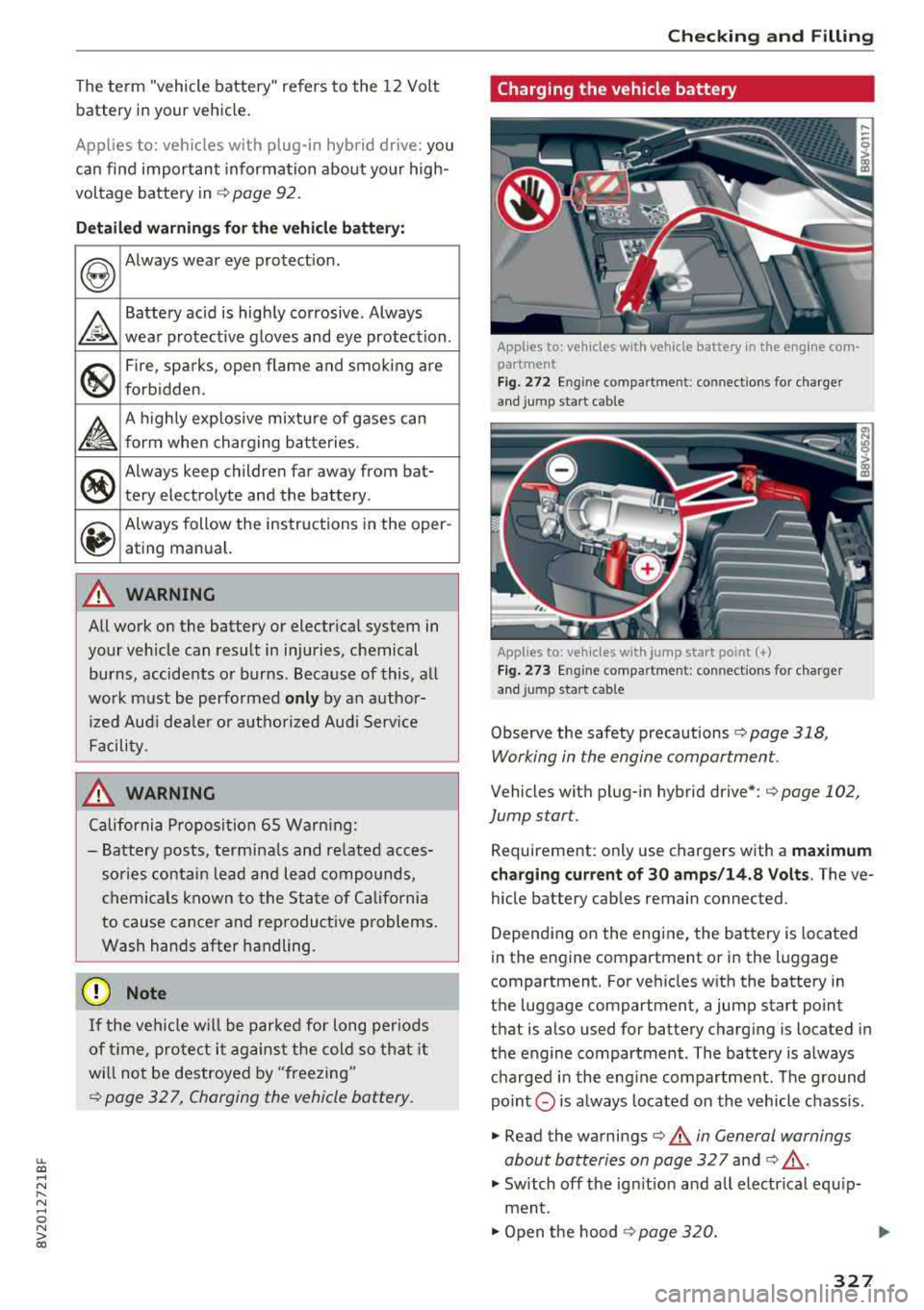
Applies to: veh icles w ith vehicle battery in t he e ng in e com
partment
Fig . 272 En g in e co mpa rtm en t: c onnect ions for charge r
a nd j ump start c abl e
Applies to: vehicles w ith jump s ta rt point(+)
Fig . 2 73 Engin e compar tm ent: c onn ect io ns fo r charge r
a n d j ump s ta rt c able
Observe the safety precautions r=>page 318,
Working in the engine compartment .
Vehicles with plug-in hybrid drive*: r=> page 102,
Jump s tar t.
Requirement: only use chargers with a ma ximum
charging current of 30 amp s/14.8 Volt s.
The ve
hicle battery cab les remain connected.
Depend ing on the engine, the battery is located
in the engine compartment or i n the l uggage
compartment. For vehicles w ith the battery in
the luggage compartment, a jump start point
that is also used for battery charg ing is located i n
the engine compartment . The battery is a lways
charged in the eng ine compartment. The g round
poin t
0 is always loca ted on the vehicle chass is .
.,. Read the warnings r=> .&.. in General warnings
about batteries on page 32 7
and r=> .&._.
.,. Switch off the ig nitio n and all electrical equ ip
ment .
.,. Open the hood r=> page 320.
327