2018 AUDI S3 SEDAN auto
[x] Cancel search: autoPage 33 of 404

u. 00 .-< N l' N .-< 0 N > 00
Opening and closing
Central locking
Description
You can lock and un lock the veh icle centrally . You
h ave the following options:
-Remote control key c> page 33, or
-Sensors in the front door hand les"
c> page 34, or
-Lock cylinder on the driver's door c> page 36,
or
-Interior central locking switch c> page 34.
Turn sign als
The turn s ignals flas h twice when yo u un lo ck the
vehicle and flash once when you lock the vehicle.
I f t hey do not flas h, then the ignition may still be
sw itched on o r one of the doo rs, the luggage
compa rtme nt, o r the hood may be open, for ex
ample.
Automatic locking (Auto Lock )
The Auto Lock funct io n locks all doors and the
l uggage compartment lid once the speed has ex
ceeded approx imately 9 mph (lS km/ h).
The vehicle will unlock aga in if the ign it ion key is
removed, the opening function in the centra l
l o cki ng switch is act ivated , or one of t he door
h andles is operated. The A uto Lock f unc tion can
be sw itched on and off in t he Infotainment sys
tem
c> page35 .
In the event of a crash with a irbag deployment,
the doo rs will a lso automa tica lly unloc k to allow
access to t he ve hicle.
Selective door unlocking
The doors and luggage compartment lid w ill lock
when they close . You can set in the Infotainment
sys tem whether
only the d river's doo r or the en
tire ve hicl e should be unlocked w hen unlocking
c> page 35 .
Unintentionally locking yourself out
Only lock your veh icle when all of the doors and
the luggage compa rtment lid a re closed and the
Open ing and cl osing
remote cont rol key is not in t he ve hicle . Thi s
helps to prevent you from locking yourself out
accidentally .
T he following condi tions p revent yo u from lock
ing yo ur remote control key in the vehi cle:
-If the d river's door is open, the vehicle cannot
be locked by press ing t he
lil button on t he re
mote co ntro l key o r by touching the locking
sensor* on a doo r.
-If the most recently used conve nience key* is in
the luggage compa rtment, t he luggage com
partment lid a utomatically unlocks again after
closing it.
-If the convenience key* that was last used is de
tected inside the ve hicle, then the vehicle can
not be locked from the o utside .
A WARNING
--
-If you leave the vehicle, sw itch the ignition
off and take the ve hicle key with you. T his
app lies part ic u larly whe n children remain in
the vehicle . O therwise the children could
s tart the engine o r operate elect rical eq uip
men t such as power w indows.
-N o one, especially c hild re n, should stay in
t he vehicle whe n it is loc ked from the out
side, because the windows can no longe r be
opene d from the inside
c> page 3 6. Locked
doors ma ke it more diffic ult for emergency
wo rkers to get into the vehicle, which puts
lives at risk .
(D Tips
-Do not leave v aluables u natten ded i n the ve
hicle. A lo cked vehi cle is not a sa fe!
-Th e LE D in t he dr iver's door ra il blink s when
yo u lock the veh icle . If th e LED li ghts up for
app roximate ly 30 seconds a fter locking,
there is a malfunction in the centra l locking
system . Have the prob lem corrected by an
authorized Audi dealer or authorized Aud i
Service Facility.
31
Page 35 of 404

Replacing the remote control key battery
.,. Pry the cover@off of the key (Dusing a coin
¢fig.17.
... Insert the new battery with the" +" facing up.
... Press the cover back onto the key until it clicks
into place .
@) For the sake of the environment
Discharged batteries must be disposed of
us·
ing methods that will not harm the env iron
ment. Do not dispose of them in household
trash.
(D Tips
The replacement battery must meet the same
specif ications as the original battery in the re
mote control key .
Synchronizing the remote control key
The remote control key must be synchronized if
the vehicle does not lock/unlock with the remote
control.
... Press the remote control key button [:@:].
.,. Insert the key in the driver's door lock within 30
seconds c::> page 36 .
.,. Press the ~ button or~ button .
Unlocking/locking with remote control
F ig . 18 Re mote cont ro l key or convenience key : b utto n pro
g ram ming
.,. To unlock the vehicle, press the@ button (D
c::> fig. 18.
~ ... To lock the veh icle, press the {f) button @c::> A
.... N once .
" ~ ... To unlock the luggage compartment lid, press 0
~ the e:5 button @ briefly . co
Opening and closing
.,. To open* the luggage compartment lid, press
and hold the
e:5 button @for at least one sec
ond.
... To trigger the a larm, press the ! PANIC I button
@ . The vehicle horn and emergency flashers
are activated .
.,. To turn off the alarm, press the I PANIC I button
@again .
If you unlock the veh icle and do not open any of
the doors, the hood, or the luggage compart ·
ment l id within 45 seconds, the vehicle automati·
cally locks again. This feature prevents the vehi·
cle from being accidentally left unlocked over a
long period of time. This does not apply if you
press and hold
the~ button @for at least one
second .
You can select in the Infotainment system if the
entire vehicle or only the driver's door should un
locking when unlocking the
vehicle¢ page 35.
_&. WARNING
-Read and following all warnings c::> & in De·
scription on page 31 .
(D Tips
- Only use the remote control key when you
are within view of the vehicle .
- Th e vehicle can only be loc ked when these
lector lever is in the P position.
- Do not use the remote con trol when you are
inside the vehicle. Otherwise, you could un
intentionally lock the vehicle. If you then
tried to start the engine or open a door, the
alarm would be triggered. If this happens,
press the
III unlock button.
- Only use the panic function in an emergen
cy.
33
Page 36 of 404

Opening and clo sin g
Unlocking/locking with the convenience
key
Applies to: vehicles with convenience key
The doors and luggage compartment lid can be
unlocked/locked without using the remote con trol key.
F ig. 19 Doo r handle : se nsor for locking
Unlocking the veh icle
.. Grasp the driver 's or front passenger's door
handle. The door unlocks automatically.
.. Pull on the door handle to open the door.
Loc king th e vehi cle
.. Place the selector lever in the "P " posit ion; oth
erwise, the vehicle cannot be locked .
.. To lock the vehicle, close the door and touch
the sensor on the door handle
o nce ¢ fig. 19,
¢ ,A .Do not hold the door handle while doing
th is.
Unlock ing and locking the vehicle can only be
done at the front doors. The remote control key
cannot be more than approximate ly 5 ft (1.5 m)
away from the door handle.
It makes no differ
ence whether the remote control key is in your
jacket pocket , purse or briefcase.
If you hold the door handle while locking, this
can impair the locking function .
The door cannot be opened for a brief period di rectly after locking it. This allows you the oppor
tunity to check that the driver's door is locked .
The settings in the Infotainment system deter mine if the entire vehicle or only one of the doors
is unlocked when unlocking the vehicle
¢ page 35 .
34
A WARNING
,-
Read and fo llowing all warnings¢ & in De-
scription on page
31.
(D Tips
If your vehicle is left standing for a long peri
od of t ime, note the following:
-The proximity sensor switches off after a
few days to save energy . You then have to
pull once on the door handle to un lock the
vehicle and a second time to open it.
-The energy management system gradually
turns off unnecessary convenience functions
to prevent the veh icle battery from draining
and to maintain the vehicle's ability to start
for as long as poss ible. You may not be ab le
to unlock your vehicle using the conven ience
key .
(0 Tips
Un locking with the conven ience key (keyless
access) can be deactivated temporar ily.
-Place the selector lever in the "P" position;
otherwise, the vehicle cannot be loc ked.
-Close the door and press the button © CD
¢page 33, fig .18.
-Press the sensor on the door handle onc e
within five seconds ¢ fig. 19, ¢,& .Do not
hold the door handle while do ing th is.
-The next time the vehicle is unlocked, it can
only be done with the remote control key or
mechanically using the doo r lock cylinder .
T he conven ience key w ill be active aga in af
ter the next locking/unlocking.
Central locking switch
Fig. 20 D river 's doo r: cen tral lo ck in g sw it c h
Page 37 of 404

~ To lock the vehicle, press the ~ button ¢.&_ .
~ To unlock the vehicle, press the Iii button
¢ fig. 20.
When locking the vehicle with the centra l locking
switch, the fo llowing applies :
- Open ing the doors and the l uggage compart
ment lid from the
outside i s not possib le for se
curity reasons , such as when stopped at a light.
- T he L ED in the cent ral lock ing switch turns o n
when a ll doo rs a re closed and locked.
- Front doo rs: you can open the doors indiv idual
ly from the ins ide by p ulling the doo r hand le.
- Rear doors*: pu ll on the door hand le
once to
u nlock the door. Pull on the doo r hand le
again
to open t he door.
- In the event of a crash w ith airbag dep loyment,
the doors un lock automatically to a llow access
to the vehicle .
A WARNING
-Read and following all warnings ¢.& in De
scription on page 31 .
- The powe r locking sw itch works w ith the ig
nition off and a utomatically locks the entire
vehicle when
the [@] button is p ressed.
- T he centra l locking switc h is inoperative
when the vehicle is locked from the o utside .
- L ocked doors make it mo re difficult for
emergency worke rs to get into the vehicle,
which puts lives at risk. Do not leave anyone
behind in the vehicle, especially children.
(D Tips
Your veh icle locks automat ica lly w hen it
reaches a speed of 9 mph (15 km/h) (Auto
Lock)
¢ page 31. You can unloc k the vehicle
aga in using the
63 button in the centra l lock
ing sw itch.
u. 00 .-< N l' N .-< 0 N > ll Th is fun ctio n is not a vail abl e in a ll co untries. 00
Open ing and cl osing
Central locking settings
You con set which functions ore controlled by the
central locking system .
~ Select in the Infotainment system: I MENU! but
ton
> Vehicle > lef t control button > V ehicle
setting s> Central lo cking .
Door unloc king
-you can decide if All doors or
o n ly the
Dr iver's door shou ld unlock. The lug
gage compartment lid also unlocks when
All is
selected . If you select
Driver' s door in a veh icle
with a conve nience key*, on ly the doo r whose
hand le you p ull will u nlock .
If you se lect
Driver 's door , all the doors and lug
gage compartment l id w ill unlock if you press the
~ button on the remote co ntrol key twice .
Long press to open windo ws -the convenience
opening/closing function can be switched on/off
¢ page 40 .
Fold mirror s* -if you switch the function on, the
ex ter ior mirrors fold in automatically when the
vehicle is locked .
Confirmation tone -when checked off./, a tone
will sound when yo u lock the vehicle
l).
35
Page 38 of 404

Opening and closing
Mechanically unlocking/locking the doors
If the central locking foils, you must unlock/lock the doors separately .
Fig. 21 Driver's door : door lock cylinder
Fig . 22 Fro nt s ide of t he doo r: emerg en cy release
Unlocking/locking the driver's door
a, 0
0
0
> (X) a,
M
5
i
~ To unlock the driver's door, turn the key to the
u nlock position @
¢fig . 21.
~ To lock the driver's door, put the se lector lever
in the P position and turn the key
once to the
lock position
@ ¢ ,&..
The settings in the Infotainment system deter
mine if the entire vehicle or only one of the doors
is unlocked when unlocking the vehicle
¢page 35.
Locking the front passenger's door/rear
doors*
The mechanica l lock is located on the edge of the
front passenger's door and the rear doors*. It is only visible when the door is open.
~ Remove the cap from the opening ¢ fig. 22.
~ Insert the key bit in the slot inside and turn the
key all the way to the right (right door) or left
(left door*).
36
A WARNING
, -
Read and fo llowing all warnings¢ & in De-
scription on page
31.
Anti-theft alarm system
If the anti-theft alarm system detects a vehicle
break-in, audio and visual warning s ignals a re
triggered. The anti-theft alarm system is switch
ed on or off when locking/unlocking your vehicle.
If the alarm is triggered, it will shut off automat
ically after a certain amount of time.
Switching the alarm off manually
~ To switch the a larm off, press the 63 button on
the remote control key or switch the ignition
on .
Break-in security feature
The alarm will sound if there is a break-in at the
doors , hood, and/or luggage compartment lid.
Page 39 of 404

LL co .... N
" N .... 0 N > co
Luggage compartment
lid
Opening/closing the luggage compartment
lid
F ig . 23 Luggage compartment lid : ope ning (handle)
Fig . 24 Driver 's door : opening th e luggage compartment
lid
Opening the luggage comp artment lid
.,. Press and hold the?:$ button on the remote
control key for at least one second, or
.,. Move the selector lever to the "P" position and
pull the?:$ button* in the driver's door
¢ fig. 24, or
.,. Press the handle in the luggage compartment
lid
¢fig. 23.
Closing the luggage compartment lid
.,. Use the inside gr ip to pull the luggage com
partment lid down and allow it to close using a
gentle push
¢ &_ .
_& WARNING
-After closing the luggage compartment lid,
make sure that it is latched. Otherwise the
luggage compartment lid could open sud
denly when driving, which increases the risk
of an accident.
Opening and closing
-Never drive with the luggage compartment
lid ajar or open, because poisonous gases
can enter the vehicle interior and create the
risk of asphyxiation.
- Never leave your vehicle unattended when
the luggage compartment lid is open. A
child could climb into the vehicle through
the luggage compartment .
If the luggage
compartment lid was then closed, the child
would be trapped in the vehicle and unable
to escape. To reduce the r isk of injury, do
not allow children to play in or around the
vehicle. Always keep the luggage compart
ment lid and the doors closed when the ve hicle is not in use.
- Always make sure no one is in the luggage
compartment lid's range of motion when it
is closing, especially near the hinges. Fin
gers or hands could be pinched.
@ Tips
- When the vehicle is locked, the luggage
compartment lid can be unlocked separately
by pressing the?:$ button on the remote
control key. The luggage compartment lid
locks automatically when it is closed again.
- In case of an emergency or a faulty handle,
the luggage compartment lid can be opened
manually from the inside
c::> page 38 .
37
Page 43 of 404
u. 00 .-< N l' N .-< 0 N > 00
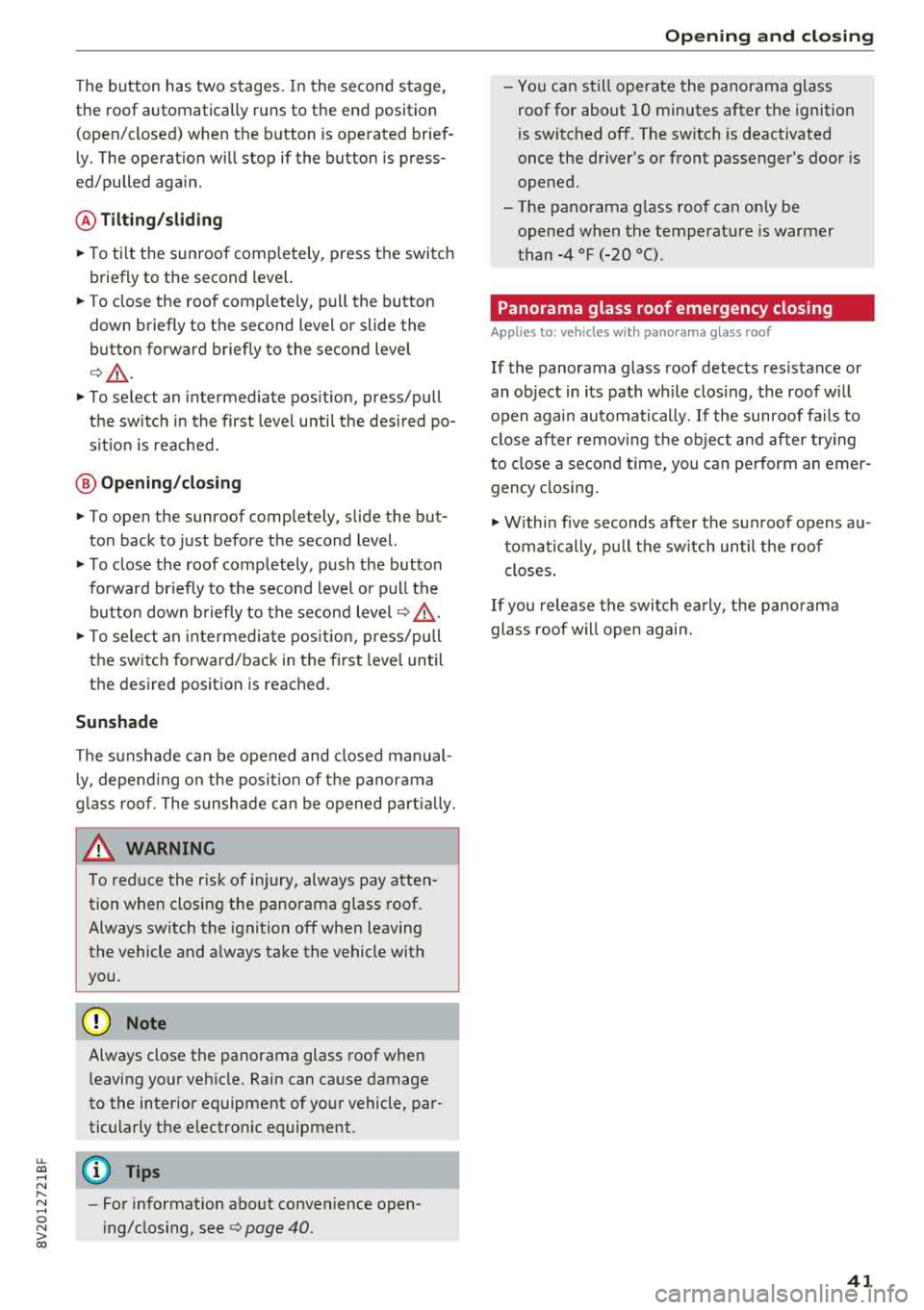
The button has two stages. In the second stage,
the roof automatically runs to the end position
(open/closed) when the button is operated brief
ly . The operat ion w ill stop if the button is press
ed/pulled again.
@ Tilt ing /sliding
~ To ti lt the sunroof comp letely, press the switch
briefly to the second level.
~ To close the roof completely, pull the button
down b riefly to the second level or slide the
button forward briefly to the second leve l
<=>& .
~ To select an intermediate pos ition, press/pull
the sw itch in the first level until the des ired po
s it ion is reached.
@ Opening /closing
~ To open the sunroof comp letely, slide the but
ton back to just before the second level.
~ T o close the roof completely, push the button
fo rward briefly to t he second level or p ull th e
bu tton dow n briefly to t he second level
c:> &
~ To se lect an inte rmedi ate pos ition, press/pull
the swi tc h forward/back in the fi rst leve l until
the desired position is reached.
Sunshade
The sunshade can be opened and closed manual
l y, depe nd ing on the posi tion of the panorama
g lass roof . The sunshade can be opened pa rtially.
A WARNING
To red uce the risk of in jury, always pay atten
tion when closi ng the pa norama glass roof.
Always sw itch the ignition off when leaving
the vehicle and a lways ta ke the vehicle with
you.
@ Note
Always close the panorama glass roof when
leaving your ve hicle. Rain can ca use damage
to the inter ior eq uipment of yo ur vehicle, par
ticula rly the e lectronic equipment.
(D Tips
-Fo r information about convenience open
i ng/closing, see
c:> page 40.
Open ing and cl osing
-You can s till operate the panorama glass
roof for about 10 minutes after the ignition
is switc hed off. The switch is deactivated
once the driver's or front passenger's door is
opened.
-The pano rama g lass roof can on ly be
opened when the temperature is warmer
than -4 °F (-20 °().
Panorama glass roof emergency closing
App lies to: vehicles wit h pano rama g lass roof
If the panorama glass roof detects resistance or
an ob ject in its path wh ile clos ing, the roof w ill
open again automa tically. If the sunroof fa ils to
cl ose after removing the ob ject and after try ing
to close a second time, you c an perform an emer
gency closing .
~ Within five seconds af ter the s un roof opens a u
t oma tically, pull t he sw itch u ntil the roof
closes .
If you release the switc h ea rly , the pa norama
glass roof w ill open again.
41
Page 44 of 404

Power top
Power top
Automatic power top
General information
A pp lies to: ve hicles w ith power top
The power top opens and closes automatically .
When open, the power top is stored completely in the power top compartment. The power top
can be opened or closed at speeds up to 30 mph
(SO km/h).
Under normal conditions, the power top is wind
and waterproof. In rare cases, small droplets of
water may form under extreme weather condi
tions such as torrential or prolonged rain. That is
normal and no cause for concern.
Follow the care instructions to keep the power
top free of leaks and to maintain its appearance
c:::> page 354, Care and cleaning. Also observe the
following:
- Open and stow the power top only when it is
clean and dry. Stowing the power top when it is
damp can create imprints in it, and if it is left
that way for long periods of time, mildew and
other damage can form. To prevent scratching
or damaging the power top, do not use any
sharp-edged objects to remove ice and snow.
The rear window may be cleared with a stand
ard ice scraper .
- Do not leave the power top open for several
weeks or the creases in it may become discol
ored .
- Do not open the power top when the tempera
ture is be low 32 °F
(0 °() . The fabric in the
power top loses elasticity in sub-zero tempera
tures.
42
Opening/closing the power top
App lies to : vehicles with power top
Fig. 32 Cente r conso le : power top sw itch
Requirement: the power top storage compart
ment must be lowered
c:::> page 44 and the lug
gage compartment lid must be closed .
.,. Switch the ignition on .
.,. To open/close the power top , pull/press and
hold the button
(D during the entire process .
The status of the power top is shown in the in
strument cluster display when operating the power top switch.
You can close the power top when the wind de
flector is installed
c:::> page 45.
A message will appear in the instrument cluster
if the power top cannot be opened or closed
c:::>page44.
A WARNING
-- When operating the power top, make sure
the function is not affected by wind or other
factors and that it does not interfere with
other drivers .
- Never drive when the power top is not
locked correctly. The wind from driving
could cause the power top to open . This can
result in injuries and damage to the vehicle .
- Make sure no one will be injured by the pow
er top supports and other moving compo
nents when opening and closing the top.
- The headroom in the rear is reduced when
opening and closing the power top . Make
sure the rear passengers keep enough dis
tance from the power top to reduce the risk
of injury .
..,.