2018 AUDI Q5 infotainment
[x] Cancel search: infotainmentPage 209 of 392

u co ..... N r--N ..... 0 <( 0 00
(D Tips
-Distances to points of interest are displayed
as a straight -line distance from your current
l ocation. The actua l distance from your cur
rent location to the point of interest is up
dated automat ica lly . The list of found
po ints of interest is not resorted when th is
happens .
- There may be entries in the list that cannot be displayed completely due to the ir length .
Se lect the co rresponding e ntry from the
li st . Se lect : righ t co ntro l butto n
> Show des
t in ati on detai ls . Det ailed informat ion for
t h e selec ted en try in t he list is then dis
p layed.
Online point of interest search (online
search)
Applies to: vehicles with a navigation system and Audi con
nect (Infotainment)
You con sear ch for points of interest on the In
tern et.
Req uirement: the requirements fo r Audi co nnect
(Info tainment) m ust be met
r=> poge 187.
.,. Press the I NAV/MAPI button repeatedly until
the
Ent er destination menu is displayed
r=> poge 203, fig . 185.
.,. Se lect : left cont rol b utton > Online search . The
search area last set is d isplayed in the inp ut
field.
- Changing the search ar ea : select: right control
bu tton
> Sel ect search area .
- Sear ching for online de stination s in the se
lec ted search are a:
enter a new city/state if
necessary. Ente r the sea rch term, such as ho tel.
Press the control knob . Select and confirm an
on line destination from th e list.
- Sear ching fo r online destination s in a specific
categor y:
select and confirm Select category .
Select and confirm a category such as Restau
rants .
Find which search areas a re available under
¢ page 206, Point of interest search.
You can sea rch fo r onl ine dest inat io n s using the
voice recognition system ¢
table on page 170.
Navigation
(D Tips
Always read the chapter r=> page 194, Audi
connect (Infotainment) general information.
Accessing destinations from myAudi
account
Applies to: vehicles with a navigation system and Audi con nect (Infotainment)
Import individual destinations from your myAudi
account into the
MMI.
Requirement:
T he requirements for Audi connect (Infota in
ment) must be met
¢ page 187 .
You must have a reg istered myAud i account a t
www .audiusa .com/myaudi . You must have ave
hicle assigned to your myAud i account and you
must have stored one or more destinations .
.. Press the INAV/MAPI button repeatedly until
the
Enter dest ination menu is displayed
r=> page 203, fig . 185 .
.. Select: left control button > myAudi contac ts.
.,. If necessa ry, enter yo ur myA ud i use r data or
your myA udi PI N
¢page 187. The con tacts
stored in myAud i a re displayed .
- Select and confirm a contact.
- Select and confirm a p rivate or business dest i-
nation .
- Select and confirm
Start route guidance.
(D Tips
- You on ly need to enter the myAudi user data
one time .
- You can rece ive your myAudi PIN if yo u have
set up a myAud i account.
- For add itiona l information, v is it
www.aud iusa.com.
Entering a destination using geo
coordinates
Applies to: vehicles with navigation system
.,. Press the INAV/MAPI button repeatedly unti l
the
En ter des tination men u is disp layed
¢ page 203, fig. 185 .
207
Page 210 of 392
Navigation
.,. Select: left control button > Geographical coor
dinates .
-Select Latitude /Longitude.
- Press the control knob to set t he in dividua l val-
u es.
- T urn the cont rol knob to the left/r ight to
c h ange the selected value .
- Select and confirm
Start route guidance .
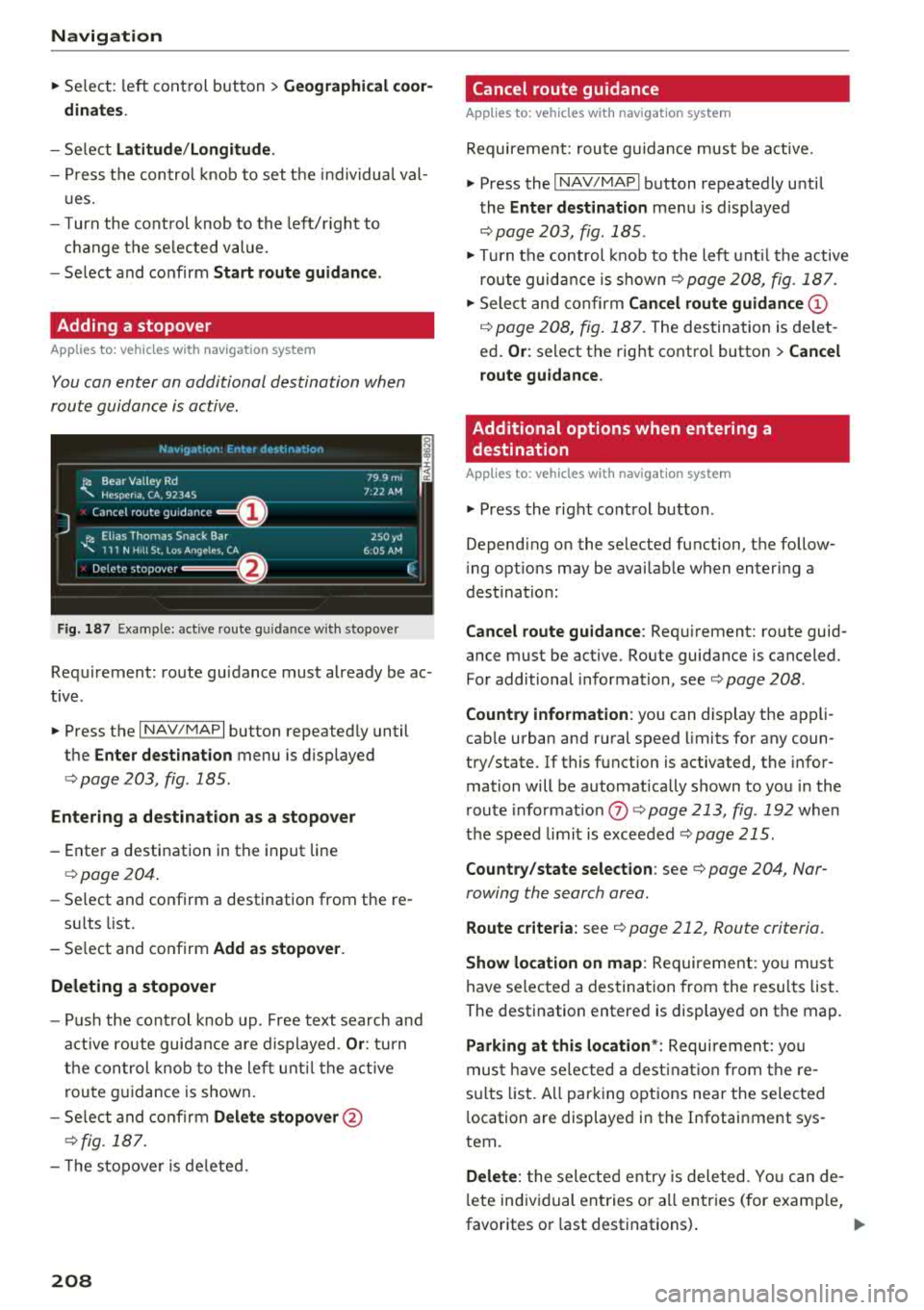
Adding a stopover
Applies to: vehicles with navigation system
You can enter an additional destination when
route guidance is active .
_________ N_a_ v_ ,_g _a _t _,o _n_ . _F _n _t _e _, _ d _e_ ,_1 _, n_ a _
t, _o _n ________ ~~
jl1 Bear Va lley Rd 79 9 m;
' HC'spcria. CA, 92345 1:22 AM
J Cancel route g~1dance ::0 -·-·-·
.JI' Elias Thomas Snack Bar
' 111 N Hill St, Los Angeles, CA
Delete stopover ====~ lfJ
250yd
6:05 AM
Fig . 187 Example: active route g uida nce w ith stopover
Requirement: route guidance must already be ac
tive .
.,. Press the I NAV/MAPI button repeatedly until
the
Enter destination menu is displayed
¢ page 203, fig . 185 .
Entering a destination as a stopover
-Enter a destination in the input line
¢page 204.
-Se lect and confirm a destination from the re -
s ul ts list .
- Select and confirm
Add as stopover.
Deleting a stopover
- Push the cont rol knob up . Free text search and
active route guidance are displayed.
Or: turn
the control knob to the left until the active
route guidance is shown.
- Select and confirm
Delete stopover @
¢fig. 187.
- T he stopove r is deleted.
208
Cancel route guidance
Applies to: vehicles with navigation system
Requirement: route guidance must be active.
.,. Press the I NAV/MAPI button repeatedly until
the
Enter destination menu is displayed
¢ page 203, fig. 185 .
.,. Turn the control knob to the left until the active
route guidance is
shown¢ page 208, fig. 187 .
.,. Select and confirm Cancel route guidance (D
¢ page 208, fig. 187. The destination is de let
ed.
Or : select the right contro l button > Cancel
route guidance .
Additional options when entering a
destination
Applies to: vehicles with navigation system
.,. Press the right control button .
Depend ing on the selected function, the follow
i ng opt ions may be avai lable when entering a
dest ination:
Cancel route guidance: Requirement: route guid
ance must be active. Route guidance is canceled.
For additional information, see ¢ page 208 .
Country information : you can display the app li
cab le urban and rural speed limits for any coun
try/state. If this function is activated, the infor
mation will be automatically shown to you in the
route informat ion
(J) ¢ page 213 , fig . 192 when
the speed limit is exceeded
¢page 215.
Country/state selection: see¢ page 204, Nar
rowing the search area .
Route criteria: see¢ page 212, Route criteria .
Show location on map: Requirement: you m ust
have selected a destination from the results list.
The destination entered is displayed on the map .
Parking at this location*: Requirement: you
must have se lected a destination from the re
su lts list . A ll parking options near the selected
l ocation are displayed in the Infotainment sys
tem.
Delete: t he selected entry is deleted. You can de
l ete individual entries or a ll entries (for examp le,
favorites or last destinations) .
...
Page 217 of 392

u co ..... N r-N .....
~ 0 co
Automatic: the map display adapts to the light
ing conditions (for example, changing from
Day
to Night when driving through a tunne l) .
Map display
Standard :
see ¢page 213, fig. 193 .
Satellite map1>: see ¢page 215, fig . 194 .
Map orientation
Destination :
the map indicates the destination
and is oriented to the north.
2D heading up map /2D north up map : the cur
rent vehicle position is disp layed . The map is ori
ented in the direction of travel or to the north.
3D map* : the current vehicle pos it ion is shown
on a three -dimensional map and is aligned to the
direction of trave l. At a scale of 62 mi (100 km)
and larger, the map orientation is to the north.
Overview map: the entire route from the vehicle
position to the destination or the next stopover is
disp layed on the map . The map sca le depends on
the length of the route and adapts automatically.
The map is oriented to the north.
Route information
The display of route information, such as the cur
rent street being driven on or points of interest
a long the current route
¢ page 213, fig. 192, can
be switched on/off or can be minimized on the
display of upcoming maneuvers.
Automatic zoom
On :
the map scale is adapted automat ica lly de
pending on the type of road being trave led (ex
pressway, highway, other roads) so that you al
ways have an optimal overview of the road ahead .
The scale is also automatically adapted when
there are upcoming maneuvers to provide a bet
ter deta iled view .
Intersection : when route guidance is active, the
map temporarily zooms in to a detailed scale
1> AU DI AG prov id es acce ss to se rvic e s fro m thir d par ty pro
v ide rs. Pe rman ent ava ilab ility can no t be g uaranteed , be·
c au se that depends on th e th ird party provider .
2> Pro vid er at tim e of pr intin g.
Navigation
when there are upcoming maneuvers so that you
can see the street or turn better.
Off : the map scale you have chosen is ma in
ta ined .
MMI map contents
You can switch the d isplay of additional informa
tion on the map in the Infotainment system dis
play on or off .
The weather forecast is displayed on a 3 m i (5
km) scale on the map .
Instrument cluster map contents
You can also set which map content disp lays in
the instrument cluster
¢ page 163.
Satellite map
Applies to: vehicles with a navigation system and Audi con·
nect (Infotainment)
You can display the navigation map with satel
lite images.
Fig. 194 Exampl e: satelli te map
Requirement: the requirements for Audi connect
services must be
met ¢ page 187.
.. Press the !NAV /MAP I butt on repeatedly until
the map is displayed.
.. Select: right control button > Map settings >
Map display > Google Earth2>1>.
T he map display is based on data received from
the Internet in the form of sate llite images,
which are then combined with the roadways from
the
Standard map view. There are two gigabytes ..,_
215
Page 218 of 392

Nav igatio n
of memory space in the MMI memory that can be
used to temporarily store the map or navigation
data that was received. Th is is roughly the
amount required for the m ap/navigation data for
a 2,48S mile (4,000 km) route . As long as the
satellite images loaded for route guidance are
stored, you can use them w ithout having an ac
tive data connection .
(D Tips
-The stored satellite map1> data can be de
leted in
Fac tor y se tting s > Navig ati on and
o nline m em ory
c::> page 246 .
- The satellite map1> is updated regularly
whenever the funct ion is opened . The proc
ess may take severa l seconds.
- When the satellite map display is switched
on
l ) with the 30 pos it ion map type, the
MM I display automatically switches to the
20 map type when driving through tunnels.
- Also read the information in the chapter
c:> page 194, Audi connect (Info tainment)
general information .
-Fo r additional informat ion, visit
www.audiusa.com .
Map update
Introduction
Applies to: veh icles with navigat ion system
There are mult iple options available for upda ting
your map material:
- Map updates through the
on line map u pdate *
c:>page 216.
-Import map updates from the SD car d* to your
MMI. You can find additional information on
line at www.aud iusa.com/myaudi .
-Map update at an authori zed Audi dealer or au
thori zed Audi Serv ice Facility. This can result in
addi tional costs.
l ) AU DI AG provides access to service s fro m third party pro
v ider s. Perma ne nt av aila bility c anno t be guaran teed, be
c a use that depen ds on th e th ird party prov ide r.
216
Online map update
Applies to: vehicles with a navigation system and Audi con
nect (Infotainment)
Using th e online mop update, you con update
the mop material in your navigation system di
rec tly from your vehicle.
Fig . 195 Example: d is pl ay of a new on li ne map update
Fig. 196 Example: se lect ion of a coun try package
Requirement: the requi rements for Audi connect
Infotainment se rvices must be met
c::> page 187 .
You must have a myAudi acco unt and have as
s igned your vehicle to it.
Using your vehicle position, the MM I identifies
reg ions which you are frequently in . Based on
th is, the MMI suggests update packages for
these regions, if they are available .
"' Select and confirm (D Start download
¢ fig . 195 if the message for a new map update
appears in the Infotainment system display .
Or:
"'Sele ct !M EN UI button> Settin gs > left control
but ton
> Sy stem maint enance > Sy stem up
date
> Online update.
Page 219 of 392

u co ..... N r-N .....
~ 0 co
A selection with the available update packages
appears in the Infotainment system disp lay
¢ fig . 196.
Selecting th e onlin e map upda te
- Se lect an update package from the list(~) @
<=>fig. 196.
-Confirm you r se lection with the I BACK I button
and go back to the selection.
- The number and amount of data fo r th e select
ed update package are now disp layed in the I n
fotainment system.
Starting the download
- Se lect and confirm Start downlo ad .
- Confirm the secur ity prompt by selecting S tart
download
again .
The update packages begin to down load and the
status of the download progress is shown in the
Infotainment system display.
In stall ation of onlin e map update s
The downloaded map mater ia l installs after you
stop your vehicle . The new update packages in
stall only after you switch off the ignition . After
restarting the MMI , the Infota inment system dis
play ind icates if the updates installed successful
ly .
- Confirm the successful update with
OK .
The new map materia l can now be used for navi
gation.
(D Tips
- Always read the chap ter ~ page 18 7.
- The amou nt of available on line map up-
dates in the vehicle is lim ited. To update
more regions, use the map update via SD
card at www .audiusa.com/myaudi.
- Always read the chap ter
¢ page 194, Audi
connect (Infotainment) general informa
tion . Na
viga tion
Traffic information
Introduction
Applies to: veh icles w ith navigation system
Fig . 1 97 Example: traffic informat ion overv iew
.,. Press the INAV/MAPI button repea tedly u nti l
the map is displayed
~ page 213, fig. 192.
.,. Select: left control button > Traffic mes sage s.
Depending on veh icle equipment, the following
i nforma tion may be shown in the traffic informa
tion
overview ¢ fig. 197:
CD A message CD ¢fig. 197wi ll appea r if the
MM I ca lculates a better route for the cu rrent
rou te g uidance. More information can be
f o und under
¢ page 218.
@ When route guidance is active, traffic inci
dents along your route are d isplayed in the
upper section of the list and are sorted by
distance.
@ T he traffic messages are sorted by street
name . If there are mu ltip le traffic messages
for the same street, an arrow is displayed in
front of the st reet name
(~ ). Select and con
firm the corresponding line to disp lay
all of
t h e traffic information .
@ The cur rent se lected traffi c message is also
shown as a map preview* i n the Infotainment
system display .
® The status line in t he Infotainment d isplay
also always ind icates the reception of traffic
information
( IT MC !orlO NLINEI).
Show ing tra ffic messages on the map : select:
one traffic message > right control button >
Show on map .
Di splaying the ne xt t raffi c message o n the map :
press the control knob. ..,.
217
Page 221 of 392

u co ..... N r--N ..... 0 <( 0 00
Online traffic information
Applies to: vehicles with a navigation system and Audi con
nect (Infotainment)
The MMI con receive real-time online traffic in
formation about congestion, accidents, road
construction and other incidents.
R equirement: the requirements for Audi connect
(Infotainment) m ust be met ¢
page 187.
~ Switching online traffic information on and
off:
select I NAV /MAP I button > rig ht control
button
> Online traffic data on(@°) or off ( 0 ).
~ Press the I NAV/MAPI button repeated ly until
the map is displayed .
~ Select: left control button > Traffic messages .
The on line traffic information will also be dis
p layed on the sate llite map
l) ¢ page 215 or on
the standard map
¢ page 213, fig. 192.
IflON LINEl traffic information cannot be re
ceived, then traffic information wi ll automatica l
ly be received through
ITMCI ¢ page 218.
Troubleshooting
Applies to: vehicles with navigation system
Problem Solution Navigation
(D Tips
-
Online traffic information is not available in
Canada .
- Always read the
chapter¢ page 194, Audi
connect (Infotainment) general informa
tion.
- Having the Online traffic data function
switched on provides the most accurate re
ports of traffic situations as well as traffic
forecasting. Your vehicle transmits and processes its anonymo us, encrypted posi
tion inform ation at regular intervals to the
traffic data provider. If you do not want to
use this, you can switch off the
online traf
fic information
function at any time .
- The
online traffic information network is
curr ently not available in all countries, and
the coverage is not nationwide. For addi
tional information, visit www.a ud iusa.com .
Free text search : the desired des- The dest ination might not be entered in the navigation database.
ti nation cannot be found.
Or: check the spe lling of the term that was searched . Check if the
desired country/state was selected for the free text search using
the
Country/state selection ¢ page 204 or the option All coun-
tries/states .
l) A U DI AG prov ides access to se rv ices from thi rd pa rty pro
v id ers. Perm anent ava ilabil ity can not be g uaranteed , be
c ause that depends on the th ird party prov ider.
219
Page 226 of 392

Radio
Station names (FM)
Variable :
scrolling text transmitted by the FM
stations is shown in the Infotainment system
display.
Fixed : scrolling text transmitted by the FM sta
tions is not shown in the Infotainment system
disp lay. Only the current section of the scro lling
text is displayed.
FM/AM HD Radio*
You can sw itch HD Rad io recept io n on o r off.
Channel sorting (SiriusXM*)
You can set the station sorting for SiriusXM sta
tion lists* by:
-Channel number: the channels are sorted in as
cending order according to their channel num
ber.
- Channel name : the channels are listed in alpha
betical order.
- First category, then channel number: th e
channels are sorted by the ir category and then
by the ir channel numbers.
- First category, then channel name: the chan
nels are sorted by their category and then by
their channel names.
Category filter (SiriusXM*)
The stations shown in the station list can be fi l
tered by your personal preferences and by pro
gram type. The program categories that you can
select depend on what is offered by your provid
er. Select the
All categories option to deactivate
all filter options and display all ava ilable stations
in the satellite station list.
Troubleshooting
Problem Solution Show "Now Playing"
screen
When the function is switched on~ and the sta
tions or presets list is open, the disp lay wi ll
switch to the
Show "Now Playing" screen view
after approximate ly five seconds ¢
page 222. De
pending on availability, information about the
set stat ion (such as stat ion name, artist and sta
tion logo) may be displayed in this view.
Preferred picture view*
You can set your preferred screen view for the
Show "Now Playing" screen¢ page 222.
-Station logo: the station logo is displayed, de
pending on availability .
-Cover art: the album cover is displayed if availa
ble.
Gracenote online database*
Requirement: the MMI must be connected to the
Internet. The
Cover art option must be selected
¢ page 224, Preferred picture view *.
When the funct ion is switched on~. the album
cover or genre cover for the song that is play ing
i s loaded from t he Gracenote online database,
depend ing on availability.
Subscription status (SiriusXM)*
This optio n is available when your subscr ipt ion is
about to expire or has already expired . The expi
ration date for your license is displayed.
Call to SiriusXM *: the contact information for
your satellite radio provider is displayed . To call
your satellite radio provider using the MMI, press
Call to SiriusXM *.
A station with poo r reception is no longer Store the stat io n as a preset in advance. Access the pre-
displayed in the station list once you sets using the presets list¢
page 223.
switch to a different station.
224
Page 231 of 392

u co ..... N r--N ..... 0 <( 0 00
The media is started and operated through the
mobile device or the
MMI, depending on the de
vice being used.
(D Tips
-Check for any connection requests on your
Bluetooth device.
-Multiple Bluetooth audio players can be
connected to the
MMI, but only one mobile
device can be active.
-Bluetooth protocols AVRCP (1.0/1.3/1.4)
and A2DP are supported.
-Note the volume setting on your Bluetooth
device. Audi recommends setting your mo
bile device to the maximum volume when
using it as a Bluetooth audio player.
-The supported media functions (such as
shuffle) depend on the Bluetooth device be
ing used.
-For more information on the supported de
vices, visit www.audiusa.com/bluetooth or
contact an authorized Audi dealer or author ized Audi Service Facility.
Wi-Fi audio player
Appl ies to: ve hicles with Wi-F i audio playe r
Using the Wi -Fi audio player media source on the
MMI, you can connect and operate your Wi-Fi-ca
pable media player (such as a smartphone) to
wirelessly play music from your media player
li
brary. The media player is connected through the
vehicle's Wi-Fi hotspot. A UPnP Server opp or an
integrated UPnPIDLNA server on your media
player is required to access your media player
li
brary.
Requirement: the Wi-Fi function on your media
player must be switched on. The
Audi MMI con
nect
app or a UPnP server app must be installed
on your media player .
Or: you must be using a
media player with an integrated UPnP/DLNA
server.
-Connecting a media player: press the I MEDIA !
button. Press the left control button until the
sources overview
c::;, page 234 is displayed. Se
lect and confirm
Wi-Fi audio player 0
c::;, page 234, fig . 211 .
Media
-If necessary, select and confirm Wi-Fi turned
off> Turn on Wi-Fi
to activate Wi-Fi in the
MMI. Select
Wi-Fi settings, if necessary. Select
the same settings on the wireless media player
that are used for the Wi-Fi hotspot.
-Starting the Wi-Fi audio player: start the Audi
MMI connect
app or a UPnP server app, or set
media permissions on your media player.
Operating the media player: the media player is
operated through the MMI.
-Press the left control button repeatedly until
the
Folders menu item appears. Select and con
firm
Folders.
-Playing music from the media player: select
and confirm
Media center .
Web radio:
see c::;, page 230 .
A WARNING
-
-As the driver, do not allow usage of the Wi
Fi hotspot to distract you from driving, as
this could increase the risk of an accident.
-It is only safe to use tablets, laptops, mo
bile devices and other similar devices when
the vehicle is stationary because, like all
loose objects, they could be thrown around
the inside of the vehicle in a crash and cause
serious injuries. Store these types of devices
securely while driving.
-Do not use any wireless devices on the front
seats within range of the airbags while driv
ing. Also read and follow the warnings in
c::;, page 2 73, Front airbags.
@ Note
Always follow the information found in ¢@ in
Wi-Fi hotspot on page 194.
(D Tips
-Always read the chapter c::;, page 194, Audi
connect (Infotainment) general informa
tion.
-Please note that a Wi-Fi connection does
not automatically make it possible to use
the Internet. For additional information,
see
c::;, page 187.
229