2018 AUDI Q3 mirror
[x] Cancel search: mirrorPage 82 of 230

Assistance systems
Switching on and off
Applies to: vehicles w ith Aud i s ide ass ist
F ig. 83 Driver's door : side ass ist bu tto n
.,. Press the button to switch the system on and
off <=>
& in General information on page 79.
The LED in the button turns on when side assist
is sw itched on.
Adjusting the display brightness
Applies to: ve hicles w ith Aud i side ass is t
The display brightness can be adjusted in the In
fotainment system .
.,. Se lect : the ICARI function button > (Car) Sys
tems *
control button > Driver assist > Audi
side ass ist .
The display brightness adjusts automatically to
the br ightness of the surroundings, both in the
i n formation and in the warning stage. In very
dark or very br ight surroundings, the automat ic
adjustment will set the d isplay to the minimum
or maximum level. In such cases, you may notice
no change when adjusting the brightness, or the
change may only be noticeable once the sur
ro undings change .
Adj ust the brightness to a level where the display
in the information stage will no t disrupt your
view ahead. If you change the brightness, the dis
p la y in the exter ior mirror wi ll briefly show the
brightness level in the information stage . The
brightness of the warning stage is linked to the
brightness in the information stage and is adjust
ed along with the information stage.
80
@ Tips
-Side assist is not active while you are mak
ing the adjustment.
- Your settings are automatically stored and
assigned to the remote control key bei ng
used.
Messages
App lies to : vehicles wi th Audi side ass ist
If side assist sw itches off by itself, the LED in the
button turns off and a message will appear in the
i nstrument cluster display:
Audi side assist: Unavailable . Sensor vision
The radar sensor vision is impaired. Do not cover
the area in front of the sensors with bike whee ls,
stickers, dirt or other objects. Clean the area in
front of the sensors, if necessary
i::> page 78,
fig. 82 .
Audi side assist: Unavailable.
Side assist cannot be switched on at this time be
cause there is a malfunction (for example, the
battery charge level may be too low).
Audi side assist: System fault!
The system cannot gua rantee that it will detect
vehicles correct ly and it has switched off. The
sensors have been moved or are fa ulty . Have the
system checked by an authorized Aud i dealer or
authorized Aud i Serv ice Facility soon .
Audi side assist: Unavailable when towing
Side assist switches off automatically when a fac
tory- installed trailer hitch is connected to the
electrical connector on the trailer. There is no
guarantee the system will switc h off when using
a retrofitted trailer hitch. Do not use side assist
when towing a trailer.
Audi drive select
Introduction
Applies to : vehicles wit h Audi drive se lec t
Drive select makes it possible to experience dif
ferent types of vehicle sett ings in one veh icle.
The driver can select from three modes,
Comfort , ..,.
Page 84 of 230

Parking systems
Parking systems
General information
A ppl ies to: ve hicles w ith a rea r parking sys te m /pa rking sys
tem p lus/rearv iew camera
Depending on your vehicle's equipment, various
parking aids will help you when parking and ma
neuvering.
The
rear park ing system is an audible parking aid
that warns you of obstacles
behind the vehicle
¢ page 83.
The parking system plus assists you when park
ing by audibly and visually indicating objects de
tected
in front of and behind the veh icle
¢ page 83.
The rearview camera shows the area behind the
vehicle in the Infotainment system display . The
lines in the rearview camera image help you to
park or maneuver
¢ page 84.
_& WARNING
-Always look for traff ic and check the area
around your vehicle by looking at it directly
as well . The parking system cannot replace
the driver's attention. The driver is always
responsible when entering or leaving a park
ing space and during similar maneuvers.
- Please note that some surfaces, such as
clothing, are not detected by the system.
- Sensors and cameras have blind spots in
which people and objects cannot be detect
ed. Be especially cautious of small children
and animals.
-
- Always pay attention to the area around the
vehicle -using the rearview mirror, too.
- The sensors can be displaced by impacts or
damage to the radiator grille, bumper,
wheel housing and the underbody . The park
ing system may be impaired as a result.
Have an authorized Audi dealer or author
ized Audi Service Facility check their func
t io n.
- Make sure the sensors are not obstructed by
stickers, deposits or other materia ls. If they
are, the sensor function could be impaired.
82
For additional information on cleaning, see
¢page 185.
(D Note
-Some objects are not detected or displayed
by the system under certain circumstances:
- objects such as barrier chains, trailer draw
bars, vertical poles or fences
- objects above the sensors such as wall ex
tensions
- objects with certain surfaces or structures
such as chain link fences or powder snow
- If you continue driving closer to a low ob
ject, it may disappear from the sensor range. Note that you will no longer be
warned about th is obstacle.
@ Tips
- The system may provide a warning even
though there are no obstacles in the cover
age area in some situations, such as:
- certain road surfaces or when there is tall
grass
- external ultrasonic sources such as from
cleaning vehicles
- in heavy rain, snow, or thick vehicle ex
haust
- We recommend that you practice parking in
a traffic-free location or parking lot to be
come familiar with the system . When doing
this, there should be good light and weath
er conditions.
- The sensors must be kept clean and free of
snow and ice for the parking aid to operate .
For information on cleaning, see
¢page 185.
- You can change the volume and pitch of the
signals as well as the display¢
page 87.
-Please refer to the instructions for towing a
trailer located in
¢page 88.
- What appears in the infotainment display is
somewhat time-delayed.
Page 99 of 230
0 co ......
"' ,....
"' ...... 0 0 :::,
00
Driving safety
Basics
Safe driving habits
Please remember -safety first!
The individual safety features of your vehicle can
work together as a system to help protect you
and your passengers in a wide range of accidents.
T hese features cannot work as a system if they
are not always correctly adjusted and correctly
used.
This chapter contains important information,
tips, instructions and warnings that you need to
read and observe for your own safety, the safety
of your passengers and others . We have summar
ized here what you need to know about safety
belts, airbags, child restraints as well as child
safety. Your safety is for us
priority number 1. Al
ways observe the information and warnings in
this section -for your own safety as well as that
of your passengers.
The information in this section applies to all
model versions of your vehicle. Some of the fea
tures descr ibed in this sections may be standard
equipment on some models, or may be optional
equipment on others. If you are not sure, ask
your authorized Audi dealer.
A WARNING
- Always make sure that you follow the in
structions and heed the WARNINGS in this
Manual. It is in your interest and in the in
terest of your passengers .
-
-Always keep the complete Owner's Litera
ture in your Audi when you lend or sell your
vehicle so that this important information
will always be available to the driver and
passengers.
- Always keep the Owner's literature handy so
that you can find it easily if you have ques
tions.
Driving safety
Important things to do before driving
Safety is everybody's job! Vehicle and occupant
safety always depends on the informed and care
ful driver .
For your safety and the safety of your passen
gers,
before driving always:
.. Make sure that all lights and signals are operat
ing correctly.
.. Make sure that the tire pressure is correct .
.. Make sure that all windows are clean and afford
good visibility to the outside .
.,. Secure all luggage and other items carefully
¢ page 102, ¢page 45.
.,. Make sure that nothing can interfere with the
pedals.
.. Adjust front seat, head restraint and mirrors
correctly for your height.
.. Instruct passengers to adjust the head re
straints according to their height.
.. Make sure to use the right child restraint cor
rectly to protect children
¢ page 134, Child
safety.
.,. Sit properly in your seat and make sure that
your passengers do the same¢
page 42, Front
seats.
.. Fasten your safety belt and wear it properly. Al
so instruct your passengers to fasten their safe
ty belts properly ¢
page 106 .
What impairs driving safety?
Safe driving is directly related to the condition of
the vehicle , the driver as well as the driver's abili
ty to concentrate on the road without being dis
tracted.
The driver is responsible for the safety of the ve
hicle and all of its occupants. If your ability to
drive is impaired, safety risks for everybody in the
vehicle increase and you also become a hazard to
everyone else on the road
¢ _&. . Therefore:
.. Do not let yourself be distracted by passengers
or by using a cellular telephone .
.. NEVER drive when your driving ability is im
paired (by med ications, alcohol, drugs, etc .) .
.. Observe all traffic laws, rules of the road and
speed limits and plain common sense . .,.
97
Page 188 of 230

Care and cleaning
wash operator to reduce the risk of acci
dents.
- To reduce the risk of cuts, protect yourself
from sharp metal components when wash ing the underbody or the inside of the wheel
housings.
- After washing the vehicle, the braking effect
may be delayed due to moisture on the
brake rotors or ice in the winter. This in
creases the risk of an accident. The brakes
must be dried first with a few careful brake
applications.
(D Note
- If you wash the vehicle in an automatic car
wash, you must fold the exterior mirrors in
to reduce the risk of damage to the mirrors.
Power folding exterior mirrors* must only
be folded in and out using the power folding
function.
- To reduce the risk of paint damage, do not
wash the vehicle in direct sunlight. -
To reduce the risk of damage to the surface,
do not use insect removing sponges, kitchen
sponges or similar items.
- Matte finish painted vehicle components:
- To reduce the risk of damage to the sur-
face, do not use polishing agents or hard
wax.
- Never use protective wax. It can destroy
the matte finish effect.
- Do not place any stickers or magnetic
signs on vehicle parts painted with matte
finish paint. The paint could be damaged
when the stickers or magnets are re
moved.
@ For the sake of the environment
Only wash the veh icle in facilities spec ially de
signed for that purpose. This will reduce the
risk of dirty water contaminated with oil from
entering the sewer system.
Cleaning and care information
When clean ing and caring for individual vehicle
components, refer to the following tables. The
information contained there is simply recom
mendations. For quest ions or for components that are
not listed, consult an authorized Aud i
dealer or authorized Audi Service Facility. Also
follow the information found in¢&..
Exterior cleaning
Component Situation Solution
Windshield wiper
Deposits ¢ page 39, Cleaning the wiper blades
blades
Headlights/
Deposits Soft sponge with a mi ld soap solutiona >
Tail lights
Sensors/
Deposits Sensors: soft cloth with solvent-free cleaning solution
Camera lenses Camera lenses: soft cloth with alcohol-free cleaning solu-
tion
Snow/ice Hand brush/so
lvent-free de -icing spray
Wheels Road salt Water
Brake dust Acid-free special cleaning solution
Exhaust tail pipes Road salt Water, cleaning solution suitable for stainless steel, if
necessary
Decorative parts/ Deposits Mild soap solution al, a cleaning solution suitable for
Trim stainless steel, if necessary
186
Page 190 of 230
Care and cleaning
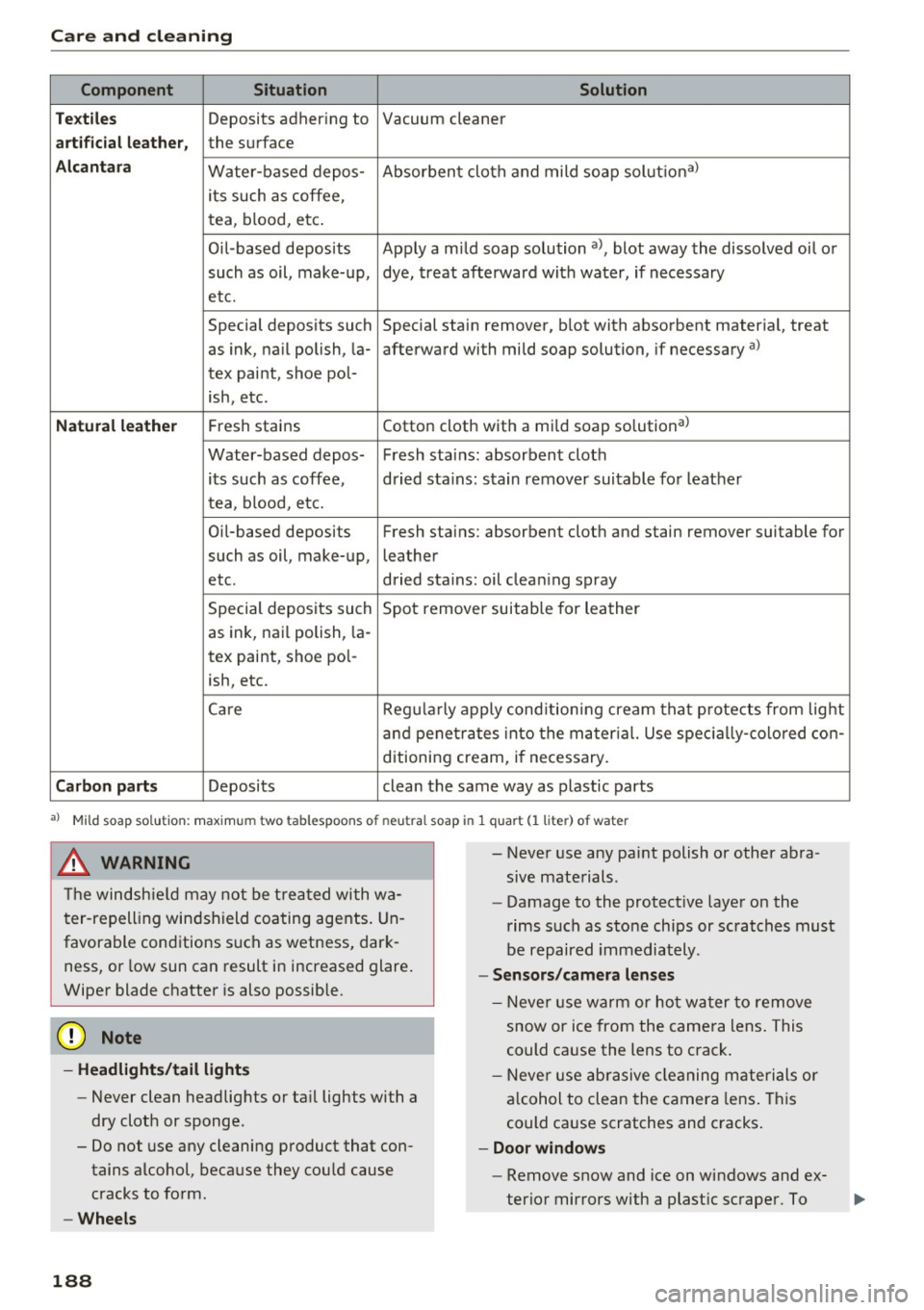
Component Situation Solution
Te xtil es
Deposits adhering to Vacuum cleaner
artifi cial le ather , the surface
Alcan tara Water-based depos- Absorbent cloth and mild soap
solutional
its such as coffee,
tea, blood, etc.
O il-based deposits Apply a mild soap solution a), blot away the dissolved oil o r
such as oil, make-up, dye, treat afterward with water, if necessary
etc.
Special deposits such Special sta ,in remover, blot with absorbent material, treat
as ink, na il polish, la- afterward with mild soap solution, if necessary al
tex paint, shoe pol-
ish, etc.
Natural leather Fresh stains Cotton cloth w
ith a mi ld soap solutional
Water-based depos- Fresh stains: absorbent cloth its such as coffee, dried sta ins: stain remover suitable fo r leather
tea, blood, etc.
Oil-based deposits Fresh stains: absorbent cloth and stain remover suitable for
such as oil, make-up, leather
etc. dried sta
ins: oil clea ning sp ray
Special deposits such Spot remover suitable for leather
as ink, nai l polish, la -
tex paint, shoe pol-
ish, etc.
Ca re Regularly apply cond itioning cream tha t protects from light
a nd penetr ates into the ma ter ial. Use spec ia lly-co lored con -
ditioning cream, i f necessary.
Carbon parts Deposits clean the same way as plastic parts
a) Mild soap sol ution: maxim um two tablesp oons of neutral soap in 1 quart (l liter) of water
_& WARNING
The windshie ld may not be trea ted with w a
ter-repelling windshield coating agents. Un
favorable conditions s uch as wetness, dark
ness, or low sun can result in increased glare .
Wipe r blade chatter is also possib le.
(D Note
- Headlights/tail light s
-Never clean headlights or ta il lights with a
dry cloth or sponge.
- Do not use any cleaning p roduct that con
tains alcohol, because they cou ld cause
cracks to form.
- Wheels
188 -
- Never use any paint polish or other abra
sive materials.
- Damage to the protect ive layer on the
rims such as stone chips or scratches must
be repaired immediately.
- Sensors /camera lenses
- N ever use wa rm or ho t wa ter to remove
snow or ice from the camera lens . This
could ca use the lens to crack .
- N eve r use abrasive cleaning m aterials or
a lcohol to clea n the camera lens . This
could cause scratches and c racks .
-Door windows
- Remove snow and ice on windows and ex-
terior mirrors with a plast ic scraper. To
Page 191 of 230

0 co ......
"' ,....
"' ...... 0 0 :::,
00
avoid scratches, move the scraper only in
one direction and not back and forth.
- Never remove snow or ice from door win
dows and mirrors using warm or hot water
because this could cause cracks to form.
- To avoid damage to the rear window de fogger, do not apply any stickers on the
heating wires on the inside of the window.
- Decorative part .s/trim
- Never use chrome care or cleaning prod-
ucts .
- Paint
- To reduce the risk of scratches, the vehicle
must be free of dirt and dust before pol
ishing or waxing.
- To prevent paint damage, do not polish or
wax the vehicle in direct sunlight .
- To reduce the risk of paint damage, do not
polish away rust spots .
- Remove cosmetics and sunscreen immedi
ately- these could damage the paint.
- Displays/instrument cluster
- The displays/instrument cluster and the
trim surrounding them must not be
cleaned with dry cleaning methods be
cause they could be scratched.
- Make sure that the instrument cluster is
switched off and has cooled off before
cleaning it.
- Make sure no fluids enter the spaces be
tween the instrument cluster and the
trim, because that could cause damage.
- Controls
- Make sure that no fluids enter the con-
trols, because this could cause damage.
- Safety belts
- Do not remove the safety belts to clean
them.
- Never clean safety belts or their compo
nents chemically or with corrosive fluids
or solvents and never allow sharp objects
to come into contact with the safety belts.
This could cause damage to the belt web bing.
- If there is damage to the webbing, the
connections, the retractors or the buckles,
Care and cleaning
have them replaced by an authorized Audi
dealer or authorized Audi Service Facility.
- Textiles/artificial leather/ Alcantara
- Never treat artificial leather/Alcantara
with leather care products, solvents, floor
polish, shoe polish, spot remove or similar
products.
- Have a specialist remove stubborn stains
to prevent damage.
- Never use steam cleaners, brushes, hard
sponges, etc . when cleaning.
- Do not turn on the seat heating* to dry the
seat .
- Objects with sharp edges, such as zippers
or rivets on clothing or belts, can cause
damage to the surface.
- Open hook and loop fasteners, for exam
ple on clothing, can damage seat covers .
Make sure hook and loop fasteners are
closed .
- Natural leather
- Never treat leather with solvents, floor
polish, shoe polish, spot remover or simi
lar products.
- Objects with sharp edges, such as zippers
or rivets on clothing or belts, can cause
damage to the surface.
- Never use steam cleaners, brushes, hard
sponges, etc. when cleaning.
- Do not turn on the seat heating* to dry the
seat.
- To help prevent the leather from fading,
do not leave the vehicle in direct sunlight
for long periods of time. If leaving the ve
hicle parked for long periods of time, you
should cover the leather to protect it from
direct sunlight.
(D Tips
- Insects are easier to remove from paint that
has been freshly waxed.
- Regular waxing can prevent rust spots from
forming.
189
Page 202 of 230

Fuses and bulbs
(D Tips
-The following table does not list fuse loca
tions that are not used.
- Some of the equipment listed in the follow
ing tables applies only to certain model ver
sions or certain optional equipment.
Fuse assignment, cockpit
The fuse number is stamped into the plastic be
low or above each fuse.
No. Equipment
1 LED headlight (left)
2 LED headlight (
right)
5 LED headlight (left)
6 LED headlight (right)
7 Steering lock
8 Convenience access contro
l module
9 Airbag control module, AIRBAG OFF
indi-
cator light
12
Transmission control module, selector
mechanism
Air quality sensor for cl imate control sys-
tern, heated w indow washer nozzles,~
button, reverse light,(®) button, oil level
13 sensor, climate contro
l system, seat occu-
pant detection system, seat heating, but-
tons in the center console, automatic dim-
ming mirror
Engine control module , quattro control
modu le, transmission control module,
14 brake lights, electromechanica
l steering,
Gateway control module, trai ler hitch con-
trol module, ESC control module, light
switch, damping control module
Headlight range control module, instru-
ment illumination, headlights (left, right),
15 diagnostic connector, crankcase housing
heater, a
ir flow sensor, socket relay, DC/
DC converter
16 Parking aid
17 Parking system rearview camera
18 TV tuner
19 Engine starter control, DC/DC converter
200
No
. Equipment
20 E
SC contro l module, climate/heating con-
trol, special functions interface
21 Selector mechanism power supply
22 Interior monitoring
(®) button, front interior lighting buttons,
23 diagnostic connector, light
switch, light/
rain sensor, humidity sensor, emergency
call system
25 Headlight power supply
26 Rear window wiper
27 Starter system
28 Infotainment system
29 Supply for
the park ing system rearview
camera and TV tuner
30 Infotainment system
31 Infotainment system
32 Instrument cluster
33 Automatic dimming rearview mirror
36 Cigarette lighter, cockpit/luggage com
-
partment socket
37 Cockpit/rear socket 38 Transmission contro l module
40 Trailer hitch control module 41 Trailer hitch control module
42 Trai ler hitch control module
44 Rear window defogge r
4S Electromechanical parking brake control
module
46 Trailer hitch control module
47 quattro control module
48 Automatic luggage compartment lid con-
tro
l modu le
so Blowe r
51 Electromechanical parking brake control
module
52 BCM
53 Front seat heating
54 Panorama gla ss roof
55 Sunshade on the panorama glass roof
56 Contro l modu le for suspension control
Page 212 of 230

Tech nical data
Gross Axle Weight Rating
The G ross Ax le We ight Rating is the max imum
load that can be applied at each axle of the vehi
cle ¢& .
Vehicle capacity weight
The vehicle capacity we ight (max. load) is l isted
on the d river's side 8-p illar.
_& WARNING
- T he ac tual Gross Axle Weight Rating a t the
front and rear axles sho uld not exceed the
permissible weights, and their combination
must not exceed the Gross Veh icle Weight
Rating.
Dimensions
- Exceed ing permissible weight ratings can
result in vehicle damage, accidents and per
sonal injury.
(D Note
- The vehicle capacity weight figures apply
when the load is d istr ibuted evenly in the
vehicle (passengers and luggage). When
t ransporting a heavy load in the luggage
compartment, carry the load as near to the
rea r axle as possib le so that the vehicle's
hand ling is not impaired .
- Do not exceed the max imum perm iss ible
axle loads or the maximum gross vehicle
we ight. Always remember that the ve hicle's
han dling will be affe cted by the extra load.
T herefore, a djust your speed acco rd ingly.
- Always observe lo cal regulations.
length (in (mm )) Width (in (mm )) Width across the Height at curb
mirrors (in (mm )) weight (in (mm))
Q3 172.8 (4,388) 72.0 ( 1,83 1) 79.4 (2,019) 62.5 (1,590)
Capacities
Approximate capaci-
ties
Fuel tank 16.9 qt (64 .0 L)
Winds hield and headlight washe r system 4
.8 qt (4.5 L)
210