2018 AUDI A7 service
[x] Cancel search: servicePage 81 of 274
a co .... N
" N .... 0 00 \,;J '
¢page 23.
A WARNING
Please note that the wheels could spin on
slick or slippery roads when overboost is ac
tive.
Launch control program
A ppl ies to: ve hicles with S tro nic
-
The launch control program provides the best
possible acceleration when starting from a stop.
Requirement: the engine must be at operating
temperature and the steering wheel must not be
turned.
.. Deactivate the Start/Stop system*¢ page 72.
The LED in the 10 ,r- l button turns on.
.. Switch the electronic stabilization control (ESC)
sport mode on
¢ page 121. The II indicator
light turns on.
.. Pull the selector lever b ack out of the D/S posi
tion briefly to select the S position or select the
DYNAMIC driving mode in drive select
¢ page 106 .
.,. Press the brake pedal firmly with your left foot
and hold it all the way down for at least one
second.
.. At the same time, press the gas pedal all the
way down w ith your right foot until the engine
reaches and stays at a high RPM level.
.. Remove your foot from the brake pedal within
five seconds
¢ & ..
A WARNING
- Always adapt your driv ing to the traffic flow.
- Only use the Launch control program when
road and traffic conditions allow it and oth
er drivers will not be endangered or both
ered by your driving and the vehicle's accel
eration.
- Please note that the drive whee ls can sp in
and the vehicle can break away when sport
mode is switched on, especially when the
road is s lippery.
Driving
-Once the vehicle has started moving, press
the
I ~ OFFI button briefly to turn the sport
mode
off.
(D Tips
- Th e transmission temperature may increase
significantly after using the launch control
program. If that happens, the program may
not be available for a few minutes. It will be
available again after a cool-down period.
- When accelerating using the launch control
program, all vehicle parts are subject to
heavy loads . This can lead to increased
wear .
Transmission malfunction
[i'J Transmission: Pres s brake pedal and select
gear again .
Press the brake pedal and select the desired se
lector lever position again . You can then continue
driv ing .
[O] Transmission overheating: Please drive con
servatively.
The transmission temperature has increased sig
nificantly due to the sporty d riving manner. Drive
in a less sporty manner until the temperature re
turns to the normal range and the indicator light
switches of .
[O] Transmission malfunction: You can continue
driving
There is a system malfunction in the transmis
sion. You may continue driving. Drive to an au
thori zed Audi dealer or authori zed Audi Service
Facility soon to have the malfunction corrected .
[O] Transmission malfunction: You can continue
driving with limited functionality
T here is a system malfunction in the transmis
sion . The transmission is switching to emergency
mode. This mode only shifts into certain gears or
will no longer shift at a ll. The engine may sta ll.
Drive to an au thorized Audi dealer or authorized
Audi Service Facility immediately to have the malfunction corrected .
..,.
79
Page 82 of 274
Driving
App lies to: ve hicles w ith S tro nic t ra n smi ssio n
Ii) 10 Tran sm issio n m alfunctio n: N o reve rse
ge ar. You c an c ontinue d riv ing
There is a system malfunct io n in the t ransm is
sion . T he transmission is switching to emergency
mode. This mode only shifts into certain gears or
will no longer shift at all. The engine may stall.
You cannot engage the r everse gear. Drive to an
author ized Audi dealer or author ized Audi Service
Facility immediately to have the malfunction cor
rected .
[!l Transmi ssio n m alfun cti on : Sto p vehicl e and
s hift t o park .
Do not cont inue drivi ng. Select the P se lector lev
er position and see an authorized Audi dea le r or
author ized Audi Service Facility for assistance.
(D Note
If the transmission has switched to emergen
cy mode, drive to an author ized Audi dealer or
author ized A udi Se rvice Facility immediate ly
to have the ma lfunction corrected.
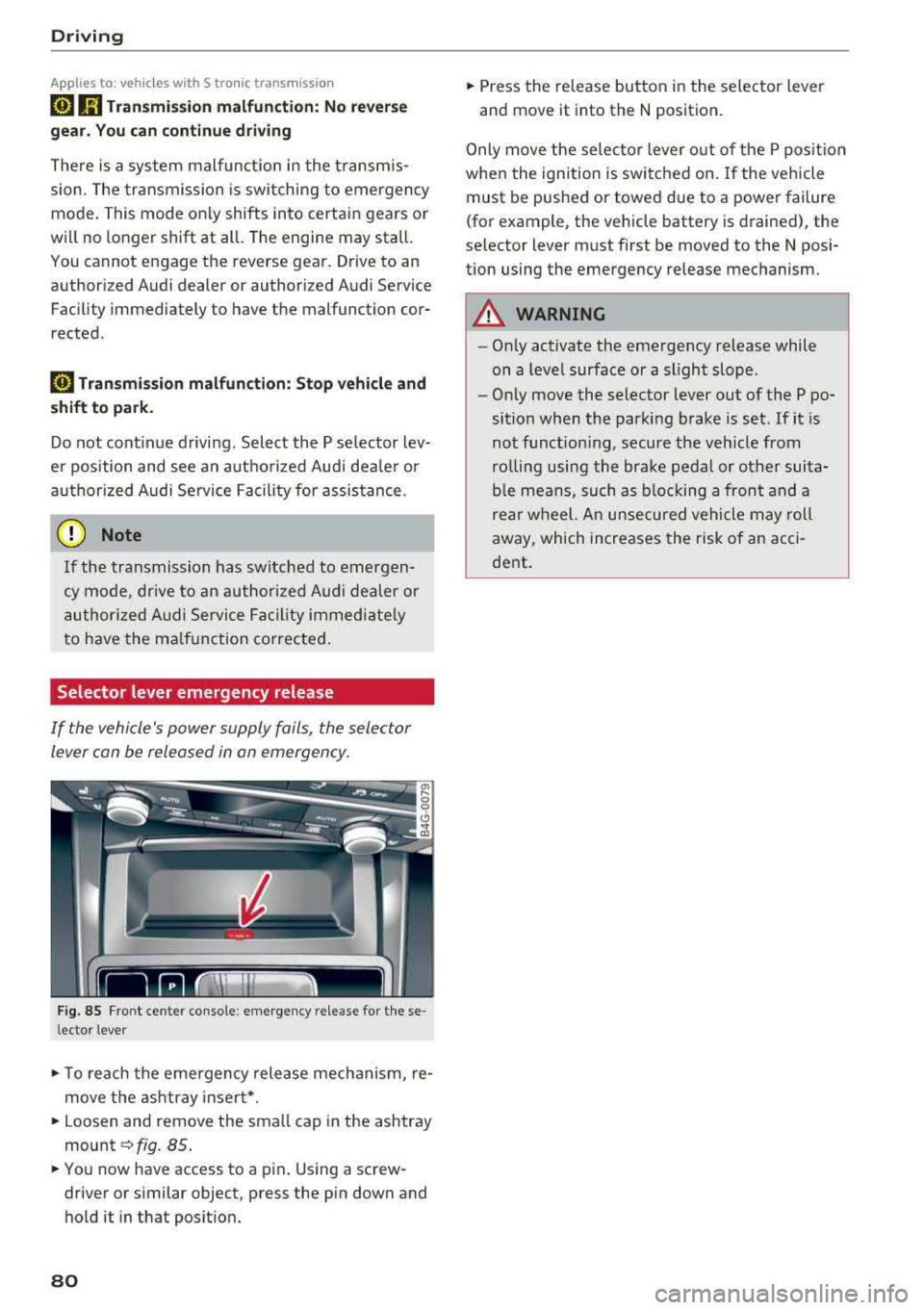
Selector lever emergency release
If the vehicle's power supply foils, the selector
lever con be released in on emergency.
F ig. 85 Fro nt ce nter console: emergency release for t hese
l ector lever
.,. T o reach the emergency release mechanism, re
move t he ashtray insert * .
.,. Loosen and remove the sma ll cap in the ashtray
mount ~ fig. 85 .
.,. You now have access to a pin . Using a screw
driver or s imilar object, press the pin down and
hold it in that posit ion.
80
.,. Press the release button in the selector lever
and move it into the N position .
Only move the selec tor lever o ut of the P posit ion
when the ignition is switched on. If the vehicle
must be pushed or towed due to a power failure
(for example, the vehicle battery is drained), the
selector lever must first be moved to the N posi
tion using the emergency release mechanism.
A WARNING
- Only activate the emergency release while
on a level surface or a slight slope .
- Only move the selector lever out of the P po
sition when the parking brake is set. If it is
not funct ioning, secure the veh icle from
ro lling using the brake pedal or other suita
ble means, such as b locking a front and a
rear wheel. An unsecured vehicle may roll
away, which increases the risk of an acci
dent .
Page 84 of 274

Trail er to wing
must attach additiona l exterior mirrors . Adjust
them so you have a sufficient visibility behind
you .
Exterior lighting
Follow the lega l regulat ions regard ing the light
ing eq uipment on your trailer . Conta ct an author
ized Audi dealer or authorized Audi Service Facili
ty for more information.
Before start ing to drive, check a ll l ight ing equip
men t on the hitc hed trailer.
The headlig ht range contro l adjusts automatical
ly to the light range of the headl ights.
Safe ty chain s
Make sure the safety chains are correctly applied
when pulling a trailer . The chains should hang
enough so t hat the trailer can dr ive around
curves. However, they must not touch the
g round .
Air su spension
Applies to: vehicles with air suspension
The air suspension must be at the standard vehi
cle height before you set the tongue weight on
the trailer a nd h itch the trailer ¢@ ,
¢page 107,
Raising/lowering the vehicle.
For ve hicles w ith a factory-installed tra iler hitch,
the air suspension trailer mode will automat ically
sw itch on if you connect the trailer cable to the
socket.
For ve hicles w ith a retrof itted trailer hitch, you
must switch on the air suspension trailer mode
manually . Select in the Infota inment system:
ICARI function button > ( Car )* s yste m s contro l
button
> V ehicle setting s > Air su spen sion : trail
e r > On .
Switch it off again after tow ing a tra ile r.
You can also switch off tra iler mode ma nually
while driving, for example, when using a bicycle rac k system .
If you have to drive through difficult road condi
tions, you can raise the vehicle aga in after hitch
ing the t rai ler or after adjust ing the tongue
weight .
82
@ Note
Applies to: vehicles with air suspension
-Changes i n temperature or load can affect
the height of the vehicle .
- Set the air suspension to the standard veh i
cle he ight, otherwise the applicable tongue
we ight no longer appl ies to your veh icle.
(D Tips
- Use chocks when park ing on inclines if the
trai ler is loaded.
- We recommend also hav ing the vehicle in
spected between the inspection intervals if
you are towing a trailer frequently.
- Avoid driv ing with a trai ler dur ing the veh i
cle break-in per iod.
Driving with a trailer
Driving with a trailer requires extra caution.
Sp eed
Adhere to t he lega l speed lim its . Fo llow the legal
regu lations
specific to the country.
As the speed increases, the dr iv ing stab il ity of
t h e tra ile r decreases. Therefore you should not
exceed the max imum lega l speed lim it w hen
t h ere are unfavorab le road, weather and/or wind
conditions. This especia lly applies when driving
downh ill.
Yo u m ust always red uce your speed as soon as
you notice even the slightest swinging motion o f
the trai ler . Never try to "straighten out" the trai l
er by acce lerating.
The we ight d istr ibution is very poor if the vehicle
is empty and the trai ler is loaded. However if you
must drive under these circumstances, then drive
especially slowly .
Brakes
B rake in a time ly manner. Downs hift befo re dr iv
i ng down hill so that the engine can assist with
braking ¢&. .
When using a trailer w it h over run bra kes, fi rst
bra ke gently t hen q uick ly. This red uces the r isk of
j erking while braking if the trailer wheels lock up .
IIJJ,,
Page 90 of 274

Assistance systems
-With stationary objects ¢ page 89.
A WARNING
Always pay attention to traffic when adaptive
cruise control is switched on and braking
guard is active. As the driver, you are still re
sponsible for starting and for maintaining
speed and distance to other objects. Braking
guard is used to assist you . The driver must
always take action to avoid a collision. The
driver is always responsible for braking at the
correct time.
- For safety reasons, do not use adaptive
cruise control when driving on roads with
many curves, when the road surface is in
poor condition and/or in bad weather (such
as ice, fog, gravel, heavy rain and hydroplan
ing). Using the system under these condi
tions increases the risk of an accident.
- Switch adaptive cruise control off tempora
rily when driving in turning lanes, on ex
pressway exits or in construction zones. This
prevents the vehicle from accelerating to
the stored speed when in these situations .
- The adaptive cruise control system will not
brake by itself if you put your foot on the ac
celerator pedal. Doing so can override the
speed and distance regulation.
- When approaching stationary objects such
as stopped traffic, adaptive cruise control
will not respond and braking guard will have limited function.
- The adaptive cruise control system and
braking guard do not react to people, ani
mals, objects crossing the road or oncoming
objects.
- The function of the radar sensors can be af
fected by reflective objects such as guard
rails, the entrance to a tunnel, heavy rain or
ice.
A WARNING
- Improper use of adaptive cruise control can
cause collisions, other accidents and serious
personal injury.
- Never let the comfort and convenience that
adaptive cruise control and braking guard
88
offer distract you from the need to be alert
to traffic conditions and the need to remain
in full control of your vehicle at all times,
- Always remember that the adaptive cruise
control and braking guard have limits -they
will not slow the vehicle down or maintain the set distance when you drive towards an
obstacle or something on or near the road
that is not moving, such as vehicles stopped
in a traffic jam, a stalled or disabled vehicle.
If registered by the radar sensors, vehicles
or obstacles that are not moving can trigger
a collision warning and if confirmed by the
video camera, an acute collision warning.
- Never follow a vehicle so closely that you
cannot stop your vehicle safely. The adap
tive cruise control cannot slow or brake the
vehicle safely when you follow another vehi cle too closely. Always remember that the
automatic braking function cannot bring the
vehicle to a sudden or emergency stop un
der these conditions .
- To prevent unintended operation, always
switch ACC off when it is not being used .
@ Note
The sensors can be displaced by impacts or
damage to the bumper, wheel housing and
underbody. That could affect the adaptive
cruise control system and braking guard .
Have an authorized Audi dealer or authorized
Audi Service Facility check their function.
© Tips
For an explanation on conformity with the
FCC regulations in the United States and the
Industry Canada regulations, see
¢page 258.
Page 96 of 274

Assistance systems
objects that you are transporting to reduce
the risk of damage or injury.
Settings in the Infotainment system
A pp lies to: ve hicles w ith Audi a daptive cruise co ntro l
~ Se lect : the ICARI function button > (Car)* Sys
tems
control button > Driver assistance > Audi
braking guard .
System -
switch the brak ing guard On /Off. When
you switch the ign ition on, the message
Braking
guard: Off
appears if the system is switched off.
Early warning -the distance and approach warn
ings in the display can be sw itched
On /Off .
(D Tips
-Your settings are automatically stored and
assigned to the remote control key being
u sed .
-If you restrict or switch off the ESC, the
braking guard also switches itse lf off
c;, page 121.
-Switch braking guard off when you are load
in g t he ve hicle onto a vehicle ca rr ier, t rain,
sh ip or other type of transportation. This
ca n prevent undesired warnings from the
braking guard system.
Messages
App lies to: ve hicles w ith Audi a daptive cruise co ntro l
Braking guard: Off
This message appears if the system is switched
off throug h the I nfota inment system . Otherwise,
if the system is turned off, the information ap
pears every time shortly after the start of the
trip.
The message also appears if the system is not
ava ilable due to a malfunct ion or if the ESC is
sw itched off
c:;, page 121 . If this is the case, the
system w ill not prov ide warnings about a possi
b le co ll ision.
Braking guard: engaged
This message appears if a sharp brake pressure
was applied due to an acute warning.
94
ACC : Unavailable!
ACC and Audi braking guard: Unavailable
The system cannot guarantee that it will detect objects correctly and is sw itched off. The sensors
have been moved or are faulty . The pre sense
functions may also be affected . Drive to an au
thorized Audi dea le r or aut horized Audi Service
Facility immediately to have the malfunction cor
rected.
ACC: Currently unavailable. No sensor vision
ACC and Audi braking guard: Currently unavail
able. No sensor vision
This message appears if the sensor v iew is ob
structed, for examp le by leaves, snow, heavy
spray or dirt . Clean the sensors
c:;, page 87,
fig . 90 .
ACC : Currently unavailable. Gradient too steep
The road exceeds the maxim um possible angle
for safe adaptive cruise control operation. Adap
tive cruise control is switched off.
ACC : Only available in D, Sor M
Select the D/S or M selector lever position.
ACC: Currently unavailable. Parking brake ap
plied
The adaptive cruise control system switches off
automat ica lly if the parking brake is set.
ACC : Currently unavailable. Stability control
(ESC) input.
This message appears if the electro nic stabiliza
tion control (ESC) is taking action to stab ilize the
vehicle. In th is case, adaptive cruise control
switches off automatically.
ACC off: Manual control!
This message appears when adaptive cruise con
trol cannot set the parking brake. Press the brake
pedal to prevent the vehicle from ro llin g.
• ••
Three white dots appear if a setting cannot be se
l ected w ith the operating lever. For example, this
happens if adaptive cru ise control cannot start
driv ing automat ically in stop-and-go traff ic
Page 100 of 274

Assistance systems
An additional indicator appears in the head-up
disp lay*.
White line(s) Active lane assist is activated
and ready to provide warnings .
Red line(s) Active lane assist warns you
(left o r right) before leaving a lane
c::>fig. 102. In addit ion, the
steering wheel vibrates lightly.
Gray line(s) Active lane assist is activated,
but not ready to give warning
c::>fig . 103.
Messages in the instrument cluster display
If the active lane assist swit ches off automat ical
ly, the indicator lig ht in the display turns off and
one of the following messages appears :
Audi active lane assist: Currently unavailable .
No camera view
This message appears if the came ra is unable to
detect the lines. This cou ld happen if :
- The camera field of v iew
c::> page 97, fig . 101 is
dirty or covered in ice. Clea n this area on the
windsh ield .
- The camera field of v iew is fogged over . Wait
until the fog has cleared before switch ing the
active lane assist on again .
- The system has been unable to detect the lanes
for an extended period of time due to road con
ditions. Sw itch act ive lane assist back on when
the lines are more visible.
Audi active lane assist : Currently unavailable
There is a temporary active lane assist ma lfunc
tion . Try sw itching the act ive lane assist on aga in
la ter.
Audi active lane assist : System fault!
Drive to an autho rized Aud i dealer or authorized
Audi Service Facility immediately to have the
malfunction corrected .
Audi active lane assist: Please take over steering
This message appears if you are not steering by
yourself . If th is is the case, active lane assist does
not switch off, but it is "not ready" to provide a
war ning. The system can help you keep the vehi-
98
cle in the lane . However, you are responsible for
driving the vehicle and must steer it yourse lf .
A WARNING
Note that messages may be de layed or not
displayed on vehicles with accessories mount
ed on the steering wheel, such as a steering
wheel spinner knob. Always keep your hands
on the stee ring wheel.
Adjusting the vibration warning
App lies to: vehicles wit h Audi active la ne ass ist
-
~ Select: the I CARI function button > (Car)* Sys
tems
contro l butto n > Driver assistance > Audi
active lane assist .
Vibration warning
You can switch the addit ional vibration warn ing
i n the steer ing wheel on or off .
(D Tips
Your settings are automatically stored and as
signed to the remote control key being used .
Page 103 of 274

a co ..... N
" N ..... 0 00 <..:l '
behind very quickly. The display may not
turn on in time.
- In poor weather conditions such as heavy
rain, snow or heavy mist.
- On very wide lanes, in tight curves, or if
there is a rise in the road surface. Vehicles
in the adjacent lane may not be detected
because they are outside of the sensor
range.
- Audi side assist cannot detect all vehicles
under all conditions, which can increase the
risk of accidents.
- Please note that side assist only displays ap
proaching vehicles or vehicles in your blind
spot if your vehicle is traveling at least 19 mph (30 km/h).
- In certain situations, the system may not
work or its function may be limited . For ex
ample:
- The display may not turn on at the right
time if vehicles are approaching or passing
very quickly.
- In poor weather conditions, such as heavy
rain, snow or fog.
- In very wide lanes, in tight curves or when
there are slopes in the roadway, vehicles
in the neighboring lanes may not be de
tected because they are outside of the
sensor range .
(D Note
The sensors can be displaced by impacts or
damage to the bumper, wheel housing and
underbody. This can impair the system. Have
an authorized Audi dealer or authorized Audi
Service Facility check their function.
(D Tips
- If the window glass in the driver's door or
front passenger's door has been tinted, the
display in the exterior mirror may be incor
rect.
- For an explanation on conformity with the
FCC regulations in the United States and the
Industry Canada regulations, see
¢page 258.
Assistance systems
Switching on and off
Applies to : veh icles w it h Audi s ide ass ist
Fig. 108 Driver 's door : side assist button
.,. Press the button to switch the system on and
off ¢.&. in General information on page 100 .
The LED in the button turns on when side assist
is switched on.
Adjusting the display brightness
App lies to: veh icles w ith Audi s ide ass ist
The display brightness can be adjusted in the In
fotainment system .
.,. Select: the I CARI function button > (Car)* Sys
tems control button > Driver assistance > Audi
side assist .
The display brightness adjusts automatically to
the brightness of the surroundings, both in the
information and in the warning stage. In very
dark or very bright surroundings, the automatic
adjustment will set the display to the minimum
or maximum level. In such cases, you may notice
no change when adjusting the brightness, or the
change may only be noticeable once the sur
roundings change.
Adjust the brightness to a level where the display
in the information stage will not disrupt your
view ahead. If you change the brightness, the dis
play in the exterior mirror will briefly show the
brightness level in the information stage . The
brightness of the warning stage is linked to the
brightness in the information stage and is adjust-
ed along with the information stage .
II>-
101
Page 104 of 274

Assistance systems
@ Tips
-Side assist is not active while you are mak
i ng the adjustment.
- Your settings are automatically stored and
assigned to the remote control key being
used.
Messages
Applies to: ve hicles w ith Audi side assist
If side ass ist switches off by itself, the LED in the
button turns off and a message will appear in the
instrument cluster display:
Audi side assist: Currently unavailable . No
sensor vision
The radar sensor v is ion is impaired . Do not cover
the area in front of the sensors with b ike wheels,
stickers, dirt or other objects . Clean the area in
front of the sensors, if
necessary¢ page 100,
fig . 107.
Audi side assist: Currently unavailable
Side assist cannot be switched on at th is time be ·
cause there is a malfunction (for example, the
battery charge level may be too low).
Audi side assist: System fault!
The system cannot guarantee that it w ill detect
vehicles correctly and it has switched off. The sensors have been moved or are faulty. Have the
system checked by an authorized Audi dealer or
authorized Audi Service Facility soon.
Audi side assist: Unavailable when towing
Side assist switches off automatically when a fac
tory-installed trailer hitch is connected to the
electrical connector on the trailer . There is no
guarantee the system will sw itch off when using
a retrofitted trailer hitch. Do not use side assist
when towing a trailer.
102
Night vision assist with
pedestrian and wild
animal detection
Description
App lies to: vehicles wit h night vision assist
The night vision assist can detect, highlight and,
if necessary, warn about pedestrians and large wild animals.
Night vision assist with pedestrian and wi ld ani
mal detection assists you at night by using an
in ·
frared camera to monitor the area in front of
your vehicle, within the limits of the system. It can d isplay objects up to a distance of approxi
mately 1000 feet (300 m). The thermal image
detected by the camera is shown in the instru
ment cluster display. Warm areas appear lighter
and cold areas appear darker.
Highlighting detected pedestrians and wild
animals
Applies to: vehicles wit h night vision assist
Fig. 109 In stru men t cl uste r: yellow highlighted pedes ·
tria ns
Fig. 110 Instrument cl uster : sy mbol when the infrar ed im
age is not v isible
Within th e limits of the system, the night vision
ass ist can detect pedestrians and wild animals
..,..