2018 AUDI A5 COUPE phone
[x] Cancel search: phonePage 192 of 409
Telephone
(D Tips
-If you deactivate* the front passenger's air
bag, the front passenger's safety be lt mi
crophone is deactivated regardless of
whether the front passenger's safety belt is
buckled or not. - A dirty microphone opening can affect
hands-free call quality. If this happens,
clean the safety belt microphone using a
brush.
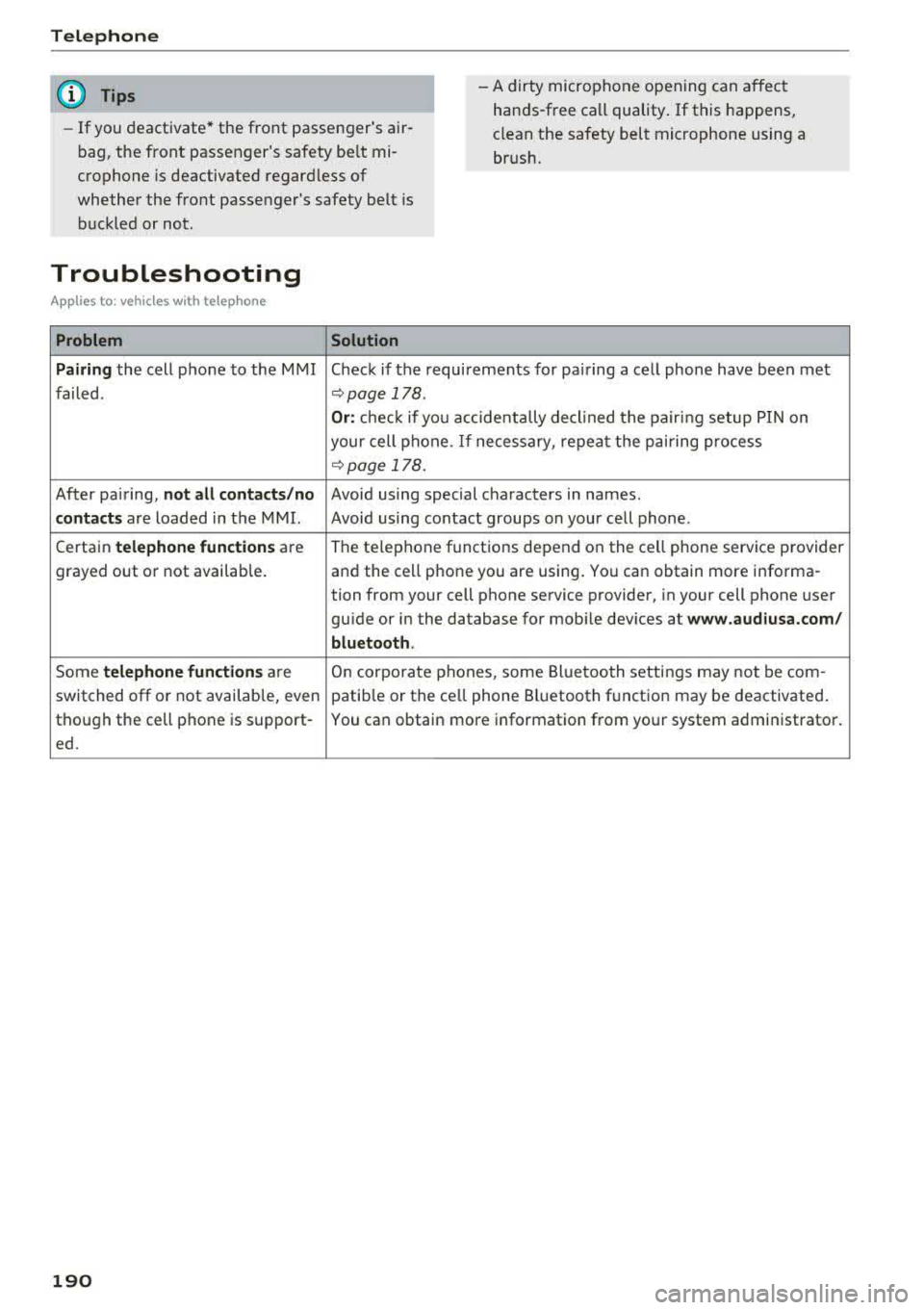
Troubleshooting
A ppl ies to : ve hicl es w ith tele phone
Problem Solution
Pairing
the cell phone to the MMI Check if the requirements for pairing a cell phone have been met
failed .
r:;,page 178 .
Or: check if you accidentally decl ined the pairing setup PIN on
your cell phone. If necessary, repeat the pairing process
r:;, page 178.
After pa iring, not all contacts /no Avoid using speci.al characters in names.
contacts are loaded in the MMI. Avoid using contact groups on your cell phone .
Certain
telephone functions are The te
lephone functions depend on the cell phone service provider
grayed out or not available. and the cell phone you are using . You can obtain more informa-
tion from your cell phone service provider, in your cell phone user
gu ide or in the database for mob ile dev ices at
www.audiusa.com/
bluetooth .
Some telephone functions are On corporate
phones, some Bluetooth settings may not be com -
switched off or not availab le, even patib le or the ce ll phone Bluetooth function may be deactivated .
though the cell phone is support- You can obtain more information from your system administrator.
ed .
190
Page 194 of 409

Audi connect (Infotainment)
~ Enter your myAudi user data. Or: enter your
eight-digit myAudi PIN .
~ Confirm your entry with OK.
Then you can open your persona l settings from
your myAudi account in your vehicle.
(D Tips
You can receive your myAudi P IN if you have
set up a myAudi account. For additional infor
mation, see
www.audiusa .com/myaudi .
Opening Audi connect
(Infotainment)
A pp lies to veh icles with Audi co nnect (Infotainment)
Fig. 188 Aud i connect ( Infotainmen t) ho me page
~ Select: the IMENU ! button> Audi connect .
~ If necessary, confirm the note displayed with
Accept.
A list of all of the available Audi connect Infotain
ment services is shown in the Infotainment sys
tem display
~ fig. 188.
You can also filter the Audi connect Infotainment
services by category:
~ Select: I M ENU I button > Audi connect > left
contro l button> for example,
Navigation for
the Aud i connect Infotainment services in the
navigation
menu ¢ page 195 .
Audi connect
Infotainment services
Basic functions
Applies to veh icles with Audi co nnect (Infotainment)
If available, funct ions specific to certain services
are in the selection menu of that particular Audi
l) Not available in all languages.
192
connect Infotainment service ¢ page 160. The
basic functions are in the corresponding options
menu:
~ Select: ! MENUI button> Audi connect> desired
Audi connect Infotainment service>
right con
trol button .
Depending on the Audi connect Infotainment
service selected, the following basic functions are
available :
Save as preview*
You can save every Audi connect Infotainment
service as a preview and display it on the Audi
connect (Infotainment) home screen
(D
¢ page 192, fig. 188 .
Show on map
You can show selected contents on the map and
use them for route guidance.
Log in
See¢ page 191, Logging into myAudi in the vehi
cle .
Read
out1>
You can allow the MMI to read out the selected
contents .
Calling*
If a phone number was assigned to an entry, you
can call the number, for examp le to reserve tick
ets.
Start route guidance
If a city was added to an entry, such as for City
Events ,
you can use it as a navigation destina
tion. Route gu idance starts immediate ly.
Change search area
The set search area can be changed at any time.
Additional information on search areas can be
fo und
under ¢page210 .
Page 197 of 409

<( a, .... N ,....
N .... 0 \0
3 a,
You must have connected your vehicle with myAudi
r=> page 191.
.,. Select: I MENU I button> Audi connect > Twitter
> left contro l button > desired function (for ex
amp le,
Trends ).
The follow ing categories can be selected in the
Twitter menu:
- My tweets : News Feed and the Tweets you have
posted are listed.
- Home: the Tweets for everyone you follow are
displayed.
- Trends : topics on Twitter that are currently
popular w ith in a country .
Different functions are available depending on
the Twitter category you have selected:
- New tweet : you can post a new tweet using
pre-made templates or using myAudi tem
plates that you have created yourself.
- Refresh : the selected Twitter function is re
freshed.
- Favorite: mark a Tweet as favorite to show you
liked it.
- Retweet: you can quote a Tweet to share it with
others.
@ Tips
- Other settings such as account, language,
Tweet security and location settings
cannot
be changed in the MMI. These changes must
be made on the Twitter website.
- You can only connect
one Twitter account
with your myAudi account.
- Audi connect (Infotainment) makes it possi
ble to access Twitter . Permanent avai lability
cannot be guaranteed, because that de pends on Twitter.
Travel (travel guide)
A pplies to vehicles with Aud i connect (Infotainment)
You can use the Audi MMI connect opp to store
points of interest on your mobile device (such as
a smartphone) and then use them for route
guidance in the
MMI.
Requirement:
Audi connect (Infotainment)
The Audi MMI connect app must be installed and
open on your mobile device .
You must be logged into your myAudi account in
the
Audi MMI connect app and you must have se
lected your vehicle.
T he Wi-Fi function on your mob ile device and on
the
MMI must be switched on.
The
MMI must be connected to the network.
... Press: !MENU ! button> Audi connect > left con-
trol button >
Information category> Travel.
After opening the trave l guide, trave l tips in your
area wi ll be displayed including current ratings as
well as the corresponding category.
... Press the left control button to change the cat
egory (such as bars nearby).
_& WARNING '---
-It is only safe to use tablets, laptops, mo
bi le dev ices and other similar devices when
the vehicle is stationary because, lik e all
loose objects, they could be thrown around
the inside of the vehicle in a crash and cause
serious inj uries. Store these types of devices
securely while driving.
- Do not use any wireless devices on the front
seats within range of the airbags while driv
ing. Also read the warnings in the chapter
r::> page 281, Front airbags.
(D Note
Always follow the information found in r=>(i) in
Wi-Fi hotspot on page 197.
(D Tips
Units of measurement, language setting s and
time are shown in the Infotainment system
display based on how they were set in the
MMI system settings r=> page 251.
Audi connect (Infotainment) in navigation
Applies to : vehicles wit h a navigat ion syste m and Audi co n·
nec t (I nfota inment)
... Select: !MENUI button> Audi connect > left
control button >
Navigation .
-
195
Page 198 of 409

Audi connect (Infotainment)
The fo llow ing A udi connect In fota inment serv ices
are curre ntly availab le:
- Naviga tio n wi th
online map view a nd Street
View
¢ page 219 .
-Point of Interest (POI) online search with
voice recognition
( such as res taur ant s): plan
r ou te g uida nce using t he M MI con trol panel
¢page 2 11 and the voice recognition system
¢ page 171 .
- Set up dest ina tions in you r M MI using yo ur
myAudi account or onl ine map view
¢ page 219 .
-Online traffic information : receive up-to-the
minute t raffic info rmation about accidents,
r oad construction and other incidents
¢ page 223 .
-Map update : import navigat ion map updates
directly to yo ur vehicle using a n SD ca rd o r as
an on line
update¢ page 221.
@ Tips
- Fo r the map update Au di c onnect Infotain
ment se rvice via SD car d, check the current
software vers ion in your vehicle and then
check
www.audiusa.com/myaudi to see if a
newe r ve rsion is ava ilable. You can a lso have
th e ne w naviga tion da ta insta lled by an A ud i
d eale r, w hich can be done for an addition al
c har ge.
- Y ou can a lso fin d ad dit io na l informat ion
a bout th e
map update onlin e at
www.audiusa.com /myaudi .
Audi connect (Infotainment) on the phone
Applies to vehicles with Audi connect (Infotainment)
~ Se lect: I M ENU I but ton > Audi connect > left
contro l button >
Communication .
The fo llow ing A udi con nect Info tainment services
a re curre ntly availab le:
- Stor ing contacts on yo ur compute r us ing yo ur
myAudi A ccount and loadi ng the contacts into
t he MM I direct ory
¢ page 188.
196
Audi connect (Infotainment) in Media
menu
Applies to vehicles with Audi connect (Infotainment)
~ Sele ct: !ME NUI button> Audi connect > righ t
control button >
Entertainment.
- Online media and Internet radio :
offers access
t o di fferen t on line me dia services as well as In
ternet radio and ope ration th ro u gh t he M MI us
ing the
Audi MMI connect app ¢ page 235 .
Applies to: vehicles with Wi·Fi audio player
-Wi-F i audio player : you can access the med ia
center throug h a Wi-Fi connecte d media player
(su ch as a s martphone)
¢ page 23 4.
.8, WARNING
It is o nly s afe to u se ta ble ts, l ap to p s, mo bile
d evi ces and other simi la r devices whe n the ve
hicl e is sta tionary beca use , like a ll loose ob
jects, they co uld be thrown a roun d the inside
of the vehicle in a cras h and cause serious in
ju ries. Store these types of devices sec urely
while driv ing.
(D Note
A lways fo llow the information fo und in ¢ 0 in
Wi -Fi hotspot on page 197.
@ Tips
- Also see t he cha pter¢ page 198, Audi con
nect (Infotainment) general information .
- For more in fo rmat ion on t he Wi-Fi a udi o
player and su pported devices, contact an
authorized A udi dealer or aut ho rize d Au di
Service Facility.
Additional options
Applies to vehicles with Audi connect (Infotainment)
~ Select: ! ME NUI button> Aud i connect > right
cont rol button.
The following options are available in the Aud i
connect In fota inment serv ices overview :
Log in*
See c:::> page 191, Logging into myAudi in the vehi -
de. ~
Page 200 of 409

Audi connect (Infotainment)
Configuring the data
connection
App lies to veh icles with Audi co nnect (Infotainment)
The data connection for Audi connect Infotain
ment services is pre-configured at the factory .
However, if a configuration should be necessary,
you can adjust the following settings.
.,. Select: I MENU I button> right control button>
Connection manager.
.,. Select: right control button > Online settings>
Data connection settings.
Using the Data connection settings menu, you
can set when an Internet connection should be
made . T he Internet connection disconnects auto
matica lly once the requested Audi connect Info
tainment service no longer requires any data.
The follow ing settings can be selected:
Audi connect (MMI)
With the Audi connect (MMI) func tion, you can
Allow or Deny the use of Audi connect Infotain
ment services if the connection is set to No re
quest or With request.
Wi-Fi devices*
Using the Wi-Fi devices function, you can Allow
or Deny a connection to the Internet.
A WARNING
-As the driver, do not allow usage of the Wi
Fi hotspot to distract you from driving, as
this could increase the risk of an accident .
-It is only safe to use tablets, laptops, mo
bile devices and other similar devices when
the vehicle is stationary because, like all
loose objects, they could be thrown around
the ins ide of the vehicle in a crash and cause
serious injuries . Store these types of devices
securely whi le driving.
-Do not use any wireless devices on the front
seats within range of the airbags while driv
ing. Also read the warnings in the chapter
cc> page 281, Front airbags.
198
(D Note
A lways follow the information found in ¢(!) in
Wi-Fi hotspot on page 197.
Audi connect
(Infotainment) general
information
Audi connect Infotainment services
Applies to vehicles w it h Aud i connect (I nfotainment)
(D Tips
-You can only use services supported by Aud i
connect (Infotainment) if you have the op
tional MMI Navigation plus equipment with
MMI touch* and Audi connect (Infotain
ment).
-Use of the L TE* mobile network standard is
not available in every country. Contact an
authorized Audi dealer or authorized Audi
Service Facility or your cell phone service
provider for additiona l information.
-Usage of Audi connect Infotainment serv
ices depends on the avai lability of services
through third party providers.
-Audi connect Infotainment services are only
available within the cell phone network cov
erage from your cell phone service provider.
-Audi connect Infotainment services are
available in the USA . Audi connect Infotain
ment services are currently not availab le in
Canada or in Mexico.
-Also read the information in the chapter
c:> page 178, Telephone.
-Availability, scope, providers, screen display
and costs of services may vary depending on
the country, model, model year, end device
and rates . For additional information, v is it
www.audiusa.com .
-An initial registration/activation on the
myAudi platform at
www.audiusa.com/
myaudi
is required to use individual serv
ices. You can contact an authorized Audi
dealer or Aud i connect (Infotainment) cus
tomer service at (877) SOS-AUDI (2834) to
Page 201 of 409

<( a, .... N ,....
N .... 0 \0
3 a,
receive information on options for expand
ing your usage and any costs that may re
su lt.
- The Audi connect Infotainment services are
a Wi-Fi/Internet-based system. If the sys
tem does not function correctly even
though all of the requirements are met, please try again later or contact Audi con
nect customer serv ice at 877 -505 -AUDI
(2834) .
-For detailed information on Audi connect
(Infotainment) and the Terms of Use, refer
to
www. audiusa.co m .
Data protection
Appl ies to vehicles w ith Audi connect (Infota inme nt)
@ Tips
- You can find add itiona l information in your
MM I in the options menu for the selected
Audi connect Infotainment service and also
on line at
w ww. aud iu sa. com .
- Your privacy is important to us.
= AUDI AG collects , processes, shares and
transmits your persona l information in ac
cordance with legal regulations in order to
ensure proper function and availability of
the individual Audi connect Infotainment
services. You can view the complete, current
and valid Audi connect data protection poli
cy in your MMI. The myAudi platform is
available for to you to activate additional
Audi connect Infotainment services and to
transfer data to your veh icle, among other
se rvices . A one-time registration is required
to establish a connection to your vehicle .
For this purpose, AUDI AG collects, process
es, transmits and uses your required per
sona l information as required for you to use
the services provided by AUDI AG. Your in
formation is not distributed to third parties .
Using your cell phone with your myAudi
Audi c onn ect ( Inf ota inm ent )
platform allows you to transmit data for
your Audi connect Infotainment services
functions to your vehicle and you can allow
specific vehicle data to be transmitted from
your vehicle .
- By activating special information services that are part of your Aud i connect portfol io,
you can use these functions directly in your
vehicle by entering data to confirm your identity (to use social networks, for exam
ple) . To do this, the identification informa
tion you provided is forwarded with the re
quest to the respect ive se rvice provide r.
Then you can access your persona l content
using a secure connection . This content is
displayed in the vehicle for your use . Your
personal content is not stored w ith in Audi
AG. The necessary connection information is processed and used for prov iding serv ices
and the proper funct ion of the services in
accordance w ith applicab le legal guidelines.
- You can find additional information in your MMI in the options menu for the selected
Audi connect Infotainment service and a lso
online at
www .audiu sa. co m.
-By p roviding Aud i connect Infotainment
serv ices, Audi of America is authorized to
co llect , p rocess, transmi t and transfer info r
mation about you and your vehicle . Addi
tional information can also be found in yo ur
MMI in the options menu for the selected
Audi connect Infotainment service .
- Informat ion on o ur data protection meas
ures in conjunction with the mobile Audi
connect ( Infotainment) app lication can be
found in the applicat ion 's privacy policy. For
add itiona l information about the
www .audiusa .com /myau di website or oth
er applications, websites o r on l ine services
connected to Audi, v is it
www .a udiu sa .com /
privacy .
199
Page 203 of 409

<( a, .... N ,....
N .... 0 \0
3 a,
Audi connect vehicle control
Introduction
Applies to vehicles with Aud i connect vehicle control
With the Audi connect vehicle control services l) ,
you can access various information or use individ
ual functions in the
Audi MMI connect app or in
myAudi .
Audi connect vehicle control includes the follow
ing services:
- Remote locking and unlocking ¢
page 202.
-Vehicle status report ¢ page 202.
-Parking location ¢ page 202.
-Geofencing Alert ¢ page 203.
-Speed Alert ¢ page 203.
-Valet Alert¢ page 203 .
- Stolen Vehicle Locator ¢ page 203.
-Online Audi service request ¢ page 203.
(D Tips
-Accessing specific data or controlling func
tions remote ly depends on the charge level
of the vehicle battery. Therefore, these
functions only have limited availability after
switching off the ignition.
- The services are provided through a SIM
card installed in the vehicle . The cost of the
call and data connections is included in the
price for the services. Services are provided
assuming that the cell phone network re
quired for the installed S IM card is funct ion
i ng and ready to operate. The available serv
ic es set by Audi AG are only available within
the cell phone network coverage area for
the cell phone service provider selected by
Audi AG .
- You can also find more information on Audi
connect on line at www.audiusa.com.
l) In pre parat io n at the time of pri nting. T he ava ilab ilit y of
the services offe red depends on th e co untry an d ma y
c hang e over tim e.
Audi connect vehicle control
Setup
Applies to vehicles with Audi connect vehicle control
To use Audi connect vehicle control services 1l,
please note the following:
Creating and verifying a user account
"'Create an account at www.audiusa.com/myaudi
and verify it.
Setting a key user in the vehicle
Requirements: the ignition must be switched on .
Another key user must not be set in the vehicle .
If necessary, reset the key user¢
page 202.
"'Select in the Infotainment system: I MENU ! but-
ton >
Audi connect > if necessary, Display
available functions >
right control button>
Audi connect user management > Key user >
Set key u ser.
"' Enter the user name for your ve rified account
and enter the 10-digit vehicle code. You can rub
the key tag for your remote control key to re
veal the vehicle code ¢
page 38.
"'Select and confirm Log in.
You can now use the vehicle control services
through the
Audi MMI connect app or thro ugh
www.audiusa.com/myaudi.
Using vehicle control services in the Audi
MMI connect app
Requirement: your mobile devices must be com
patible.
"' Install and start the Audi MMI connect app on
your mobi le device .
"'Log in to the Audi MMI connect app using your
user name and Audi online password and select
your vehicle.
(D Tips
- Store the vehicle code in a secure place. It
may be necessary to re-enter the vehicle
code.
201
Page 207 of 409

Emergency call
Introduction
The following functions may be available depend
ing on the vehicle and the market.
- Emergency
ca ll ¢ page 205.
- Online roads ide ass istance ¢ page 206 .
@ Tips
- The serv ices are provided through a SIM
card installed in the vehicle . The cost of the
call and data connections is included in the
price for the services . Services a re provided
assuming that the cell phone network re
quired for the installed S IM card is function
ing and ready to operate. The available serv
i ces set by Audi AG are only available within
the cell phone network coverage area for
the cell phone service provider selected by
Audi AG.
- You can find what data will be transferred
at www.aud iusa.com.
- These services cannot be deactivated using
the settings in the Infotainment system.
Emergency call
Description
Appl ies to: vehicles with emergency call function
You can request help when in an eme rgency or
dangerous situation using the emergency call
function
l) _ An emergency call is a combination
of data transmission and a phone call. The data
transmission from your vehicle forwards impor
tant information, such as the vehicle and position
data, to the emergency call center.
1l The av ailabilit y of the serv ices o ffere d d ep end s on t he
c o untry a nd may chang e over t ime.
Emergen cy call
Making an emergency call
App lies to: vehicles with emergency call function
The emergency coll con be mode two different
ways .
Fig. 191 Front head liner: cover for the e mergency call b ut
ton
Requirement: the L ED @ must be green when
the service is available . The service is not availa
ble when the LED is red .
Manual emergency call
Requirement: the ignition must be switched on .
.. Tap the cover (D ¢ fig. 191 to open it .
.. Press the emergency call button. The LED@
blinks green and the emergency call is started.
.. If you press the emergency call button by m is
take, then press it again immed iately. The
emergency call is canceled .
Automatic emergency call
The vehicle electrical system initiates an auto
matic emergency call under certa in circumstan
ces, for example if an airbag deploys. The LED in
the emergency call button@blinks green . The
emergency call is made . This cannot be cance led.
(D Tips
If the emergency call is canceled due to a
poor connection, then the system automati
cally tries to connect again.
205