2018 AUDI A5 COUPE change time
[x] Cancel search: change timePage 109 of 409

Assistance systems Electronic speed limiter
Your vehicle may be factory equipped with t ires
that are rated for a maximum speed of 130 mph (210 km/h). This is less than the maximum speed
of your vehicle. To reduce the risk of sudden tire
failure and loss of control if the vehicle is operat
ed at excessive speeds, your vehicle also has an
electronic speed limiter . The electronic speed
limiter prevents your vehicle from going faster
than the t ire speed rating. For mo re information
~page 341.
If the engine control unit receives faulty vehicle
road speed s ignals, the Malfunction Indicator
L amp
(MIL) ¢..ij will illuminate. If this occurs,
contact the nearest autho rized Audi dealer for
assistance.
_& WARNING
Always observe the posted speed limits and
adjust your speed to suit prevailing road, traf
fic and weather conditions. Never drive your
vehicle faster than the max imum speed rating
of the tires installed.
Speed warning system
Introduction
Applies to: vehicles with speed warning system
The speed warning system helps you to stay be
low a specified maximum speed that can be set,
changed or deleted in the Infotainment system.
-
The speed warning system warns you if you are
exceeding the maximum speed that you have set .
A wa rning tone will sound as soo n as yo ur speed
exceeds the s tored value sligh tly. The
[01 (USA
models)/
[01 (Canada models) indicator light
and a message appear in the instrument cluster
display at the same time. The
HI] / [0] indicator
light and the message turn off if the speed falls
back below the stored maximum speed.
Setting a threshold is recommended if you would l ike to be reminded when yo u reach a certain
maximum speed. Situations where you may want
to do so include driving in a country with a gen er-
Ass is ta nce syst ems
al speed limit or if there is a specified maximum
speed for winter tires.
Setting the warning threshold
Se lect in the Infotainment system: !MENU I b ut
ton
> Vehi cle > left contro l button > Driver a ss is
tance > S peed w arning > Manual.
(j) Tips
Regardless of t he speed warning system, you
shou ld always mon itor your speed using the
speedometer and make s ure yo u are fo llow ing
the lega l speed limit .
Cruise control system
Switching on
Applies to: vehicles with cruise control system
The cruise control system makes it possible to
drive at a constant speed starting at
15 mph
(20 km/h) .
0
f
~
0
Fig . 1 07 Operat ing lever: cruise control system
~
"' 0 > u. m
.. To switch the system on, pull the lever into po-
sition
(D ~ fig. 107 .
.. Dr ive at the speed to be maintained.
.. To store the speed, press the button @.
T he stored speed and the
cij;jl)~14 (USA models) /
Bl (Canada models) indicator light appear in the
instrument cluster display . An additional ind ica
tor appears in the head-up display *.
T he speed is maintained by modifying engine
power or through an active brake intervention.
A WARNING
-~
- Always pay attention to the traffic around
you when the cruise control system is in
107
Page 115 of 409

-No messages are displayed when at speeds
under
20 mph (30 km/h) .
Settings in the Infotainment system
Applies to: veh icles with predictive efficiency assist
~ In the Infotainment system, select: IMENU !
button > Vehicle > left control button > Driver
assistance
> Efficiency assist .
Predictive messages are shown when this f unc
tion is sw itched on.
(D Tips
No predictive messages are shown on vehicles
w ithout a navigation system .
Audi adaptive cruise
control
Description
Applies to: veh icles with Audi adaptive cruise contro l
Fig. 111 De tect ion range
The adaptive cruise control system is a combina
t ion of speed and distance regulation.
It assists
the driver by both regulating the speed and
maintaining a distance to the vehicle driving
ahead, within the limits of the system . If the sys
tem detects a veh icle driving ahead, the adaptive
cru ise control can brake and acce lerate your vehi
cle . This increases driving comfort dur ing long
tr ips on highways and in stop-and -go traff ic (au
tomatic transm iss ion*) .
What can adaptive cruise control do?
<( ~ The adaptive cruise contro l system uses video, ra-
"' ~ dar, ultrasound and navigation data. Veh icles
.... 0 \0
3
driving ahead can be recognized up to 650 feet
(200 m) away.
Predictive functions offer the driver additional
comfort and contr ibute to the reduction in fue l
consumption and CO2 emissions
¢ page 120.
On open roads with no traffic , it functions like a
cruise control system. The stored speed is main
tained . When approaching a vehicle driving
ahead, the adaptive cruise contro l system auto
matically brakes to match that vehicle's speed
and then mainta ins the set distance. As soon as
the system does not detect a vehicle dr iv ing
ahead, adaptive cru ise control accelerates up to
the stored speed .
Applies to: vehicles with automatic transmissions
In stop-and-go traffic, adaptive cruise control can
brake until the veh icle is stationary and then can
also start driving again automat ically under cer
ta in cond itions
¢ page 117.
In traffic jams or stop-and -go traffic, traffic jam
ass ist can assist the
driver ¢ page 121.
Which functions can be controlled?
When you switc h adapt ive cruise control on, you
can set the current speed as the "contro l speed"
¢ page 115, Switching on/off.
When driving, you can stop cru ise control
¢ page 118 or change the speed ¢ page 117 at
any time.
You can also set the distance to the vehicle driv ing ahead and set the driving mode of the adap
t ive cru ise control
¢ page 118.
113
Page 119 of 409
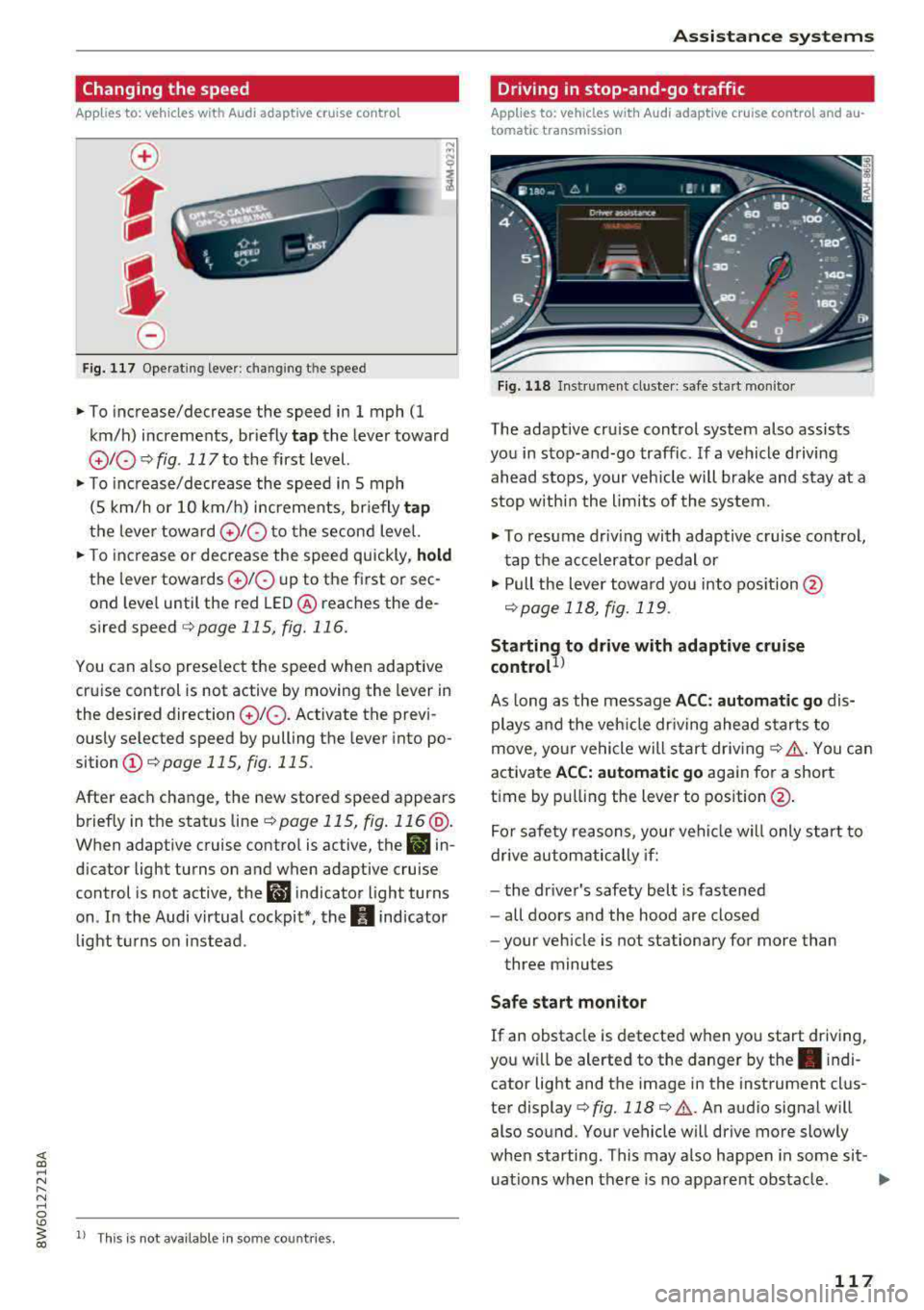
Changing the speed
Applies to: vehicles with Audi adaptive cruise contro l
0
f
' 0
Fig. 117 Operating lever: chang ing the speed
.,. To increase/decrease the speed in 1 mph (1
km/h) increments, br iefly
tap the lever toward
010 ¢ fig. 117 to the first level.
.,. To increase/decrease the speed in 5 mph
(5 km/h or 10 km/h) increments, br iefly
tap
the lever toward 0 10 to the second level.
.,. To increase or decrease the speed quickly, hold
the lever towards 0 10 up to the first or sec
ond level until the red LED@ reaches the de
s ired speed
¢page 115, fig. 116.
You can a lso preselect the speed when adaptive
cruise control is not active by moving the lever in
the desired direction
0 10 . Activate the previ
ously selected speed by pulling the lever into po
sition
(I) ¢ page 115, fig. 115.
After each change, the new stored speed appears
briefly in the status
line¢ page 115, fig. 116 @.
When adaptive cruise control is active, the II in
d icator light turns on and when adaptive cruise
control is not active, the
I.I indicator light turns
on . In the Audi virtual cockpit*, the
II indicator
light t urns on instead .
ll This is not available in some countries.
Assistance systems
Driving in stop-and-go traffic
Applies to: vehicles with Audi adaptive cruise control and au
tomatic transmission
Fig. 118 Instrume nt cluste r: safe start monitor
The adaptive cru ise control system also assists
you in stop-and-go traffic. If a vehicle driving
ahead stops, your vehicle will brake and stay at a
stop within the limits of the system.
"' To resume driv ing with adaptive cruise control,
tap the accelerator pedal or
"' Pull the lever toward you into pos ition @
<:!)page 118, fig. 119 .
Starting to drive with adaptive cruise
controt1>
As long as the message ACC: automatic go dis
plays and the vehicle dr iving ahead starts to
move, your vehicle will start driv ing
r:!) .&. -You can
activate
ACC: automatic go again for a short
time by pulling the lever to position@.
For safe ty reasons, your vehicle w ill only start to
drive automatically if:
- the driver's safety belt is fastened
- all doors and the hood are closed
- your veh icle is not stationary for more than
three minutes
Safe start monitor
If an obstacle is detected when you start driving,
you w ill be alerted to the danger by
the. indi
cator light and the image in the instrument clus
ter
display¢ fig. 118 ¢ .&,. .An audio signal will
also sound. Your vehicle will drive more slowly
when starti ng. This may also happen in some sit-
uations when there is no apparent obstacle.
.,.
117
Page 121 of 409

That is equal to the general recommendation of
"half the speed shown on the speedometer".
The distances provided are specified val ues. De
pending on the d riving situation and how the ve
hicle ahead is driving, the actual distance may be
more or less than these target distances.
If you change the time gaps, the newly se t value
appears briefly in the instrument cluster display,
for example
II for Distance 3. This only occurs if
the
Driver assistance disp lay is not currently
shown in the display
~ page 115, fig. 116.
Distance 1 : this setting corresponds to a distance
of 92 feet (28 meters) when traveling at 62 mph
(100 km/h), or a time distance of 1 second.
Distance 2 : this setting corresponds to a distance
of 118 feet (36 meters) when traveling at 62
mph (100 km/h), or a time distance of 1.3 sec
onds.
Distance 3: this setting corresponds to a distance
of 164 feet (SO meters) when traveling at 62
mph (100 km/h), or a time distance of 1.8 sec
onds.
Distance 4: this setting corresponds to a distance
of 219 feet (67 meters) when traveling a t 62
mph (100 km/h), or a time distance of 2.4 sec
onds.
Distance 5: this setting corresponds to a distance
of 328 feet (100 meters) when traveling at 62
mph (100 km/h), or a time distance of 3.6 sec
onds.
A WARNING
When setting the distance, the driver is re
sponsible for adhering to any applicab le legal
regulations.
@ Tips
- Depending on the selected driving mode in
drive select* and the set distance, the driv
ing behavior will vary from dynamic to com
fortable when accelerating
c::;, page 139.
- Distance 3 is set automatically each time
you switch the ignition on. If you would like
to set another d istance as the default set
ting, you can have the
adaptive cruise con-
Assistance systems
trol menu enabled by an authorized Audi
dealer or authorized Audi Service Facility.
- Your settings are automatica lly stored and
assigned to the remote control key being
used.
Setting the driving program
Applies to : vehicles wit h Audi ada ptive c ruise control
Depending on the selected driving program and
distance, driving behavior when accelerating will
vary from dynamic to comfortable .
Setting the driving program on vehicles
without drive select*
.,. Select in the Infotainment system: I MENU! but
ton
> Vehicle > left control button > Driver as
sistance> Audi adaptive cruise control > Driv
ing program
> Comfort, Standard or Dynamic.
Setting the driving mode on vehicles with
drive select*
See c::;, page 139.
¢j) Tips
Your settings are automatically stored and as
s igned to the remote control key being used .
Driver intervention request
Applies to: vehicles wit h Audi ada ptive cr uise contro l
Fig. 121 Instrument cluster : request for driver interven·
t ion
T he request for driver intervention instructs you
to take over if the adaptive cruise control braking
function is not able to maintain a sufficient dis
tance to the vehicle driving ahead
c::;, fig. 121 .
119
Page 122 of 409

Assistance systems
Predictive control
(efficiency assist)
Description
Applies to: vehicles with Audi adaptive cruise control and pre·
dict ive efficiency assist
Fig. 122 Instrument cluster: predictive control
General information
The predictive control 1l uses the map informa·
tion from the navigation system in order to react
proactively when driving. Information from the
camera -based traffic sign recognition* is also ap·
plied to recognize traffic signs
r::!> page 109.
When coming up to areas with speed limits or
changes in the course of the road (such as curves,
inte rsections or traffic circles), the system brakes
automatically and then accelerates back up to
the set speed.
When adaptive cruise cont rol is switched off, the
system only provides notificat ions without con
trolled intervent ions
r::!> page 112 .
The driver can override the predictive control at
any time by pressing the accelerator or brake
pedal. If the system changes the vehicle speed to
adapt to speed limits, you can ch ange the speed
using the lever
<:!> page 117 , fig . 117 .
Always switch off the predictive control in
the following situations:
- When increased attention is needed from the
driver .
- In poor we ather condit ions such as snow or
heavy rain .
- When driving on roads in poor condition.
l) This is no t a vail able in som e coun trie s.
120
Indicator in the instrument cluster display
When switching on the adaptive cruise control
for the first time, the message
ACC: 1111 + B ac
tive
in the instr ument cluster indicates the avail
ability of the predictive control.
The symbol appears when the system
i s regulating the speed to match a speed limit .
If
this is the case, the system is regulating a speed
of 50 mph (80 km/h). The speed is then taken
over by the adaptive cruise control. The speed in
the speedometer LED ring adjusts to the speed to
be maintained
r::!> page 115, fig. 116 . The ..
r::!> fig. 122 symbol appears when there is an adap
tation to the route ahead .
If you are in the
Driver assistance display in the
i nstrument cluster, then the following symbols
will indicate which occurrence the system is cur
rently responding to:
Symbol Meaning
MPH
USA models:
speed limiter
km/h
Canada models:
speed limiter
Ir
Curve
_J!L
,ir
Intersection
~ Traffic circle ·· Of );
A WARNING
- Read the warnings on c> .& in General infor
mation on page 114
and on r::!> .& in Descrip
tion an page 109 .
-Pay attention to traffic and the area around
your vehicle when predictive control is
sw itched on. The driver is always responsi
ble for assessing the traffic situation.
-There is an increase in the risk of an acci
dent, because the system does not consider
"right of way" rules and also does not re-
spond to traffic lights.
._
Page 132 of 409

Ass is tan ce sys tems
Ill Audi pre sen se : cu rrent ly rest ricted . See
owner 's manu al
This message appea rs when there is a tempora ry
fa ilure in a subsystem, such as the ESC. If this
message appears repeated ly, drive to an author
ized Audi dealer or authorized Audi Service Facili
ty to have the malfunction corrected.
(II Aud i pre sen se: emergency br aking sy ste m
off
This message appea rs if the pre sense functions
are switched off thro ugh the Info tainmen t sys
tem or if the system is not ready .
Audi active Lane assist
Description
Applies to : vehicles wi th A udi act ive la n e ass ist
Active lane ass ist (lane departure warning) de
tects lane marker lines within the l imits of the
system using a camera in the windshield . If you
are approach ing a detected lane marker l ine and
it appears likely that you will leave the lane, the
system w ill warn you with corrective steering.
You can override this steering at any time. If you pass over a line, the steering whee l will vibrate
lightly . In order for this warn ing v ibration to oc
cur, it must first be sw itched on in the Infotain
ment system. Act ive lane assis t is ready for oper
ation when the lane marker line is detected on at
least one side of the veh icle .
The system is designed for driving on express ways and h ighways and therefore only activates
at speeds above approx imately 40 mph (65 km/
h).
Applies to: vehicles with side assist: if you acti
vate a turn s ignal when active lane assist is ready
and it classifies a lane change as critical because
of vehicles traveling alongside you or approach i n g you, the re w ill be noticeable corrective steer
i n g shortly before you leave the lane. This will at
tempt to keep your veh icle in the lane.
Applies to: vehicles without side assist: the ready
system does not wa rn you if you activate a turn
signal befo re cross ing the lane marker line. In
130
this case, it assumes that you are chang ing lanes
intentionally .
Applies to: vehicles with adaptive cruise control:
there is no corrective steer ing or warnings if the
system recognizes a dist inct passing maneuver .
If the conditions are met, traffic jam assist
switches on at speeds under approximately
40 mph (65
km/h) ¢ page 121.
A WARNING
,-
- The system warns the driver that the vehicle
is leaving the lane using correct ive steering .
The driver is always responsible for keeping
the vehicle within the lane.
- The system can help you keep the vehicle in the lane, but it does not drive by itse lf . Al
ways keep your hands on the steering
wheel.
- Cor rective steering may not occur in certain
situations, such as du ring heavy braking.
- There may be cases where the camera does
not recognize all lane marker lines. Correc
tive stee ring can only take place on the s ide
of the vehicle where lane marker lines are
detected.
- Othe r road structures or objects could poss i
bly be identified un intent ionally as lane
marker lines . As a result, corrective steering
may be unexpected or may not occur.
- The camera view can be restricted, for ex
ample by vehicles driving ahead or by rain,
snow, heavy spray or light shining into the
camera. This can result in active lane ass ist
not detecting the lane marker lines or de
tect ing them incorrectly .
- In certain s ituations where visibility is low,
the vehicle may switch from an "early" to
"late" steering correction .
- Under certain cond it ions such as ruts in the
road, an inclined roadway or crosswinds, the
corrective steer ing alone may not be enough
to keep the vehicle in the m iddle of the lane .
- For safety reasons, act ive la ne assist must
not be used when there are poor road and/
or weather conditions such as slippery roads, fog, gravel, heavy rain, snow and the
Page 135 of 409
There is a temporary malfunction that may pre
vent the active lane assist from switching on. Try
switch ing the active lane assist on again later.
111 Audi active lane assist: Please take over
steering!
This message appears if you are not steering by
yourself. Ac tive lane assist is activated, but is not
ready to give warning
A WARNING
Note that messages may be delayed or not
displayed on vehicles with accessor ies mount
ed on the steering whee l, such as a steering
wheel spinner knob. Always keep your hands
on the steer ing whee l.
Adjusting the steering time and vibration
warning
A pplies to: ve hicles with Audi active lane assist
You can adjust individual active lane assist set
tings in the Infotainment system .
-
.. Select in the Infotainment system: IMENUI but
ton
> Vehicle > left contro l button > Driver as
sistance
> Audi active lane assist.
Steering time
Early :
in this setting, the corrective steering hap
pens continuously to help keep the vehicle in the
center of the lane.
Late: in this setting, the system provides correc
tive steering just before a wheel goes over a de
tected lane marker line.
Vibration warning
You can switch the additional vibration warning
in the steering wheel on or off.
WARNING
With the vibration warning switched off,
there will also be no visual warning in the in
strument clus .ter display when crossing a lane
marker line.
Assistance systems
(D Tips
In certain markets : your sett ings are stored
automat ically and assigned to the remote
control key in use.
Audi side assist
Description
Applies to: vehicles wi th Aud i s ide ass ist
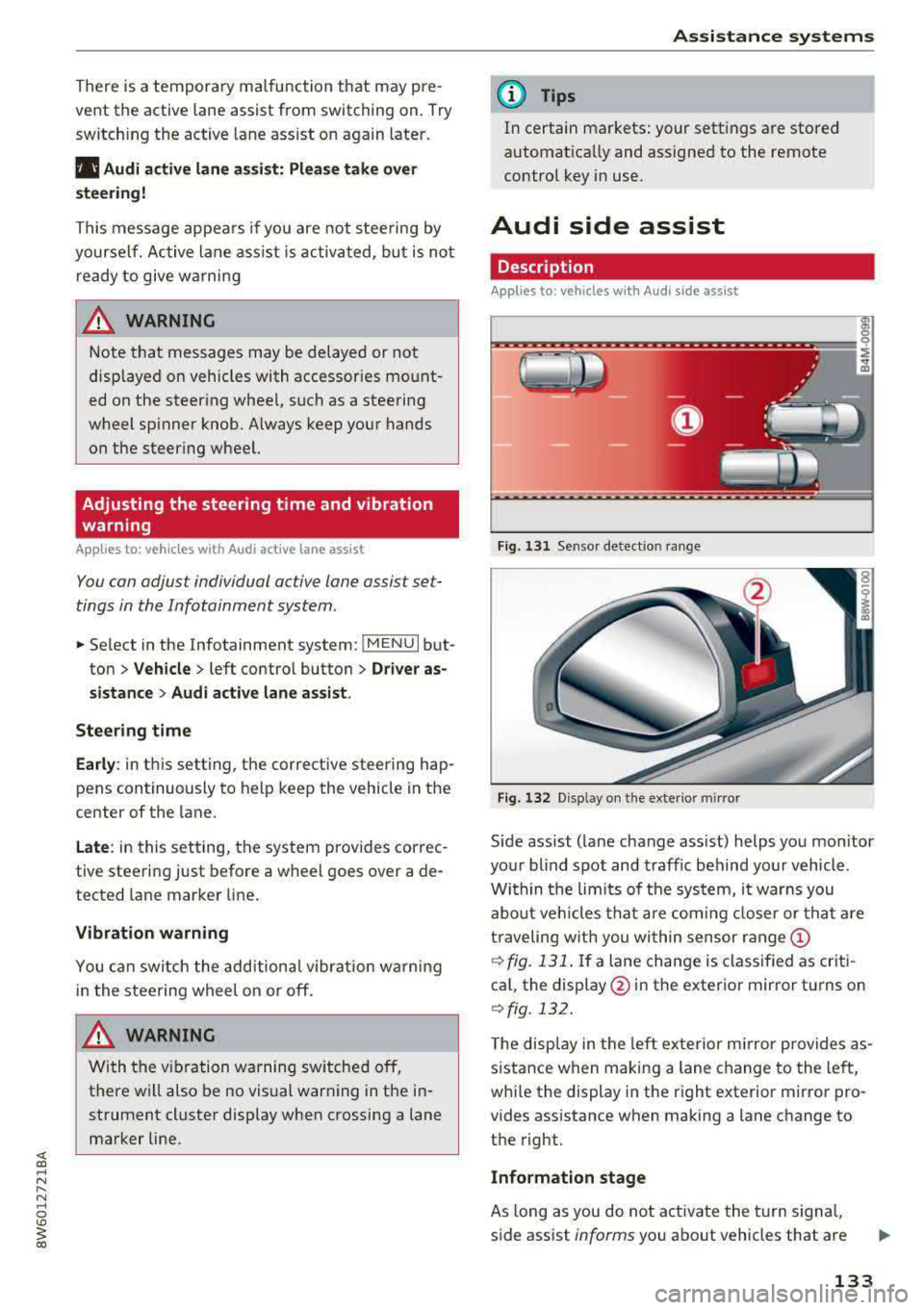
Fig . 131 Sensor detection range
Fig. 132 D isp lay on the exterio r m irror
S ide assist (lane change ass ist) helps you mon itor
your blind spot and traffic behind your vehicle .
Within the limi ts of the system, it warns you
about veh icles that are coming closer or that are
traveling with you wi thin sensor
range ©
¢ fig. 131. If a lane change is classified as criti
cal, the display @in the exterior mirror turns on
¢fig . 132.
The display in the left exterior mirror p rovides as
sistance when making a lane change to the left,
whi le the display in the right exterior mirror pro
vides assistance when making a lane change to
the right.
Information stage
As long as you do not activate the turn signal,
side assist
informs you about vehicles that are
133
Page 136 of 409

Ass is tance sy stems
detected and classified as crit ical. The d isp lay in
the mirror turns on, but is dim .
The display remains dim in the info rmation stage
so that yo ur view toward the front is not distur
bed .
Warning stage
I f the d isp lay in a mirror blinks br ight ly when you
ac tivate a turn sig nal, side assist is
warning you
about de tected ve hicles tha t it has classified as
cr itical. If this happens, check traffic by g lanc ing
in the exterior mirrors and over your shoulder
¢ .&. in General information on page 135 .
Applies to: vehicles with active lane assist: the
d isp lay in the mirror can also blink if you have not
activated a turn signal: if you are approaching a
detected lane marker line and it appears you will
be leaving the lane, side ass ist will warn you
about detected vehicles that it has classified as
cr itical.
(D Tips
You can ad just the brightness on of the dis
play on the rearview
mirror¢ page 135.
General information
Applies to: vehicles with Audi side assist
®
@
©
F ig . 133 Driving s itua tio ns
134
AUD I
F ig. 13 4 Rear of the ve hicle : posit ion of t he se nsors
Side assist funct ions at speeds above approx i
mately 9 mph (15 km/h) .
@ Vehicles that are approaching
"' 00
I m
In certain cases, a veh icle w ill be classified as
critical for a lane change even if it is st ill some
what far away. The faster a vehicle approaches,
the sooner the display in the ex terior m irror will
turn o n.
@ Vehicles traveling with you
Vehicles traveling with you are indicated in the
exter ior mir ror if they are class ified as cr it ical for
a la ne change . All vehicles detected by side ass ist
a re indicated by the time they enter your "blind
spot", at the latest.
© Vehicles you are p assing
If you slowly pass a vehicle that side assist has detected (the differe nce in speed between the
vehicle and your vehicle is less than approximate
ly 9 mph ( 15 km/h)), the disp lay in the exter ior
mir ror turns on as soon as the vehicle ente rs you r
blind spot.
The display wi ll not turn on if you quickly pass a
vehicle that side ass ist has detected (the differ
ence in speed is grea ter than approximate ly 9
mph (15 km/h)) .
Functional limitations
The radar sensors are des igned to detect the left
and right adjacent lanes whe n the road lanes are
the norma l width. I n some situa tions, the display
i n the exte rior m irror may turn o n even though
there is no vehicle located in the area tha t is criti
ca l for a lane c hange. For example: