2018 AUDI A4 Control
[x] Cancel search: ControlPage 60 of 403

Lights and Vision
@ Tips
The setting is automatica lly stored and as
signed to the remote control key that is be ing
used.
Instrument illumination
The brightness of th e illumination for the instru
ments , display and head-up display* can be ad
jus ted.
F ig . 53 Instru ment i llumi natio n
"' Press the knob to release it.
"'T urn the knob toward"-" o r"+" to reduce or in
crease the brightness .
,,, Press the knob again to return it to its or iginal
pos ition .
(D Tips
Depending on vehicle equipment, the inst ru
ment illumination (needles and gauges) may
turn on when the lights are off and the igni
tion is switched on . The illumination for the
gauges reduces automatically and eventually
tur ns off as brightness outside increases . This
function reminds the driver to turn the low
beams on at the app ropr iate time.
58
Vision
Adjusting exterior mirrors
Fig. 54 Driver 's doo r: kno b fo r t he e xterio r mirrors
Turn the knob to the des ired position:
0
-a ll adjustment functions are deactivated.
q / P -adjus ts the left/right exter io r mirror.
Move the knob in the desired direct ion.
(@ -Heats* the mir ror glass depend ing on the
outside temperature.
8 -F olds the exterior mirrors* . To fold the m ir
rors out, turn the knob to one of the other posi
tions . In the I nfota inment system, you can select
i f the m irro rs fo ld in au tomatically when yo u lock
the
ve hicl e~ page 41 .
Front passenger's exterior mirror tilt
function *
To help you see the curb when backing into a
parki ng space, the su rface of the m irro r til ts
slight ly. For this to happen, the knob must be in
the position for the front passenger's exterior
mirror.
Yo u can adjust the tilte d mir ror s urface by t urn
i ng t he knob in the desired di rect io n. When you
move out of reverse and into another gear, the
new m irror position is stored and assigned to the
key you are using .
The m irror goes back into its or iginal pos ition
once you drive forward faster than 9 mp h
(15 km/h) or turn the ignition off.
&_ WARNING
Cu rved mi rror sur faces (for example convex)
enla rge the field of vision. However, they
Page 61 of 403

a co .... N ,....
N .... 0 0
3 co
make objects in the mirror appear smaller
and farther away. Your may estimate incor
rectly when you use these mirrors to gauge
your distance from the vehicles behind you
when changing lanes, which increases the risk of an accident .
Q) Note
- Applies to vehicles with power folding exte
rior mirrors: if the mirror housing was
moved by outside forces (such as an impact
when maneuvering), you must use the pow
er folding function to fold the mirror all the
way out. The mirrors will make a loud noise
when they latch into place. The mirror hous
ing must not be moved back into place by
hand because this would impair the func
tion of the mirror mechanism.
-Applies to vehicles without power folding
exterior mirrors: if the mirror housing was
moved by outside forces (such as an impact
when maneuvering), you must move it back
in place by hand.
- If you wash
th@ vehicle in an automatic car
wash, you must fold the exterior mirrors in
to reduce the risk of damage to the mirrors.
Never fold power folding exterior mirrors*
by hand . Only fold them in and out using
the power controls.
{!) Tips
-If the power adjusting function malfunc
tions, the glass in both mirrors can be ad
justed by pressing on the edge of it by hand.
- The exterior mirror settings are stored with
the memory function*
9 page 67.
Dimming the mirrors
Your vehicle is equipped with a manual or auto
matic* dimming rearview mirror .
Manual dimming rearview mirror
.,. Pull the lever on the bottom of the mi rror back .
Lights and Vision
Automatic dimming rearview mirror*
.,. The interior and exterior mirrors dim automati
cally when light shines on them, for example
from headlights on a vehicle behind you.
A WARNING ,-
If the glass on an automatic dimming mirror
breaks, electrolyte can leak out. This liquid
can irritate the skin, eyes and respiratory sys
tem. If there is contact with the fluid, flush
immediately with plenty of water. Consult a
physician if necessary .
- Repeated or long -term exposure to electro
lyte fluid can lead to irritation of the air
ways, especially in people with asthma or
other respiratory conditions. Take deep
breaths immediately after leaving the vehi
cle or, if this is not possible, open all of the
doors and windows as wide as possible.
- If electrolyte fluid enters the eyes, flush
them thoroughly with a large amount of
clean water for at least 15 minutes and then
seek medical attention.
- If electrolyte fluid comes into contact w ith
the skin, flush the affected area with clean
water for at least 15 minutes and then clean
with soap and water and seek medical at
tention . Clean affected clothing and shoes
thoroughly before wearing again.
- If the fluid was swallowed and the person is
conscious, flush the mouth with water for at least 15 minutes . Do not induce vomiting
unless this is recommended by medical pro
fessionals . Seek medical attention immedi
ately .
0 Note
If the glass on an automatic dimming mirror
breaks, electrolyte can leak out. This liquid
damages plastic surfaces and paint . Clean
this liquid as quickly as possible, for example
with a wet sponge .
(D Tips
-If the light reaching the rearview mirror is
obstructed, the automatic dimming mirror
will not function correctly,
59
Page 65 of 403

Replacing rear wiper blade
Applies to: vehicles with rear window wiper
Fig . 60 Rear window w iper : in stall ing the wiper b lade
Removing the wiper blade
... Fold the w iper arm away from the rear window .
... Remove the wiper blade from its holder.
Installing the wiper blade
... Press the wiper blade mount into the retainer.
... Fold the window wiper arm back onto the rear
window.
A WARNING
For safety reasons, the windshield wiper
blades should be replaced once or tw ice each
year .
Digital compass
Switching the compass on and off
Applies to: vehicles with digital compass
Fig. 61 Rearview mirror: digita l compass is sw itc hed on
Lights and Vision
.,. To turn the compass on or off, press the button
@ until the compass in the mirror appears or
disappears.
T he dig ital compass only works when the ignition
is turned on . The directions are indicated with ab
breviations:
N (north), NE (northeast), E (east),
SE (southeast), S (south), SW (southwest), W
(west), NW (northwest).
(0 Tips
To prevent inaccurate compass readings, do
not bring any remote controls, electrical devi
ces or metallic objects near the mirror.
63
Page 69 of 403
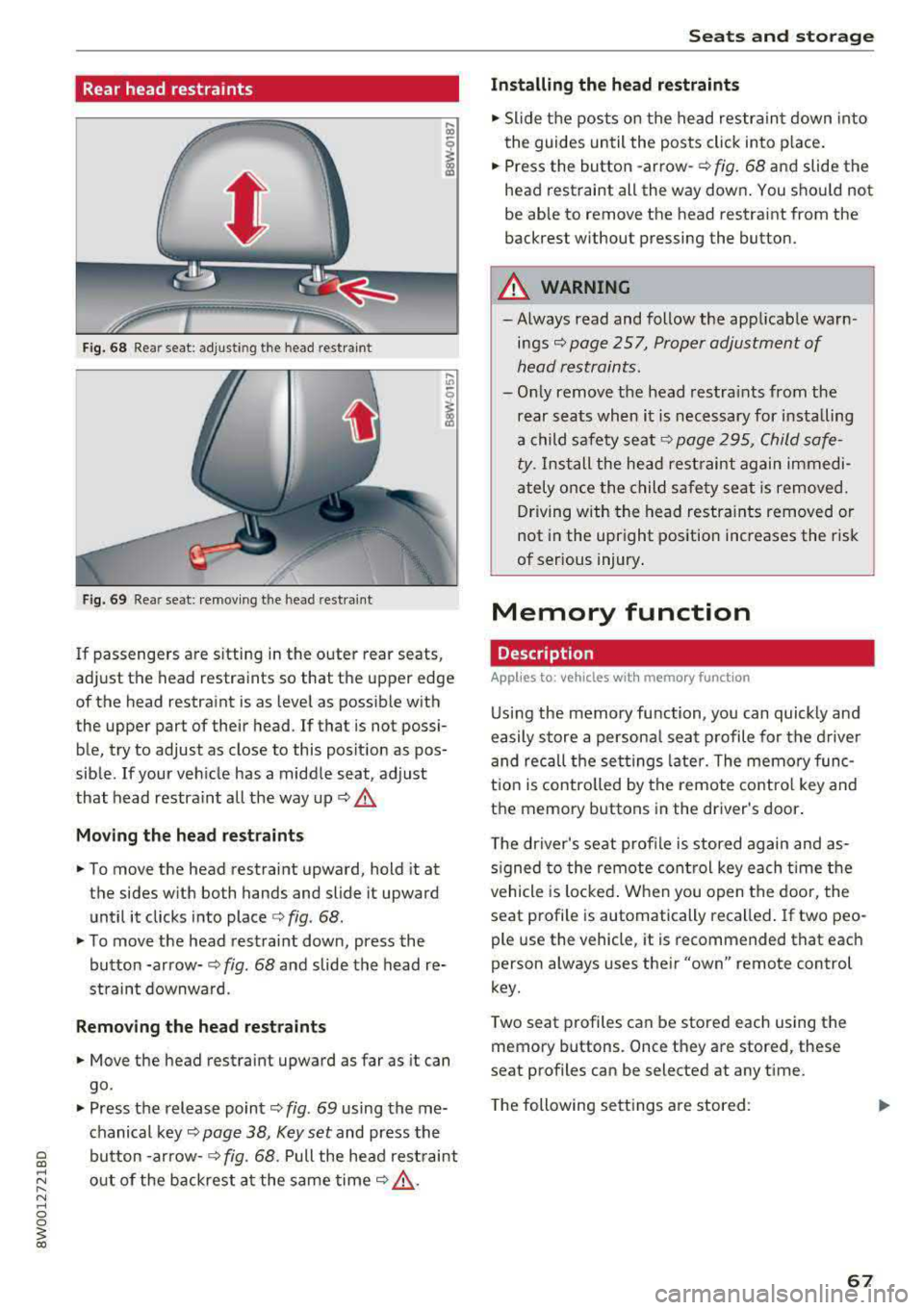
Rear head restraints
Fig. 68 Re ar seat : adjus ting the head re stra in t
Fig. 69 Re ar seat: remov ing the head rest ra in t
If passenge rs are s itting in the outer rear seats ,
ad just the head restraints so that t he upper edge
of the head restraint is as level as possib le with
the upper part of their head . If that is not possi
ble, try to adjust as close to this posit ion as pos
sible . If your ve hicle has a midd le seat, adjust
that head restraint all the way up
c:> A_
Mo ving the head rest raint s
.. To move the head restraint upward, hold it at
the sides w it h both hands and slide it upward
until it clicks into place
c:> fig . 68 .
.. To move the head restraint down, press the
button -arrow-
c:> fig . 68 and slide the head re
straint downwa rd.
Remo ving the head restraints
.. Move the head restraint upward as far as it can
go .
.. Press the release point c:> fig. 69 using the me
chanical key
c:> page 38, Key set and press the
bu tton -arrow-
c:> fig. 68. Pull the head rest raint
out of the backrest a t the same time
c:> &_ .
Seats and storag e
Installing the head restraints
.. Slide the pos ts on the head restrain t down into
the guides until the posts click into p lace .
.. Press the button -arrow-c:> fig. 68 and slide the
head rest raint all the way down . You shou ld not
be able to remove the head restraint from the
back rest without pressing the button.
_& WARNING ~
-Always read and follow the applicable warn
ings
c:> page 257, Proper adjustment of
h ead restraints .
-Only remove the head restra ints from the
rear seats when it is necessary for installing
a child safety seat
c:> page 295 , Child safe
ty .
Install the head restraint again immedi
ately once the child safety seat is removed. D riving with the head restra ints removed or
not in the upright position increases the risk
of serious injury .
Memory function
Description
Applies to: vehicles with memory function
Using the memory function, you can quickly and
easily store a persona l seat p rofile for the d river
and recall the set tings late r. The memo ry func
t ion is controlled by the remote contro l key and
the memory buttons in the driver 's door .
T he driver's se at profile is stored again and as
s igned to the remote con trol key each t ime the
vehicle is locked . W hen you open the door, the
seat profile is automatically recalled . If two peo
ple use the v ehicle , it is recommended that each
person always uses the ir
"own" remote control
key.
T wo seat p rofiles can be stored each using the
memory buttons . Once they are stored, these
seat p rofiles can be selected at any t ime .
T he following se tt ings a re stored :
67
Page 70 of 403

Seats and storage
Remote con- Memory but-
trol key ton
Driver Driver
Seat X X
Both exterior
X X mirrors*
Remote control key
Applies to: vehicles with memory function
The driver's seat profile can be assigned to the
remote control key when the vehicle is locked .
.,. Select in the Infotainment system : IMENUI but
ton >
Vehicle > left control button > Vehicle
settings > Seats > Driver's seat > Store set
tings on remote control key .
(D Tips
If you do not wish to have the seat profile for
another driver assigned to the remote control
key, switch the memory function off in the In
fotainment system.
Memory buttons
Applies to: vehicles with memory function
Fig. 70 Drive r's doo r: me mory function butto ns
Storing a seat profile
.,. Press the ISETI button. The LED in the button
turns on .
.,. Press memory button II] or [Ii.
A signal tone will sound when it is successfully
stored.
Accessing a seat profile
... If the driver's door is open and the ignition is
switched off, press the memory button.
68
.,. If the driver's door is closed or the ignition is
switched on, press and hold the memory but
ton until the seat adjustment is complete .
A WARNING
-For safety reasons, the seat sett ing can only
be recalled when the vehicle is stationary to reduce the r isk of an accident.
- In an emergency, seat adjustment operat ion
can be stopped by p ressing the
ISETI button
or the buttons @or@
Q page 65, fig . 64 .
Sockets
Fig. 71 Cente r conso le: 12 vo lt socke t
Fig. 72 Rear center co nso le: 12 vo lt socket *
The 12-volt sockets can be used for electrical ac
cessor ies. The power usage must not exceed
120 watts.
There is an additional 12 volt socket* located on
the side trim panel in the luggage compartment.
A WARNING
The sockets and the electrical accessories con
nected to them only function when the igni
tion is switched on. Incorrect usage can lead
to serious i njuries or burns. To reduce the r isk
,..
Page 78 of 403

Warm and cold
Warm and cold
Climate control system
Description
The climate control system warms, cools and re moves humidity from the air in the vehicle interi
or. It is the most effective when the windows and
sunroof * are closed. If there is a bui ld-up of heat
inside the vehicle, ventilation can he lp to speed
up the cooling process.
I n all heating mode f unctions except for
defrost,
the blower only switches to a higher speed once
the engine coolant has reached a sufficient tem
perature .
Pollutant filt er
The po llutant filter removes poll utants such as
dust and pollen from the a ir .
Ke y recognit ion
The climate control settings are automatically
stored and assigned to the remote contro l key
that is in use .
76
® For the sake of the environment
-If you would like to reduce fuel consump
t ion, sw itch the air conditioning
off. This
will also reduce emissions.
- In veh icles with a diesel engine, you can
switch the auxiliary heater
off in the Info
tainment system.
(D Tips
- To prevent interference with the heating
and cooling output and to prevent the win
dows from fogging over, the air intake in
front of the windshie ld must be free of ice,
snow or leaves.
- Condensation from the cooling system can
dr ip and form a pudd le of water under the
vehicle . This is norma l and does not mean
there is a leak.
- The energy management system may tem porarily switch
off certain functions, such as
the seat heating* o r rear window defogger.
T hese systems are ava ilable again as soon
as the ene rgy supply has been restored.
Page 79 of 403

Warm and cold
3 zone deluxe automatic climate control
Operation
.... M
~ a,
Fig. 90 3-zone de lu xe a uto mat ic cl imate contro l; cockpit controls
Fig. 9 1 3-zone de luxe automatic cl imate control system: rear controls
Press the knobs, buttons or rocker switches to
turn the functions on or off . When the funct ion is
sw itched on, the LED in the respect ive button or
knob t urns
on ¢ fig. 90. The rocker switc hes are
se nsitive to to uch. The drive r and front passenger
sett ings can be ad justed sepa rately.
You can adjust the settings for the rea r of the ve
hi cle using the controls in the rear
~ fig. 91 .
On right-hand dr ive vehicles*, the functions of
the rocker sw itched ® and ® are switched .
OFF
clima te control sy stem
You can switc h the cl imate control system on and
off using the OFF button.
It also sw itches on when you press another button or a knob. A
irflow
from outside is b locked when the clima te control
system is sw itched off.
A/C Cooling mode
You can switch the coo ling mode on or off using
the rocker switch ®· The air is not coo led and hu
mid ity is not removed when cooling mode is
switched off. This can cause fog on the w indows .
Cooling mode switches off automatically when
t h e outs ide tempe ra ture is below zero .
A/Ceco cooling mode*
You can switch the eco cooling mode on or off us-
ing the rocker switch ®· The climate control
..,.
77
Page 80 of 403

Warm and cold
system operates most efficiently in eco cooling
mode.
A/C MAX cooling mode*
You can switch the maximum cool ing mode on or
off using the rocker switch@. Th e air is not
coo led and humidity is not removed when cooling
mode is switched off. This can cause fog on the
windows. Cooling mode switches off automati
cally when the outside temperature is below
zero. When the cooling mode is switched on, the
vehicle interior is cooled as quickly as possible
and dehumidified .
c:E) Recirculation mode
In recirculation mode, the air inside the vehicle is
circu lated and filtered. This prevents the unfil
tered air outside the vehicle from entering the
vehicle interior. Switching recirculation mode on
when dr iv ing through a tunnel or when s itting in
traffic is recommended
Q &, .
Using the button, recirculation mode is~ using
the button. You can also switch the recirculation
mode off by pressing the knob (D or the ~ but
ton.
AUTO
Automatic mode
Automatic mode maintains a constant tempera
ture inside the vehicle. Air temperature, airflow
and air distribution are controlled automatically .
You can switch automatic mode on or off by
pressing the
knob@.
Temperature
You can adjust the temperature between 60°F
( + 16°()
and 84°F ( +28°() by turn ing the knob
(D . Outs ide of this range, LO or HI will appear in
the climate control system display . In both set
tings, the climate control runs constantly at the
maximum cooling or heating level. The tempera
ture is not regulated.
The temperature can be adjusted in the rear us
ing the rear contro ls
Q fig. 91.
86'~ Blower
You can adjust the vo lume of air generated by the
blower to your preference using the rocker switch
@ . The blower should always run at a low setting
78
to prevent the windows from fogging and to en
sure a continuous exchange of air inside the vehi
cle. To have the blower regulated automatically,
press one of the knobs
(D .
Air distribution
You can use the rocker sw itches @to adjust the
vents where the air will flow out of. Press the
rocker switches @repeatedly unti l the desired
air distribution setting is displayed in the climate
control system controls. To have the air distribu
tion regulated automatically, press one of the
knobs
(D .
""lll"' OPEN/CLOSE the wide vent
You can open and close the wide vent in the cock
pit using the rocker switch ®·
JI~ Seat heating and ventilation*
If you press the button J ,J, the seat heating/
ventilat ion is switched on at the highest leve l (3) .
The LEDs indicate the temperature level. To re
duce the temperature, press the button again. To
switch the seat heating/ventilation off, press the
button repeatedly until the LED turns
off.
3% Defrosting
The windshield and side windows are defrosted
or cleared of condensation as quick ly as possible .
The maximum amount of air flows mainly from
the vents below the windsh ield. Recirculation
mode switches off. The temperature should be
set at
+72°F (+22°() or higher . The temperature
i s controlled automat ically .
Defrost is switched on and off
3% using the but
ton. You can switch the function off by pressing a knob
(D .
Applies to vehicles with windshield defogger: the
windshield defogger switches on automatically
when outside temperatures are low. If you would like to sw itch the windshield defroster on man
ually, press the
3%. The LED in the button blinks.
ClWREAR Rear window defogger
Press the button [email protected] switch the rear window de
fogger on. It on ly operates when the engine is
running. It switches off automatically after
10 to .,,.