2018 AUDI A3 SEDAN steering wheel
[x] Cancel search: steering wheelPage 90 of 404

Driving
& WARNING
Hill descent control cannot overcome phys ical
limitations, so it may not be able to maintain
a constant speed under all condit ions. Always
be ready to apply the brakes .
Manual shifting (tiptronic mode)
Applies to: vehicles with automatic transmissions
The tiptronic mode allows the driver to shift the
gears manually.
F ig. 9 3 Center conso le : shifting manually w ith the se lector
l ever
F ig . 94 Steering wheel: shifting manual ly w it h the s hift
paddles*
Shifting with the selector lever
You can sh ift into tiptro nic mode while stationary
a nd while driv ing.
• To s hift into tiptronic mode, p ush the selector
lever from the "D/S" position to the right in the
t ip tr onic sh ift gate . Once the transmission has
swi tched modes, t he se lec tor lever posi tion
M
is shown in the instrumen t clus ter display
¢ page 84, fig. 90. For example, M4 means the
fo urth gear is engaged.
• To shift up a gear, tap the se lector lever for
ward
0 ¢ fig. 93 .
88
• To shift down a gear, tap the selecto r lever
backward
0 -
Shifting with the shift paddles*
You can operate the s hift paddles in the "D/S" or
" M " (tiptro nic shift ga te) se lec tor lever posi tions.
• To shift up one gear, tap the shift paddle 0
¢fig . 94.
• To shift down a gear, tap the 0 shift paddle.
• Applies to: RS models: to select the lowest/
highest possi ble gear, press and hold the sh if t
paddle
0 10 .
If the shift paddles a re tapped wh ile in the "D/S"
selector lever position, a utomat ic mode sw itches
off briefly . To swit ch from manually shift ing bac k
to automatic shifting immediate ly, tap t he shift
padd le
0 ¢ fig . 94 for 1 second .
To keep sh ift ing using the shift padd les, move
the selec to r l ever to the right o ut o f th e "D/S" po
sition into the tiptronic shift gate .
The tra nsmission a utomatically sh ifts up or dow n
before cr itical engine speed is reac hed.
Applies to: RS models: when accelerating, the
transm iss ion does
not au tomatically shift to the
next gear short ly before the maxim um permitted
engine RP M is re ached. Shift to the next highest
gear at the right time.
The tra nsmission on ly allows manual shifting
whe n the engine speed is w ith in the perm itted
r a nge.
Kick-down
Applies to: vehicles with automatic transmissions
Kick-down enables maximum acceleration.
When you p ress the accelerator pedal down be
yo nd the res istance point (called kick-down), the
automat ic transmission downshifts into a lower
gear, depending on vehicle s peed and engine
RPM .
It shifts up into the next higher gear once
t h e maximum specified engine RPM is reached .
Applies to: RS models: in tipt ronic mode, the
transm iss ion does
not automa tic ally shift down
i nto a lower ge ar. If yo u m ust accelera te, for ex
ample to pass a vehi cle, you mus t sh ift manually .
..,.
Page 98 of 404

e-tron
For additional information, see ¢ page 17, Trip
computer (Audi virtual cockpit).
~ Applies to: vehicles with analog instrument
cluster: Open the
Tachometer display by turn
ing the left thumbwheel on the multifunction
steering wheel.
When opening the driver's door, the charge level is shown in the instrument cluster when the igni
tion is switched on, or the charge level and the
remaining charge time for the high -voltage bat
tery is displayed when charging .
The power meter gives feedback about the partic ular accelerator pedal position and shows the
current demand
(%) for electricity or fuel regard
less of which engine is active.
An economical driving and recuperation range is
shown in green
¢ page 99, Energy recovery (re
cuperation) .
A driving range that is not economi
cal is shown in orange .
(D Vehicle not drive ready (OFF)
@ Recuperation (CHARGE)
@ Vehicle ready to drive (READY) or
coasting
© Efficient driving with electric motor
and/or gasoline engine (EFFICIEN
CY)
® Economic driving while the electric
motor or gasoline engine is in the
partial power range
@ Driving in full power range
0 100% output
@ BOOST: the electric motor supports
the combustion engine
® High-voltage battery charge level
@ EV mode: active a=,v, standby, a=,v
or currently unavailable. ~v
@ Speed limit for electric driving in EV
mode (80 mph/ 130 km/h)
Indicator lights and messages
Applies to: vehicles with plug -in hybr id drive
Also note the indicator lights in¢ page 20.
The gasoline engine is active when the II'§] indica
tor light turns on.
96
•• Drive system: system fault! Safely park
vehicle
There is a malfunction in the plug-in hybrid sys
tem. The brake booster and the power steering
may stop working. Stop the vehicle immediately
or as soon as possible. Park the vehicle in a safe place outdoors that is not near buildings, roof
overhangs, carports or similar structures. Switch
the ignition off. Have the problem corrected by
an authorized Audi dealer or authorized Audi
Service Facility.
•• Electric drive: overheated! Safely stop
vehicle and check coolant
The coolant level is too low or the coolant tem
perature is too high.
Stop the vehicle in the outdoors as soon as it is
safely possible. Switch the ignition off.
Read the important safety
precautions ¢.& in
Coolant on page 103
and check the coolant level
¢page 102.
If the coolant level is OK, the malfunction may be
caused by the system overheating. Let the vehi
cle's electric drive system cool down for some
time .
If the message turns off after cooling down and
switching the ignition back on, you can continue
driving. Contact an authorized Audi dealer or au
thorized Audi Service Facility immediately to have
the malfunction corrected.
If the indicator light stays on, contact an author
ized Audi dealer or authorized Audi Service Facili
ty.
lltll Drive system: system fault! Please con
tact workshop
There is a malfunction in the plug-in hybrid sys
tem . Drive to an authorized Audi dealer or au
thorized Audi Service Facility immediately to have
the malfunction corrected.
1/1111 Drive system: system fault! Restart not
possible. Please contact workshop
There is a malfunction in the plug-in hybrid sys
tem. Do not open the hood. Drive to an author- ized Audi dealer or authorized Audi Service
.,,_
Page 99 of 404
LL co ..... N
" N ..... 0 N > co
Faci lity immedi ately to have t he m alfunc tion cor
rected .
IIJII Battery temperature too low . Vehicle
cannot be started. See owner's manual
Th e outside tempe rature is too low . The vehicle
can no longe r st art at tempe ra tur es below - 18 °F
(- 28 °C). Con ta ct an a utho riz e d Audi d ealer o r au
thor ized A udi Se rvice Fac ility.
POWER LIMIT Warning! Limited performance
If t he indicator lig ht turns on and th is message
appears , th ere may be a n engine co ntro l ma l
f u nction. The
[3B* in d icator light in t he instr u
men t clus ter also tur ns on . The engine ou tput is
r educed . Dr ive to a n au thor ized Audi dealer or
a uthor ized Audi Se rvice Facili ty i mme diate ly to
ha ve the m alfunct ion co rre cted.
II e-tron mode: EV currently unavailable
This message appea rs whe n the 1.,,..1 button is
p ressed and the con ditions for elect ric d rive
mode a re not met.
Ill Vehicle sound: malfunction! Pedestrians
cannot hear vehicle . Please contact Service
The vehicle sou nd is no longer f unctio ning. D rive
e xtremely care fully, since ot he rs may not hea r
your veh icle. Dr ive to an author ized Audi dealer
or author ized Audi Se rvice Facility immed iate ly to
have the ma lf u nction corrected .
Range display
Applies to: ve hicles with plug-in hybrid drive
Fig. 99 Instr ume nt cluste r: ra nge disp lay
The range can be disp layed in the trip computer .
You can access t he range disp lay w ith the multi
fu nction steeri ng wheel buttons
c:;> page 13 , Mui-
e-tron
ti function s teeri ng whee l plus or r:::;> page 1 6, M ul
tifunction steering wheel.
D epen ding on t he sele cte d plug -in hy brid mo de,
t he disp la y g ives the foll owing informa tion:
(D Remaini ng e lec tric m otor range or comb ined
total range
@ Remaini ng gasoline eng ine range
® R emaini ng e lectr ic moto r ra nge
(D Tips
The va lues given are b ase d on t he lates t con
sum ption va lues .
Range and statistics
Applies to: vehicles with plug-in hybrid drive
Fig. 100 In fotainmen t system : e -tro n range mo nitor
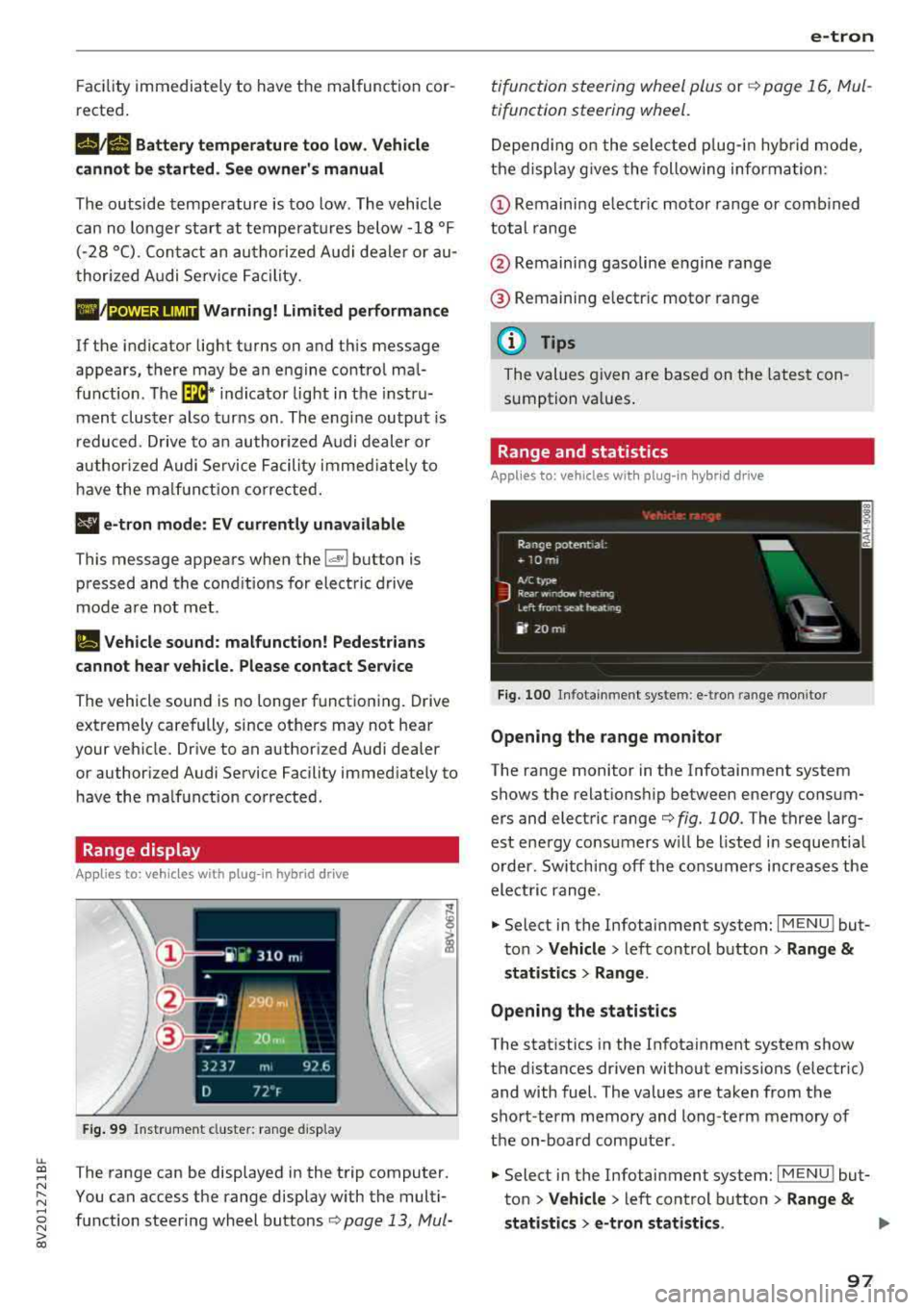
Opening the range monitor
The range monitor in the Infotainment system
shows the relat ions hip between ene rgy co nsum
ers and elect ric range
c:;> fig. 100 . The three larg
est ene rgy consu mers w ill be l ist ed in sequent ia l
o rder. Sw itching off the cons umers increases the
elect ric range .
.. Select in the Infotai nment system: I MENU ! but
t o n
> Vehicle > left con trol button > Range &
statist ics > Range .
Opening the statistics
The stat istics in the In fotainment system show
t h e d ista nces dr iven without emissions (electric)
and with fuel. The values are taken from the
sho rt-term memory and long-te rm m emory of
the on-board comp ute r.
.. Select in the Infotai nment system: I MENU ! but
ton
> Vehicle > left con trol b utton > Range &
statistics > e-tron statistics . IJ,,
97
Page 102 of 404

e-tron
Driving situations Conditions Vehicle behavior
-Intentionally take your foot off of The gasoline engine turns off automati-
the gas pedal to allow for pro- cally and disengages when you release the longed coasting. accelerator pedal completely. The veh icle
Driving on highways glides without being propelled
.
- Reduce the vehicle speed by re-Fuel consumption can be reduced by
and expressways
leasing the accelerator pedal and coasting.
not by braking.
- Use the "S" selector lever position A sporty driving style increases fue l con-
and tiptron ic mode sparingly.
sumption.
- Do not run the gasoline engine to The temperature of the gasoline engine
warm the engine while the vehicle rises very s lowly and the fuel consump-
is parked tion increases considerably.
- Use the rear window/exterior This conserves the energy in the high-volt-
Driving in cold weath- mirror defogger and the seat heat-
age battery so that it is availab le to run
ing sparing ly. the vehicle in electric mode.
er
- Park the vehicle in a garage over-This reduces exposure of the high-voltage
n ight battery to cold temperatures. The re-
quired temperature range for the high-
voltage battery will then be reached more quickly after you start dr iving.
Energy flow display
Applies to : vehicles with plug-in hybrid drive
Fig. 102 Inst rument duster: energy flow display
An energy flow display can be shown in the in
strument cluster display/Infotainment system
1>.
The image is animated in the Infota inment sys
tem
1> .
l l Not available in all Infota inme nt syste ms.
100
Fig. 103 Infota inment system•: energy flow disp lay
Display of energy flow indicator in the
instrument cluster display
.,. Open the first Veh icle tab (tr ip compute r) using
the
l q 1> I button on the multifunction steering
wheel.
.,. Applies to: vehicles with Audi virtual cockpit: on
the multifunction steering wheel, select: left
control button
> Energy flow.
Page 103 of 404

LL co .... N
" N
~ Applies to: vehicles with analog instrument cluster: open the
Energy flo w ind icator disp lay
by turning the left thumbwhee l on the mult i
function steering wheel.
Component Color
(D Gasoline engine Orange
Gray
@ High-voltage battery Green
Green
(animated in the
Infota inment sys-
tern
al)
Gray
(§) Motion arrow Green
Orange
Green -orange
@ Motion arrow Green
a) Not avail ab le in all Infot ainmen t systems.
The power currently available in the electric drive
sys tem is displayed when you open the energy
flow disp lay.
The bars are filled in with different colors based
on the power
status @~ fig. 102:
- White : electric power currently availab le
- Green: electric power currently being used
The more ba rs that are filled in the E-max section
@ , the longe r the maximum power can be utiliz
ed . The bars turn off in the E-max section when
the maximum power can no longer be utilized.
When the elec tric dr ive power is greatly red uced,
the drive mode will automatically switch to using
the gasoline engine.
The availability of power is genera lly restr icted
under the fo llow ing cond itions:
- The temperature of the high-voltage battery is
very co ld or very hot.
- The high-voltage battery charge level is low.
.... 0 N ii'i l) Not availab le in al l Infota inment system s.
e-tron
Image in the Infota inment display1
)
~ In the Infotainment system, select: I MENU I
button > Veh icl e > left control button >Audi
d rive select .
M eaning
The gasoline engine is running
The gasoline engine is off
High-voltage battery charge level
The high-voltage battery is charging
The vehicle is not in drive ready mode
E lectric driv ing
Driving w ith the gasoline engine
Driving with the gasoline engine and electric mo-
tor (boost)
Recuperation
The power availability is not v is ible if the
111 ind i
cator light turns on.
(0 Tips
High power availability is necessary, for exam
ple, when need ing to acce lerate q uickly wh ile
i n e lectric driving mode to pass another vehi
cle.
Vehicle tool kit and tire mobility kit
Applies to: vehicles wit h plug -in hybr id drive
F ig. 104 Lu ggage compartment: veh icle tool kit and tire
mob ility k it
101
Page 124 of 404

Ass is tanc e system s
A WARNING
You should only resume the stored speed if it
is not too high for existing traffic condit ions.
Otherwise you can increase the r isk of an acci
dent .
Lap timer
Introduction
Applies to: vehicles with lap timer
You can measure and analyze lap times with the
lap timer in the display.
Opening th e lap timer
i.. Open the first Vehicle tab (t rip computer) using
t h e
l
whee l.
i.. Applies to: vehicles with analog instrument
cluster: Press the
[gJ button on the m ultifunc
tion steering whee l and select
Lap t imer in the
menu .
... Applies to: vehicles with Audi virtual cockpit: on
the multifunction steering wheel, select: left
contro l button
> Lap times .
Operating the lap t ime r
... On the multifunction steering whee l, turn the
l eft thumbwhee l
(J) ¢page 13 or (D ¢page 16
unt il the desired menu item is d isplayed in the
instrument cluster .
... Press the left thumbwheel to confirm the selec
tion .
A WARNING
Your foc us should always be on d riving your
vehicle safely. As the drive r, you have com
ple te responsibi lity for safety in traffic. Only
use the functions s uch as the lap timer in such
a way that you always maintain comp lete con
trol over your vehicle in all traffic situations.
(D Tips
You can ret rieve information from the trip
computer while the lap timer stopwatch is
running .
122
-
Lap times and timing
Applies to: vehicles with lap timer
Requirement: the lap time r must be open
¢ page 122.
Timing laps
... To start timing, select Lap 1 - pre ss OK or S tart
lap 1
in the menu .
i.. Applies to: vehicles with Audi virtual cockpit: to
start t iming au tomatically when yo u start dr iv
ing, select
S tart lap 1 by driving off or St art by
dri ving off in the menu .
... To measure the lap time, select New lap - pre ss
OK or New lap
in t he menu . This starts timing
the next lap at the same t ime .
After completing, the d ifference between the
l ast lap and the previous best lap time will be in
dicated with
a" -"/ . or "+ "fll .
Pausing timing and displaying a split time
i.. To insert a pause m , sele ct Pau se in the menu.
i.. To cont inue tim ing, select Pre ss OK to re sume
or Re sume in the menu .
... T o display a sp lit time, select Split time in the
menu. The split time
r~1 appears for approxi
mate ly 10 seconds in the instrument cluster .
The timing of the current lap continues.
Re setting timing
... Using the mult ifunct ion steer ing whee l, select
Reset or Reset time s in the menu.
(D Tips
-A max imum of 30 lap t imes (analog instru
ment cl uster) or 99 lap times (Audi virtua l
cockpit*) can be measured.
- If tim ing is paused, you can continue i t later
even if you switch the ignition off.
- Saved lap times cannot be individually de
leted from the total results .
- T he save d la p timer va lues w ill remain after
switching the ignition off.
Page 125 of 404

u. 00 .-< N l' N .-< 0 N > 00
Lap statistics
Applies to: vehicles with lap timer
Displaying lap statistics
You can d isplay the number of laps d riven, the
fastest
l ap "+ ", the s lowest lap "- ", and the ave r
age time
" 0 " in the inst rument cluste r.
.,. Applies to: vehicles with analog instrument
cluster: select
Statistic s in the menu using the
mult ifunction steering w heel.
.,. Applies to: vehicles with Audi virtual cockpit: on
the m ult if u nct io n steer ing whee l, select: left
contro l bu tton
> Lap sta ti stic s o r Stati stics.
.. T urn the thumbwhee l down or up to disp lay the
individ ua l lap times.
.. To return to the lap timing that was begun,
press the left thumbwheel.
Res etting lap statistics
Applies to: vehicles with Audi virtual cockpit
.. On the multifunction steering whee l, select:
the right contro l button
> Re set stati stic s.
(D Tips
-The lap statistics lis t the lap times for t he
l ast 30 laps.
- Applies to: vehicles with Audi virtual cock
pit: the fastest and slowest lap times from
u p to 99 timed laps will be disp layed .
Audi adaptive cruise
control
Description
Applies to: vehicles with Audi adaptive cruise control
)
F ig . 122 De tect ion range
A ss istance systems
T he adaptive cruise cont rol system is a combina
tion of speed and distance regu lation.
It assists
the driver by both regu lating the speed and
maintain ing a d istance to the vehicle driv ing
ahead, w ith in the limits of the system. If the sys
tem detects a vehicle driving ahead, the adaptive cruise control can brake and accelerate your vehi
cle . T his increases d riving comfort during long
trips o n highways and in stop-and-go traffic.
What can adap tiv e crui se con trol do ?
The adaptive cru ise control sys tem uses radar .
The radar is subject to designated system limits
¢ page 124 .
On open roads with no traffic, it functions like a
cruise contro l system . The stored speed is main
ta ined . When approaching a vehicle ahead and
the system detects it, the adapt ive cruise control
system automat ically brakes to match that ob
ject's speed and t hen maintains the stored d is
t a nce. As soon as t he sys tem does not de tec t a
vehicle driving ahead, adaptive cruise cont ro l ac
ce lerates up to the stored speed .
Within the lim its of t he sys tem, adapt ive cru ise
contro l can brake in stop -and-go t raff ic until t he
vehicle is s tat iona ry and then begin driving again
under certain conditions ¢
page 12 7, Driving in
stop-ond-go traffic .
Which functions can be controlled?
When you switc h adap tive cr uise control o n, you
can set the cur rent speed as the "contro l speed"
¢ page 12 5, Switching on/off .
When driving, yo u can stop cru ise cont rol
¢ page 127 or change the speed ¢page 126 at
any t ime .
You can also set the distance to the vehicle ahead and set the adaptive c ruise cont rol d riving pro
gr am
~ page 128.
123
Page 128 of 404

Ass is tance sy stem s
@Indicator lights
Ill-Adaptive cruise control is switched on . No
veh icles are detected ahead . The stored speed is
maintained.
• -A vehicle driving ahead was detected. The
adapt ive cruise control system regulates the
speed and d istance to the vehicle ahead and
brakes/accelerates automatically.
(-) -Adaptive cruise control is switched on. Ave
h icle was detected ahead . Yo ur vehicle remains
stopped and w ill not start driv ing automat ica lly .
• -The automatic braking is not enough to
maintain a sufficient distance to a vehicle dr iv ing
ahead . You must intervene
r:::;, page 129, Driver
intervention request .
© Instrument clu ster di splay
If adaptive cruise contro l is not shown in the in
strument cluster display, you can call i t up using
the multifunction steering wheel buttons
r:::;, page 13 .
Based on the graphics in the d isp lay, you can de
termine if the system is mainta ining a distance to
a vehicle ahead and what that distance to this ve
h icle is:
No vehicle -no vehicle was detected driving
ahead.
Sil ver vehicle -a vehicle was detected driving
ahead.
Red vehicle -request for driver intervention
r:::;, page 129.
The five distance bar s on the gauge@ represent
the set d istance (refer
to r:::;, page 128 for infor
mat io n on how to change the distance). If yo u
fa ll below the se lected distance, the distance
bars become red from the bottom upward.
A WARNING
If you press the ISE TI b utton when driving at
speeds below 20 mph (30 km/h), the vehicle
accelerates automat ica lly up to 20 mph (30
km/h), which is the m inimum speed that can
be set.
126
@ Tips
- If you switch the ignition or the adaptive
cruise control system off, the set speed is
erased for safety reasons.
- The electronic stabilization control (ESC)
and the anti-slip-regulation (ASR) are auto
matically switc hed on when the adaptive
cruise control is switched on.
Changing the speed
Applies to: vehicles with Audi adaptive cruise control
0
f
I
0
Fig . 12 8 Ope rat ing leve r: chang ing the speed
.. To increase or decrease the speed in incre
ments,
tap the lever in the 0 10 direction.
,... ... ,...
i
.. To increase or decrease the speed qu ick ly, hold
the lever toward 0 10 until the red LED @
r:::;,page 125, fig . 127 reaches the desired
speed.
You can also preselect the speed when adapt ive
c ruise control is not active by moving the lever in
the des ired direction
0 10 . Act ivate the prev i
ous ly selected speed by pulling the lever into po
s ition
(D r:::;, page 125, fig. 126.
After each change, the new stored speed appea rs
br iefly in the status l ine
r:::;, page 125, fig . 127@.
When adaptive cru ise cont rol is act ive , the flJ or
• ind icator light turns o n, and when adaptive
c ruise contro l is not a ctive, the
IIJ ind icator light
turns on . In the Audi virtua l cockpit*, the
II indi
cator light turns o n instead .