2018 Alfa Romeo Stelvio cruise control
[x] Cancel search: cruise controlPage 75 of 276

Reconfigurable Display Items
1.Headlight Warning Lights
Displays the headlight warning light for
either of the following active modes:
Headlights
Automatic Headlights
2. Gear Selector Information
Displays the following information
controlled by the gear selector function:
P = PARK
R = REVERSE
N = NEUTRAL
D= DRIVE, (automatic forward speed)
AutoStick: + shifting to higher gear in
manual (sequential) driving mode –
shifting to lower gear in sequential
driving mode
3. Forward Collision, Lane Departure,
Cruise Control
Displays operations for the following
modes:
Forward Collision Warning (FCW)
Lane Departure Warning (LDW)
Cruise Control (CC) or Active Cruise
Control (ACC) (if equipped) 4.
Speed Limit Warning Light
Shows information regarding the Speed
Limiter function.
5. Compass
6. Reconfigurable Main Area
Can display the following screens:
Home
Trip A
Trip B (can be activated/deactivated
through the Information and
Entertainment System)
Performance
The screens can be selected, on rotation,
by pushing the MENU selection button on
the windshield wiper stalk.
Depending on the driving mode chosen
using the Alfa DNA Pro (Dynamic, Natural,
Advanced Efficiency and RACE), the
screens can be graphically different. Navigation instructions and call
information can be set and displayed in
the Information and Entertainment
System.
Home
The parameters shown on the display for
the Dynamic, Natural and Advanced
Efficiency modes are:
Time
Outside Temperature
Current Speed (shown if the repeat
modes of the Phone and Navigation
functions are not active)
Range
05036V0002EMMENU Selection Button
05036S0004NAInstrument Cluster Display
73
Page 98 of 276
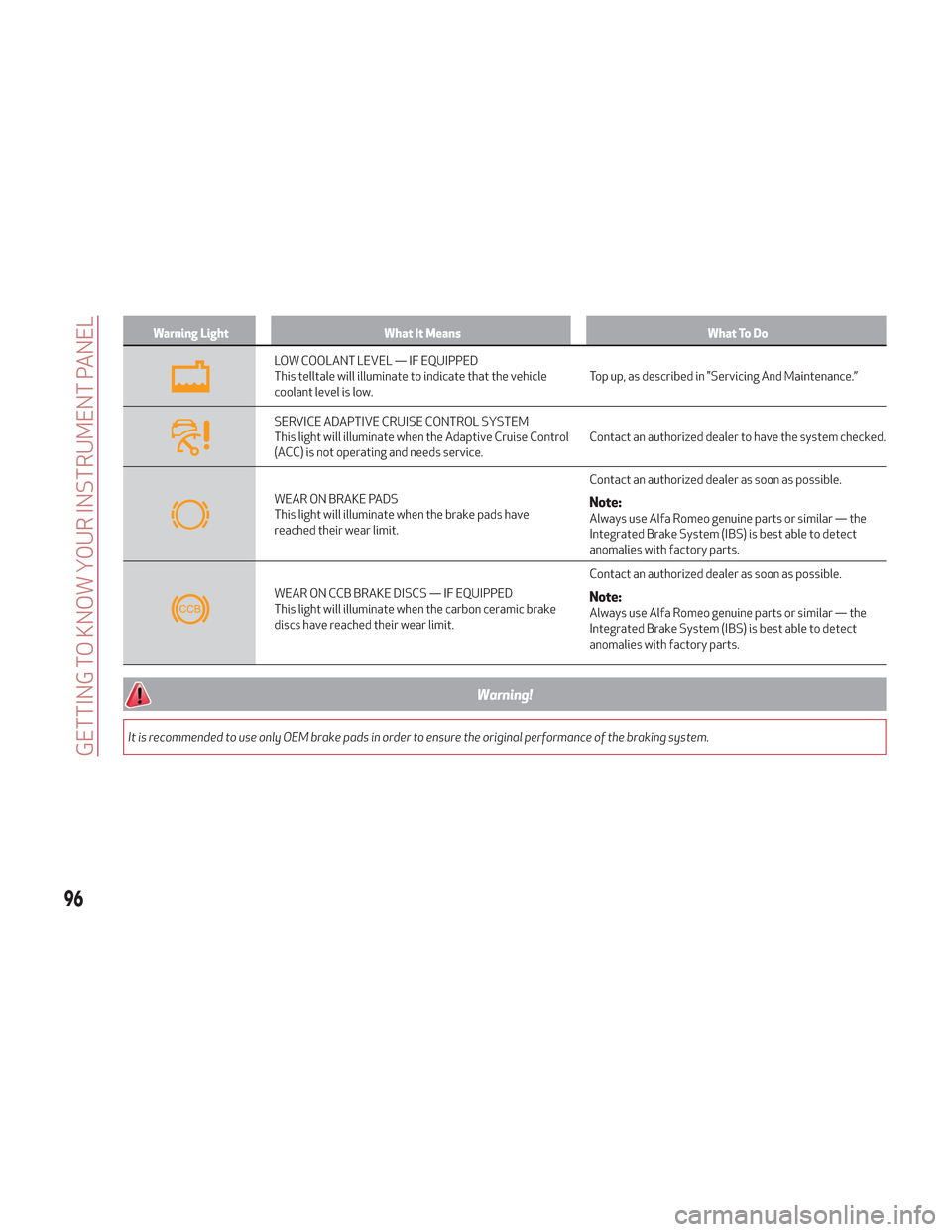
Warning LightWhat It Means What To Do
LOW COOLANT LEVEL — IF EQUIPPED
This telltale will illuminate to indicate that the vehicle
coolant level is low.Top up, as described in "Servicing And Maintenance.”
SERVICE ADAPTIVE CRUISE CONTROL SYSTEM
This light will illuminate when the Adaptive Cruise Control
(ACC) is not operating and needs service.Contact an authorized dealer to have the system checked.
WEAR ON BRAKE PADS
This light will illuminate when the brake pads have
reached their wear limit.Contact an authorized dealer as soon as possible.Note:Always use Alfa Romeo genuine parts or similar — the
Integrated Brake System (IBS) is best able to detect
anomalies with factory parts.
WEAR ON CCB BRAKE DISCS — IF EQUIPPED
This light will illuminate when the carbon ceramic brake
discs have reached their wear limit.Contact an authorized dealer as soon as possible.Note:Always use Alfa Romeo genuine parts or similar — the
Integrated Brake System (IBS) is best able to detect
anomalies with factory parts.
Warning!
It is recommended to use only OEM brake pads in order to ensure the original performance of the braking system.
96
GETTING TO KNOW YOUR INSTRUMENT PANEL
Page 101 of 276
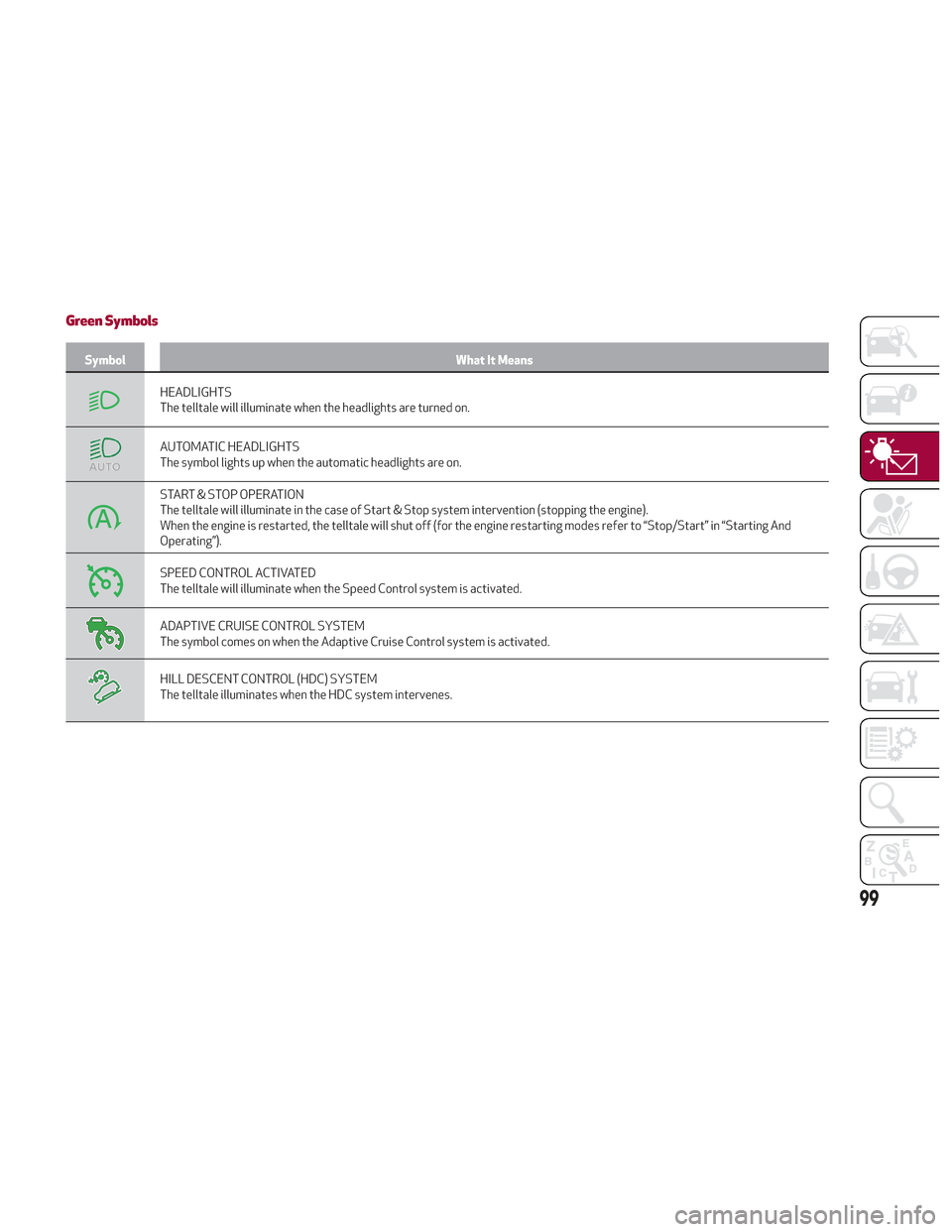
Green Symbols
SymbolWhat It Means
HEADLIGHTS
The telltale will illuminate when the headlights are turned on.
AUTOMATIC HEADLIGHTS
The symbol lights up when the automatic headlights are on.
START & STOP OPERATION
The telltale will illuminate in the case of Start & Stop system intervention (stopping the engine).
When the engine is restarted, the telltale will shut off (for the engine restarting modes refer to “Stop/Start” in “Starting And
Operating”).
SPEED CONTROL ACTIVATED
The telltale will illuminate when the Speed Control system is activated.
ADAPTIVE CRUISE CONTROL SYSTEM
The symbol comes on when the Adaptive Cruise Control system is activated.
HILL DESCENT CONTROL (HDC) SYSTEM
The telltale illuminates when the HDC system intervenes.
99
Page 147 of 276

STARTING AND OPERATING
Let’s get to the core of the vehicle, and
see how you can explore its fullest
potential. We’ll look at how to drive
safely in any situation, making it a
welcome companion with our comfort
and wallets in mind.STARTING THE ENGINE........146
ENGINE BLOCK HEATER — IF
EQUIPPED ............... .149
ELECTRIC PARK BRAKE ........149
AUTOMATIC TRANSMISSION .....152
ALFA DNA PRO SELECTOR ......158
ALFA ACTIVE SUSPENSION (AAS) . .161
STOP/START SYSTEM .........161
SPEED LIMITER .............163
SPEED CONTROL
(CRUISE CONTROL) ..........164
ADAPTIVE CRUISE CONTROL (ACC) —
IF EQUIPPED .............. .166
PARK SENSORS SYSTEM .......173
LANE DEPARTURE WARNING (LDW)
SYSTEM — IF EQUIPPED .......176
REAR BACK-UP CAMERA / DYNAMIC
GRIDLINES .............. .179
REFUELING THE VEHICLE .......180
VEHICLE LOADING ...........182
SUGGESTIONS FOR DRIVING .....183
145
Page 166 of 276
Programmed Speed Icon Flashing
The programmed speed will flash in the
following scenarios:
When the accelerator pedal has been
fully pressed and the vehicle has
exceeded the programmed speed.
Activating the system after setting a
limit below the effective speed of the
vehicle.
In the event of overtake acceleration.
Deactivation
The feature can be activated/
deactivated through the Information and
Entertainment System.
Deactivating The Device
To access this feature on the main menu,
select the following items in sequence:
"Settings", "Safety", “Speed Limiter” and
“OFF”.
Automatic Deactivation Of The Device
The device deactivates automatically in
the event of fault in the system. In this
case, contact an authorized dealer.
Temporary Signal Loss
When the devices loses the signal, the
white symbol without the speed
indication illuminates on the display.
System Failure
If there is a system failure, the amber
symbol
illuminates on the display.
SPEED CONTROL (CRUISE
CONTROL)
Speed Control Description
This is an electronically controlled driving
assistance feature that allows the
desired vehicle speed to be maintained,
without having to press the accelerator
pedal. This feature can be used at a speed
above 25 mph (40 km/h) on long
stretches of dry, straight roads with few
variations (highways).
The speed control buttons are located on
the left side of the steering wheel.
Note:
To ensure correct operation, the
speed control is designed to deactivate
if more than one function is operated
simultaneously. In this case, the system
can be reactivated by pushing the on/off
button
and setting the desired
speed.
It is not recommended to use this
feature in city traffic.
While driving downhill, the system
could brake the vehicle to keep the set
speed the same.
Warning!
Speed Control can be dangerous where the
system cannot maintain a constant speed.
Your vehicle could go too fast for the
conditions, and you could lose control and
have an accident. Do not use Speed Control
in heavy traffic or on roads that are winding,
icy, snow-covered or slippery.
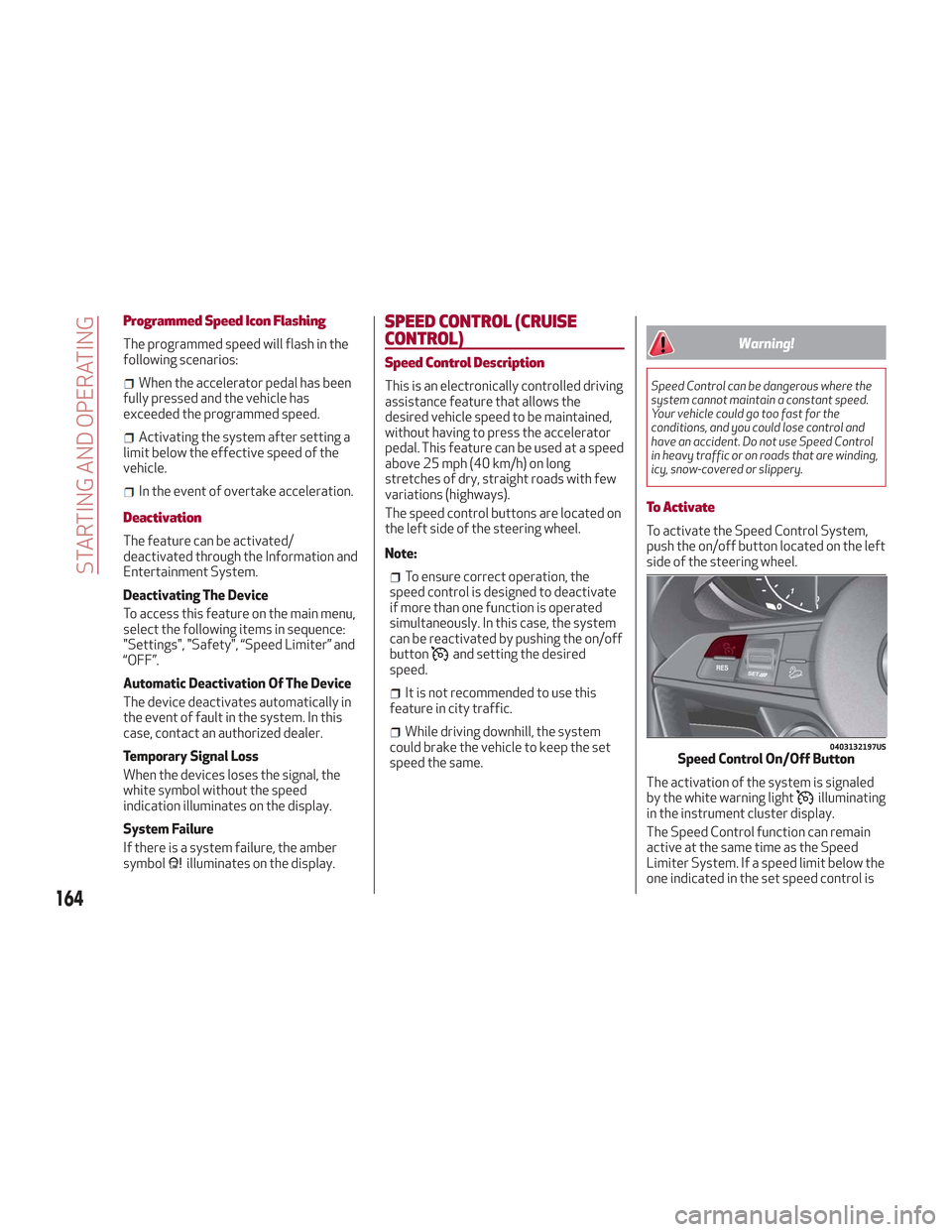
To Activate
To activate the Speed Control System,
push the on/off button located on the left
side of the steering wheel.
The activation of the system is signaled
by the white warning light
illuminating
in the instrument cluster display.
The Speed Control function can remain
active at the same time as the Speed
Limiter System. If a speed limit below the
one indicated in the set speed control is
0403132197USSpeed Control On/Off Button
164
STARTING AND OPERATING
Page 168 of 276

you should accelerate until you are close
to that speed. Then, push and release the
RES button.
To Deactivate
Lightly pressing the brake pedal
deactivates the speed control without
deleting the set speed.
The speed control may also be
deactivated by applying the electric park
brake or when the braking system is
operated (e.g. operation of the ESC
system).
The set speed is deleted in the following
cases:
Pushing the on/off button twice
The ignition is cycled to the STOP
position
There is a malfunction with the Speed
Control.
ADAPTIVE CRUISE CONTROL
(ACC) — IF EQUIPPED
System Description
Adaptive Cruise Control (ACC) is a driver
assist system that combines the speed
control functions with maintaining the
distance from the vehicle ahead.
The system allows to set and hold the
vehicle at the desired speed without
needing to press the accelerator. It also
allows to set and hold a distance from the
vehicle ahead (these settings are set by
the driver).
The Adaptive Cruise Control (ACC)
system uses a radar sensor located
behind the front bumper and a camera
located in the center/upper part of the
windshield, to detect the presence of a
vehicle close ahead. This system enhances driving comfort
while on the highway or out of town with
light traffic.
If the sensor does not detect a vehicle
ahead, the system will maintain a fixed
set speed.
If the sensor detects a vehicle ahead, the
system automatically intervenes by
braking (or accelerating) slightly in order
keep the set distance while not
exceeding the original set speed, seeking
to adapt to the speed of the vehicle
ahead.
Note:
Adaptive Cruise Control
performance is not guaranteed under the
following circumstances, and it is
0403132300USFront Bumper Radar Location
0403132301USWindshield Camera Location
166
STARTING AND OPERATING
Page 169 of 276
recommended to disable the system
under the following circumstances:
Driving in fog, heavy rain, or snow.
Driving in heavy traffic or
construction zones.
Driving on icy, snowy, slippery roads,
roads with steep climbs and descents, or
roads with numerous turns and bends.
Entering a turn lane.
When circumstances do not allow
safe driving at a constant speed.
Warning!
Adaptive Cruise Control (ACC) is a
convenience system. It is not a substitute
for active driving involvement. It is always
the driver’s responsibility to be attentive of
road, traffic, and weather conditions,
vehicle speed, distance to the vehicle ahead;
and, most importantly, brake operation to
ensure safe operation of the vehicle under
all road conditions. Your complete attention
is always required while driving to maintain
safe control of your vehicle. Failure to follow
these warnings can result in a collision and
death or serious personal injury.
The ACC system:
Does not react to pedestrians, oncoming
vehicles, and stationary objects (e.g., a
stopped vehicle in a traffic jam or a disabled
vehicle).
Cannot take street, traffic, and weather
conditions into account, and may be limited
upon adverse sight distance conditions.
Does not always fully recognize complex
driving conditions, which can result in wrong
or missing distance warnings.
Will bring the vehicle to a complete stop
while following a target vehicle and hold the
vehicle for approximately 3 minutes in the
stop position. If the target vehicle does not
start moving within 3 minutes the parking
brake will be activated, and the ACC system
will be canceled.
You should switch off the ACC system:
When driving in fog, heavy rain, heavy
snow, sleet, heavy traffic, and complex
driving situations (i.e., in highway
construction zones).
When entering a turn lane or highway off
ramp; when driving on roads that are
winding, icy, snow-covered, slippery, or have
steep uphill or downhill slopes.
When circumstances do not allow safe
driving at a constant speed.
Activation/Deactivation
The system has four operating states:
Enabled (speed not set)
Activated (speed set)
Paused
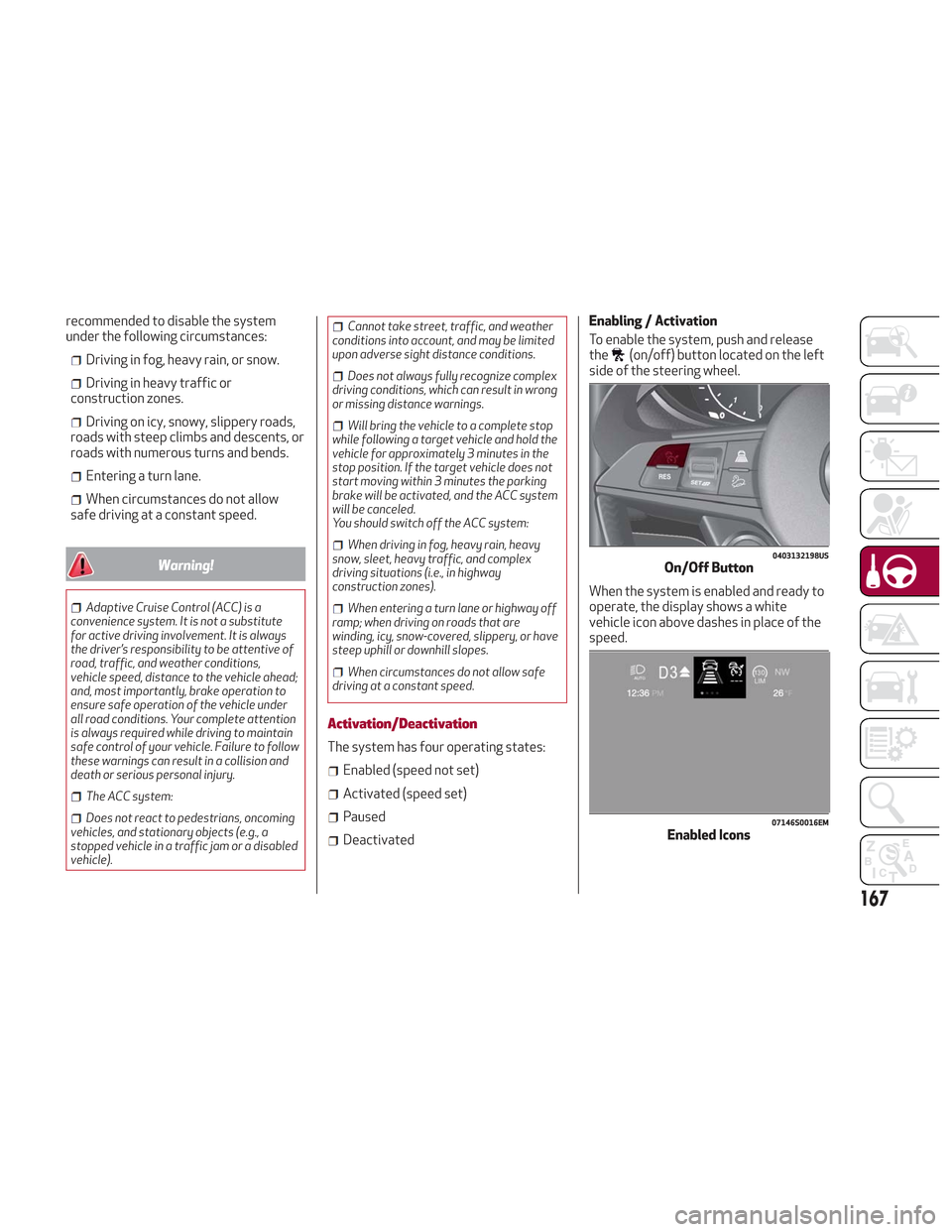
Deactivated Enabling / Activation
To enable the system, push and release
the
(on/off) button located on the left
side of the steering wheel.
When the system is enabled and ready to
operate, the display shows a white
vehicle icon above dashes in place of the
speed.
0403132198USOn/Off Button
07146S0016EMEnabled Icons
167
Page 170 of 276

Setting a speed activates the system.
The display shows the icon in green with
the set speed.
Note:The system cannot be enabled
when RACE mode is active.
Warning!
Leaving the Adaptive Cruise Control (ACC)
system on when not in use is dangerous. You
could accidentally set the system or cause it
to go faster than you want. You could lose
control and have a collision. Always leave
the system off when you are not using it.
Pausing / Deactivating
With the system enabled (speed not set),
push the
(on/off) button to disable.
With the system active (speed set), push
the
(on/off) button to pause. The
display will show the icon in white with
the speed in brackets. To then deactivate
the system, push the
(on/off) button
again.
Setting The Desired Speed
The speed can be set from a minimum of
20 mph (30 km/h) to a maximum of
110 mph (180 km/h).
When the vehicle reaches the desired
speed, push the SET switch upward or
downward and release it to activate the
system. When the accelerator is released,
the vehicle will maintain the set speed
automatically. While the accelerator pedal is pressed,
the system will not be able to control the
distance between the vehicle and the one
ahead. In this case, the speed will be
determined only by the position of the
accelerator pedal.
The system will return to normal
operation as soon as the accelerator
pedal is released.
The system
cannotbe set:
When pressing the brake pedal.
When the brakes are overheated.
When the electric park brake has been
operated.
When either PARK (P), REVERSE (R) or
NEUTRAL (N) is engaged.
When the engine rpm is above a
maximum threshold.
When the vehicle speed is not within
the operational speed range.
When the ESC (or ABS or other
stability control systems) are operating
or have just operated.
When the ESC system is off.
When the Forward Collision Warning
system (if equipped) is braking
automatically.
In the event of system failure.
When the engine is OFF.
In case of obstruction of the radar
sensor (in this case the bumper area
where it is located must be cleaned).
If the system is set, the conditions
described above also cause a
cancellation or deactivation of the
system. These situations may vary
according to the conditions.
Note: The system will not be deactivated
when speeds higher than those set are
reached by pressing the accelerator
pedal above 110 mph (180 km/h). In
these situations, the system may not
work correctly and it is recommended to
deactivate it.
To Vary The Speed Setting
Increasing Speed
Once the system has been activated, you
can increase the speed by lifting the SET
switch. Each time it is operated, the
speed increases by 1 mph.
By holding the button up, the set speed
will increase in increments of 5 mph until
0403132201USSET Switch
168
STARTING AND OPERATING