2018 Alfa Romeo MiTo instrument panel
[x] Cancel search: instrument panelPage 37 of 212

no messages or symbols are shown on
the display.
The device also acts on the dynamic car
control systems (engine, steering, ESC
system, instrument panel).
TURNING “Dynamic” MODE ON/OFF
4)
Activation
Move lever 1 upwards (to the letter “d”)
and hold in this position for 0.5 seconds
until the corresponding LED lights up or
the word “Dynamic” appears on the
display.
Deactivation
Mover the lever 1 to the "Natural"
position.
1.4 Turbo MultiAir versions
Selecting the “Dynamic” operation mode,
the turbocharger overboost feature is
enabled. The engine management control
unit allows - in relation to the position of
the accelerator pedal and for a limited
time - maximum pressure levels to be
reached inside the turbocharger, with a
consequent increase in engine torque
with respect to that which is normally
possible.
This function is particularly useful
whenever maximum performance is
required for a short time (e.g. when
overtaking).
IMPORTANT During acceleration, when
the “Dynamic” function is used the
steering may shudder, which is typical of
a sports setting.
TURNING “All Weather” MODE ON/OFF
Activation
Move lever 1 downwards (to the letter
“a”) and hold in this position for
0.5 seconds until the corresponding LED
lights up or the word “All Weather”
appears on the display.
Deactivation
To deactivate “All Weather” mode (and
return to “Natural”), carry out the same
procedure described for “Dynamic” mode,
but move lever 1 to “a”.
IMPORTANT
4)"FAST" VERSION: Considering the high
levels of vehicle performance, it is
recommended to not use the "Dynamic"
mode when driving the first kilometres with
the vehicle in order to provide the
mechanical components with the necessary
running-in period.
DYNAMIC SUSPENSION (active
shock absorber system)
This system interacts with the “Alfa DNA”
system. The “Alfa DNA” system lever
allows you to choose three different
driving settings depending on the route
type and on the road surface (see
paragraph “Alfa DNA system”).
In “Natural” and “All Weather” operating
mode, the active shock absorbers adjust
the car suspension to suit the route type
and the driving stresses, thus
considerably improving driving comfort
in particular on rough terrain.
The "Dynamic" operating mode produces
a sports driving setting characterised by
more responsive acceleration and
greater effort on the steering wheel to
give a sporty feeling. The shock absorber
damping action is also adjusted and
divided, to guarantee higher precision
and reactivity of the car, while
maintaining a good comfort level.
The driver will notice that the vehicle is
more precise when cornering and quicker
in changing direction.
35
Page 39 of 212

IMPORTANT If the ignition key is turned
to MAR, all the LEDs will stay on for
approximately 4 seconds (check
function).
IMPORTANT If the ignition key is turned
to STOP, the LED for the operating mode
selected will stay on for approximately
2 seconds (LED 3 or 4).
Engine starting always occurs on petrol;
then, depending on the position of the
switch 1 the following occurs:
the switch pressed on the right side
(identified by the symbol
): indicates
petrol operation with activation of the
associated orange LED 3;
the switch pressed on the left side
(identified by the symbolG): indicates
LPG operation with activation of the
associated green LED 4.
If the LPG runs out, the system
automatically switches to petrol: theorange LED 3 comes on and the green
LED 4 indicating LPG operation goes off.
When the vehicle is refuelled with LPG
after a normal start-up on petrol, the fuel
system automatically returns to LPG: the
orange LED 3 switches off and the green
LED 4 for LPG operation switches on.
REFUELLING
12)
LPG
Maximum refuelling capacity (including
reserve): 39 litres. The figure already
takes into account the 80% tank filling
limit and the residual fluid required for
priming; this figure represents the
maximum permitted capacity. In addition,
after different refuelling processes, this
figure may vary due to differences
between the network pump supply
pressures, pumps having different
supply/locking features, tank not
completely run out of fuel.
IMPORTANT In order to avoid
inconsistent information by the LPG
gauge on the instrument panel, it is
recommended to refill with at least
10 litres each time.
WARNING
20)Note that in some countries (including
Italy) there are legal restrictions in force for
parking/garaging motor vehicles fuelled by
gas that is denser than air; LPG comes under
this category.
21)Do not switch between the two
operating modes whilst starting the engine.
22)If gas is smelt, switch from LPG
operation to petrol operation and
immediately go to an Alfa Romeo Dealership
to have the vehicle checked and possible
system faults excluded.
IMPORTANT
5)The car is equipped with a gaseous LPG
injection system designed specifically for it:
it is therefore absolutely forbidden to alter
the configuration of the system or its
components. The use of other components or
materials could cause malfunctions and lead
to a reduction in safety; therefore, in the
case of problems, contact a Fiat Dealership.
To prevent damage to the gas system parts
when towing or raising the vehicle, follow the
instructions in the "Towing the vehicle"
paragraph of the Owner Handbook.
6)The system operates at temperatures
ranging between −20°C and 100°C.
38A0J0321C
37
Page 40 of 212

7)When using a painting oven, the LPG tank
should be removed from the car and later
carefully refitted at an Alfa Romeo
Dealership. Although the LPG system has
numerous safety features, it is advisable to
proceed as follows every time the vehicle is
not in use for a long period or moved in an
emergency as a result of a breakdown or
accident: unscrew the devices fastening the
cover of the LPG tank, then remove it. Close
the LPG cock rotating the ring nut clockwise
(see "Passive safety / active safety"). Refit
the cover and retighten the fastening
devices.
8)When switching is requested, metallic
noise from the valves which pressurise the
circuit can be heard. For the switching logic
described above, a delay between the valve
ticking and the switching off of the
instrument panel indication is completely
normal.
9)It is strictly forbidden to use any additive
in the LPG. Periodically (at least once every
six months) it is advisable to let the LPG in
the tank run out and, at the first refuelling, to
check that it does not exceed the maximum
capacity of 39 litres (with a tolerance of
2 litres excess). If the value is above 39 litres
(with tolerance of 2 litres excess), contact an
Alfa Romeo Dealership immediately.10)In particular usage conditions, such as
starting and operation at low ambient
temperature or LPG supply with low propane
content, the system may switch temporarily
to petrol operation, without a visual
indication on the petrol/LPG switch. In the
event of low LPG levels in the tank or request
for high performance (e.g. overtaking, car
fully laden, steep hills) the system may
automatically switch to petrol operation to
guarantee the engine power requested. In
this event, the performed switching is shown
by the orange (petrol) LED lit and the green
(LPG) LED off on the petrol/LPG witch. When
the above conditions stop, the system
automatically restores the LPG operation;
the orange (petrol) LED turns off and the
green (LPG) LED is lit on the switch. To
achieve the automatic switching described
above, make sure that there is always
enough fuel in the petrol tank.
11)Only use LPG for motor vehicles.
12)The LPG supply system is equipped with
a "consumption" function linked to the LED
display of LPG level on the switch. This
function activates only after a consistent
variation in fuel level has been detected. It is
therefore advisable to fill up with fuel at the
first LPG refuelling to obtain a more
"precise" indication of the level.
38
GETTING TO KNOW YOUR CAR
Page 41 of 212

This section of the booklet gives you all the information you need
to understand, interpret and use the instrument panel correctly.
KNOWING THE INSTRUMENT PANEL
CONTROL PANEL AND ON-BOARD INSTRUMENTS .........40
DISPLAY....................................42
MENU ITEMS . . . ..............................43
TRIP COMPUTER . . . . ..........................45
WARNING LIGHTS AND MESSAGES . ..................46
EOBD SYSTEM (European On Board Diagnosis) . . . . . . . .....64
Page 42 of 212

CONTROL PANEL AND ON-BOARD INSTRUMENTS
RECONFIGURABLE MULTIFUNCTION DISPLAY
1. Speedometer (speed indicator)
2. Reconfigurable multifunction display
3. Rev counter
4. Fuel level gauge with reserve warning light
5. Engine coolant temperature indicator with overheating warning light
Warning lights present on diesel versions only. On diesel versions, the end of scale for the rev counter is 6000 rpm
IMPORTANT The illumination of the instrument panel graphics may vary according to version.
39A0J1541C
40
KNOWING THE INSTRUMENT PANEL
Page 43 of 212
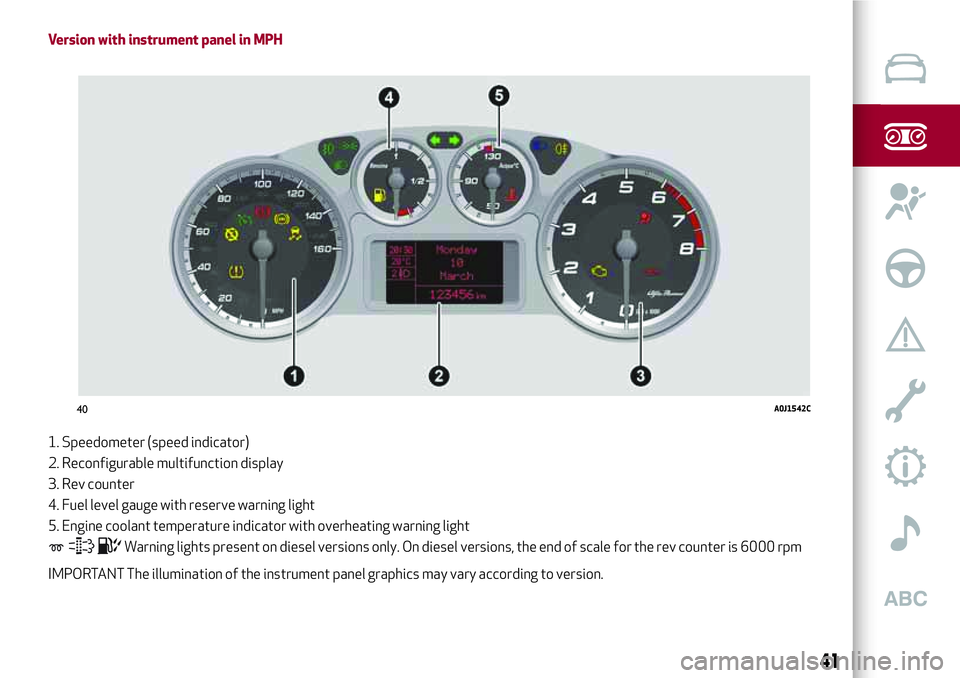
Version with instrument panel in MPH
1. Speedometer (speed indicator)
2. Reconfigurable multifunction display
3. Rev counter
4. Fuel level gauge with reserve warning light
5. Engine coolant temperature indicator with overheating warning light
Warning lights present on diesel versions only. On diesel versions, the end of scale for the rev counter is 6000 rpm
IMPORTANT The illumination of the instrument panel graphics may vary according to version.
40A0J1542C
41
Page 44 of 212

DISPLAY
The car is equipped with a reconfigurable
multifunction display that, according to
the previously applied settings, will show
useful driving information.
With the ignition key removed, the
display lights up and shows the time and
total odometer reading (in km or miles)
for a few seconds when a door is
opened/closed.
RECONFIGURABLE MULTIFUNCTION
DISPLAY
The following information is shown on the
display (example given in fig. 41 ):
1: Time
2: Area reserved for messages
(information, settings, etc)
3: Milometer (total distance covered
in km or miles).4: Car status indications (e.g. doors open,
possible ice on road, etc.)/Start&Stop
function indication (where
provided)/Gear Shift Indicator (where
provided)
5: Headlight alignment position (only with
dipped beam headlights on)
6: External temperature
The turbocharger pressure will appear on
some versions when “DYNAMIC” driving
mode is selected (see “Alfa DNA system”
in this chapter).
GEAR SHIFT INDICATOR
(where provided)
The GSI (Gear Shift Indicator) system
advises the driver to change gear through
a special indication on the display.
Through the GSI, the driver is informed
that the gear change will allow a
reduction in fuel consumption.
Therefore, for driving oriented towards
reducing fuel consumption, it is advisable
to stick to “Natural” or “All Weather”
mode and to follow the suggestions of
the Gear Shift Indicator, where traffic
conditions permit.
When the SHIFT UP icon
is shown on
the display the GSI suggests the driver to
up-shift, whereas if the SHIFT DOWN
icon
is displayed, the driver is advised
to down-shift.
The indication in the instrument panel
remains on until the driver shifts gear or
the driving conditions go back to a
situation where gearshifting is not
required to improve consumption.
CONTROL BUTTONS
“+” or(versions with Start&Stop
system) fig. 42: to scroll upwards through
the screen and the related options or to
increase the displayed value.
SET/
: press briefly to access the
menu and/or go to next screen or confirm
the selection. Hold down to go back to
the standard screen.
“–” or
(versions with Start&Stop
system): to scroll downwards through the
screen and the related options or to
decrease the displayed value.
IMPORTANT The control buttons
activate different functions according to
the following situations:
41A0K0600C
42A0J0302C
42
KNOWING THE INSTRUMENT PANEL
Page 45 of 212

within the menu, they allow you to
scroll up or down;
during settings operations, they
increase or decrease values.
SETUP MENU
The menu comprises a series of options
which can be selected using the buttons
andto access the different
selection and setting (Setup) operations
indicated below.
Some options have a submenu. The menu
can be activated by briefly pressing the
SET/ button
.
The menu includes the following items:
MENU
LIGHTING
SPEED WARNING
HEADLIGHT SENSOR (where
provided)
RAIN SENSOR (where provided)
TRIP B ACTIVATION
SET TIME
SET DATE
FIRST PAGE (where provided)
SEE RADIO
AUTOCLOSE
MEASUREMENT UNIT
LANGUAGE
WARNINGS VOLUME
SEAT BELT BEEP
SERVICE
PASSENGER AIRBAG
DAYTIME RUNNING LIGHTS
COURTESY LIGHTS
EXIT MENU
On vehicles equipped withUconnect™
system (where provided), some menu
items are shown on the navigator display.
MENU ITEMS
IMPORTANT If there is anUconnect™
system, some menu items are displayed
and managed by the latter and not the
instrument panel (refer to the
description in the “Multimedia” chapter
or in the supplements available online).
Menu
Access to the Setup Menu.
Lighting
(only with side lights on)
Adjustment (8 levels) of the brightness of
the instrument panel, theUconnect™
system controls (where provided) and the
dual-zone automatic climate control
system controls (where provided).
Speed warning
Vehicle speed limit setting (km/h or mph).
When this is exceeded, the driver is
notified by an audible warning signal.
Headlight sensor
(where provided)
Automatic switch on/off of lights
according to external light conditions.
The dusk sensor sensitivity can be
adjusted according to 3 levels (level
1=minimum sensitivity, level 2=average
sensitivity, level 3=maximum sensitivity).
43