2018 Acura TLX Speed
[x] Cancel search: SpeedPage 169 of 589

168
uuOperating the Switches Around the Steering Wheel uWipers and Washers
Controls
Wipers and Washers
The windshield wipers and washers can be
used when the power mode is in ON.
■MIST
The wipers run at high speed until you release
the lever.
■Wiper switch (OFF, INT*1/AUTO*2, LO,
HI)
Move the lever up or down to change the
wiper settings.
■Adjusting wiper operation*
Turn the adjustment ring to adjust the wiper
operation.
■Washer
Sprays while you pull the lever toward you.
When you release the lever for more than one
second, the spray stops, the wipers sweep two
or three more times to clear the windshield,
then stop.
*1: Models with manual intermittent operation
*2: Models with automati c intermittent operation
■Windshield Wipers/Washers1Wipers and Washers
NOTICE
Do not use the wipers when the windshield is dry.
The windshield will get sc ratched, or the rubber
blades will get damaged.
Turn the washers off if no washer fluid comes out.
The pump may get damaged.
The wiper motor may stop motor operation
temporarily to prevent an overload. Wiper operation
will return to normal within a few minutes, once the
circuit has returned to normal.
If the vehicle speeds up while the wipers are
operating intermittently, the length of the wipe
interval shortens.
When the vehicle speeds up, the wiper operation’s
shortest delay setting and the LO setting become
the same.
NOTICE
In cold weather, the blades may freeze to the
windshield.
Operating the wipers in th is condition may damage
the wipers. Use the defrost er or heated windshield
*
to warm the windshield, then turn the wipers on.
Models with intermittent time adjustment ring
MIST
OFF
LO: Low speed wipe
HI : High speed wipe Pull to
use
washer.
INT
*1/AUTO*2
Lower speed, fewer sweeps
Higher speed, more sweeps
* Not available on all models
18 ACURA TLX-31TZ36300.book 168 ページ 2017年2月21日 火曜日 午後2時32分
Page 170 of 589

Continued169
uuOperating the Switches Around the Steering Wheel uWipers and Washers
Controls
When you push the lever down to AUTO, the
windshield wipers sweep once, and go into
the automatic mode.
The wipers operate intermittently, at low
speed, or at high speed and stops in
accordance with the amount of rainfall the
rainfall sensor detects.
■AUTO sensitivity adjustment
When the wiper function is set to AUTO, you
can adjust the sensitivity of the rainfall sensor
(using the adjustment ring) so that wipers will
operate in accordance with your preference.
Sensor sensitivity
■Automatic Intermittent Wipers*1 Wipers and Washers
If the wipers st op operating due to an obstacle such
as the build-up of snow, pa rk the vehicle in a safe
place.
Rotate the wiper switch to OFF, and set the power
mode to ACCESSORY or VEHICLE OFF (LOCK), then
remove the obstacle.
1 Automatic Intermittent Wipers*
The rainfall sensor is in the location shown below.
NOTICE
AUTO should always be turned OFF before the
following situation in order to prevent severe damage
to the wiper system:
•Cleaning the windshield
•Driving through a car wash•No rain present
Rainfall Sensor
Adjustment Ring
Low sensitivity
High sensitivity
* Not available on all models
18 ACURA TLX-31TZ36300.book 169 ページ 2017年2月21日 火曜日 午後2時32分
Page 174 of 589
173
uuOperating the Switches Around the Steering Wheel uDriving Position Memory System
Continued
Controls
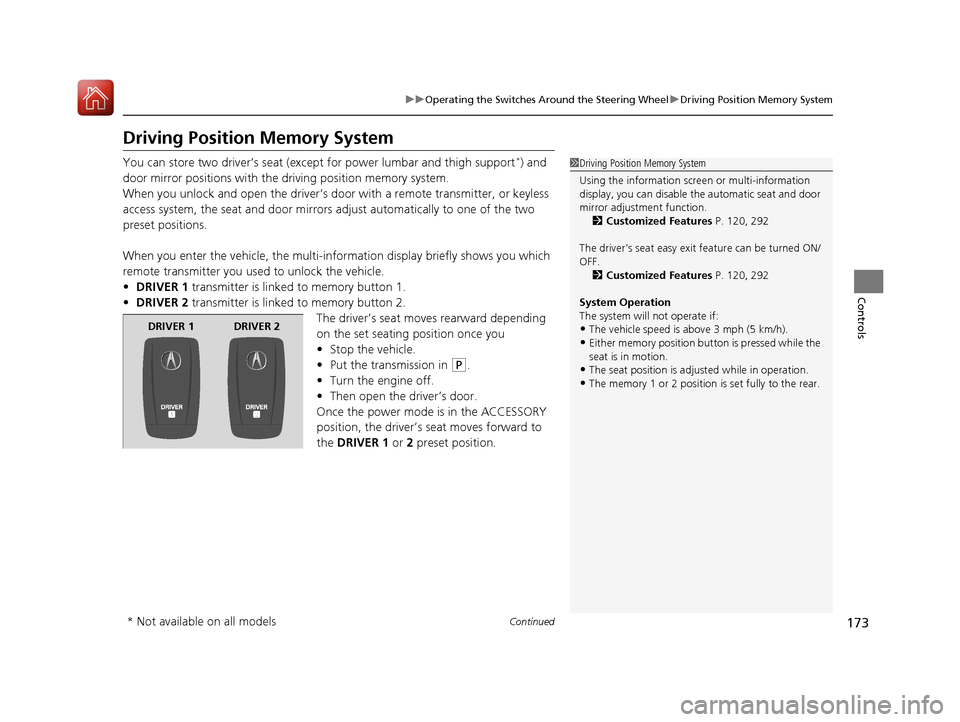
Driving Position Memory System
You can store two driver’s seat (exc ept for power lumbar and thigh support*) and
door mirror positions with the dr iving position memory system.
When you unlock and open the driver’s door with a remote transmitter, or keyless
access system, the seat and door mirrors adjust automatically to one of the two
preset positions.
When you enter the vehicle, the multi-in formation display briefly shows you which
remote transmitter you used to unlock the vehicle.
• DRIVER 1 transmitter is linked to memory button 1.
• DRIVER 2 transmitter is linked to memory button 2.
The driver’s seat moves rearward depending
on the set seating position once you
•Stop the vehicle.
• Put the transmission in
(P.
• Turn the engine off.
• Then open the driver’s door.
Once the power mode is in the ACCESSORY
position, the driver’s seat moves forward to
the DRIVER 1 or 2 preset position.
1 Driving Position Memory System
Using the information scr een or multi-information
display, you can disable th e automatic seat and door
mirror adjust ment function.
2 Customized Features P. 120, 292
The driver’s seat easy exit feature can be turned ON/
OFF. 2 Customized Features P. 120, 292
System Operation
The system will not operate if:
•The vehicle speed is above 3 mph (5 km/h).
•Either memory position button is pressed while the
seat is in motion.
•The seat position is adju sted while in operation.
•The memory 1 or 2 position is set fully to the rear.
DRIVER 1 DRIVER 2
* Not available on all models
18 ACURA TLX-31TZ36300.book 173 ページ 2017年2月21日 火曜日 午後2時32分
Page 205 of 589

204
Controls
Climate Control System
Using Automatic Climate Control
The automatic climate control system maintains the interior temperature you select.
The system also selects the proper mix of heated or cooled air that raises or lowers
the interior temperature to your pr eference as quickly as possible.
Use the system when the engine is running.
1. Press the AUTO button.
2. Adjust the interior temperature using the driver’s side or passenger’s side
temperature control switch.
3. Press the (On/Off) button to cancel.1Using Automatic Climate Control
If any buttons/icons on the touch screen are pressed
while using the climate control system in auto, the
function of the button/icon th at was pressed will take
priority.
The AUTO indicator will go off, but functions
unrelated to the button/icon that was pressed will be
controlled automatically.
During idle-stops, air-conditioning is suspended, and
only the blower remains active.
If you do not want air-cond itioning suspended, press
to cancel idle-stop.
To prevent cold air from bl owing in from outside, the
fan may operate at low speed for a while after the
AUTO button has been pressed.
If the interior is very warm, you can cool it down
more rapidly by partial ly opening the windows,
turning the system on auto, and setting the
temperature to low. Change the fresh air mode to
recirculation mode until the temperature cools down.
When you set the temperat ure to the lower or upper
limit, Lo or Hi is displayed.
Models with Auto Idle Stop
All models
(On/Off) ButtonAUTO Button
On Demand Multi-Use Display
TM
Driver’s Side
Temperature
Control Switch
Passenger’s
Side
Temperature
Control Switch Passenger’s
Side
Temperature
Driver’s Side
Temperature
18 ACURA TLX-31TZ36300.book 204 ページ 2017年2月21日 火曜日 午後2時32分
Page 209 of 589

uuClimate Control System uUsing Automatic Climate Control
208
Controls
■SYNC on and off
1.Select SYNC.
2. Select On for synchronization mode, and
Off for dual mode.
u When in synchronization mode, the
passenger’s side temperature becomes
the same as the driver’s side settings.
3. Adjust the temperature from the driver’s
side.
■Changing the fan speed
1.Select .
u When the left or right side of the
is selected, the fan speed level goes up or
down one level at a time.
2. Change the fan speed with one of the
following:
The fan speed level indicators: Select your
desired speed level. The smaller indicator is
for a slower speed, an d the larger for a
faster speed.
(+/(-: To go up or down one level at a
time.
Fan Auto : The system automatically selects
the fan speed most suitable to the ambient
environment.
1 SYNC on and off
When the system is not in SYNC mode, the driver’s
side temperature and th e front passenger’s side
temperature can be set separately.
You can also turn off SYNC mode by changing the
front passenger’s si de temperature.
1Changing the fan speed
While the climate control system is in auto, Fan Auto
is highlighted.
Fan Speed Level Indicators
18 ACURA TLX-31TZ36300.book 208 ページ 2017年2月21日 火曜日 午後2時32分
Page 229 of 589

228
uuAudio System Basic Operation uAdjusting the Sound
Features
Adjusting the Sound
1. Select Audio Menu , then select Sound
Settings .
2. Select the Bass, Treble , Fader , Balance ,
Subwoofer or SVC (Speed-sensitive
Volume Compensation).
3. Use
(+, (- or other icons to adjust the
setting.
1 Adjusting the Sound
The SVC has four modes: Off, Low , Mid, and High.
SVC adjusts the volume level based on the vehicle
speed. As you go faster, audio volume increases. As
you slow down, audi o volume decreases.
Instead of using
( +, (- or icons, you can also touch
the point where your desired setting is.
18 ACURA TLX-31TZ36300.book 228 ページ 2017年2月21日 火曜日 午後2時32分
Page 261 of 589

uuAudio System Basic Operation uApple CarPlay
260
Features
After you have connected your iPhone to the system via the 2.5A USB port, use the
following procedure to set up Apple CarPlay. Use of Apple CarPlay will result in the
transmission of certain user and vehicle information (such as vehicle location, speed,
and status) to your iPhone to enhance th e Apple CarPlay experience. You will need
to consent to the sharin g of this information on the information screen.
■Enabling Apple CarPlay
Enable Once: Allows only once. (Prompt
shows again next time.)
Always Enable : Allows anytime. (Prompt
does not show again.)
Cancel : Does not allow this consent.
You may change the consent settings under
the Smartphone Settings menu.
■Setting Up Apple CarPlay1Setting Up Apple CarPlay
You can also use the method below to set up Apple
CarPlay:
Press the SETTINGSSelect Smartphone
Settings Apple CarPlay Device List
Use of user and vehicle information
The use and handling of user and vehicle information
transmitted to/from your iP hone by Apple CarPlay is
governed by the Apple iOS terms and conditions and
Apple’s Privacy Policy.
18 ACURA TLX-31TZ36300.book 260 ページ 2017年2月21日 火曜日 午後2時32分
Page 282 of 589

281
uuGeneral Information on the Audio System uHonda App License Agreement
Continued
Features
5. Unauthorized Use and Abuse. You are responsible for ensuring your (and any aut horized third parties’) use of the SOFTWARE and
SERVICES remains in compliance with this AGREEMENT and all other applicable HONDA TERMS and PR OVIDER TERMS. You acknowledge
and agree that any use of the SOFTWARE or SERVICES occurring through your VEHICLE will be deemed your actions and that HONDA and
PROVIDERS may rely upon such actions. You agree to immediately notify us if you suspect fraudulent or abusive activity involvin g the
SOFTWARE or SERVICES. If you so notify us or if we otherwise suspect fraudulent or abusive activity, you agree to cooperate with us in any
fraud investigation and to use any fraud prevention measures we pr escribe. Your failure to immediately notify us or cooperate to use such
measures will result in your liability for all fraudulent usage or abusive activity associated with your VEHICLE.
6. SOFTWARE Updates.
The SOFTWARE and SERVICES may be updated when your VEHICLE is serviced by a DEALER or remotely, over-the-
air, by HONDA from time to time; such updates may occur with or without further notice or your future consent. The SOFTWARE may be
updated at HONDA’s discretion and for any purpose including, with out limitation, to patch or otherwise improve the SOFTWARE or
SERVICES functionality, security, or stability. All updates to the SOFTWARE and SERVICES are subject to this AGREEMENT and any other
applicable HONDA TERMS and PROVIDER TERMS.
7. Uninstalling, Removing, and Replacing the SOFTWARE.
Replacing SOFTWARE or HONDA SERVICE S with software or firmware not
provided and installed by HONDA or a DEAL ER will render all representations and warranties for the SOFTWARE, HONDA SERVICES, an d
VEHICLE functionality reliant upon the SOFTWARE or HONDA SERVICES null and void.
D. SOFTWARE Operationa l Notices and Warnings
1. Vehicle Geolocation Information.
You acknowledge that your VEHICLE may be equi pped with certain traffic and map features. The
traffic feature will automatically collect and transmit, through GPS technology, your Vehicle’s cu rrent location (longitude and latitude),
travel direction and speed (“VEHICLE GEOLOCATION INFORMATION”) to HONDA and PROVIDERS. The VEHICLE GEOLOCATION
INFORMATION is used by HONDA and PROVIDERS to provide traffic and navigation-related information to you, but may also be used to
provide other SERVICES or offers to you. HONDA will not use such VEHICLE GEOLOCATION INFORMATION for its own marketing efforts,
or provide such information to unaffiliated third parti es for their own purposes, without your express consent.
18 ACURA TLX-31TZ36300.book 281 ページ 2017年2月21日 火曜日 午後2時32分