Page 301 of 589

300
uuCustomized Features u
Features
*1:Default SettingSetup
Group Customizable Features Descri
ption Selectable Settings
Vehicle
Settings
DefaultCancels/Resets all customized items in the
Vehicle Settings group as default.Yes/No
Driver
Assist
Forward Collision Warning
DistanceChanges at which distance CMBSTM alerts.Long /Normal*1/ Short
Head-up WarningTurns the head-up warning on and off.On*1/Off
ACC Forward Vehicle
Detect BeepCauses the system to beep when the system
detects a vehicle, or when the vehicle goes out of
the ACC with LSF range.
On /Off*1
ACC Display Speed UnitChanges the speed unit for ACC with LSF on the
multi-information display.mph*1/km/h (U.S.)
mph /km/h*1 (Canada)
Road Departure Mitigation
SettingChanges the setting for the road departure
mitigation system.Normal*1/Wide /
Warning Only
Lane Keeping Assist
Suspend BeepCauses the system to b eep when the LKAS is
suspended.On /Off*1
Blind Spot Info*Changes the setting for the blind spot
information.Audible And Visual
Alert*1/Visual Alert /
Off
* Not available on all models
18 ACURA TLX-31TZ36300.book 300 ページ 2017年2月21日 火曜日 午後2時32分
Page 303 of 589

302
uuCustomized Features u
Features
*1:Default SettingSetup
Group Customizable Features Descri
ption Selectable Settings
Vehicle
Settings
Driving
Position
Memory Position LinkTurns the driving position memory system on and
off.On*1/Off
Seat Position Movement At
Entry/ExitDepending on the set seating position the driver
seat may move forward or rearward when
entering/exiting the vehicle.
On*1/Off
Keyless
Access
Door Unlock ModeChanges which doors unlock when you grab the
driver’s door handle.Driver Door Only*1/
All Doors
Keyless Access Light FlashCauses some exterior lig hts to flash when you
unlock/lock the doors.On*1/ Off
Keyless Access BeepCauses the beeper to sound when you unlock/
lock the doors.On*1/Off
Remote Start System On/
Off*Turns the remote engine start feature on and off.On*1/Off
Walk Away Auto Lock
Changes the settings for the automatic locking
the doors when you walk away from the vehicle
while carrying the keyless access remote.
On /Off*1
* Not available on all models
18 ACURA TLX-31TZ36300.book 302 ページ 2017年2月21日 火曜日 午後2時32分
Page 305 of 589

304
uuCustomized Features u
Features
*1:Default SettingSetup
Group Customizable Features Descri
ption Selectable Settings
Vehicle
SettingsDoor
Auto Door LockChanges the setting for when the doors
automatically lock.With Vehicle
Speed*1/Shift from P/
Off
Auto Door UnlockChanges the setting for when the doors unlock
automatically.
All Doors When
Driver’s Door
Opens
*1/ All Doors
When Shifted to
Park /All Doors When
Ignition Switched
Off /Off
Key And Remote Unlock
ModeSets up either the driver ’s door or all doors to
unlock on the first push of the remote or built-in
key.Driver Door*1/ All
Doors
Keyless Lock Answer BackLOCK/UNLOCK- The exterior lights flash.
LOCK (2nd push)- The beeper sounds.On*1/ Off
Security Relock Timer
Changes the time it takes for the doors to relock
and the security system to set after you unlock
the vehicle without opening any door.90seconds/
60seconds/
30seconds
*1
Auto Folding Door Mirror*Changes how you can fold the door mirrors.
Auto Fold With
Keyless*1/Manual
Only
* Not available on all models
18 ACURA TLX-31TZ36300.book 304 ページ 2017年2月21日 火曜日 午後2時32分
Page 308 of 589
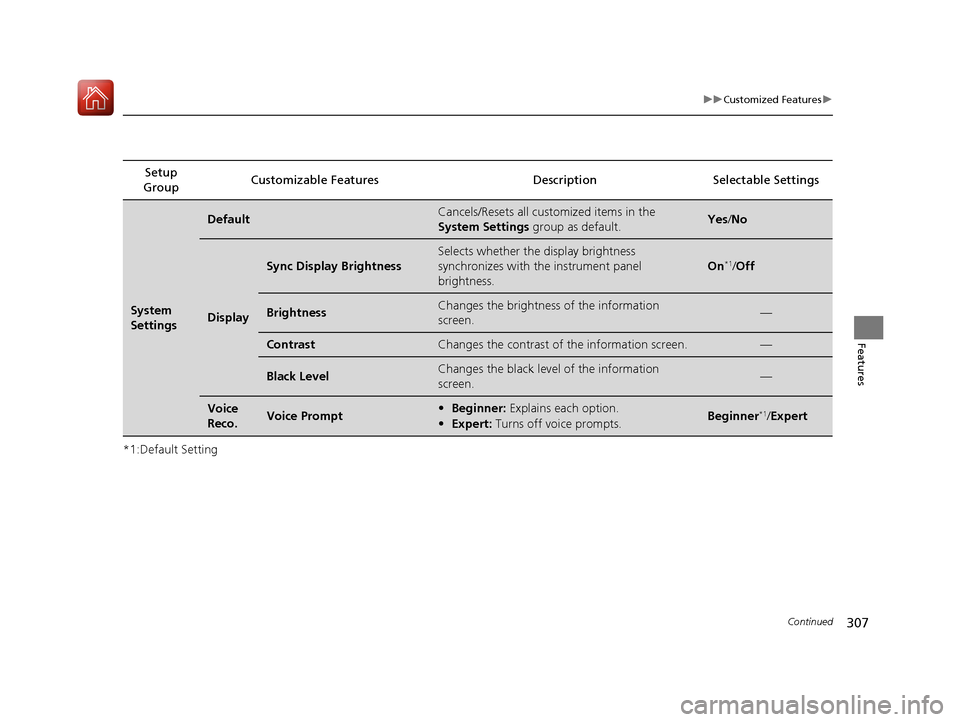
307
uuCustomized Features u
Continued
Features
*1:Default SettingSetup
Group Customizable Features Description Selectable Settings
System
Settings
DefaultCancels/Resets all customized items in the
System Settings
group as default.Yes/No
Display
Sync Display Brightness
Selects whether the display brightness
synchronizes with the instrument panel
brightness.
On*1/ Off
BrightnessChanges the brightness of the information
screen.—
ContrastChanges the contrast of the information screen.—
Black LevelChanges the black level of the information
screen.—
Voice
Reco.Voice Prompt• Beginner: Explains each option.
• Expert: Turns off voice prompts.Beginner*1/Expert
18 ACURA TLX-31TZ36300.book 307 ページ 2017年2月21日 火曜日 午後2時32分
Page 309 of 589

308
uuCustomized Features u
Features
*1:Default SettingSetup
Group Customizable Features Descri
ption Selectable Settings
System
SettingsOthers
LanguageChanges the display language.English*1/Français /
Español
Operation Restriction Tips*Alerts you when manual control of the system is
disabled to prevent distraction while driving. Only
voice commands are available.
On*1/ Off
Header Clock DisplaySelects whether the clock display comes on.On*1/Off
Factory Data ResetResets all the settings to their factory default.
2 Defaulting All the Settings P. 313—
Smartphone
Settings
Default Cancels/Resets all cust
omized items in the
Smartphone Settings group as default. Yes
/No
Apple CarPlay Device List Sets up the Apple CarPlay connection. —
Android Auto Device List Sets up the Android Auto connection. —
Smartphone Volume Adjusts the volume of the smartphone function. 1~8
*1~11
Version Shows software version of Apple CarPlay and
Android Auto unit. —
* Not available on all models
18 ACURA TLX-31TZ36300.book 308 ページ 2017年2月21日 火曜日 午後2時32分
Page 312 of 589
311
uuCustomized Features u
Continued
Features
■List of customizable options
*1:Default Setting Setup
Group Customizable Features Description Selectable Settings
Edit Source OrderChanges the order of source list.
2
Selecting an Audio Source P. 220—
Sound Settings Bass
Adjusts the settings of the audio speaker’s sound.
2Adjusting the Sound P. 228—
Treble
Fader
Balance
Subwoofer
SVC
Audio
SettingsSiriusXM
Play the Song from the
BeginningTurns on and off the Tune Start function.On*1/
Off
SportsFlash
NotificationTurns on and off the sports alert function.Disable*1/Enable
once /Enable
BeepCauses the system to beep when the sports alert
is notified.On*1/ Off
Favorite
TeamsSelects your favorite sport teams.—
On Demand Multi-Use DisplayTM
18 ACURA TLX-31TZ36300.book 311 ページ 2017年2月21日 火曜日 午後2時32分
Page 314 of 589
313
uuCustomized Features uDefaulting All the Settings
Features
Defaulting All the Settings
You can reset all the menu and customiz ed settings as the factory defaults.
1. Press the SETTINGS button.
2. Rotate to select System Settings, then
press .
3. Rotate to select Factory Data Reset ,
then press .
u The pop-up menu appears on the screen.
4. Rotate to select Yes, then press .
u The confirmation message will appear.
5. Rotate to select Yes, then press
again to reset the settings.
u The confirmation message will appear.
Press to select OK.1Defaulting All the Settings
When you transfer the vehicle to a third party, reset
all settings to default a nd delete all personal data.
The following settin gs will be reset:
•Audio preset settings•Phonebook entries
•Other display and each item settings
18 ACURA TLX-31TZ36300.book 313 ページ 2017年2月21日 火曜日 午後2時32分
Page 315 of 589

314
Features
HomeLink® Universal Transceiver
The HomeLink ® Universal Transceiver can be pr ogrammed to operate up to three
remote controlled devices around your home, such as garage doors, lighting, or
home security systems.
Refer to the safety information that came wi th your garage door opener to test that
the safety features are functioning properly. If you do not have the safety
information, contact the manufacturer.
Before programming HomeLink, make sure that people and objects are out of the
way of the garage or gate to prevent potential injury or damage.
When programming a garage door opener, park just outside the garage door’s path.
■Important Safety Precautions
1HomeLink ® Universal Transceiver
Before programming HomeLi nk to operate a garage
door opener, confirm that the opener has an external
entrapment protection system, such as an “electronic
eye,” or other safety and reverse stop features. If it
does not, HomeLink may not be able to operate it.
18 ACURA TLX-31TZ36300.book 314 ページ 2017年2月21日 火曜日 午後2時32分