Page 198 of 589

Continued197
uuInterior Lights/Interior Convenience Items uInterior Convenience Items
Controls
■When charging does not start
Perform one of the solutions in the following table.
IndicatorCauseSolution
Slow Blink
There is an obstacle(s) between
the charging area and the
device.Remove the
obstacle(s).
The device is not within the
charging area. Move the device to the
center of the charging
area where is
located.
Fast BlinkThe wireless charger is faulty.
Turn the vehicle off
and back on. If the
indicator still blinks,
contact a dealer.
1
Wireless Charger*
This system consumes a lot of power. Do not use the
system for a long time when the engine is not
running. This may weaken the battery, making it
difficult to start the engine.
When using the wireless charger, check the user’s
manual that came with th e compatible device you
want to charge.
NOTICE
Do not place any magneti c recording media or
precision machines within the charging area while
charging.
The data on your cards such as credit cards can be
lost because of the magneti c effect. Also precision
machines such as watches can go wrong.
Page 208 of 589
Continued207
uuClimate Control System uUsing Automatic Climate Control
Controls
■Switching the vent mode
Select a desired vent mode icon, or Mode
Auto: The system automatically selects the
vent mode most suitable to the ambient
environment.
Vent mode
: Dashboard vents and back of the center
console
: Dashboard and floor vents, and back of
the center console : Floor vents
: Floor and defroster vents
■A/C on and off
1.Select A/C.
2. Select On or Off .
1Switching the vent mode
While the climate control system is in auto, Mode
Auto is highlighted.
18 ACURA TLX-31TZ36300.book 207 ページ 2017年2月21日 火曜日 午後2時32分
Page 216 of 589

215
uuAudio System uUSB Port
Features
USB Port
1. Open the center pocket and tray.
2 Center Pocket P. 193
2.Open the cover.
3. Install the device USB connector or the USB
flash drive to the USB port.
u The USB port (2.5A) is for charging
devices, playing audio files and
connecting compatib le phones with
Apple CarPlay or Android Auto.
1 USB Port
•Do not leave the iPod or USB flash drive in the
vehicle. Direct sunlight and high temperatures may
damage it.
•We recommend using an extension cable with the
USB port.
•Do not connect the iPod or USB flash drive using a
hub.
•Do not use a device such as a card reader or hard
disk drive, as the device or your files may be
damaged.
•We recommend backing up yo ur data before using
the device in your vehicle.
•Displayed messages may vary depending on the
device model and software version.
If the audio system does not recognize the iPod, try
reconnecting it a few times or reboot the device. To
reboot, follow the manufac turer’s instructions
provided with the iPod or visit the following website:
•U.S.: www.apple.com/ipod.
•Canada: www.apple.com/ca/ipod.
The USB port can supply up to 2.5A of power. It does
not output 2.5A unless requested by the device.
For amperage details, read the operating manual of
the device that ne eds to be charged.
Set the power mode to ACCESSORY or ON first.
Under certain condi tions, a device connected to the
port may generate noise in the radio you are listening
to.
USB charge
18 ACURA TLX-31TZ36300.book 215 ページ 2017年2月21日 火曜日 午後2時32分
Page 296 of 589
295
uuCustomized Features u
Continued
Features
Maintenance ResetMaintenance Info.
Preferred Dynamic ModeDynamic
Mode
Key And Remote Unlock Mode
Keyless Lock Answer Back
Security Relock Timer
Auto Door Lock
Auto Door Unlock Door
Wireless ChargingWireless Charger*
Auto Folding Door Mirror*
Door Unlock Mode
Keyless Access Beep
Interior Light Dimming Time
Headlight Auto Off Timer
Auto Light Sensitivity
Remote Start System On/Off*
Walk Away Auto Lock
Lighting
Keyless Access
Keyless Access Light Flash
* Not available on all models
18 ACURA TLX-31TZ36300.book 295 ページ 2017年2月21日 火曜日 午後2時32分
Page 305 of 589

304
uuCustomized Features u
Features
*1:Default SettingSetup
Group Customizable Features Descri
ption Selectable Settings
Vehicle
SettingsDoor
Auto Door LockChanges the setting for when the doors
automatically lock.With Vehicle
Speed*1/Shift from P/
Off
Auto Door UnlockChanges the setting for when the doors unlock
automatically.
All Doors When
Driver’s Door
Opens
*1/ All Doors
When Shifted to
Park /All Doors When
Ignition Switched
Off /Off
Key And Remote Unlock
ModeSets up either the driver ’s door or all doors to
unlock on the first push of the remote or built-in
key.Driver Door*1/ All
Doors
Keyless Lock Answer BackLOCK/UNLOCK- The exterior lights flash.
LOCK (2nd push)- The beeper sounds.On*1/ Off
Security Relock Timer
Changes the time it takes for the doors to relock
and the security system to set after you unlock
the vehicle without opening any door.90seconds/
60seconds/
30seconds
*1
Auto Folding Door Mirror*Changes how you can fold the door mirrors.
Auto Fold With
Keyless*1/Manual
Only
* Not available on all models
18 ACURA TLX-31TZ36300.book 304 ページ 2017年2月21日 火曜日 午後2時32分
Page 373 of 589

uuWhen Driving uShifting
372
Driving
■Shift Operation1Shift Operation
NOTICE
When you change (D to (R and vice versa, come to
a complete stop and keep the brake pedal depressed.
Operating the shift button before the vehicle has
come to a complete standstill can damage the
transmission.
Use the gear position indicator and the shift button
indicator to check the gear position before selecting
a shift button.
If the indicator of the curren tly selected gear position,
or all the gear position indicators are blinking
simultaneously, there is a problem with the
transmission.
Avoid sudden acceleration and have the transmission
checked by a dealer as soon as possible.
The fuel supply may be cut of f if you drive at engine
speeds in or over the tachometer’s red zone (engine
speed limit). If this happe ns, you may experience a
slight jolt.
When the engine speed is increased while the
transmission is in
( N, (P or (R, the fuel supply may
be cut off even without the engine speed entering
the tachometer’s red zone.
The beeper sounds once when you change to
( R.
Gear Position Indicator
Tachometer’s red zone
Press the (P button.
Pull back the (R button.
Press the
( N button.
Press the
( D button.
Shift Button
Indicator
M (sequential mode) Indicator
Sequential Mode Gear
Selection Indicator
18 ACURA TLX-31TZ36300.book 372 ページ 2017年2月21日 火曜日 午後2時32分
Page 442 of 589

Continued441
uuBraking uCollision Mitigation Braking SystemTM (CMBSTM)
Driving
The system may automatically shut off and the CMBSTM indicator will come on under
certain conditions. Some examples of thes e conditions are listed below. Other
conditions may reduce some of the CMBS
TM functions.
2 Front Sensor Camera P. 389
■Environmental conditions
• Driving in bad weather (rain, fog, snow, etc.).
• Sudden changes between light and dark, such as an entrance or exit of a tunnel.
• There is little contrast between objects and the background.
• Driving into low sunlight (e.g., at dawn or dusk).
• Strong light is reflec ted onto the roadway.
• Driving in the shadows of trees, buildings, etc.
• Roadway objects or structures are misinterpreted as vehicles and pedestrians.
• Reflections on the interior of the front windshield.
• Driving at night or in a dark condition such as a tunnel.
■Roadway conditions
• Driving on a snowy or wet roadway (obs cured lane marking, vehicle tracks,
reflected lights, road spray, high contrast).
• Driving on curvy, winding, or undulating roads.
• The road is hilly or the vehicle is approaching the crest of a hill.
■CMBSTM Conditions and Limitations1CMBSTM Conditions and Limitations
Do not paint, or apply any coverings or paint to the
radar sensor area. This can impact CMBS
TM operation.
Have your vehicle checked by a dealer if you find any
unusual behavior of the system (e.g., the warning
message appears too frequently).
If the front of the vehicle is impacted in any of the
following situations, the ra dar sensor may not work
properly. Have your vehi cle checked by a dealer:
•The vehicle mounted onto a bump, curb, chock,
embankment, etc.
•You drive the vehicle where the water is deep.•Your vehicle has a frontal collision.
If you need the radar sensor to be repaired, or
removed, or the radar se nsor cover is strongly
impacted, turn off the system by pressing the
CMBS
TM off button and take your vehicle to a dealer.
18 ACURA TLX-31TZ36300.book 441 ページ 2017年2月21日 火曜日 午後2時32分
Page 458 of 589
457Continued
Driving
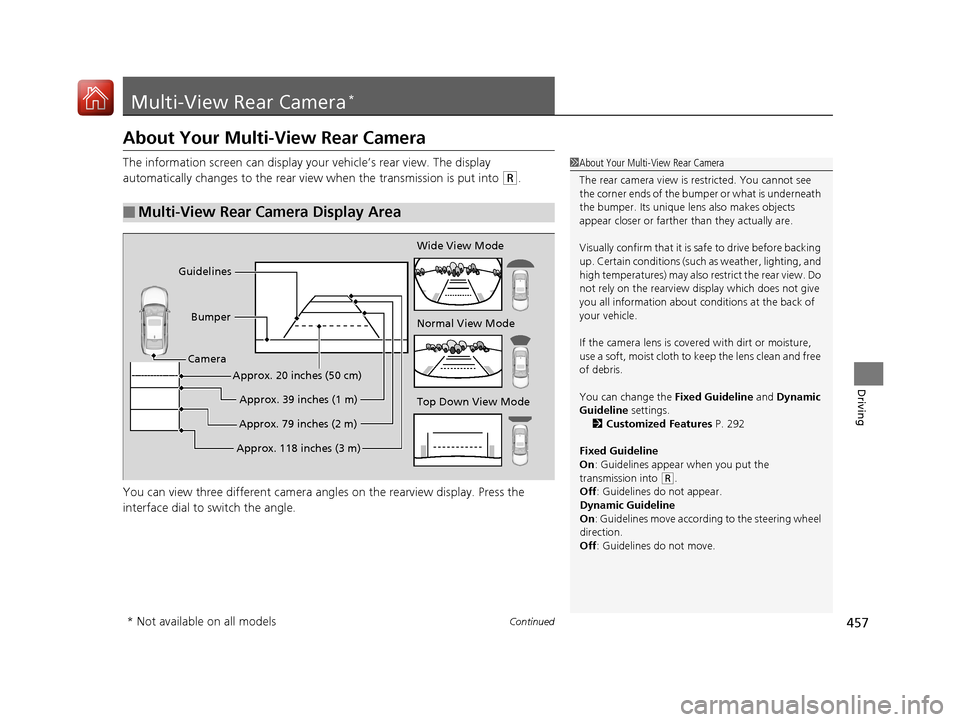
Multi-View Rear Camera*
About Your Multi-View Rear Camera
The information screen can display your vehicle’s rear view. The display
automatically changes to the rear view when the transmission is put into
(R.
You can view three differen t camera angles on the rearview display. Press the
interface dial to switch the angle.
■Multi-View Rear Camera Display Area
1 About Your Multi-View Rear Camera
The rear camera view is restricted. You cannot see
the corner ends of the bum per or what is underneath
the bumper. Its unique le ns also makes objects
appear closer or farther than they actually are.
Visually confirm that it is safe to drive before backing
up. Certain conditions (such as weather, lighting, and
high temperatures) may also re strict the rear view. Do
not rely on the rearview display which does not give
you all information about conditions at the back of
your vehicle.
If the camera lens is cove red with dirt or moisture,
use a soft, moist cloth to keep the lens clean and free
of debris.
You can change the Fixed Guideline and Dynamic
Guideline settings. 2 Customized Features P. 292
Fixed Guideline
On : Guidelines appear when you put the
transmission into
( R.
Off : Guidelines do not appear.
Dynamic Guideline
On : Guidelines move according to the steering wheel
direction.
Off : Guidelines do not move.
Top Down View Mode Normal View Mode Wide View Mode
Guidelines
Bumper
Camera
Approx. 118 inches (3 m)Approx. 79 inches (2 m)Approx. 39 inches (1 m)
Approx. 20 inches (50 cm)
* Not available on all models
18 ACURA TLX-31TZ36300.book 457 ページ 2017年2月21日 火曜日 午後2時32分

