Page 427 of 589

uuWhen Driving uTire Pressure Monitoring System (TPMS) with Tire Fill Assist
426
Driving
To select the tire pressure monitor, set the power
mode to ON, and roll the right selector wheel
until you see the tire pressure screen.
The pressure for each tire is displayed in PSI
(U.S.) or kPa (Canada).
Tire Pressures Low is displayed when a tire
has significantly low pressure. The specific tire
is displayed on the screen.
■Tire Pressure Monitor1Tire Pressure Monitor
The pressure displayed on the multi-information
display can be slightly different from the actual
pressure as measured by a gauge. If there is a
significant di fference between the two values, or if
the low tire pressure/TPMS indicator and the message
on the multi-information di splay do not go off after
you have inflated the tire to the specified pressure,
have the system checked by a dealer.
Tire Pressure Monitor Problem may appear if you
drive with the compact spare tire
*, or there is a
problem with the TPMS.
* Not available on all models
18 ACURA TLX-31TZ36300.book 426 ページ 2017年2月21日 火曜日 午後2時32分
Page 430 of 589

429Continued
Driving
Braking
Brake System
Use the parking brake to keep the vehicle stationary when parked. When the
parking brake is applied, you can manu ally or automatically release it.
■To apply
Pull the electric parking brake switch up gently
and securely.
u The electric parking brake indicator
comes on.
■Parking Brake1Parking Brake
You may hear the electric parking brake system
motor operating from the re ar wheel area when you
apply or release the parki ng brake, or set the power
mode to OFF. This is normal.
The brake pedal may slightly move due to the electric
parking brake system opera tion when you apply or
release the parking br ake. This is normal.
You cannot apply or release the parking brake if the
battery goes dead.
2 Jump Starting P. 542
If you pull up and hold the electric parking brake
switch while driving, the brakes on all four
wheels are applied by the VSA ® system until the
vehicle come to a stop. The electric parking
brake then applies, and the switch should be
released.
Electric Parking
Brake Switch
Models with electronic gear selector
Electric Parking
Brake Switch
Models with shift lever
18 ACURA TLX-31TZ36300.book 429 ページ 2017年2月21日 火曜日 午後2時32分
Page 433 of 589

uuBraking uBrake System
432
Driving
Your vehicle is equipped with disc brakes at all four wheels. A vacuum power assist
helps to reduce the effort needed on the brake pedal. The brake assist system
increases the stopping force when you depress the brake pedal hard in an
emergency situation. The an ti-lock brake system (ABS) helps you retain steering
control when braking very hard.
2 Brake Assist System P. 436
2 Anti-lock Brake System (ABS) P. 435
■Foot Brake1Foot Brake
Check the brakes after driving through deep water,
or if there is a buildup of road surface water. If
necessary, dry the brakes by lightly depressing the
pedal several times.
If you hear a continuous me tallic friction sound when
applying the brakes, this is caused by the brake wear
indicator rubbing on the brake rotor and indicates
that the brake pads need to be replaced. Have the
vehicle checked by a deal er. If you hear only an
occasional squeak or squeal when you initially apply
the brake pedal, this may be normal and caused by
high frequency vibration of the brake pads against
the rotating brake disc.
Constantly using the brak e pedal while going down a
long hill builds up heat, which reduces the brake
effectiveness. Apply engine braking by taking your
foot off the accelerator pe dal and downshifting to a
lower gear.
Do not rest your foot on the brake pedal while
driving, as it will lightly apply the brakes and cause
them to lose effectiveness over time and reduce pad
life. It will also conf use drivers behind you.
18 ACURA TLX-31TZ36300.book 432 ページ 2017年2月21日 火曜日 午後2時32分
Page 437 of 589
436
uuBraking uBrake Assist System
Driving
Brake Assist System
Designed to assist the driver by generati ng greater braking force when you depress
the brake pedal hard during emergency braking.
■Brake assist system operation
Press the brake pedal firmly for more powerful braking.
When brake assist operates, the pedal ma y wiggle slightly and an operating noise
may be heard. This is normal. Keep holding the brake pedal firmly down.
■Brake Assist System
18 ACURA TLX-31TZ36300.book 436 ページ 2017年2月21日 火曜日 午後2時32分
Page 439 of 589

uuBraking uCollision Mitigation Braking SystemTM (CMBSTM)
438
Driving
■When the system activates
At system’s earliest collision alert stage, you can change the distance ( Long/
Normal /Short) between vehicles at which aler ts will come on through multi-
information display setting options.
2 List of customizable options P. 123, 300
■Vibration alert on the steering wheel
When a potential collision to an oncoming detected vehicle is determined, the
system alerts you with rapid vibration on th e steering wheel, in addition to visual and
audible alerts. u Take appropriate action to prevent a co llision (apply the brakes, operate the
steering wheel, etc.).
1 When the system activates
The camera in the CMBS
TM is also designed to detect
pedestrians.
However, this pedestrian detection feature may not
activate or may not detect a pedestrian in front of
your vehicle under certain conditions.
Refer to the ones indicating the pedestrian detection
limitations from the list. 2 CMBS
TM Conditions and Limitations P. 441
The head-up warning uses a lens located at the front
end of the dashboard.
Do not cover the lens or spill any liquid on it.
Lens
The system provides visual, audible and tactile alerts of a possible collision, and
stops if the collision is avoided.
u Take appropriate action to prevent a collision (apply the brakes, change
lanes, etc.)
Beep
Head-up
Warning
Lights
Visual Alerts
Audible Alert
Tactile Alert
1 Vibration alert on the steering wheel
Vibration alert function is disabled when the electric
power steering (EPS) system indicator comes on. 2 Electric Power Steering (EPS) System
Indicator P. 79
18 ACURA TLX-31TZ36300.book 438 ページ 2017年2月21日 火曜日 午後2時32分
Page 450 of 589
449
uuParking Your Vehicle uParking Sensor System*
Continued
Driving
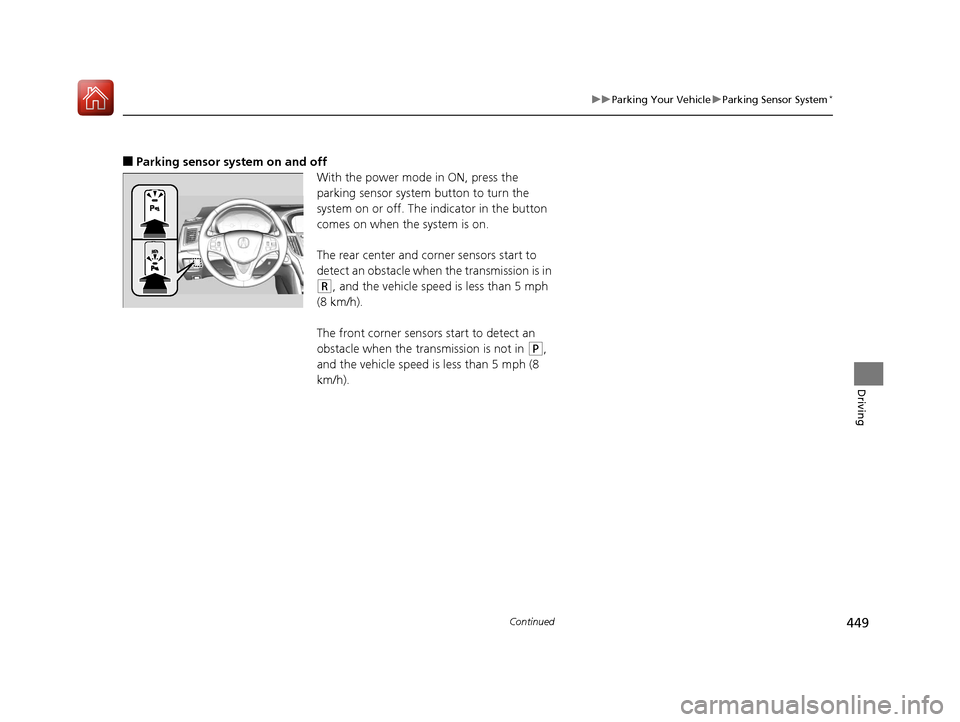
■Parking sensor system on and off
With the power mode in ON, press the
parking sensor system button to turn the
system on or off. The indicator in the button
comes on when the system is on.
The rear center and corner sensors start to
detect an obstacle when the transmission is in
(R, and the vehicle speed is less than 5 mph
(8 km/h).
The front corner sensors start to detect an
obstacle when the transmission is not in
(P,
and the vehicle speed is less than 5 mph (8
km/h).
18 ACURA TLX-31TZ36300.book 449 ページ 2017年2月21日 火曜日 午後2時32分
Page 452 of 589
451
uuParking Your Vehicle uParking Sensor System*
Driving
1. Make sure that the parking sensor system is not activated. Set the power mode to
VEHICLE OFF (LOCK).
2. Press and hold the parking sensor system button, and set the power mode to ON.
3. Keep pressing the button for 10 seconds. Release the button when the indicator
in the button flashes.
4. Press the button again. The indi cator in the button goes off.
u The beeper sounds twice. The r ear sensors are now turned off.
To turn the rear sensors on again, follo w the above procedure. The beeper sounds
three times when the rear sensors come back on.
■Turning off All Rear Sensors1 Turning off All Rear Sensors
When you set the gear position to
(R, the indicator
in the parking sensor system button blinks as a
reminder that the rear sens ors have been turned off.
18 ACURA TLX-31TZ36300.book 451 ページ 2017年2月21日 火曜日 午後2時32分
Page 454 of 589

Continued453
uuParking Your Vehicle uCross Traffic Monitor*
Driving
The system activates when:
• The power mode is in ON.
• The Cross Traffic Monitor is turned on.
2 Cross Traffic Monitor On and Off P. 456
2 Customized Features P. 292
•The transmission is in (R.
• Your vehicle is moving at 3 mph (5 km/h) or
lower.
When a vehicle is detected approaching from a rear corner, Cross Traffic Monitor
alerts you with a buzzer and a displayed warning.
The system will not detect a vehicle that approaches from directly behind your
vehicle, nor will it provide alerts about a detected vehicle when it moves directly
behind your vehicle.
The system does not detect or provide alerts for a vehicle that is moving away from
your vehicle, and it may not detect or ale rt for pedestrians, bicycles, or stationary
objects.
■How the System Works1 Cross Traffic Monitor*
Cross Traffic Monitor may not detect or may delay
alerting an approaching vehi cle, or may alert without
an approaching vehicle under the following
conditions:
•An obstacle, such as a nother vehicle and a wall,
near your vehicle’s rear bumper, is blocking the
radar sensor’s scope.
•Your vehicle is moving at the speed of about 3 mph
(5 km/h) or higher.
•A vehicle is approaching at the speed other than
between about 6 mph (10 km/h) and 16 mph (25
km/h).
•The system picks up external interference such as
other radar sensors from an other vehicle or strong
radio wave transmitted fr om a facility nearby.
•Either corner of the rear bumper is covered with
snow, ice, mud or dirt.
•When there is bad weather.
•Your vehicle is on an incline.
•Your vehicle is tilted due to a heavy load in the rear.•Your vehicle is reversing towards a wall, a pole, a
vehicle, and so on.
•The rear bumper or the sensors have been
improperly repaired or the rear bumper has been
deformed. Have your vehi cle checked by a dealer.
Radar sensors:
Underneath the rear bumper
corners
* Not available on all models
18 ACURA TLX-31TZ36300.book 453 ページ 2017年2月21日 火曜日 午後2時32分