2018 Acura RDX drive mode
[x] Cancel search: drive modePage 11 of 453

10
Quick Reference Guide
Instrument Panel (P 67)
CanadaU.S.
Turn Signal and Hazard
Warning Indicators
All-Wheel Drive (
AWD)
with Intelligent Control
System Indicator
*
System Indicators
Malfunction
Indicator Lamp
Low Oil Pressure
Indicator
Charging System
Indicator
Anti-lock Brake System
( ABS ) Indicator
Vehicle Stability
Assist (VSA ®) System
Indicator
VSA ® OFF Indicator
Low Tire Pressure/
TPMS Indicator
Lights Indicators
Lights On Indicator
High Beam Indicator
Fog Light Indicator
*
Immobilizer System
Indicator Seat Belt Reminder
Indicator
System Indicators
CRUISE CONTROL
Indicator*
Parking Brake and
Brake System
Indicator (Red) Supplemental Restraint
System Indicator
Door and Tailgate
Open Indicator
*
CRUISE MAIN
Indicator*
Tachometer
Speedometer
Fuel Gauge
Security System Alarm
Indicator
Shift Lever
Position
Indicator Low Fuel Indicator
Gauges (P 95)/Multi-Information Display (P 96)/System Indicators (P 68)
System Message
IndicatorBrake System
Indicator (Amber)
Temperature
Gauge
Electric Power Steering
(EPS) System Indicator
Canada
U.S.
Keyless Access System
Indicator
Lane Departure
Warning (LDW)
Indicator
*
Blind spot information
(BSI) System Indicator*
Collision Mitigation
Braking SystemTM
(CMBSTM) Indicator*
Lane Keeping Assist System
( LKAS) Indicator*/CRUISE
CONTROL Indicator*
Multi-Information Display
(M (Sequential Shift mode)
Indicator/Gear Position
Indicator
Models without
full color display
Adaptive Cruise Control ( ACC)
Indicator*/ CRUISE MAIN
Indicator*
Page 15 of 453

14
Quick Reference Guide
Climate Control System (P 182)
● Press the AUTO button to activate the climate control system.
● Press the button to turn the system on or off.
● Press the button to de frost the windshield.
The climate control system is voice operable. See the navigation system manual for complete details.
Models with navigation system
Driver’s Side Temperature
Control Dial / (Fan Control) Buttons
(Windshield Defroster) Button
A/C
(Air Conditioning) Button
Air flows from floor and
windshield defroster vents. Air flows from floor vents. Air flows from floor and
dashboard vents. Air flows from dashboard
vents.
SYNC (Synchronized) Button
(Recirculation) Button
AUTO Button Passenger’s Side Temperature
Control Dial
MODE Control Button (On/Off) Button
Page 17 of 453

16
Quick Reference Guide
Driving (P 257)
Release ButtonShift Lever
Depress the brake pedal and press the
release button to move out of
( P.
Move the shift lever without
pressing the release button.
Press the release button to
move the shift lever.
●
Shifting
Park
Turn off or start the engine.
Transmission is locked.
Reverse
Used when reversing.
Neutral
Transmission is not locked.
Drive
Normal driving. D-paddle shift mode can be used.
S Position
Sequential shift mode can be used. Paddle Shifters (P 279)
M Indicator Shift Down (-)
Paddle Shifter Shift Up (+)
Paddle Shifter
●
Paddle shifters allow you to shift gears much like a manual transmission (1st
through 6th). This is useful for engine braking.
● D-paddle shift mode: The transmission will shift back to automatic mode once
the system detects that the vehicle is cruising.
● Sequential shift mode: Holds the selected gear, and the M indicator comes on.
Selected Gear Number
Automatic Transmission (P 277)
● Shift to
(P and depress the brake pedal when
starting the engine.
Shift Lever Position
Indicator
● The selected gear
position is shown in
the instrument panel.
Models without full color displayModels with full color display
M Indicator Selected Gear
Number Shift Lever
Position
Indicator
Page 23 of 453
22
Quick Reference Guide
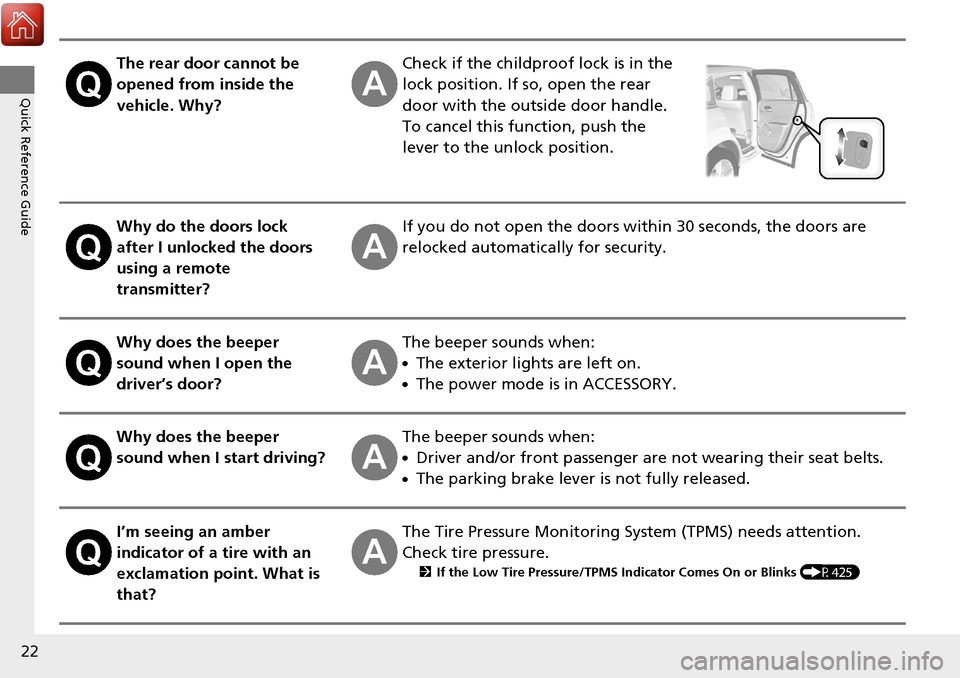
The rear door cannot be
opened from inside the
vehicle. Why?Check if the childproof lock is in the
lock position. If so, open the rear
door with the outside door handle.
To cancel this function, push the
lever to the unlock position.
Why do the doors lock
after I unlocked the doors
using a remote
transmitter?If you do not open the doors within 30 seconds, the doors are
relocked automatically for security.
Why does the beeper
sound when I open the
driver’s door?The beeper sounds when:
●The exterior lights are left on.
●The power mode is in ACCESSORY.
Why does the beeper
sound when I start driving?The beeper sounds when:
●Driver and/or front passenger are not wearing their seat belts.
●The parking brake lever is not fully released.
I’m seeing an amber
indicator of a tire with an
exclamation point. What is
that?The Tire Pressure Monitoring System (TPMS) needs attention.
Check tire pressure.
2 If the Low Tire Pressure/TPMS Indicator Comes On or Blinks (P425)
Page 31 of 453

uuFor Safe Driving uYour Vehicle’s Safety Features
30
Safe DrivingFor the safety of you and your passenge rs, make a habit of checking these items
each time before you drive.
• After everyone has entered the vehicle, be sure all doors and the tailgate are
closed and locked. Locking the doors and the tailgate helps prevent an occupant
from being ejected and an outsider from unexpectedly opening a door or the
tailgate.
2 Locking/Unlocking the Doors from the Inside P. 130
•Adjust your seat to a position suitable for driving. Be sure the front seats are
adjusted as far to the rear as possible while allowing the driver to control the
vehicle. Sitting too close to a front airbag can result in serious or fatal injury in a
crash.
2 Adjusting the Seats P. 164
•Adjust head restraints to the proper posi tion. Head restraints are most effective
when the center of the head restraint alig ns with the center of your head. Taller
persons should adjust their head restraint to the highest position.
2 Adjusting the Head Restraints P. 166
•Always wear your seat belt, and make sure you wear it properly. Confirm that any
passengers are properly belted as well.
2 Fastening a Seat Belt P. 34
•Protect children by using seat belts or chil d seats according to a child’s age, height
and weight.
2 Child Safety P. 52
■Safety Checklist1Safety Checklist
If the door and tailgate open indicator
* is on and a
message appears on the multi-information display, a
door and/or the tailgate is not completely closed.
Close all doors and the ta ilgate tightly until the
message disappears. 2 Door and Tailgate Open Indicator
* P. 74
2 Multi-Information Display Warning and
Information Messages P. 89
Models with
full color displayModels without
full color display
*
* Not available on all models
Page 33 of 453

uuSeat Belts uAbout Your Seat Belts
32
Safe Driving
■Proper use of seat belts
Follow these guidelines for proper use:
• All occupants should sit upright, well back in the seat, and remain in that position
for the duration of the trip. Slouching an d leaning reduces the effectiveness of
the belt and can increase the chance of serious injury in a crash.
• Never place the shoulder part of a lap/shoulder seat belt under your arm or
behind your back. This could cause very serious injuries in a crash.
• Two people should never use the same seat belt. If they do, they could be very
seriously injured in a crash.
• Do not put any accessories on the seat be lts. Devices intended to improve comfort
or reposition the shoulder part of a seat be lt can reduce the protective capability
and increase the chance of serious injury in a crash.
Your vehicle monitors front seat belt use. If
the power mode is set to ON before the
driver’s seat belt is fastened, a beeper will
sound and the indicator will blink. If the driver
does not fasten the belt before the beeper
stops, the indicator will remain on.
The beeper will also periodically sound and
the indicator will blink while driving until the
driver’s and front passenger’s seat belts are
fastened.
■Seat Belt Reminder
1 About Your Seat Belts
If a rear seat passenger moves around and extends
the seat belt, the lockable retractor may activate. If
this happens, release the retractor by unfastening the
seat belt and allow the belt to retract completely.
Then refasten the belt.
1Seat Belt Reminder
The indicator will also come on if a front passenger
does not fasten their seat be lt within 6 seconds after
the power mode is set to ON.
When no one is sitting in th e front passenger’s seat,
or a child or small adult is riding there, the indicator
will not come on.
This is because the weight sensors in the seat cannot
detect their presence.
Models with
full color
displayModels
without full
color display
Page 41 of 453

40
uuAirbags uAirbag System Components
Safe Driving
The front, front side, and side curtain
airbags are deployed according to the
direction and severity of impact. Both side
curtain airbags are deployed in a rollover.
The airbag system includes:
aTwo SRS (Supplemental Restraint System)
front airbags. The driver’s airbag is stored
in the center of the steering wheel; the
front passenger’s airbag is stored in the
dashboard. Both are marked SRS
AIRBAG.
bTwo side airbags, one for the driver and
one for a front passenger. The airbags are
stored in the outer edges of the seat-
backs. Both are marked SIDE AIRBAG .
cTwo side curtain airbags, one for each
side of the vehicle. The airbags are stored
in the ceiling, above the side windows.
The front and rear pillars are marked
SIDE CURTAIN AIRBAG.
dAn electronic control unit that, when the
vehicle is on, continually monitors
information about the various impact
sensors, seat and buckle sensors, rollover
sensor, airbag activators, seat belt
tensioners, and other vehicle
information. During a crash event the
unit can record such information.
eAutomatic front seat belt tensioners. In
addition, the driver’s and front
passenger’s seat belt buckles incorporate
sensors that detect whether or not the
belts are fastened.
fA driver’s seat position sensor. If the seat
is too far forward, the airbag will inflate
with less force.
gWeight sensors in the front passenger’s
seat. The front passenger’s airbag will be
turned off if the weight on the seat is 65
lbs (29 kg) or less (the weight of an infant
or small child).
hImpact sensors that can detect a
moderate-to-severe front or side impact.
iAn indicator on the dashboard that alerts
you that the front passenger’s front
airbag has been turned off.
jAn indicator on the instrument panel that
alerts you to a possible problem with your
airbag system or seat belt tensioners.
kA rollover sensor that detects whether
the vehicle is about to roll over.
Page 43 of 453

42
uuAirbags uTypes of Airbags
Safe Driving
Types of Airbags
Your vehicle is equipped with three types of airbags:
• Front airbags: Airbags in front of the driver ’s and front passenger’s seats.
• Side airbags: Airbags in the driver’s and front passenger’s seat-backs.
• Side curtain airbags: Airbags above the side windows.
Each is discussed in the following pages.
Front Airbags (SRS)
The front SRS airbags inflate in a moderate-to -severe frontal collision to help protect
the head and chest of the driver and/or front passenger.
SRS (Supplemental Restraint System) indica tes that the airbags are designed to
supplement seat belts, not replace them. Seat belts are the occupant’s primary
restraint system.
The front airbags are housed in the center of the steering wheel for the driver, and
in the dashboard for the front pass enger. Both airbags are marked SRS AIRBAG.
■Housing Locations
1Types of Airbags
The airbags can inflate whenever the power mode is
in ON.
After an airbag inflates in a crash, you may see a
small amount of smoke. This is from the combustion
process of the infl ator material and is not harmful.
People with respiratory pr oblems may experience
some temporary discomfort. If this occurs, get out of
the vehicle as soon as it is safe to do so.
1 Front Airbags (SRS)
During a frontal crash severe enough to cause one or
both front airbags to deploy, the airbags can inflate
at different rates, dependi ng on the severity of the
crash, whether or not the se at belts are latched, and/
or other factors. Frontal airbags are designed to
supplement the seat belts to help reduce the
likelihood of head and chest injuries in frontal
crashes.