Page 113 of 453
112
uuGauges and Multi-Information Display uMulti-Information Display
Instrument Panel
*1:Default SettingSetup Group Customizable Features
Description Selectable Settings
Meter Setup Language Selection
Changes the displayed language. English
*1/
Francais /
Español
Adjust Outside Temp.
Display Adjusts the temperature reading by a few degrees. -5°F ~
±0°F
*1 ~ +5°F
(U.S.)
-3°C ~ ±0°C
*1 ~ +3°C
(Canada)
“Trip A” Reset Timing Changes the setting of how to reset trip meter A,
average fuel economy A, average speed A, and elapsed
time A. When Refueled
/IGN Off/
Manually Reset
*1
“Trip B” Reset Timing Changes the setting of how to reset trip meter B,
average fuel economy B, av
erage speed B, and elapsed
time B. When Refueled
/IGN Off/
Manually Reset*1
Turn by Turn Display*Selects whether the turn-b y-turn display comes on
during the route guidance. On*1/
Off
* Not available on all models
Page 117 of 453
116
uuGauges and Multi-Information Display uMulti-Information Display
Instrument Panel
■Example of customization settings
The steps for changing the “TRIP A” RESET TIMING /”Trip A” Reset Timing setting
to WITH REFUEL /When Refueled are shown below. The default setting for “TRIP
A” RESET TIMING/ ”Trip A” Reset Timing is MANUALLY RESET/Manually
Reset .
1.Press / button to select VEHICLE
SETTINGS /Vehicle Settings , then press
the SEL/RESET button.
2. Press the / button until METER
SETUP/ Meter Setup appears on the
display.
3. Press the SEL/RESET button.
u LANGUAGE SELECTION /Language
Selection appears first in the display.
*1 : Models without full color display
*2 : Models with full color display
All models
*1 *2
*1*2
Page 118 of 453
117
uuGauges and Multi-Information Display uMulti-Information Display
Instrument Panel
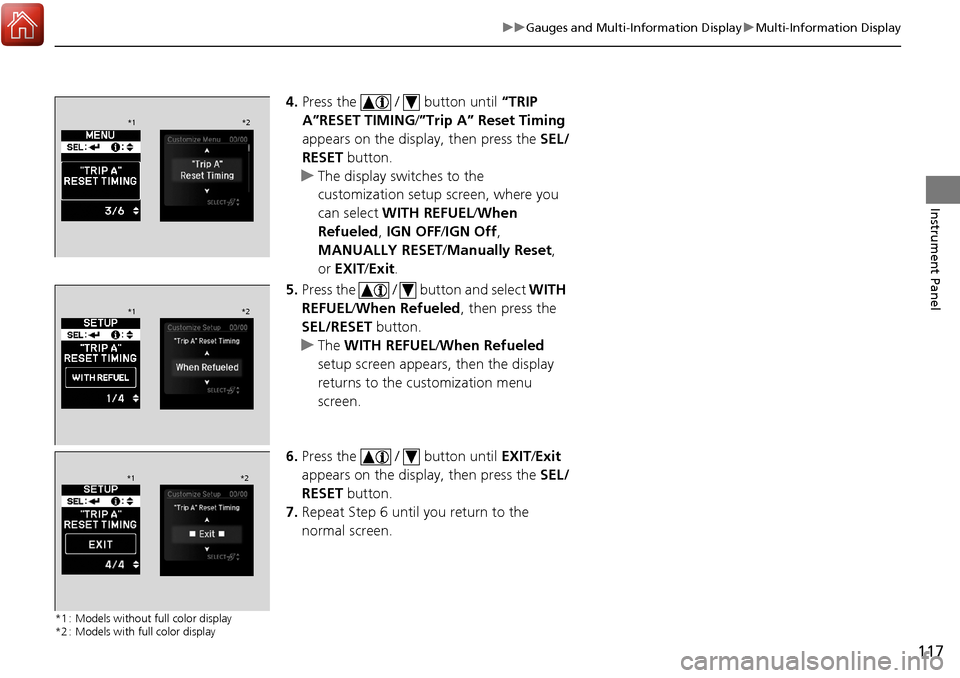
4. Press the / button until “TRIP
A”RESET TIMING /”Trip A” Reset Timing
appears on the display, then press the SEL/
RESET button.
u The display swit ches to the
customization setup screen, where you
can select WITH REFUEL /When
Refueled, IGN OFF/IGN Off ,
MANUALLY RESET/ Manually Reset,
or EXIT /Exit .
5. Press the / button and select WITH
REFUEL /When Refueled , then press the
SEL/RESET button.
u The WITH REFUEL /When Refueled
setup screen appears, then the display
returns to the customization menu
screen.
6. Press the / button until EXIT/Exit
appears on the display, then press the SEL/
RESET button.
7. Repeat Step 6 until you return to the
normal screen.
*1 : Models without full color display
*2 : Models with full color display
*1 *2
*1*2
*1*2
Page 123 of 453
122
uuLocking and Unlocking the Doors uKey Types and Functions
Controls
■Keyless access remote
The built-in key can be used to lock/unlock the
doors and the tailgate wh en the keyless access
remote battery becomes weak and the power
door lock/unlock operation is disabled.
To remove the built-in key, pull it out while
pressing the release button. To reinstall the
built-in key, push the built-in key into the
keyless access remote until it clicks.
Models without two-way keyless
access remote
Models with two-way keyless
access remote
Built-in Key Release Knob
Built-in Key Release Knob
Page 128 of 453

Continued127
uuLocking and Unlocking the Doors uLocking/Unlocking the Doors from the Outside
Controls
■Locking the doors
Press the lock button.
Once: u Some exterior lights flash, all the doors
and tailgate lock, and the security system
sets.
Twice (within five se conds after the first
push):
u A beeper sounds and verifies the security
system is set.
■Unlocking the doors
Press the unlock button.
Once: u Some exterior lights flash twice, and the
driver’s door unlocks.
Twice:
u The remaining doors and tailgate unlock.
*1 :Checking Door Lock Status* P. 129
■Using the Remote Transmitter1Using the Remote Transmitter
If you do not open a door within 30 seconds of
unlocking the vehicle with the remote transmitter,
the doors will auto matically relock.
You can change the relock timer setting. 2 Customized Features P. 102, 108
If the interior light switch is in the door activated
position, the interior light s come on when you press
the unlock button.
No doors opened: The li ghts fade out after 30
seconds.
Doors relocked with the remote: The lights go off
immediately. 2 Interior Lights P. 171
The remote transmitter us es low-power signals, so
the operating range may vary depending on the
surroundings.
The remote will not lock th e vehicle when a door is
open.
If the distance at which it works varies, the battery is
probably low.
If the LED does not come on when you press a
button, the battery is dead. 2 Replacing the Button Battery P. 386
You can customize the door unlock mode setting. 2 Customized Features P. 102, 108
LED
Unlock
Button Lock
Button
LED*1
Unlock
Button
Lock
Button
* Not available on all models
Page 130 of 453

129
uuLocking and Unlocking the Doors uLocking/Unlocking the Doors from the Outside
Controls
You can remotely check if your vehicle’s doors
are all locked or any are unlocked using the
keyless access remote from extended
distances.
Press the lock button, the Amber (left) LED blinks once. Then after three seconds one
of the following feedback will come:
• Green (center) comes on: Acknowle dges that the doors are locked.
• Red (right) comes on: Acknowledges that doors are not locked, or any door is not
completely closed.
• Red (right) blinks three times: The remote does not receive the door lock status
from the vehicle.
■Checking Door Lock Status*1 Checking Door Lock Status*
Operate the remote in an open space. If there are
buildings or other obstacl es between your vehicle
and the remote, the remote may not work even
within the operable range. However, the range of
unlock, all doors, and panic functions are the same as
the standard keyless access remote. 2 Using the Remote Transmitter P. 127
When checking the door lock status, you can also
start or stop the engine. 2 Remote Engine Start with Vehicle
Feedback
* P. 272
Red
Green
Amber
Lock Button
* Not available on all models
Page 137 of 453

uuOpening and Closing the Tailgate uOpening/Closing the Power Tailgate
136
Controls
Press the power tailgate button for more than
one second to operate.
To reverse direction while the power tailgate is
in operation, press the button again. The
beeper sounds three times and the tailgate
reverses direction.
■Customizing when to open the tailgate
ANYTIME/Anytime: The power tailgate unlocks and opens at the same time. This
is the default setting.
WHEN UNLOCKED/When Unlocked: The tailgate opens when all doors are
unlocked.
2 Customized Features P. 102, 108
■Remote Transmitter1Opening/Closing the Power Tailgate
If you replace the battery or the power tailgate fuse
while the tailgate is open, the power tailgate may be
disabled. The power tail gate resumes once you
manually close the tailgate.
Installing aftermarket com ponents other than Acura
genuine accessories on the power tailgate may
prevent it from fully opening or closing.
Make sure the power tailgate is fully open before you
get your luggage in and out.
Make sure the power tailgate is fully closed before
you start the vehicle.
The beeper sounds when you start driving while the
power tailgate is still open, or closing.
If the power tailgate meet s resistance while opening
or closing, the auto reverse feature reverses the
direction. The beeper sounds three times.
The auto reverse function stops sensing when the
tailgate is almost closed to make sure that it fully
closes.
Do not touch the sensors located on both sides of the
tailgate. The power tailga te does not close if you
touch either sensor when you are trying to close the
tailgate.
Be careful not to scratch the sensors with a sharp
object. If scratched, they can be damaged, and the
power tailgate closing feature malfunctions.
HOLD
HOLD
Power
Tailgate
Button
Page 141 of 453

uuSecurity System uSecurity System Alarm
140
Controls
■Setting the security system alarm
The security system alarm automatically sets when the following conditions have
been met:
• The power mode is in VEHICLE OFF (LOCK).
• The hood is closed.
• All doors and the tailgate are locked from outside with the key, remote
transmitter, or keyless access system.
■When the security system alarm sets
The security system alarm indicator in the instrument panel blinks. When the
blinking interval changes after about 15 se conds, the security system alarm is set.
■To cancel the security system alarm
The security system alarm is canceled when the vehicle is unlocked using the remote
transmitter, keyless ac cess system, or the power mode is set to ON. The security
system alarm indicator goe s off at the same time.
1Security System Alarm
Do not set the security system alarm when someone
is in the vehicle or a window is open. The system can
accidentally activate when:
•Unlocking the door with the lock tab.•Moving the shift lever out of ( P.
If the battery goes dead after you have set the
security system alarm, the security alarm may go off
once the battery is re charged or replaced.
If this occurs, deactivate the security system alarm by
unlocking a door using the remote transmitter, or
keyless access system.
Do not attempt to alter th is system or add another
device to it.