Page 258 of 489
257
uuCustomized Features u
Continued
Features
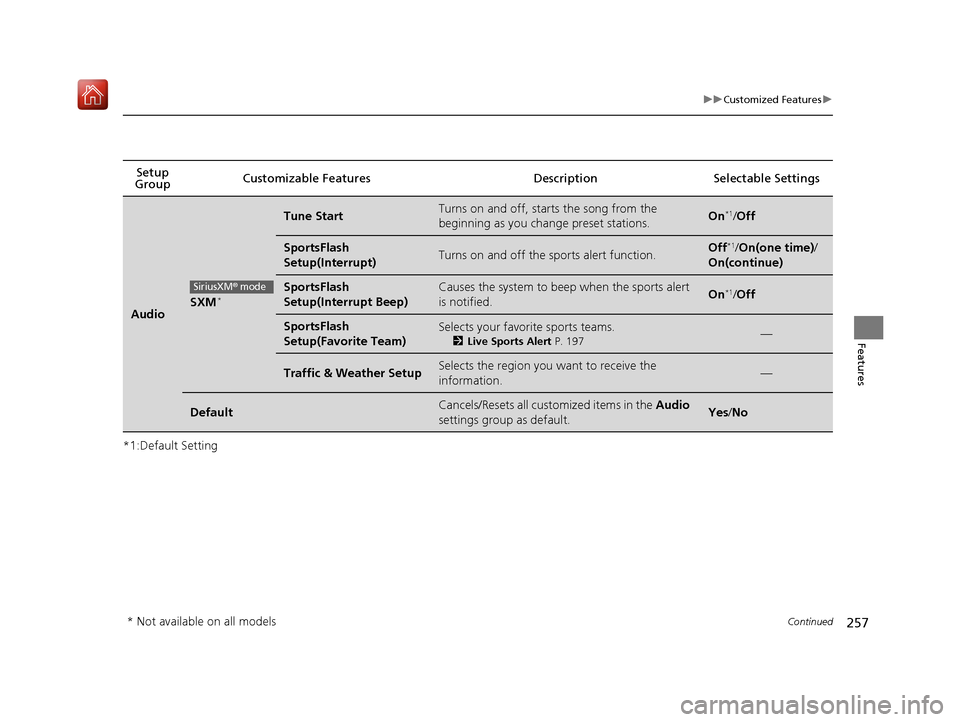
*1:Default SettingSetup
Group Customizable Features Description Selectable Settings
AudioSXM*
Tune StartTurns on and off, starts the song from the
beginning as you chan
ge preset stations.On*1/Off
SportsFlash
Setup(Interrupt)Turns on and off the sports alert function.Off*1/On(one time) /
On(continue)
SportsFlash
Setup(Interrupt Beep)Causes the system to beep when the sports alert
is notified.On*1/ Off
SportsFlash
Setup(Favorite Team)Selects your favorite sports teams.
2 Live Sports Alert P. 197—
Traffic & Weather SetupSelects the region you want to receive the
information.—
DefaultCancels/Resets all customized items in the Audio
settings group as default.Yes /No
SiriusXM® mode
* Not available on all models
18 NSX-31T6N6100.book 257 ページ 2017年10月27日 金曜日 午後1時39分
Page 261 of 489
260
uuCustomized Features u
Features
*1:Default SettingSetup
Group Customizable Features Description Selectable Settings
System Clock Clock/
Wallpaper
Type
Clock
See
Clock/Info on P. 252
Wallpaper
Clock Adjustment
Clock Format
Date Format
Auto Time Zone*
Manual Time Zone*
Auto Daylight*
Clock Display
Clock Reset
Others Language
Change the display language. English
*1/
Français /
Español
Touch Panel Sensitivity Sets the sensitivity of the touch panel screen. High
*1/Low
* Not available on all models
18 NSX-31T6N6100.book 260 ページ 2017年10月27日 金曜日 午後1時39分
Page 262 of 489
261
uuCustomized Features u
Continued
Features
*1:Default SettingSetup
Group Customizable Features Description Selectable Settings
System Others Climate Screen Timeout
Changes the length of time the climate control
display stays on when you press the
CLIMATE
button. Never/
5 Seconds/ 10
Seconds
*1/ 20
Seconds
Detail Information Displays the details of the head unit and
operating system information. —
Factory Data Reset Resets all the settings to their factory default.
2
Defaulting All the Settings P. 266Yes /No
Default Cancels/Resets all cust
omized items in the
System group as default. Yes
/No
18 NSX-31T6N6100.book 261 ページ 2017年10月27日 金曜日 午後1時39分
Page 263 of 489
262
uuCustomized Features u
Features
*1:Default SettingSetup
Group Customizable Features Desc
ription Selectable Settings
VehicleMeter
Setup
Language SelectionChanges the displayed language on the driver
information interface.English*1/Français /
Español
Adjust Outside Temp
DisplayAdjusts the temperature reading by a few
degrees.
-5°F ~ ±0°F*1 ~ +5°F
(U.S.)
-3°C ~ ±0°C
*1 ~ +3°C
(Canada)
“Trip A” Reset TimingChanges the setting of how to reset trip meter A
and average fuel economy A.With Refuel /IGN Off /
Manually Reset*1
“Trip B” Reset TimingChanges the setting of how to reset trip meter B
and average fuel economy B.With Refuel /IGN Off /
Manually Reset*1
Turn by Turn DisplaySelects whether the turn-by-turn display comes
on during the route guidance.On*1/ Off
Display km/MilesSelects the trip computer units.Auto*1/km/Miles
18 NSX-31T6N6100.book 262 ページ 2017年10月27日 金曜日 午後1時39分
Page 266 of 489
265
uuCustomized Features u
Features
*1:Default SettingSetup
Group Customizable Features Desc
ription Selectable Settings
Vehicle
Dynamic
Mode
Setup
Scheduler
Changes the Integrated Dynamics System mode
schedule. The vehicle starts in the QUIET or
SPORT mode according to the selected item or
time schedule.OFF /Always Sport*1/
Always Quiet /Last
Start/ Quiet: 12am-
6am/ Quiet: 12am-
8am
Maintenance
InfoResetUsed to reset the engine oil life display when the
maintenance service has been performed.—
DefaultCancels/Resets all customized items in the
Vehicle group as default.Yes/No
Smart-
phone Apple CarPlay
Sets up the Apple CarPlay connection. —
Android Auto Sets up the Android Auto connection. —
Default Cancels/Resets all customized items in the
Smartphone
group as default. Yes
/No
18 NSX-31T6N6100.book 265 ページ 2017年10月27日 金曜日 午後1時39分
Page 267 of 489
266
uuCustomized Features uDefaulting All the Settings
Features
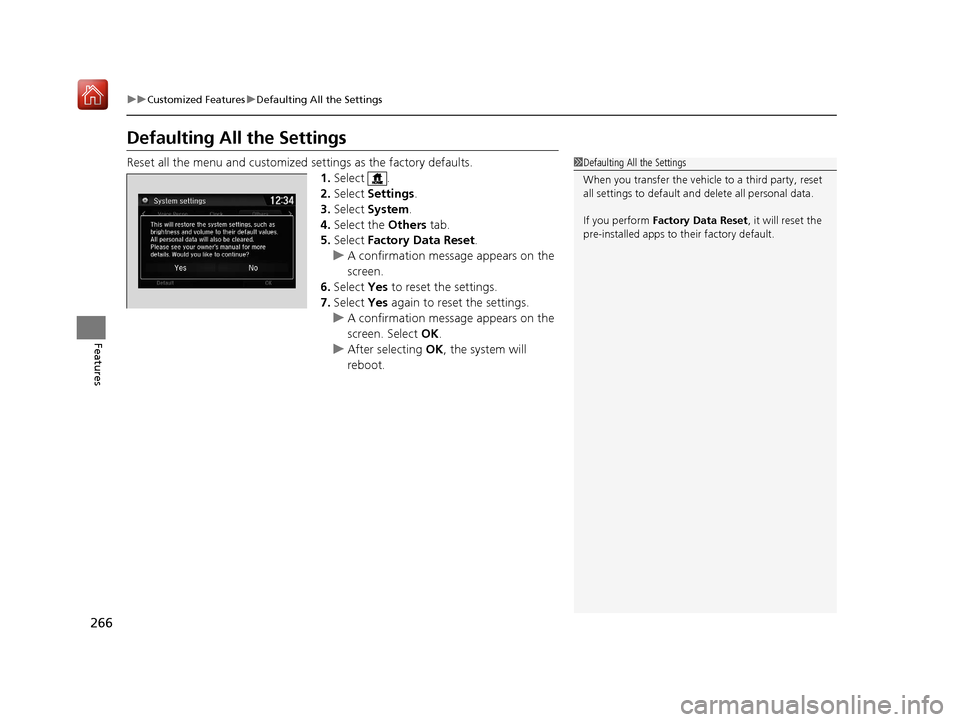
Defaulting All the Settings
Reset all the menu and customized settings as the factory defaults.
1. Select .
2. Select Settings .
3. Select System .
4. Select the Others tab.
5. Select Factory Data Reset .
u A confirmation message appears on the
screen.
6. Select Yes to reset the settings.
7. Select Yes again to reset the settings.
u A confirmation message appears on the
screen. Select OK.
u After selecting OK, the system will
reboot.1 Defaulting All the Settings
When you transfer the vehicle to a third party, reset
all settings to default a nd delete all personal data.
If you perform Factory Data Reset , it will reset the
pre-installed apps to their factory default.
18 NSX-31T6N6100.book 266 ページ 2017年10月27日 金曜日 午後1時39分
Page 276 of 489
275
uuBluetooth ® HandsFreeLink ®u HFL Menus
Continued
Features
Select Account
Enable Text/EmailText/Email
New Message NotificationSelect whether a pop-up alert co mes on the screen when HFL
receives a new text/e-mail message.
Turn the text/e-mail message function on and off.
Select a mail or te xt message account.
DefaultCancel/Reset all customized items in the Phone settings group as default.
18 NSX-31T6N6100.book 275 ページ 2017年10月27日 金曜日 午後1時39分
Page 383 of 489

382
uuMaintenance MinderTMuTo Use Maintenance MinderTM
Maintenance
■Maintenance Service Items1Maintenance Service Items
•Independent of the Maintenance Minder
information, replace the brake fluid every 3 years.
•Adjust the valves during services A, B, 1, 2, or 3 if
they are noisy.
•Inspect direct injection + port injection fuel system
every 3 years or service item B is indicated.
•Inspect tire condition ev ery 3,100 miles (5,000 km).
Maintenance Minder Message System Message
Indicator
Main Item Sub Items
*1: If a message SERVICE does not appear more than 12 months after the display is reset, change the
engine oil every year.
# : See information on maintenance and emissions warranty.
CODEMaintenance Main Items
A
●Replace engine oil*1
B●Replace engine oil*1 and oil filter●Inspect front and rear brakes●Check expiration date for temporary tire repair kit
bottle
●Inspect tie rod ends, steering gearbox, and boots●Inspect suspension components●Inspect driveshaft boots●Inspect brake hoses and li nes (Including ABS/VSA)●Inspect all fluid levels and condition of fluids●Inspect exhaust system#
●Inspect fuel lines and connections#
●Inspect direct injection + port injection fuel system*2: If you drive in dusty conditions, replace the air cleaner element every 15,000 miles (24,000 km).
*3: If you drive primarily in urban areas that have high concentrations of soot in the air from industry and
from diesel-powered vehicles, replace the dust and pollen filters every 15,000 miles (24,000 km) or
every year.
*4: Driving in mountainous areas at very low vehicle speeds results in higher transmission temperature. This requires transmission fluid and clutch fluid changes more frequently than recommended by the
Maintenance Minder. If you regularly drive your vehicle under this condition, have the transmission
fluid and clutch fluid changed every 20,000 miles (32,000 km).
*5: Driving in mountainous areas at very low vehicle speeds results in higher level of mechanical (Shear) stress to fluid. This requires Twin Motor Unit fluid changes more frequently than recommended by the
Maintenance Minder. If you regularly drive your vehicle under these conditions, have the Twin Motor
Unit fluid changed at 7,500 miles (12,000 km), then every 15,000 miles (24,000 km).
CODEMaintenance Sub Items
1
●Inspect tire condition
2●Replace air cleaner element*2
●Replace dust and pollen filters*3
3●Replace transmission fluid*4
●Replace clutch fluid*4
4●Replace spark plugs●Inspect valve clearance●Inspect Active Exhaust Valve function●Replace Intake Sound Control
5
●Replace engine coolant
6●Replace Twin Motor Unit fluid*5
18 NSX-31T6N6100.book 382 ページ 2017年10月27日 金曜日 午後1時39分