Page 207 of 697

206
Controls
Interior Lights/Interior Convenience Items
Interior Lights
■ON
The interior lights come on regardless of
whether the tailgate and doors are open or
closed.
■Door activated
The interior lights come on in the following
situations:
• When the tailgate or any of the doors are
opened.
• You unlock the driver’s door.
• When the power mode is set to VEHICLE
OFF (LOCK).
■OFF
The interior lights remain off regardless of
whether the tailgate or any doors are open or
closed.
■Interior Light Switches1 Interior Light Switches
In the door activated position, the interior lights fade
out and go off about 30 se conds after the doors are
closed.
The lights go off after about 30 seconds in the
following situations:
•When you unlock the driver’s door but do not open
it.
•When you set the power mode to VEHICLE OFF
(LOCK) but do not open a door.
You can change the interi or lights dimming time.
2 Customized Features P. 126, 358
The interior lights go off i mmediately in the following
situations:
•When you lock the driver’s door.
•When you close the driver’s door in ACCESSORY
mode.
•When you set the power mode to ON.
To avoid draining the ba ttery, do not leave the
interior light on for an extended length of time when
the engine is off.
If you leave any of the tailgate or doors open in
VEHICLE OFF (LOCK) mode, th e interior lights go off
after about 15 minutes.
Door Activated Position
Off
On
18 ACURA MDX-31TZ56400.book 206 ページ 2017年8月23日 水曜日 午後4時1分
Page 222 of 697

Continued221
uuClimate Control System uUsing Automatic Climate Control
Controls
1. Select the driver’s or passenger’s side
temperature control icon.
2. Change the temperature setting from the
following:
Temperature bar: Select a point where your
desired temperature setting is.
Farther to the left is for a lower, and to the
right for a higher setting.
(+/(-: To raise or lower the temperature
setting one degree at a time.
While you select and hold
(+/(-, the
temperature decreases or increases.
Max Cool: To rapidly cool down the interior.
u The A/C indicator comes on. The setting
returns to the previously selected value
when you select it again.
Max Heat: To rapidly warm up the interior.
u The A/C indicator goes off. The setting
returns to the previously selected value
when you select it again.
■Changing the Interior Temperature Setting1 Using Automatic Climate Control
If you select the Max Cool or Max Heat during Auto
Idle Stop, the engine restarts automatically.
Models with Auto Idle StopThe side you selected.
Temperature Bar
18 ACURA MDX-31TZ56400.book 221 ページ 2017年8月23日 水曜日 午後4時1分
Page 224 of 697

Continued223
uuClimate Control System uUsing Automatic Climate Control
Controls
■SYNC on and off
1.Select SYNC.
2. Select On for synchronization mode.
u When in synchronization mode, the front
passenger’s side temperature and the
rear passenger compartment become
the same as the driv er’s side settings.
3. Adjust the temperature or change the
mode from the driver’s side.
■Changing the fan speed
1.Select .
u When the left or right side of the
is selected, the fan speed level goes up or
down one level at a time.
2. Change the fan speed with one of the
following:
The fan speed level indicators: Select your
desired speed level. The smaller indicator is
for a slower speed, and the larger for a
faster speed.
(+/(-: To go up or down one level at a
time.
Front Fan AUTO : The system automatically
selects the fan speed most suitable to the
ambient environment.
1 SYNC on and off
When you press the button or select the Front
icon, the system synchronizes the driver’s and
front passenger’s temp erature settings.
When the system is not in SYNC mode, the driver's
side temperature, the front passenger’s side
temperature and the rear passenger compartment (if
it is on) can be set separately.
You can also turn off SYNC mode by changing the
front passenger’s side temperature or rear
passenger’s temperature.
1 Changing the fan speed
While the climate control system is in auto, Front
Fan AUTO is highlighted.
Fan Speed Level Indicators
18 ACURA MDX-31TZ56400.book 223 ページ 2017年8月23日 水曜日 午後4時1分
Page 228 of 697
Continued227
uuClimate Control System uRear Climate Control System
Controls
■Changing the rear temperature setting
Change the temperature setting from the
following:
(+/(-: To raise or lower the temperature
setting one degree at a time.
While you select and hold
(+/(-, the
temperature decreases or increases.
■Switching the vent mode Select a desired vent mode icon.
Vent mode: Rear console vents
: Rear console vents and floor vents
: Rear floor vents
1Changing the rear temperature setting
When you set the temperature to the lower or upper
limit, Lo or Hi is displayed.
(+/(- (Temperature Control) Icon
Vent Mode Icon
18 ACURA MDX-31TZ56400.book 227 ページ 2017年8月23日 水曜日 午後4時1分
Page 229 of 697
228
uuClimate Control System uRear Climate Control System
Controls
■Changing the fan speed
Change the fan speed with one of the
following:
The fan speed level indicators: Select your
desired speed level. The smaller indicator is for
a slower speed, and the larger for a faster
speed.
(+/(-: To go up or down one level at a time.
Fan Speed Level Indicators
18 ACURA MDX-31TZ56400.book 228 ページ 2017年8月23日 水曜日 午後4時1分
Page 240 of 697
239
Features
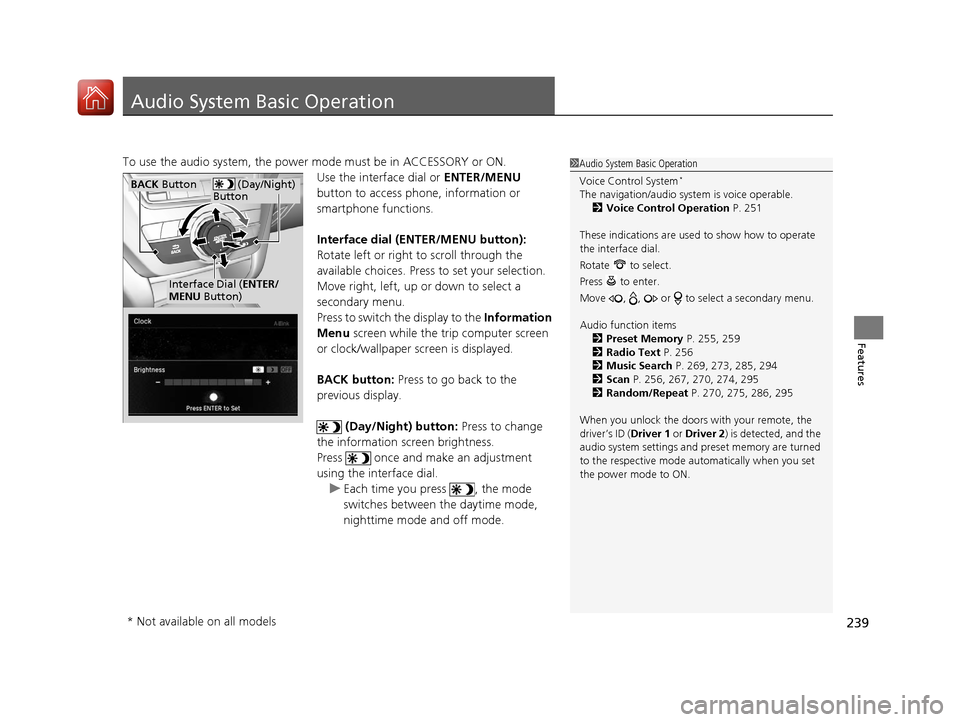
Audio System Basic Operation
To use the audio system, the power mode must be in ACCESSORY or ON.Use the interface dial or ENTER/MENU
button to access phone, information or
smartphone functions.
Interface dial (E NTER/MENU button):
Rotate left or right to scroll through the
available choices. Press to set your selection.
Move right, left, up or down to select a
secondary menu.
Press to switch the display to the Information
Menu screen while the trip computer screen
or clock/wallpaper screen is displayed.
BACK button: Press to go back to the
previous display.
(Day/Night) button: Press to change
the information screen brightness.
Press once and make an adjustment
using the interface dial. u Each time you press , the mode
switches between the daytime mode,
nighttime mode and off mode.1Audio System Basic Operation
Voice Control System
*
The navigation/audio system is voice operable.
2 Voice Control Operation P. 251
These indications are used to show how to operate
the interface dial.
Rotate to select.
Press to enter.
Move , , or to se lect a secondary menu.
Audio function items 2 Preset Memory P. 255, 259
2 Radio Text P. 256
2 Music Search P. 269, 273, 285, 294
2 Scan P. 256, 267, 270, 274, 295
2 Random/Repeat P. 270, 275, 286, 295
When you unlock the doors with your remote, the
driver’s ID ( Driver 1 or Driver 2) is detected, and the
audio system settings and pr eset memory are turned
to the respective mode automatically when you set
the power mode to ON. (Day/Night)
ButtonBACK Button
Interface Dial ( ENTER/
MENU Button)
* Not available on all models
18 ACURA MDX-31TZ56400.book 239 ページ 2017年8月23日 水曜日 午後4時1分
Page 244 of 697
243
uuAudio System Basic Operation uOn Demand Multi-Use DisplayTM
Features
1. Select Audio Menu , then select Screen
Settings .
2. Use
(+, (- or other icons to adjust the
setting.
■Changing the Screen Settings1 Changing the Screen Settings
The following are adjustable screen settings:
•Sync Display Brightness
Selects whether the screen brightness synchronizes
with the instruments panel brightness.
•Brightness
•Contrast
•Black Level•Beep
Mutes a beep that sounds every time you touch the
screen.
•Keyboard
Changes the on-screen keyboard from the
alphabetical order to the qwerty type.
Instead of using
( +, (- or icons, you can also touch
the point where your desired setting is.
18 ACURA MDX-31TZ56400.book 243 ページ 2017年8月23日 水曜日 午後4時1分
Page 258 of 697

257
uuAudio System Basic Operation uPlaying SiriusXM ® Radio
Continued
Features
Playing SiriusXM® Radio
On Demand Multi-Use DisplayTM
VOL/ (Volume/Power) Knob
Press to turn the audio system on
and off.
Turn to adjust the volume.
Category Up/Down Icons
Select or to display and select
a SiriusXM® Radio category.
Audio Menu
Select to display the menu items.
Source
Select to change an audio source. (Information) Icon
Select to displays the current
channel details.
Select to displays the previous
screen.
Preset Icons
Tune the preset channel. Select and hold the
preset icon to store that channel. Select or to display preset 4 onwards.
Tune
Select to displays the channel
number input screen.
Presets/Controls
Select to changes between the
Presets mode and Controls mode
of the Replay function.
Browse
Select to displays the channel list
of Categories , Channels or
Featured channels types.
Channel Up/Down Icons
Select or to the previous or
next channel.
Select and hold to rapidly skip 10
channels at a time.
18 ACURA MDX-31TZ56400.book 257 ページ 2017年8月23日 水曜日 午後4時1分


