Page 623 of 697

622
uuCleaning uExterior Care
Maintenance
Aluminum is susceptible to deterioration caused by salt and other road
contaminants. When necessary, as early as possible use a sponge and mild detergent
to wipe away these contaminants. Do no t use a stiff brush or harsh chemicals
(including some commercial wheel cleaners). These can damage the protective finish
on aluminum alloy wheels, resulting in corrosion. Depending on the type of finish,
the wheels also may lose their luster or appear burnished. To avoid water stains,
wipe the wheels dry with a cloth while they are still wet.
The inside lenses of exterior lights (headlig hts, brake lights, etc.) may fog temporarily
if you have driven in the rain, or after the vehicle has been run through a car wash.
Dew condensation also may build up inside the lenses when there is a significant
enough difference between the ambient and inside lens temperatures (similar to
vehicle windows fogging up in rainy conditions). These conditions are natural
processes, not structural design problems in the exterior lights.
Lens design characteristics may result in mo isture developing on the light lens frame
surfaces. This also is not a malfunction.
However, if you see large amounts of wa ter accumulation, or large water drops
building up inside the lenses, have your vehicle inspected by a dealer.
■Maintaining Aluminum Wheels
■Fogged Exterior Light Lenses
18 ACURA MDX-31TZ56400.book 622 ページ 2017年8月23日 水曜日 午後4時1分
Page 624 of 697

623
Maintenance
Accessories and Modifications
Accessories
When installing accessories, check the following:
• Do not install accessories on the windsh ield. They can obstruct your view and
delay your reaction to driving conditions.
• Do not install any accessories over areas marked SRS Airbag, on the sides or backs
of the front seats, on front or side pillars, or near the side windows.
Accessories installed in these areas may interfere with proper operation of the
vehicle’s airbags or may be propelled into you or another occupant if the airbags
deploy.
• Be sure electronic accessories do not overload electrical circuits or interfere with
proper operation of your vehicle.
2 Fuses P. 658
•Before installing any electro nic accessory, have the installer contact a dealer for
assistance. If possible, have a deal er inspect the final installation.
1Accessories and Modifications
Acura Genuine accessori es are recommended to
ensure proper operati on on your vehicle.
3WARNING
Improper accessories or modifications can
affect your vehicle’s handling, stability, and
performance, and cause a crash in which
you can be seriously hurt or killed.
Follow all instruction s in this owner’s
manual regarding accessories and
modifications.
18 ACURA MDX-31TZ56400.book 623 ページ 2017年8月23日 水曜日 午後4時1分
Page 625 of 697

624
uuAccessories and Modifications uModifications
Maintenance
Modifications
Do not modify your vehicle in a manner that may affect its handling, stability, or
reliability, or install non-genuine Acura parts or accessories that may have a similar
effect.
Even minor modifications to vehicle systems can affect overall vehicle performance.
Always make sure all equipment is prop erly installed and maintained, and do not
make any modification to your vehicle or its systems that might cause your vehicle
to no longer meet federal, state, prov ince, territory, and local regulations.
The on-board diagnostic port (OBD-II/SAE J1962 connector) installed on this vehicle
is intended to be used with automobile system diagnostic devices or with other
devices that Acura has appr oved. Use of any other type of device may adversely
affect the vehicle’s electronic systems or allow them to be compromised, possibly
resulting in a system malfunction, drained battery, or other unexpected problems.
Do not modify or attempt to repair any of the electrical components.
18 ACURA MDX-31TZ56400.book 624 ページ 2017年8月23日 水曜日 午後4時1分
Page 626 of 697

625
Handling the Unexpected
This chapter explains how to handle unexpected troubles.
ToolsTypes of Tools .................................. 626
If a Tire Goes Flat Changing a Flat Tire
*....................... 627
Temporarily Repair ing a Flat Tire*..... 634
Engine Does Not Start Checking the Engine ........................ 646
If the Keyless Access Remote Battery is Weak ............................................. 647
Emergency Engine Stop ................... 648
Jump Starting .................................... 649 Overheating
How to Handle Overheating............. 651
Indicator, Coming On/Blinking
If the Low Oil Pressure Indicator Comes On ... 653
If the Charging System Indicator Comes On ................................................. 653
If the Malfunction Indicator Lamp Comes On or Blinks ................................... 654
If the Brake System Indicator (Red) Comes On ................................................... 655
If the Speed-Sensitive Electric Power Steering
(EPS) System Indicator Comes On........... 655
If the Low Tire Pressure/TPMS Indicator Comes On or Blinks ....................... 657
If the Transmission System Indicator Blinks along with the Warning Message ...... 657
Fuses Fuse Locations ................................. 658
Inspecting and Changing Fuses ........ 665
Emergency Towing ........................... 666
When You Cannot Unlock the Fuel Fill Door.. 667
When You Cannot Open the Tailgate.. 668
Refueling........................................... 669
Refueling From a Portable Fuel Container.. 669
* Not available on all models
18 ACURA MDX-31TZ56400.book 625 ページ 2017年8月23日 水曜日 午後4時1分
Page 630 of 697
629
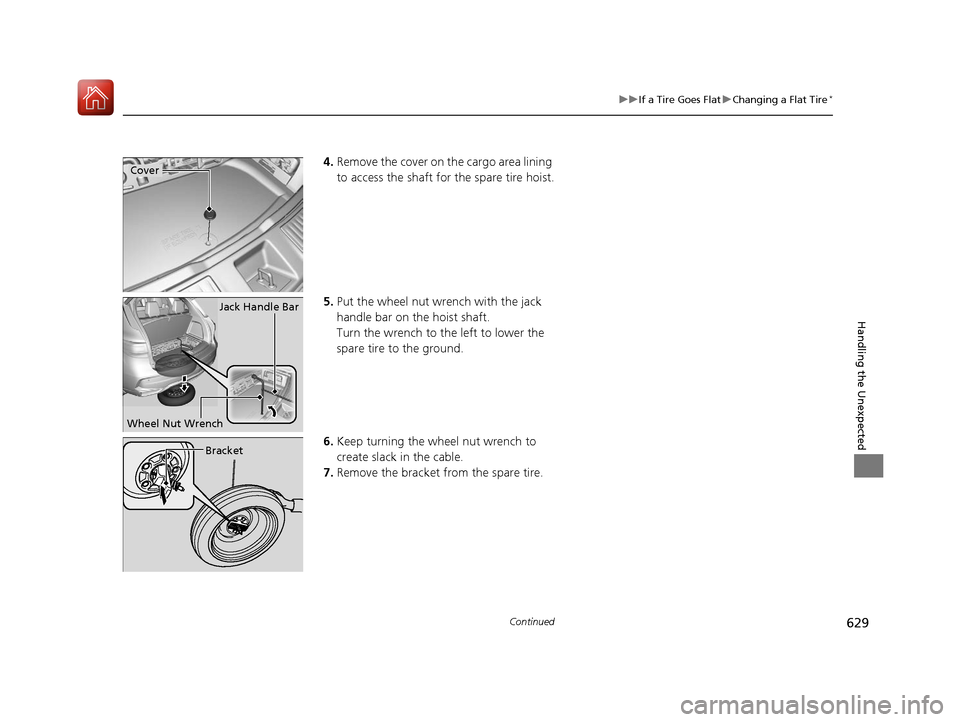
uuIf a Tire Goes Flat uChanging a Flat Tire*
Continued
Handling the Unexpected
4. Remove the cover on the cargo area lining
to access the shaft for the spare tire hoist.
5. Put the wheel nut wrench with the jack
handle bar on the hoist shaft.
Turn the wrench to the left to lower the
spare tire to the ground.
6. Keep turning the wh eel nut wrench to
create slack in the cable.
7. Remove the bracket from the spare tire.Cover
Jack Handle Bar
Wheel Nut Wrench
Bracket
18 ACURA MDX-31TZ56400.book 629 ページ 2017年8月23日 水曜日 午後4時1分
Page 638 of 697

Continued637
uuIf a Tire Goes Flat uTemporarily Repairing a Flat Tire*
Handling the Unexpected
1. Remove the valve cap from the tire valve
stem.
2. Remove the sealant/air hose from the
packaging.
3. Attach the sealant/air hose onto the tire
valve stem. Screw it until it is tight.
■Injecting Sealant and Air1Injecting Sealant and Air
In cold temperatures, the sealant may not flow easily.
In this situation, warm it up for five minutes before
using.
The sealant can permanentl y stain clothing and other
materials. Be careful duri ng handling and wipe away
any spills immediately.
3WARNING
Tire sealant contains substances that are
harmful and can be fatal if swallowed.
If accidentally swallowed, do not induce
vomiting. Drink plenty of water and get
medical attention immediately.
For skin or eye contact, flush with cool
water and get medical attention if
necessary.
Valve Stem
Valve Cap
Sealant/Air Hose
Valve Stem
Sealant/Air Hose
18 ACURA MDX-31TZ56400.book 637 ページ 2017年8月23日 水曜日 午後4時1分
Page 639 of 697

uuIf a Tire Goes Flat uTemporarily Repairing a Flat Tire*
638
Handling the Unexpected
4. Plug in the compressor to the accessory
power socket.
u Be careful not to pinch the cord in a
door or window.
u Do not plug any other electronic
devices into other accessory power
sockets.
2 Accessory Power Sockets P. 213
5.Start the engine.
u Keep the engine running while injecting
sealant and air.
2 Carbon Monoxide Gas P. 74
6.Turn the selector switch to REPAIR.
1Injecting Sealant and Air
NOTICE
Do not operate the temporary tire repair kit compressor
for more than 15 minu tes. The compressor can
overheat and become permanently damaged.
There are three accessory power sockets:
•In the console compartment•In the front of the center pocket•In the left side panel in the cargo area 2 Accessory Power Sockets P. 213
Until the sealant injection is complete, the pressure
shown on the pressure gauge will appear higher than
actual. After the sealant injection is complete the
pressure will drop and then begin to rise again as the
tire is inflated with air. This is normal. To accurately
measure the air pressure usi ng the gauge, turn the air
compressor off only after the sealant injection is
complete.
3WARNING
Running the engine with the vehicle in an
enclosed or even partly enclosed area can
cause a rapid build-up of toxic carbon
monoxide.
Breathing this colorless, odorless gas can
cause unconsciousness and even death.
Only run the engine to power the air
compressor with th e vehicle outdoors.
REPAIR
18 ACURA MDX-31TZ56400.book 638 ページ 2017年8月23日 水曜日 午後4時1分
Page 640 of 697

Continued639
uuIf a Tire Goes Flat uTemporarily Repairing a Flat Tire*
Handling the Unexpected
7. Press the inflator switch to turn on the
compressor.
u The compressor starts injecting sealant
and air into the tire.
u When the sealant injection is complete,
continue to add air.
8. After the air pressure reaches 35 psi (240
kPa), turn off the kit.
u To check the pressure, occasionally turn
off the compressor and read the gauge.
9. Unplug the power plug from the accessory
power socket.
10. Unscrew the sealant/ai r hose from the tire
valve stem. Reinstall the valve cap.
11. Press the pressure relief button until the
gauge returns to 0 psi (0 kPa).Pressure Gauge
ON
OFF
1Injecting Sealant and Air
If the required air pressure is not reached within 10
minutes, the tire may be too severely damaged for
the kit to provide the necessa ry seal, and your vehicle
will need to be towed.
See an Acura dealer for a replacement sealant bottle
and proper disposal of an empty bottle.
Sealant/Air Hose
Valve Stem
Pressure Relief Button
18 ACURA MDX-31TZ56400.book 639 ページ 2017年8月23日 水曜日 午後4時1分