2017 YAMAHA TMAX lock
[x] Cancel search: lockPage 103 of 124

Periodic maintenance and adjustment
8-31
1
2
3
4
5
6
7
8
9
10
11
12
13
14
(XP530E-A, XP530-A)
(XP530D-A)
(XP530D-A)
1. Spare fuse
2. Seat lock fuse
3. Signaling system fuse
4. Ignition fuse
5. Taillight fuse
6. Radiator fan motor fuse
7. Fuel injection system fuse
8. Backup fuse
1. Spare fuse
2. Windshield motor fuse
3. Signaling system fuse
4. Ignition fuse
5. Taillight fuse
6. Radiator fan motor fuse
7. Fuel injection system fuse
8. Backup fuse
1
34568
12
7
1
34568
12
7
1. Brake light fuse
2. Cruise control fuse
3. Spare fuse
3
1
2
BV1-28199-E0.book 31 ページ 2016年12月19日 月曜日 午前11時25分
Page 104 of 124

Periodic maintenance and adjustment
8-32
1
2
3
4
5
6
7
8
9
10
11
12
13
14 3. Turn the vehicle power on and turn
on the electrical circuit in question
to check if the device operates.
4. If the fuse immediately blows again, have a Yamaha dealer
check the electrical system.
EAU77161
Vehicle lights
Except for the front turn signal lights
and license plate light, this model is
equipped with LED lighting. If a light
does not come on, check the fuses and
then have a Yamaha dealer check the
vehicle.
If a front turn signal light or license plate
light does not come, check and replace
the bulb. (See page 8-33 or 8-33.)
NOTICE
ECA16581
Do not affix any type of tinted film or
stickers to the headlight lens.
Specified fuses:Main fuse:
40.0 A
Headlight fuse: 7.5 A
Taillight fuse: 7.5 A
Brake light fuse:
1.0 A (XP530D-A)
Signaling system fuse: 7.5 A
Ignition fuse: 7.5 A
Windshield motor fuse:
20.0 A (XP530D-A)
Radiator fan motor fuse: 15.0 A
Fuel injection system fuse: 7.5 A
ABS control unit fuse:
7.5 A
ABS motor fuse: 30.0 A
ABS solenoid fuse:
15.0 A
Cruise control fuse: 1.0 A (XP530D-A)
Backup fuse: 15.0 A
Electronic thrott le valve fuse:
7.5 A
Auxiliary DC jack fuse: 2.0 A
Seat lock fuse: 7.5 A (XP530-A, XP530E-A)
1. Headlight
2. Auxiliary light
1
21
2
BV1-28199-E0.book 32 ページ 2016年12月19日 月曜日 午前11時25分
Page 105 of 124

Periodic maintenance and adjustment
8-33
1
2
3
4
5
6
7
8
9
10
11
12
13
14
EAU52322
Replacing a front turn signal
light bulb
1. Place the scooter on the center- stand.
2. Remove the turn signal light bulb socket (together with the bulb) by
turning it counterclockwise.
3. Remove the burnt-out bulb by pushing it in and turning it counter-
clockwise.
4. Insert a new bulb into the socket, push it in, and then turn it clock-
wise until it stops.
5. Install the socket (together with the bulb) by turning it clockwise.
EAU58010
Replacing the license plate
light bulb
1. Remove the license plate light unitby removing the nuts and collars,
and then remove the license plate
light bulb socket (together with the
bulb) by pulling it out.
2. Remove the burnt-out bulb by pull- ing it out.
3. Insert a new bulb into the socket.
4. Install the socket (together with the bulb) by pushing it in, and then in-
stall the license plate light unit by
installing the collars and nuts.
1. Turn signal light bulb socket
1. Turn signal light bulb
2. Turn signal light bulb socket
1
12
1. Nut
2. License plate light unit
1. License plate light bulb
1 2
1
BV1-28199-E0.book 33 ページ 2016年12月19日 月曜日 午前11時25分
Page 108 of 124

Periodic maintenance and adjustment
8-36
1
2
3
4
5
6
7
8
9
10
11
12
13
14 Engine overheating
WARNING
EWAT1041
Do not remove the radiator cap when the engine and radiator are hot.
Scalding hot fluid and steam may be blown out under pressure, which
could cause serious injury. Be sure to wait until the engine has cooled.
Place a thick rag, like a towel, over the radiator cap, and then slowly ro-
tate the cap counterclockwise to the detent to allow any residual pres-
sure to escape. When the hissing sound has stopped, press down on the
cap while turning it counterclockwise, and then remove the cap.
TIP
If coolant is not available, tap water c
an be temporarily used instead, provided that
it is changed to the recommended coolant as soon as possible.
Wait until the engine
has cooled.
Check the coolant
level in the reservoir
and radiator.Add coolant.
(See TIP.)
The coolant level is
OK.
There is no leakage.
There is leakage.
The coolant level is
low.
Check the cooling
system for leakage.
Have a Yamaha
dealer check and
repair the cooling
system.
Start the engine. If the engine overheats again,
have a Yamaha dealer check and repair the cooling
system.
BV1-28199-E0.book 36 ページ 2016年12月19日 月曜日 午前11時25分
Page 109 of 124

Periodic maintenance and adjustment
8-37
1
2
3
4
5
6
7
8
9
10
11
12
13
14
EAU77371
Emergency mode
When the smart key is lost, damaged,
or its battery has discharged, the vehi-
cle can still be turned on and the engine
started. You will need a mechanical key
and the smart key system identification
number (see page 3-3). To operate the
vehicle in emergency mode, carry out
the following steps.
TIP
Emergency mode operation will be
cancelled if the respective steps are not
carried out within the time set for each
operation or if the “OFF/LOCK” switch
is pushed. 1. Stop the vehicle in a safe place.
2. Unlock the seat by inserting the mechanical key into the lock locat-
ed right side of body and turn it
counter clockwise.
3. Open the seat and check that the trunk light comes on.
4. Push the “ON/ ” switch once.
5. Without completely shutting the seat, raise and lower it three times
within 10 seconds.
TIP
Use the rear storage compartment light
as a guide when raising and lowering
the seat. The smart key system indicator
light on the speedometer will come
on for three seconds to indicate
the transition to emergency mode.
6. After the smart key system indica- tor light goes off, use the “ / ”
switch to enter the identification
number. Refer to the following pro-
cedure on how to input the identifi-
cation number.
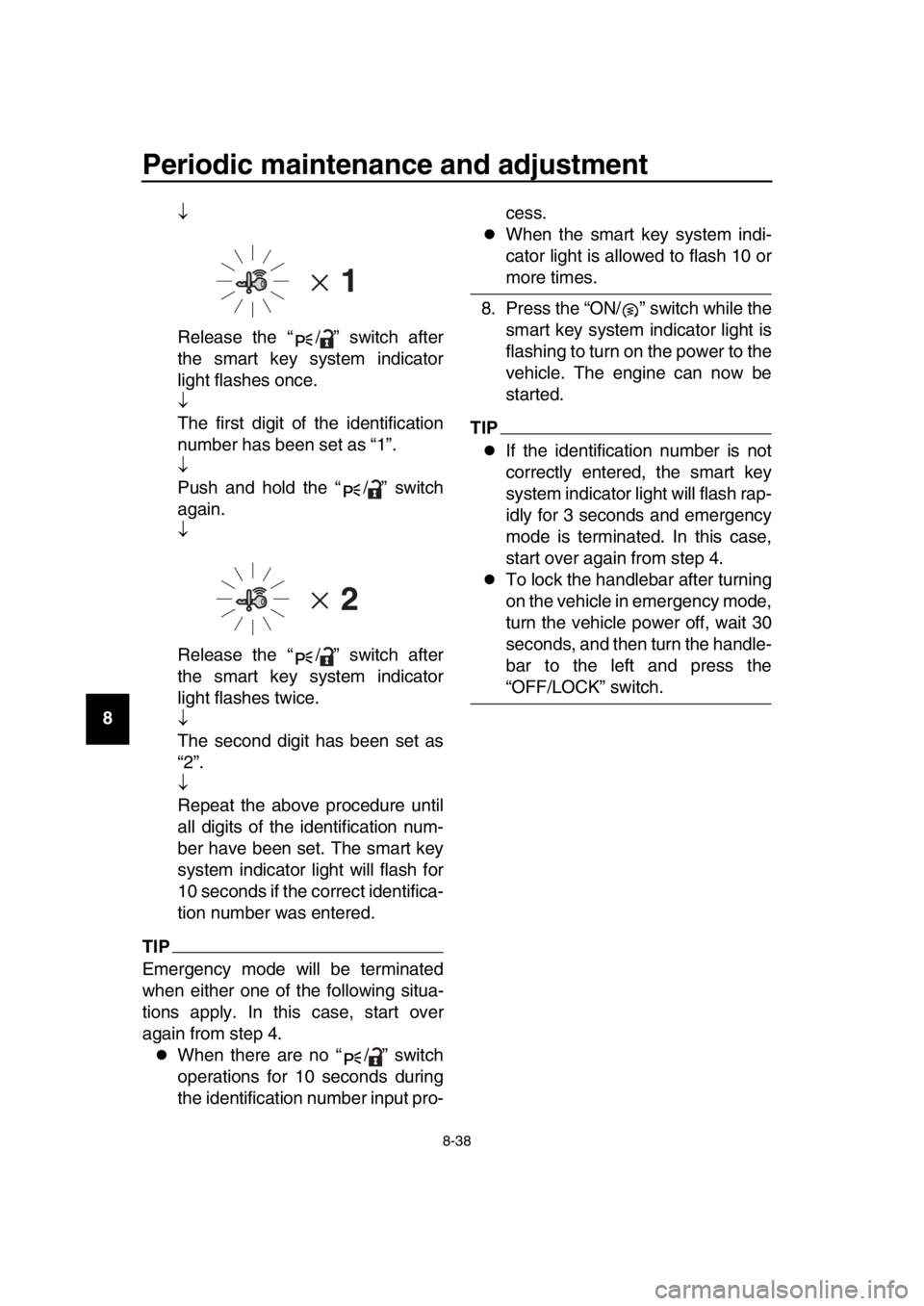
7. Inputting the identification number is done by counting the number of
flashes of the smart key system in-
dicator light.
For example, if the identification
number is 123456:
Push and hold the “ / ” switch.
The smart key system indicator
light will start to flash.
1. Smart key system indicator light “ ”
1. Identification number
1
1
BV1-28199-E0.book 37 ページ 2016年12月19日 月曜日 午前11時25分
Page 110 of 124
Periodic maintenance and adjustment
8-38
1
2
3
4
5
6
7
8
9
10
11
12
13
14
Release the “ / ” switch after
the smart key system indicator
light flashes once.
The first digit of the identification
number has been set as “1”.
Push and hold the “ / ” switch
again.
Release the “ / ” switch after
the smart key system indicator
light flashes twice.
The second digit has been set as
“2”.
Repeat the above procedure until
all digits of the identification num-
ber have been set. The smart key
system indicator light will flash for
10 seconds if the correct identifica-
tion number was entered.
TIP
Emergency mode will be terminated
when either one of the following situa-
tions apply. In this case, start over
again from step 4.
When there are no “ / ” switch
operations for 10 seconds during
the identification number input pro- cess.
When the smart key system indi-
cator light is allowed to flash 10 or
more times.
8. Press the “ON/ ” switch while the smart key system indicator light is
flashing to turn on the power to the
vehicle. The engine can now be
started.
TIP
If the identification number is not
correctly entered, the smart key
system indicator light will flash rap-
idly for 3 seconds and emergency
mode is terminated. In this case,
start over again from step 4.
To lock the handlebar after turning
on the vehicle in emergency mode,
turn the vehicle power off, wait 30
seconds, and then turn the handle-
bar to the left and press the
“OFF/LOCK” switch.
BV1-28199-E0.book 38 ページ 2016年12月19日 月曜日 午前11時25分
Page 121 of 124

12-1
1
2
3
4
5
6
7
8
9
10
11
12
13
14
Index
A
ABS .......................................................5-19
ABS warning light ....................................5-3
Acceleration and deceleration .................7-3
Air filter element, replacing ....................8-15
Auxiliary DC jack ...................................5-28
B
Battery ...................................................8-28
Brake fluid, changing .............................8-24
Brake fluid level, checking .....................8-23
Brake lever, front ...................................5-17
Brake lever, rear ....................................5-18
Brake levers, lubricating ........................8-26
Braking ....................................................7-4
C
Cables, checking and lubricating...........8-25
Canister .................................................8-10
Care.........................................................9-1
Catalytic converter.................................5-23
Centerstand and sidestand, checking and lubricating.....................................8-26
Coolant ..................................................8-14
Cruise control indicator lights ..................5-2
Cruise control switches ...........................5-2
Cruise control system (XP530D-A) .........4-1
D
Data recording, vehicle..........................11-2
Diagnostic connector .............................11-2
Dimmer/Pass switch ................................5-1
D-mode (drive mode)
(XP530-A, XP530D-A) ..........................4-3
Drive belt slack ......................................8-24
Drive mode switch ...................................5-2
E
Emergency mode ..................................8-37
Engine break-in .......................................7-5
Engine idling speed, checking ...............8-16
Engine oil and oil filter cartridge ............8-10
Engine serial number ............................11-1
Engine stop switch ..................................5-1
Engine trouble warning light ....................5-2
F
Front and rear brake lever free play, checking ..............................................8-20
Front and rear brake pads, checking.....8-22
Front fork, checking ...............................8-27
Fuel .......................................................5-21
Fuel consumption, tips for reducing ........7-5
Fuel tank cap .........................................5-20
Fuel tank overflow hose ........................5-22 Fuses, replacing.................................... 8-30
H
Handlebar switches................................. 5-1
Hazard switch ......................................... 5-1
High beam indicator light ........................ 5-2
Horn switch ............................................. 5-1
How to lock the centerstand.................. 3-10
How to lock the steering.......................... 3-9
I
Identification numbers ........................... 11-1
Ignition circuit cut-off system................. 5-30
Indicator lights and warning lights ........... 5-2
K
Key, handling of smart and mechanical
key ........................................................ 3-3
L
License plate light bulb, replacing ......... 8-33
M
Maintenance and lubrication, periodic .... 8-4
Maintenance, emission control system ... 8-3
Matte color, caution................................. 9-1
Menu switch ............................................ 5-2
Model label............................................ 11-1
Multi-function display .............................. 5-5
O
ON/Start switch ....................................... 5-1
Operating range of the smart key system .................................................. 3-2
P
Panels, removing and installing .............. 8-7
Parking .................................................... 7-6
Parking mode ........................................ 3-12
Part locations .......................................... 2-1
Powering off the vehicle .......................... 3-8
Powering on the vehicle .......................... 3-7
R
Rear brake lock cable, adjusting ........... 8-21
Rear brake lock, checking..................... 8-22
Rear brake lock lever ............................ 5-18
Rear view mirrors .................................. 5-26
S
Safe-riding points .................................... 1-5
Safety information ................................... 1-1
Select switch ........................................... 5-2
Shock absorber assembly..................... 5-27
Sidestand .............................................. 5-29
Smart key ................................................ 3-5
Smart key battery, replacing ................... 3-6
Smart key system ................................... 3-1
Smart key system indicator light ............. 5-3
BV1-28199-E0.book 1 ページ 2016年12月19日 月曜日 午前11時25分