2017 VOLVO XC90 T8 mirror
[x] Cancel search: mirrorPage 145 of 580

INSTRUMENTS AND CONTROLS
}}
143
8. Repeat the calibration procedure if neces-
sary.
Related information
• Defrosting windows and mirrors (p. 204)
• Compass (p. 141)
Lighting panel and controls
The lighting ring on the left-side steering wheel lever can be used to activate the vehicle's exte-rior lighting. Instrument lighting brightness can be adjusted using the thumb wheel on the lighting panel.
Lighting ring on the left-side steering
wheel lever
Lighting
ring posi- tion Result
With the ignition in mode II or if the engine is running:
• In the
US: the Daytime Run-
ning Lights (DRL) will be off
• In
Canada : the Daytime Run-
ning Lights will be on
• High beam flash can be used
With the ignition in mode II or if the engine is running: A
• Parking lights will be
on
• In the
US: the Daytime Run-
ning Lights will be off
• In
Canada : the Daytime Run-
ning Lights will be on
• High beam flash can be used
With the ignition in mode II or if the engine is running:
• The Daytime Running Lights will be
off
• The low beam headlights willbe
on
• High Beams/High Beam flash can be used
Page 154 of 580

||
INSTRUMENTS AND CONTROLS
* Option/accessory.
152
Rear interior lighting
Rear reading lights
The rear interior lighting/reading lights are located in the ceiling.
Rear reading lights: second 13
and third row * of seats
Rear reading light: second row of seats in models with a laminated panoramic roof *
The rear reading lights are turned on or off by briefly pressing the button in the ceiling console.Adjust the brightness by pressing and holdingthe button.
Glove compartment lightingThe glove compartment lighting comes on orgoes off when the glove compartment is openedor closed.
Vanity mirror lightingThe vanity mirror lighting comes on or goes offwhen the cover over the mirror is opened orclosed.
Ground lightingThe ground lighting comes on or goes off when adoor is opened or closed.
Doorsill lightingThe doorsill lighting comes on or goes off when adoor is opened or closed.
Cargo area lightingThe cargo area lighting comes on or goes offwhen the tailgate is opened or closed.
Ambience lighting1. In the center display's Top view, select
SettingsMy CarLights and Lighting
Ambient Lighting
2. Choose among the following settings:
•Under
Ambient Light Intensity, choose:Off, Low or High.
•
Ambient Light Level: Reduced or Full.
13 In models with a laminated panoramic roof * there are lights on each side of the roof
Page 167 of 580

INSTRUMENTS AND CONTROLS
}}
* Option/accessory.165
Adjusting the steering wheel
The steering wheel can be adjusted to various positions.
WARNING
Never adjust the steering wheel while driving.
The steering wheel's height and reach can be adjusted
Adjusting the steering wheel
To adjust the steering wheel:
1. Push the lever downward/forward to release the steering wheel.
2. Adjust the steering wheel to a suitable posi- tion.
3. Pull back the lever to lock the steering wheel in place. If the lever is difficult to pull into place, press the steering wheel lightly at thesame time as you pull the lever.
Related information
• Steering wheel (p. 164)
• Adjustable steering force
* (p. 258)
Seats
The vehicle is equipped with 7 seats. The front seats can be adjusted electronically * or man-
ually. The second and third row seats are adjusted primarily manually.
The adjustment settings for the power front seats *, door mirrors and the head-up display can
be stored in memory buttons. Using the multi-function control *, comfort in the
front seats can be further enhance by e.g., adjust- ing the lumbar support or extending the length ofthe front seat cushion. The rear seats can be folded down and their head restraints can be adjusted. The second rowseats can be moved forward/rearward and theirbackrest tilt can also be changed.
Related information
• Adjusting power front seats
* (p. 167)
• Adjusting function settings in the multifunc- tional front seats
* (p. 170)
• Manually operated front seats (p. 166)
• Using the power seat memory function
*
(p. 168)
• Folding the second row backrests (p. 176)
• Getting into and out of the third row of seats (p. 178)
Page 170 of 580
INSTRUMENTS AND CONTROLS
* Option/accessory.
168
Adjusting the passenger's seat from the driver's seat *
Using the controls on the side of the driver's seat, the driver can adjust the position of thefront passenger's seat.
Activating the function in the center
display
From the center display, the function can be acti- vated in two ways. After activating the function, adjust the passeng- er's seat within 10 seconds . If no adjustments
are made in that time span, the function deacti- vates automatically.
Activating from Function view
1. Go to the center display's Function view. 2. Activate the function by tapping
Adjust
passenger seat.
Activating from Settings
–In the center display, select SettingsMy
Car
SeatsAdjust Passenger Seat
From Driver Position.
Power seat controls
Move the passenger's seat forward/rearward by moving the control forward/rearward.
Change the passenger seat's backrest tilt by moving the control forward/rearward.
Related information
• Power front seats
* (p. 167)
• Adjusting power front seats
* (p. 167)
• Seat belts (p. 64)
Using the power seat memory function
*
The memory function can be used to store the settings (positions) of the power front seats *,
door mirrors and the head-up display *.
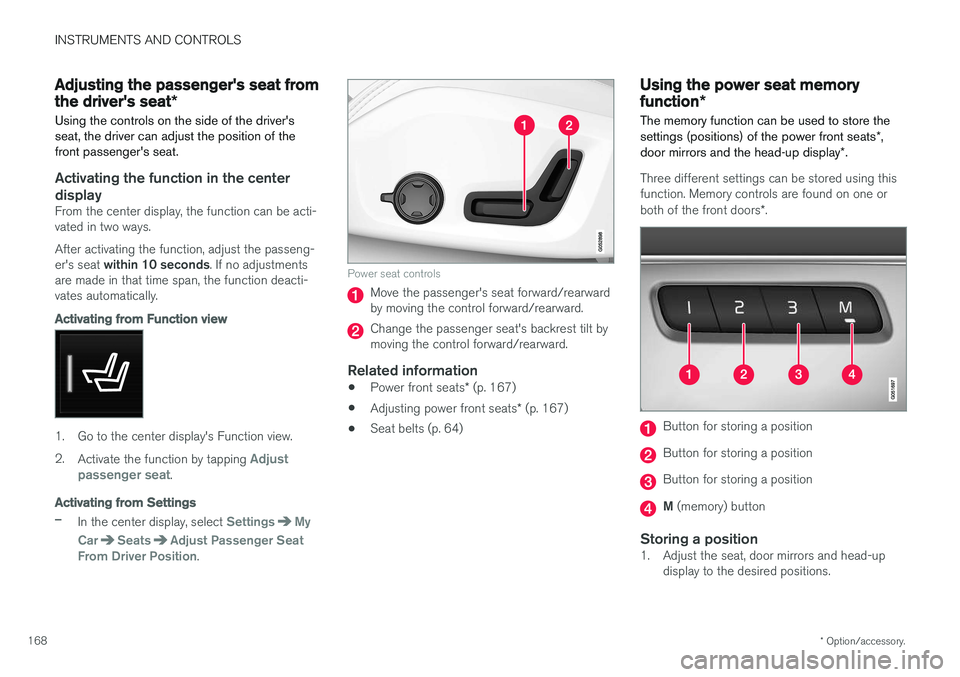
Three different settings can be stored using this function. Memory controls are found on one or both of the front doors *.
Button for storing a position
Button for storing a position
Button for storing a position
M (memory) button
Storing a position1. Adjust the seat, door mirrors and head-up
display to the desired positions.
Page 171 of 580

INSTRUMENTS AND CONTROLS
}}
* Option/accessory.169
2.
Press and release the M button. The indica-
tor light in the button will illuminate.
3. Press button 1, 2 or 3 within 3 seconds to
store the current position of the seat/ mirrors/head-up display in the selected but-ton.
> When the position has been stored in the selected button, an audible signal will sound and the indicator light in the M but-
ton will go out.
If none of the buttons (1, 2 or 3) are pressedwithin 3 seconds, the indicator light in the M but-
ton will go out and the position will not be stored.
The seat/mirrors/head-up display must be moved before new settings can be stored.
Using a stored positionA stored position can be used when one of thefront doors is opened or closed:
Front door open
–Press one of the bottons ( 1–3 ) briefly. The
seat, door mirrors and head-up display will move to the positions stored in that button.
Front door closed
–Press and hold one of the buttons ( 1–3 ) until
the seat, door mirrors and head-up display have moved to the positions stored in thatbutton. The seat, door mirrors and head-up display willstop automatically if the button is released beforethe they have reached the stored positions.
WARNING
•
Because the driver's seat can be adjusted with the ignition off, children should neverbe left unattended in the vehicle.
• Movement of the seat can be STOPPEDat any time by pressing any button on thepower seat control panel.
• Do not adjust the seat while driving. Theseat should be adjusted so that the brakepedal can be depressed fully. In addition,position the seat as far rearward as com-fort and control allow.
• The seat rails on the floor must not beobstructed in any way when the seat is inmotion.
Related information
•
Adjusting power front seats
* (p. 167)
• Power front seats
* (p. 167)
Multifunctional front seats *
In addition to the adjustment settings offered by the power seat controls, the multifunction controlprovides additional possibilities for convenienceand comfort.
Multifunction control on the side of the seat
The multifunction control can be used to adjust lumbar support *, the backrest's side bolsters *, the
length of the seat cushion and the massagefunction *. The adjustment settings made with the
control are shown in the center display * and cer-
tain settings can be made directly from the cen- ter display.
Center displayThe adjustment settings for the driver and pas-senger seats made using the multifunction con-trol are shown in the center display. If only oneseat is adjusted, the settings are shown in the
Page 189 of 580

CLIMATE
}}
* Option/accessory.187
Climate system sensors The climate system's sensors help regulate the passenger compartment temperature, humiditylevel, etc.
Location of the sensors
Humidity sensor: in the rearview mirror con- sole.
Ambient temperature sensor: in the pas- senger's side door mirror.
Passenger compartment temperature sen- sor: near the center console buttons.
Sunlight sensor: on the upper side of the dashboard.
NOTE
Do not cover or block the sensors with cloth- ing or other objects.
On models equipped with the optional Interior Air Quality System, there is also an air quality sensorlocated at the climate system's air intake.
Related information
•Climate control system (p. 186)
• Perceived temperature (p. 186)
• Interior Air Quality System (IAQS)
* (p. 195)
Parking climate (preconditioning)
The climate in the passenger compartment can be preconditioned and maintained, even whenthe vehicle is parked. For full functionality, the
vehicle's charging cable must be connected .
Parking climate/preconditioning and maintaining pas- senger compartment climate comfort is controlled from the Parking climate tab in the center display's Climate
view.
Page 190 of 580

||
CLIMATE
* Option/accessory.
188
PreconditioningPreconditioning the vehicle before driving can help reduce wear and reduce energy consump-tion during a trip.
NOTE
Full preconditioning is only possible when the vehicle's charging cable is connected. In other cases, the passenger compartment can be cooled for 3 minutes in warm weather. This function is started from the
Parking
climate tab in the center display's Climate
view.
With the charging cable connected, precondition- ing can be started immediately or a timer functioncan start this procedure at a later time. This feature utilizes several of the vehicle's sys- tems:
• The High Voltage Coolant Heater (HVCH)warms the hybrid battery and passengercompartment in cold weather.
• In warm weather, the ventilation system willattempt to cool the passenger compartmentto the current ambient temperature.
• In warm weather, the air conditioning systemwill cool the passenger compartment to acomfortable temperature. •
The electrically heated steering wheel andseats can be activated.
• Heating for the windshield, tailgate windowand door mirrors can be activated.
If preconditioning is used in warm weather, a cer-tain amount of water may condense under thevehicle, which is normal. When preconditioning is used, this system will attempt to establish a comfortable temperature in the passenger compartment but not necessarily
the temperature currently set in the climate system .
Maintaining a comfortable passenger compartment climate
The climate in the passenger compartment can be maintained even when the vehicle is parkedand the engine is turned off (e.g., if anyoneintends to remain in the vehicle). This function can only be direct-started.This function utilizes several of the vehicle's sys- tems:
• Residual heat from the engine is used helpkeep the passenger compartment warm incool temperatures.
• In warm weather, the ventilation system willattempt to cool the passenger compartmentto the current ambient temperature.
This function will not be activated if the vehicle islocked from the outside in order to avoid using residual engine heat unnecessarily. This functionis primarily intended for use when the engine isnot running but someone remains in the vehicle.
Related information
•
Starting and stopping preconditioning(p. 192)
• Activating/deactivating the climate comfort retaining function
* (p. 189)
• Activating/deactivating the parking climate timer (p. 189)
• Charging the hybrid battery (p. 403)
• Hybrid battery charging cable (p. 394)
Page 199 of 580
CLIMATE
}}
* Option/accessory.197
Climate system controls
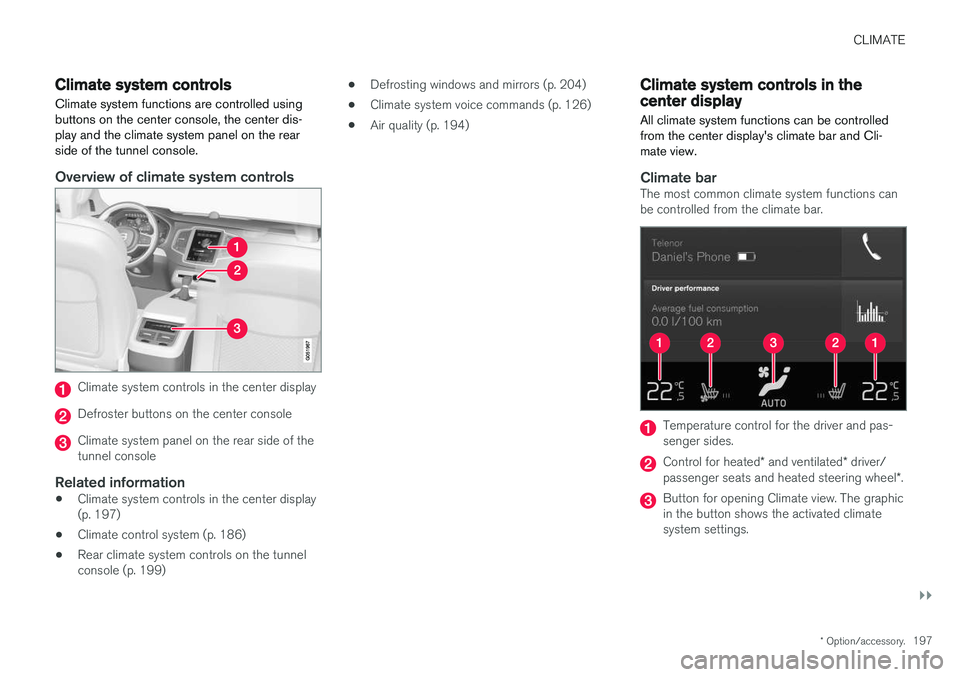
Climate system functions are controlled using buttons on the center console, the center dis-play and the climate system panel on the rearside of the tunnel console.
Overview of climate system controls
Climate system controls in the center display
Defroster buttons on the center console
Climate system panel on the rear side of the tunnel console
Related information
• Climate system controls in the center display(p. 197)
• Climate control system (p. 186)
• Rear climate system controls on the tunnelconsole (p. 199) •
Defrosting windows and mirrors (p. 204)
• Climate system voice commands (p. 126)
• Air quality (p. 194)
Climate system controls in the center display
All climate system functions can be controlled from the center display's climate bar and Cli-mate view.
Climate barThe most common climate system functions can be controlled from the climate bar.
Temperature control for the driver and pas- senger sides.
Control for heated * and ventilated * driver/
passenger seats and heated steering wheel *.
Button for opening Climate view. The graphic in the button shows the activated climatesystem settings.