2017 VOLVO XC60 steering wheel
[x] Cancel search: steering wheelPage 117 of 398

INSTRUMENTS AND CONTROLS
* Option/accessory, for more information, see Introduction.115
Information display – menu controls
The controls on the left steering wheel lever are used to access the menus (p. 115) that are dis-played in the instrument panel (p. 69). Themenus displayed depend on the current ignitionmode (p. 80).
Analog Instrument panel and menu controls
Digital Instrument panel * and menu controls
OK : access to the list of messages (p. 116)
and message confirmation.
Thumb wheel: browse among menus and options in the list of functions.
RESET : reset the active function. Used in
certain cases to select/activate a function, see the explanation under each respectivefunction.
The menus shown on the information displays inthe instrument panel are controlled with the leftlever. The menus displayed depend on ignition mode. Press OK to erase a message and return
to the menus.
Information display – menu overview
The menus displayed depend on the current ignition mode (p. 80).
The following menu alternatives may vary, depending on the equipment installed in the vehi-cle.
Analog instrument panelDigital speed Trip comp. opt.Service status
Messages (##) 23
Digital instrument panel
*Settings
Themes
Contrast mode /Color mode
Service status
Messages
Trip computer reset
Related information
• Information displays – introduction (p. 69)
• Information display – menu controls (p. 115)
• Information display – messages (p. 116)
23
Number of messages in parentheses
Page 118 of 398

INSTRUMENTS AND CONTROLS
116
Information display – messagesThe controls on the left steering wheel lever are used to scroll among messages displayed in theinstrument panel and to confirm selections. When information, indicator or warning symbols illuminate, an explanatory message will be dis-played in the instrument panel.
When a warning (p. 75), information (p. 73) or indicator symbol (p. 73) comes on, a correspond-ing message appears in the information panel. Anerror message is stored in a memory list until thefault is rectified. Press OK to acknowledge and scroll among the
messages.
NOTE
If a warning message appears while you are using the trip computer, the message must be read and confirmed by pressing OK before
the previous activity can be resumed.
MessageDescription
Stop engineAStop and switch off the engine as soon as possible.Serious risk of damage. Con-tact an authorized Volvoworkshop.
Stop safelyAStop and switch off the engine. Serious risk of dam-age. Contact an authorizedVolvo workshop.
Service urgentAHave the vehicle checked by an authorized Volvo work-shop immediately.
Service requiredAHave the vehicle checked by an authorized Volvo work-shop as soon as possible.
See manualARead the owner's manual.
Book time for mainte-nanceTime to book service at an authorized Volvo retailer.
Time for reg- ular mainte-nanceTime for regular service at an authorized Volvo workshop.The timing is determined bythe number of miles driven,number of months since thelast service, engine runningtime.
MessageDescription
Maintenance overdueIf the service intervals are not followed, the warranty doesnot cover any damaged parts.Contact an authorized Volvoworkshop for service.
Temporarily OFFAA function has been tempo- rarily switched off and isreset automatically while driv-ing or after starting again.
Low battery Power savemodeThe audio system is switched off to save current. Chargethe battery.
A There will also be a system-specific part of this message
Related information
• Information displays – introduction (p. 69)
• Information display – menu overview (p. 115)
• Information display – menu controls (p. 115)
Page 156 of 398

||
LOCKS AND ALARM
* Option/accessory, for more information, see Introduction.
154
Unlock – Press the Unlock button on the
remote once to unlock the driver's door. After a short pause, press the Unlock button a second time within 10 seconds to unlock theother doors and the tailgate. This function can be changed so that all doors unlock at the same time by pressing My Car and
going to
SettingsCar settingsLock
settings
Change doors unlock setting. For
a description of the menu system, see My Car – introduction (p. 77).
Approach lighting – As you approach the
vehicle, press the button on the remote key to light the interior lighting, parking lights, license plate lighting and the lights in the door mirrors *.
These lights will switch off automatically after 30, 60 or 90 seconds. For a description of the menusystem, see My Car – introduction (p. 77).
Unlock tailgate – Press the button twice
within several seconds to disarm the alarm sys- tem (the alarm indicator light on the dashboardwill go out), and unlock only the tailgate. Pressing this button for several seconds also opens the tailgate on models equipped with theoptional power tailgate.
NOTE
As an added safety precaution, the parking lights will come on automatically for a shortperiod when the tailgate has been opened.
After closing, the tailgate will not automatically relock. Press Lock to relock it and rearm thealarm. For information on opening the tailgate from the passenger compartment, see Locking/unlocking– tailgate (p. 165)
Panic alarm – This button can be used to
attract attention during emergency situations. To activate the panic alarm, press and hold this button for at least 3 seconds or press it twicewithin 3 seconds. The turn signals and horn willbe activated. The panic alarm will stop automati-cally after 2 minutes and 45 seconds. To deactivate, wait approximately 5 seconds and press the button again. The Panic alarm button will not unlock the vehi- cle.
Related information
• Locking/unlocking – from inside (p. 164)
• Locking/unlocking – from the outside(p. 163)
• Locking/unlocking confirmation (p. 152)
Remote key – range The remote key has a range of approximately 60 ft. (20 m) from the vehicle.
NOTE
Buildings or other obstacles may interfere with the function of the remote key. The vehi-cle can also be locked or unlocked with thekey blade, see Alarm-related functions(p. 171).
If the remote key is removed from the vehicle while the engine is running or if the ignition is in mode
I or II and all of the doors are closed, a
message will appear in the instrument panel dis- play and there will be an audible signal. When the remote key is returned to the vehicle, the message will be erased and the audible sig-nal will stop after one of the following has beendone:
• The remote key is inserted in the ignition slot
• The vehicle's speed exceeds 20 mph(30 km/h)
• The
OK button on the left steering wheel
lever is pressed
Related information
• Remote key – functions (p. 153)
Page 176 of 398

DRIVER SUPPORT
* Option/accessory, for more information, see Introduction.
174
Active chassis * (Four C)
Active chassis, Four-C (Continuously Controlled Chassis Concept), regulates the characteristicsof the shock absorbers so that the vehicle's driv-ing characteristics can be adjusted. There arethree settings: Comfort, Sport and Advanced.
Operation
Chassis settings
Use the buttons in the center console to change setting. The setting in use when the engine isswitched off is activated the next time the engineis started.
NOTE
This system is available on Canadian models only.
Comfort
Comfort mode offers a somewhat softer ride and the transmission shifts gears at lower rpm. Thismode is particularly suitable for long-distancehighway driving. The indicator light in the buttonwill be on when this mode is selected.
Sport
In this mode, the vehicle's body sway is reduced during cornering and steering response is moreimmediate. The transmission shifts up at higherrpm for sportier driving. The indicator light in thebutton will be on to indicate that Sport mode hasbeen selected.
Advanced
In this mode, body sway in curves is minimal and steering response is very direct. Gear shifting isdone at high rpm in each gear for dynamic andactive driving.
Related information
• Adjustable steering force
* (p. 179)
Stability system – introduction The Electronic Stability Control (ESC) system consists of a number of functions designed tohelp reduce wheel spin, counteract skidding andto generally help improve directional stability.
A pulsating sound will be audible when the system is actively operating and isnormal. Acceleration will also beslightly slower than normal.
WARNING
ESC is a supplementary aid and cannot deal with all situations or road conditions. The driver is always responsible for operating the vehicle in a safe manner in accordancewith current traffic regulations.
ESC consists of the following functions: • Traction control
• Spin control
• Active Yaw Control
• Engine Drag Control
• Corner Traction Control
• Trailer Stability Assist
Page 177 of 398

DRIVER SUPPORT
}}
175
Traction Control (TC)
This function is designed to help reduce wheel spin at low speeds by transferring power from adrive wheel that begins to lose traction to thewheel on the opposite side of the vehicle (on thesame axle).
Spin Control (SC)
The SC function is designed to help prevent the drive wheels from spinning while the vehicle isaccelerating.
Active Yaw Control (AYC)
This function helps maintain directional stability, for example when cornering, by braking one ormore of the wheels if the vehicle shows a ten-dency to skid or slide laterally.
Corner Traction Control (CTC)
CTC compensates for understeering and helps provide additional stability when acceleratingthrough a curve by preventing the inside wheelfrom spinning. This is particularly useful whenaccelerating on a curving highway on-ramp. CTC is most effective if the stability system's Sport mode is selected. See the section about
Sport mode.
Engine Drag Control (EDC)
EDC helps keep the engine running if the wheels show a tendency to lock, e.g., when shifting downin the Geartronic manual shifting mode or whileusing the engine's braking function on a slippery surface. If the engine were to stop, power steer-ing would not function, making the vehicle moredifficult to steer.
Trailer Stability Assist (TSA)
1
The TSA helps stabilize a vehicle that is towing a trailer when the vehicle and trailer have begun tosway. See Trailer Stability Assist (TSA) (p. 282)for more information. This system is automatically deactivated if the driver selects
Sport mode.
Related information
•Stability system – operation (p. 175)
• Stability system – symbols and messages (p. 177)
• Trailer Stability Assist (TSA) (p. 282)
Stability system – operation
Operation
Sport mode
The stability system is always activated and can- not be switched off.
However, the driver can select Sport mode, which offers more
active driving characteristics. Sport mode can be selected in
the MY CAR menus, see My Car – introduction (p. 77).
In Sport mode, the engine management system
monitors movement of the accelerator pedal and steering wheel for sportier driving by allowingmore lateral movement of the rear wheels beforeESC is activated. Under certain circumstances, such as when driv- ing with snow chains, or driving in deep snow orloose sand, it may be advisable to temporarily use Sport mode for maximum tractive force.
If the driver releases pressure on the accelerator pedal, ETC will also activate to help stabilize thevehicle. To switch to Sport mode:
Sport mode remains active until the driver
switches it off in the menu or until the engine is
1 Included when a Volvo trailer hitch is installed
Page 181 of 398

DRIVER SUPPORT
* Option/accessory, for more information, see Introduction.179
Adjustable steering force*
Steering force increases with the speed of the vehicle to give the driver enhanced sense ofcontrol and stability. At low speed the vehicle iseasy to steer in order to facilitate parking, etc.
Adjustable steering force *Steering force can be changed under MY CAR
Car settingsSteering wheel force.
Select Low, Medium or High. For a description
of the menu system, My Car – introduction (p. 77).
NOTE
This steering force level menu function can- not be accessed when the vehicle is inmotion.
NOTE
In certain situations, the power steering may become too warm and will have to be tempo-rarily cooled down. While this is happening,the power steering effect will be reducedslightly and somewhat more effort may berequired to turn the steering wheel. If this occurs, a message will be displayed in the instrument panel.
Related information
• Active chassis
* (Four C) (p. 174)
Road Sign Information (RSI) * –
introduction
RSI is a feature that helps the driver see road signs with the posted speed limit.
Introduction
Examples of readable road signs
If the vehicle passes a sign showing the speed limit, this will be displayed in the center console.
WARNING
RSI does not function in all situations and is only intended to provide supplementary infor-mation. The driver is always responsible for operating the vehicle safely.
Related information
• Road Sign Information (RSI) – operation (p. 180)
• Road Sign Information (RSI) – limitations(p. 180)
Page 183 of 398

DRIVER SUPPORT
}}
181
Cruise control (CC) – introductionCruise control is designed to assist the driver by maintaining a set speed. It is primarily intendedfor use on long straight roads in steady traffic,such as on highways and other main roads.
Operation
Steering wheel-mounted controls and display
Standby mode
Resume set speed
Deactivating
Activate/set speed
Selected speed ( gray symbol indicates
standby mode)
Cruise control active: white symbol ( gray
symbol indicates standby mode)
Related information
• Cruise control (CC) – engaging and setting speed (p. 181)
• Cruise control (CC) – deactivating (p. 183)
Cruise control (CC) – engaging and setting speed
Cruise control is designed to assist the driver by maintaining a set speed. It is primarily intendedfor use on long straight roads in steady traffic,such as on highways and other main roads.
Engaging the cruise control function
Steering wheel-mounted controls and display
Standby mode
Resume set speed
Deactivating
Activate/set speed
Selected speed ( gray symbol indicates
standby mode)
Cruise control active: white symbol ( gray
symbol indicates standby mode)
Page 187 of 398
DRIVER SUPPORT
}}
185
Radar sensor type approval
USA FCC ID: L2C0038TR Canada IC: 3432A-0038TR This device complies with Part 15 of the FCC Rules and with Industry Canada license-exemptRSS standard(s). Operation is subject to the fol-lowing two conditions: (1) This device may notcause harmful interference, and (2) This devicemust accept any interference received, includinginterference that may cause undesired operation. The term “IC:” before the radio certification num- ber only signifies that Industry Canada technicalspecifications were met.
WARNING
Changes or modifications not expressively approved by the party responsible for compli-ance could void the user's authority to oper-ate the equipment.
Related information
•Toggling between ACC and CC (standard Cruise Control) (p. 182)
• Cruise control (CC) – introduction (p. 181)
• Adaptive Cruise Control – troubleshooting(p. 198) •
Adaptive Cruise Control – symbols and mes-sages (p. 196)
• Adaptive Cruise Control – setting time inter-val (p. 189)
• Adaptive Cruise Control – setting speed(p. 188)
• Radar sensor (p. 193)
• Adaptive Cruise Control (ACC) – QueueAssist (p. 191)
• Adaptive Cruise Control – passing anothervehicle (p. 191)
• Adaptive Cruise Control – limitations(p. 194)
• Adaptive Cruise Control – function (p. 185)
• Adaptive Cruise Control – engaging (p. 187)
• Adaptive Cruise Control – deactivating(p. 189)
Adaptive Cruise Control – function
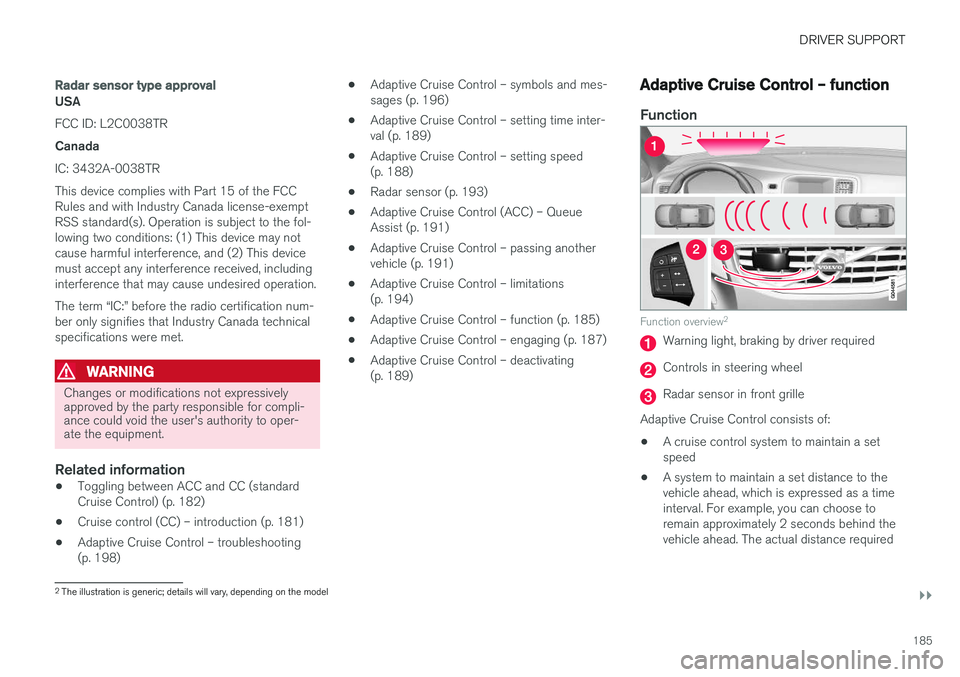
Function
Function overview 2
Warning light, braking by driver required
Controls in steering wheel
Radar sensor in front grille
Adaptive Cruise Control consists of:
• A cruise control system to maintain a set speed
• A system to maintain a set distance to thevehicle ahead, which is expressed as a timeinterval. For example, you can choose toremain approximately 2 seconds behind thevehicle ahead. The actual distance required
2
The illustration is generic; details will vary, depending on the model