2017 VOLVO XC60 center console
[x] Cancel search: center consolePage 164 of 398
LOCKS AND ALARM
* Option/accessory, for more information, see Introduction.
162 Tested To Comply With FCC Standards For Automobile UseCanada – IC:267T-5WK48952, 267T-5WK48964, 267T-5WK48891 NOTEThis device complies with RSS -210 of Industry Canada. Operation is subject to the following twoconditions: (1) This device may not cause harmfulinterference, and (2) this device must acceptinterference received, including interference thatmay cause undesired operation. CAUTIONChanges or modifications not expressly approved by the manufacturer could void the user's author-ity to operate the equipment.
Keyless drive
* – antenna locations
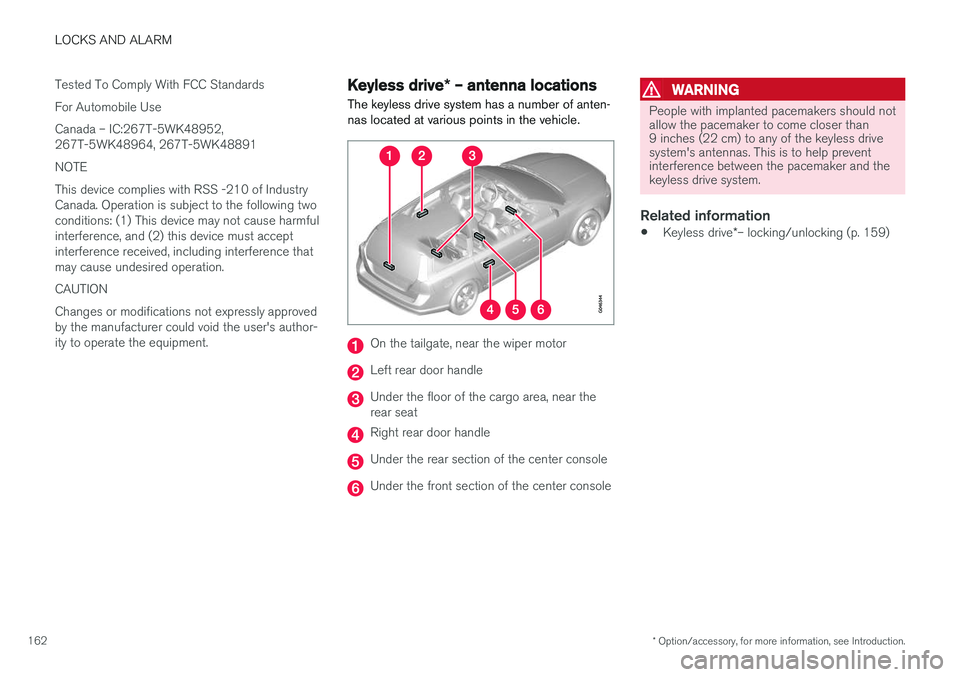
The keyless drive system has a number of anten- nas located at various points in the vehicle.
On the tailgate, near the wiper motor
Left rear door handle
Under the floor of the cargo area, near the rear seat
Right rear door handle
Under the rear section of the center console
Under the front section of the center console
WARNING
People with implanted pacemakers should not allow the pacemaker to come closer than9 inches (22 cm) to any of the keyless drivesystem's antennas. This is to help preventinterference between the pacemaker and thekeyless drive system.
Related information
• Keyless drive
*– locking/unlocking (p. 159)
Page 176 of 398

DRIVER SUPPORT
* Option/accessory, for more information, see Introduction.
174
Active chassis * (Four C)
Active chassis, Four-C (Continuously Controlled Chassis Concept), regulates the characteristicsof the shock absorbers so that the vehicle's driv-ing characteristics can be adjusted. There arethree settings: Comfort, Sport and Advanced.
Operation
Chassis settings
Use the buttons in the center console to change setting. The setting in use when the engine isswitched off is activated the next time the engineis started.
NOTE
This system is available on Canadian models only.
Comfort
Comfort mode offers a somewhat softer ride and the transmission shifts gears at lower rpm. Thismode is particularly suitable for long-distancehighway driving. The indicator light in the buttonwill be on when this mode is selected.
Sport
In this mode, the vehicle's body sway is reduced during cornering and steering response is moreimmediate. The transmission shifts up at higherrpm for sportier driving. The indicator light in thebutton will be on to indicate that Sport mode hasbeen selected.
Advanced
In this mode, body sway in curves is minimal and steering response is very direct. Gear shifting isdone at high rpm in each gear for dynamic andactive driving.
Related information
• Adjustable steering force
* (p. 179)
Stability system – introduction The Electronic Stability Control (ESC) system consists of a number of functions designed tohelp reduce wheel spin, counteract skidding andto generally help improve directional stability.
A pulsating sound will be audible when the system is actively operating and isnormal. Acceleration will also beslightly slower than normal.
WARNING
ESC is a supplementary aid and cannot deal with all situations or road conditions. The driver is always responsible for operating the vehicle in a safe manner in accordancewith current traffic regulations.
ESC consists of the following functions: • Traction control
• Spin control
• Active Yaw Control
• Engine Drag Control
• Corner Traction Control
• Trailer Stability Assist
Page 181 of 398

DRIVER SUPPORT
* Option/accessory, for more information, see Introduction.179
Adjustable steering force*
Steering force increases with the speed of the vehicle to give the driver enhanced sense ofcontrol and stability. At low speed the vehicle iseasy to steer in order to facilitate parking, etc.
Adjustable steering force *Steering force can be changed under MY CAR
Car settingsSteering wheel force.
Select Low, Medium or High. For a description
of the menu system, My Car – introduction (p. 77).
NOTE
This steering force level menu function can- not be accessed when the vehicle is inmotion.
NOTE
In certain situations, the power steering may become too warm and will have to be tempo-rarily cooled down. While this is happening,the power steering effect will be reducedslightly and somewhat more effort may berequired to turn the steering wheel. If this occurs, a message will be displayed in the instrument panel.
Related information
• Active chassis
* (Four C) (p. 174)
Road Sign Information (RSI) * –
introduction
RSI is a feature that helps the driver see road signs with the posted speed limit.
Introduction
Examples of readable road signs
If the vehicle passes a sign showing the speed limit, this will be displayed in the center console.
WARNING
RSI does not function in all situations and is only intended to provide supplementary infor-mation. The driver is always responsible for operating the vehicle safely.
Related information
• Road Sign Information (RSI) – operation (p. 180)
• Road Sign Information (RSI) – limitations(p. 180)
Page 201 of 398

DRIVER SUPPORT
}}
199
Distance Alert – introduction
Distance Alert is part of Adaptive Cruise Control and is a function that provides information aboutthe time interval to the vehicle ahead.
IntroductionDistance Alert is active at speeds above approxi- mately 18 mph (30 km/h). Time interval informa-tion is only given for a vehicle that is drivingahead of your vehicle in the same direction. Noinformation is provided for vehicles driving towardyou, moving very slowly, or at a standstill.
Amber warning light 4
.
An amber warning light in the windshield glows steadily if your vehicle is closer to the one aheadthan the set time interval.
NOTE
Distance Alert only monitors distance to the vehicle ahead while Adaptive Cruise Control isin standby mode or off.
WARNING
Distance Alert only indicates the distance to the vehicle ahead. It does not affect thespeed of your vehicle.
Related information
• Distance Alert – operation (p. 199)
• Distance Alert – limitations (p. 200)
• Distance Alert – symbols and messages (p. 202)
Distance Alert – operation
Distance Alert is part of Adaptive Cruise Control and is a function that provides information aboutthe time interval to the vehicle ahead.
Press the button in the center instrument panel to switch this function on or off. The indicatorlight in the button illuminates when the functionis on. Depending on the optional equipment selected, there may not be room for a Distance Alert but-ton in the center console. In this case, the func-tion is controlled through the menu system. Press MY CAR and go to
SettingsCar settings
Distance alertOn/Off.
4
The illustration is generic; certain details may vary from model to model
Page 207 of 398

DRIVER SUPPORT
}}
205
City Safety – operation
Using City Safety™
NOTE
The City Safety™ function is activated auto-
matically each time the engine has been switched off and restarted.
On and OffIn certain situations, it may be desirable to switch City Safety ™ off, such as when driving in close
quarters where leaves, branches, etc. may obscure the hood and windshield. When the engine is running, City Safety ™ can be
switched off as follows: Press My Car in the center console control panel
and go to
SettingsCar settingsDriver
support systems
City Safety. Select Off.
If the engine is switched off, City Safety ™ will
reactivate when the engine is restarted.
WARNING
The laser sensor emits light when the ignition is in mode II or higher, even if City Safety ™
has been switched off.
To switch City Safety ™ on again: •
Follow the same procedure as for switching City Safety
™ off but select
On.
Related information
• City Safety – introduction (p. 203)
• City Safety – function (p. 204)
• City Safety – limitations (p. 205)
• City Safety – troubleshooting (p. 206)
• City Safety – symbols and messages (p. 208)
• City Safety – Laser sensor (p. 209)
• My Car – introduction (p. 77)
City Safety – limitations
Limitations
WARNING
The laser sensor has certain limitations and its function may be reduced (or it may notfunction at all) in conditions such as heavyrain or snowfall, or by dense fog or thick,blowing dust or snow. Condensation, dirt, iceor snow on the windshield may also interferewith the sensor
Page 215 of 398

DRIVER SUPPORT
}}
* Option/accessory, for more information, see Introduction.213
Collision warning* – operation
Settings are made by pressing MY CAR on the
center console control panel and using the menus displayed.
Activating/deactivating both warning
signals
To switch the system's audible and visual sig-
nals on or off at the same time, press MY CAR
on the center console control panel and go to
SettingsCar settingsDriver support
systems
Collision Warning. If Pedestrian
and Cyclist Detection with Full Auto Brake is on, the system will perform a self-test each time theengine is started by briefly illuminating the warn-ing light. See My Car – introduction (p. 77) for adescription of the menu system. When the engine is switched on, the system set- ting that was being used when it was switchedoff will be the default setting.
NOTE
The auto-brake and pedestrian/cyclist detec- tion features are always on, even if the audi-ble and visual warning signals have beendeactivated.
Activating/deactivating the audible warning signal only
The audible warning signal can be activated/ deactivated by pressing MY CAR on the center
console control panel and going to
Settings
Car settingsDriver support systemsWarning sound if risk of collision.
Setting a warning distanceThis setting determines the distance at which the visual and audible warnings are triggered. Select
Long, Normal or Short by pressing MY CAR on
the center console control panel and going to
SettingsCar settingsDriver support
systems
Collision WarningWarning
distance.
The warning distance determines the level of sensitivity used by the system. The warning dis- tance
Long provides an earlier warning. Begin by
using Long and if the system gives too many
warnings, try changing to Normal.
WARNING
• The setting Short should only be used in
situations where traffic is light and mov- ing at low speeds.
• Pedestrian and Cyclist Detection with FullAuto Brake alerts the driver to the risk ofa collision but this function cannot reducethe driver
Page 226 of 398

DRIVER SUPPORT
224
Driver Alert Control (DAC) – operation
Operating DACSettings are made using menu system and the display in the center console. See My Car – intro-duction (p. 77) for more information on the menusystem.
On/Off
To put Driver Alert in standby mode:• In the
MY CAR menu, scroll to
Car settings
Driver support systemsDriver Alertand check the box. If the box is not checked, the function is off.
Related information
•Driver Alert Control (DAC) – introduction(p. 223)
• Driver Alert Control (DAC) – function(p. 224)
• Driver Alert Control (DAC) – limitations(p. 225)
• Driver Alert Control (DAC) – symbols andmessages (p. 226)
• Driver Alert Control (DAC) – introduction(p. 223)
• Lane Departure Warning (LDW) – introduc-tion (p. 228)
Driver Alert Control (DAC) – function
FunctionDriver Alert is activated when the vehicle exceeds a speed of 40 mph (65 km/h) and will remainactive as long as the speed is over approx.37 mph (60 km/h).
If the vehicle is being driven erratically,the driver will be alerted by an audible signal and the message
Driver Alert
Time for a break is displayed. The
warning will be repeated after a short time if the driving pattern remains the same. Press the OK button to erase a message.
WARNING
• An alert should be taken seriously since it is sometimes difficult for a driver to real-ize that he/she is fatigued.
• In the event of a warning or if the driverfeels fatigued, stop as soon as possible ina safe place and rest.
Related information
• Driver Alert Control (DAC) – introduction (p. 223)
• Driver Alert Control (DAC) – operation(p. 224)
• Driver Alert Control (DAC) – limitations(p. 225) •
Driver Alert Control (DAC) – symbols andmessages (p. 226)
• Driver Alert System (p. 223)
• Lane Departure Warning (LDW) – introduc-tion (p. 228)
Page 228 of 398

DRIVER SUPPORT
226
Driver Alert Control (DAC) – symbols and messages Depending on the situation, DAC may display certain symbols and text messages in the instru-ment panel or center console screen.
Symbols and messages
Instrument panel
SymbolMessageDescription
Driver Alert Time for a breakThe vehicle has been driven erratically. The driver receives an audible signal and a text message.
Windscreen Sensors blockedThe camera is temporarily not functioning, due to snow, ice, or dirt on the windshield. Clean the area of the wind- shield in front of the camera. See The camera