2017 VOLVO XC60 esp
[x] Cancel search: espPage 100 of 398

||
INSTRUMENTS AND CONTROLS
* Option/accessory, for more information, see Introduction.
98
Overhead courtesy lighting
The passenger compartment lighting is switched on and off automatically when button (3) is in theneutral position. The lighting comes on and remains on for 30 seconds if:
• the vehicle is unlocked from the outside withthe key or remote control
• the engine is switched off and the ignition is in mode
0.
The lighting switches off when:
• the engine is started
• the vehicle is locked from the outside.
The lighting comes on and remains on for two minutes if one of the doors is open. The passenger compartment lighting can be switched on and off manually within 30 minutesafter the vehicle has been unlocked. If the lighting is switched on manually and the vehicle is locked, the courtesy lighting will switchoff automatically after one minute.
Courtesy lights/door step lighting *
The courtesy lights/door step lighting switch on/off automatically when one of the front doorsis opened/closed.
Glove compartment lighting
The glove compartment lighting switches on/off automatically when the lid is opened/closed.
Related information
•Rear interior lighting (p. 98)
Rear interior lighting
The lights are switched on or off by pressing each respective button.
Rear reading lights
Cargo area lightingThe cargo area lighting comes on automatically when the tailgate is opened.
Related information
• Front interior lighting (p. 97)
Page 104 of 398

INSTRUMENTS AND CONTROLS
* Option/accessory, for more information, see Introduction.
102
Tailgate wiper/washer
The tailgate wiper operates at two speeds: inter- mittent and continuous.
Move the lever forward to start the tailgate washer.
Intermittent wiping
Normal (continuous) wiping
NOTE
The rear wiper is equipped with a cut-off function, which means that it will not operateif its electric motor overheats. The wiper willfunction again after a cool-down period(30 seconds or longer, depending on the heatof the motor and ambient temperature condi-tions).
Tailgate wiper and reverse gearIf the windshield wipers are on and the transmis- sion is put into reverse gear, the tailgate wiper will go into intermittent wiping function 19
. This
function is deactivated when a different gear is selected.
NOTE
On vehicles with the optional rain sensor, the tailgate wiper will be activated when reverseis selected, if the rain sensor is activated andit is raining.
If the tailgate wiper is in the normal (continuous) wiping mode, selecting different gears will notaffect its function.
Related information
• Engine compartment – washer fluid (p. 344)
Power windows
All power windows can be operated using the control panel in the driver's door. The controlpanels in the other doors only operate the win-dow in the respective doors.
Driver's door control panel
Switch for power child safety locks * and dis-
engaging rear power window buttons, see Child safety locks (p. 63)
Rear window controls
Front window controls.
19 Consult your Volvo retailer if you would like to have this function deactivated.
Page 106 of 398

INSTRUMENTS AND CONTROLS
* Option/accessory, for more information, see Introduction.
104
Power door mirrors
The control on the driver's door is used to adjust the position of the door mirrors.
Door mirror controls
Adjusting1. Press the L button for the left door mirror or
the R button for the right door mirror. The
light in the button comes on.
2. Adjust the position with the joystick in the center.
3. Press the L or R button again. The light
should no longer be on.
WARNING
Objects seen in the mirrors may appear fur- ther away than they actually are.
Retractable power door mirrors *The mirrors can be retracted for parking/driving in narrow spaces: 1.
Press down the L and R buttons at the same
time.
2. Release them after approximately one sec- ond. The mirrors automatically stop in the fully retracted position.
Fold out the mirrors by pressing down the L and
R buttons at the same time. The mirrors automat-
ically stop in the fully extended position.
Storing the position *The mirror positions are stored in the key mem-ory when the vehicle has been locked with theremote key. When the vehicle is unlocked withthe same remote control the mirrors and the driv-er's seat adopt the stored positions when thedriver's door is opened. The function can be activated/deactivated in MY CAR under
SettingsCar settingsCar
key memory
Personal settings in key
memory. See My Car – introduction (p. 77) for a
description of the menu system.
Tilting the door mirrors when parking *
The door mirrors can be tilted down to help give the driver a better view along the sides of thevehicle, for example when parallel parking. To activate this function, select reverse gear and press the
L or R mirror control button to tilt the
mirror down. The function can be activated/deactivated in MY CAR under
SettingsCar settings
Side mirror settingsTilt left mirror or Tilt
right mirror. See My Car – introduction (p. 77)
for a description of the menu system. The door mirror will reset to its normal position:
• after 10 seconds when reverse is disen- gaged and the car remains stopped.
• immediately when reverse is disengaged andthe vehicle's forward speed exceeds approxi-mately 6 mph (10 km/h).
• immediately if you press the corresponding
L
or R button again.
• when the engine is turned off.
• when the side mirrors are folded in.
NOTE
Only one mirror can be tilted down at a time.
Home safe and approach lightingThe light on the door mirrors comes on when approach lighting or home safe lighting isselected, see Approach lighting (p. 99) andHome safe lighting (p. 99).
Page 108 of 398
INSTRUMENTS AND CONTROLS
* Option/accessory, for more information, see Introduction.
106
Heated windshield *, rear window
and door mirror defrosters
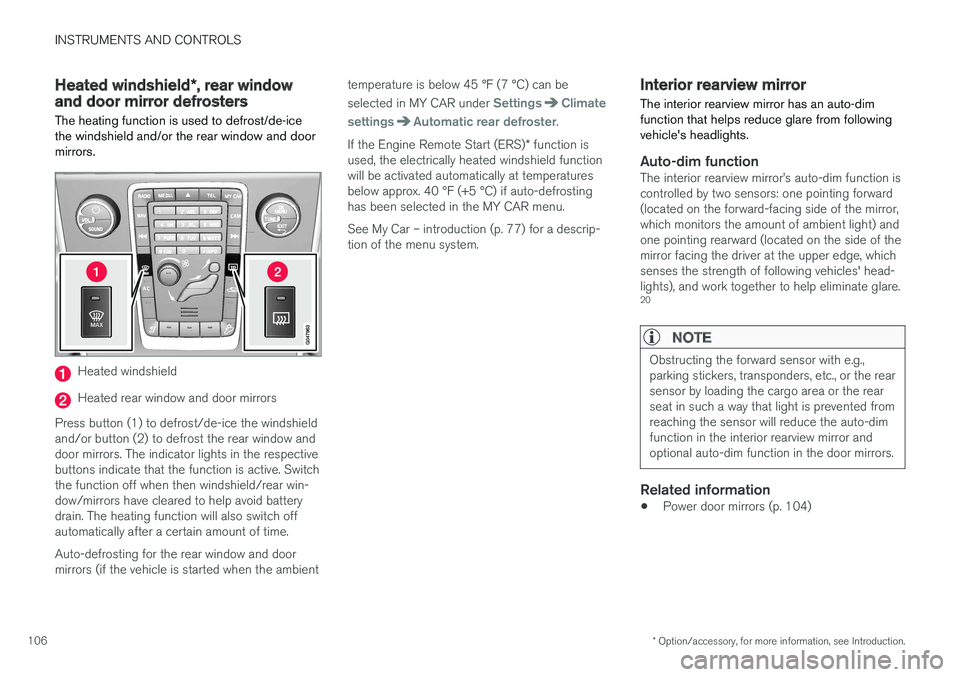
The heating function is used to defrost/de-ice the windshield and/or the rear window and doormirrors.
Heated windshield
Heated rear window and door mirrors
Press button (1) to defrost/de-ice the windshield and/or button (2) to defrost the rear window anddoor mirrors. The indicator lights in the respectivebuttons indicate that the function is active. Switchthe function off when then windshield/rear win-dow/mirrors have cleared to help avoid batterydrain. The heating function will also switch offautomatically after a certain amount of time. Auto-defrosting for the rear window and door mirrors (if the vehicle is started when the ambient temperature is below 45 °F (7 °C) can be selected in MY CAR under
SettingsClimate
settings
Automatic rear defroster.
If the Engine Remote Start (ERS) * function is
used, the electrically heated windshield function will be activated automatically at temperaturesbelow approx. 40 °F (+5 °C) if auto-defrostinghas been selected in the MY CAR menu. See My Car – introduction (p. 77) for a descrip- tion of the menu system.
Interior rearview mirror The interior rearview mirror has an auto-dim function that helps reduce glare from followingvehicle's headlights.
Auto-dim functionThe interior rearview mirror
Page 115 of 398

INSTRUMENTS AND CONTROLS
113
5. Firmly press and release the “learn” or
“smart” button. (The name and color of the button may vary by manufacturer.) There are30 seconds to initiate step 6.
6. Return to the vehicle and firmly press, hold for two seconds and release the pro-grammed HomeLink button. Repeat the“press/hold/release” sequence a secondtime, and, depending on the brand of thegarage door opener (or other rolling codeequipped device), repeat this sequence athird time to complete the programmingprocess.
HomeLink should now activate your rolling codeequipped device.
Gate Operator/Canadian Programming
Canadian radio-frequency laws require transmit- ter signals to “time-out” (or quit) after severalseconds of transmission – which may not be longenough for HomeLink to pick up the signal dur-ing programming. Similar to this Canadian law,some U.S. gate operators are designed to “time-out” in the same manner. If you live in Canada or you are having difficulties programming a gate operator or garage dooropener by using the “Programming” procedures, replace “Programming HomeLink” step 2 with the following : •
Continue to press and hold the HomeLink button while you
press and release - every
two seconds (“cycle”) your hand-held trans-
mitter until the HomeLink indicator light changes from a slow to a rapidly blinkinglight. Now you may release both the Home-Link and hand-held transmitter buttons.
Proceed with “Programming” step 3 to complete.
Resetting HomeLink ButtonsUse the following procedure to reset (erase pro-gramming) from the three HomeLink buttons(individual buttons cannot be reset but can be“reprogrammed” as outlined in the following sec-tion):
1. Press and hold the two outer HomeLink but- tons until the indicator light begins to flash.
2. Release both buttons. > HomeLink is now in the training (or learn-ing) mode and can be programmed at any time beginning with “Programming” - step1.
Reprogramming a Single HomeLink Button
To program a device to HomeLink using a Home- Link button previously trained, follow these steps:
1. Press and hold the desired HomeLink but-
ton. DO NOT release the button. 2. The indicator light will begin to flash after 20
seconds. Without releasing the HomeLink button, proceed with “Programming” - step 1.
For questions or comments, contact HomeLinkat: www.homelink.com/www.youtube.com/HomeLinkGentex or by phoning the hotline at 1–800–355–3515. This device complies with FCC rules part 15 and Industry Canada (IC) RSS-210. Operation is sub-ject to the following two conditions: (1) Thisdevice may not cause harmful interference, and(2) This device must accept any interference thatmay be received including interference that maycause undesired operation.
NOTE
The transmitter has been tested and complies with FCC and IC rules. Changes or modifica-tions not expressly approved by the partyresponsible for compliance could void the user
Page 117 of 398

INSTRUMENTS AND CONTROLS
* Option/accessory, for more information, see Introduction.115
Information display – menu controls
The controls on the left steering wheel lever are used to access the menus (p. 115) that are dis-played in the instrument panel (p. 69). Themenus displayed depend on the current ignitionmode (p. 80).
Analog Instrument panel and menu controls
Digital Instrument panel * and menu controls
OK : access to the list of messages (p. 116)
and message confirmation.
Thumb wheel: browse among menus and options in the list of functions.
RESET : reset the active function. Used in
certain cases to select/activate a function, see the explanation under each respectivefunction.
The menus shown on the information displays inthe instrument panel are controlled with the leftlever. The menus displayed depend on ignition mode. Press OK to erase a message and return
to the menus.
Information display – menu overview
The menus displayed depend on the current ignition mode (p. 80).
The following menu alternatives may vary, depending on the equipment installed in the vehi-cle.
Analog instrument panelDigital speed Trip comp. opt.Service status
Messages (##) 23
Digital instrument panel
*Settings
Themes
Contrast mode /Color mode
Service status
Messages
Trip computer reset
Related information
• Information displays – introduction (p. 69)
• Information display – menu controls (p. 115)
• Information display – messages (p. 116)
23
Number of messages in parentheses
Page 118 of 398

INSTRUMENTS AND CONTROLS
116
Information display – messagesThe controls on the left steering wheel lever are used to scroll among messages displayed in theinstrument panel and to confirm selections. When information, indicator or warning symbols illuminate, an explanatory message will be dis-played in the instrument panel.
When a warning (p. 75), information (p. 73) or indicator symbol (p. 73) comes on, a correspond-ing message appears in the information panel. Anerror message is stored in a memory list until thefault is rectified. Press OK to acknowledge and scroll among the
messages.
NOTE
If a warning message appears while you are using the trip computer, the message must be read and confirmed by pressing OK before
the previous activity can be resumed.
MessageDescription
Stop engineAStop and switch off the engine as soon as possible.Serious risk of damage. Con-tact an authorized Volvoworkshop.
Stop safelyAStop and switch off the engine. Serious risk of dam-age. Contact an authorizedVolvo workshop.
Service urgentAHave the vehicle checked by an authorized Volvo work-shop immediately.
Service requiredAHave the vehicle checked by an authorized Volvo work-shop as soon as possible.
See manualARead the owner's manual.
Book time for mainte-nanceTime to book service at an authorized Volvo retailer.
Time for reg- ular mainte-nanceTime for regular service at an authorized Volvo workshop.The timing is determined bythe number of miles driven,number of months since thelast service, engine runningtime.
MessageDescription
Maintenance overdueIf the service intervals are not followed, the warranty doesnot cover any damaged parts.Contact an authorized Volvoworkshop for service.
Temporarily OFFAA function has been tempo- rarily switched off and isreset automatically while driv-ing or after starting again.
Low battery Power savemodeThe audio system is switched off to save current. Chargethe battery.
A There will also be a system-specific part of this message
Related information
• Information displays – introduction (p. 69)
• Information display – menu overview (p. 115)
• Information display – menu controls (p. 115)
Page 128 of 398

CLIMATE
* Option/accessory, for more information, see Introduction.
126
Climate – general information
The vehicle is equipped with Electronic Climate
Control (ECC) (p. 130) that cools, heats ordehumidifies the air in the passenger compart-ment.
Air conditioning
NOTE
• The air conditioning can be switched off, but to ensure the best possible climatecomfort in the passenger compartmentand to prevent the windows from misting,it should always be on.
• In warm weather, a small amount of watermay accumulate under the car when ithas been parked. This water is condensa-tion from the A/C system and is normal.
Side windows and laminated panoramic roof
To ensure that the air conditioning works opti- mally, the side windows, and the laminated panor-amic roof should be closed.
Fog on the inside of the windowsThe defroster function (p. 133) should be usedto remove fog or mist from the inside of the win-dows. Keeping the windows clean with a com-mercially available window washing spray will alsohelp prevent fogging or misting.
Temporary shut-off of the air conditioning
The air conditioning (p. 133) is momentarily dis- engaged during full acceleration or when drivinguphill with a trailer. This may result in a temporaryincrease in cabin temperature.
Ice and snowAlways keep the air intake grille at the base ofthe windshield free of snow.
Climate system maintenanceSpecial tools and equipment are required tomaintain and carry out repairs on the climate sys-tem. Work of this type should only be done by atrained and qualified Volvo service technician.
RefrigerantVolvo cares about the environment. The air condi-tioning system in your car contains a CFC-freerefrigerant – R134a. This substance will notdeplete the ozone layer. The air conditioning sys-tem contains 1.76 lbs (800 g) of R134a. Thesystems uses PAG oil.
Related information
• Climate – sensors (p. 126)
• Climate – menu settings (p. 128)
Climate – sensors
The climate system utilizes a number of sensors to help regulate the temperature and humiditylevel in the passenger compartment.
Sensor location
• The sunlight sensor is located on the top side of the dashboard.
NOTE
The sunlight sensor monitors which side of the car that is most exposed to sunlight. Thiscan mean that the temperature may differbetween the right and left-side air vents, evenif the temperatures set for both sides of thepassenger compartment are the same.
•
The temperature sensor for the passenger compartment is located below the climatecontrol panel.
• The outside (ambient) temperature sensor islocated on the door mirror.
• The humidity sensor
* is located in the interior
rearview mirror.
NOTE
Do not cover or block the sensors with cloth- ing or other objects.