2017 VOLVO V90 ESP
[x] Cancel search: ESPPage 137 of 594

INSTRUMENTS AND CONTROLS
}}
* Option/accessory.135
WARNING
The car's audio system is not able to deter- mine when daylight is too weak or sufficientlystrong, e.g. in fog and rain, in all situations. The driver is always responsible for ensuring that the car is driven with a beam pattern suit-able for the traffic situation and in accordancewith applicable traffic regulations.
Thumbwheel in the instrument panel
Thumbwheel for adjusting interior brightness
Thumbwheel for headlamp levelling
A car with LED 21
headlamps * has automatic
headlamp levelling and therefore does not have the thumbwheel for headlamp levelling.
Adjusting the interior brightness
The lamps inside the car come on differently depending on the ignition position used. The thumbwheel adjusts the brightness of display lighting, control lighting, ambient light and ambi- ence light *.
Headlamp levelling
The load in the car changes the vertical align- ment of the headlamp beam, which could dazzleoncoming motorists. Avoid this by adjusting theheight of the beam. Lower the beam if the car isheavily laden. For different load cases and settings, see the section "Headlamp levelling".
Related information
• Passenger compartment lighting (p. 145)
• Activating/deactivating main beam (p. 138)
• Ignition positions (p. 385)
• Position lamps (p. 136)
• Headlamp levelling (p. 135)
Headlamp levelling
Headlamp levelling 22
is adjusted using one of
the thumbwheels in the instrument panel.
1. Leave the engine running, or have the car's
electrical system in ignition position I.
2. Roll the thumbwheel up/down to raise/lower beam alignment.
The position in which the thumbwheel should be set for a number of load cases is shown below.
Examples of thumbwheel position.
Thumbwheel in position 0
Thumbwheel in position 1
21 LED (Light Emitting Diode)
22 Applies to vehicles with halogen headlamps.
Page 138 of 594

||
INSTRUMENTS AND CONTROLS
136
Load caseThumb- wheelposition
Only driver. 0 Driver and passenger in the front passenger seat. 0
Driver and passenger in the frontpassenger seat. Three passengers in the rear seat. 1
Driver and passenger in the frontpassenger seat. Three passengers in the rear seat. 220 kg load in the cargo area. 1
Driver and maximum load in the cargo area. 2
Related information
•
Headlamp control (p. 134)
Position lamps
The position lamps are switched on with the rotating ring on the stalk switch.
Stalk switch rotating ring in position lamps position.
Turn the rotating ring to the position - the
position lamps are switched on (number plate lighting is switched on at the same time). If the car's electrical system is in ignition position II or the car is running then the daytime running
lights are switched on instead of the front posi-tion lamps. However, this does not apply at sta-
tionary when the car is running, if the rotating
ring is moved to position
from another
position . In this case, the position lamps are
switched on. If the tailgate is opened when it is dark outside, the rear position lamps come on (if not alreadyswitched on) to warn road users approaching from behind. This takes place irrespective of theposition of the rotating ring or the ignition posi-tion of the car's electrical system. When driving for more than 30 seconds at max. 10 km/h (approx. 6 mph), or if the speedexceeds 10 km/h (approx. 6 mph), the daytimerunning lights are switched on. The driver should turn to a position other than
.
Related information
•
Headlamp control (p. 134)
• Ignition positions (p. 385)
Page 139 of 594

INSTRUMENTS AND CONTROLS
}}
* Option/accessory.137
Daytime running lights The daytime running lights are switched on when the rotating ring on the stalk switch is in position
, or as well as when
the car's electrical system is in ignition position II
or when the car is running. For the
posi-
tion, this only applies in daylight. In weak daylight or darkness, dipped beam is switched oninstead.
Daytime running lights during the day.
DRL
Stalk switch rotating ring in AUTO position.
If the stalk switch rotating ring is in the position, the daytime running lights (Daytime Running Lights - DRL) are switched on when thecar is driven in daylight. The car automaticallychanges lighting from daytime running light todipped beam in weak daylight or darkness. Changing to dipped beam also takes place if thefront fog lamp and/or rear fog lamp are activated. At
stationary when the car is running, the posi-
tion lamps are switched on instead of other light- ing, if the rotating ring is moved to the position for position lamps,
, from another position .
WARNING
This system help to save energy - it cannot determine in all situations when daylight is tooweak or sufficiently strong, e.g. in mist andrain. The driver is always responsible for ensuring that the car is driven with the correct beampattern for the traffic situation and in accord-ance with applicable traffic regulations.
Related information
•Headlamp control (p. 134)
• Dipped beam (p. 137)
• Ignition positions (p. 385)
Dipped beam
When driving with the stalk switch's rotating ring in the
position, dipped beam is activated
automatically in weak daylight or darkness.
Stalk switch rotating ring in AUTO position.
With the stalk switch's rotating ring in the position, dipped beam is activated automatically in weak daylight or darkness, when the car's electrical system is in ignition position II or when
the car is running. With the stalk switch's rotating ring in
position, dipped beam is also activated automati- cally if:
• the front fog lamps
* are activated
• the rear fog lamp is activated
• the front and rear fog lamps are activated
Page 142 of 594

||
INSTRUMENTS AND CONTROLS
140
Manual operation
NOTE
Keep the windscreen surface in front of the camera sensor free from ice, snow, mist anddirt. Do not stick or attach anything to the wind- screen in front of the camera sensor as thismay reduce effectiveness or cause one ormore of the systems dependent on the cam-era to stop working.
If this symbol is shown in the driver dis- play, together with the message Active
High Beam Temporarily
unavailable, then switching between
main and dipped beam must be performed man- ually. The rotating ring on the stalk switch can still be in the
position. The symbol extin-
guishes when these message are shown.
The same applies if this symbol is shown together with the message
Windscreen sensor Sensor
blocked, see Owner's manual.
Active main beam may be temporarily unavailable e.g. in situations with dense fog or heavy rain.When active main beam becomes available again,or the windscreen sensors are no longer blocked, the message goes out and the
symbol illu-
minates.
WARNING
Active main beam is an aid for using the opti- mum beam pattern when conditions arefavourable. The driver always bears responsibility for man- ually switching between main and dippedbeam when traffic situations or weather con-ditions so require.
IMPORTANT
Examples of when manual switching between main and dipped beam may be required:
• In heavy rain or dense fog
• In freezing rain
• In snow flurries or slush
• In moonlight
• When driving in poorly lit built-up areas
• When the traffic ahead has weak lighting
• If there are pedestrians on or beside theroad
• If there are highly reflective objects suchas signs in the vicinity of the road
• When the lighting from oncoming trafficis obscured by e.g. a crash barrier
• When there is traffic on connecting roads
• On the brow of a hill or in a hollow
• In sharp bends.
Read more about the camera sensor's limitations in the section "Limitations for City Safety".
Related information
• Headlamp control (p. 134)
• Limitations of City Safety (p. 337)
Page 143 of 594

INSTRUMENTS AND CONTROLS
* Option/accessory.141
Active bending lights *
Active bending lights are designed to provide maximum illumination in bends and junctions. Cars with LED 26
headlamps * can have active
bending lights, depending on the car's equip- ment level.
Headlamp pattern with function deactivated (left) and activated (right) respectively.
The LED headlamps can include the Active bend- ing lights function, depending on the car's equip-ment level. Active bending lights follow steeringwheel movements to provide maximum illumina-tion in bends and junctions and thereby increasesafety. The function is activated automatically when the car is started. In the event of a fault in the func- tion, the
symbol illuminates in the driver
display at the same time as the driver display shows an explanatory text. The function is only active in weak daylight or darkness and only when the car is moving anddipped beam is switched on.
Deactivating/activating the functionThe function is in activated mode when the car isdelivered from the factory and can be deacti-vated/activated via the centre display in twoways:
Via the function view
Press the Active Bending
Lights button.
Via settings
1. Press Settings in the top view.
2. Press
My CarLights and LightingExterior Lights.
3. Deselect/select
Active Bending Lights.
Related information
• Settings view (p. 169)
• Front fog lamps/cornering lights
* (p. 142)
Adapting the beam pattern from the headlamps
If the car is equipped with LED headlamps with adaptive functionality, then the headlamp patternshould be reset when changing from right to left-hand traffic, and vice versa.
Halogen headlampsThe headlamp pattern does not need to be adjusted. The headlamp pattern is designed insuch a way that oncoming traffic is not dazzled.
LED headlamps *The headlamp pattern should be adjusted if theactive main beam has adaptive functionality; seethe section "Activating/deactivating main beam".The car must remain stationary and be runningwhen the headlamp pattern is changed betweenright and left-hand traffic. 1.
Press
Settings in the top view in the centre
display.
2. Press
My CarLights and LightingExterior Lights.
3. Select
Temporary Right Hand Traffic/Temporary Left Hand Traffic.
Related information
• Settings view (p. 169)
• Activating/deactivating main beam (p. 138)
26
LED (Light Emitting Diode)
Page 145 of 594

INSTRUMENTS AND CONTROLS
}}
* Option/accessory.143
Press the on/off button. The
symbol in the
driver display illuminates when the rear fog lamp is switched on. The rear fog lamp is switched off automatically when:
• the ignition knob is turned to
STOP or when
the stalk switch's rotating ring is set in posi- tion
• the stalk switch's rotating ring is in position
and the front fog lamps are switched
off.
NOTE
Regulations on the use of rear fog lamps vary from country to country.
Related information
• Headlamp control (p. 134)
• Front fog lamps/cornering lights
* (p. 142)
• Ignition positions (p. 385)
Brake lights The brake light automatically comes on during braking.
The brake light is switched on when the brake pedal is depressed. In addition, it is switched onwhen one of driver support systems Adaptive cruise control
*, City Safety or Rear Collision
Warning brakes the car.
Related information
• Emergency brake lights (p. 408)
• Adaptive cruise control
* (p. 290)
• City Safety (p. 330)
• Rear Collision Warning (p. 340)
Hazard warning flashers
The hazard warning flashers warn other road users by means of all of the car's direction indi-cator lamps flashing simultaneously when thisfunction is activated.
Button for hazard warning flashers.
Press the button to activate the hazard warning flashers. The hazard warning flashers are automatically activated when the car brakes so powerfully thatthe emergency brake lights are activated and thespeed is low. The hazard warning flashers start toflash after the emergency brake lights have stop-ped flashing and are then deactivated automati-cally when the car drives away again or are deac-tivated if the button is depressed.
Page 147 of 594
INSTRUMENTS AND CONTROLS
}}
145
Passenger compartment lighting
The passenger compartment lighting is acti- vated/deactivated with the buttons in the over-head controls above the front seats and the rearseat.
All lighting in the passenger compartment can be switched on and off manually within 30 minutesfrom when:
• the car has been switched off and its electri- cal system is in ignition position
0
• the car has been unlocked but it has not been started.
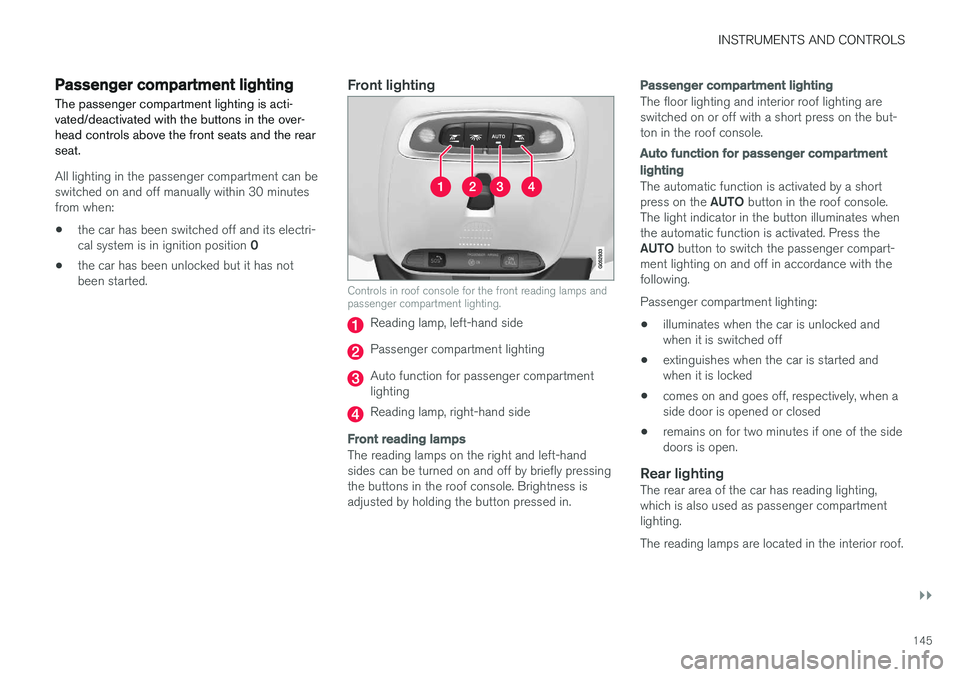
Front lighting
Controls in roof console for the front reading lamps and passenger compartment lighting.
Reading lamp, left-hand side
Passenger compartment lighting
Auto function for passenger compartment lighting
Reading lamp, right-hand side
Front reading lamps
The reading lamps on the right and left-hand sides can be turned on and off by briefly pressingthe buttons in the roof console. Brightness isadjusted by holding the button pressed in.
Passenger compartment lighting
The floor lighting and interior roof lighting are switched on or off with a short press on the but-ton in the roof console.
Auto function for passenger compartment lighting
The automatic function is activated by a short press on the
AUTO button in the roof console.
The light indicator in the button illuminates when the automatic function is activated. Press the AUTO button to switch the passenger compart-
ment lighting on and off in accordance with the following. Passenger compartment lighting: • illuminates when the car is unlocked and when it is switched off
• extinguishes when the car is started andwhen it is locked
• comes on and goes off, respectively, when aside door is opened or closed
• remains on for two minutes if one of the sidedoors is open.
Rear lightingThe rear area of the car has reading lighting,which is also used as passenger compartmentlighting. The reading lamps are located in the interior roof.
Page 148 of 594

||
INSTRUMENTS AND CONTROLS
* Option/accessory.
146
Reading lamps above the rear seat 27
.
Reading lamp above the rear seat in cars with panorama roof *.
The reading lamps are switched on or off by briefly pressing the button on the lamp. Bright-ness is adjusted by holding the button pressed in.
Glovebox lightingGlovebox lighting is switched on and off respec-tively when the lid is opened or closed.
Vanity mirror lighting *The lighting for the vanity mirror in the sun visoris switched on and off respectively when thecover is opened or closed.
Ground lightingThe ground lighting is switched on and off whenthe corresponding door is opened or closed.
Door sill lightingThe door sill lighting is switched on and off whenthe corresponding door is opened or closed.
Lighting in the cargo areaThe lighting in the cargo area is switched on andoff respectively when the tailgate is opened orclosed.
Ambient light1.
Press Settings in the top view in the centre
display.
2. Press
My CarLights and LightingInterior Lighting. 3. Choose between the following settings:
•Under
Ambient Light Intensity, select
from Off, Low and High.
• Under
Ambient Light Level, select fromReduced and Full.
Controls located next to the steering wheel.
The intensity of the ambient light can be adjusted using the control in the instrument panel:
–Turn the thumbwheel to adjust the intensity.
Ambience lights
*The car is equipped with a number of LEDs that make it possible to change the colour of the light.These lights are switched on when the car is run-ning.
27
In cars with panorama roof * there are two lamp units, one on each side of the roof.