2017 VOLVO S90 lights
[x] Cancel search: lightsPage 191 of 548
CLIMATE
}}
* Option/accessory.189
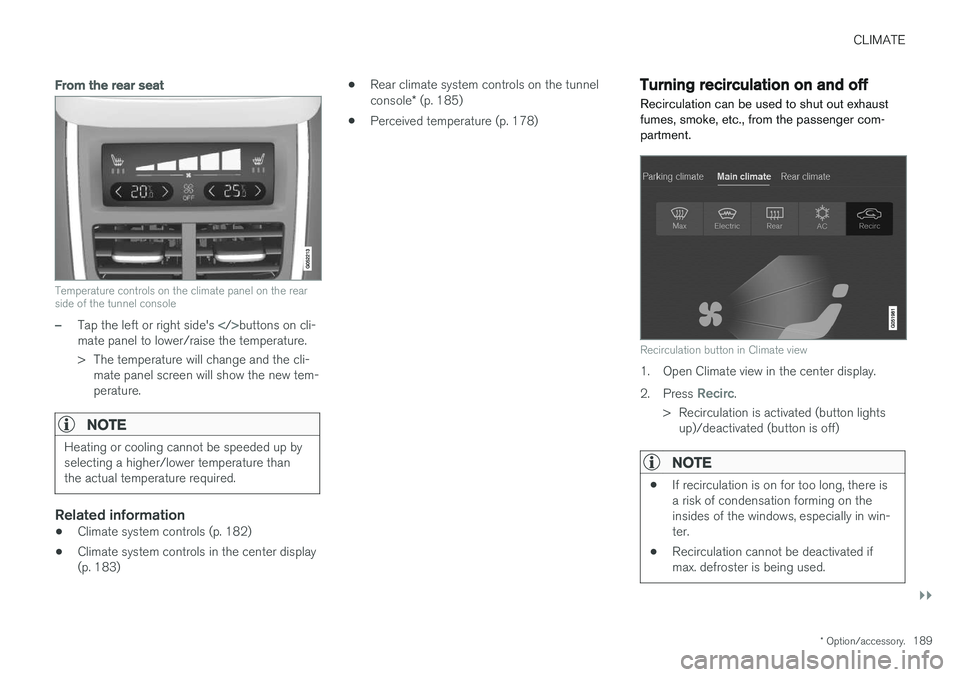
From the rear seat
Temperature controls on the climate panel on the rear side of the tunnel console
–Tap the left or right side's buttons on cli-
mate panel to lower/raise the temperature.
> The temperature will change and the cli- mate panel screen will show the new tem- perature.
NOTE
Heating or cooling cannot be speeded up by selecting a higher/lower temperature thanthe actual temperature required.
Related information
• Climate system controls (p. 182)
• Climate system controls in the center display (p. 183) •
Rear climate system controls on the tunnel console
* (p. 185)
• Perceived temperature (p. 178)
Turning recirculation on and off
Recirculation can be used to shut out exhaust fumes, smoke, etc., from the passenger com-partment.
Recirculation button in Climate view
1. Open Climate view in the center display. 2. Press
Recirc.
> Recirculation is activated (button lights up)/deactivated (button is off)
NOTE
• If recirculation is on for too long, there is a risk of condensation forming on theinsides of the windows, especially in win-ter.
• Recirculation cannot be deactivated ifmax. defroster is being used.
Page 193 of 548

CLIMATE
}}
* Option/accessory.191
From the center display's Climate view
Activate/deactivate max. defroster
Max. defroster button in Climate view
1. Open Climate view in the center display. 2.
Tap
Max.
> Max. defroster is activated (button lights up)/deactivated (button is off). Max. defroster overrides automatic climate control and recirculation, and activates theair conditioning, changes blower speed to
56 and the temperature to HI6.
When max. defroster is deactivated, the climate system returns to the previoussettings.
Activating/deactivating windshield heating *
Windshield heating button in Climate view
1. Open Climate view in the center display. 2.
Tap
Electric.
> Windshield heating is activated (button lights up)/deactivated (button is off).
If windshield heating is activated while the Start/ Stop function has turned off the engine, theengine will restart.
NOTE
• Triangular areas at the far sides of the windshield are not heated electrically andwill take slightly longer to defrost/de-ice.
• The heated windshield may affect theperformance/range of e.g., transpondersused to automatically pay highway tolls orother communication equipment.
Activating/deactivating rear window and door mirror heating
Rear window/door mirror heating button in Climate view
1. Open Climate view in the center display. 2.
Tap
Rear.
> Rear window/door mirror heating is acti- vated (button lights up)/deactivated (but- ton is off).
6In models with the 4-zone climate system *, front seats only.
Page 195 of 548

CLIMATE
* Option/accessory.193
2. Tap the steering wheel heating button
repeatedly to select one of four levels:
Off,High, Middle or Low.
> The level changes and is displayed in the button.
Automatic steering wheel heatingThe automatic function starts heating the steer- ing wheel automatically when the engine isstarted if the temperature is sufficiently cold. Thisfeature can be activated/deactivated. 1. Tap
Settings in the center display's Top
view.
2. Tap
Climate.
3. Under
Auto Steering Wheel Heating
Level, select Off, Low, Middle or High to
activate/deactivate the automatic function.
Related information
• Climate system controls (p. 182)
• Climate system controls in the center display (p. 183)
• Steering wheel (p. 159)
Air conditioning
The air conditioning cools and dehumidifies the air in the passenger compartment.
Activating/deactivating the main air conditioning unit
Air conditioning button in Climate view
1. Open Climate view in the center display. 2. Tap
AC.
> The air conditioning is activated (button lights up)/deactivated (button is off).
When the air conditioning is activated, it will be switched on and off automatically by the climatesystem as necessary.
NOTE
• For the air conditioning to function opti- mally, close the side windows and the moonroof
*
• The air conditioning cannot be activated if the blower is set to
Off
Related information
•Climate system controls in the center display (p. 183)
Page 196 of 548

CLIMATE
* Option/accessory.
194
Turning seat heating * on and off
The seats can be heated for added comfort in cold weather.
Activating/deactivating front seat heating
Steering wheel and seat buttons in the climate bar
1. Tap the left or right side steering wheel and seat button in the center display's climate bar to open the steering wheel and seatheating controls. If the vehicle is not equipped with the optional heated steering wheel or ventilatedseats, the button for seat heating will bedirectly accessible in the climate bar. 2. Tap the seat heating button repeatedly to
select one of four levels:
Off, High, Middleor Low.
> The level changes and is displayed in the button.
Activating/deactivating rear seat heating
From the front seat *
Temperature buttons for Rear climate in Climate view
1. Open Climate view in the center display and
tap Rear climate.
2. Tap the button repeatedly to select one of the following seat heating levels:
Off, Low,Middle or High.
> The level will change and will be displayed in the button.
From the rear seat
With the 2-zone climate system
Seat heating buttons on the climate panel on the rear side of the tunnel console
–Press repeatedly on the left or right side but- tons on the climate panel on the rear side ofthe tunnel console to select one of four lev- els:
Off, High, Middle or Low.
> The level changes and the indicator lights in the button display the level.
With the 4-zone climate system *
Page 226 of 548

||
LOCKS AND ALARM
* Option/accessory.
224
Locking
All of the doors have to be closed before the vehicle can be locked but the trunk can be open. Lock the doors and trunk by pressing the pres- sure sensitive indentation on the outside of anyof the door handles. The lock indicator light onthe dashboard will begin to flash to show that thevehicle is locked and the alarm has been armed.
NOTE
Only one of a door handle's lock/unlock sur- faces should be pressed at a time. If bothareas are pressed simultaneously, the desiredlocking/unlocking action may not occur ormay be delayed.
To close windows or the moonroof * when locking
the vehicle, hold the pressure sensitive surface on the outside of a door handle until the win-dow(s)/moonroof have closed completely. Thewindows/moonroof will stop if the button isreleased before they are fully closed.
Unlocking
Pull a door handle to unlock and open the door or press the rubberized button under the trunkopening control. The lock indicator light on thedashboard will go out to show that the vehicle isunlocked and the alarm has been disarmed. The lock/unlock settings can be changed in the center display's Top view: Go to:
SettingsMy CarKeyless Unlockand select All Doors or Single Door.
Automatic relockingIf no door or the trunk is opened within two minutes after being unlocked, the vehicle willautomatically relock.
Remote door unlockThe vehicle can be unlocked using the Volvo OnCall app.
Related information
•
Remote key (p. 217)
• Remote key's range (p. 219)
• Detachable key blade (p. 221)
• Alarm (p. 236)
• Locking/unlocking from inside the vehicle(p. 224)
• Foot movement trunk operation
* (p. 232)
• Locking/unlocking the trunk (p. 228)
Locking/unlocking from inside the vehicle The lock buttons on either of the front doors can be used to lock or unlock all doors and the trunkat the same time. The rear doors can be locked using their respective lock buttons
*.
The central locking system
Central locking/unlocking buttons and indicator lights on the front doors
–Press the button to lock the vehicle.
Press
to unlock.
Page 229 of 548

LOCKS AND ALARM
227
Indicators in the interior lock buttons
Lock buttons in the front doors
Front door lock button and indicator light
Indicator lights on: all doors are locked. If a door is opened, the lights in both doors will go out.
In all doors
Rear door lock button and indicator light
Indicator light in the respective door on: that door is locked. If a door is opened, the light in thatdoor will out but the other indicator lights willremain on.
Confirmation alternatives
Various alternatives for locking/unlocking confir-mation can be selected in the center display. 1.Tap
Settings in the center display's Top
view.
2. Tap
My CarLocking.
3. Change the settings under
Locking and
Unlocking Feedback.
Related information
• Locking/unlocking from outside the vehicle (p. 223)
• Home safe lighting (p. 149)
• Adjusting the power door mirrors (p. 102)
Page 294 of 548

DRIVER SUPPORT
* Option/accessory.
292
Radar sensor - type approval
USA & Canada:
FCC ID: L2C0054TR IC: 3432A-0054TR FCC
ID: L2C0055TR IC: 3432A-0055TR This device complies with Part 15 of the FCC Rules and with Industry Canada license-exemptRSS standard(s). Operation is subject to the fol-lowing two conditions: (1) This device may not cause harmful interfer- ence, and (2) This device must accept any interference received, including interference that may causeundesired operation.
WARNING
Changes or modifications not expressively approved by the party responsible for compli-ance could void the user's authority to oper-ate the equipment.
The term “IC:” before the radio certification num- ber only signifies that Industry Canada technicalspecifications were met.
Related information
• Driver support system radar sensor (p. 288)
Driver support system camera
The camera is used by a number of driver sup- port systems to e.g., detect a driving lane's sidemarker lines or traffic signs.
Camera location
The camera is used by the following driver sup- port systems:
• Adaptive Cruise Control (ACC)
*
• Driving lane assistance
*
• Driver Alert Control
*
• Pilot Assist
*
• City Safety
• Run-off Mitigation
• Road sign information
*
• Active high beams
*
Related information
•Camera limitations (p. 293)
• Adaptive Cruise Control (ACC)
* (p. 261)
• Driving lane assistance (p. 320)
• Driver Alert Control (DAC) (p. 318)
• Pilot Assist
* (p. 275)
• City Safety
™ (p. 296)
• Run-off Mitigation (p. 325)
• Road Sign Information (RSI)
* (p. 316)
• High and low beam headlights (p. 142)
Page 300 of 548

||
DRIVER SUPPORT
298If City Safety has prevented a collision, the vehi- cle will be kept at a standstill until the drivertakes action. If the vehicle has slowed to avoidcolliding with the vehicle ahead, your speed willbe reduced to that vehicle's speed. When auto-brake is triggered, the seat belt pre- tensioners may also be activated, see the article"Seat belts" for additional information. Auto-braking can be cancelled if the driver presses hard on the accelerator pedal. When City Safety applies the brakes, the brake lights will illuminate. When City Safety is triggered and applies the brakes, a text message will be displayed in theinstrument panel.
Related information
•
City Safety
™ troubleshooting (p. 302)
• City Safety in crossing traffic (p. 301)
• City Safety limitations (p. 304)
• City Safety symbols and messages (p. 307)
• Detecting obstructions with City Safety(p. 299)
• Rear Collision Warning (RCW) (p. 308)
• City Safety warning level settings (p. 298)
• City Safety in crossing traffic (p. 301)
• Seat belts (p. 60)
• City Safety when evasive action is not possi-ble (p. 302)
City Safety warning level settings
City Safety is always activated but the function's warning distance can be adjusted.
NOTE
City Safety cannot be turned off and activates automatically each time the engine is started.
Setting a warning level (distance)
The distance set for warnings determines the system's responsiveness and sets the distance atwhich visual, audible and tangible (haptic) warn-ings will be triggered. To do so:1. Tap
Settings in the center display's Top
view.
2. Tap
My CarIntelliSafeCity Safety.
3. Choose among
Earlier, Normal or Later.
Begin by choosing
Earlier. If too many warnings
are given, change to Normal.
If the driver feels that warnings are given too often, the warning level can be lowered. Thismeans that warnings will be provided later, result-ing in fewer warnings being given. The setting
Later should only used in exceptional
circumstances, e.g., for a more dynamic driving style.
WARNING
• No automatic system can be guaranteed to function 100% correctly in all situa-tions. For that reason, never test CitySafety by driving toward a person orobject. This could result in serious injuryor death.
• Even if the setting
Earlier has been
selected, warnings may be perceived as being given late, e.g., if the difference inspeed is great or if the vehicle aheadbrakes suddenly.
• City Safety can provide a warning for apotential collision but it can never shortenthe driver's reaction time.
• To help make City Safety as effective as possible, always using the setting
Earlieris recommended.
NOTE
•
Due to local traffic regulations in certain markets, Rear Collision Warning (RCW) will
not activate the rear turn signals.
That part of the function will be deacti- vated.
• The use of the rear turn signals will alsobe deactivated if the City Safety warning level is set at
Later. See also the section