2017 VOLVO S60 lock
[x] Cancel search: lockPage 166 of 398

LOCKS AND ALARM
164
Alarm – turning off
The alarm system provides a warning if an attempt is made to break into the vehicle.
If the alarm is sounding, it can be stopped by pressing the Unlock button on the remote key orby inserting the remote key in the ignition slot.Two short flashes from the car's turn signals con-firm that the alarm has been turned off.
Related information
• Alarm indicator (p. 162)
• Alarm – arming/disarming (p. 163)
• Remote key – replacing the battery (p. 151)
Alarm-related functions
The following is general information regarding the alarm system in your vehicle.
Automatic re-armingIf the doors are unlocked, the locks will automati- cally re-engage (re-lock) and the alarm will re-arm after 2 minutes unless a door or the trunkhas been opened.
Remote key not functioningIf the remote key is not functioning properly, thealarm can be turned off and the vehicle can bestarted as follows:
1. Open the driver's door with the key blade.
>This will trigger the alarm.
2. To turn off the alarm, insert the remote key
into the ignition slot (also on vehicles with the optional keyless drive). 3. Start the engine.
Related information
•
Detachable key blade – unlocking (p. 150)
• Detachable key blade – general information(p. 149)
• Starting the engine (p. 252)
Page 169 of 398

DRIVER SUPPORT
}}
167
Spin Control (SC)
The SC function is designed to help prevent the drive wheels from spinning while the vehicle isaccelerating.
Active Yaw Control (AYC)
This function helps maintain directional stability, for example when cornering, by braking one ormore of the wheels if the vehicle shows a ten-dency to skid or slide laterally.
Corner Traction Control (CTC)
CTC compensates for understeering and helps provide additional stability when acceleratingthrough a curve by preventing the inside wheelfrom spinning. This is particularly useful whenaccelerating on a curving highway on-ramp. CTC is most effective if the stability system's Sport mode is selected. See the section about
Sport mode.
Engine Drag Control (EDC)
EDC helps keep the engine running if the wheels show a tendency to lock, e.g., when shifting downin the Geartronic manual shifting mode or whileusing the engine's braking function on a slipperysurface. If the engine were to stop, power steer-ing would not function, making the vehicle moredifficult to steer.
Trailer Stability Assist (TSA)
The TSA helps stabilize a vehicle that is towing a trailer when the vehicle and trailer have begun tosway. See Trailer Stability Assist (TSA) (p. 287)for more information. This system is automatically deactivated if the driver selects
Sport mode.
Related information
•Stability system – operation (p. 167)
• Stability system – symbols and messages (p. 169)
• Trailer Stability Assist (TSA) (p. 287)
Stability system – operation
Operation
Sport mode
The stability system is always activated and can- not be switched off.
However, the driver can select Sport mode, which offers more
active driving characteristics. Sport mode can be selected in
the MY CAR menus, see My Car – introduction (p. 71).
In Sport mode, the engine management system
monitors movement of the accelerator pedal and steering wheel for sportier driving by allowingmore lateral movement of the rear wheels beforeESC is activated. Under certain circumstances, such as when driv- ing with snow chains, or driving in deep snow orloose sand, it may be advisable to temporarily use Sport mode for maximum tractive force.
If the driver releases pressure on the accelerator pedal, ETC will also activate to help stabilize thevehicle. To switch to Sport mode:
Sport mode remains active until the driver
switches it off in the menu or until the engine is switched off. ETC will return to normal modewhen the engine is restarted.
Page 177 of 398

DRIVER SUPPORT
175
the previous section "Turning ACC off com- pletely." The next time the system is switched on,ACC will be reactivated.
Related information
•
Adaptive Cruise Control – introduction(p. 176)
• Adaptive Cruise Control – function (p. 177)
Cruise control (CC) – deactivating Cruise control is designed to assist the driver by maintaining a set speed. It is primarily intendedfor use on long straight roads in steady traffic,such as on highways and other main roads.
Automatic deactivationThe cruise control is automatically deactivated temporarily
if one of the following occurs:
• If the speed drops below approximately 20 mph (30 km/h).
• When the brake pedal is depressed.
• If the gear selector is moved to position
N.
• During wheel spin or wheel lock-up.
• If the vehicle's speed is increased by usingthe accelerator pedal for more than 1 minute.
• Engine speed (rpm) is too high or too low.
The currently set speed will be saved in the sys-tem's memory.
Temporary deactivationThe driver can temporarily deactivate the cruise control by pressing 0. The saved speed is shown
in brackets in the information display.
Resume set speedIf the cruise control has been deactivated tempo- rarily, it can be reactivated by pressing
. The
vehicle's speed returns to the most recently set speed.
WARNING
There may be a significant increase in speed after the
button has been pressed.
Deactivation
The Cruise control is disengaged by pressing or by switching off the engine. The set speed is cleared.
WARNING
Cruise control should not be used in heavy traffic or when driving on wet or slipperyroads. Cruise control may not maintain setspeed on steep downgrades.
Related information
• Cruise control (CC) – introduction (p. 173)
• Cruise control (CC) – engaging and setting speed (p. 173)
Page 192 of 398
DRIVER SUPPORT
190
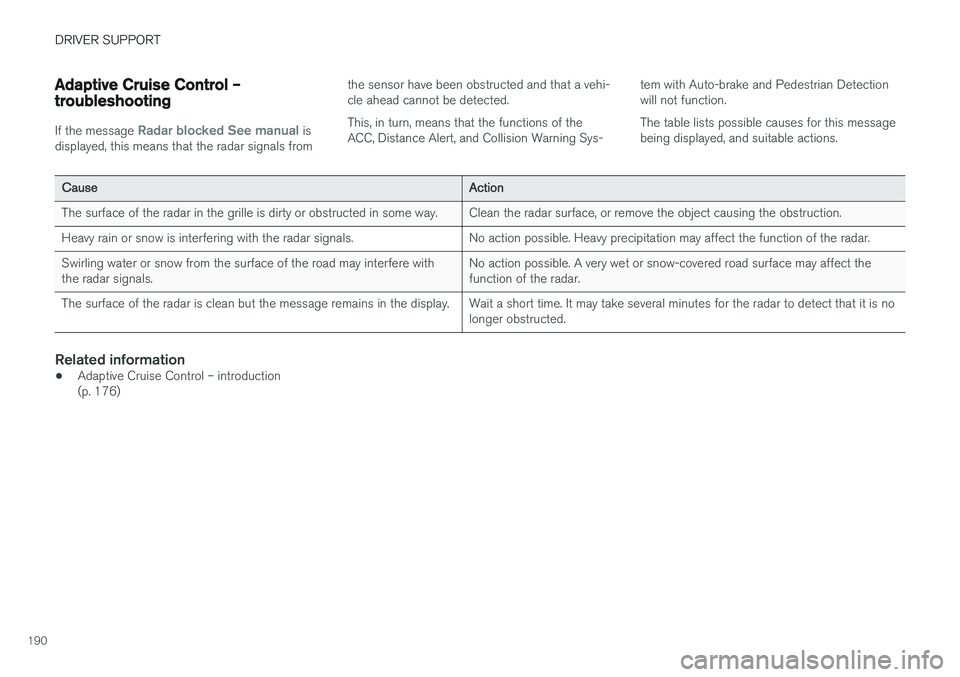
Adaptive Cruise Control – troubleshooting
If the message Radar blocked See manual is
displayed, this means that the radar signals from the sensor have been obstructed and that a vehi- cle ahead cannot be detected. This, in turn, means that the functions of the ACC, Distance Alert, and Collision Warning Sys-
tem with Auto-brake and Pedestrian Detectionwill not function. The table lists possible causes for this message being displayed, and suitable actions.
CauseAction
The surface of the radar in the grille is dirty or obstructed in some way.Clean the radar surface, or remove the object causing the obstruction.
Heavy rain or snow is interfering with the radar signals.No action possible. Heavy precipitation may affect the function of the radar.
Swirling water or snow from the surface of the road may interfere with the radar signals.No action possible. A very wet or snow-covered road surface may affect the function of the radar.
The surface of the radar is clean but the message remains in the display.Wait a short time. It may take several minutes for the radar to detect that it is no longer obstructed.
Related information
•
Adaptive Cruise Control – introduction (p. 176)
Page 196 of 398

DRIVER SUPPORT
194
Distance Alert – symbols and messagesDistance Alert is part of Adaptive Cruise Control and is a function that provides information aboutthe time interval to the vehicle ahead.Symbols and text messagesA text message can be erased by pressing briefly on the OK button on the turn signal lever.
SymbolMessageDescription
Radar blocked See manualDistance Alert has been temporarily disconnected because the radar is obstructed in some way and cannot detect other vehicles. See Adaptive Cruise Control – limitations (p. 186) for information on the radar sensor
Page 200 of 398

||
DRIVER SUPPORT
198may not be detected. Normally, the license plate and taillight reflectors give the rear section of avehicle ahead sufficient reflective surfaces to bedetected.
NOTE
•
Keep the windshield in front of the laser sensor free of ice, snow, dirt, etc., see CitySafety – function (p. 196).
• Snow or ice on the hood deeper than2 inches (5 cm) may obstruct the sensor.Keep the hood free of ice and snow.
• Do not mount or in any way attach any-thing on the windshield that couldobstruct the laser sensor.
Related information
• City Safety – introduction (p. 195)
• City Safety – function (p. 196)
• City Safety – operation (p. 197)
• City Safety – troubleshooting (p. 198)
• City Safety – symbols and messages (p. 200)
• City Safety – Laser sensor (p. 201)
City Safety – troubleshooting
TroubleshootingIf Windscreen Sensors blocked appears in the
information display, this indicates that the City Safety ™ laser sensor is obstructed in some way
and cannot detect vehicles ahead of you, which means that the system is not functioning. However, this message will not be displayed in all situations in which the sensor is obstructed. Forthis reason, the driver must ensure that the areaof the windshield in front of the sensor is alwayskept clean. The following table shows some of the situations that can cause the message to be displayed andsuggested actions.
CauseAction
The area of the windshield in front of the sensor isdirty or covered by ice orsnow.Clean the wind- shield or removethe ice/snow.
The laser sensor's field of view is obstructed.Remove the obstruction.
NOTE
If a crack, scratch or stone chip should occur in the section of the windshield in front thelaser sensor, contact a trained and qualifiedVolvo service technician to repair or replacethe windshield (see the illustration showingthe location of the sensor in City Safety –function (p. 196)). Failing to do so may result in reduced City Safety ™ functionality.
To help prevent limited or reduced functional- ity, please also observe the following:
• Volvo recommends that cracks, scratchesor stone chips on the windshield in front of the laser sensor
should not be
repaired; in such cases, the entire wind- shield should be replaced.
• Before the windshield is replaced, con-tact a Volvo retailer to ensure that thecorrect windshield is ordered and instal-led. If the wrong type of windshield is used, this may cause City Safety
™ to
function improperly or not at all. Volvo recommends the use of only GenuineVolvo Replacement Windshields.
• When replacing windshield wipers, usethe same type or ones approved by Volvo.
Related information
• City Safety – introduction (p. 195)
• City Safety – function (p. 196)
Page 202 of 398

DRIVER SUPPORT
200
City Safety – symbols and messages
Symbols and messages in the display
When City Safety™ automatically applies the
brakes, one or more of the symbols in the main instrument panel may illuminate and its associ- ated message will be displayed. A text message can be erased by pressing briefly on the
OK button on the turn signal lever.
SymbolMessageMeaning/action required
Auto braking by City SafetyCity Safety ™ is applying/has applied the brakes automatically.
Windscreen Sensors blockedThe laser sensor is temporarily not functioning due to an obstruction.
• Remove the obstruction and/or clean the windshield in front of the sensor(s).
For more information on the sensor
Page 213 of 398

DRIVER SUPPORT
}}
211
Collision warning – troubleshooting
Fault tracing and actionsIf the message Windscreen Sensors blockedis displayed, this means that the camera isobscured and cannot detect pedestrians, cyclists, vehicles or road marker lines in front of the vehi-cle. This, in turn, means that Pedestrian and Cyclist Detection with Full Auto Brake, Driver Alert Con-trol, Lane Departure Warning or Lane KeepingAid will not have full functionality. The table lists possible causes for this message being displayed, and suitable actions.
CauseAction
The surface of the windshield in front of the camera is dirty or covered with ice or snow.Clean or clear the section of the windshield in front of the camera.
Fog, heavy rain or snow is interfering with the function of the camera.No action possible. Heavy precipitation may affect the function of the cam- era.
The surface of the windshield is clean but the message remains in the display.Wait a short time. It may take several minutes for the camera to register vis- ibility.
The surface between the inside of the windshield and the camera is dirty.Contact an authorized Volvo retailer or service technician to have this sur- face cleaned.