2017 VOLKSWAGEN TIGUAN Parking assist
[x] Cancel search: Parking assistPage 188 of 341

In the following driving situations, the yellow indicator lamp lights up in the housing of the respective
exterior mirror:
•If your vehicle is being overtaken.
•When overtaking another vehicle with a speed difference of up to approximately 15 km/h
(9 mph). No display will be shown if the takeover manoeuvre is much faster.
The yellow indicator lamp flashes if a possible critical situation is detected when you indicate in the
direction of the detected vehicle.
The quicker another vehicle approaches, the earlier there is a corresponding display in the exterior
mirror.
Lane change system Side Assist Plus
If the vehicle is equipped with a lane keeping system and the system is switched on, the driver is
warned by a corrective steering intervention when changing lanes during a possible critical situation
(information level, warning level). The steering intervention also occurs when the turn signal is
activated for the corresponding direction. If the steering intervention is overridden by the driver, the
steering wheel vibrates to give an additional warning.
Automatic deactivation
The lane change system will switch off automatically if the radar sensors are permanently covered.
This can be caused by a layer of ice or snow in front of the radar sensor, for example.
A text message will be shown on the instrument cluster display.
If the lane change system sensor has been automatically deactivated, the system cannot be
activated until the ignition has been switched off and back on again.
The lane change system and Rear Traffic Alert are switched off automatically when the factory-
fitted towing bracket is electrically connected with a trailer or similar ⇒ Trailer towing. The lane
change system and Rear Traffic Alert are automatically switched on again when the trailer is
unhitched from the vehicle. The lane change system and Rear Traffic Alert must be switched off
manually if a non-factory-fitted towing bracket is used.
Brightness
The brightness of the visual display will automatically adapt to the light levels.
The basic brightness level can be set in the Infotainment system ⇒ Operation and display in the
Infotainment system.
The lane change system is not active during the setting procedure.
Rear Traffic Alert
Fig. 149 Rear Traffic Alert: monitored area around the vehicle leaving the parking space.
Fig. 150 Display in the Infotainment system: Rear Traffic Alert.
First read and observe the introductoryinformation and safety warnings⇒
Introduction
Switching on and off
•By means of the Assist systems menu in the instrument cluster ⇒ Instrument cluster
operation.
Page 189 of 341

•OR: depending on the vehicle equipment, by means of the button for the driver assist systems
⇒ Button for driver assist systems.
•OR: depending on the vehicle equipment, in the Driver assistance menu in the Infotainment
system ⇒ Operation and display in the Infotainment system.
Function
Rear Traffic Alert monitors the traffic crossing behind the vehicle when reversing out of a parking
space or manoeuvring. Rear Traffic Alert functions using radar sensors in the rear bumper.
Key to ⇒ Fig. 150:
Critical situation. Do not drive on!Possible critical situation.
Detection of a critical situation can also take place acoustically:
•A warning signal will sound and a text message will be displayed in the instrument cluster for
vehicles without Park Distance Control.
•A warning signal will sound with the continuous Park Distance Control tone if Park Distance
Control is installed in the vehicle. If the Park Distance Control is deactivated, no warning can be
given to the driver and the Rear Traffic Alert system will also be switched off temporarily.
If there is a fault in the system's scanned area, the yellow indicator lamp lights up .
Automatic braking intervention to minimise damage
If Rear Traffic Alert detects an approaching road user and the driver has not pressed the brake, the
system can brake automatically.
The Rear Traffic Alert helps the driver to prevent damage by initiating an automatic braking
intervention. Automatic braking intervention takes place when reversing at speeds of between
1-12 km/h (1-7 mph). The vehicle is held stationary for up to two seconds after vehicle standstill has
been detected.
After automatic braking intervention is activated to prevent damage to the vehicle, the system
requires approximately ten seconds before it can activate another automatic braking intervention.
The automatic braking intervention can be interrupted by pressing the accelerator or brake pedal
sharply and taking control of the vehicle.
Troubleshooting
First read and observe the introductoryinformation and safety warnings⇒
Introduction
No sensor visibility, error message, system switches itself off
•Clean the radar sensors or remove stickers or accessories from the radar sensors ⇒ Caring for
and cleaning the vehicle exterior.
•Check whether any damage is visible.
The system is not responding as expected
•The radar sensors are dirty ⇒ Caring for and cleaning the vehicle exterior. The sensor visibility
may be impaired by dirt and snow or also residue from cleaning agents or coatings.
•The prerequisites for system operation must be met ⇒ System limits.
•The radar sensors are covered by water.
•The vehicle is damaged in the area of the radar sensors, e.g. caused by parking collisions.
•The detection ranges of the radar sensors are blocked by add-on parts, e.g. bicycle carriers.
•Changes have been made to the paintwork in the area of the radar sensors or structural
modifications have been made, e.g. on the vehicle front end or the running gear.
•Tinting foils have been retrofitted on the side windows.
The intelligent technology of the lane change system including Rear Traffic Alert cannot
overcome the laws of physics, and functions only within the limits of the system. Do not
let the auxiliary function of the Rear Traffic Alert tempt you to take any risks while driving
– this can cause accidents. The system is not a substitute for the full concentration of the
driver.
•Never use the system with impaired vision or in unpredictable traffic situations, e.g. on
extremely busy roads or across several lanes.
•Always pay attention to the area around the vehicle – cyclists and pedestrians are
often not clearly detected.
•The Rear Traffic Alert will not always independently bring the vehicle to a complete
stop.
WARNING
Page 190 of 341

Parking and manoeuvring
Parking
Stopping the vehicle
Always park the vehicle in the specified order.
Always stop the vehicle on a suitable surface ⇒.
•Bring the vehicle to a stop. On vehicles with a manual gearbox, fully depress the clutch.
•Press and hold the brake pedal.
•With a DSG dual clutch gearbox, move the selector lever to position P.
•Switch on the electronic parking brake ⇒ Electronic parking brake.
•Stop the engine and switch off the ignition ⇒ Starting and stopping the engine. The indicator
lamp in the instrument cluster display must light up red.
•With a manual gearbox, select first gear for flat ground and uphill inclines, or reverse gear for
downhill inclines, and then release the clutch.
•Locking the steering column ⇒ Steering
•Take your left foot off the brake.
•Make sure that all vehicle occupants leave the vehicle.
•Get out of the vehicle. Take all vehicle keys with you.
•Lock the vehicle.
Parking on uphill and downhill gradients
Turn the steering wheel so that the front wheels will roll against the kerb if the parked vehicle starts
to move.
Please adhere to relevant legislation when stopping and parking your vehicle.
®
The components of the exhaust system become very hot. This can cause fires and serious
injuries.
•Never park the vehicle where parts of the exhaust system can come into contact with
inflammable material underneath the vehicle, e.g. undergrowth, leaves, dry grass, spilt
fuel, oil etc.
WARNING
The vehicle may roll away if you leave and park the vehicle incorrectly. This can cause
accidents and serious injuries.
•Before leaving the vehicle, make sure that the electronic parking brake is switched on
and that the indicator light lights up red on the instrument cluster display when
the ignition is switched off.
•Never remove the vehicle key from the ignition lock when the vehicle is in motion. The
steering lock may be activated and you will no longer be able to steer or control the
vehicle.
•Never leave children or people requiring assistance alone in the vehicle. They could
switch off the electronic parking brake, or move the selector lever or gearshift lever,
and thus set the vehicle in motion.
•Always take all vehicle keys with you every time you leave the vehicle. The engine can
be started and electrical equipment such as the window controls can be operated. This
can cause serious injury.
•Never leave children or people requiring assistance alone in the vehicle. They could
become trapped in the vehicle in an emergency and may not be able to get themselves
to safety. For example, locked vehicles may be subjected to very high or very low
temperatures depending on the season. This can cause serious injuries and illness or
fatalities, especially among small children.
WARNING
•Always take care when driving in car parks with protruding kerbstones or bollards.
Objects that protrude from the ground can damage the bumper and other components
when parking the vehicle or driving out of a parking space. Stop before the wheels
touch the fixed boundaries or kerbs.
•Drive carefully through dips in the road, over driveways, ramps, kerbstones and other
objects. Low-lying vehicle components such as the bumper, spoiler and parts of the
running gear, engine or exhaust system could be damaged.
NOTICE
Page 193 of 341

DSG: if the gear selector lever is moved to position N, the Auto Hold function will not be switched
on or will be switched off. As a result, the vehicle will not be held securely in a stationary position ⇒
.
Holding the vehicle stationary with the Auto Hold function
•Make sure that the Auto Hold function is operational. The indicator lamp in the
button lights up yellow.
•Brake the vehicle to bring it to a standstill ⇒ Parking.
•Manual gearbox: disengage the clutch and either keep the clutch fully depressed or shift to
neutral.
•Release the brake. The indicator lamp will light up greenon the instrument cluster display.
The vehicle is being held stationary by the Auto Hold function ⇒.
Switching off the Auto Hold function
•Press the button ⇒. The indicator lamp in the button
⇒ Fig. 152 (arrow) switches off.
The electronic parking brake switches on automatically to hold the vehicle securely. However, the
electronic parking brake will not switch on if the brake pedal is depressed when the Auto Hold
function is switched off ⇒.
Switching off the Auto Hold function temporarily using the button
It can sometimes be necessary to turn the Auto Hold function off temporarily to enable the vehicle
to roll more easily, for example when manoeuvring.
•With the engine switched on, depress the brake pedal.
•Press the button. The Auto Hold function is deactivated.
The Auto Hold function will be reactivated as soon as the brake pedal is depressed again when the
vehicle has come to a standstill.
The system's limits
If the clutch grinds while the ignition is switched off or the driver door is open, the vehicle cannot be
secured against rolling away with the Auto Hold function or the electronic parking brake in certain
circumstances ⇒. After switching off the ignition or opening the driver door, make sure
that the indicator lampin the instrument cluster display lights up red. The electronic
parking brake is switched on.
Safety notes on the parking systems
The parking systems include the following:
•Park Distance Control ⇒ Park Distance Control.
•Rear view camera system (Rear View) ⇒ Rear view camera system (Rear View).
•Park Assist ⇒ Park Assist.
•Area View ⇒ Area View.
•Trailer manoeuvring system (Trailer Assist) ⇒ Trailer Assist
The systems available depend on the equipment in the vehicle.
Always observe and follow the general safety notes when using the parking systems.
®
The intelligent Auto Hold function cannot overcome the laws of physics, and operates
only within the limits of the system. Never let the extra convenience afforded by the Auto
Hold function tempt you into taking any risks when driving.
•Make sure that the indicator lamp in the instrument cluster display lights up green
or red if you want to hold the vehicle securely. The vehicle is being held by the
Auto Hold function if the green indicator lamp is lit and by the electronic parking brake
if the red warning lamp is lit.
•Never leave the vehicle if the engine is running and the Auto Hold function is switched
on.
•The Auto Hold function cannot hold the vehicle in all hill start situations or brake it
sufficiently on all slopes going downhill, e.g. if the ground is slippery or icy.
WARNING
Switch off the Auto Hold function before driving into a car wash. Damage may otherwise
be caused by automatic activation of the electronic parking brake.
NOTICE
Page 194 of 341

Volkswagen recommends that drivers practise using the parking systems in a traffic-calmed
area or car park to allow them to familiarise themselves with the systems and their functions.
Park Distance Control
Introduction
This chapter contains information on the followingsubjects:
⇒ Switching on and off
⇒ Display representation
⇒ Settings
⇒ Troubleshooting
The Park Distance Control system
assists the driver when manoeuvring
and parking.
Park Distance Control detects the distance from an obstacle by means of sensors in the front and
rear bumpers ⇒ Vehicle overviews. If there is an obstacle in the detection range of the sensors, the
system indicates this on the Infotainment system and by means of signal tones.
System limits
The sensors may not always be able to detect objects such as trailer drawbars, thin rails, fences,
posts, trees, very low or high obstacles and open or opening boot lids.
In some cases, dirt and ice on the sensors could be registered as an obstacle.
Switching on and off
Fig. 153 In the centre console: button for switching Park Distance Control on and off (depending on
equipment).
First read and observe the introductoryinformation and safety warnings⇒
Introduction
Switching on Park Distance Control
•Select reverse gear.
•OR: press the button or .
The intelligent technology used in the parking systems cannot overcome the laws of
physics, and functions only within the limits of the system. Never let the extra
convenience afforded by the parking systems tempt you into taking any risks when
driving. The parking systems cannot replace the full concentration of the driver.
•Always adapt your speed and driving style to suit visibility, weather, road and traffic
conditions.
•Unintentional vehicle movements can cause serious injury.
•Keep looking in the direction in which you are parking and at the relevant area
surrounding the vehicle.
•Do not allow the displays in the instrument cluster and the images shown in the
Infotainment system to distract you from the traffic.
•Always monitor the area around the vehicle as the parking systems will not always
detect infants, animals and objects.
•The parking systems have blind spots in which obstacles and people are not
registered.
•External sources of sound and certain surfaces on objects and clothing may influence
the sensors' signals. In certain circumstances, the systems will be unable to detect or
properly detect people and objects.
•Certain objects, for example narrow posts or railings, may be difficult or impossible to
see on the screen because of its low resolution or poor light conditions.
•When approaching objects at high speeds, the parking systems' signals and displays
may not respond quickly enough to emit a warning.
WARNING
Page 200 of 341

•Changes have been made to the paintwork around the camera or the construction has been
modified, e.g. vehicle front end or the running gear.
Response to all circumstances
•Switch off the system temporarily.
•Check whether any of the causes described below apply.
•You can switch the system back on again once you have rectified the cause of the problem.
•If the system still fails to respond as expected, have the system checked by a qualified
workshop.
Park Assist
Introduction
This chapter contains information on the followingsubjects:
⇒ Prerequisites
⇒ Looking for a parking space
⇒ Driving into a parking space
⇒ Driving out of a parking space
⇒ Troubleshooting
Park Assist shows parking spaces
which are suitable for parking and
assists the driver when driving into and
out of parking spaces.
Park Assist is an extension of Park Distance Control ⇒ Park Distance Control.
Park Assist automatically steers the vehicle. The driver must control the accelerator, gear changes
and brake!
Driving into a parking space using Park Assist takes place in the following steps:
•Look for a parking space.
•Drive into a parking space.
System limits
The sensors may not always be able to detect objects such as trailer drawbars, thin rails, fences,
posts, trees and open or opening boot lids. This can result in damage to your vehicle.
In some cases, dirt and ice on the sensors could be registered as an obstacle.
Prerequisites
First read and observe the introductoryinformation and safety warnings⇒
Introduction
The following prerequisites must be met for driving into and out of parking spaces:
•The traction control system (TCS) must be switched on ⇒ Brake support systems.
•Distance: maintain a distance of 0.5 – -2.0 metres when driving past the parking space.
•The parking space must have at least the dimensions required by Park Assist.
•Speed when driving past the parking space (for parking spaces parallel to the road): not above
40 km/h (25 mph).
•Speed when driving past the parking space (for parking spaces perpendicular to the road): not
above 20 km/h (12 mph).
•Maximum speed: 7 km/h (4 mph). An automatic braking intervention can take place when
driving into a parking space.
The parking manoeuvre can be continued after the automatic brake intervention.
Fast steering wheel movements can cause serious injury.
•During the manoeuvring operation, do not reach for the steering wheel until prompted
to do so by the system.
•Exception: if a dangerous situation occurs, intervene and take over the steering.
WARNING
Park Assist uses parked vehicles, the kerb and other objects as guidance. Please ensure
that the wheels and tyres are not damaged when parking the vehicle. If necessary, stop the
parking procedure in good time to prevent damage to the vehicle.
NOTICE
Page 201 of 341
The automatic braking intervention takes place a maximum of once per parking manoeuvre. The
parking manoeuvre will be cancelled if a speed of approximately 7 km/h (4 mph) is exceeded again.
Automatic cancellation of driving in/out of a parking space
Park Assist cancels the manoeuvre for driving into or leaving a parking space if one of the following
situations occurs:
•The button is pressed.
•The driver intervenes using the steering wheel.
•The driver door is opened.
•The parking operation is not completed within around six minutes.
•There is a system fault.
•TCS is switched off or is taking corrective action.
Automatic braking intervention to minimise damage
In some countries, Park Assist can assist the driver with an automatic braking intervention in certain
situations ⇒.
Depending on the vehicle equipment and certain conditions, e.g. weather, load or inclination of the
vehicle, Park Assist can automatically brake the vehicle before an obstacle. Following this
intervention, the driver must depress the brake pedal. An automatic braking intervention is activated
to minimise damage and ends the parking manoeuvre.
Looking for a parking space
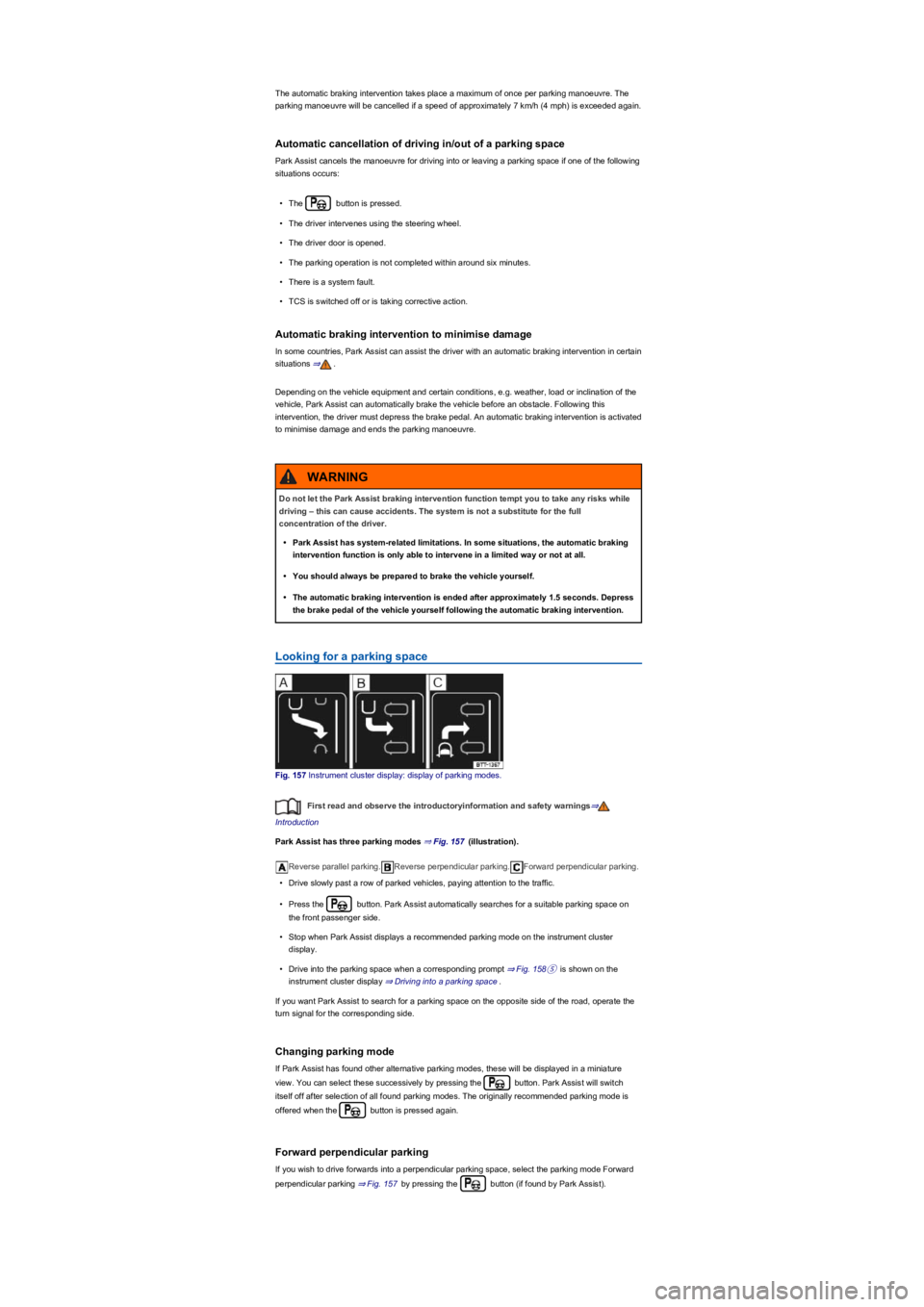
Fig. 157 Instrument cluster display: display of parking modes.
First read and observe the introductoryinformation and safety warnings⇒
Introduction
Park Assist has three parking modes ⇒ Fig. 157 (illustration).
Reverse parallel parking.Reverse perpendicular parking.Forward perpendicular parking.
•Drive slowly past a row of parked vehicles, paying attention to the traffic.
•Press the button. Park Assist automatically searches for a suitable parking space on
the front passenger side.
•Stop when Park Assist displays a recommended parking mode on the instrument cluster
display.
•Drive into the parking space when a corresponding prompt ⇒ Fig. 158⑤ is shown on the
instrument cluster display ⇒ Driving into a parking space.
If you want Park Assist to search for a parking space on the opposite side of the road, operate the
turn signal for the corresponding side.
Changing parking mode
If Park Assist has found other alternative parking modes, these will be displayed in a miniature
view. You can select these successively by pressing the button. Park Assist will switch
itself off after selection of all found parking modes. The originally recommended parking mode is
offered when the button is pressed again.
Forward perpendicular parking
If you wish to drive forwards into a perpendicular parking space, select the parking mode Forward
perpendicular parking ⇒ Fig. 157 by pressing the button (if found by Park Assist).
Do not let the Park Assist braking intervention function tempt you to take any risks while
driving – this can cause accidents. The system is not a substitute for the full
concentration of the driver.
•Park Assist has system-related limitations. In some situations, the automatic braking
intervention function is only able to intervene in a limited way or not at all.
•You should always be prepared to brake the vehicle yourself.
•The automatic braking intervention is ended after approximately 1.5 seconds. Depress
the brake pedal of the vehicle yourself following the automatic braking intervention.
WARNING
Page 202 of 341

Park Assist can be activated retroactively. If a suitable parking space was driven past before,
it is displayed.
Driving into a parking space
Fig. 158 On the instrument cluster display: parking perpendicular to the road. Looking for a parking
space, positioning the vehicle for parking and manoeuvring.
First read and observe the introductoryinformation and safety warnings⇒
Introduction
Key to ⇒ Fig. 158 (reverse perpendicular parking mode):
Prompt to drive forward
Your vehicle
Parked vehicle or obstacle.
Parking space detected
Prompt to select reverse gear.
Prompt to press the brake pedal.
Progress bar Symbolically shows the relative distance still to be driven.
The prerequisites for parking space selection must be met ⇒ Prerequisites and the vehicle must be
stationary.
•Release the steering wheel ⇒.
•Select reverse gear when a reverse arrow appears on the instrument cluster display.
•Carefully press the accelerator.
•Brake when an acoustic signal prompting you to change direction sounds, an arrow
⇒ Fig. 158① lights up, the white symbol lights up or a message is displayed.
•Drive forwards until an acoustic signal sounds or until the prompt to reverse is shown on the
instrument cluster display.
•Repeat reversing and driving forwards until a corresponding message is displayed on the
instrument cluster. A signal tone may also sound.
Driving out of a parking space
Fig. 159 On the instrument cluster display: driving out of a parallel parking space.
First read and observe the introductoryinformation and safety warnings⇒
Introduction
Key to ⇒ Fig. 159:
Stationary vehicle.
Your vehicle with reverse gear engaged