2017 TOYOTA YARIS Fuel system
[x] Cancel search: Fuel systemPage 3 of 396

3
1
8 7 5 4
3
2
9
6
4-2. Driving proceduresEngine (ignition) switch ..... 136
Automatic transmission ..... 139
Manual transmission ......... 142
Turn signal lever................ 143
Parking brake .................... 144
4-3. Operating the lights
and wipers
Headlight switch ................ 145
Fog light switch ................. 148
Windshield wipers and washer ..................... 150
Rear window wiper and washer ..................... 153
4-4. Refueling
Opening the fuel tank cap .................................. 156
4-5. Toyota Safety Sense C
Toyota Safety Sense C ..... 159
PCS (Pre-Collision System) .... 165
LDA (Lane Departure Alert) .... 178
Automatic High Beam ....... 183
4-6. Using the driving support
systems
Cruise control .................... 188
Driving assist systems....... 192
4-7. Driving tips
Winter driving tips.............. 197 5-1. Using the air conditioning
system and defogger
Air conditioning system...... 202
5-2. Using the audio system Steering wheel audio switches........................... 210
AUX port/USB port ............ 211
5-3. Using the interior lights Interior lights list................. 212• Interior light ................... 212
• Personal lights............... 213
5-4. Using the storage features List of storage features ...... 214• Glove box ...................... 215
• Cup holders ................... 215
• Bottle holders ................ 216
• Auxiliary box .................. 217
Luggage compartment features ........................... 218
5-5. Using the other interior features
Other interior features........ 220 • Sun visors ..................... 220
• Vanity mirrors ................ 220
• Power outlet .................. 221
• Assist grips .................... 2225Interior features
Page 4 of 396

TABLE OF CONTENTS4
6-1. Maintenance and careCleaning and protecting the vehicle exterior .......... 224
Cleaning and protecting the vehicle interior ........... 227
6-2. Maintenance Maintenance requirements ................... 230
General maintenance ........ 232
Emission inspection and maintenance (I/M)
programs ......................... 235
6-3. Do-it-yourself maintenance Do-it-yourself service precautions ..................... 236
Hood.................................. 239
Positioning a floor jack ...... 241
Engine compartment ......... 243
Tires .................................. 253
Tire inflation pressure........ 261
Wheels .............................. 265
Air conditioning filter .......... 268
Wireless remote control battery ............................. 270
Checking and replacing fuses ............................... 273
Light bulbs ......................... 278 7-1. Essential information
Emergency flashers ........... 292
If your vehicle has to be stopped in
an emergency.................. 293
7-2. Steps to take in an emergency
If your vehicle needs to be towed .......................... 295
If you think something is wrong............................... 300
Fuel pump shut off system ............................. 301
If a warning light turns on or a warning buzzer
sounds ............................. 302
If you have a flat tire .......... 312
If the engine will not start ... 325
If the vehicle battery is discharged ....................... 327
If your vehicle overheats.... 330
If the vehicle becomes stuck ................................ 333
6Maintenance and care7When trouble arises
Page 7 of 396

7
The installation of a mobile two-way radio system in your vehicle could affect
electronic systems such as:
●Multiport fuel injection system/sequential multiport fuel injection system
● Cruise control system (if equipped)
● Anti-lock brake system
● SRS airbag system
● Seat belt pretensioner system
● Toyota Safety Sense C (if equipped)
Be sure to check with your Toyota dealer for precautionary measures or spe-
cial instructions regarding installation of a mobile two-way radio system.
Your Toyota is equipped with several sophisticated computers that will record
certain data, such as: • Engine speed
• Accelerator status
• Brake status
• Vehicle speed
• Shift position (except manual transmission)
The recorded data varies according to the vehicle grade level and options
with which it is equipped. These computers do not record conversations or
sounds, and only record images outside of the vehicle in certain situati\
ons.
●Data Transmission
Your vehicle may transmit the data re corded in these computers to Toyota
without notification to you.
●Data usage
Toyota may use the data recorded in these computers to diagnose malfunc-
tions, conduct research and development, and improve quality.
Toyota will not disclose the recorded data to a third party except:
• With the consent of the vehicle owner or with the consent of the lessee if the vehicle is leased
• In response to an official request by the police, a court of law or a govern- ment agency
• For use by Toyota in a lawsuit
• For research purposes where the data is not tied to a specific vehicle or vehicle owner
●To learn more about the vehicle data collected, used and shared by Toy-
ota, please visit www.toyota.com/privacyvts/
.
Installation of a mobile two-way radio system
Vehicle data recordings
Page 73 of 396

732. Instrument cluster
2
Instrument cluster
Warning lights inform the driver of malfunctions in the indicated vehi-
cle’s systems.
Warning lights
*1
(Except Canada)
Brake system warning
light ( →P. 302)
*1Electric power steering
system warning light
(→P. 303)
*1
(Canada)
Brake system warning
light ( →P. 302)
*1, 2, 5
PCS warning light
(→P. 303)
*1Charging system warn-
ing light ( →P. 302)*1, 3Slip indicator
(→P. 304)
*1
Low engine oil pressure
warning light ( →P. 302)
*2
(Yellow)
Automatic High Beam
indicator ( →P. 304)
*1
(Red)
High engine coolant
temperature warning
light ( →P. 302)*2
(Yellow)
Cruise control indicator
(→P. 304)
*1
(Except Canada)
Malfunction indicator
lamp ( →P. 302)
*2
(Yellow)
LDA indicator
(→P. 304)
*1
(Canada)
Malfunction indicator
lamp ( →P. 302)
*2, 4
(Yellow)
Lane marker indicators
(→P. 304)
*1SRS warning light
(→P. 303)Open door warning light
(→P. 304)
*1
(Except Canada)
ABS warning light
(→P. 303)Low fuel level warning
light ( →P. 304)
*1
(Canada)
ABS warning light
(→P. 303)Driver’s and front pas-
senger’s seat belt
reminder light ( →P. 304)
Page 82 of 396

822. Instrument cluster
The temperature display shows temperatures within the range of
-40°F (-40°C) and 122°F (50°C).
■Display
In the following situations, the correct outside temperature may not
be displayed, or the display may take longer than normal to change:
●When the vehicle is stopped, or moving at low speeds (less than
16 mph [25 km/h])
● When the outside temperature has changed suddenly (at the
entrance/exit of a ga rage, tunnel, etc.)
■When “− −” or “E” is displayed
The system may be malfunctioning. Take your vehicle to your Toy-
ota dealer.
■ When disconnecting and reco nnecting battery terminals
The following information data will be reset.
● Driving range
● Average fuel consumption
● Average vehicle speed
● Clock data
■ Liquid crystal display
Small spots or light spots may appear on the display. This phenomenon is
characteristic of liquid crystal displa y, and there is no problem continuing to
use the display.
■ Changing the pre-collision warning timing
→P. 168
Outside temperature display
NOTICE
■The multi-information disp lay at low temperatures
Allow the interior of the vehicle to warm up before using the liquid crystal
information display. At extremely low temperatures, the display monitor may
respond slowly, and display changes may be delayed.
Page 115 of 396

115
4Driving
4-1. Before drivingDriving the vehicle ............. 116
Cargo and luggage ........... 127
Vehicle load limits ............. 131
Trailer towing..................... 132
Dinghy towing (vehicles with an automatic
transmission)................... 133
Dinghy towing (vehicles with a manual
transmission)................... 134
4-2. Driving procedures Engine (ignition) switch ..... 136
Automatic transmission ..... 139
Manual transmission ......... 142
Turn signal lever................ 143
Parking brake .................... 144 4-3. Operating the lights
and wipers
Headlight switch ................ 145
Fog light switch ................. 148
Windshield wipers and washer ..................... 150
Rear window wiper and washer ..................... 153
4-4. Refueling Opening the fuel tank cap .................................. 156
4-5. Toyota Safety Sense C Toyota Safety Sense C ..... 159
PCS (Pre-Collision System) .... 165
LDA (Lane Departure Alert) .... 178
Automatic High Beam ....... 183
4-6. Using the driving support systems
Cruise control .................... 188
Driving assist systems ...... 192
4-7. Driving tips Winter driving tips ............. 197
Page 147 of 396
1474-3. Operating the lights and wipers
4
Driving
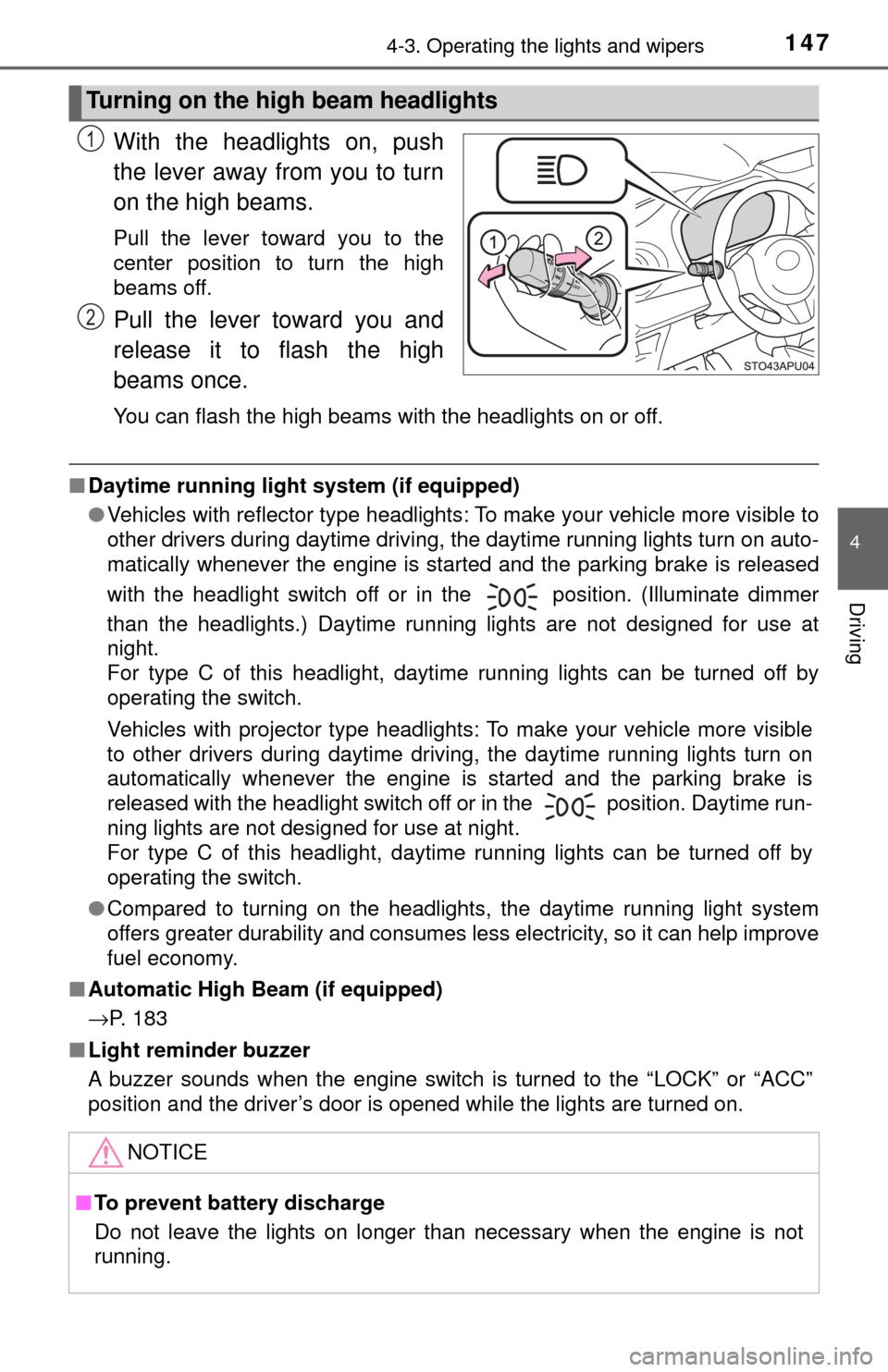
With the headlights on, push
the lever away from you to turn
on the high beams.
Pull the lever toward you to the
center position to turn the high
beams off.
Pull the lever toward you and
release it to flash the high
beams once.
You can flash the high beams with the headlights on or off.
■Daytime running light system (if equipped)
●Vehicles with reflector type headlights: To make your vehicle more visible to
other drivers during daytime driving, the daytime running lights turn on auto-
matically whenever the engine is started and the parking brake is released
with the headlight switch off or in the position. (Illuminate dimmer
than the headlights.) Daytime running lights are not designed for use at
night.
For type C of this headlight, daytime running lights can be turned off by
operating the switch.
Vehicles with projector type headlights: To make your vehicle more visible
to other drivers during daytime driving, the daytime running lights turn on
automatically whenever the engine is started and the parking brake is
released with the headlight switch off or in the position. Daytime run-
ning lights are not designed for use at night.
For type C of this headlight, daytime running lights can be turned off by
operating the switch.
● Compared to turning on the headlights, the daytime running light system
offers greater durability and consumes less electricity, so it can help improve
fuel economy.
■ Automatic High Beam (if equipped)
→P. 183
■ Light reminder buzzer
A buzzer sounds when the engine switch is turned to the “LOCK” or “ACC”
position and the driver’s door is opened while the lights are turned on.
Turning on the high beam headlights
1
2
NOTICE
■To prevent battery discharge
Do not leave the lights on longer than necessary when the engine is not
running.
Page 157 of 396
1574-4. Refueling
4
Driving
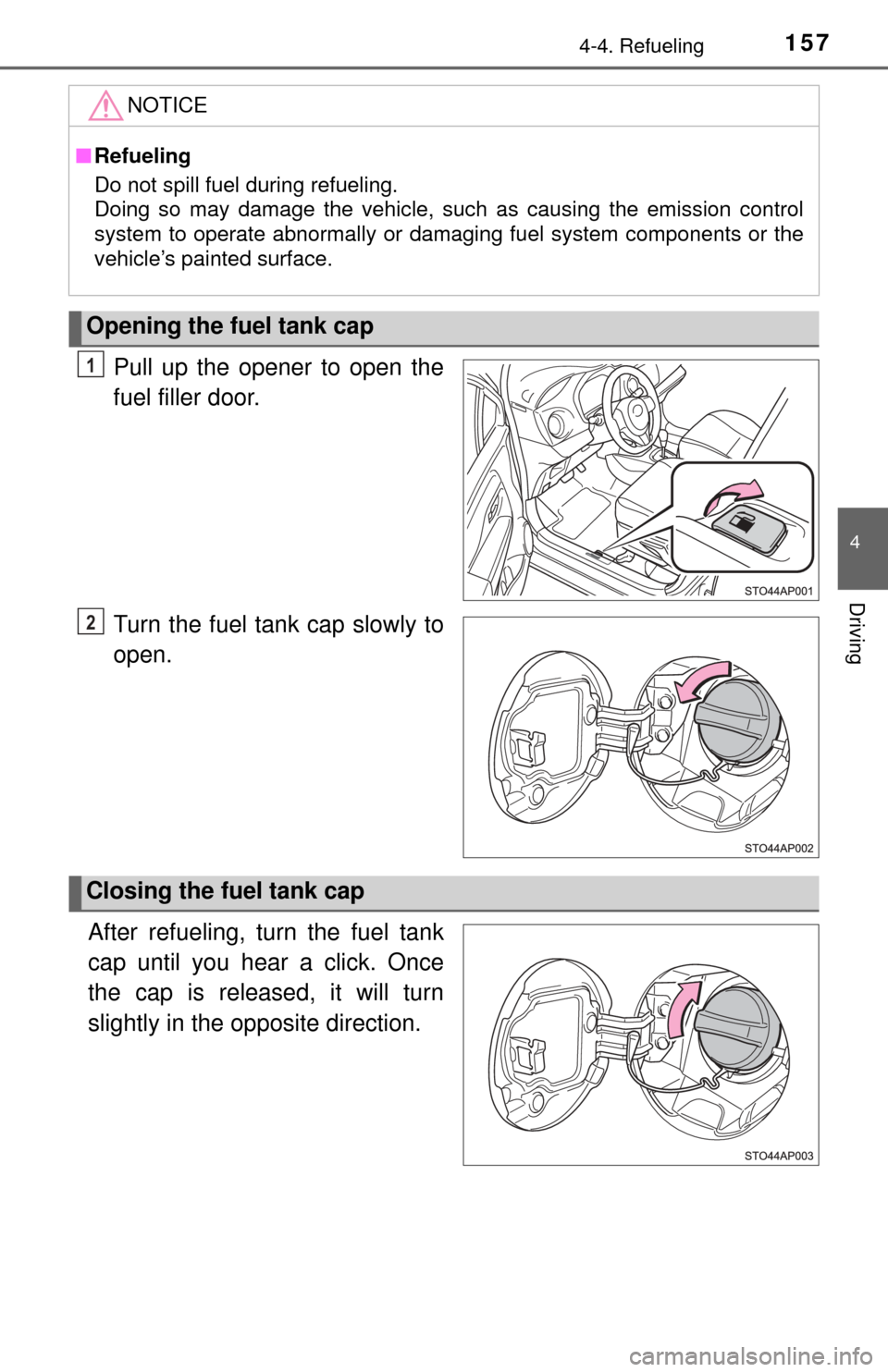
Pull up the opener to open the
fuel filler door.
Turn the fuel tank cap slowly to
open.
After refueling, turn the fuel tank
cap until you hear a click. Once
the cap is released, it will turn
slightly in the opposite direction.
NOTICE
■ Refueling
Do not spill fuel during refueling.
Doing so may damage the vehicle, such as causing the emission control
system to operate abnormally or damaging fuel system components or the
vehicle’s painted surface.
Opening the fuel tank cap
1
2
Closing the fuel tank cap