2017 TOYOTA YARIS Auto headlight
[x] Cancel search: Auto headlightPage 3 of 396

3
1
8 7 5 4
3
2
9
6
4-2. Driving proceduresEngine (ignition) switch ..... 136
Automatic transmission ..... 139
Manual transmission ......... 142
Turn signal lever................ 143
Parking brake .................... 144
4-3. Operating the lights
and wipers
Headlight switch ................ 145
Fog light switch ................. 148
Windshield wipers and washer ..................... 150
Rear window wiper and washer ..................... 153
4-4. Refueling
Opening the fuel tank cap .................................. 156
4-5. Toyota Safety Sense C
Toyota Safety Sense C ..... 159
PCS (Pre-Collision System) .... 165
LDA (Lane Departure Alert) .... 178
Automatic High Beam ....... 183
4-6. Using the driving support
systems
Cruise control .................... 188
Driving assist systems....... 192
4-7. Driving tips
Winter driving tips.............. 197 5-1. Using the air conditioning
system and defogger
Air conditioning system...... 202
5-2. Using the audio system Steering wheel audio switches........................... 210
AUX port/USB port ............ 211
5-3. Using the interior lights Interior lights list................. 212• Interior light ................... 212
• Personal lights............... 213
5-4. Using the storage features List of storage features ...... 214• Glove box ...................... 215
• Cup holders ................... 215
• Bottle holders ................ 216
• Auxiliary box .................. 217
Luggage compartment features ........................... 218
5-5. Using the other interior features
Other interior features........ 220 • Sun visors ..................... 220
• Vanity mirrors ................ 220
• Power outlet .................. 221
• Assist grips .................... 2225Interior features
Page 74 of 396

742. Instrument cluster
*1: These lights turn on when the engine switch is turned to the “ON” positionto indicate that a system check is being performed. They will turn off after
the engine is started, or after a few seconds. There may be a malfunction
in a system if a light does not come on, or if the lights do not turn off. Have
the vehicle inspected by your Toyota dealer.
*2: If equipped
*3: The light flashes to indicate that the system is operating and come on toindicate a malfunction.
*4: The lights turn on with LDA indicator to indicate a malfunction.
*5: The light flashes to indicate a malfunction.
The indicators inform the driver of the operating state of the vehicle’s
various systems.
*1
(Except Canada)
Tire pressure warning
light ( →P. 305)
*1
(Except Canada)
Maintenance required
reminder light ( →P. 306)
*1
(If equipped)
Low windshield washer
fluid warning light
(→P. 305)
Indicators
Turn signal indicator
(→P. 143)*1, 4Eco Driving Indicator
Light ( →P. 120)
Headlight high beam
indicator ( →P. 147)
*2
(Green)
Cruise control indicator
(→P. 188)
*2
(Green)
Automatic High Beam
indicator ( →P. 183)
*2
“SET” indicator
(→P. 188)
*2
Front fog light indicator
(→P. 148)
*2
(Green)
LDA indicator
(→P. 178)
*3
(Blue)
Low engine coolant tem-
perature indicator
*2, 9
(Green)
Lane marker indicators
(→P. 179)
Page 115 of 396
115
4Driving
4-1. Before drivingDriving the vehicle ............. 116
Cargo and luggage ........... 127
Vehicle load limits ............. 131
Trailer towing..................... 132
Dinghy towing (vehicles with an automatic
transmission)................... 133
Dinghy towing (vehicles with a manual
transmission)................... 134
4-2. Driving procedures Engine (ignition) switch ..... 136
Automatic transmission ..... 139
Manual transmission ......... 142
Turn signal lever................ 143
Parking brake .................... 144 4-3. Operating the lights
and wipers
Headlight switch ................ 145
Fog light switch ................. 148
Windshield wipers and washer ..................... 150
Rear window wiper and washer ..................... 153
4-4. Refueling Opening the fuel tank cap .................................. 156
4-5. Toyota Safety Sense C Toyota Safety Sense C ..... 159
PCS (Pre-Collision System) .... 165
LDA (Lane Departure Alert) .... 178
Automatic High Beam ....... 183
4-6. Using the driving support systems
Cruise control .................... 188
Driving assist systems ...... 192
4-7. Driving tips Winter driving tips ............. 197
Page 147 of 396
1474-3. Operating the lights and wipers
4
Driving
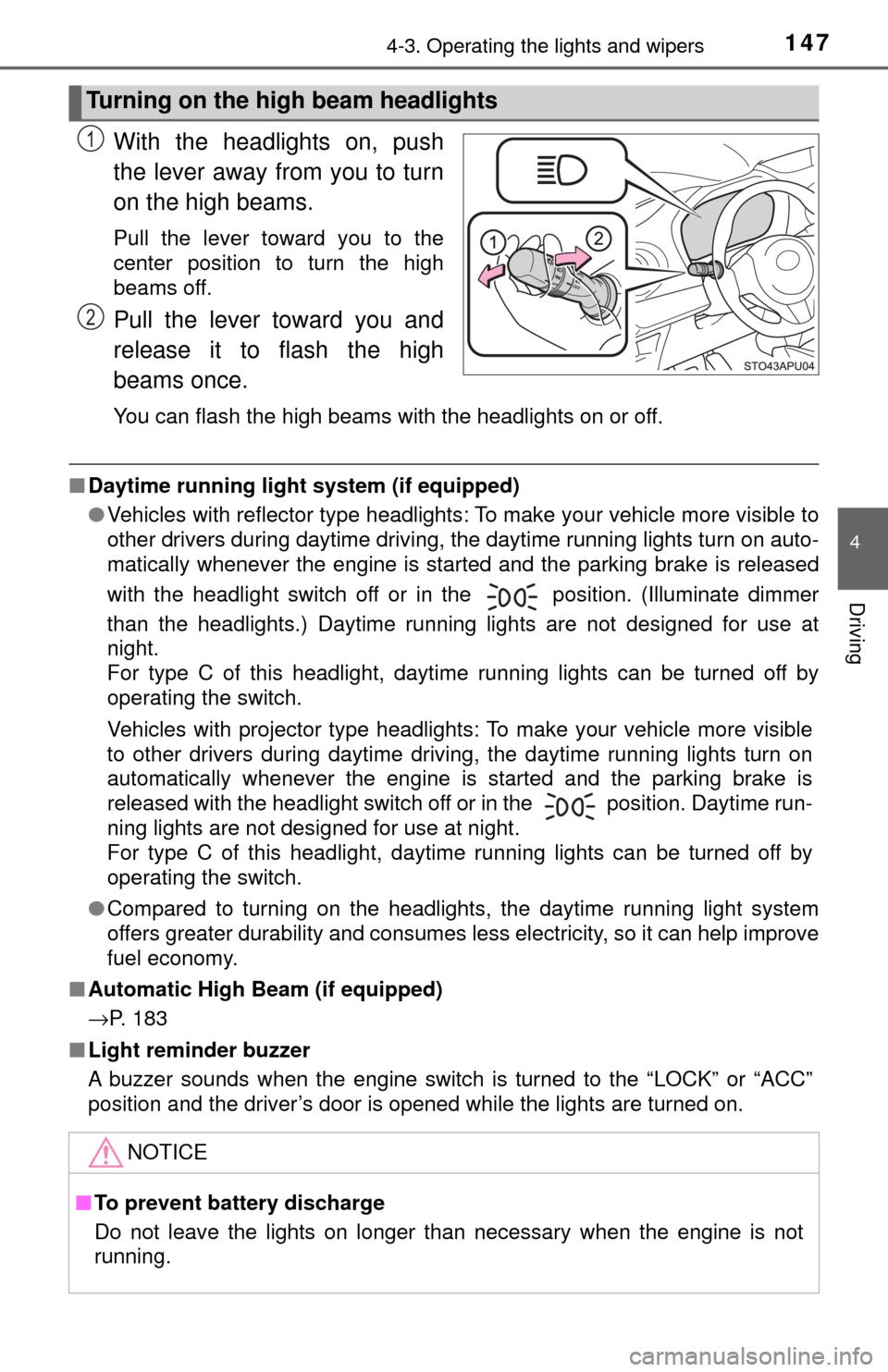
With the headlights on, push
the lever away from you to turn
on the high beams.
Pull the lever toward you to the
center position to turn the high
beams off.
Pull the lever toward you and
release it to flash the high
beams once.
You can flash the high beams with the headlights on or off.
■Daytime running light system (if equipped)
●Vehicles with reflector type headlights: To make your vehicle more visible to
other drivers during daytime driving, the daytime running lights turn on auto-
matically whenever the engine is started and the parking brake is released
with the headlight switch off or in the position. (Illuminate dimmer
than the headlights.) Daytime running lights are not designed for use at
night.
For type C of this headlight, daytime running lights can be turned off by
operating the switch.
Vehicles with projector type headlights: To make your vehicle more visible
to other drivers during daytime driving, the daytime running lights turn on
automatically whenever the engine is started and the parking brake is
released with the headlight switch off or in the position. Daytime run-
ning lights are not designed for use at night.
For type C of this headlight, daytime running lights can be turned off by
operating the switch.
● Compared to turning on the headlights, the daytime running light system
offers greater durability and consumes less electricity, so it can help improve
fuel economy.
■ Automatic High Beam (if equipped)
→P. 183
■ Light reminder buzzer
A buzzer sounds when the engine switch is turned to the “LOCK” or “ACC”
position and the driver’s door is opened while the lights are turned on.
Turning on the high beam headlights
1
2
NOTICE
■To prevent battery discharge
Do not leave the lights on longer than necessary when the engine is not
running.
Page 182 of 396
1824-5. Toyota Safety Sense C
WARNING
■Before using the LDA system
Do not rely solely on the LDA system. The LDA system does not drive the
vehicle automatically, nor does it reduce the amount of care you need to
take. As such, the driver must always assume full responsibility for under-
standing his/her surroundings, for operating the steering wheel to correct
the driving line, and for driving safely.
Inappropriate or negligent driving could lead to an accident.
■ To avoid operating the LDA by mistake
Switch the LDA system off using the LDA switch when not in use.
NOTICE
■To prevent damage to or incorr ect operation of the LDA system
● Do not modify the headlights or attach stickers to the surface of the lights.
● Do not modify the suspension. If your suspension needs repairs, contact
your Toyota dealer.
● Do not install or place anything on the hood or the grille. Also, do not install
a grille guard (bull bars, kangaroo bar etc.).
Page 183 of 396
1834-5. Toyota Safety Sense C
4
Driving
Automatic High Beam∗
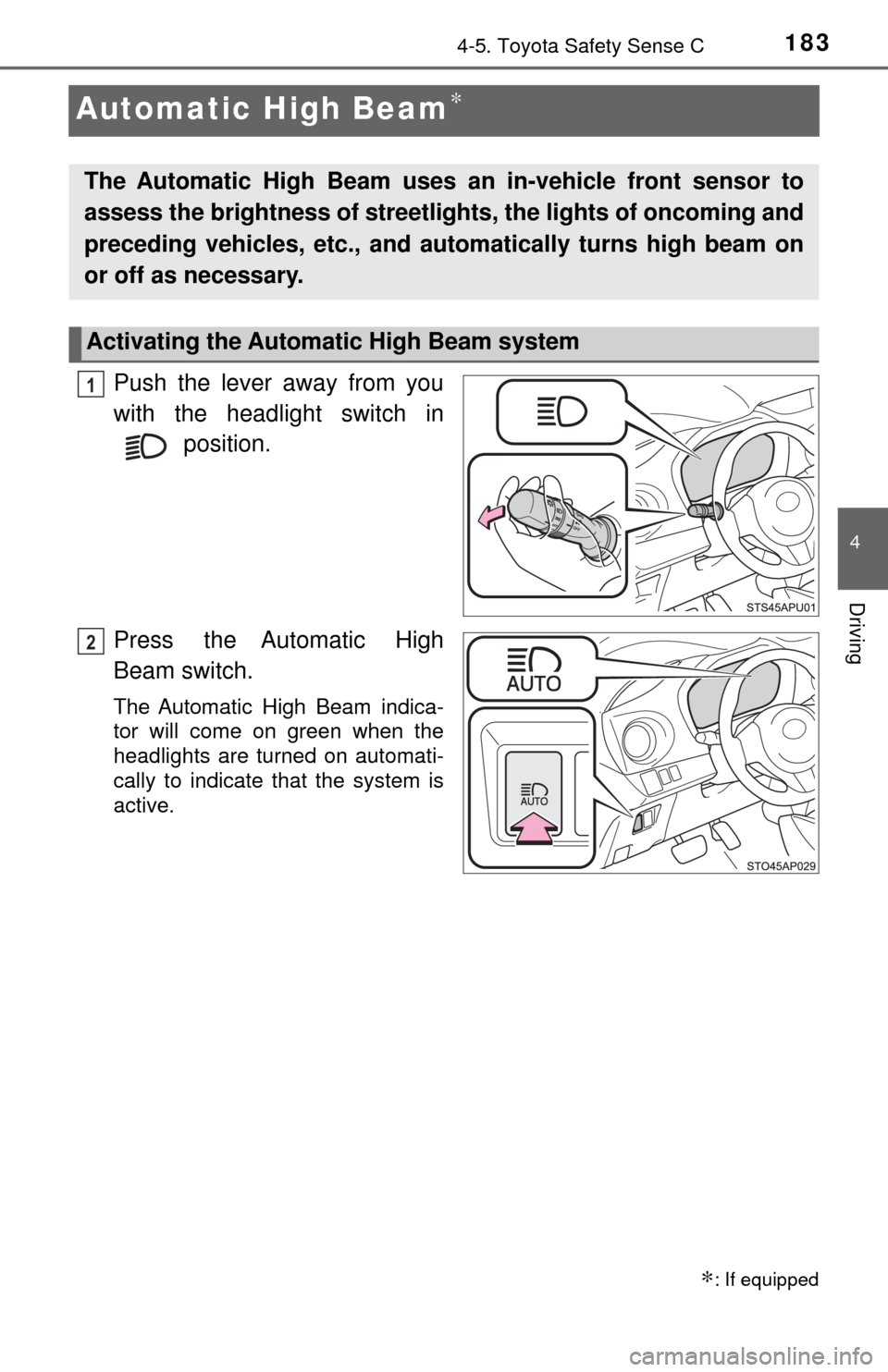
Push the lever away from you
with the headlight switch in position.
Press the Automatic High
Beam switch.
The Automatic High Beam indica-
tor will come on green when the
headlights are turned on automati-
cally to indicate that the system is
active.
∗: If equipped
The Automatic High Beam uses an in-vehicle front sensor to
assess the brightness of streetli ghts, the lights of oncoming and
preceding vehicles, etc., and au tomatically turns high beam on
or off as necessary.
Activating the Automatic High Beam system
1
2
Page 184 of 396
1844-5. Toyota Safety Sense C
When all of the following conditions are fulfilled, high beam will be
automatically turned on:
●Vehicle speed is above appr oximately 25 mph (40 km/h).
● The area ahead of the vehicle is dark.
● There are no oncoming or preceding vehicles with headlights or tail
lights turned on.
● There are few streetlights on the road ahead.
If any of the following conditions are fulfilled, high beam will be auto-
matically turned off:
● Vehicle speed drops below ap proximately 19 mph (30 km/h).
● The area ahead of the vehicle is not dark.
● Oncoming or preceding vehicles have headlights or tail lights
turned on.
● There are many streetlights on the road ahead.
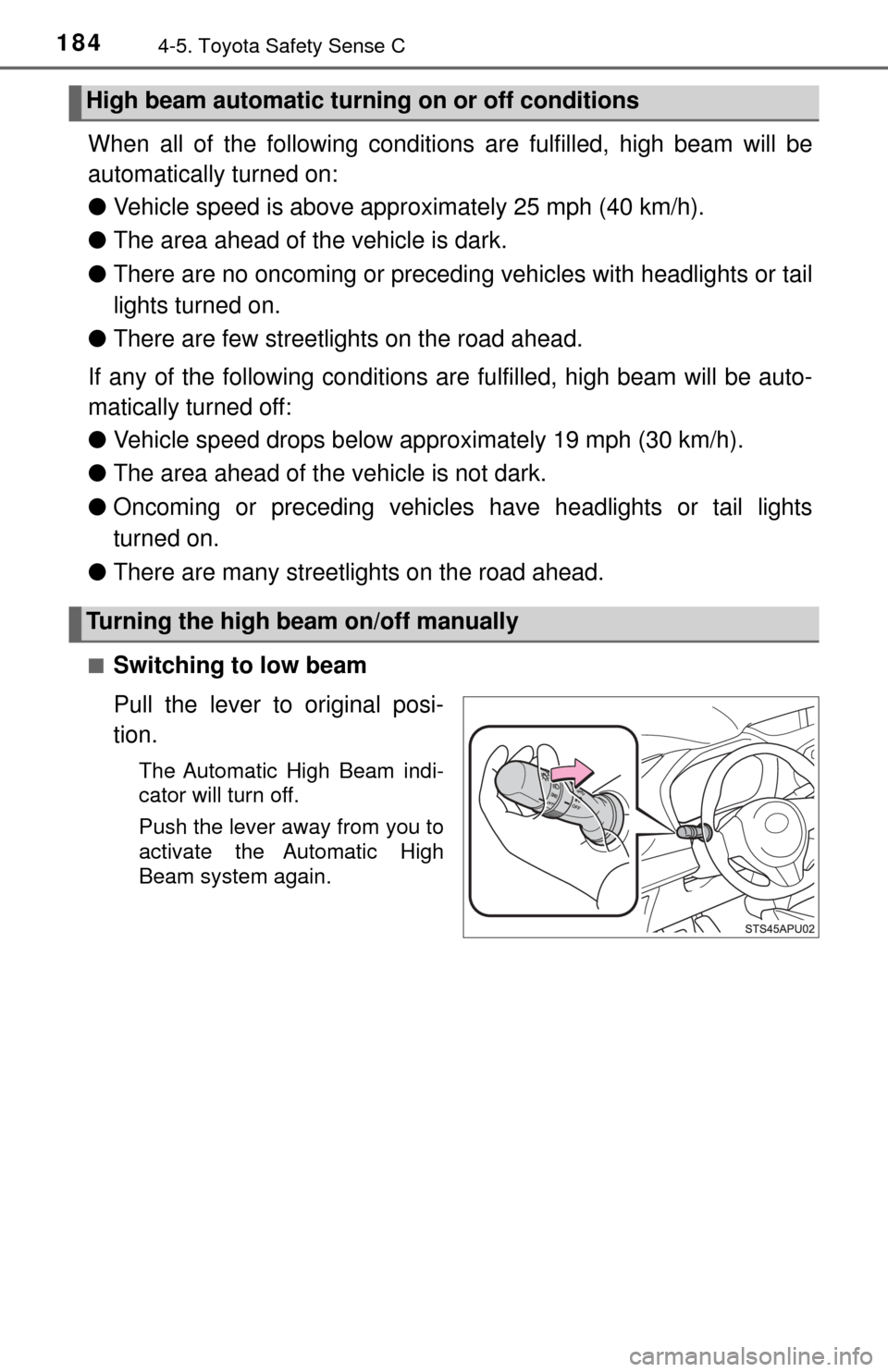
■Switching to low beam
Pull the lever to original posi-
tion.
The Automatic High Beam indi-
cator will turn off.
Push the lever away from you to
activate the Automatic High
Beam system again.
High beam automatic turning on or off conditions
Turning the high beam on/off manually
Page 185 of 396
1854-5. Toyota Safety Sense C
4
Driving
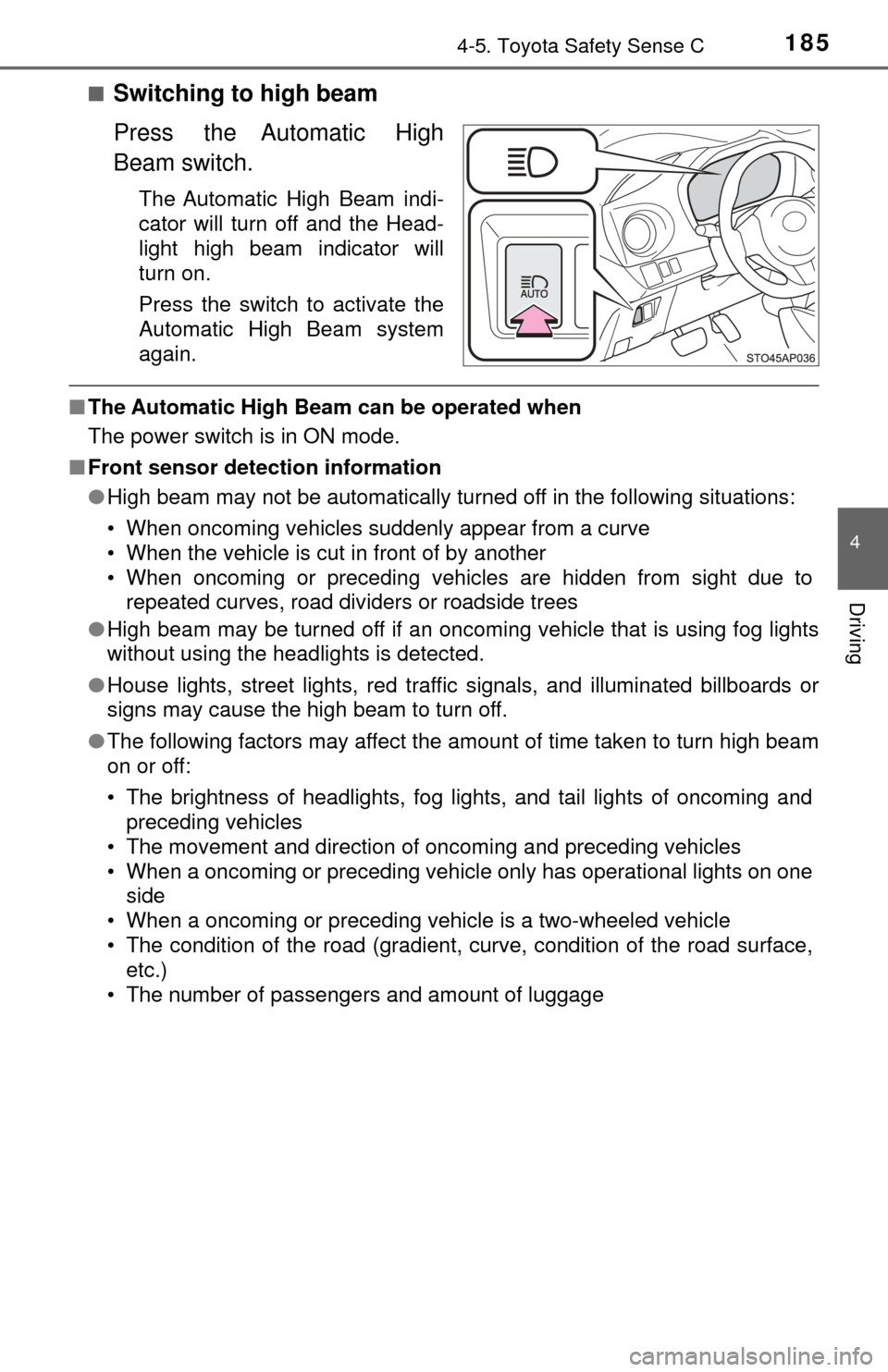
■Switching to high beam
Press the Automatic High
Beam switch.
The Automatic High Beam indi-
cator will turn off and the Head-
light high beam indicator will
turn on.
Press the switch to activate the
Automatic High Beam system
again.
■The Automatic High Beam can be operated when
The power switch is in ON mode.
■ Front sensor detection information
●High beam may not be automatically turned off in the following situations:
• When oncoming vehicles suddenly appear from a curve
• When the vehicle is cut in front of by another
• When oncoming or preceding vehicles are hidden from sight due to
repeated curves, road dividers or roadside trees
● High beam may be turned off if an oncoming vehicle that is using fog lights
without using the headlights is detected.
● House lights, street lights, red traf fic signals, and illuminated billboards or
signs may cause the high beam to turn off.
● The following factors may affect the amount of time taken to turn high beam
on or off:
• The brightness of headlights, fog lights, and tail lights of oncoming and
preceding vehicles
• The movement and direction of oncoming and preceding vehicles
• When a oncoming or preceding vehicle only has operational lights on one side
• When a oncoming or preceding vehicle is a two-wheeled vehicle
• The condition of the road (gradient, curve, condition of the road surface, etc.)
• The number of passengers and amount of luggage