Page 59 of 396
591-1. For safe use
1
For safety and security
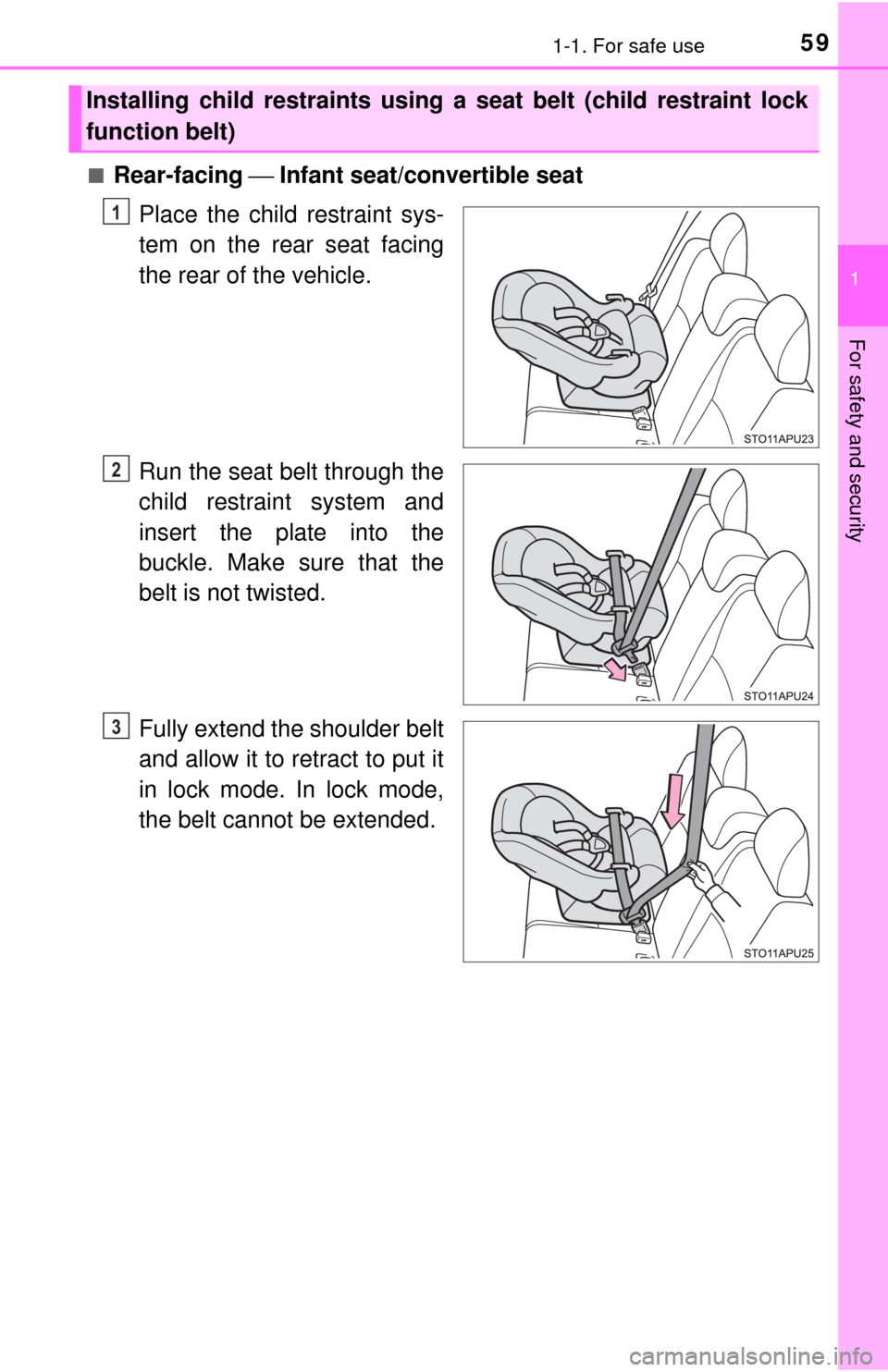
■Rear-facing ⎯ Infant seat/convertible seat
Place the child restraint sys-
tem on the rear seat facing
the rear of the vehicle.
Run the seat belt through the
child restraint system and
insert the plate into the
buckle. Make sure that the
belt is not twisted.
Fully extend the shoulder belt
and allow it to retract to put it
in lock mode. In lock mode,
the belt cannot be extended.
Installing child restraints using a seat belt (child restraint lock
function belt)
1
2
3
Page 60 of 396
601-1. For safe use
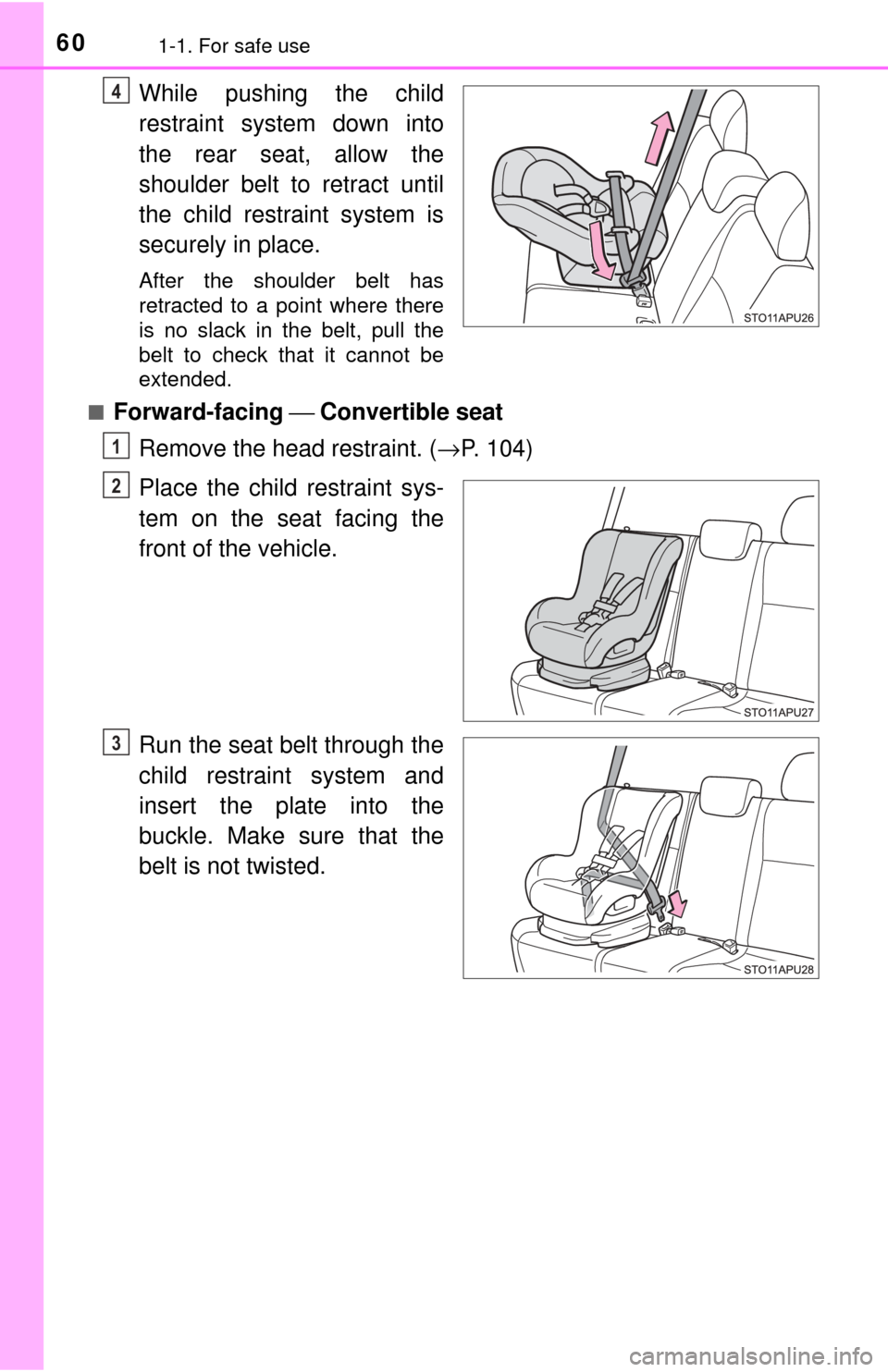
While pushing the child
restraint system down into
the rear seat, allow the
shoulder belt to retract until
the child restraint system is
securely in place.
After the shoulder belt has
retracted to a point where there
is no slack in the belt, pull the
belt to check that it cannot be
extended.
■
Forward-facing ⎯ Convertible seat
Remove the head restraint. ( →P. 104)
Place the child restraint sys-
tem on the seat facing the
front of the vehicle.
Run the seat belt through the
child restraint system and
insert the plate into the
buckle. Make sure that the
belt is not twisted.
4
1
2
3
Page 61 of 396
611-1. For safe use
1
For safety and security
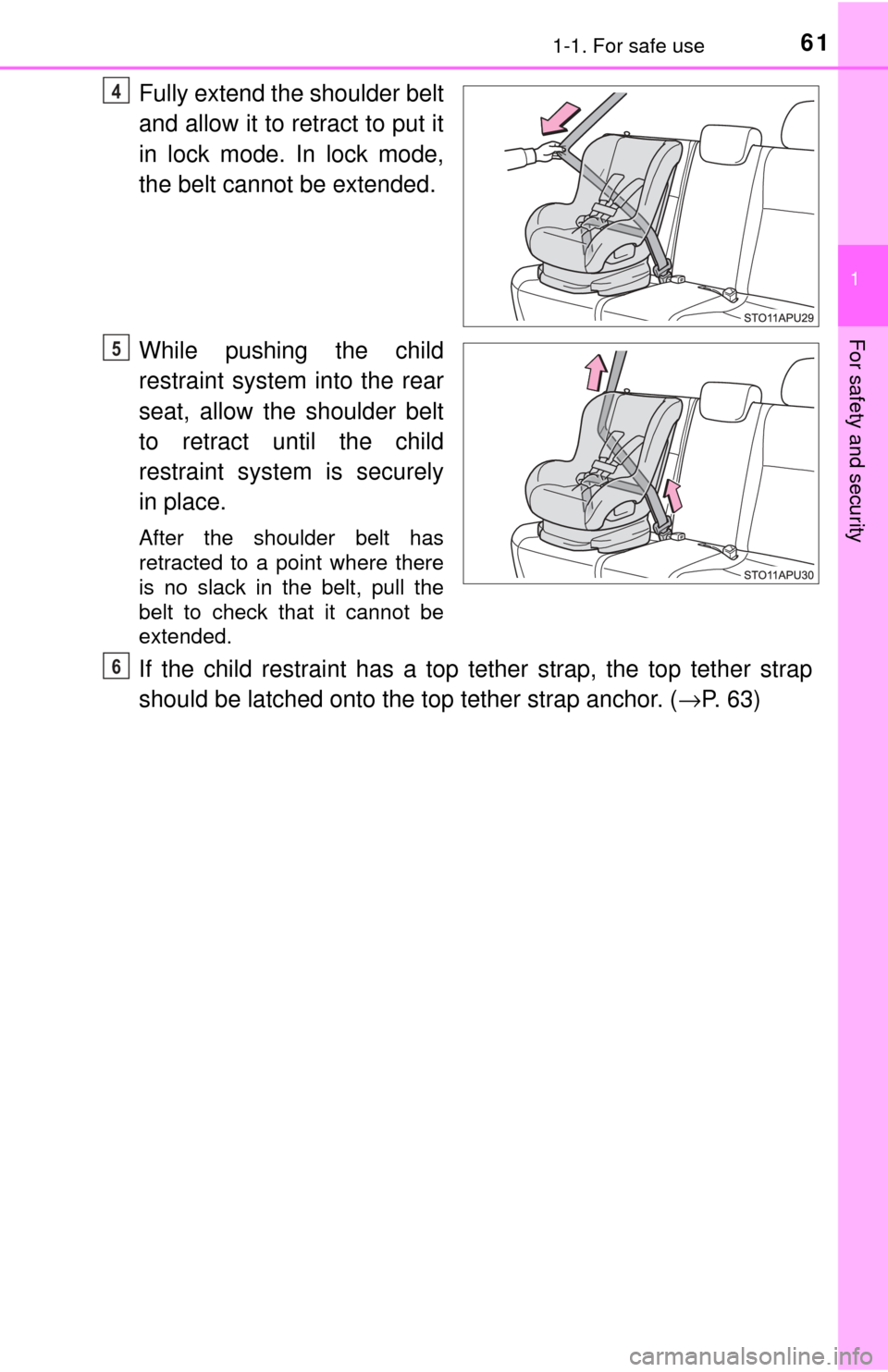
Fully extend the shoulder belt
and allow it to retract to put it
in lock mode. In lock mode,
the belt cannot be extended.
While pushing the child
restraint system into the rear
seat, allow the shoulder belt
to retract until the child
restraint system is securely
in place.
After the shoulder belt has
retracted to a point where there
is no slack in the belt, pull the
belt to check that it cannot be
extended.
If the child restraint has a top tether strap, the top tether strap
should be latched onto the top tether strap anchor. (→P. 63)
4
5
6
Page 64 of 396
641-1. For safe use
WARNING
■When installing a booster seat
To prevent the belt from going into ALR lock mode, do not fully extend the
shoulder belt. ALR mode causes the belt to tighten only. This could cause
injury or discomfort to the child. ( →P. 29)
■ When installing a child restraint system
Follow the directions given in the child restraint system installation manual
and fix the child restraint system securely in place.
If the child restraint system is not correctly fixed in place, the child or other
passengers may be seriously injured or even killed in the event of a sudden
braking, sudden swerving or an accident.
● When a booster seat is installed, always ensure that the shoulder belt is
positioned across the center of the child’s shoulder. The belt should be
kept away from the child’s neck, but not so that it could fall off the child’s
shoulder. Failure to do so may result in death or serious injury in the event
of a sudden braking, sudden swerving or an accident.
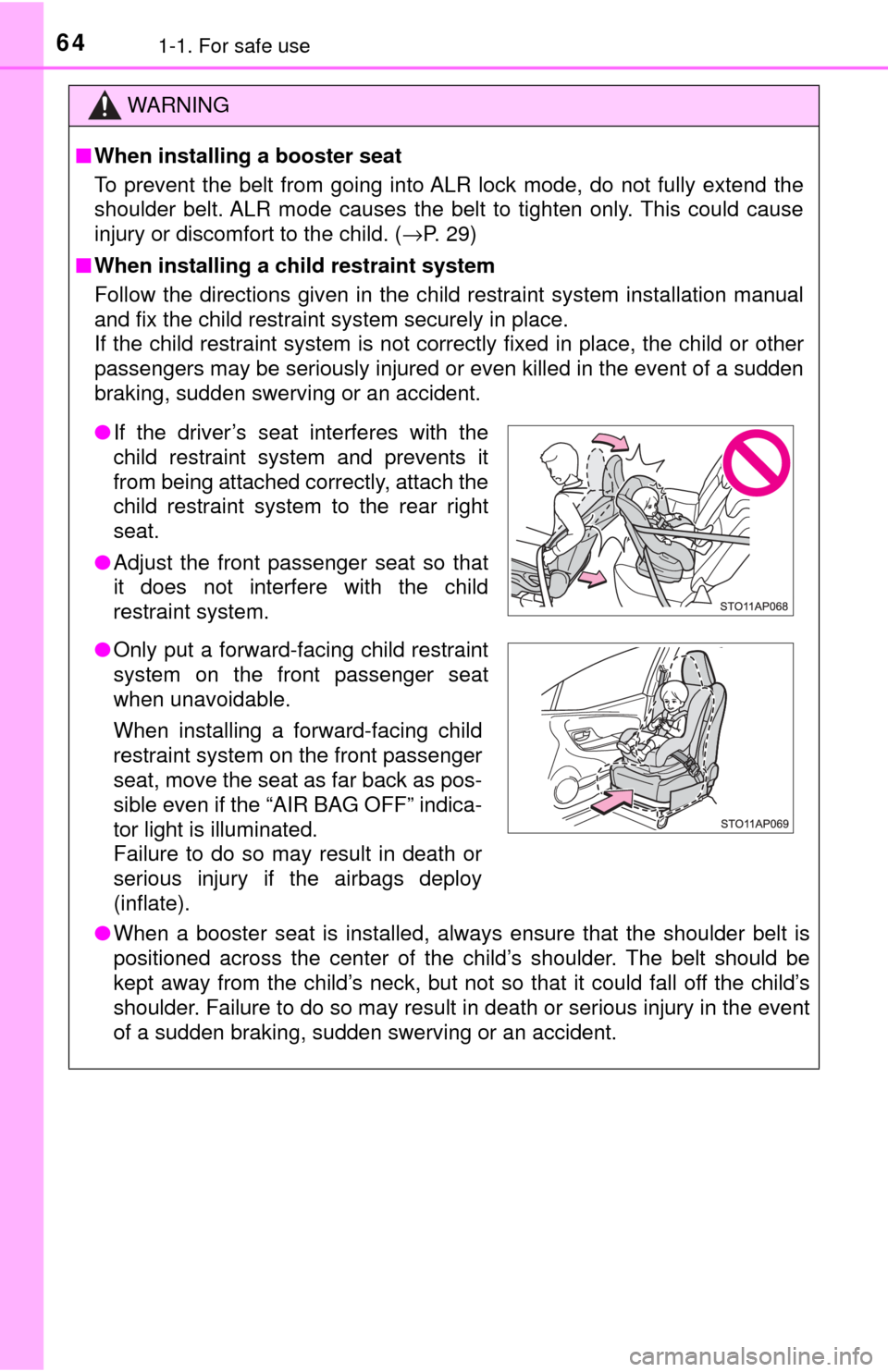
●If the driver’s seat interferes with the
child restraint system and prevents it
from being attached correctly, attach the
child restraint system to the rear right
seat.
● Adjust the front passenger seat so that
it does not interfere with the child
restraint system.
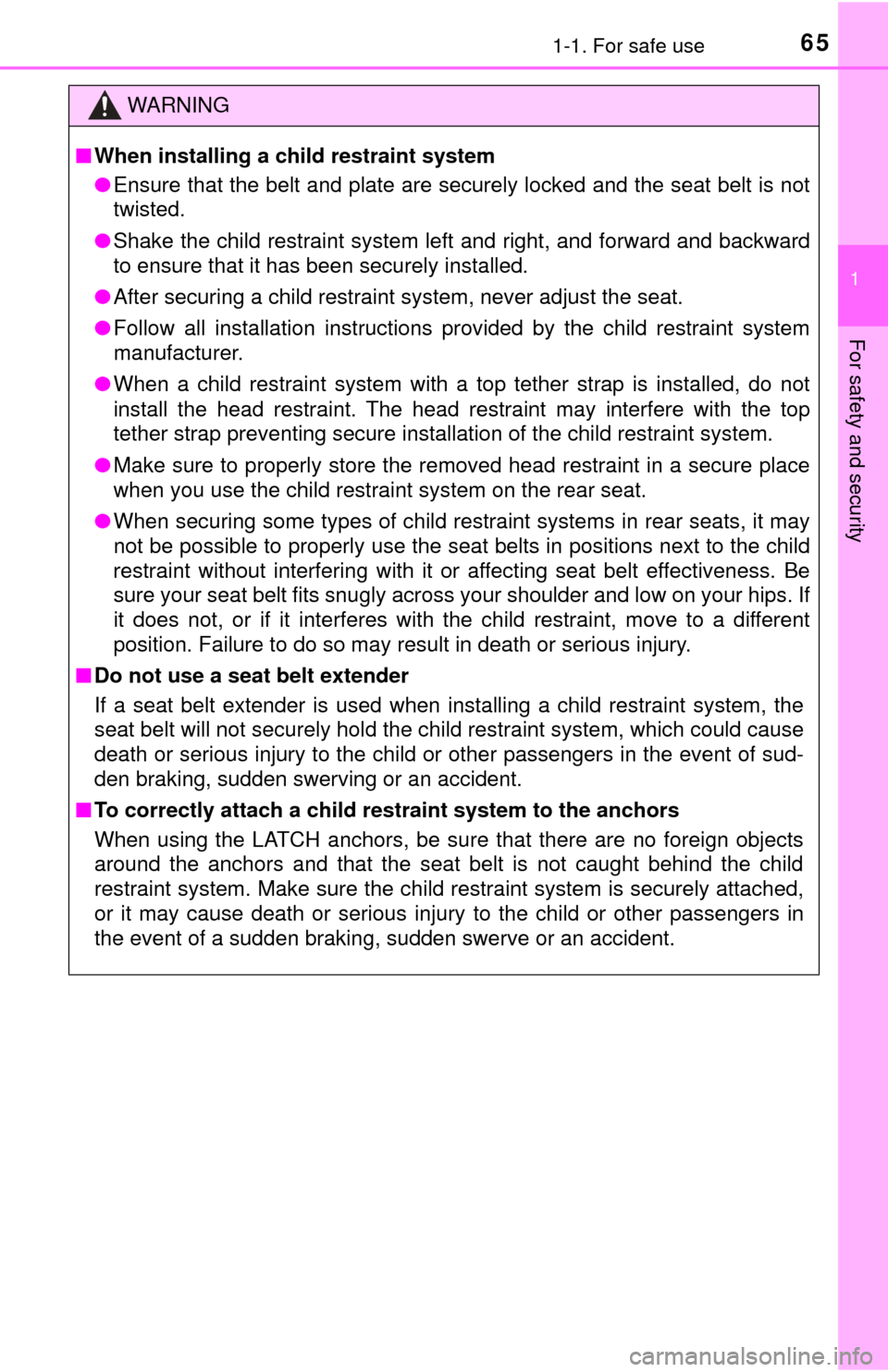
● Only put a forward-facing child restraint
system on the front passenger seat
when unavoidable.
When installing a forward-facing child
restraint system on the front passenger
seat, move the seat as far back as pos-
sible even if the “AIR BAG OFF” indica-
tor light is illuminated.
Failure to do so may result in death or
serious injury if the airbags deploy
(inflate).
Page 65 of 396
651-1. For safe use
1
For safety and security
WARNING
■When installing a child restraint system
● Ensure that the belt and plate are securely locked and the seat belt is not
twisted.
● Shake the child restraint system left and right, and forward and backward
to ensure that it has been securely installed.
● After securing a child restraint system, never adjust the seat.
● Follow all installation instructions provided by the child restraint system
manufacturer.
● When a child restraint system with a top tether strap is installed, do not
install the head restraint. The head restraint may interfere with the top
tether strap preventing secure installation of the child restraint system.
● Make sure to properly store the removed head restraint in a secure place
when you use the child restraint system on the rear seat.
● When securing some types of child restraint systems in rear seats, it may
not be possible to properly use the seat belts in positions next to the child
restraint without interfering with it or affecting seat belt effectiveness. Be
sure your seat belt fits snugly across your shoulder and low on your hips. If
it does not, or if it interferes with the child restraint, move to a different
position. Failure to do so may result in death or serious injury.
■ Do not use a seat belt extender
If a seat belt extender is used when installing a child restraint system, the
seat belt will not securely hold the child restraint system, which could cause
death or serious injury to the child or other passengers in the event of sud-
den braking, sudden swerving or an accident.
■ To correctly attach a child r estraint system to the anchors
When using the LATCH anchors, be sure that there are no foreign objects
around the anchors and that the seat belt is not caught behind the child
restraint system. Make sure the child restraint system is securely attached,
or it may cause death or serious injury to the child or other passengers in
the event of a sudden braking, sudden swerve or an accident.
Page 83 of 396
83
3
Operation of
each component
3-1. Key information
Keys .................................... 84
3-2. Opening, closing and locking the doors
Side doors ........................... 89
Back door ............................ 94
3-3. Adjusting the seats Front seats .......................... 98
Rear seats......................... 101
Head restraints.................. 104
3-4. Adjusting the steering wheel and mirrors
Steering wheel .................. 107
Inside rear view mirror ...... 109
Outside rear view mirrors ............................. 111
3-5. Opening and closing the windows
Power windows ................. 113
Page 87 of 396

873-1. Key information
3
Operation of each component
■Conditions affecting operation (wireless remote control)
The wireless remote control function may not operate normally in the follow-
ing situations:
●When the wireless key battery is depleted
● Near a TV tower, electric power plant, gas station, radio station, large dis-
play, airport or other facility that generates strong radio waves or electrical
noise
● When carrying a portable radio, cellul ar phone or other wireless communi-
cation devices
● When the wireless key is in contact with, or is covered by a metallic object
● When other wireless keys (that emit radio waves) are being used nearby
● If window tint with a metallic content or metallic objects are attached to the
rear window
■ Key battery depletion
If the wireless remote control function does not operate, the battery may be
depleted. Replace the battery when necessary.
■ Customization that can be conf igured at your Toyota dealer
Settings (e.g. wireless remote control system) can be changed.
(Customizable features: →P. 363)
■ Certification for the wireless remote control
U.S.A.
FCC ID: HYQ23AAA
FCC ID: HYQ12BBY
NOTE:
This device complies with part 15 of the FCC Rules. Operation is subject to
the following two conditions: (1) This device may not cause harmful interfer-
ence, and (2) this device must accept any interference received, including
interference that may cause undesired operation.
FCC WARNING:
Changes or modifications not expressly approved by the party responsible for
compliance could void the user’s authority to operate the equipment.
Canada
NOTE:
This device complies with Industry Canada licence-exempt RSS standard(s).
Operation is subject to the following two conditions: (1) this device may not
cause interference, and (2) this device must accept any interference, includ-
ing interference that may cause undesired operation of the device.
Page 92 of 396
923-2. Opening, closing and locking the doors
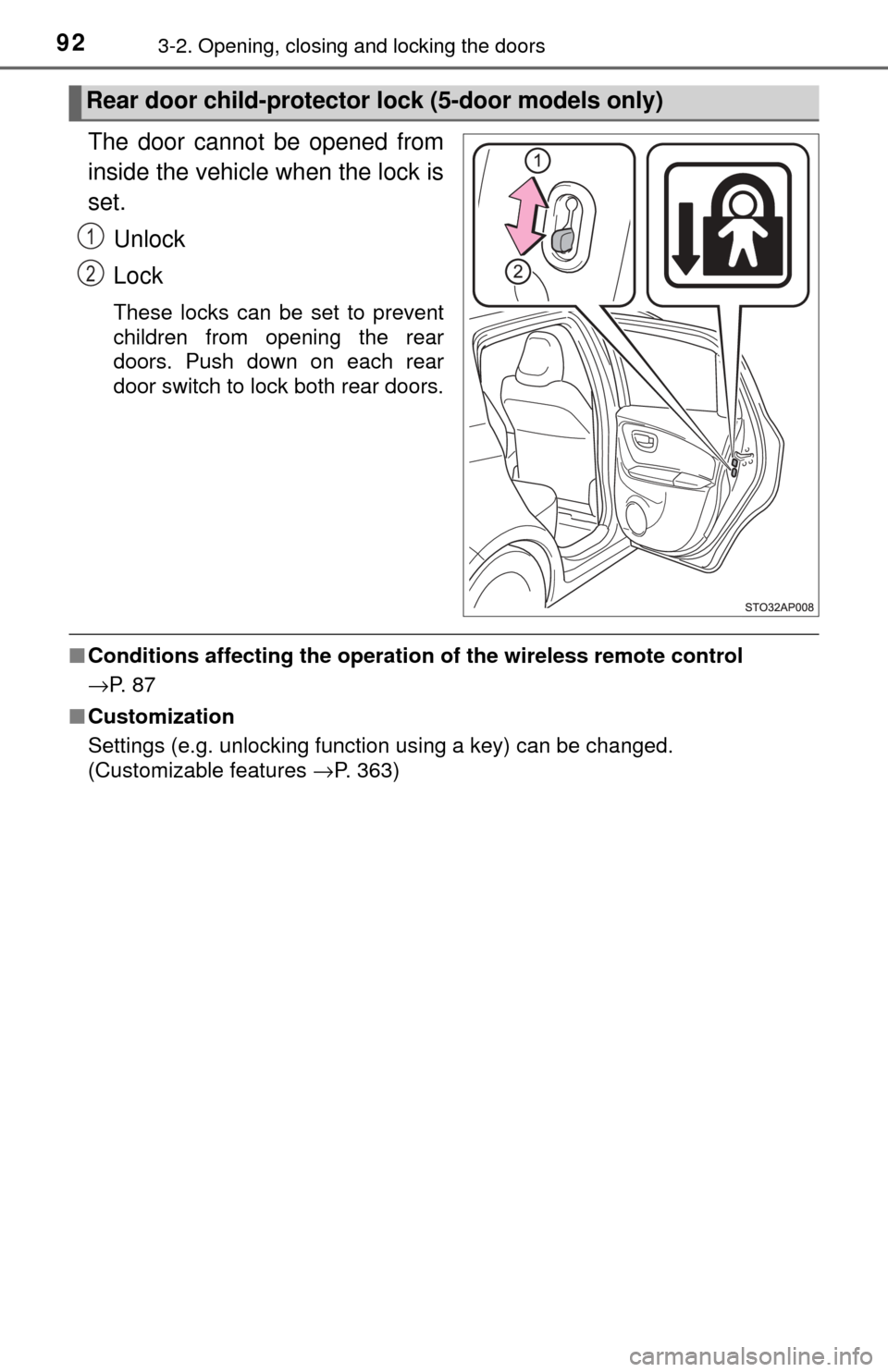
The door cannot be opened from
inside the vehicle when the lock is
set.Unlock
Lock
These locks can be set to prevent
children from opening the rear
doors. Push down on each rear
door switch to lock both rear doors.
■Conditions affecting the operatio n of the wireless remote control
→P. 8 7
■ Customization
Settings (e.g. unlocking function using a key) can be changed.
(Customizable features →P. 363)
Rear door child-protector lock (5-door models only)
1
2