Page 431 of 668
4Maintenance and care
431
VERSO_EE_OM64517E
4-1. Maintenance and care
Cleaning and protecting
the vehicle exterior ......... 432
Cleaning and protecting
the vehicle interior .......... 436
4-2. Maintenance
Maintenance
requirements................... 439
4-3. Do-it-yourself maintenance
Do-it-yourself service
precautions ..................... 442
Hood ................................. 446
Positioning a floor jack ...... 448
Engine compartment......... 450
Tires .................................. 467
Tire inflation pressure ....... 479
Wheels .............................. 481
Air conditioning filter ......... 484
Key battery........................ 487
Checking and replacing
fuses ............................... 491
Light bulbs ........................ 506
Page 487 of 668
487
4-3. Do-it-yourself maintenance
4
Maintenance and care
VERSO_EE_OM64517E
Key battery
Replace the battery with a new one if it is discharged.
■You will need the following items:
● Flathead screwdriver (To prevent damage to the key, cover
the tip of the screwdriver with rag.)
● Small Phillips-head screwdriver
● Lithium battery
Vehicles without smart entry & start system: CR2016
Vehicles with smart entry & start system: CR1632
■ Replacing the battery (vehicles without smart entry & start
system)
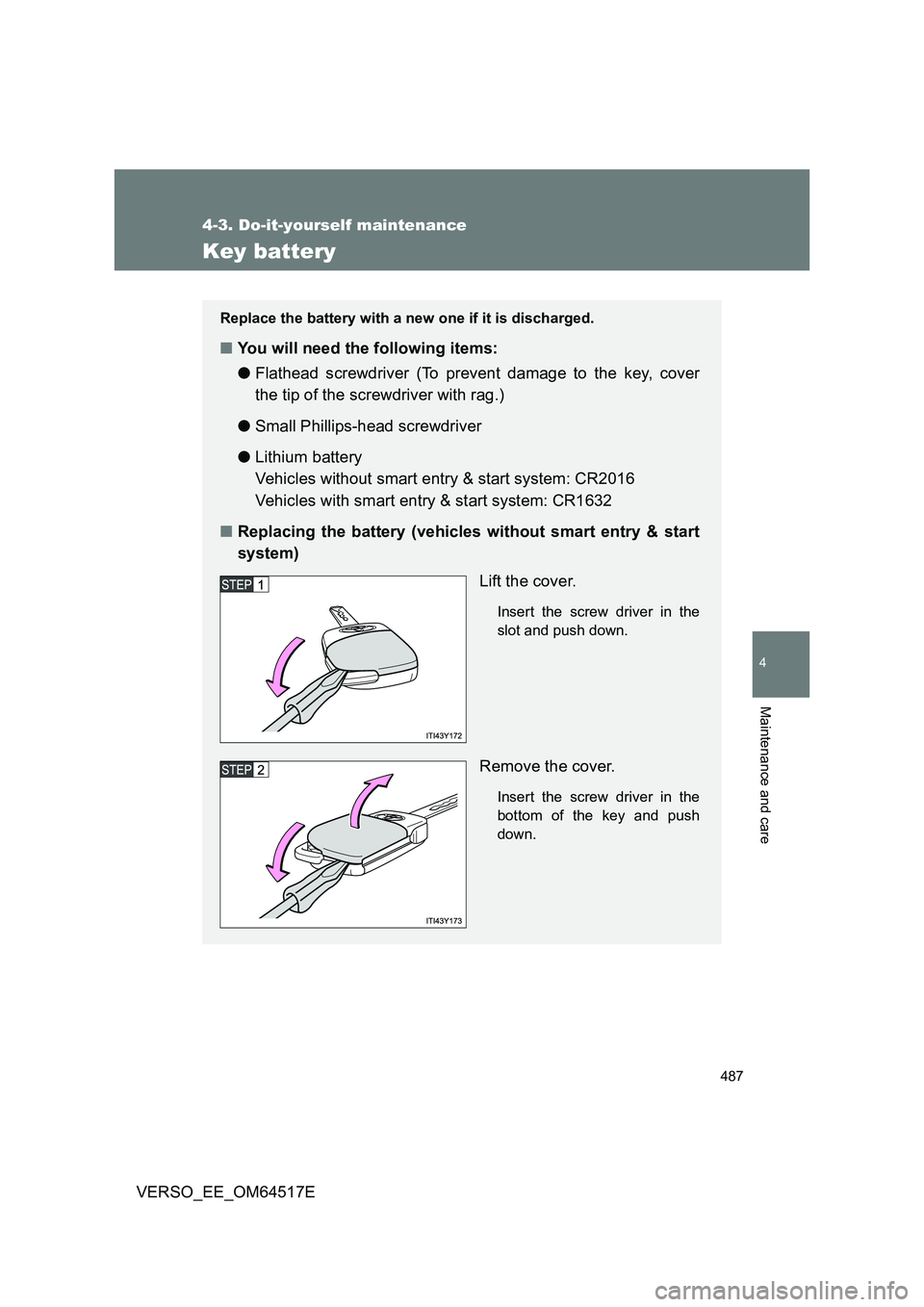
Lift the cover.
Insert the screw driver in the
slot and push down.
Remove the cover.
Insert the screw driver in the
bottom of the key and push
down.
Page 488 of 668
488
4-3. Do-it-yourself maintenance
VERSO_EE_OM64517E
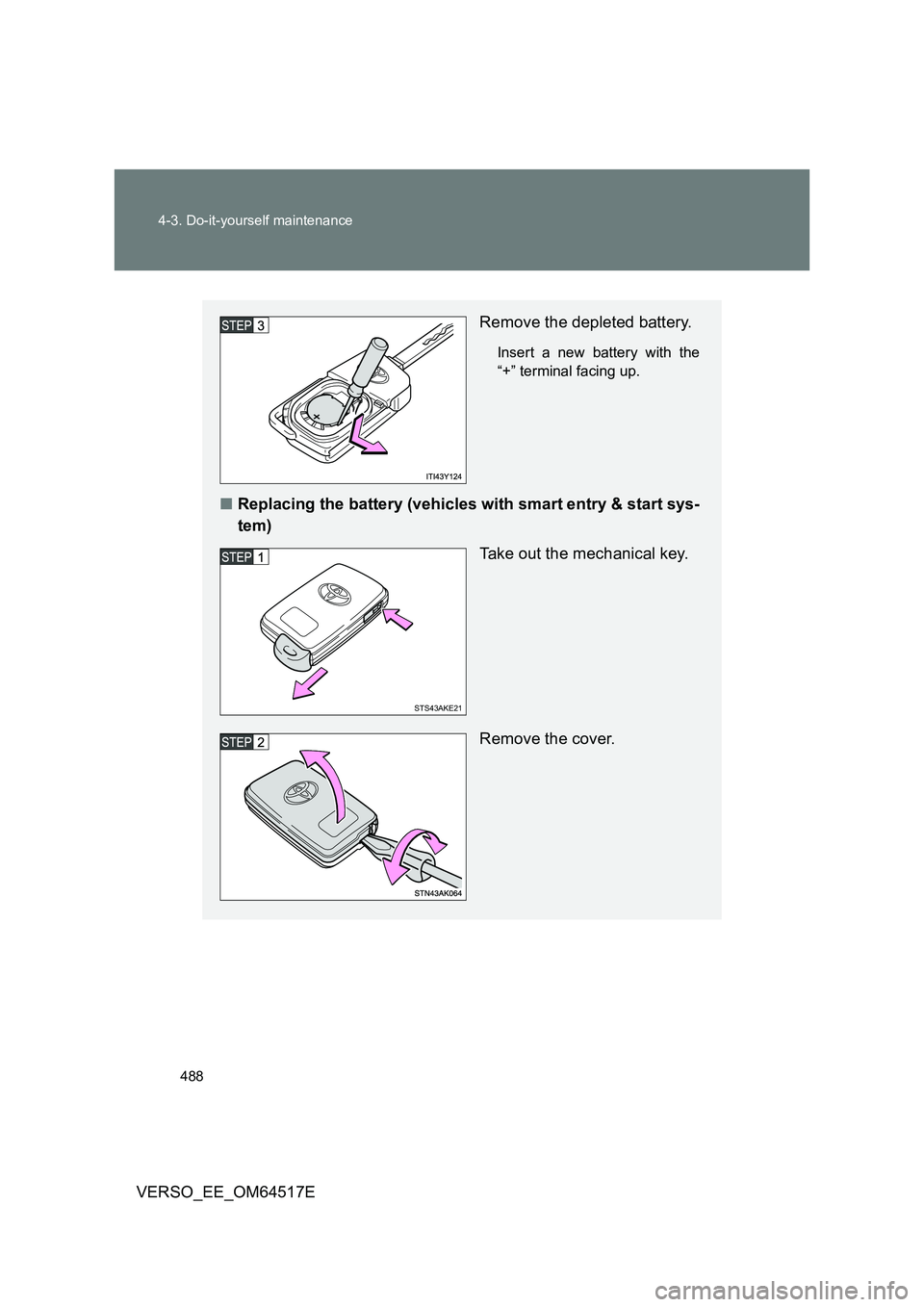
Remove the depleted battery.
Insert a new battery with the
“+” terminal facing up.
■ Replacing the battery (vehicles with smart entry & start sys-
tem)
Take out the mechanical key.
Remove the cover.
STS43AKE21
Page 489 of 668
489
4-3. Do-it-yourself maintenance
4
Maintenance and care
VERSO_EE_OM64517E
■ If the key battery is discharged
The following symptoms may occur.
● The smart entry & start system (if equipped) and wireless remote control
will not function properly.
● The operational range is reduced.
■ Use the following types of lithium battery
Vehicles without smart entry & start system: CR2016
Vehicles with smart entry & start system: CR1632
● Batteries can be purchased at any authorized Toyota dealer or repairer,
or another duly qualified and equipped professional, jewelers, or camera
stores.
● Replace only with the same or equivalent type recommended by any
authorized Toyota dealer or repairer, or another duly qualified and
equipped professional.
● Dispose of used batteries according to local laws.
Remove the depleted battery.
Insert a new battery with the
“+” terminal facing up.
Page 490 of 668
490
4-3. Do-it-yourself maintenance
VERSO_EE_OM64517E
WARNING
■ Removed battery and other parts
These parts are small and if swallowed by a child, they can cause choking.
Keep away from children. Failure to do so could result in death or serious
injury.
■ Certification for the key battery
CAUTION: RISK OF EXPLOSION IF BATTERY IS REPLACED BY AN
INCORRECT TYPE. DISPOSE OF USED BATTERIES ACCORDING TO
THE INSTRUCTIONS
NOTICE
■ For normal operation after replacing the battery
Observe the following precautions to prevent accidents.
● Always work with dry hands.
Moisture may cause the battery to rust.
● Do not touch or move any other components inside the remote control.
● Do not bend the battery terminals.
Page 531 of 668
5When trouble arises
531
VERSO_EE_OM64517E
5-1. Essential information
Emergency flashers .......... 532
If your vehicle needs to
be towed ......................... 533
If you think something is
wrong .............................. 540
Fuel pump shut off system
(gasoline engine) ............ 541
5-2. Steps to take in an
emergency
If a warning light turns on
or a warning buzzer
sounds... ........................ 542
If a warning message is
displayed ........................ 551
If you have a flat tire
(vehicles with
spare tire) ....................... 566
If you have a flat tire
(vehicles with emergency
tire puncture repair kit).... 583
If the engine will not
start................................. 600
If the shift lever cannot be
shifted from “P” (vehicles
with a Multidrive)............. 603
If you lose your keys ......... 604
If you cannot operate
the back door opener...... 605
If the electronic key does
not operate properly
(vehicles with smart
entry & start system)....... 606
If the vehicle battery is
discharged ...................... 609
If your vehicle overheats ... 613
If the vehicle becomes
stuck ............................... 617
If your vehicle has to
be stopped in
an emergency ................. 619
Page 539 of 668
5
539
5-1. Essential information
When trouble arises
VERSO_EE_OM64517E
NOTICE
■ To prevent damage to the vehicle when towing using a wheel-lift type
truck
● Vehicles without smart entry & start system: Do not tow the vehicle from
the rear when the engine switch is in the “LOCK” position or the key is
removed. The steering lock mechanism is not strong enough to hold the
front wheels straight.
● Vehicles with smart entry & start system: Do not tow the vehicle from the
rear when the “ENGINE START STOP” switch is off. The steering lock
mechanism is not strong enough to hold the front wheels straight.
● When raising the vehicle, ensure adequate ground clearance for towing at
the opposite end of the raised vehicle. Without adequate clearance, the
vehicle could be damaged while being towed.
■ To prevent damage to the vehicle when towing with a sling-type truck
Do not tow with a sling-type truck, either from the front or rear.
■ To prevent damage to the vehicle during emergency towing
Do not secure cables or chains to the suspension components.
Page 556 of 668
556
5-2. Steps to take in an emergency
VERSO_EE_OM64517E
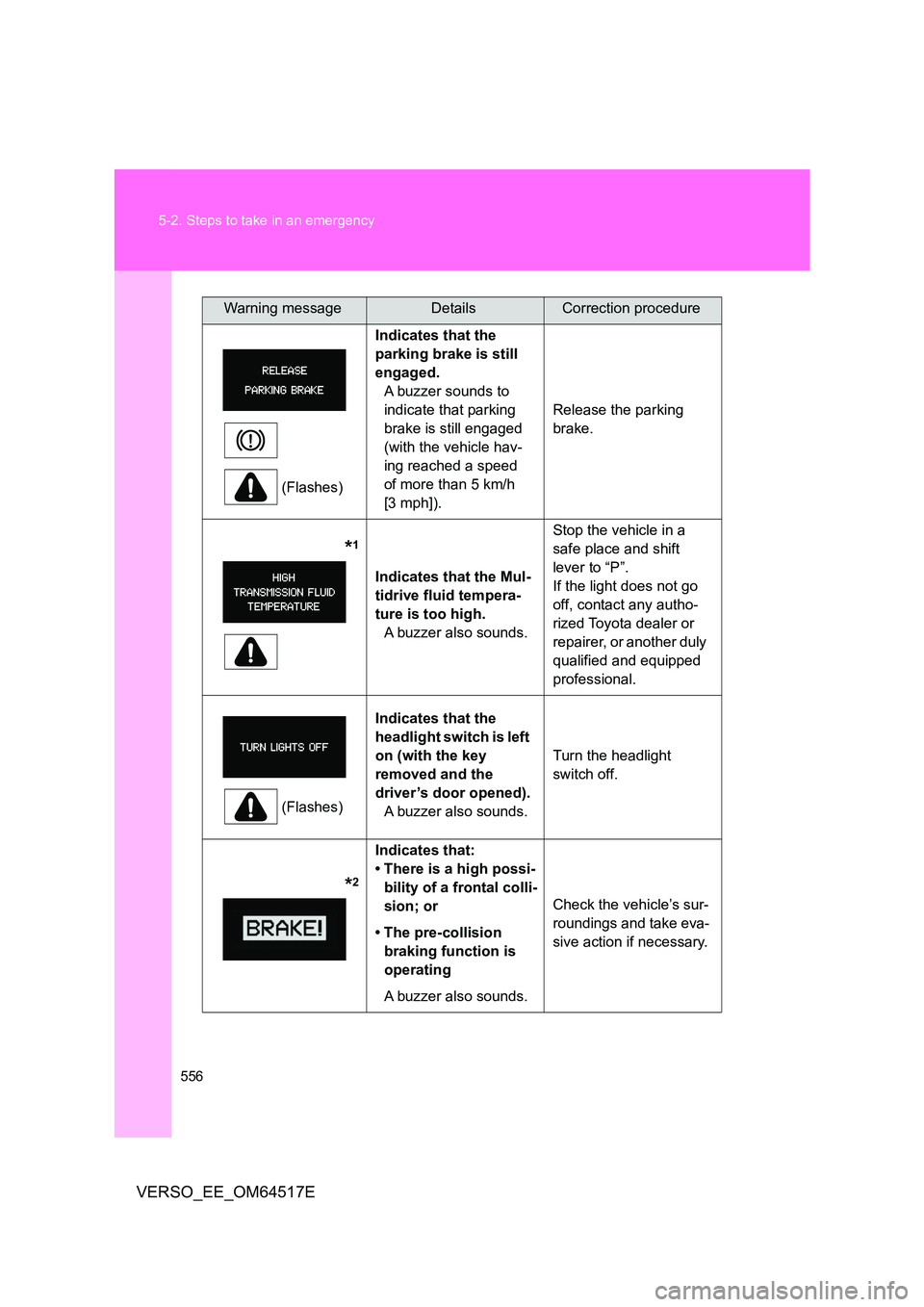
(Flashes)
Indicates that the
parking brake is still
engaged.
A buzzer sounds to
indicate that parking
brake is still engaged
(with the vehicle hav-
ing reached a speed
of more than 5 km/h
[3 mph]).
Release the parking
brake.
*1
Indicates that the Mul-
tidrive fluid tempera-
ture is too high.
A buzzer also sounds.
Stop the vehicle in a
safe place and shift
lever to “P”.
If the light does not go
off, contact any autho-
rized Toyota dealer or
repairer, or another duly
qualified and equipped
professional.
(Flashes)
Indicates that the
headlight switch is left
on (with the key
removed and the
driver’s door opened).
A buzzer also sounds.
Turn the headlight
switch off.
*2
Indicates that:
• There is a high possi-
bility of a frontal colli-
sion; or
• The pre-collision
braking function is
operating
A buzzer also sounds.
Check the vehicle’s sur-
roundings and take eva-
sive action if necessary.
Warning messageDetailsCorrection procedure