Page 549 of 668

5
549
5-2. Steps to take in an emergency
When trouble arises
VERSO_EE_OM64517E
■ If the tire pressure warning system is not functioning (vehicles with a
tire pressure warning light system)
The tire pressure warning system will be disabled in the following conditions:
(When the condition becomes normal, the system will work properly.)
● If tires not equipped with tire pressure warning valves and transmitters
are used
● If the ID code on the tire pressure warning valves and transmitters is not
registered in the tire pressure warning computer
● If the tire inflation pressure is 380 kPa (3.9 kgf/cm2 or bar, 55 psi) or
higher
The tire pressure warning system may be disabled in the following condi-
tions:
(When the condition becomes normal, the system will work properly.)
● If electronic devices or facilities using similar radio wave frequencies are
nearby
● If a radio set at a similar frequency is in use in the vehicle
● If a window tint that affects the radio wave signals is installed
● If there is a lot of snow or ice on the vehicle, particularly around the
wheels or wheel housings
● If non-genuine Toyota wheels are used (Even if you use Toyota wheels,
the tire pressure warning system may not work properly with some types
of tires.)
● If tire chains are used
■ If the tire pressure warning light frequently comes on after blinking for
1 minute (vehicles with a tire pressure warning light system)
If the tire pressure warning light frequently comes on after blinking for 1 min-
ute when the engine switch (vehicles without smart entry & start system) or
the “ENGINE START STOP” switch (vehicles with smart entry & start sys-
tem) is turned on, have it checked by any authorized Toyota dealer or
repairer, or another duly qualified and equipped professional.
Page 560 of 668
560
5-2. Steps to take in an emergency
VERSO_EE_OM64517E
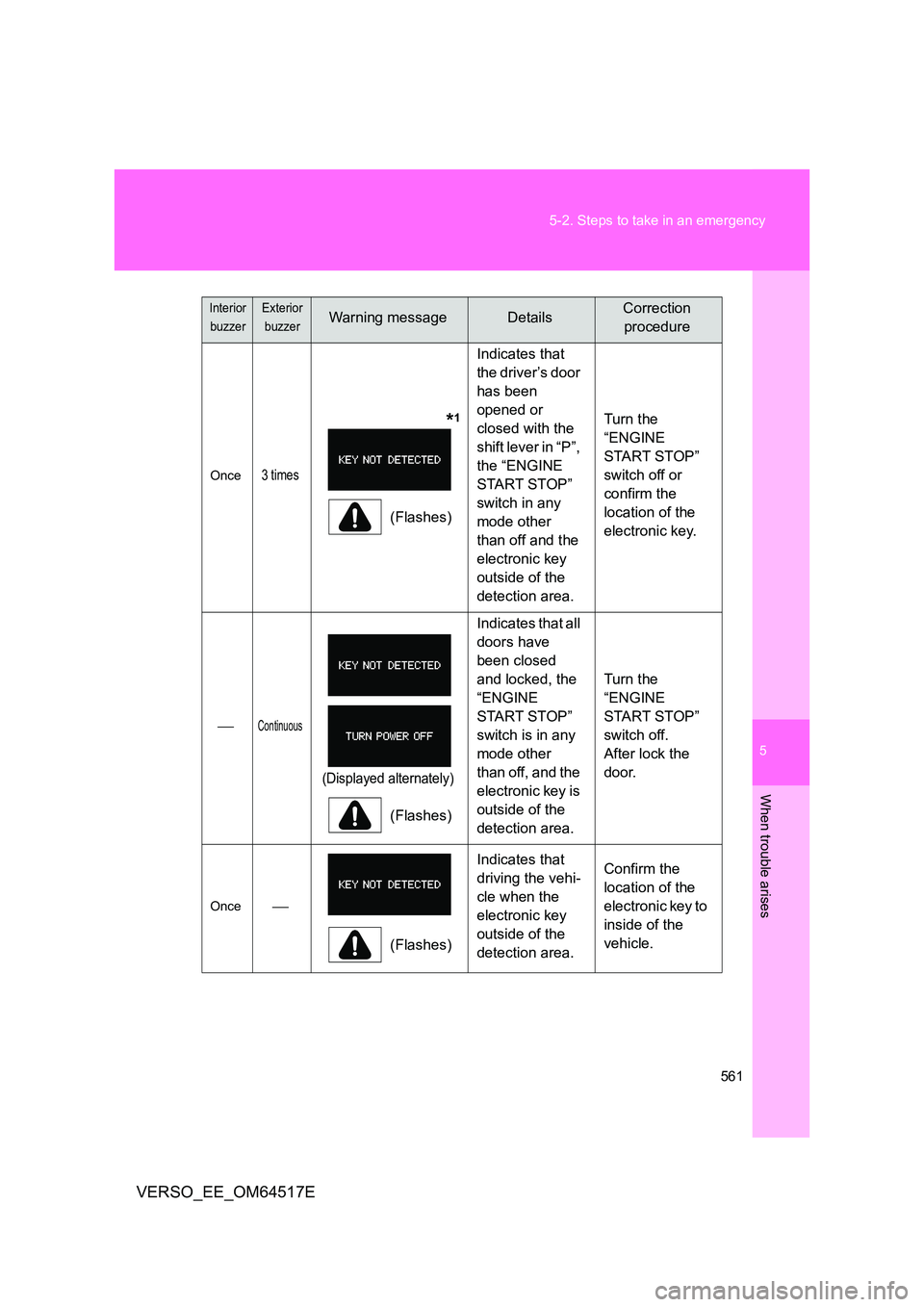
Follow the correction procedures. (vehicles with smart entry & start system)
After taking the specified steps to correct the suspected problem,
check that the warning light turns off.
Interior
buzzer
Exterior
buzzerWarning messageDetailsCorrection
procedure
Once
(Flashes)
Indicates that
an attempt was
made to start
the engine with-
out the elec-
tronic key being
present, or the
electronic key
was not func-
tioning normally.
Confirm the
location of the
electronic key.
Once3 times
(Flashes)
Indicates that a
door other than
the driver’s door
has been
opened or
closed with the
“ENGINE
START STOP”
switch in any
mode other
than off and the
electronic key
outside of the
detection area.
Confirm the
location of the
electronic key.
Page 561 of 668
5
561
5-2. Steps to take in an emergency
When trouble arises
VERSO_EE_OM64517E
Once3 times
*1
(Flashes)
Indicates that
the driver’s door
has been
opened or
closed with the
shift lever in “P”,
the “ENGINE
START STOP”
switch in any
mode other
than off and the
electronic key
outside of the
detection area.
Turn the
“ENGINE
START STOP”
switch off or
confirm the
location of the
electronic key.
Continuous
(Displayed alternately)
(Flashes)
Indicates that all
doors have
been closed
and locked, the
“ENGINE
START STOP”
switch is in any
mode other
than off, and the
electronic key is
outside of the
detection area.
Turn the
“ENGINE
START STOP”
switch off.
After lock the
door.
Once
(Flashes)
Indicates that
driving the vehi-
cle when the
electronic key
outside of the
detection area.
Confirm the
location of the
electronic key to
inside of the
vehicle.
Interior
buzzer
Exterior
buzzerWarning messageDetailsCorrection
procedure
Page 562 of 668
562
5-2. Steps to take in an emergency
VERSO_EE_OM64517E
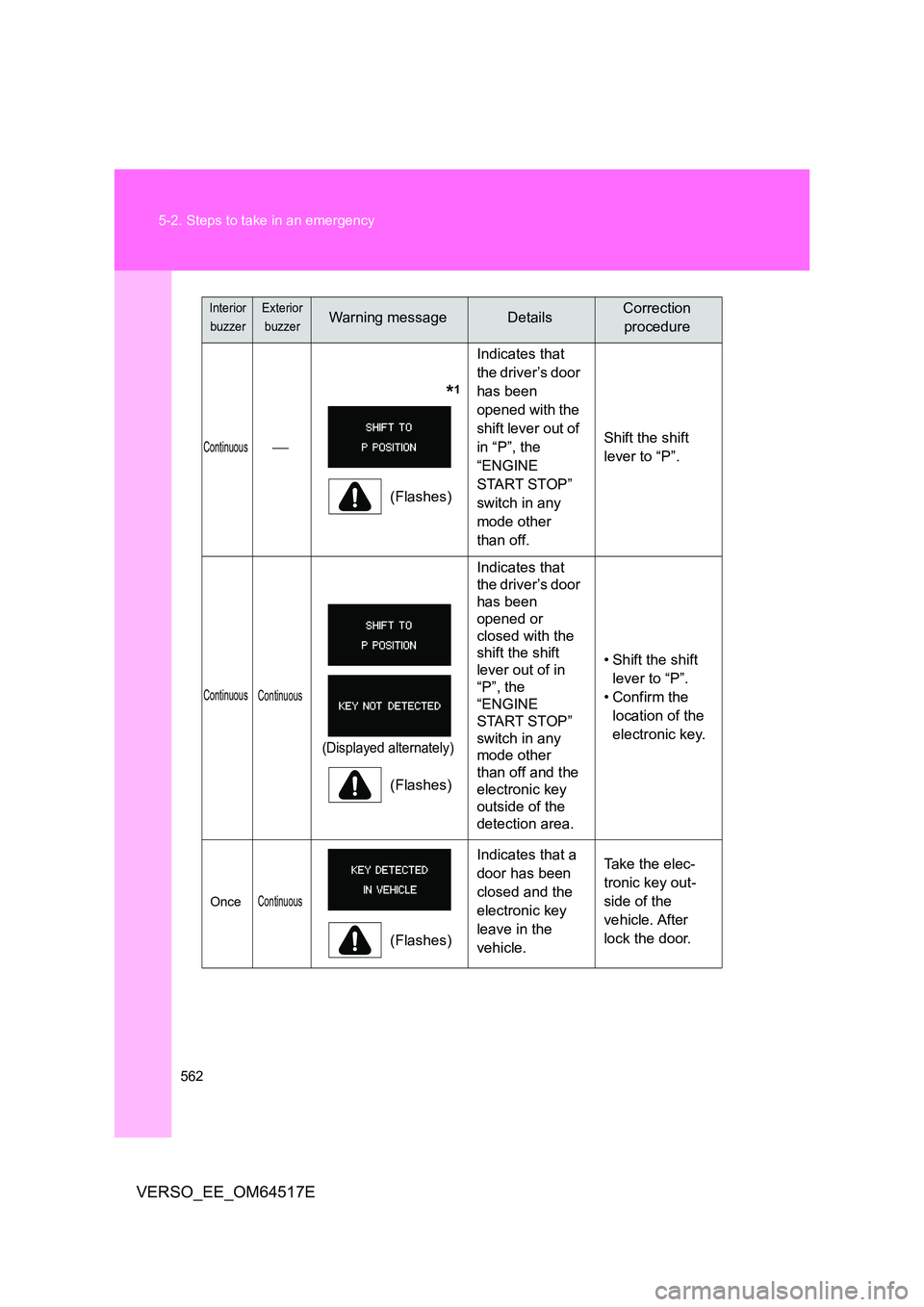
Continuous
*1
(Flashes)
Indicates that
the driver’s door
has been
opened with the
shift lever out of
in “P”, the
“ENGINE
START STOP”
switch in any
mode other
than off.
Shift the shift
lever to “P”.
Continuous Continuous
(Displayed alternately)
(Flashes)
Indicates that
the driver’s door
has been
opened or
closed with the
shift the shift
lever out of in
“P”, the
“ENGINE
START STOP”
switch in any
mode other
than off and the
electronic key
outside of the
detection area.
• Shift the shift
lever to “P”.
• Confirm the
location of the
electronic key.
OnceContinuous
(Flashes)
Indicates that a
door has been
closed and the
electronic key
leave in the
vehicle.
Take the elec-
tronic key out-
side of the
vehicle. After
lock the door.
Interior
buzzer
Exterior
buzzerWarning messageDetailsCorrection
procedure
Page 563 of 668
5
563
5-2. Steps to take in an emergency
When trouble arises
VERSO_EE_OM64517E
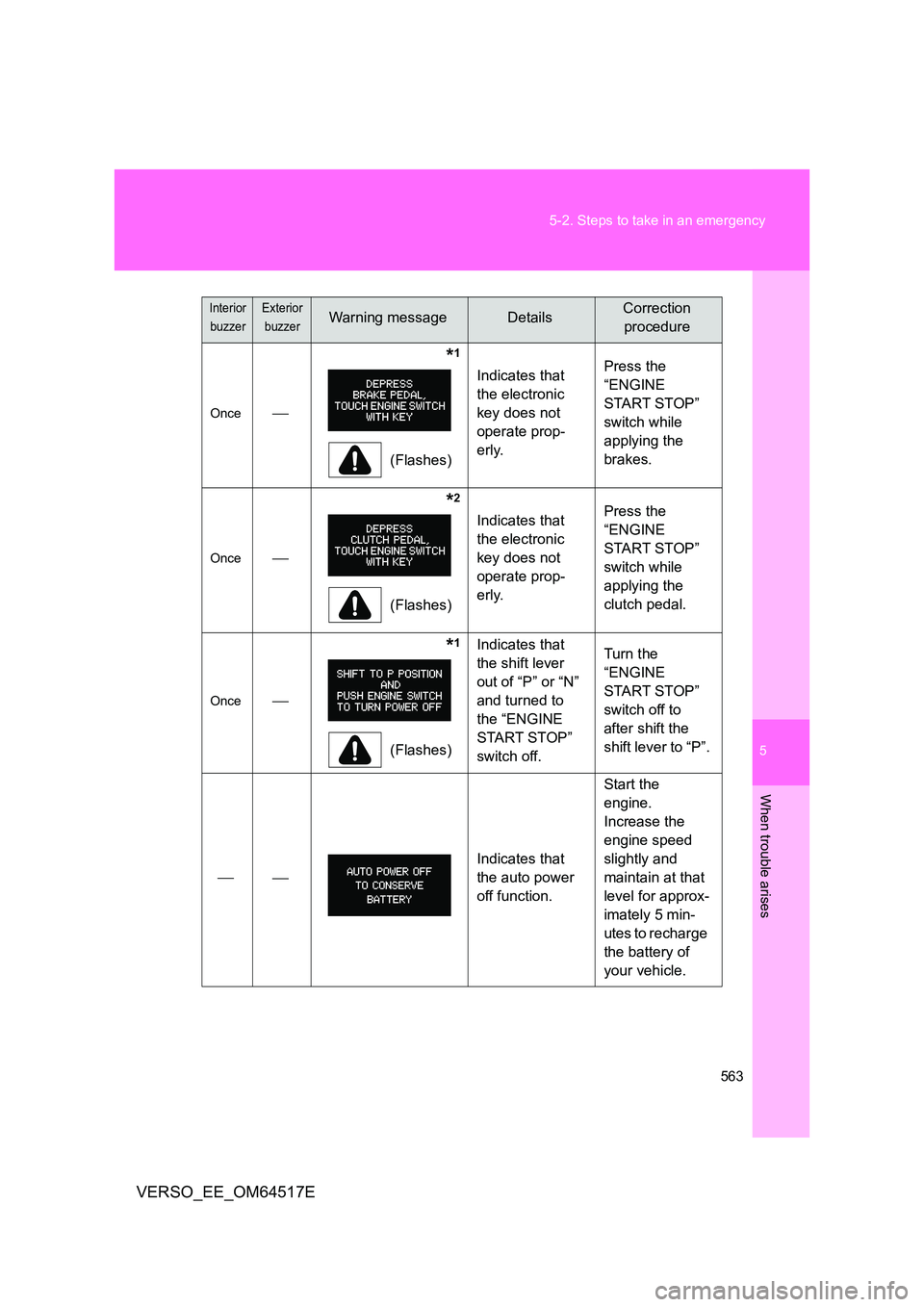
Once
*1
(Flashes)
Indicates that
the electronic
key does not
operate prop-
erly.
Press the
“ENGINE
START STOP”
switch while
applying the
brakes.
Once
*2
(Flashes)
Indicates that
the electronic
key does not
operate prop-
erly.
Press the
“ENGINE
START STOP”
switch while
applying the
clutch pedal.
Once
*1
(Flashes)
Indicates that
the shift lever
out of “P” or “N”
and turned to
the “ENGINE
START STOP”
switch off.
Turn the
“ENGINE
START STOP”
switch off to
after shift the
shift lever to “P”.
Indicates that
the auto power
off function.
Start the
engine.
Increase the
engine speed
slightly and
maintain at that
level for approx-
imately 5 min-
utes to recharge
the battery of
your vehicle.
Interior
buzzer
Exterior
buzzerWarning messageDetailsCorrection
procedure
Page 564 of 668
564
5-2. Steps to take in an emergency
VERSO_EE_OM64517E
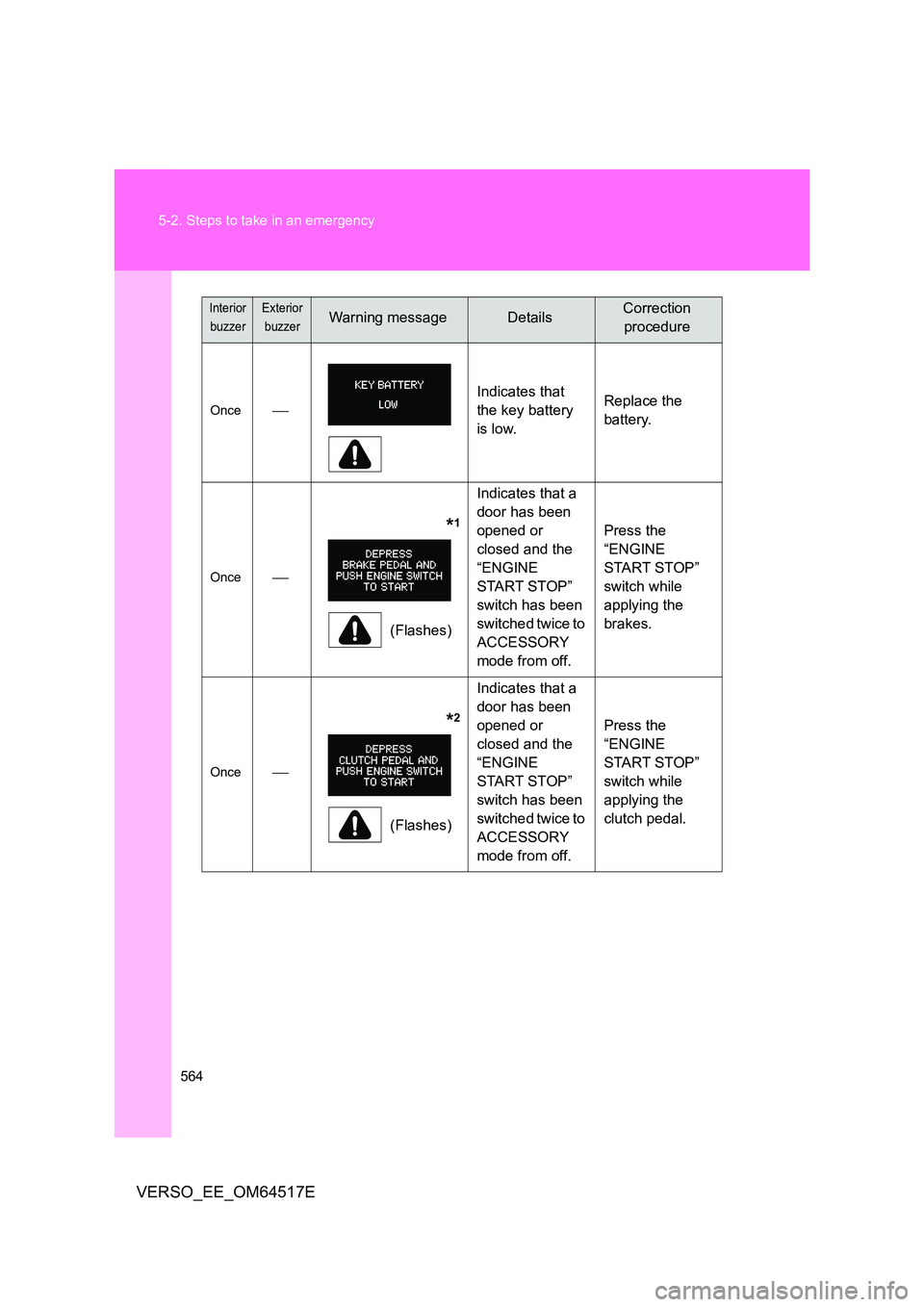
Once
Indicates that
the key battery
is low.
Replace the
battery.
Once
*1
(Flashes)
Indicates that a
door has been
opened or
closed and the
“ENGINE
START STOP”
switch has been
switched twice to
ACCESSORY
mode from off.
Press the
“ENGINE
START STOP”
switch while
applying the
brakes.
Once
*2
(Flashes)
Indicates that a
door has been
opened or
closed and the
“ENGINE
START STOP”
switch has been
switched twice to
ACCESSORY
mode from off.
Press the
“ENGINE
START STOP”
switch while
applying the
clutch pedal.
Interior
buzzer
Exterior
buzzerWarning messageDetailsCorrection
procedure
Page 565 of 668
5
565
5-2. Steps to take in an emergency
When trouble arises
VERSO_EE_OM64517E
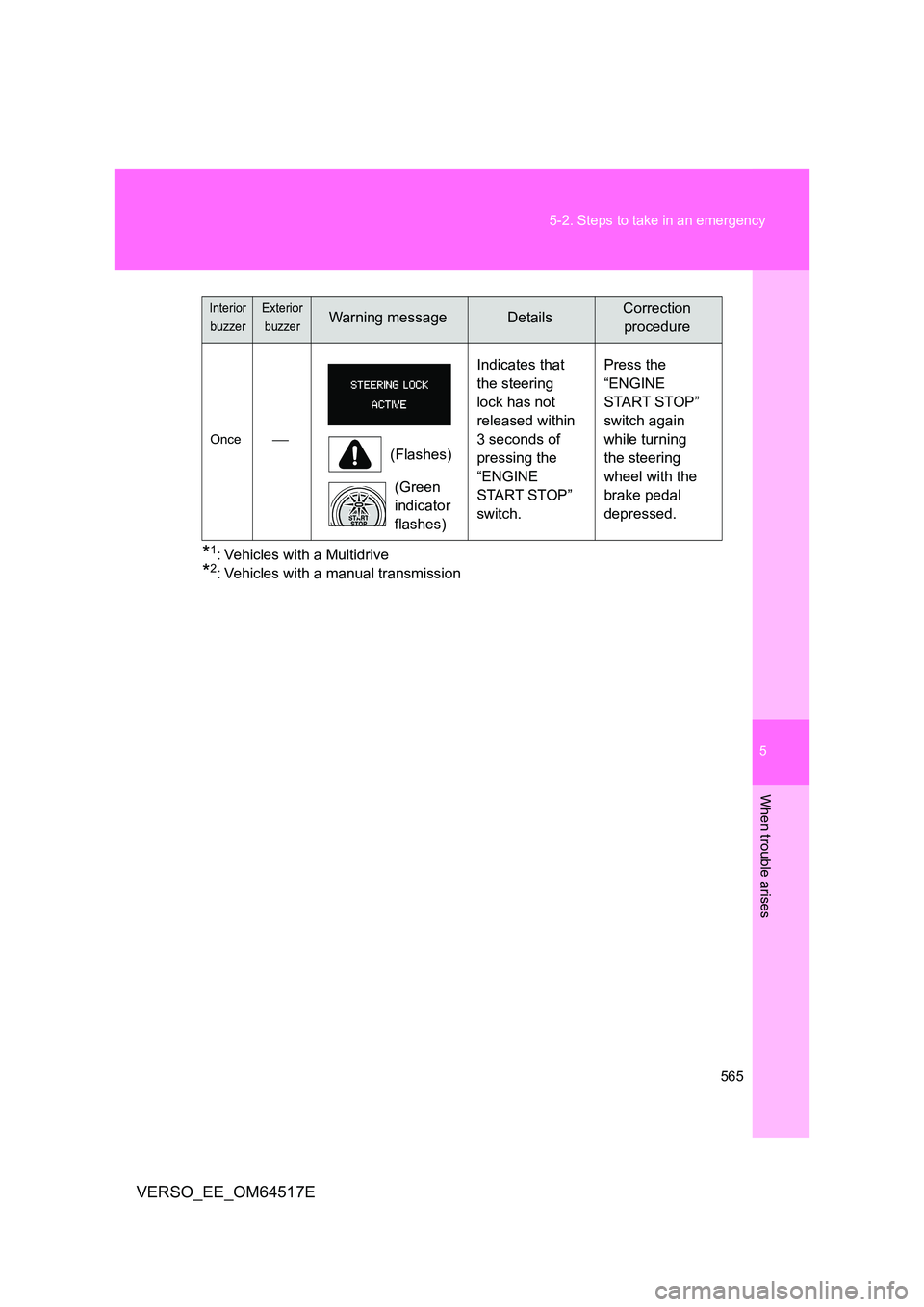
*1: Vehicles with a Multidrive
*2: Vehicles with a manual transmission
Once (Flashes)
(Green
indicator
flashes)
Indicates that
the steering
lock has not
released within
3 seconds of
pressing the
“ENGINE
START STOP”
switch.
Press the
“ENGINE
START STOP”
switch again
while turning
the steering
wheel with the
brake pedal
depressed.
Interior
buzzer
Exterior
buzzerWarning messageDetailsCorrection
procedure
Page 602 of 668
602
5-2. Steps to take in an emergency
VERSO_EE_OM64517E
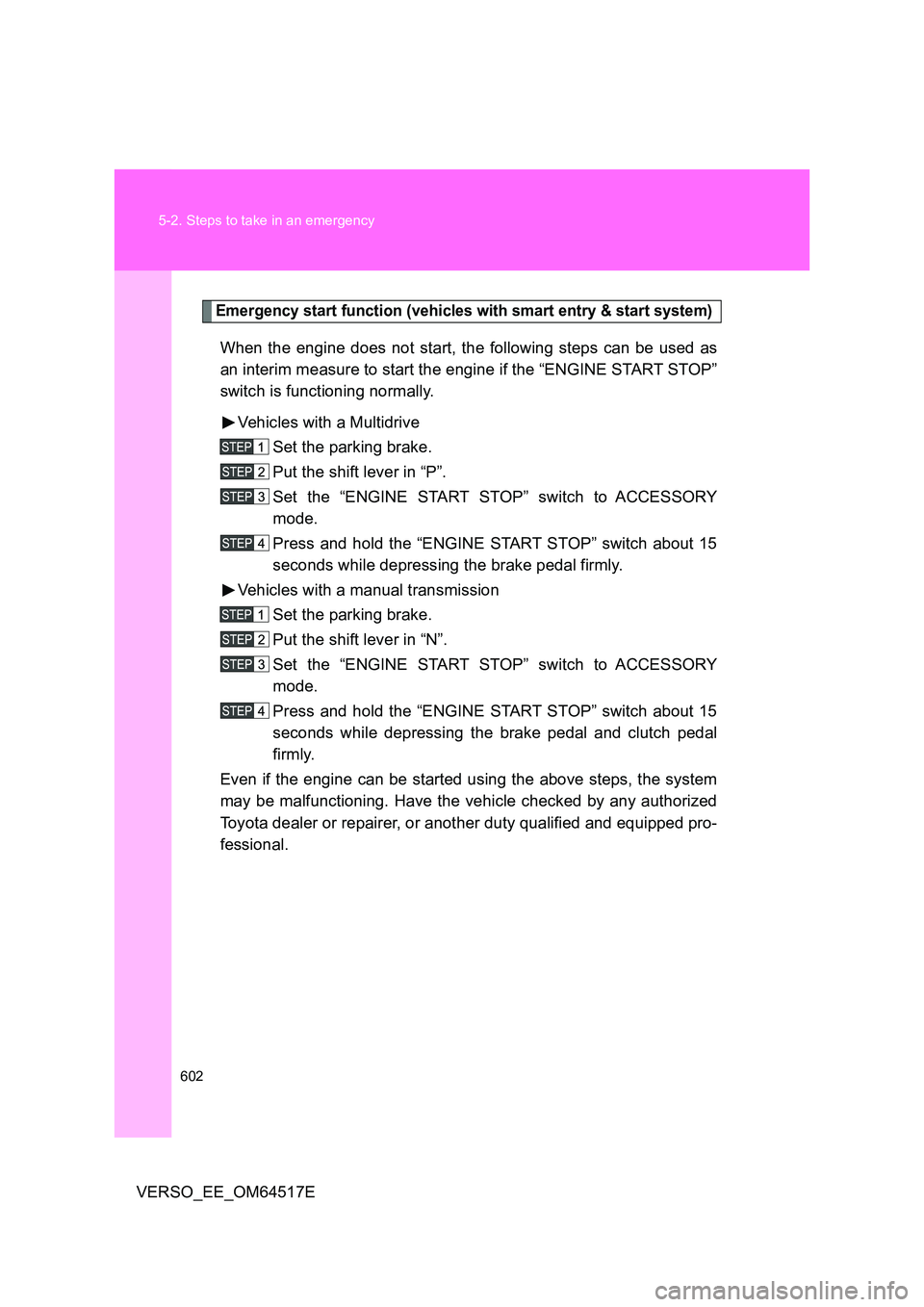
Emergency start function (vehicles with smart entry & start system)
When the engine does not start, the following steps can be used as
an interim measure to start the engine if the “ENGINE START STOP”
switch is functioning normally.
Vehicles with a Multidrive
Set the parking brake.
Put the shift lever in “P”.
Set the “ENGINE START STOP” switch to ACCESSORY
mode.
Press and hold the “ENGINE START STOP” switch about 15
seconds while depressing the brake pedal firmly.
Vehicles with a manual transmission
Set the parking brake.
Put the shift lever in “N”.
Set the “ENGINE START STOP” switch to ACCESSORY
mode.
Press and hold the “ENGINE START STOP” switch about 15
seconds while depressing the brake pedal and clutch pedal
firmly.
Even if the engine can be started using the above steps, the system
may be malfunctioning. Have the vehicle checked by any authorized
Toyota dealer or repairer, or another duty qualified and equipped pro-
fessional.