Page 296 of 668
296
2-5. Using other driving systems
VERSO_EE_OM64517E
■ Cruise control can be set when
● On vehicles with a Multidrive, the shift lever is in the “D” or range 4 or
higher of “M” has been selected.
● On vehicles with a Multidrive, range 4 or higher has been selected by
using the paddle shift.
● Vehicle speed is above approximately 40 km/h (25 mph).
■ Accelerating after setting the vehicle speed
● The vehicle can be accelerated normally. After acceleration, the set
speed resumes.
● Even without canceling the cruise control, the set speed can be
increased by first accelerating the vehicle to the desired speed and then
pushing the lever down to set the new speed.
■ Automatic cruise control cancellation
Cruise control will stop maintaining the vehicle speed in any of the following
situations.
● Actual vehicle speed falls more than approximately 16 km/h (10 mph)
below the preset vehicle speed.
At this time, the memorized set speed is not retained.
● Actual vehicle speed is below approximately 40 km/h (25 mph).
● VSC+ is activated.
● Speed limiter is activated (if equipped).
■ If the cruise control indicator light flashes
Press the “ON-OFF” button once to deactivate the system, and then press
the button again to reactivate the system.
If the cruise control speed cannot be set or if the cruise control cancels
immediately after being activated, there may be a malfunction in the cruise
control system. Have the vehicle inspected by any authorized Toyota dealer
or repairer, or another duly qualified and equipped professional.
Page 299 of 668
299
2-5. Using other driving systems
2
When driving
VERSO_EE_OM64517E
■ Speed limiter can be set when
The vehicle speed is more than approximately 30 km/h (18 mph).
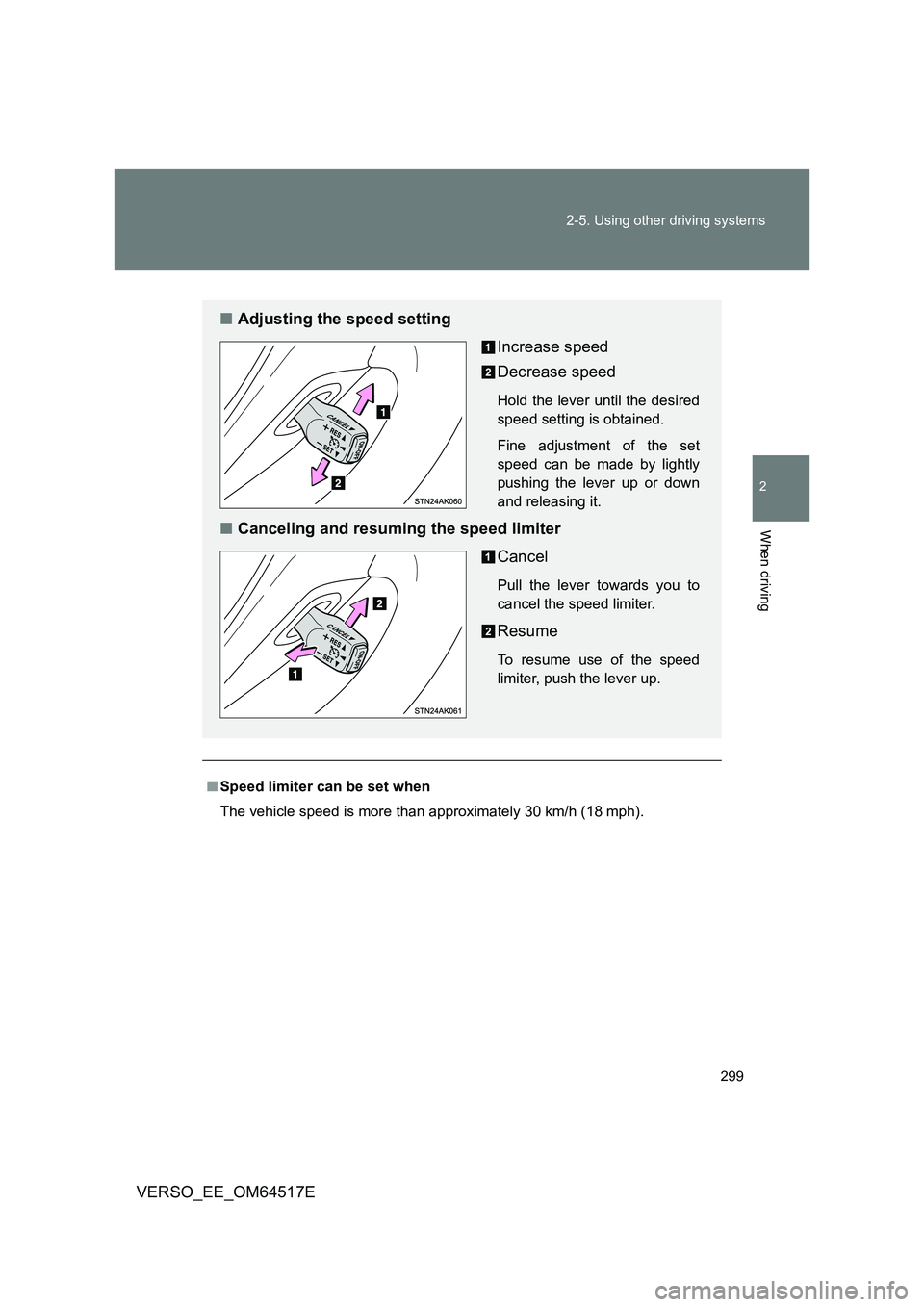
■ Adjusting the speed setting
Increase speed
Decrease speed
Hold the lever until the desired
speed setting is obtained.
Fine adjustment of the set
speed can be made by lightly
pushing the lever up or down
and releasing it.
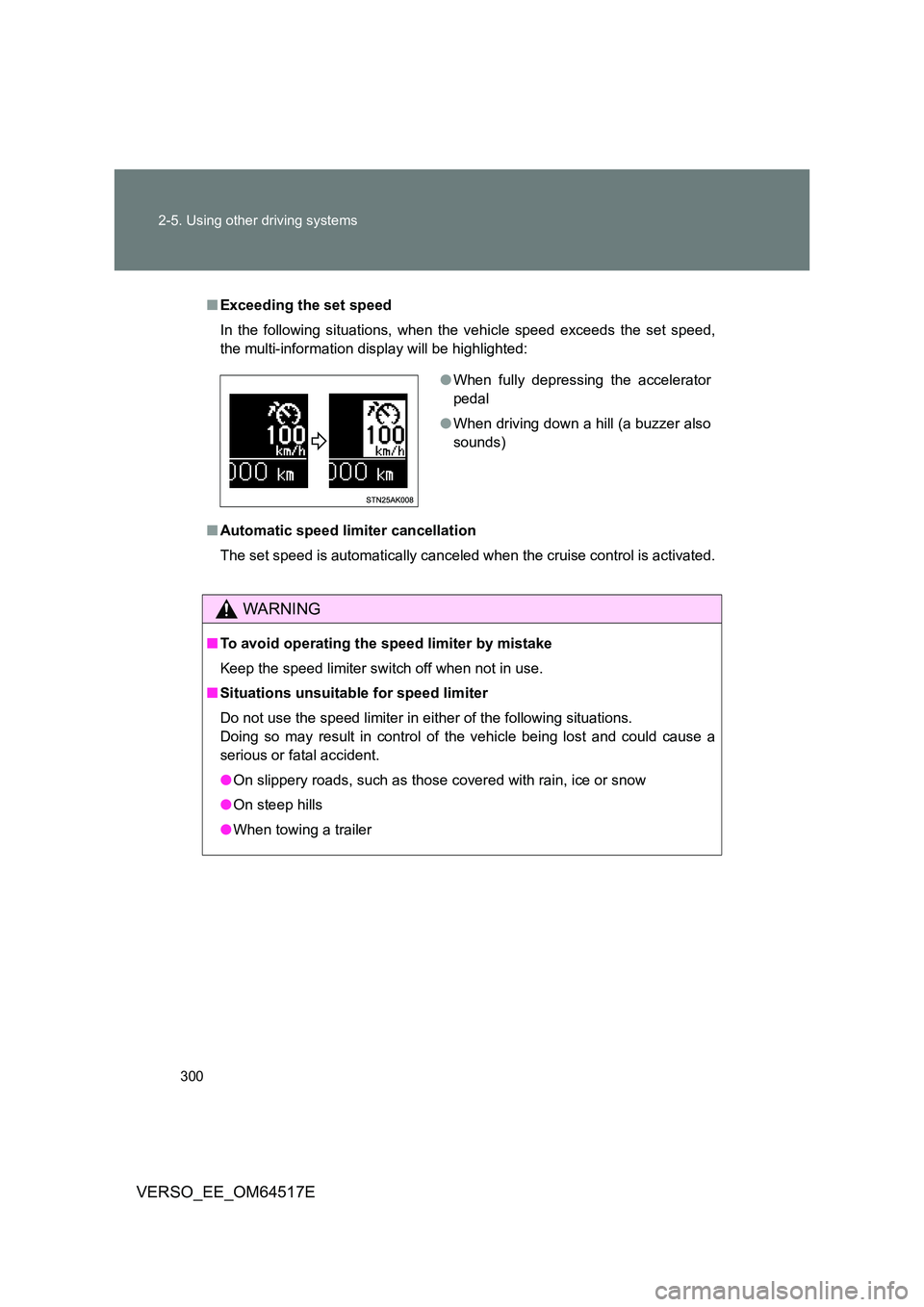
■ Canceling and resuming the speed limiter
Cancel
Pull the lever towards you to
cancel the speed limiter.
Resume
To resume use of the speed
limiter, push the lever up.
Page 300 of 668
300
2-5. Using other driving systems
VERSO_EE_OM64517E
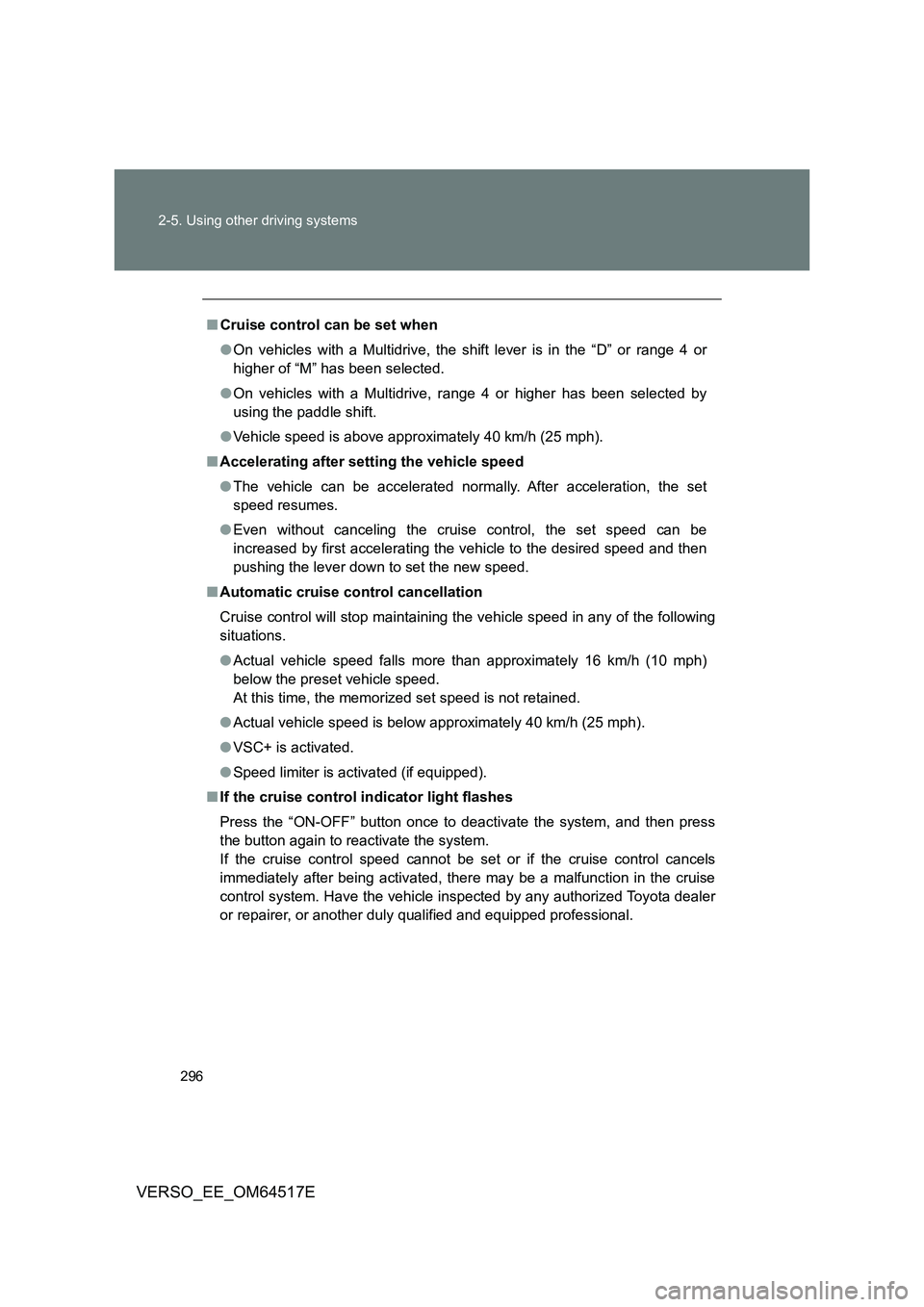
■ Exceeding the set speed
In the following situations, when the vehicle speed exceeds the set speed,
the multi-information display will be highlighted:
■ Automatic speed limiter cancellation
The set speed is automatically canceled when the cruise control is activated.
WARNING
■ To avoid operating the speed limiter by mistake
Keep the speed limiter switch off when not in use.
■ Situations unsuitable for speed limiter
Do not use the speed limiter in either of the following situations.
Doing so may result in control of the vehicle being lost and could cause a
serious or fatal accident.
● On slippery roads, such as those covered with rain, ice or snow
● On steep hills
● When towing a trailer
●When fully depressing the accelerator
pedal
● When driving down a hill (a buzzer also
sounds)
Page 301 of 668
301
2-5. Using other driving systems
2
When driving
VERSO_EE_OM64517E
Toyota parking assist-sensor
: If equipped
The distance from your vehicle to nearby obstacles when parallel
parking or maneuvering into a garage is measured by the sensors
and communicated via an indicator and a buzzer. Always check the
surrounding area when using this system.
■ Types of sensors
Front corner sensors
Front center sensors
Rear corner sensors
Rear center sensors
■ Toyota parking assist-sensor switch
Turns the Toyota parking
assist-sensor on/off
When on, the indicator light
comes on to inform the driver
that the system is operational.
Page 302 of 668
302
2-5. Using other driving systems
VERSO_EE_OM64517E
Display
When the sensors detect an obstacle, the Toyota parking assist-sen-
sor indicator is illuminated by an LED depending on position and dis-
tance to the obstacle.
Front center sensor operation
Front corner sensor operation
Rear corner sensor operation
Rear center sensor operation
The light comes on to indicate
that the system is operating
The distance display and buzzer
When a sensor detects an obstacle, the direction of and the approxi-
mate distance to the obstacle are displayed and the buzzer sounds.
■ Sensor operation and distance to an obstacle
The system operates when the vehicle approaches an obstacle, as
shown by the following table.
Page 306 of 668

306
2-5. Using other driving systems
VERSO_EE_OM64517E
■ Sensor detection information
● Certain vehicle conditions and the surrounding environment may affect
the ability of a sensor to correctly detect an obstacle. Particular instances
where this may occur are listed below.
• There is dirt, snow or ice on a sensor.
• A sensor is frozen.
• A sensor is covered in any way.
• The vehicle is leaning considerably to one side.
• On an extremely bumpy road, on an incline, on gravel, or on grass.
• The vicinity of the vehicle is noisy due to vehicle horns, motorcycle
engines, air brakes of large vehicl es, or other loud noises producing
ultrasonic waves.
• There is another vehicle equipped with parking assist sensors in the
vicinity.
• A sensor is coated with a sheet of spray or heavy rain.
• The vehicle is equipped with a fender pole or radio antenna.
• Towing eyelet is installed.
• A bumper or sensor receives a strong impact.
• The vehicle is approaching a tall or right-angled curb.
• In harsh sunlight or intense cold weather.
• A non-genuine Toyota suspension (lowered suspension etc.) is
installed.
In addition to the examples above, there are instances in which, because of
their shape, signs and other objects may be judged by a sensor to be closer
than they are.
● The shape of the obstacle may prevent a sensor from detecting it. Pay
particular attention to the following obstacles:
• Wires, fences, ropes, etc.
• Cotton, snow and other materials that absorb sound waves
• Sharply-angles objects
• Low obstacles
• Tall obstacles with upper sections projecting outwards in the direction
of your vehicle
Page 313 of 668
313
2-5. Using other driving systems
2
When driving
VERSO_EE_OM64517E
■ The Stop & Start system protection feature
Vehicles without smart entry & start system
When an excessively loud sound is bei ng projected by the audio system,
the audio system may be automatically cut off in order to maintain power
for the Stop & Start system function.
If this occurs, turning the engine switch to the “LOCK” position then to the
“ACC” or “ON” position re-enables the audio system.
Vehicles with smart entry & start system
When an excessively loud sound is bei ng projected by the audio system,
the audio system may be automatically cut off in order to maintain power
for the Stop & Start system function.
If this occurs, turning the “ENGINE START STOP” switch off then to
ACCESSORY mode or IGNITION ON mode re-enables the audio system.
■ Steering wheel operation
When the engine is stopped by the Stop & Start system, the steering wheel
may become heavier than when driving.
■ Hood
If the hood is opened while the engine is stopped by the Stop & Start system,
the engine cannot be restarted by the Stop & Start system or by the auto-
matic engine start function. Restart the engine with the engine switch opera-
tion. ( P. 198, 202)
Even if the hood is closed after the engine is started with the hood open, the
Stop & Start system will not operate. Close the hood, turn the engine switch
off, wait 30 seconds or more, and then start the engine.
■ When to use the Stop & Start system
Use the Stop & Start system when stopping the vehicle temporarily at red
lights, intersections, etc. When stopping the vehicle for a longer period of
time, turn off the engine completely.
■ Stop & Start system warning buzzer
If the engine is stopped by the Stop & Start system and the following action
is performed, a buzzer will sound and the Stop & Start indicator will flash.
This indicates that the engine is only stopped by the Stop & Start system, not
that the engine has been turned off completely.
The shift lever is shifted to a position other than “N” with the clutch pedal
released.
Page 315 of 668

315
2-5. Using other driving systems
2
When driving
VERSO_EE_OM64517E
WARNING
■ When the Stop & Start system is operating
● Keep the shift lever in “N” and apply the brake pedal or parking brake for
safety while the engine is stopped due to the Stop & Start system (while
Stop & Start indicator is on).
Unexpected accidents may occur due to the automatic engine start func-
tion.
● Do not leave the vehicle while the engine is stopped due to the Stop &
Start system (while Stop & Start indicator is on).
Unexpected accidents may occur due to the automatic engine start func-
tion.
● Ensure that the engine is not stopped by the Stop & Start system while the
vehicle is in a poorly ventilated area. The engine may restart due to the
automatic engine start function, causing exhaust gases to collect and
enter the vehicle and resulting in death or a serious health hazard.
NOTICE
■ To ensure the system operates correctly
If any one of the following situations occurs, the Stop & Start system may not
operate correctly, thus, please have your vehicle checked by any authorized
Toyota dealer or repairer, or another duly qualified and equipped profes-
sional.
● While the driver’s seat belt is fastened, the driver’s and front passenger’s
seat belt reminder light flashes.
● Even when the driver’s seat belt is not fastened, the driver’s and front pas-
senger’s seat belt reminder light remains off.
● Even when the driver’s door is closed, the open door warning light comes
on, or the interior light comes on when the interior light switch is in the door
position.
● Even when the driver’s door is opened, the open door warning light does
not come on, or the interior light does not come on when the interior light
switch is in the door position.