Page 470 of 741

RAV4_OM_OM0R005U_(U)
4695-22. Bluetooth®
5
Audio system
When registering/connecting a cellular phone
When making/receiving a call
A cellular phone cannot be registered.
An incorrect passcode was entered on the cellular phone.
→Enter the correct passcode on the cellular phone.
The registration operation has not been completed on the cellular phone
side.
→Complete the registration operation on the cellular phone (approve
registration on the phone).
Old registration information remains on either this system or the cellular
phone.
→Delete the existing registration information from both this system
and the cellular phone, then register the cellular phone you wish to
connect to this system. ( →P. 433)
A Bluetooth® connection cannot be made.
Another Bluetooth® device is already connected.
→ Manually connect the cellular phone you wish to use to this sys-
tem. ( →P. 435)
Bluetooth® function is not enabled on the cellular phone.
→ Enable the Bluetooth® function on the cellular phone.
Automatic Bluetooth® connection on this system is set to off.
→ Set automatic Bluetooth® connection on this system to on when
the engine switch is turned to th e “ACC” or “ON” position (vehicles
without smart key system) or ACCE SSORY or IGNITION ON mode
(vehicles with smart key system). (→P. 435)
“Please check your device settings.” message is displayed.
Bluetooth® function is not enabled on the cellular phone.
→ Enable the Bluetooth® function on the cellular phone.
Old registration information remains on either this system or the cellular
phone.
→Delete the existing registration information from both this system
and the cellular phone, then register the cellular phone you wish to
connect to this system. ( →P. 433)
A call cannot be made/received.
Your vehicle is in a “Out of cellular service area. Please try again later.”
area.
→ Move to where “Out of cellular ser vice area. Please try again later.”
no longer appears on the display.
Page 472 of 741

RAV4_OM_OM0R005U_(U)
4715-22. Bluetooth®
5
Audio system
In other situations
The Bluetooth® connection status is displayed at the top of the screen each
time the engine switch is turned to the “ACC” or “ON” position (vehicles
without smart key system) or ACCESSORY or IGNITION ON mode (vehi-
cles with smart key system).
Connection confirmation display on this system is set to on.
→ To turn off the display, set conn ection confirmation display on this
system to off. ( →P. 437)
Even though all conceivable measures have been taken, the symptom sta-
tus does not change.
The cellular phone is not close enough to this system.
→Bring the cellular phone closer to this system.
The cellular phone is the most likely cause of the symptom.
→Turn the cellular phone off, remo ve and reinstall the battery pack,
and then restart the cellular phone.
→ Enable the cellular phone’s Bluetooth
® connection.
→ Stop the cellular phone’s security software and close all applica-
tions.
→ Before using an appli cation installed on the cellular phone, care-
fully check its source and how its operation might affect this sys-
tem.
Page 476 of 741
RAV4_OM_OM0R005U_(U)
4755-22. Bluetooth®
5
Audio system
■Reconnecting the portable audio player
If the portable audio player is disconnected due to poor reception when the
engine switch is in the “ACC” or “ON” position (vehicles without smart \
key
system) or ACCESSORY or IGNITION ON mode (vehicles with smart key
system), the system automatically reconnects the portable audio player.
If you have switched off the portable audio player yourself, follow the instruc-
tions below to reconnect:
●Select the portable audio player again
● Enter the portable audio player
■ When you sell your car
Be sure to delete your personal data. ( →P. 398)
■ Certification
Page 497 of 741
496
RAV4_OM_OM0R005U_(U)
6-1. Using the air conditioning system and defogger
■Fogging up of the windows
●The windows will easily fog up when the humidity in the vehicle is high.
Turning on will dehumidify the air from the outlets and defog the wind-
shield effectively.
● If you turn off, the windows may fog up more easily.
● The windows may fog up if the recirculated air mode is used.
■ Outside/recirculated air mode
●When driving on dusty roads such as tunnels or in heavy traffic, set the out-
side/recirculated air mode button to the recirculated air mode. This is effec-
tive in preventing outside air from entering the vehicle interior. During
cooling operation, setting the recirculated air mode will also cool the vehicle
interior effectively.
● Outside/recirculated air mode may automatically switch depending on the
temperature setting or the inside temperature.
■ When the outside temperature exceeds 75 °F (24 °C) and the air condition-
ing system is on
● In order to reduce the air conditioning power consumption, the air condition-
ing system may switch to recirculated air mode automatically. This may also
reduce fuel consumption.
● Recirculated air mode is selected as a default mode when the engine switch
is in the “ON” position (vehicles without smart key system) or IGNITION ON
mode (vehicles with smart key system)
● It is possible to switch to outside air mode at any time by pressing .
■ Micro dust and pollen filter
●In order to prevent the windshield from fogging up when the outside air is
cold, the following may occur:
• Outside air mode does not switch to recirculated air mode.
• The dehumidification function operates.
• The operation cancels after approximately 1 minute.
● In rainy weather, the windows may fog up. Press .
● In extremely humid weather, the windows may fog up.
● The pollens are filtered out even if the micro dust and pollen filter is turned
off.
■ When the outside temperature is low
The dehumidification function may not operate even when the “A/C” button is
pressed.
Page 501 of 741
500
RAV4_OM_OM0R005U_(U)
6-1. Using the air conditioning system and defogger
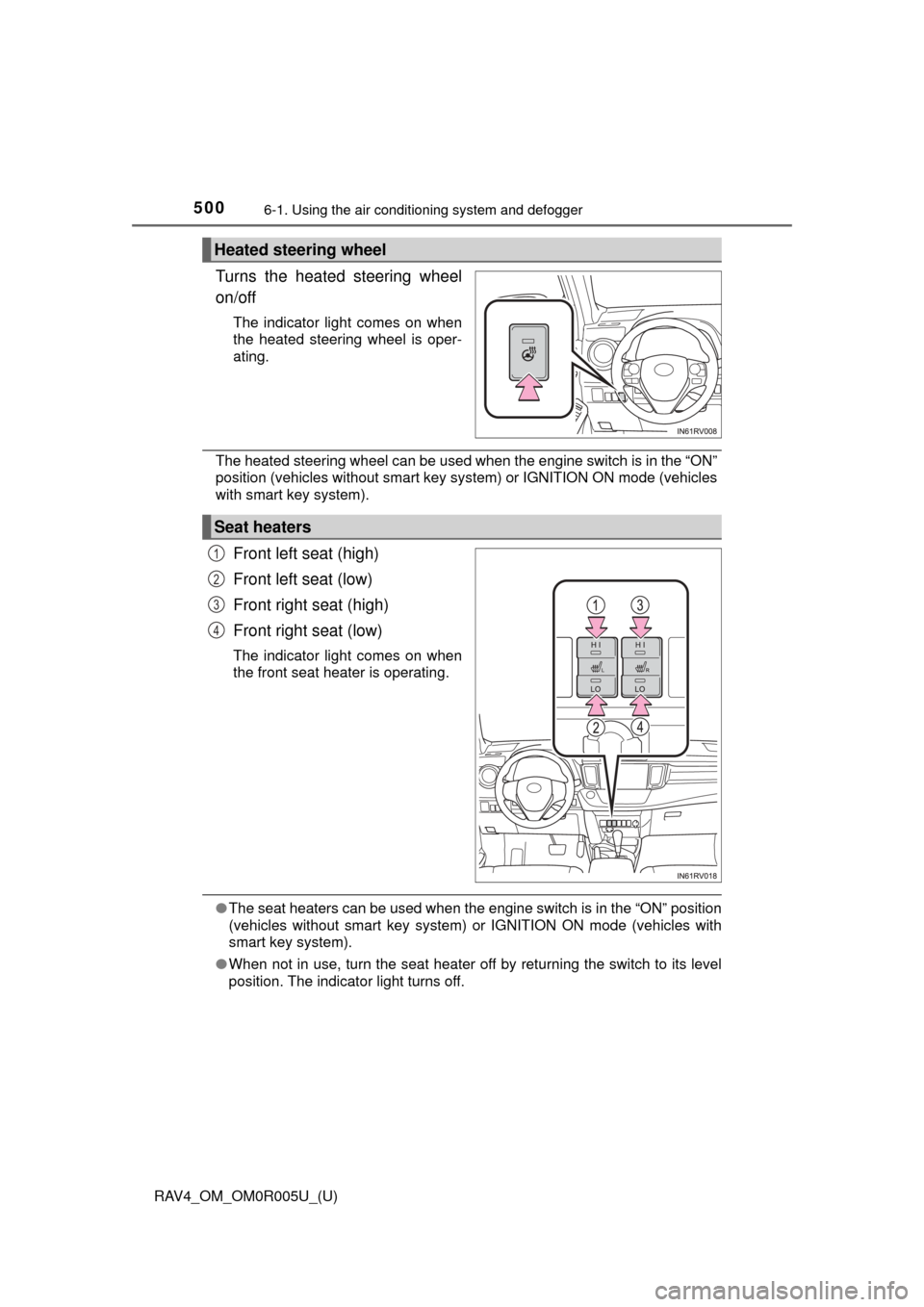
Turns the heated steering wheel
on/off
The indicator light comes on when
the heated steering wheel is oper-
ating.
The heated steering wheel can be used when the engine switch is in the “ON”
position (vehicles without smart key system) or IGNITION ON mode (vehicles
with smart key system).
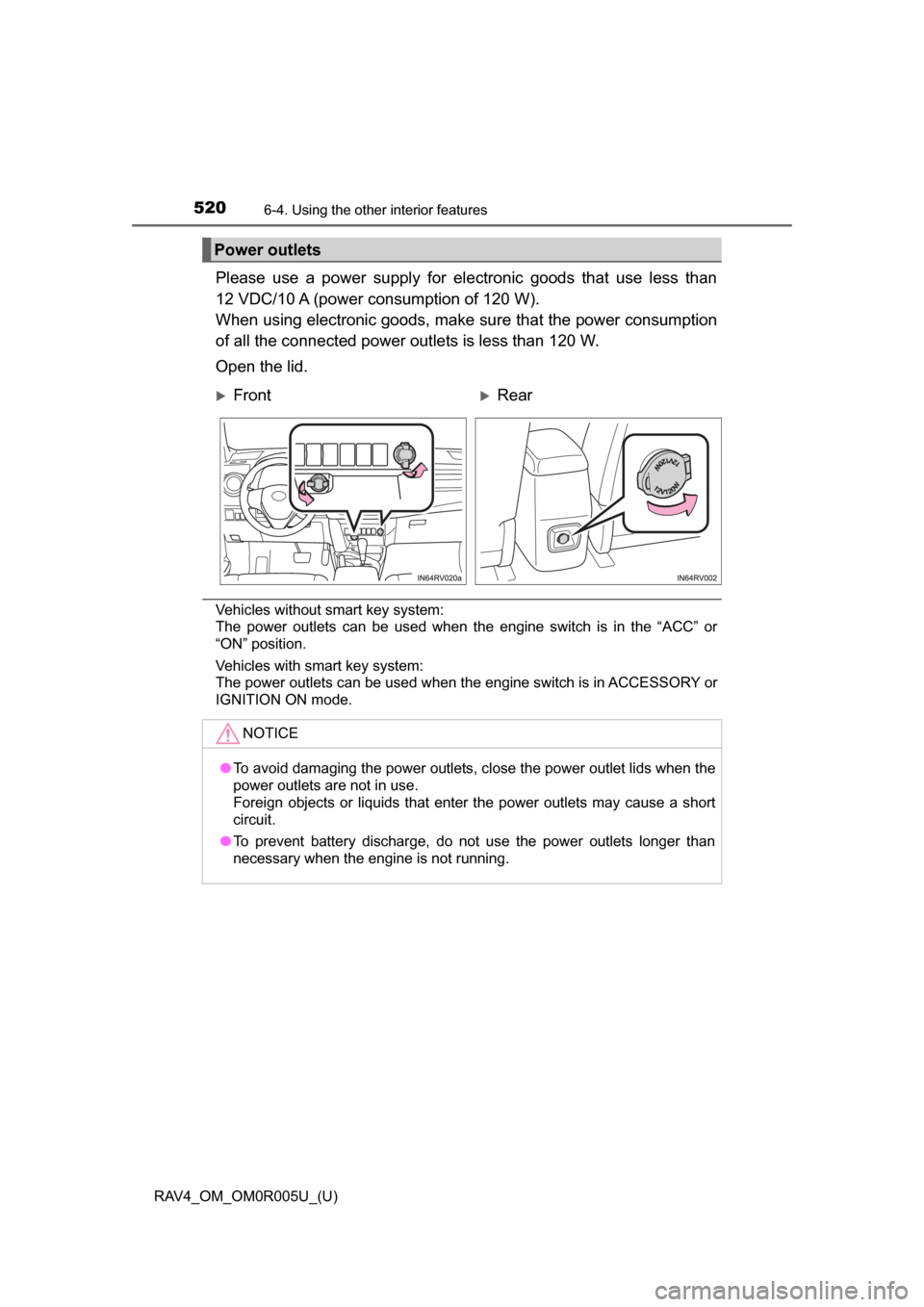
Front left seat (high)
Front left seat (low)
Front right seat (high)
Front right seat (low)
The indicator light comes on when
the front seat heater is operating.
●The seat heaters can be used when the engine switch is in the “ON” position
(vehicles without smart key system) or IGNITION ON mode (vehicles with
smart key system).
● When not in use, turn the seat heater off by returning the switch to its level
position. The indicator light turns off.
Heated steering wheel
Seat heaters
1
2
3
4
Page 521 of 741
520
RAV4_OM_OM0R005U_(U)
6-4. Using the other interior features
Please use a power supply for electronic goods that use less than
12 VDC/10 A (power consumption of 120 W).
When using electronic goods, make su re that the power consumption
of all the connected power outlets is less than 120 W.
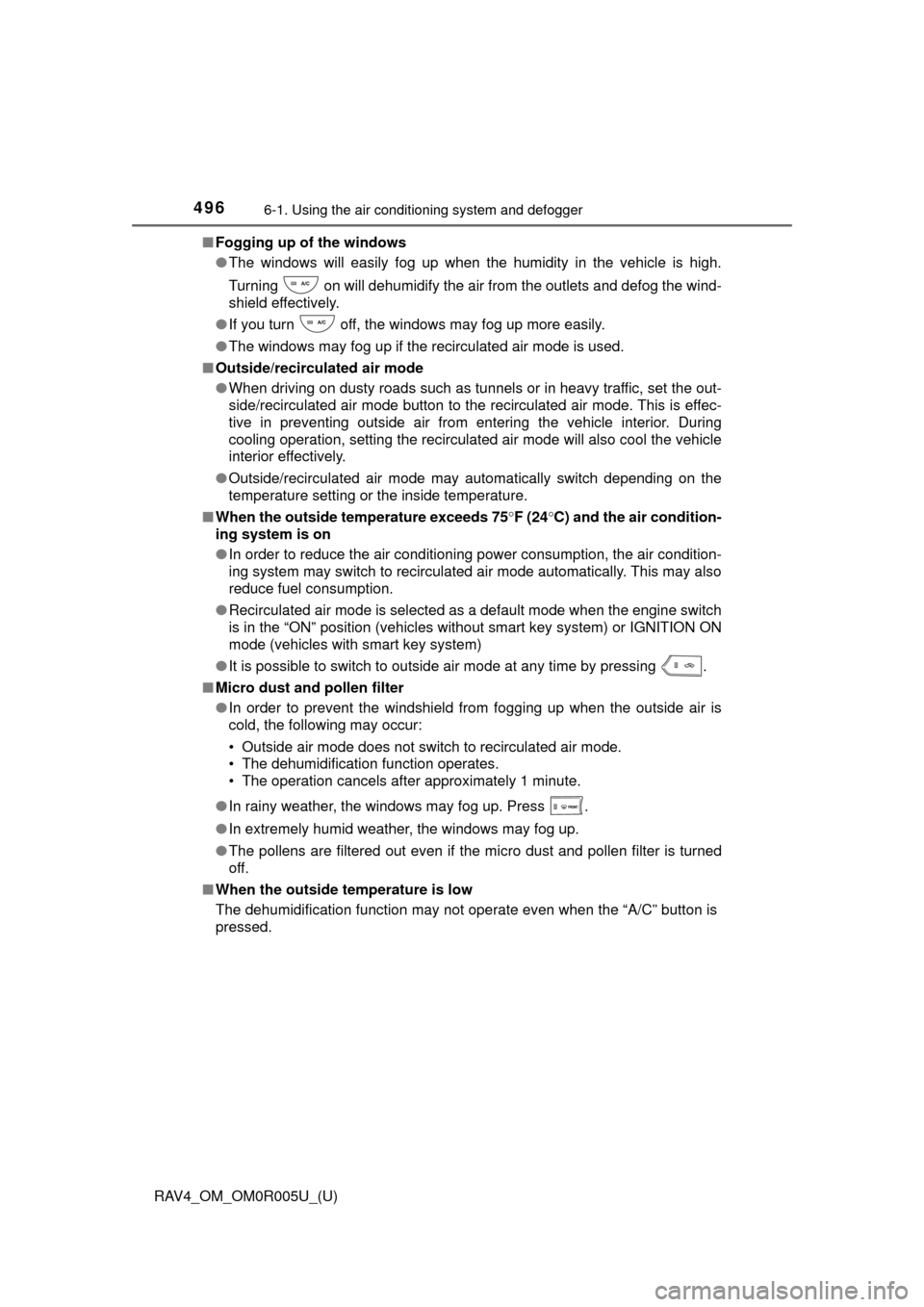
Open the lid.
Vehicles without smart key system:
The power outlets can be used when the engine switch is in the “ACC” or
“ON” position.
Vehicles with smart key system:
The power outlets can be used when the engine switch is in ACCESSORY or
IGNITION ON mode.
Power outlets
FrontRear
NOTICE
● To avoid damaging the power outlets, close the power outlet lids when the
power outlets are not in use.
Foreign objects or liquids that enter the power outlets may cause a short
circuit.
● To prevent battery discharge, do not use the power outlets longer than
necessary when the engine is not running.
Page 551 of 741
550
RAV4_OM_OM0R005U_(U)
7-3. Do-it-yourself maintenance
WARNING
The engine compartment contains many mechanisms and fluids that may
move suddenly, become hot, or become electrically energized. To avoid death
or serious injury, observe the following precautions.
■When working on the engine compartment
● Keep hands, clothing and tools away from the moving fan and engine
drive belt.
● Be careful not to touch the engine, radiator, exhaust manifold, etc. right
after driving as they may be hot. Oil and other fluids may also be hot.
● Do not leave anything that may burn easily, such as paper and rags, in the
engine compartment.
● Do not smoke, cause sparks or expose an open flame to fuel or the bat-
tery. Fuel and battery fumes are flammable.
● Be extremely cautious when working on the battery. It contains poisonous
and corrosive sulfuric acid.
■ When working near the electric cooling fans or radiator grille
Vehicles without smart key system
Be sure the engine switch is off. With the engine switch in the “ON” position,
the electric cooling fans may automatically start to run if the air conditioning
is on and/or the coolant temperature is high. ( →P. 560)
Vehicles with smart key system
Be sure the engine switch is off. With the engine switch in IGNITION ON
mode, the electric cooling fans may automatically start to run if the air condi-
tioning is on and/or the coolant temperature is high. ( →P. 560)
■ Safety glasses
Wear safety glasses to prevent flying or falling material, fluid spray, etc.
from getting in your eyes.
NOTICE
■If you remove the air cleaner filter
Driving with the air cleaner filter removed may cause excessive engine wear
due to dirt in the air.
Page 569 of 741
568
RAV4_OM_OM0R005U_(U)
7-3. Do-it-yourself maintenance
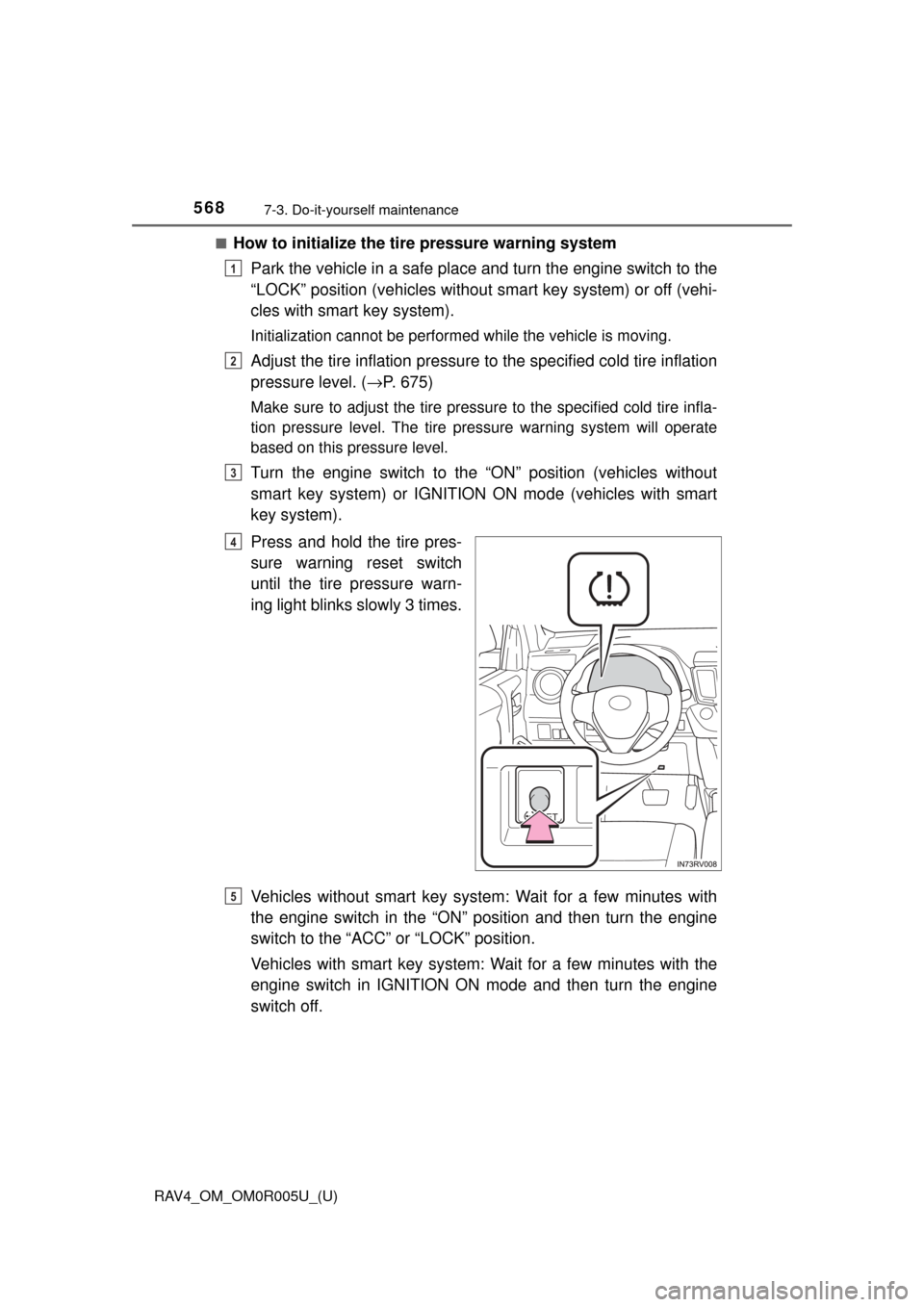
■How to initialize the tire pressure warning systemPark the vehicle in a safe place and turn the engine switch to the
“LOCK” position (vehicles without smart key system) or off (vehi-
cles with smart key system).
Initialization cannot be performed while the vehicle is moving.
Adjust the tire inflation pressure to the specified cold tire inflation
pressure level. ( →P. 675)
Make sure to adjust the tire pressu re to the specified cold tire infla-
tion pressure level. The tire pressure warning system will operate
based on this pressure level.
Turn the engine switch to the “ON” position (vehicles without
smart key system) or IGNITION ON mode (vehicles with smart
key system).
Press and hold the tire pres-
sure warning reset switch
until the tire pressure warn-
ing light blinks slowly 3 times.
Vehicles without smart key system: Wait for a few minutes with
the engine switch in the “ON” position and then turn the engine
switch to the “ACC” or “LOCK” position.
Vehicles with smart key system: Wait for a few minutes with the
engine switch in IGNITION ON mode and then turn the engine
switch off.
1
2
3
4
5