Page 628 of 741
6278-2. Steps to take in an emergency
RAV4_OM_OM0R005U_(U)
8
When trouble arises
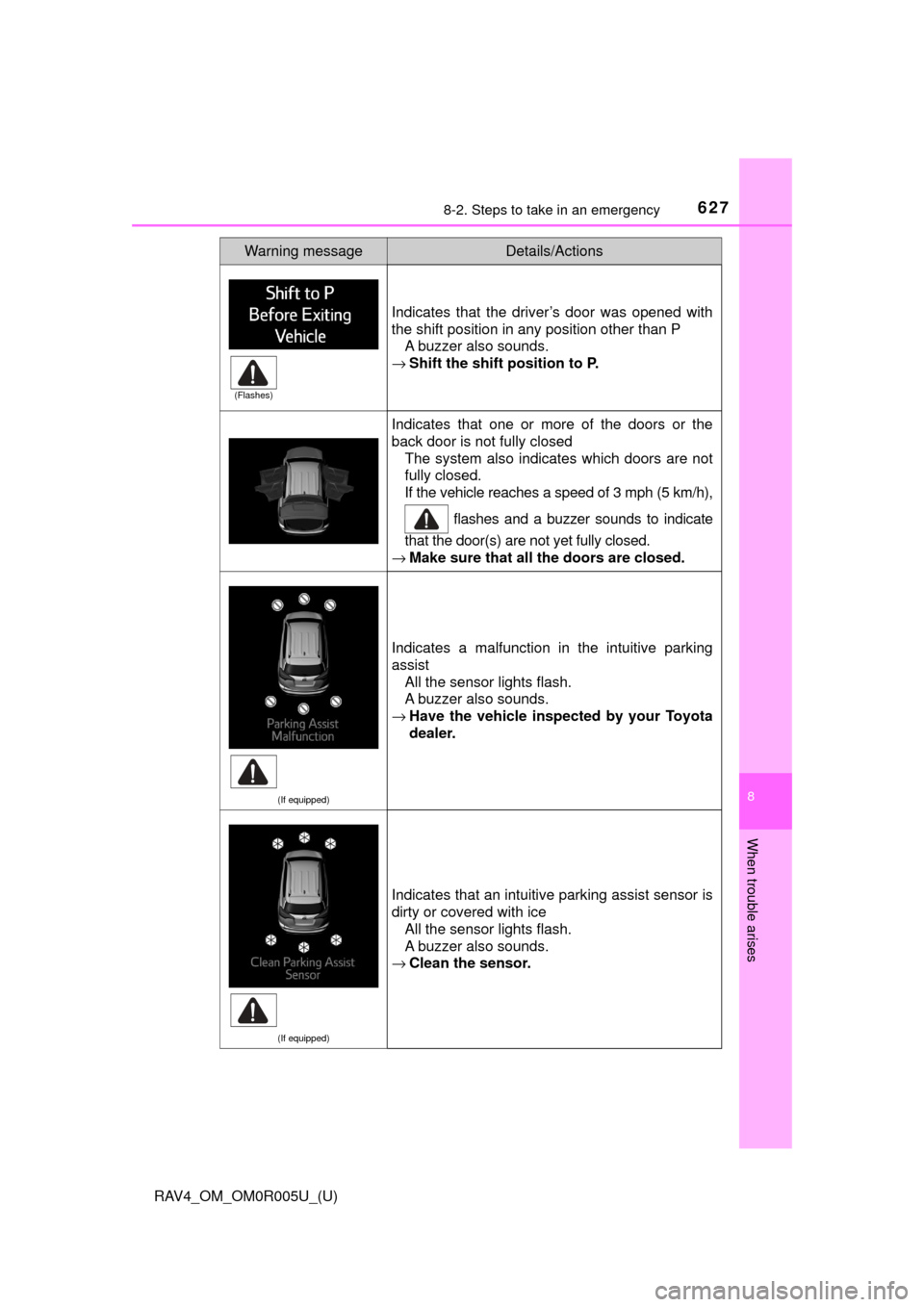
Indicates that the driver’s door was opened with
the shift position in any position other than PA buzzer also sounds.
→ Shift the shift position to P.
Indicates that one or more of the doors or the
back door is not fully closed
The system also indicates which doors are not
fully closed.
If the vehicle reaches a speed of 3 mph (5 km/h),
flashes and a buzzer sounds to indicate
that the door(s) are not yet fully closed.
→ Make sure that all the doors are closed.
(If equipped)
Indicates a malfunction in the intuitive parking
assist
All the sensor lights flash.
A buzzer also sounds.
→ Have the vehicle inspect ed by your Toyota
dealer.
(If equipped)
Indicates that an intuitive parking assist sensor is
dirty or covered with ice
All the sensor lights flash.
A buzzer also sounds.
→ Clean the sensor.
Warning messageDetails/Actions
(Flashes)
Page 629 of 741
6288-2. Steps to take in an emergency
RAV4_OM_OM0R005U_(U)
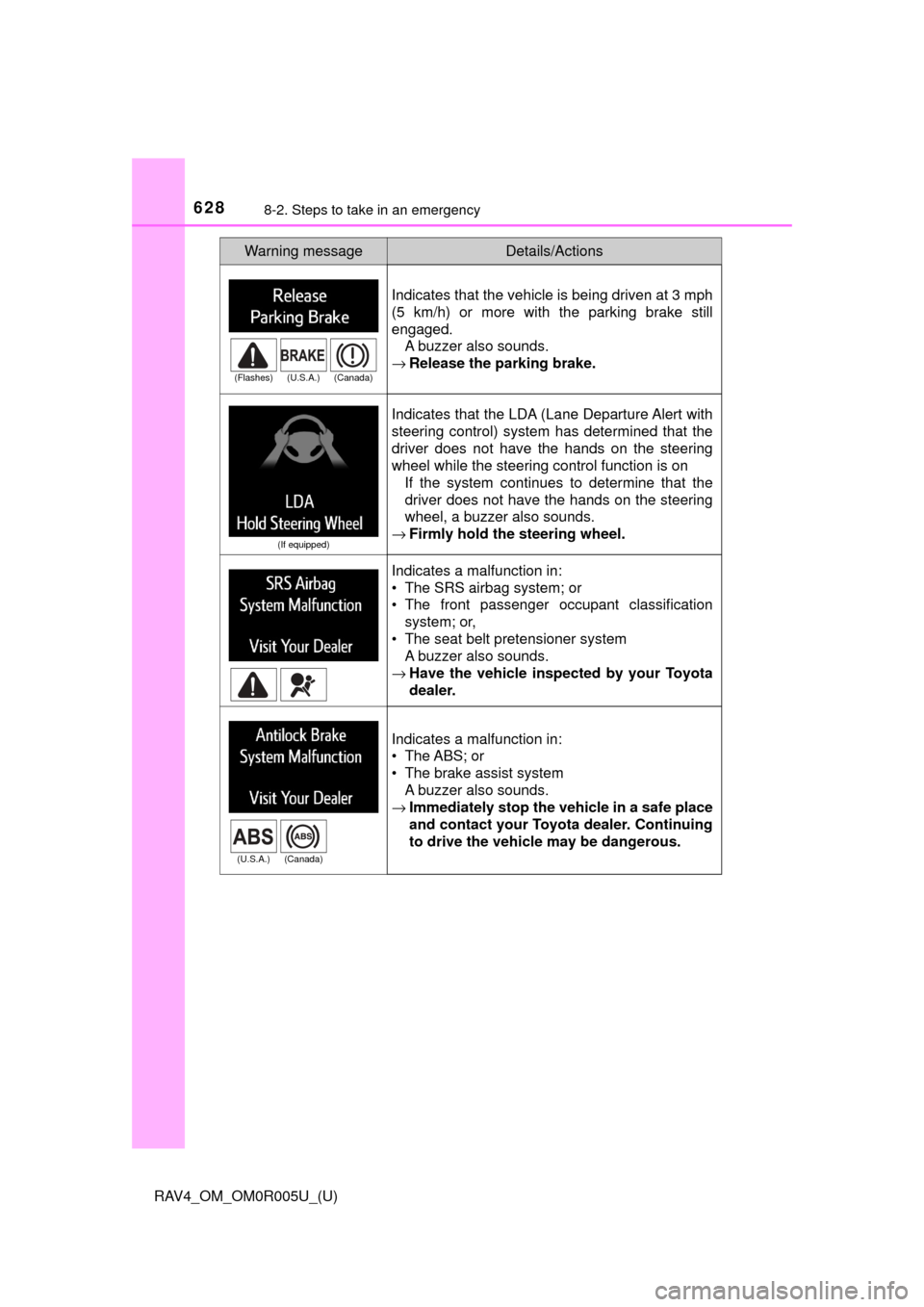
Indicates that the vehicle is being driven at 3 mph
(5 km/h) or more with the parking brake still
engaged.A buzzer also sounds.
→ Release the parking brake.
(If equipped)
Indicates that the LDA (Lane Departure Alert with
steering control) system has determined that the
driver does not have the hands on the steering
wheel while the steering control function is on
If the system continues to determine that the
driver does not have the hands on the steering
wheel, a buzzer also sounds.
→ Firmly hold the steering wheel.
Indicates a malfunction in:
• The SRS airbag system; or
• The front passenger occupant classification
system; or,
• The seat belt pretensioner system A buzzer also sounds.
→ Have the vehicle inspect ed by your Toyota
dealer.
Indicates a malfunction in:
• The ABS; or
• The brake assist system A buzzer also sounds.
→ Immediately stop the vehicle in a safe place
and contact your Toyota dealer. Continuing
to drive the vehicle may be dangerous.
Warning messageDetails/Actions
(Flashes) (U.S.A.) (Canada)
(U.S.A.) (Canada)
Page 653 of 741
6528-2. Steps to take in an emergency
RAV4_OM_OM0R005U_(U)
WARNING
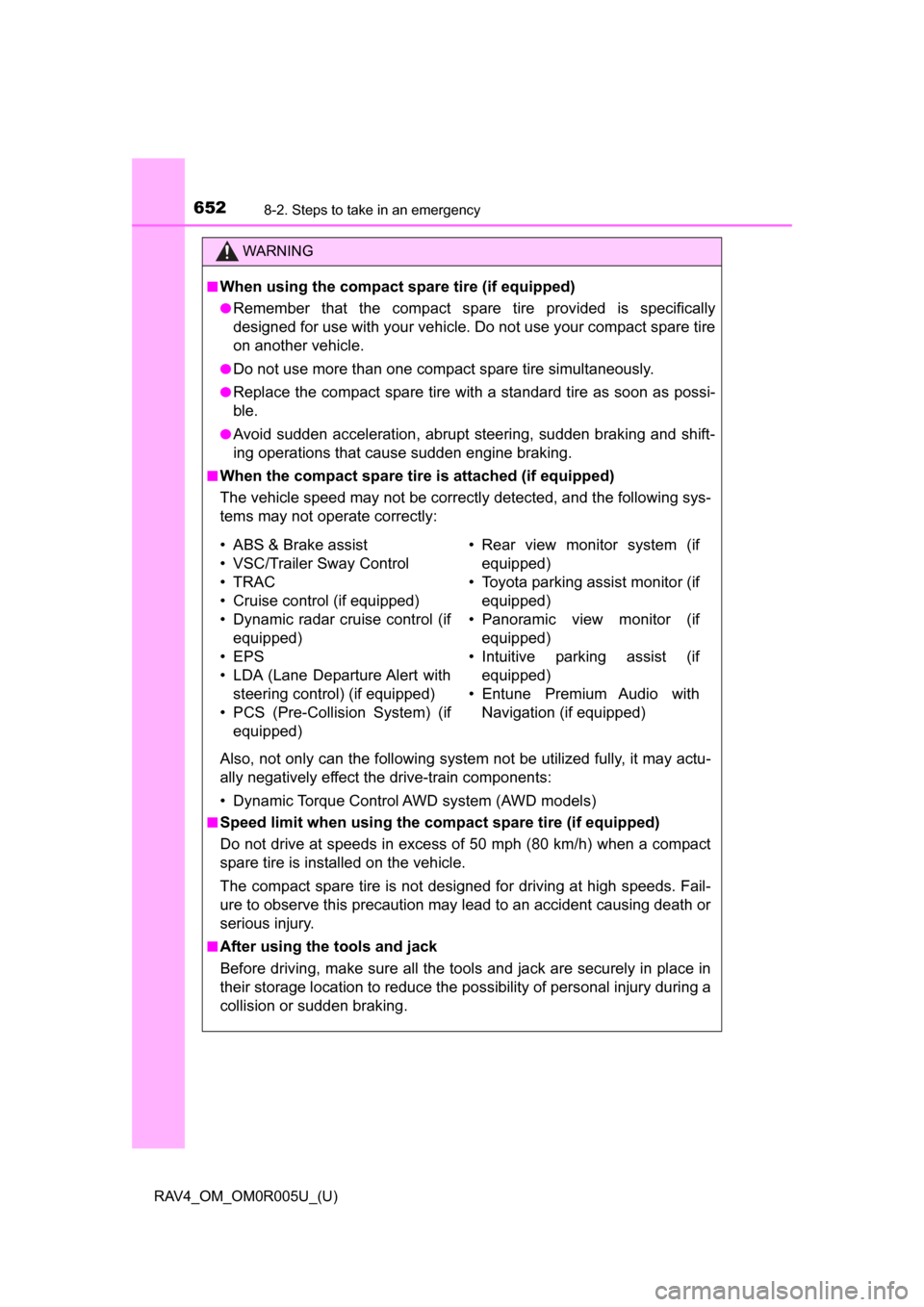
■When using the compact spare tire (if equipped)
●Remember that the compact spare tire provided is specifically
designed for use with your vehicle. Do not use your compact spare tire
on another vehicle.
●Do not use more than one compact spare tire simultaneously.
●Replace the compact spare tire with a standard tire as soon as possi-
ble.
●Avoid sudden acceleration, abrupt steering, sudden braking and shift-
ing operations that cause sudden engine braking.
■When the compact spare tire is attached (if equipped)
The vehicle speed may not be correctly detected, and the following sys-
tems may not operate correctly:
Also, not only can the following system not be utilized fully, it may actu-
ally negatively effect the drive-train components:
• Dynamic Torque Control AWD system (AWD models)
■Speed limit when using the compact spare tire (if equipped)
Do not drive at speeds in excess of 50 mph (80 km/h) when a compact
spare tire is installed on the vehicle.
The compact spare tire is not designed for driving at high speeds. Fail-
ure to observe this precaution may lead to an accident causing death or
serious injury.
■After using the tools and jack
Before driving, make sure all the tools and jack are securely in place in
their storage location to reduce the po ssibility of personal injury during a
collision or sudden braking.
• ABS & Brake assist
• VSC/Trailer Sway Control
• TRAC
• Cruise control (if equipped)
• Dynamic radar cruise control (if equipped)
• EPS
• LDA (Lane Departure Alert with steering control) (if equipped)
• PCS (Pre-Collision System) (if equipped)
• Rear view monitor system (if
equippedF
• Toyota parking assist monitor (if equipped)
• Panoramic view monitor (if equipped)
• Intuitive parking assist (if equipped)
• Entune Premium Audio with Navigation (if equipped)
Page 661 of 741

6608-2. Steps to take in an emergency
RAV4_OM_OM0R005U_(U)■
When recharging or replacing the ba ttery (vehicles with smart key sys-
tem)
● In some cases, it may not be possible to unlock the doors using the smart
key system when the battery is discharged. Use the wireless remote control
or the mechanical key to lock or unlock the doors.
● The engine may not start on the first attempt after the battery has recharged
but will start normally after the second attempt. This is not a malfunction.
● The engine switch mode is memorized by the vehicle. When the battery is
reconnected, the system will return to the mode it was in before the battery
was discharged. Before disconnecting the battery, turn the engine switch off.
If you are unsure what mode the engine switch was in before the battery dis-
charged, be especially careful when reconnecting the battery.
■ When the battery is removed or discharged
●The power back door (if equipped) must be initialized. ( →P. 121)
● The moon roof (if equipped) must be initialized. ( →P. 162)
● Toyota parking assist monitor (if equipped) must be initialized. (Refer to
“NAVIGATION AND MULTIMEDIA SYSTEM OWNER’S MANUAL”)
● Panoramic view monitor (if equipped) must be initialized. (Refer to “NAVI-
GATION AND MULTIMEDIA SYSTEM OWNER’S MANUAL”)
WARNING
■Avoiding battery fires or explosions
Observe the following precautions to prevent accidentally igniting the flam-
mable gas that may be emitted from the battery:
● Make sure each jumper cable is connected to the correct terminal and that
it is not unintentionally in contact with any other than the intended terminal.
● Do not allow the other end of the jumper cable connected to the “+” termi-
nal to come into contact with any other parts or metal surfaces in the area,
such as brackets or unpainted metal.
● Do not allow the + and - clamps of the jumper cables to come into contact
with each other.
● Do not smoke, use matches, cigarette lighters or allow open flame near
the battery.
Page 701 of 741
700
RAV4_OM_OM0R005U_(U)
9-2. Customization
■Intuitive parking assist*1, 2 (→P. 277)
*1: If equipped
*2: Vehicles with 8 sensor type only
■
Automatic light control system ( →P. 213)
*: If equipped
■
Lights (→ P. 213)
*: U.S.A. only
FunctionDefault settingCustomized
setting
Detection distance of the front
center sensor Far Near O—O
Detection distance of the rear
center sensor Far Near O
—O
Buzzer volume Level 3 Level 1 to 5 O
—O
Display setting All sensors
displayed Display off O
—O
123
FunctionDefault settingCustomized
setting
Light sensor sensitivity*Standard-2 to 2O—O
Time elapsed before the
headlights automatically turn
off after the doors are closed30
seconds
Off
O—O60 seconds
90 seconds
Automatic High Beam*OnOff——O
123
FunctionDefault settingCustomized
setting
Daytime running lights*OnOffO—O
123
Page 705 of 741
704
RAV4_OM_OM0R005U_(U)
9-3. Initialization
Items to initialize
The following items must be initialized for normal system opera-
tion after such cases as the battery being reconnected, or main-
tenance being performed on the vehicle:
ItemWhen to initializeReference
Power back door
(if equipped)• After reconnecting or changing the battery
• After changing a fuse
P. 121
Moon roof (If equipped)
• After reconnecting or changing the battery
• After changing a fuse
P. 162
Maintenance required
reminder message
(U.S.A. only)• After the mainte-
nance is performedP. 543
Tire pressure warning
system (If equipped)• When changing the
tire sizeP. 5 6 8
Toyota parking assist
monitor (if equipped)
• After reconnecting or changing the battery
• After changing a fuseRefer to “NAVIGATION AND MULTIMEDIA
SYSTEM OWNER’S MANUAL”
Panoramic view
monitor (if equipped)
Page 720 of 741
719
RAV4_OM_OM0R005U_(U)
Index
What to do if... (Troubleshooting) .................... 720
Alphabetical index ..................... 724
For vehicles with Entune Premium Audio with Naviga-
tion or Entune Audio Plus, refer to the “NAVIGATION
AND MULTIMEDIA SYSTEM OWNER’S MANUAL” for
information regarding the equipment listed below.
• Navigation system
• Audio system
• Rear view monitor system
• Toyota parking assist monitor
• Panoramic view monitor
Page 726 of 741

725Alphabetical index
RAV4_OM_OM0R005U_(U)
Automatic High Beam ............. 217
Automatic light control system .................................... 216
Automatic transmission.......... 203 If the shift lever cannot be
shifted from P ..................... 209
Paddle shift switches ........... 206
AUX port ........................... 330, 393
Auxiliary box ............................ 507
Back door
Back door.............................. 113
Jam protection function......... 121
Power back door ................... 116
Touchless power back door .................................... 115
Wireless remote control .......... 99
Back-up lights Replacing light bulbs............. 599
Wattage ................................ 676
Battery ...................................... 561 Battery checking ................... 561
If the vehicle battery
is discharged ...................... 658
Preparing and checking before winter....................... 314
Warning light/ message ............................. 629
Bluetooth
®........................ 384, 472
Audio system ................ 376, 439
Hands-free system (for cellular phone) ..... 379, 441
Registering a Bluetooth
® device....... 365, 432
Selecting a Bluetooth®
device ......................... 367, 434
Wireless communication ........... 359, 427
Bluetooth
® audio ............. 376, 439 Bluetooth
® phone
(audio system)....................... 359
Deleting the call history ........ 373
Making a call......................... 379
Managing speed dials........... 372
Managing the contacts ......... 374
Phone settings ...................... 366
Receiving a call .................... 381
Speaking on the phone......... 379
Bluetooth
® phone (Entune Audio)
Deleting the call history ........ 458
Making a call......................... 443
Managing the contacts ......... 462
Message function ................. 450
Phone settings ...................... 456
Receiving a call .................... 446
Speaking on the phone......... 447
Bottle holders .......................... 507
Brake Fluid ...................................... 560
Parking brake ....................... 212
Warning light/message..................... 615, 626
Brake assist ............................. 307
Break-in tips............................. 167
Brightness control Instrument panel light
control .................................. 86
BSM (Blind Spot Monitor) ....... 297 Blind Spot Monitor
function............................... 301
Rear Cross Traffic Alert function............................... 304
Care .................................. 536, 539 Aluminum wheels ................. 537
Exterior ................................. 536
Interior .................................. 539
Radar sensor ................ 234, 300
Seat belts.............................. 540
B
C