Page 39 of 741

391-1. For safe use
RAV4_OM_OM0R005U_(U)
1
For safety and security
Your vehicle is equipped with ADVANCED AIRBAGS designed based
on the US motor vehicle safety standards (FMVSS208). The airbag
sensor assembly (ECU) controls airbag dep loyment based on infor-
mation obtained from the sensors et c. shown in the system compo-
nents diagram above. This informat ion includes crash severity and
occupant information. As the airbags deploy, a chemical reaction in
the inflators quickly fills the airbag s with non-toxic gas to help restrain
the motion of the occupants.
WARNING
■ SRS airbag precautions
Observe the following precautions regarding the SRS airbags.
Failure to do so may cause death or serious injury.
● The driver and all passengers in the vehicle must wear their seat belts
properly.
The SRS airbags are supplemental devices to be used with the seat belts.
● The SRS driver airbag deploys with considerable force, and can cause
death or serious injury especially if the driver is very close to the airbag.
The National Highway Traffic Safety Administration (NHTSA) advises:
Since the risk zone for the driver’s airbag is the first 2 - 3 in. (50 - 75 mm)
of inflation, placing yourself 10 in. (250 mm) from your driver airbag pro-
vides you with a clear margin of safety. This distance is measured from
the center of the steering wheel to your breastbone. If you sit less than 10
in. (250 mm) away now, you can change your driving position in several
ways:
• Move your seat to the rear as far as you can while still reaching the ped-
als comfortably.
• Slightly recline the back of the seat.
Although vehicle designs vary, many drivers can achieve the 10 in.
(250 mm) distance, even with the driver seat all the way forward, simply
by reclining the back of the seat somewhat. If reclining the back of your
seat makes it hard to see the road, raise yourself by using a firm, non-
slippery cushion, or raise the seat if your vehicle has that feature.
• If your steering wheel is adjustable, tilt it downward. This points the air-
bag toward your chest instead of your head and neck.
The seat should be adjusted as recommended by NHTSA above, while
still maintaining control of the foot pedals, steering wheel, and your view
of the instrument panel controls.
Page 45 of 741
451-1. For safe use
RAV4_OM_OM0R005U_(U)
1
For safety and security
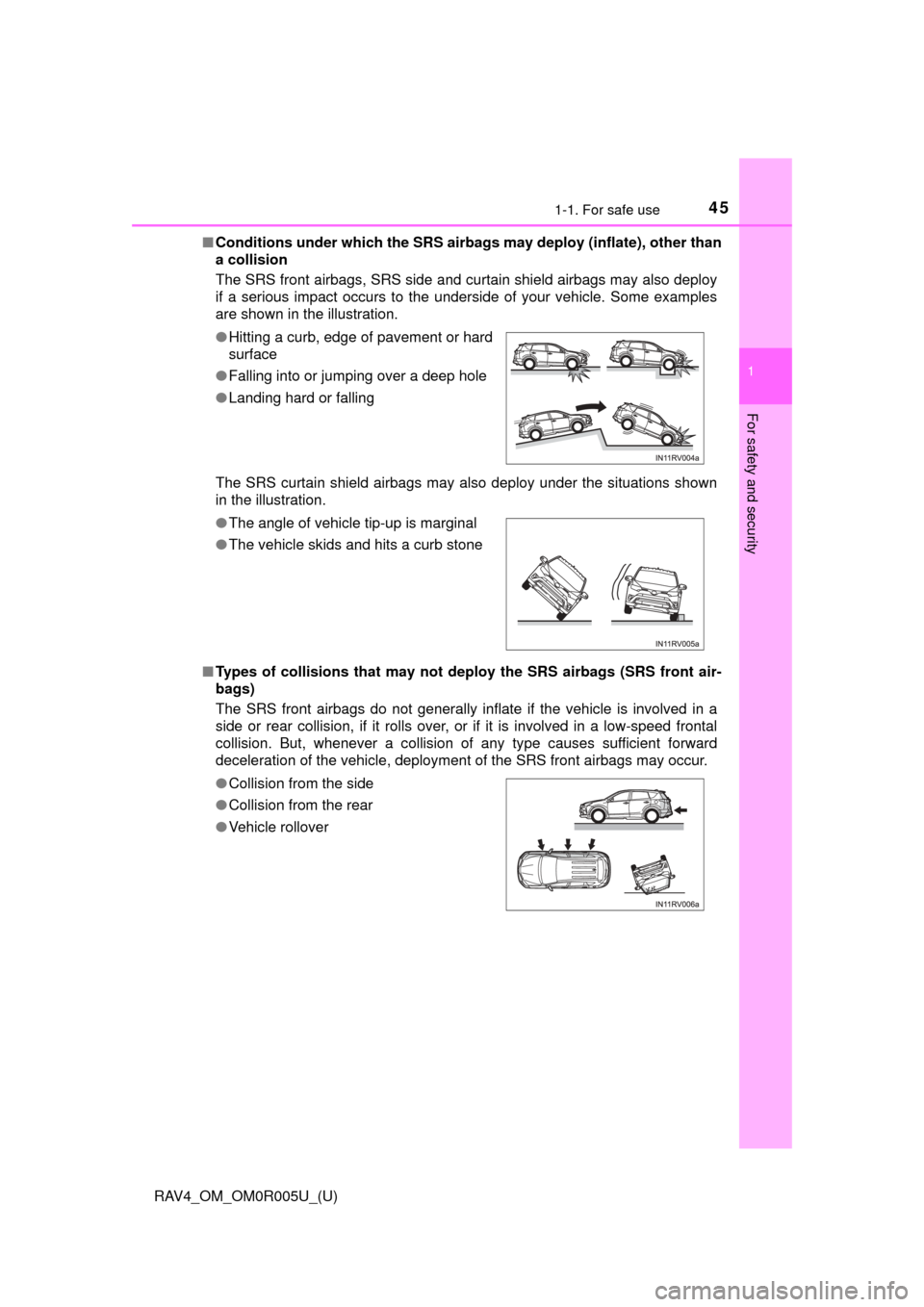
■Conditions under which the SRS airbags may deploy (inflate), other than
a collision
The SRS front airbags, SRS side and curtain shield airbags may also deploy
if a serious impact occurs to the underside of your vehicle. Some examples
are shown in the illustration.
The SRS curtain shield airbags may also deploy under the situations shown
in the illustration.
■ Types of collisions that may not de ploy the SRS airbags (SRS front air-
bags)
The SRS front airbags do not generally inflate if the vehicle is involved in a
side or rear collision, if it rolls over, or if it is involved in a low-speed frontal
collision. But, whenever a collision of any type causes sufficient forward
deceleration of the vehicle, deployment of the SRS front airbags may occur. ● Hitting a curb, edge of pavement or hard
surface
● Falling into or jumping over a deep hole
● Landing hard or falling
● The angle of vehicle tip-up is marginal
● The vehicle skids and hits a curb stone
● Collision from the side
● Collision from the rear
● Vehicle rollover
Page 50 of 741
501-1. For safe use
RAV4_OM_OM0R005U_(U)■
Adult*1
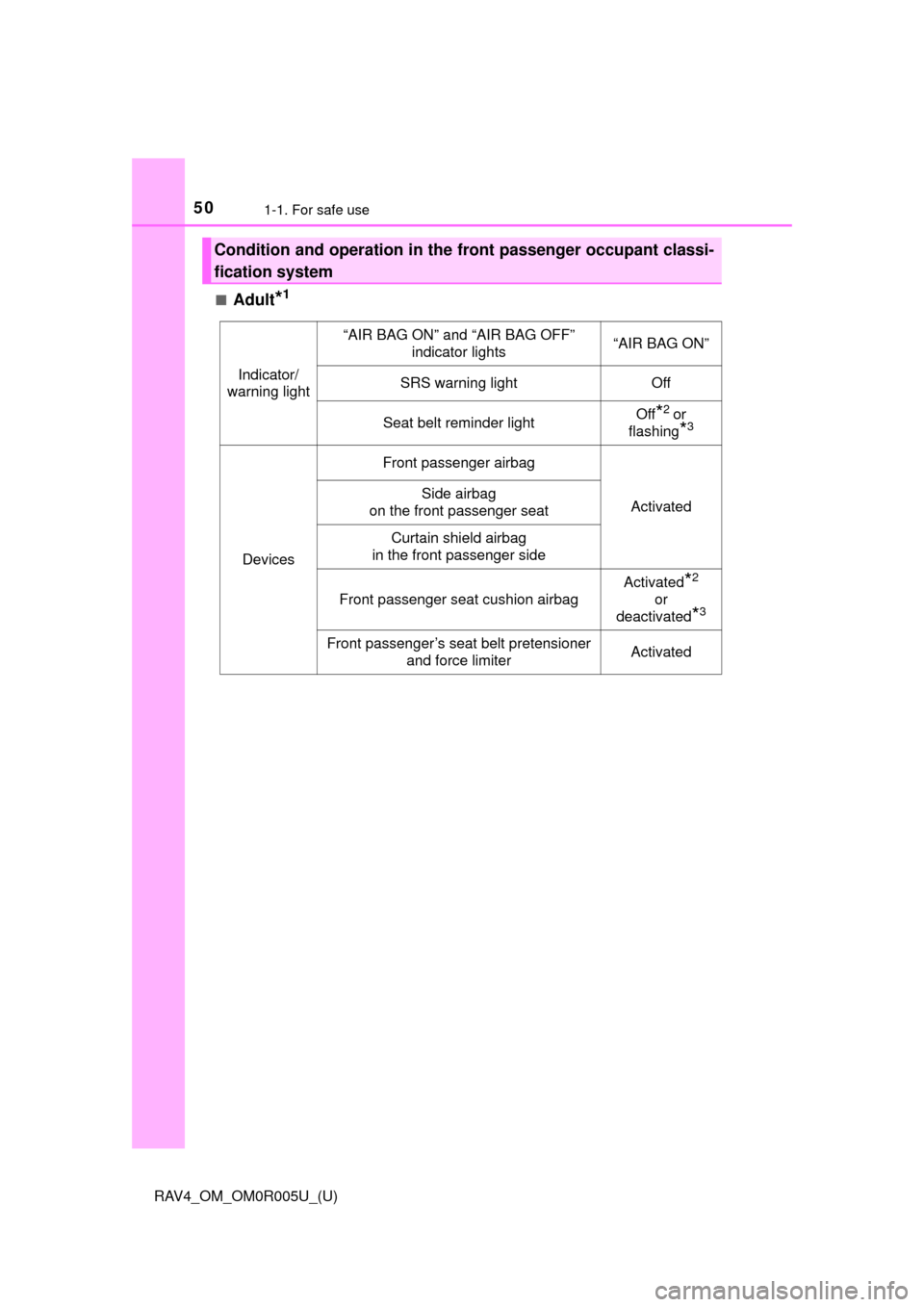
Condition and operation in the fr
ont passenger occupant classi-
fication system
Indicator/
warning light
“AIR BAG ON” and “AIR BAG OFF” indicator lights“AIR BAG ON”
SRS warning lightOff
Seat belt reminder lightOff*2 or
flashing
*3
Devices
Front passenger airbag
ActivatedSide airbag
on the front passenger seat
Curtain shield airbag
in the front passenger side
Front passenger seat cushion airbag
Activated*2
or
deactivated
*3
Front passenger’s seat belt pretensioner and force limiterActivated
Page 75 of 741
751-2. Theft deterrent system
RAV4_OM_OM0R005U_(U)
1
For safety and security
For vehicles sold in Canada
WARNING
■Certification for the engine immobilizer system
Changes or modifications not expressly approved by the party responsible
for compliance could void the user’s authority to operate the equipment.
NOTICE
■To ensure the system operates correctly
Do not modify or remove the system. If modified or removed, the proper
operation of the system cannot be guaranteed.
Page 78 of 741
78
RAV4_OM_OM0R005U_(U)
2. Instrument cluster
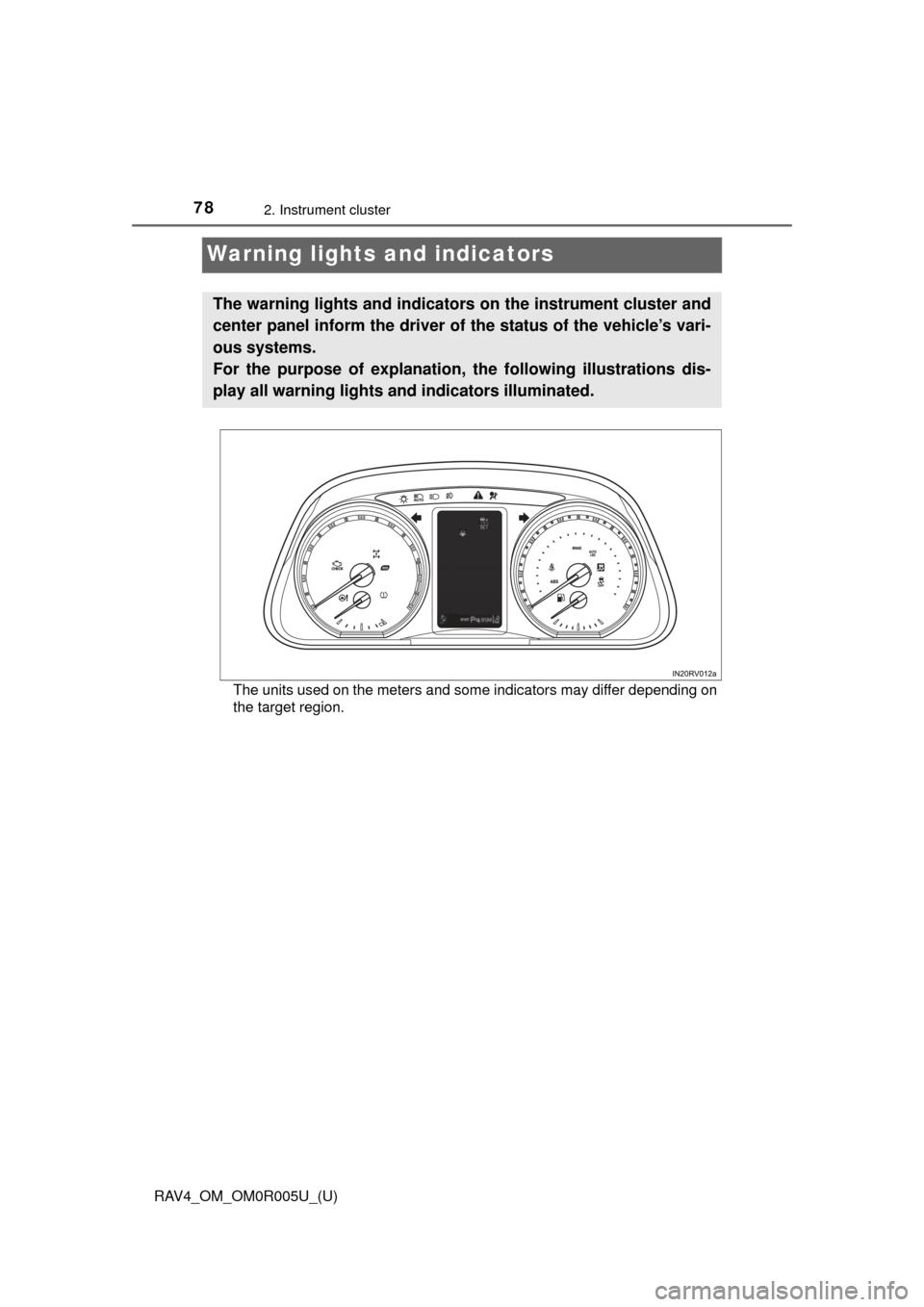
Warning lights and indicators
The units used on the meters and some indicators may differ depending on
the target region.
The warning lights and indicators on the instrument cluster and
center panel inform the driver of the status of the vehicle’s vari-
ous systems.
For the purpose of explanation, the following illustrations dis-
play all warning lights and indicators illuminated.
Page 82 of 741

82
RAV4_OM_OM0R005U_(U)
2. Instrument cluster
*1: These lights turn on when the engine switch is turned to the “ON” position(vehicles without smart key system) or IGNITION ON mode (vehicles with
smart key system), to indicate that a system check is being performed.
They will turn off after the engine is started, or after a few seconds. There
may be a malfunction in a system if the lights do not come on, or turn off.
Have the vehicle inspected by your Toyota dealer.
*2: The light flashes to indicate that the system is operating.
*3: This light illuminates on the center panel.
*4: In order to confirm operation, the BS M outside rear view mirror indicators
illuminate in the following situations:
• When the engine switch is turned to the “ON” position (vehicles without smart key system) or IGNITION ON mode (vehicles with smart key sys-
tem) while the system is set to on.
• When the system is set to on while the engine switch is in the “ON” posi- tion (vehicles without smart key system) or IGNITION ON mode (vehicles
with smart key system).
If the system is functioning correctly, the BSM outside rear view mirror indi-
cators will turn off after a few seconds.
If the BSM outside rear view mirror indicators do not illuminate or do not
turn off, there may be a malfunction with the system. If this occurs, have the
vehicle inspected by your Toyota dealer.
*5: This light illuminates on the outside rear view mirrors.
*6: The light turns on when the system is off.
*7: When the outside temperature is approximately 37° F (3°C) or lower, the
indicator will flash for approximately 10 seconds, then stay on.
*4, 5
(if equipped)
BSM outside rear
view mirror indicators
( →P. 297)*1, 6
(if equipped)
PCS warning light
(→P. 243)
(if equipped)
BSM indicator ( →P. 297)
*7
(if equipped)
Ice warning indicator
(→P. 634)
*1, 3“AIR BAG ON/OFF”
indicator ( →P. 4 9 )
Page 83 of 741

RAV4_OM_OM0R005U_(U)
832. Instrument cluster
2
Instrument cluster
■Eco Driving Indicator
Suggests Zone of Eco driving and Eco driving ratio based on acceleration.
Eco Driving Indicator will not operate in the following conditions:
● The shift lever is anything other than D.
● Paddle shift switch (if equipped) is operated.
● Neither normal mode nor Eco drive mode is selected. ( →P. 205)
● The vehicle speed is approximately 80 mph (130 km/h) or higher. Eco Driving Indicator Light
During Eco-friendly acceleration (Eco
driving), Eco Driving Indicator Light will
turn on.
When the acceleration exceeds Zone of
Eco driving, or when the vehicle is
stopped, the light turns off.
Eco Driving Indicator Light availability
can be customized. The default setting
is on. ( →P. 694)
Eco Driving Indicator Zone Display
Suggests the Zone of Eco driving with
current Eco driving ratio based on
acceleration.
Zone of Eco driving
Eco driving ratio based on acceleration
If the acceleration exceeds the Zone of Eco driving, the right side of the
Eco Driving Indicator Zone Display illuminates.
WARNING
■ If a safety system warning light does not come on
Should a safety system light such as the ABS and SRS warning light not
come on when you start the engine, this could mean that these systems are
not available to help protect you in an accident, which could result in death
or serious injury. Have the vehicle inspected by your Toyota dealer immedi-
ately if this occurs.
1
2
3
4
Page 92 of 741

92
RAV4_OM_OM0R005U_(U)
2. Instrument cluster
■System check display
After turning the engine switch to IGNITION ON mode, opening image is dis-
played while system operation is checked. When the system check is com-
plete, the normal screen will return.
■ Dynamic Torque Control AWD system display
Displays the Dynamic Torque Control AWD system operation state and the G-
force state.
■ Suspension of the settings display
In the following situations, the settings display using the meter control
switches will be suspended.
●When a warning message appears on the multi-information display
● When the vehicle begins to move
■ When disconnecting and reco nnecting battery terminals
The drive information will be reset.
■ Liquid crystal display
Small spots or light spots may appear on the display. This phenomenon is
characteristic of liquid crystal displays, and there is no problem continuing to
use the display.Torque distribution display
Displays the amount of drive torque
applied.
G-force display
Displays the current G-force state.
1
2