Page 573 of 676
5738-2. Steps to take in an emergency
RAV4-HV_OM_OM42B03U_(U)
8
When trouble arises
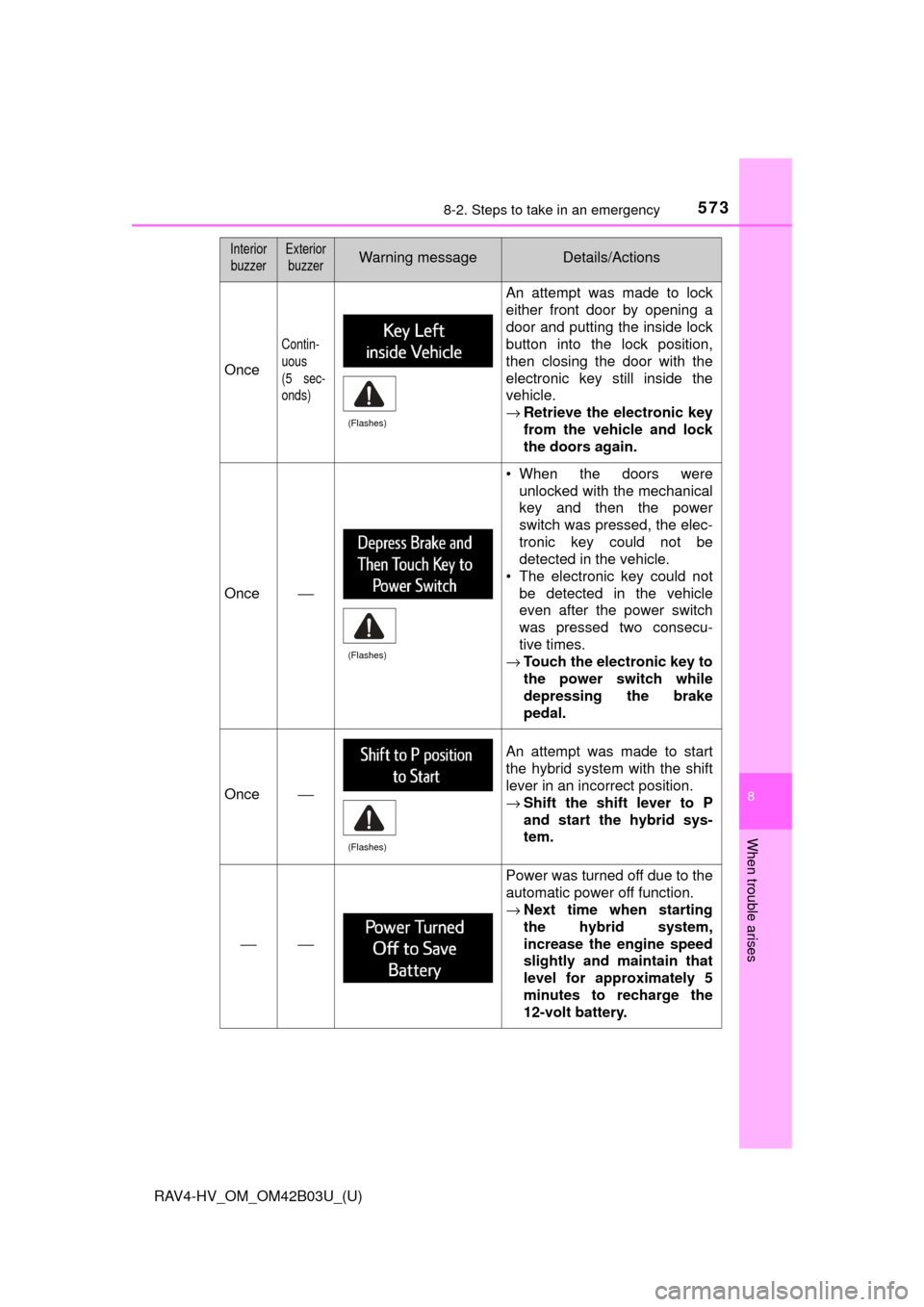
Once
Contin-
uous
(5 sec-
onds)
An attempt was made to lock
either front door by opening a
door and putting the inside lock
button into the lock position,
then closing the door with the
electronic key still inside the
vehicle.
→Retrieve the electronic key
from the vehicle and lock
the doors again.
Once⎯
• When the doors were
unlocked with the mechanical
key and then the power
switch was pressed, the elec-
tronic key could not be
detected in the vehicle.
• The electronic key could not be detected in the vehicle
even after the power switch
was pressed two consecu-
tive times.
→ Touch the electronic key to
the power switch while
depressing the brake
pedal.
Once⎯
An attempt was made to start
the hybrid system with the shift
lever in an incorrect position.
→Shift the shift lever to P
and start the hybrid sys-
tem.
⎯⎯
Power was turned off due to the
automatic power off function.
→Next time when starting
the hybrid system,
increase the engine speed
slightly and maintain that
level for approximately 5
minutes to recharge the
12-volt battery.
Interior
buzzerExterior buzzerWarning messageDetails/Actions
(Flashes)
(Flashes)
(Flashes)
Page 574 of 676
5748-2. Steps to take in an emergency
RAV4-HV_OM_OM42B03U_(U)
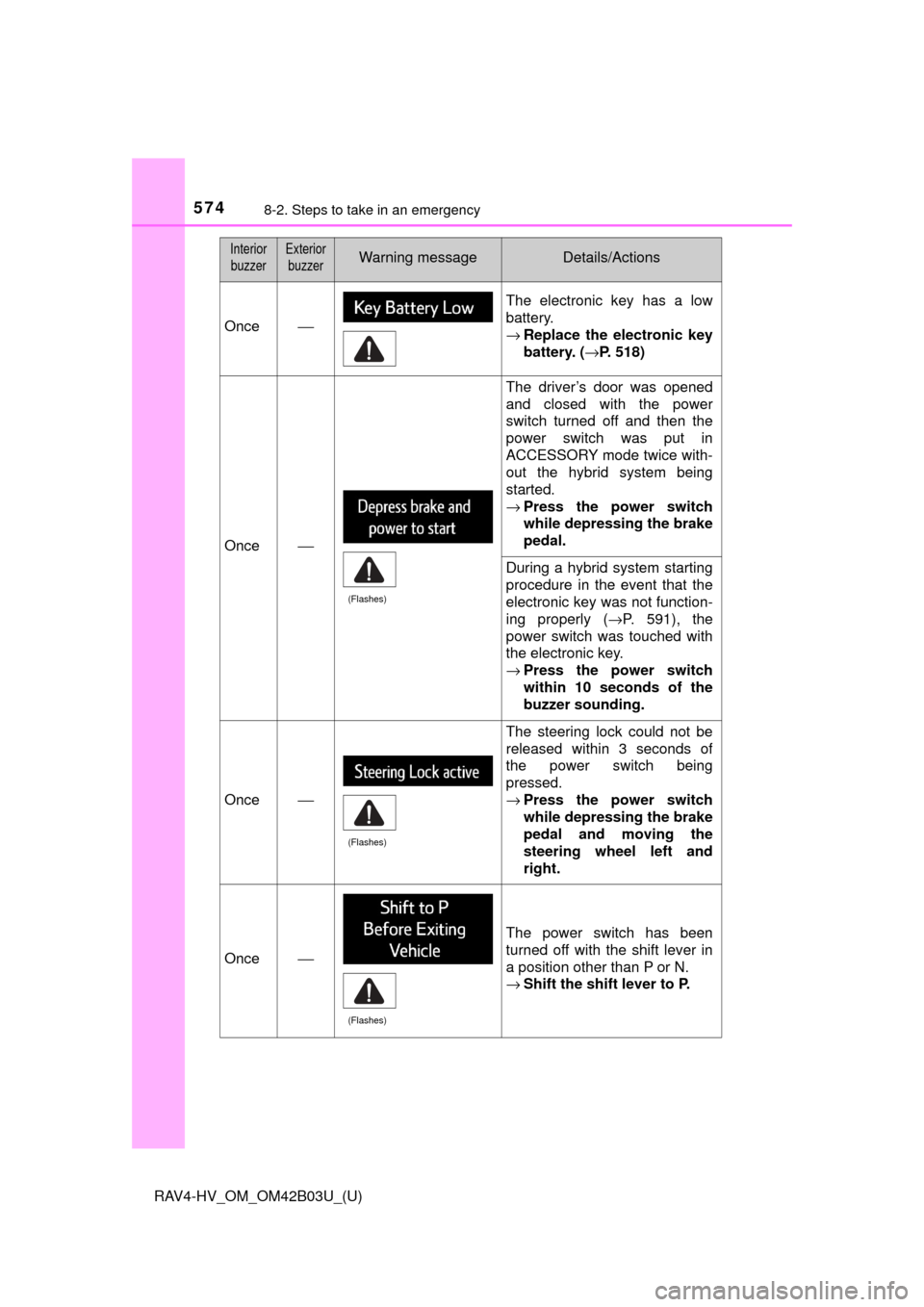
Once⎯
The electronic key has a low
battery.
→Replace the electronic key
battery. ( →P. 518)
Once⎯
The driver’s door was opened
and closed with the power
switch turned off and then the
power switch was put in
ACCESSORY mode twice with-
out the hybrid system being
started.
→Press the power switch
while depressing the brake
pedal.
During a hybrid system starting
procedure in the event that the
electronic key was not function-
ing properly ( →P. 591), the
power switch was touched with
the electronic key.
→ Press the power switch
within 10 seconds of the
buzzer sounding.
Once⎯
The steering lock could not be
released within 3 seconds of
the power switch being
pressed.
→Press the power switch
while depressing the brake
pedal and moving the
steering wheel left and
right.
Once⎯
The power switch has been
turned off with the shift lever in
a position other than P or N.
→Shift the shift lever to P.
Interior
buzzerExterior buzzerWarning messageDetails/Actions
(Flashes)
(Flashes)
(Flashes)
Page 588 of 676

588
RAV4-HV_OM_OM42B03U_(U)
8-2. Steps to take in an emergency
If the hybrid system will not start
One of the following may be the cause of the problem:
●The electronic key may not be functioning properly. ( →P. 590)
● There may not be sufficient fuel in the vehicle’s tank.
Refuel the vehicle. ( →P. 81)
● There may be a malfunction in the immobilizer system. (→P. 8 4 )
● There may be a malfunction in the steering lock system.
● The hybrid system may be malfunctioning due to an electrical prob-
lem such as electronic key battery depletion or a blown fuse. How-
ever, depending on the type of malfunction, an interim measure is
available to start the hybrid system. (→ P. 589)
One of the following may be the cause of the problem:
● The 12-volt battery may be discharged. ( →P. 592)
● The 12-volt battery terminal con nections may be loose or corroded.
( → P. 496)
Reasons for the hybrid system not starting vary depending on
the situation. Check the follo wing and perform the appropriate
procedure:
The hybrid system will not start even though the correct starting
procedure is being followed. ( →P. 198)
The interior lights and headlights are dim, or the horn does not
sound or sounds at a low volume.
Page 590 of 676
590
RAV4-HV_OM_OM42B03U_(U)
8-2. Steps to take in an emergency
If the electronic key does not operate properly
Use the mechanical key (→P. 108)
in order to perform the following
operations:
Locks all the doors
Unlocks the door
Turning the key rearward unlocks
the driver’s door. Turning the key
once again within 3 seconds
unlocks the other doors.
If communication between the electronic key and vehicle is
interrupted ( →P. 141) or the electronic key cannot be used
because the battery is depleted, the smart key system and wire-
less remote control cannot be used. In such cases, the doors
can be opened and the hybrid system can be started by follow-
ing the procedure below.
Locking and unlocking the doors
1
2
Page 591 of 676

5918-2. Steps to take in an emergency
RAV4-HV_OM_OM42B03U_(U)
8
When trouble arises
Ensure that the shift lever is in P and depress the brake pedal.
Touch the Toyota emblem side
of the electronic key to the
power switch.
When the electronic key is
detected, a buzzer sounds and the
power switch will turn to ON mode.
When the smart key system is
deactivated in customization set-
ting, the power switch will turn to
ACCESSORY mode.
Firmly depress the brake pedal and check that is displayed
on the multi-information display.
Press the power switch.
In the event that the hybrid system still cannot be started, contact your
Toyota dealer.
■ Stopping the hybrid system
Shift the shift lever to P and press the power switch as you normally do when
stopping the hybrid system.
■ Replacing the key battery
As the above procedure is a temporary measure, it is recommended that the
electronic key battery be replaced immediately when the battery is depleted.
(→P. 518)
■ Changing power switch modes
Release the brake pedal and press the power switch in step above.
The hybrid system does not start and modes will be changed each time the
switch is pressed.( →P. 199)
■ When the electronic key does not work properly
●Make sure that the smart key system has not been deactivated in the cus-
tomization setting. If it is off, turn the function on.
(Customizable features: →P. 636)
● Check if battery-saving mode is set. If it is set, cancel the function.
(→P. 137)
Starting the hybrid system
1
2
3
4
3
Page 594 of 676

5948-2. Steps to take in an emergency
RAV4-HV_OM_OM42B03U_(U)
Make sure the “READY” indicator comes on. If the indicator light
does not come on, contact your Toyota dealer.
Once the hybrid system has started, remove the jumper cables in
the exact reverse order from which they were connected.
Close the exclusive jump starting terminal cover, and reinstall the
fuse box cover to its original position.
When installing, first hook the fuse box cover onto the two rear tabs.
Once the hybrid system starts, ha ve the vehicle inspected at your
Toyota dealer as soon as possible.
■ Starting the hybrid system when the 12-volt battery is discharged
The hybrid system cannot be started by push-starting.
■ To prevent 12-volt battery discharge
●Turn off the headlights and the audio system while the hybrid system is off.
● Turn off any unnecessary electrical components when the vehicle is running
at a low speed for an extended period, such as in heavy traffic.
■ Charging the 12-volt battery
The electricity stored in the 12-volt battery will discharge gradually even when
the vehicle is not in use, due to natural discharge and the draining effects of
certain electrical appliances. If the vehicle is left for a long time, the 12-volt
battery may discharge, and the hybrid system may be unable to start. (The
12-volt battery recharges automatically while the hybrid system is operating.)
■ When recharging or repl acing the 12-volt battery
● In some cases, it may not be possible to unlock the doors using the smart
key system when the 12-volt battery is discharged. Use the wireless remote
control or the mechanical key to lock or unlock the doors.
● The hybrid system may not start on the first attempt after the 12-volt battery
has recharged but will start normally after the second attempt. This is not a
malfunction.
● The power switch mode is memorized by the vehicle. When the 12-volt bat-
tery is reconnected, the system will return to the mode it was in before the
12-volt battery was discharged. Before disconnecting the 12-volt battery,
turn the power switch off.
If you are unsure what mode the power switch was in before the 12-volt bat-
tery discharged, be especially careful when reconnecting the 12-volt battery.
● Some systems may require initialization. ( →P. 641)
7
8
9
Page 635 of 676
RAV4-HV_OM_OM42B03U_(U)
6359-2. Customization
9
Vehicle specifications
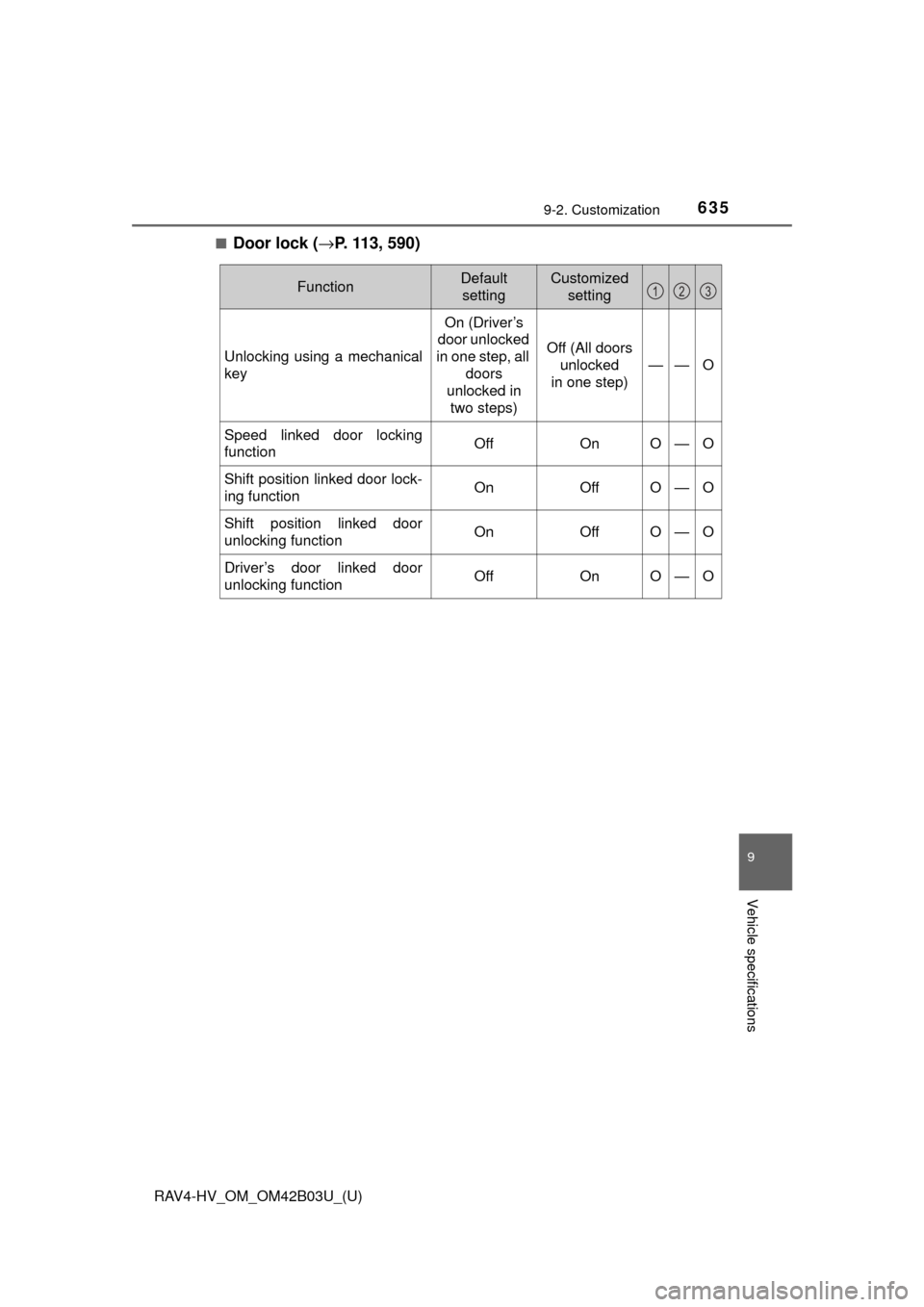
■Door lock (→P. 113, 590)
FunctionDefault
settingCustomized setting
Unlocking using a mechanical
key
On (Driver’s
door unlocked
in one step, all
doors
unlocked in two steps)
Off (All doors unlocked
in one step)
——O
Speed linked door locking
functionOffOnO—O
Shift position linked door lock-
ing functionOnOffO—O
Shift position linked door
unlocking functionOnOffO—O
Driver’s door linked door
unlocking functionOffOnO—O
123
Page 636 of 676
636
RAV4-HV_OM_OM42B03U_(U)
9-2. Customization
■Smart key system (→P. 108) and wireless remote control
( → P. 113, 119, 136)
*: The default setting varies according to on some models.
■
Smart key system (→ P. 113, 119, 136)
*: Settings that can be changed by electronic key ( →P. 117)
FunctionDefault
settingCustomized setting
Operation signal (buzzer)*Level 5OffO—OLevel 1 to 7
Operation signal (emergency
flashers)OnOffO—O
Time elapsed before the auto-
matic door lock function is
activated if a door is not
opened after being unlocked
60 seconds
30 seconds
——O
120 seconds
Open door reminder buzzer
(When locking the vehicle)OnOff——O
Unlocking operation
Driver’s door unlocked in
one step, all doors
unlocked in
two steps
All doors
unlocked in
one step
O—O
Alarm (panic mode)OnOff——O
123
FunctionDefault settingCustomized setting
Smart key systemOnOffO—O
Select doors to unlock*Driver’s doorAll the doorsO—O
Number of consecutive door
lock operations2 timesAs many as desired——O
123