Page 191 of 784
PRIUS PRIME_OM_OM47A88U_(U)
1913. Instrument cluster
3
Instrument cluster
The indicators inform the driver of the operating state of the vehicle’s
various systems.
Indicators
IndicatorsPages
Turn signal indicator P. 336
Headlight indicator (U.S.A.) P. 338
Tail light indicator (Canada) P. 340
Parking brake indicator (U.S.A.) P. 337
Parking brake indicator (Canada)P. 337
Headlight high beam indicatorP. 340
Fog light indicator (if equipped) P. 348
Security indicator P. 75
“READY” indicatorP. 324
Shift position indicators P. 330
*1, 2Slip indicator light P. 477
*1, 3VSC OFF indicatorP. 478
Cruise control indicatorP. 401
Radar cruise control indicatorP. 391
Page 244 of 784

244
PRIUS PRIME_OM_OM47A88U_(U)
3. Instrument cluster
■Enabling/disabling of the head-up display
When the head-up display is turned off with the “HUD” switch, it is not dis-
played until the “HUD” switch is used to turn the head-up display on again.
(Operation of the head-up display is not linked with the power switch.)
■ Display brightness
●The brightness of the head-up display is automatically adjusted according to
the operation status of the headlights (on/off) and the brightness of the sur-
roundings.
● When the brightness of the head-up display is adjusted to a certain level or
higher, the display automatically dims when the vehicle is stopped. Once the
vehicle starts off and the vehicle speed reaches approximately 3.1 mph
(5 km/h) or more, the display automatically returns to its previous bright-
ness.
■ Vehicle speed display
In extremely cold environments, the display of the speedometer and the vehi-
cle speed of the head-up display may slightly differ.
■ Head-up display
The head-up display may seem dark and hard to see when viewed through
sunglasses, especially polarized sunglasses.
■ When the 12-volt battery is disconnected
The customize settings of the head-up display will be reset.
■ Route guidance display
The route guidance is not displayed on both the head-up display and multi-
information display simultaneously. When the route guidance is displayed on
the head-up display, the multi-information display does not display the route
guidance even if the navigation system-linked display ( →P. 225) is selected
on the multi-information display.
Page 296 of 784
2964-4. Adjusting the steering wheel and mirrors
PRIUS PRIME_OM_OM47A88U_(U)
Inside rear view mirror
The height of the rear view mirror can be adjusted to suit your driving
posture.
Adjust the height of the rear view
mirror by moving it up and down.
Manual anti-glare inside rear view mirror
Reflected light from the headlights of vehicles behind can be reduced
by operating the lever.
Normal position
Anti-glare position
The rear view mirror’s position can be adjusted to enable suffi-
cient confirmation of the rear view.
Adjusting the height of rear view mirror (vehicles with manual
anti-glare inside rear view mirror)
Anti-glare function
1
2
Page 297 of 784
2974-4. Adjusting the steering wheel and mirrors
PRIUS PRIME_OM_OM47A88U_(U)
4
Operation of each component
Auto anti-glare inside rear view mirror
Responding to the level of brightne ss of the headlights of vehicles
behind, the reflected light is automatically reduced.
Changing automatic anti-glare
function mode
On
Off
When the automatic anti-glare
function is in ON mode, the indica-
tor illuminates.
The function will set to ON mode
each time the power switch is
turned to ON mode.
Pressing the button turns the func-
tion to OFF mode. (The indicator
also turns off.)
■To prevent sensor error (vehicles with auto anti-glare inside rear view
mirror)
Indicator
1
2
To ensure that the sensors operate prop-
erly, do not touch or cover them.
WARNING
Do not adjust the position of the mirror while driving.
Doing so may lead to mishandling of the vehicle and cause an accident,
resulting in death or serious injury.
Page 305 of 784

305
PRIUS PRIME_OM_OM47A88U_(U)
5Driving
5-1. Before drivingDriving the vehicle ............. 306
Cargo and luggage ........... 318
Vehicle load limits ............. 321
Trailer towing..................... 322
Dinghy towing ................... 323
5-2. Driving procedures Power (ignition) switch ...... 324
Hybrid transmission........... 330
Turn signal lever................ 336
Parking brake .................... 337
5-3. Operating the lights and wipers
Headlight switch ................ 338
Automatic High Beam ....... 343
Fog light switch ................. 348
Windshield wipers and washer ............................ 350 5-4. Refueling
Opening the fuel tank cap .................................. 356
5-5. Using the driving support systems
Toyota Safety Sense P ..... 361
PCS (Pre-Collision System)........................... 369
LDA (Lane Departure Alert with steering
control) ............................ 381
Dynamic radar cruise control with full-speed
range............................... 391
Driving mode select switch .............................. 406
BSM (Blind Spot Monitor) ........ 408
• The Blind Spot Monitor
function ......................... 412
• The Rear Cross Traffic
Alert function ................. 415
Intuitive parking assist....... 420
Intelligent Clearance Sonar .............................. 430
S-APGS (Simple Advanced Parking
Guidance System) .......... 442
Driving assist systems ...... 476
5-6. Driving tips Winter driving tips ............. 482
Page 338 of 784
338
PRIUS PRIME_OM_OM47A88U_(U)
5-3. Operating the lights and wipers
Headlight switch
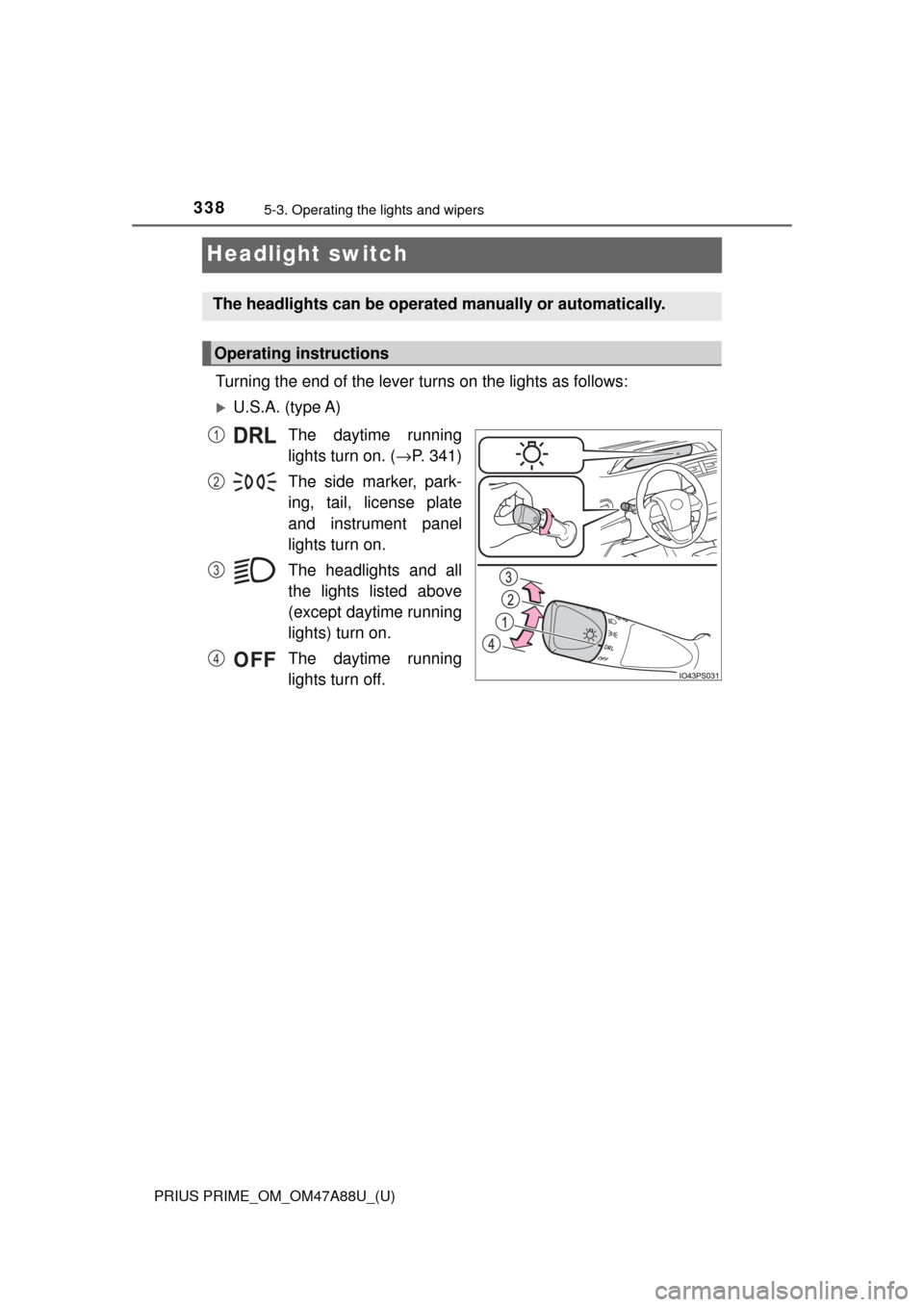
Turning the end of the lever turns on the lights as follows:
U.S.A. (type A)The daytime running
lights turn on. ( →P. 341)
The side marker, park-
ing, tail, license plate
and instrument panel
lights turn on.
The headlights and all
the lights listed above
(except daytime running
lights) turn on.
The daytime running
lights turn off.
The headlights can be operated manually or automatically.
Operating instructions
1
2
3
4
Page 339 of 784
PRIUS PRIME_OM_OM47A88U_(U)
3395-3. Operating the lights and wipers
5
Driving
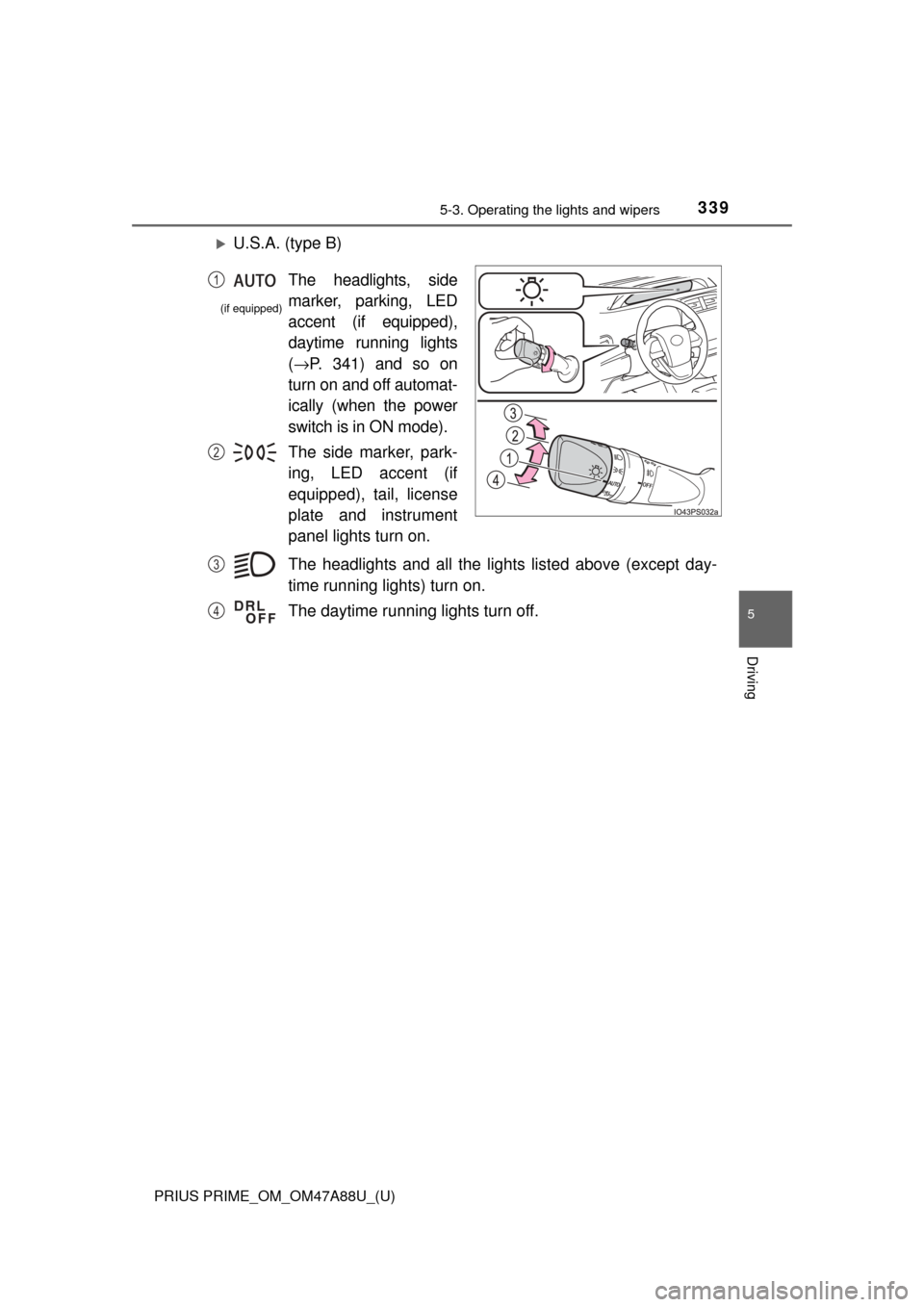
U.S.A. (type B)The headlights and all the ligh ts listed above (except day-
time running lights) turn on.
The daytime running lights turn off.
The headlights, side
marker, parking, LED
accent (if equipped),
daytime running lights
( → P. 341) and so on
turn on and off automat-
ically (when the power
switch is in ON mode).
The side marker, park-
ing, LED accent (if
equipped), tail, license
plate and instrument
panel lights turn on. 1
2
(if equipped)
3
4
Page 340 of 784
340
PRIUS PRIME_OM_OM47A88U_(U)
5-3. Operating the lights and wipers
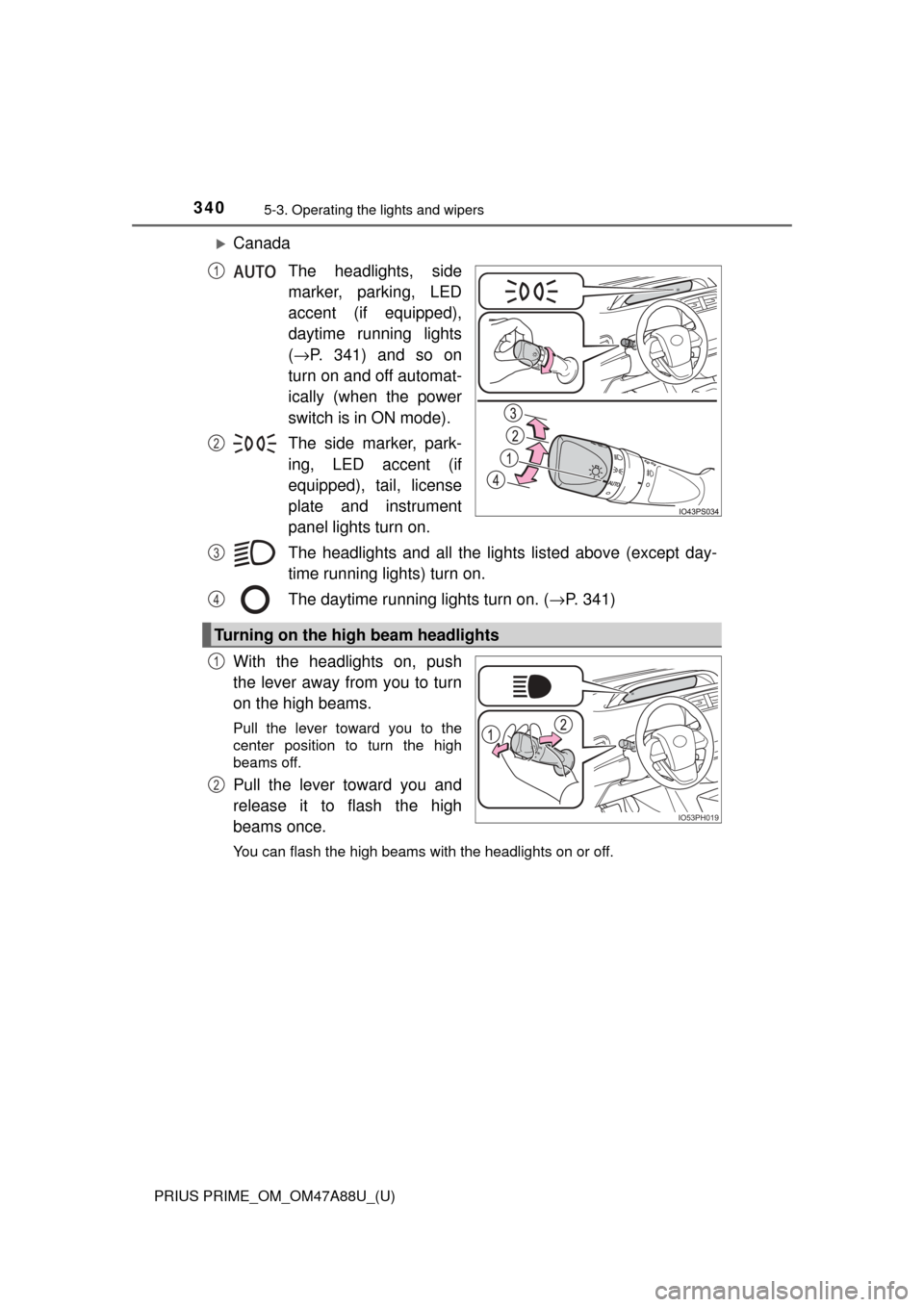
CanadaThe headlights, side
marker, parking, LED
accent (if equipped),
daytime running lights
(→ P. 341) and so on
turn on and off automat-
ically (when the power
switch is in ON mode).
The side marker, park-
ing, LED accent (if
equipped), tail, license
plate and instrument
panel lights turn on.
The headlights and all the ligh ts listed above (except day-
time running lights) turn on.
The daytime running lights turn on. ( →P. 341)
With the headlights on, push
the lever away from you to turn
on the high beams.
Pull the lever toward you to the
center position to turn the high
beams off.
Pull the lever toward you and
release it to flash the high
beams once.
You can flash the high beams with the headlights on or off.
1
2
Turning on the high beam headlights
3
4
IO53PH019
1
2