Page 135 of 304

135
1. VOICE COMMAND SYSTEM OPERATION
PRIUS PRIME_Navi_OM47A96U_(U)
16.07.05 09:52
VOICE COMMAND SYSTEM
4
1Press the talk switch.
2Select “OK”.
3Say the tab selection command or se-
lect the desired tab.
Commands related with each function are
displayed on the screen of the each func-
tion tab. Some commonly used com-
mands are displayed on the screen of the
function tab.
INFORMATION
● The voice command system can be
operated while guidance is being spo-
ken, when “Voice Prompt Interrupt”
(→ P.63) is set to on. (It is not necessary
to wait for the confirmation beep before
speaking a command.)
● Voice commands may not be recognized
if:
• Spoken too quickly.
• Spoken at a low or high volume.
• The roof or windows are open.
• Passengers are talking while voice
commands are spoken.
• The air conditioning speed is set high.
• The air conditioning vents are turned towards the microphone.
● In the following conditions, the system
may not recognize the command prop-
erly and using voice commands may not
be possible:
• The command is incorrect or unclear.
Note that certain words, accents or
speech patterns may be difficult for the
system to recognize.
• There is excessive background noise, such as wind noise.
● The ability to dial a contact using voice
commands may take some time after the
power switch is in ACCESSORY or ON
mode, especially when the phone has
many contacts.
VOICE COMMAND SYSTEM
OPERATION
The voice command system is operat-
ed by selecting a tab corresponding to
each function. The tabs are found on
the upper part of the screen.
To train voice recognition and to display
the tutorial. (→ P.136)
To prevent the screen from being dis-
played again, select “Do Not Tell Me
Again” .
Page 139 of 304

139
1. VOICE COMMAND SYSTEM OPERATION
PRIUS PRIME_Navi_OM47A96U_(U)
16.07.05 09:52
VOICE COMMAND SYSTEM
4
1Press the talk switch.
2Say “Call
types>” .
A confirmation screen will be displayed
showing the recognition results. If multiple
matching items are found, a selection
screen will be displayed. Say “
ber>” or select the number.
VOICE COMMAND EXAMPLE:
CALL NAMEINFORMATION
●In the same manner as it is displayed on
the screen, “Call
types>”, after saying “Call a contact”
say the name, or the name and type of
phone, of a contact.
For example: “Call a contact” , “John
Smith” or “Call a contact” , “Mary
Davis” , “Mobile”
● There are 4 types of phones: Home,
Mobile, Work and Other.
● Short or abbreviated names in the con-
tacts list may not be recognized. Change
names in the contacts list to full names.
● Sometimes a voice recognition result
confirmation screen will be displayed.
After confirming the result, say “Yes” or
“No” .
● When the system recognizes multiple
names from the contacts list, a name
candidate list will be displayed on the
screen. If the desired name is not dis-
played on the top of the screen, say or
select the number of the name from the
candidate list (number 1, number 2, etc.)
to select a name from the candidate list.
● When a contact has multiple phone
numbers registered in the contacts list, a
candidate list will be displayed. If the
desired phone number is not displayed
on the top of the screen, say or select
the number of the desired phone num-
ber from the candidate list (number 1,
number 2, etc.) to select a phone num-
ber from the candidate list.
Page 140 of 304

140
1. VOICE COMMAND SYSTEM OPERATION
PRIUS PRIME_Navi_OM47A96U_(U)
16.07.05 09:52
1Press the talk switch.
2Say the phone number.
In the same manner as it is displayed on
the screen, “Dial ”, after saying
“Dial a number” say the phone number.
Say the phone number one digit at a time.
For example, if the phone number is
2345678:
Say “two three four five six seven
eight”
Do not say “twenty three forty five sixty
seven eight”
Calling to the following phone numbers
• 3 digit numbers (911, 411, 611)
• 7 digit numbers (Local phone numbers)
• 10 digit numbers (Area code + Local
phone number)
• 11 digit phone numbers (1 + Area code + Local phone number)
As the system cannot recognize additional
numbers, say the complete number with-
out stopping.
Calling to other phone numbers
3Say “Call” or press the switch on
the steering wheel.
VOICE COMMAND EXAMPLE:
DIAL NUMBER
When the system recognizes multiple
phone numbers, a phone number candi-
date list will be displayed on the screen.
Pressing the
switch on the steer-
ing wheel makes a call to the top entry
on the list. If the desired phone number
is not displayed on the top of the screen,
say the number of the desired phone
number from the candidate list to select
a phone number from the candidate list.
Page 142 of 304
142
1. VOICE COMMAND SYSTEM OPERATION
PRIUS PRIME_Navi_OM47A96U_(U)
16.07.05 09:52
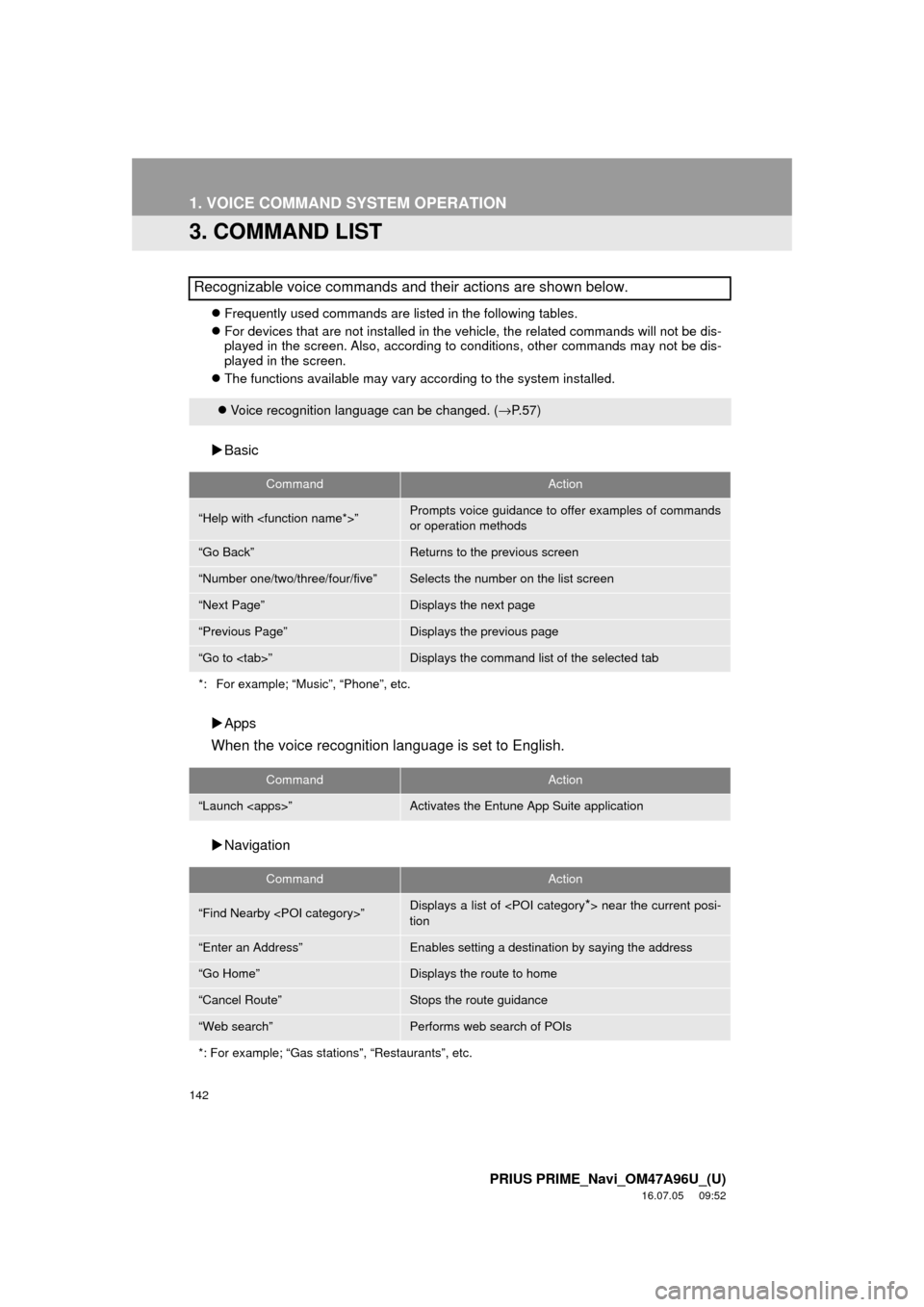
3. COMMAND LIST
Frequently used commands are listed in the following tables.
For devices that are not installed in the vehicle, the related commands will not be dis-
played in the screen. Also, according to conditions, other commands may not be dis-
played in the screen.
The functions available may vary according to the system installed.
Basic
Apps
When the voice recognition language is set to English.
Navigation
Recognizable voice commands and their actions are shown below.
Voice recognition language can be changed. ( →P.57)
CommandAction
“Help with ”Prompts voice guidance to offer examples of commands
or operation methods
“Go Back”Returns to the previous screen
“Number one/two/three/four/five”Selects the number on the list screen
“Next Page”Displays the next page
“Previous Page”Displays the previous page
“Go to ”Displays the command list of the selected tab
*: For example; “Music”, “Phone”, etc.
CommandAction
“Launch ”Activates the Entune App Suite application
CommandAction
“Find Nearby ”Displays a list of near the current posi-
tion
“Enter an Address”Enables setting a destina tion by saying the address
“Go Home”Displays the route to home
“Cancel Route”Stops the route guidance
“Web search”Performs web search of POIs
*: For example; “Gas stations”, “Restaurants”, etc.
Page 143 of 304
143
1. VOICE COMMAND SYSTEM OPERATION
PRIUS PRIME_Navi_OM47A96U_(U)
16.07.05 09:52
VOICE COMMAND SYSTEM
4
Phone
Audio*
Information*
CommandAction
“Redial”Places a call to the phone number of the latest outgoing
call
“Call Back”Places a call to the phone number of latest incoming call
“Show Recent Calls”Displays the call history screen
“Dial ”Places a call to the said phone number
“Call ”Place a call to the said phone type of the contact from the
phone book
CommandAction
“Play Playlist ”Plays tracks from the selected playlist
“Play Artist ”Plays tracks from the selected artist
“Play Song ”Plays the selected track
“Play Album ”Plays tracks from the selected album
*: Only for external music device
CommandAction
“Show Forecast”Displays weather information
“Show Traffic”Displays traffic information
*: Available models and ava ilable country and areas (→P.148)
Page 144 of 304
144
PRIUS PRIME_Navi_OM47A96U_(U)
16.07.05 09:52
2. MOBILE ASSISTANT OPERATION
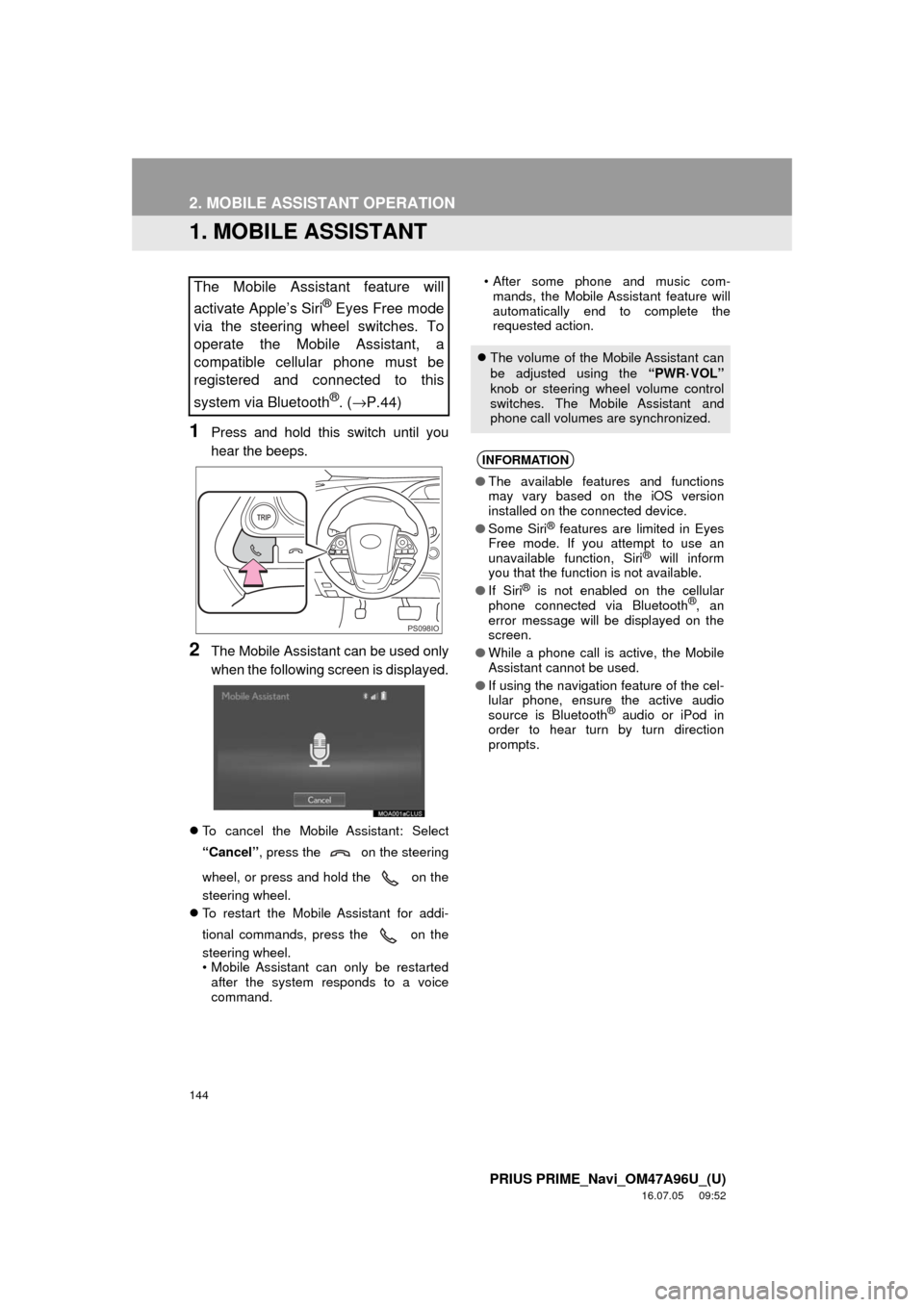
1. MOBILE ASSISTANT
1Press and hold this switch until you
hear the beeps.
2The Mobile Assistant can be used only
when the following screen is displayed.
To cancel the Mobile Assistant: Select
“Cancel” , press the on the steering
wheel, or press and hold the on the
steering wheel.
To restart the Mobile Assistant for addi-
tional commands, press the on the
steering wheel.
• Mobile Assistant can only be restarted
after the system responds to a voice
command. • After some phone and music com-
mands, the Mobile Assistant feature will
automatically end to complete the
requested action.
The Mobile Assistant feature will
activate Apple’s Siri
® Eyes Free mode
via the steering wheel switches. To
operate the Mobile Assistant, a
compatible cellular phone must be
registered and connected to this
system via Bluetooth
®. ( →P.44)
PS098IO
The volume of the Mobile Assistant can
be adjusted using the “PWR
·VOL”
knob or steering wheel volume control
switches. The Mobile Assistant and
phone call volumes are synchronized.
INFORMATION
● The available features and functions
may vary based on the iOS version
installed on the connected device.
● Some Siri
® features are limited in Eyes
Free mode. If you attempt to use an
unavailable function, Siri
® will inform
you that the function is not available.
● If Siri
® is not enabled on the cellular
phone connected via Bluetooth®, an
error message will be displayed on the
screen.
● While a phone call is active, the Mobile
Assistant cannot be used.
● If using the navigation feature of the cel-
lular phone, ensure the active audio
source is Bluetooth
® audio or iPod in
order to hear turn by turn direction
prompts.
Page 145 of 304
145
2. MOBILE ASSISTANT OPERATION
PRIUS PRIME_Navi_OM47A96U_(U)
16.07.05 09:52
VOICE COMMAND SYSTEM
4
MICROPHONE
It is not necessary to speak directly into
the microphone when using the Mobile
Assistant. (Microphone location:
→P.134)
INFORMATION
● Wait for the listening beeps before using
the Mobile Assistant.
● The Mobile Assistant may not recognize
commands in the following situations:
• Spoken too quickly.
• Spoken at a low or high volume.
• The roof or windows are open.
• Passengers are talking while the
Mobile Assistant is being used.
• The air conditioning speed is set high.
• The air conditioning vents are turned toward the microphone.
Page 148 of 304
148
PRIUS PRIME_Navi_OM47A96U_(U)
16.07.05 09:53
1. USEFUL INFORMATION
1. RECEIVING WEATHER INFORMATION
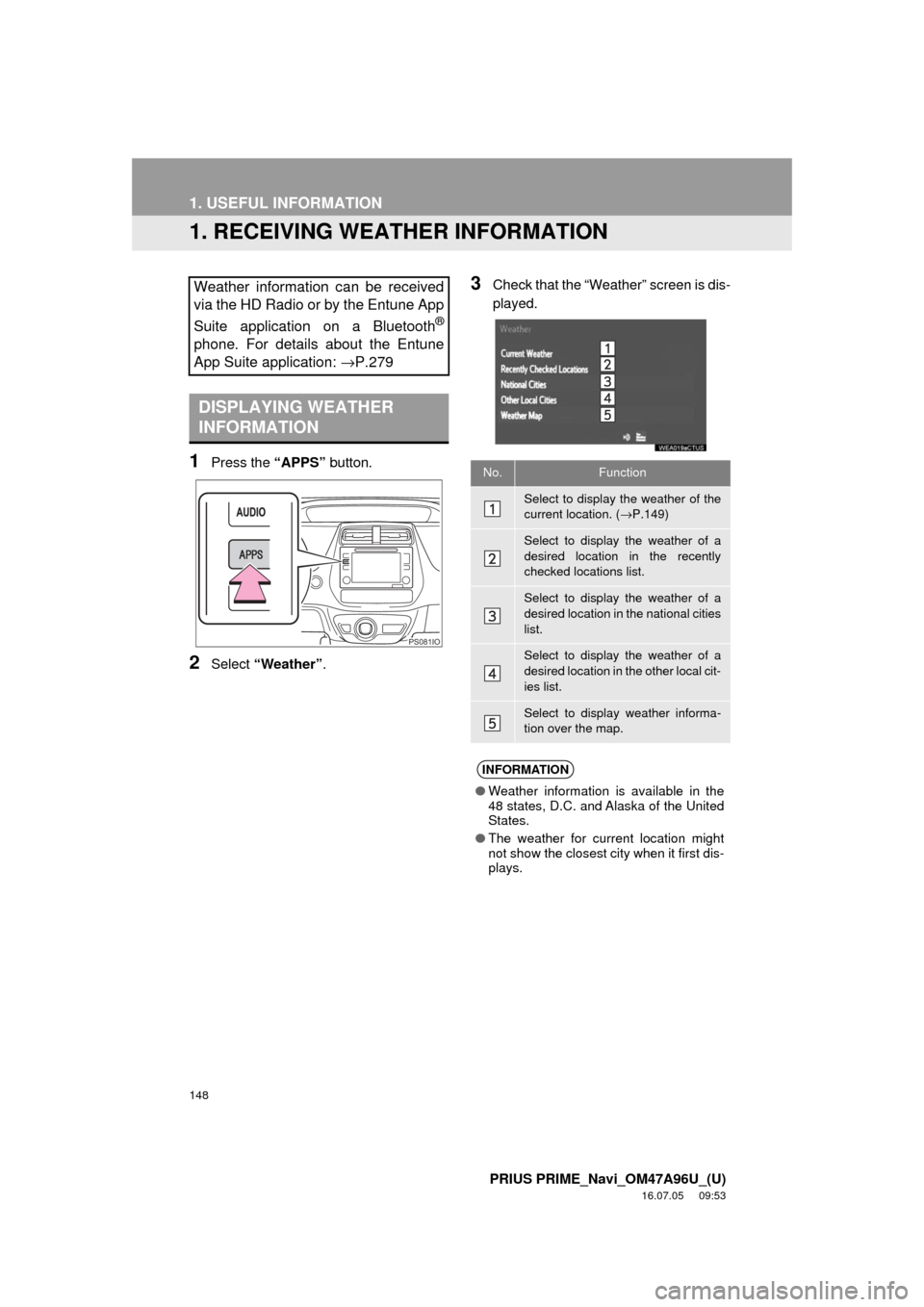
1Press the “APPS” button.
2Select “Weather” .
3Check that the “Weather” screen is dis-
played.Weather information can be received
via the HD Radio or by the Entune App
Suite application on a Bluetooth
®
phone. For details about the Entune
App Suite application: →P.279
DISPLAYING WEATHER
INFORMATION
PS081IO
No.Function
Select to display the weather of the
current location. (→P.149)
Select to display the weather of a
desired location in the recently
checked locations list.
Select to display the weather of a
desired location in the national cities
list.
Select to display the weather of a
desired location in the other local cit-
ies list.
Select to display weather informa-
tion over the map.
INFORMATION
● Weather information is available in the
48 states, D.C. and Alaska of the United
States.
● The weather for current location might
not show the closest city when it first dis-
plays.

