2017 TOYOTA PRIUS light
[x] Cancel search: lightPage 556 of 796
556
PRIUS_OM_OM47B54U_(U)
6-4. Using the other interior features
■Programming an entry gate (for U.S.A. owners)/Programming a
devices in the Canadian market
Place the remote control transmitter 1 to 3 in. (25 to 75 mm)
away from the HomeLink
® buttons.
Keep the HomeLink® indicator light in view while programming.
Press and hold the selected HomeLink® button.
Repeatedly press and release (cyc le) the remote control trans-
mitter for 2 seconds each until step 4 is completed.
When the HomeLink
® indicator light starts to flash rapidly,
release the buttons.
Test the HomeLink
® operation by pressing the newly pro-
grammed button. Check to see if the gate/device operates cor-
rectly.
Repeat the steps above to program another device for any of the
remaining HomeLink
® buttons.
■Programming other devices
To program other devices such as home security systems, home
door locks and lighting, contact your Toyota dealer for assistance.
■Reprogramming a button
The individual HomeLink
® buttons cannot be erased but can be
reprogrammed. To reprogram a button, follow the “Reprogramming
a HomeLink
® button” instructions.
Press the appropriate HomeLink
® button. The HomeLink® indicator
light should come on.
The HomeLink® compatible transceiver in your vehicle continues to send a
signal for up to 20 seconds as long as the button is pressed.
Operating HomeLink®
1
2
3
4
5
6
Page 557 of 796
PRIUS_OM_OM47B54U_(U)
5576-4. Using the other interior features
6
Interior features
Press and hold the desired HomeLink® button. After 20 seconds, the
HomeLink® indicator light will start flashing slowly. Keep pressing the
HomeLink® button and press and hold the transmitter button until the
HomeLink® indicator light changes from a slow to a rapid flash.
Release the buttons.
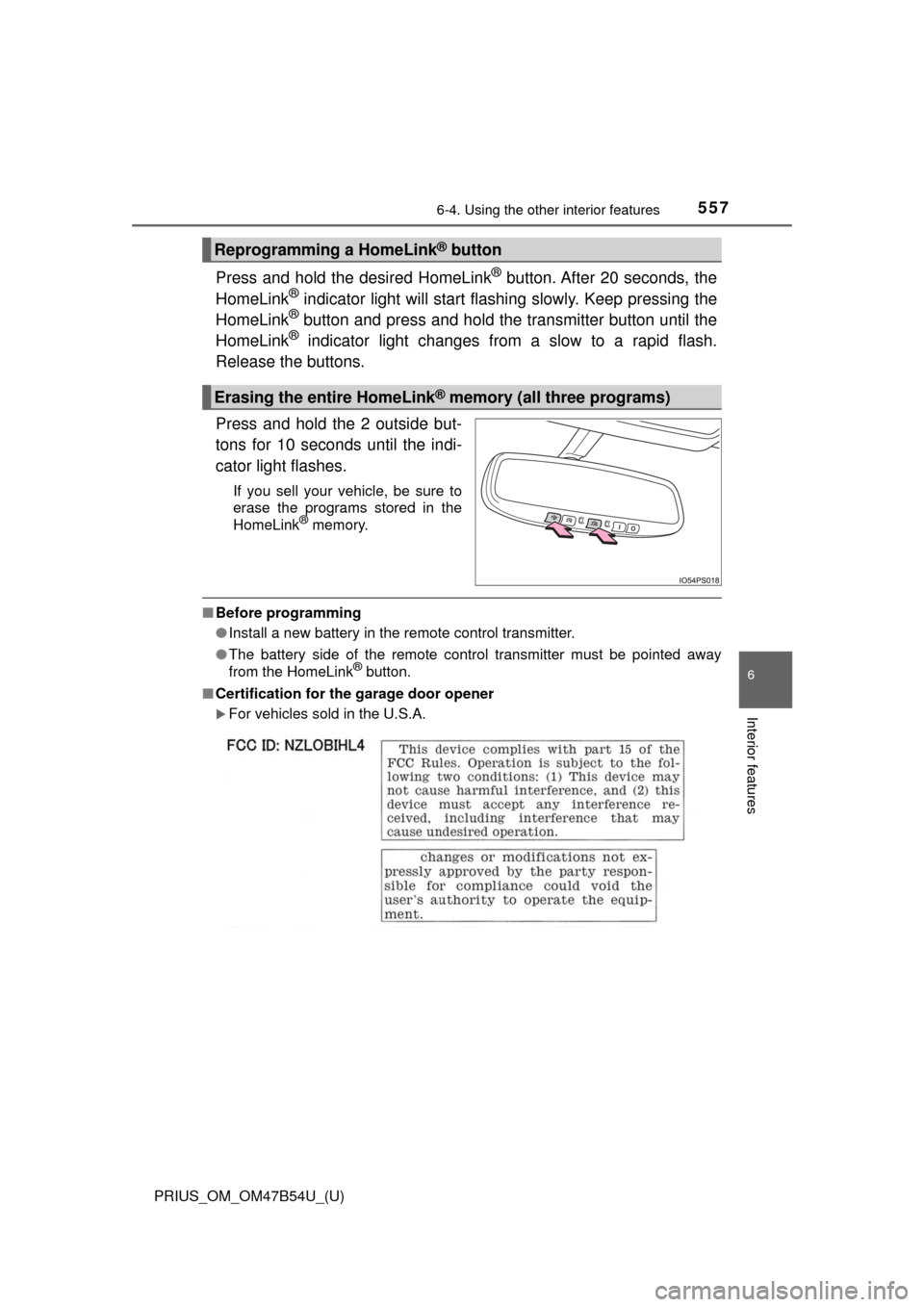
Press and hold the 2 outside but-
tons for 10 seconds until the indi-
cator light flashes.
If you sell your vehicle, be sure to
erase the programs stored in the
HomeLink
® memory.
■ Before programming
●Install a new battery in the remote control transmitter.
● The battery side of the remote control transmitter must be pointed away
from the HomeLink
® button.
■ Certification for the garage door opener
For vehicles sold in the U.S.A.
Reprogramming a HomeLink® button
Erasing the entire HomeLink® memory (all three programs)
Page 559 of 796
559
PRIUS_OM_OM47B54U_(U)
6-4. Using the other interior features
6
Interior features
Safety Connect∗
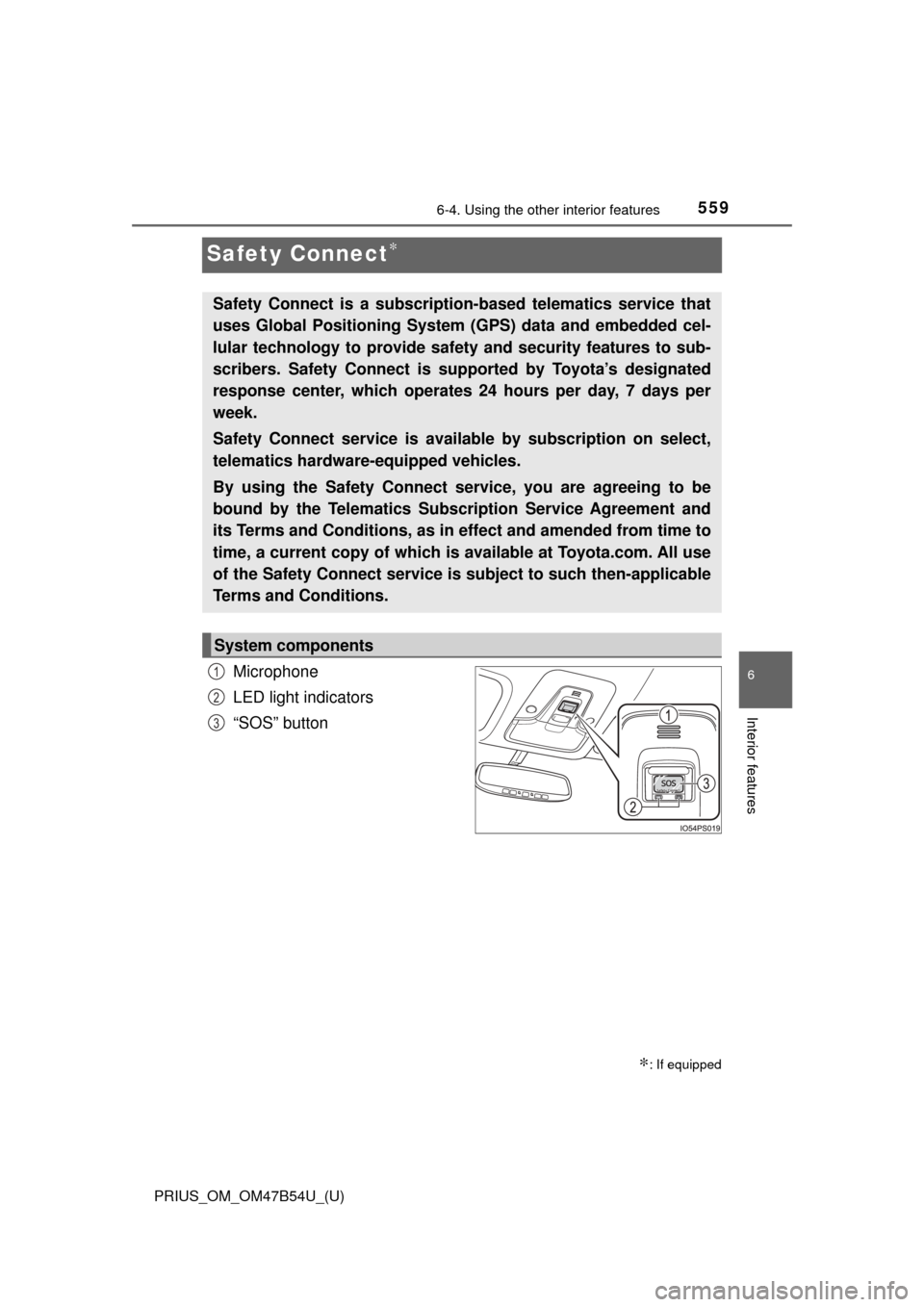
Microphone
LED light indicators
“SOS” button
∗: If equipped
Safety Connect is a subscription-based telematics service that
uses Global Positioning System (GPS) data and embedded cel-
lular technology to provide safety and security features to sub-
scribers. Safety Connect is s upported by Toyota’s designated
response center, which operates 24 hours per day, 7 days per
week.
Safety Connect service is avai lable by subscription on select,
telematics hardware-equipped vehicles.
By using the Safety Connect service, you are agreeing to be
bound by the Telematics Subscription Service Agreement and
its Terms and Conditions, as in ef fect and amended from time to
time, a current copy of which is available at Toyota.com. All use
of the Safety Connect service is subject to such then-applicable
Terms and Conditions.
System components
1
2
3
Page 561 of 796
PRIUS_OM_OM47B54U_(U)
5616-4. Using the other interior features
6
Interior features
■Safety Connect Services Information
●Phone calls using the vehicles Bluetooth® technology will not be possible
during Safety Connect.
● Safety Connect is available beginning Fall 2009 on select Toyota models.
Contact with the Safety Connect response center is dependent upon the
telematics device being in operative condition, cellular connection availabil-
ity, and GPS satellite signal reception, which can limit the ability to reach the
response center or receive emergency service support. Enrollment and
Telematics Subscription Service Agreement required. A variety of subscrip-
tion terms is available; charges vary by subscription term selected.
● Automatic Collision Notification, Emergency Assistance, Stolen Vehicle
Location, and Enhanced Roadside Assistance will function in the United
States, including Hawaii and Alaska, and in Canada. No Safety Connect
services will function outside of the United States in countries other than
Canada.
● Safety Connect services are not subject to section 255 of the Telecommuni-
cations Act and the device is not TTY compatible.
■ Languages
The Safety Connect response center will offer support in multiple languages.
The Safety Connect system will offer voice prompts in English and Spanish.
Please indicate your language of choice when enrolling.
■ When contacting th e response center
You may be unable to contact the response center if the network is busy.
When the power switch is turned to ON mode, the red indicator light
comes on for 2 seconds then turns off. Afterward, the green indicator
light comes on, indicating t hat the service is active.
The following indicator light pattern s indicate specific system usage
conditions:
● Green indicator light on = Active service
● Green indicator light flashing = Sa fety Connect call in process
● Red indicator light (except at vehicle start-up) = System malfunction
(contact your Toyota dealer)
● No indicator light (off) = Safety Connect service not active
Safety Connect LE D light Indicators
Page 565 of 796

565
PRIUS_OM_OM47B54U_(U)
7Maintenance and care
7-1. Maintenance and careCleaning and protecting the vehicle exterior .......... 566
Cleaning and protecting the vehicle interior ........... 572
7-2. Maintenance Maintenance requirements ................... 577
General maintenance........ 580
Emission inspection and maintenance (I/M)
programs......................... 583
7-3. Do-it-yourself maintenance Do-it-yourself service precautions ..................... 584
Hood ................................. 587
Positioning a floor jack ...... 589
Engine compartment ......... 590
Tires .................................. 604
Tire inflation pressure ....... 614
Wheels .............................. 617
Air conditioning filter.......... 620
Wiper rubber replacement .................... 623
Electronic key battery........ 627
Checking and replacing fuses ............................... 630
Headlight aim .................... 633
Light bulbs......................... 635
Page 569 of 796

PRIUS_OM_OM47B54U_(U)
5697-1. Maintenance and care
7
Maintenance and care
NOTICE
■To prevent paint deterioration and corrosion on the body and compo-
nents (aluminum wheels etc.)
● Wash the vehicle immediately in the following cases:
• After driving near the sea coast
• After driving on salted roads
• If coal tar or tree sap is present on the paint surface
• If dead insects, insect droppings or bird droppings are present on the
paint surface
• After driving in an area contaminated with soot, oily smoke, mine dust, iron powder or chemical substances
• If the vehicle becomes heavily soiled with dust or mud
• If liquids such as benzene and gasoline are spilled on the paint surface
● If the paint is chipped or scratched, have it repaired immediately.
● To prevent the wheels from corroding, remove any dirt and store in a place
with low humidity when storing the wheels.
■ To prevent damage to the windshield wiper arms
When lifting the wiper arms away from the windshield pull the driver side
wiper arm upward first, and repeat for the passenger’s side. When returning
the wipers to their original position, do so from the passenger’s side first.
■ Cleaning the exterior lights
● Wash carefully. Do not use organic substances or scrub with a hard brush.
This may damage the surfaces of the lights.
● Do not apply wax to the surfaces of the lights.
Wax may cause damage to the lenses.
Page 576 of 796
576
PRIUS_OM_OM47B54U_(U)
7-1. Maintenance and care
NOTICE
■Cleaning detergents
● Do not use the following types of detergent, as they may discolor the vehi-
cle interior or cause streaks or damage to painted surfaces:
• Non-seat portions: Organic substances such as benzene or gasoline,
alkaline or acidic solutions, dye, and bleach
• Seats: Alkaline or acidic solutions, such as thinner, benzene, and alco- hol
● Do not use polish wax or polish cleaner. The instrument panel’s or other
interior part’s painted surface may be damaged.
■ Preventing damage to leather surfaces
Observe the following precautions to avoid damage to and deterioration of
leather surfaces:
● Remove any dust or dirt from leather surfaces immediately.
● Do not expose the vehicle to direct sunlight for extended periods of time.
Park the vehicle in the shade, especially during summer.
● Do not place items made of vinyl, plastic, or containing wax on the uphol-
stery, as they may stick to the leather surface if the vehicle interior heats
up significantly.
■ Water on the floor
Do not wash the vehicle floor with water.
Vehicle systems such as the audio system may be damaged if water comes
into contact with electrical components such as the audio system above or
under the floor of the vehicle. Water may also cause the body to rust.
■ When cleaning the inside of the windshield (vehicles with Toyota
Safety Sense P)
Do not allow glass cleaner to contact the lens. Also, do not touch the lens.
(→P. 269).
■ Cleaning the inside of the rear window
● Do not use glass cleaner to clean the rear window, as this may cause
damage to the rear window defogger heater wires. Use a cloth dampened
with lukewarm water to gently wipe the window clean. Wipe the window in
strokes running parallel to the heater wires.
● Be careful not to scratch or damage the heater wires.
■ When cleaning the air intake vent and filter
Do not clean the air intake vent and filter with water or other liquids.
Page 581 of 796
PRIUS_OM_OM47B54U_(U)
5817-2. Maintenance
7
Maintenance and care
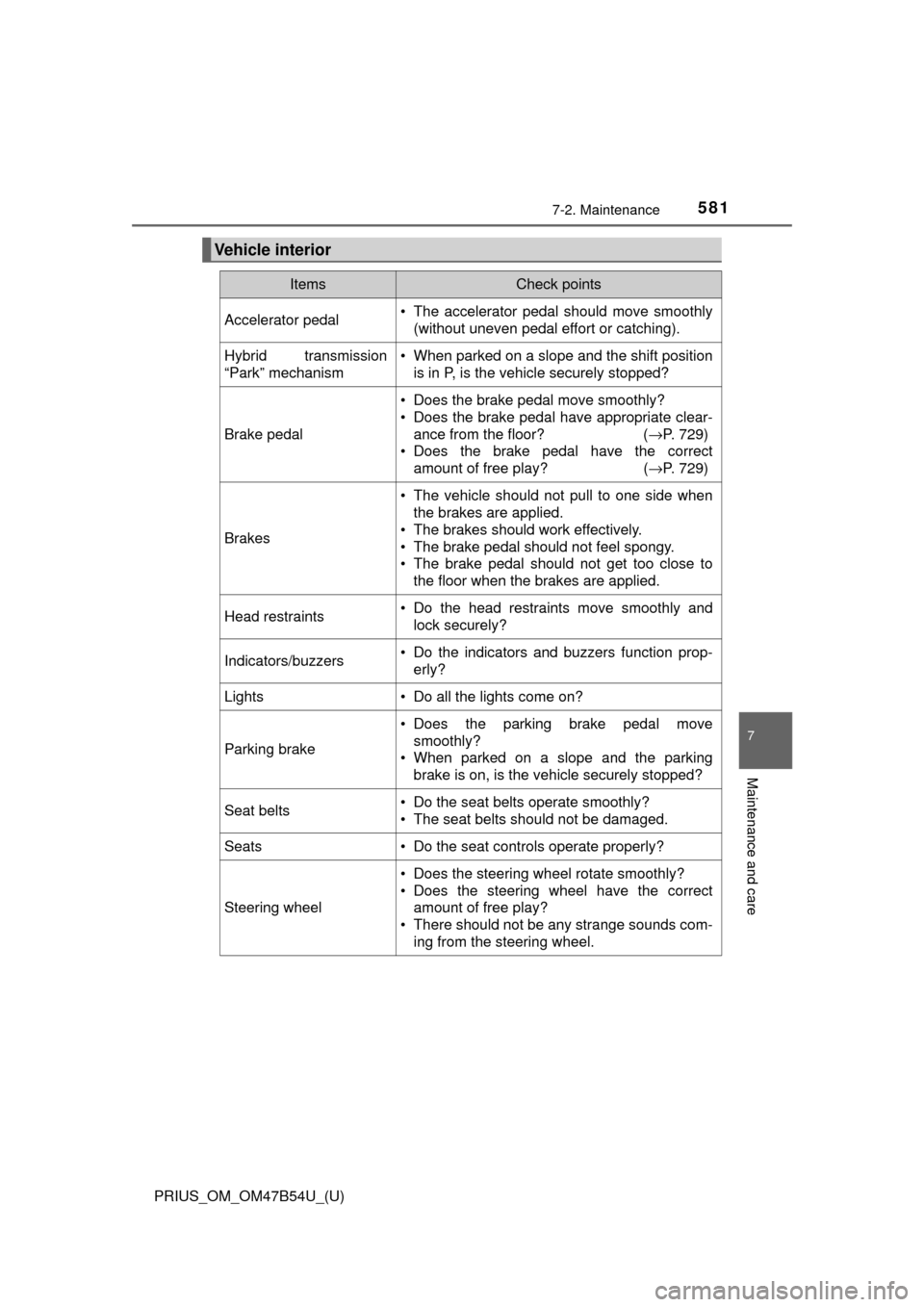
Vehicle interior
ItemsCheck points
Accelerator pedal• The accelerator pedal should move smoothly(without uneven pedal effort or catching).
Hybrid transmission
“Park” mechanism• When parked on a slope and the shift positionis in P, is the vehicle securely stopped?
Brake pedal
• Does the brake pedal move smoothly?
• Does the brake pedal have appropriate clear-
ance from the floor? ( →P. 729)
• Does the brake pedal have the correct amount of free play? ( →P. 729)
Brakes
• The vehicle should not pull to one side when
the brakes are applied.
• The brakes should work effectively.
• The brake pedal should not feel spongy.
• The brake pedal should not get too close to the floor when the brakes are applied.
Head restraints• Do the head restraints move smoothly andlock securely?
Indicators/buzzers• Do the indicators and buzzers function prop-erly?
Lights• Do all the lights come on?
Parking brake
• Does the parking brake pedal movesmoothly?
• When parked on a slope and the parking brake is on, is the vehicle securely stopped?
Seat belts• Do the seat belts operate smoothly?
• The seat belts should not be damaged.
Seats• Do the seat controls operate properly?
Steering wheel
• Does the steering wheel rotate smoothly?
• Does the steering wheel have the correctamount of free play?
• There should not be any strange sounds com- ing from the steering wheel.