Page 38 of 54

36
1 The set speed may also be cancelled by depressing the brake pedal.2 The set speed may be resumed once vehicle speed exceeds 25 mph.
DRCC helps maintain a pre-set distance to a preceding vehicle when the
preceding vehicle is traveling at a lower speed. This mode is always sel\
ected first
when the cruise control button is depressed. Constant speed cruise contr\
ol mode
is also available.
Vehicle will cruise at a set speed, decelerate to maintain selected dist\
ance from a
slower vehicle traveling in front and accelerate back up to the selected\
speed if the
vehicle in front changes lanes or speeds up.
(1) Push the ON-OFF button. The “RADAR READY” or “
” indicator will come on.
(2) Push the lever down to SET speed, push it up to Resume and pull it\
or depress brake to Cancel.
(3) Push up to increase the set speed, push down to decrease (1mph in\
crements).
(1) Note: If DRCC is turned off and
you hold the ON-OFF button for
at least 1.5 seconds, the system
switches to constant speed
control mode. Vehicle-to-vehicle distance button
Cruise control switch
Display
Set speed
Increase
speed
Decrease
speed
(3)
SetCancel1
Resume2(2)
Dynamic Radar Cruise Control (DRCC)
TOYOTA SAFETY SENSE
TURNING SYSTEM ON/OFF
ADJUSTING SET SPEED
Page 39 of 54
37
OVERVIEW
FEATURES & OPERATIONS
TOYOTA SAFETY SENSE
SAFETY & EMERGENCY FEATURES
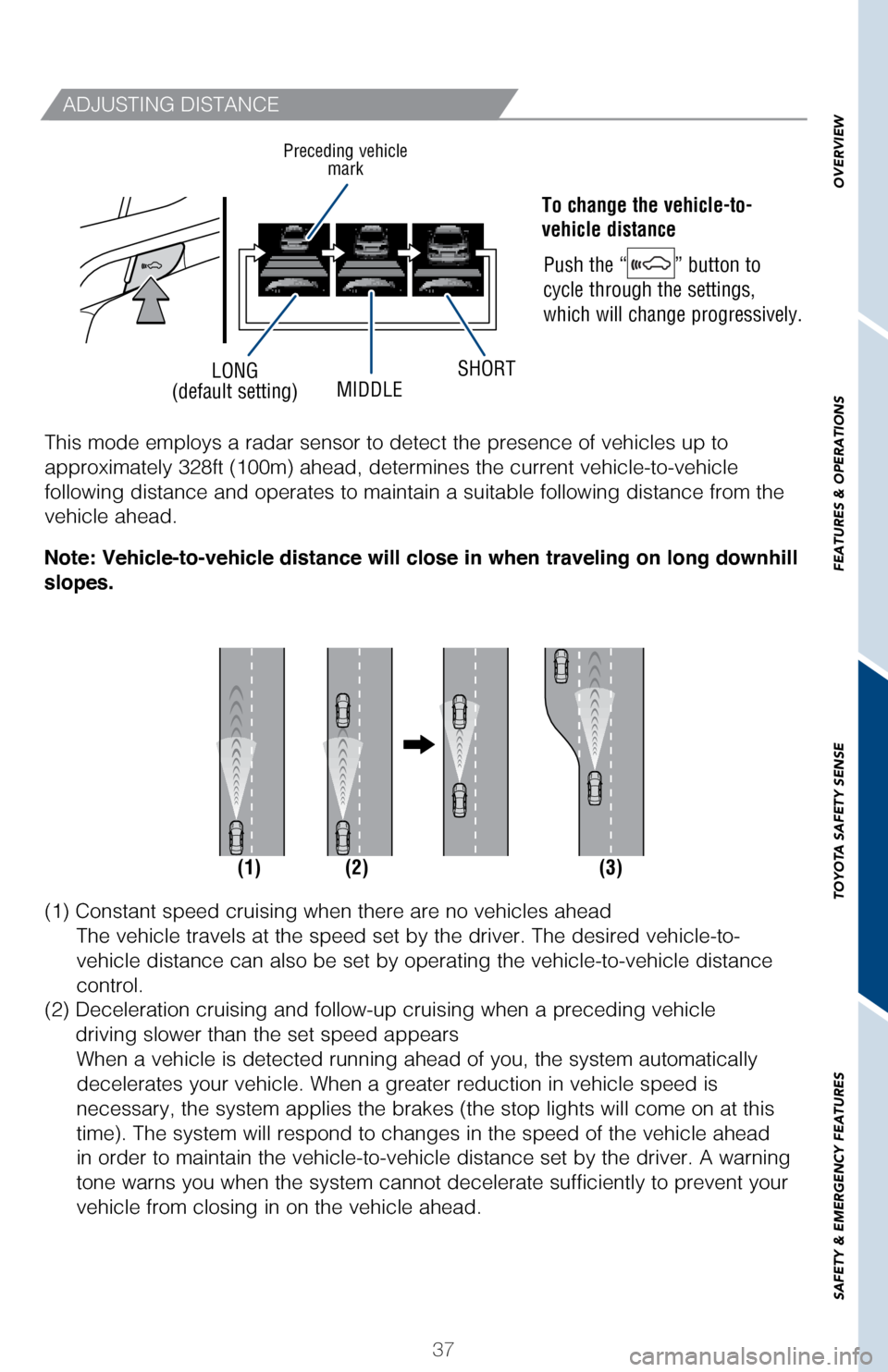
LONG
(default setting) MIDDLESHORT
ADJUSTING DISTANCE
To change the vehicle-to-
vehicle distance
Push the “
” button to
cycle through the settings,
which will change progressively.
Preceding vehicle mark
(1) (2) (3)
This mode employs a radar sensor to detect the presence of vehicles up t\
o
approximately 328ft (100m) ahead, determines the current vehicle-to-ve\
hicle
following distance and operates to maintain a suitable following distanc\
e from the
vehicle ahead.
(1) Constant speed cruising when there are no vehicles ahead
The vehicle travels at the speed set by the driver. The desired vehicle-\
to-
vehicle distance can also be set by operating the vehicle-to-vehicle dis\
tance
control.
(2) Deceleration cruising and follow-up cruising when a preceding vehi\
cle
driving slower than the set speed appears When a vehicle is detected running ahead of you, the system automaticall\
y
decelerates your vehicle. When a greater reduction in vehicle speed is
necessary, the system applies the brakes (the stop lights will come on \
at this
time). The system will respond to changes in the speed of the vehicle a\
head
in order to maintain the vehicle-to-vehicle distance set by the driver. \
A warning
tone warns you when the system cannot decelerate sufficiently to prevent\
your
vehicle from closing in on the vehicle ahead.
Note: Vehicle-to-vehicle distance will close in when traveling on long downhill
slopes.
Page 40 of 54

TOYOTA SAFETY SENSE
SWITCHING TO CONSTANT SPEED CONTROL MODE
The AHB uses an in-vehicle camera sensor to assess the brightness of str\
eetlights,
the lights of oncoming and p")
38
Auto High Beams (AHB)
TOYOTA SAFETY SENSE
SWITCHING TO CONSTANT SPEED CONTROL MODE
The AHB uses an in-vehicle camera sensor to assess the brightness of str\
eetlights,
the lights of oncoming and preceding vehicles, etc., and automatically t\
urns high
beam on or off as necessary.
(3) Acceleration when there are no longer any preceding vehicles drivi\
ng
slower than the set speedThe system accelerates until the set speed is reached. The system then
returns to constant speed cruising.
Note: When your vehicle is too close to a vehicle ahead, and sufficient
automatic deceleration via the cruise control is not possible, the display will
flash and the buzzer will sound to alert the driver. An example of this would be
if another driver cuts in front of you while you are following a vehicle. Depress
the brake pedal to ensure an appropriate vehicle-to-vehicle distance.
Note: When the engine is turned off, it will automatically default to DR\
CC.
If you are already using DRCC “
”, push ON-OFF button to turn the system off
first, then push and hold ON-OFF button for at least 1.5 seconds to swit\
ch.
(1) (2)
Page 44 of 54

42
Star Safety System™
SAFETY AND EMERGENCY FEATURES
Smart Stop Technology automatically reduces engine power when the accele\
rator
and brake pedals are pressed simultaneously under certain conditions.
SST engages when the accelerator is depressed first and the brakes are a\
pplied
firmly for longer than one-half second at speeds greater than five miles\
per hour.
SST doesn’t engage if the brake pedal is depressed before the acceler\
ator pedal,
allowing vehicles to start on a steep hill and safely accelerate without\
rolling
backward. VSC helps prevent loss of traction during cornering by reducing engine p\
ower and
applying brake force to selected wheels.
Toyota’s VSC monitors steering angle and the direction your vehicle i\
s traveling.
When it senses that the front or rear wheels begin to lose traction, VSC\
reduces
engine power and applies braking to selected wheels. This helps restore \
traction
and vehicle control.
Toyota’s ABS sensors detect which wheels are locking up and limits wh\
eel lockup
by “pulsing” each wheel’s brakes independently. Pulsing release\
s brake pressure
repeatedly for fractions of a second. This helps the tires attain the tr\
action that
current road conditions will allow, helping you to stay in directional c\
ontrol.
Brake Assist is designed to detect sudden or “panic” braking, and \
then add braking
pressure to decrease the vehicle’s stopping distance. When there’s\
only a split
second to react, Brake Assist can add additional brake pressure more qui\
ckly than
just the driver alone can. Helps to maintain drive power and prevent the 4 wheels from spinning whe\
n starting
the vehicle or accelerating on slippery roads.
Toyota’s ABS technology has Electronic Brake-force Distribution (EBD\
) to help
maintain stability and balance when braking. Abrupt stops cause the vehi\
cle to tilt
forward, reducing the braking power of the rear wheels. EBD responds to \
sudden
stops by redistributing brake force to maximize the braking effectivenes\
s of all four
wheels. All new Toyota vehicles come standard with the Star Safety System
TM, which
combines Vehicle Stability Control (VSC), Traction Control (TRAC), A\
nti-lock Brake
System (ABS), Electronic Brake-force Distribution (EBD), Brake Assis\
t (BA) and
Smart Stop Technology (SST).
Refer to the Owner’s Manual for more details and important information on limitations
to these systems.
VEHICLE STABILITY CONTROL (VSC)
ACTIVE TRACTION CONTROL (A-TRAC)
MULTI-TERRAIN ANTI-LOCK BRAKE SYSTEM (ABS)
ELECTRONIC BRAKE FORCE DISTRIBUTION (EBD)
BRAKE ASSIST (BA)
SMART STOP TECHNOLOGY (SST)