Page 481 of 608
481
LC200_OM_OM60P24U_(U)
6-3. Do-it-yourself maintenance
6
Maintenance and care
Checking and replacing fuses
Turn the engine switch off.
Open the fuse box cover.
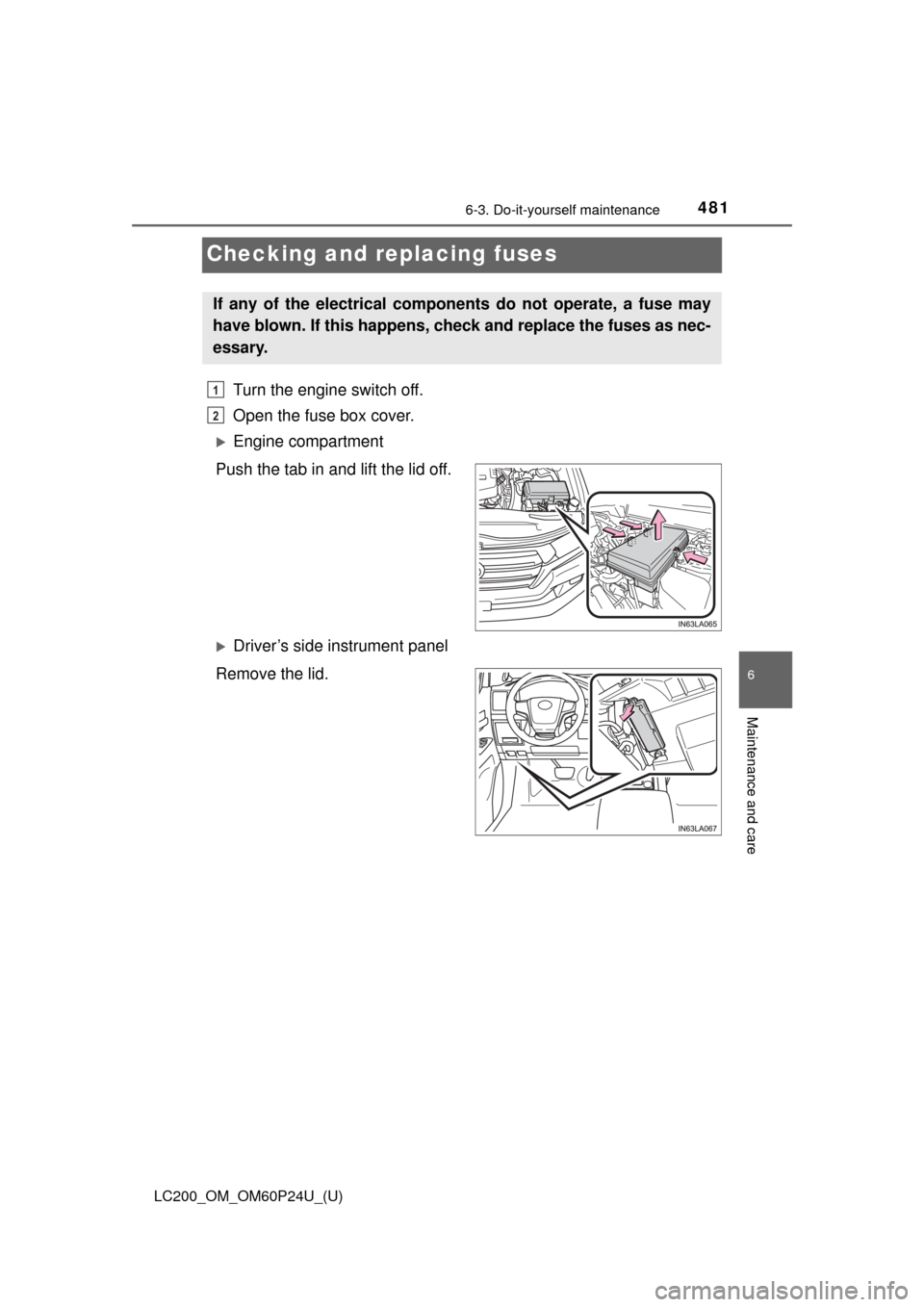
Engine compartment
Push the tab in and lift the lid off.
Driver’s side instrument panel
Remove the lid.
If any of the electrical components do not operate, a fuse may
have blown. If this happens, check and replace the fuses as nec-
essary.
1
2
Page 487 of 608
487
LC200_OM_OM60P24U_(U)
6-3. Do-it-yourself maintenance
6
Maintenance and care
Light bulbs
Check the wattage and color of the light bulb being replaced.
(→ P. 559)
→ P. 4 5 1
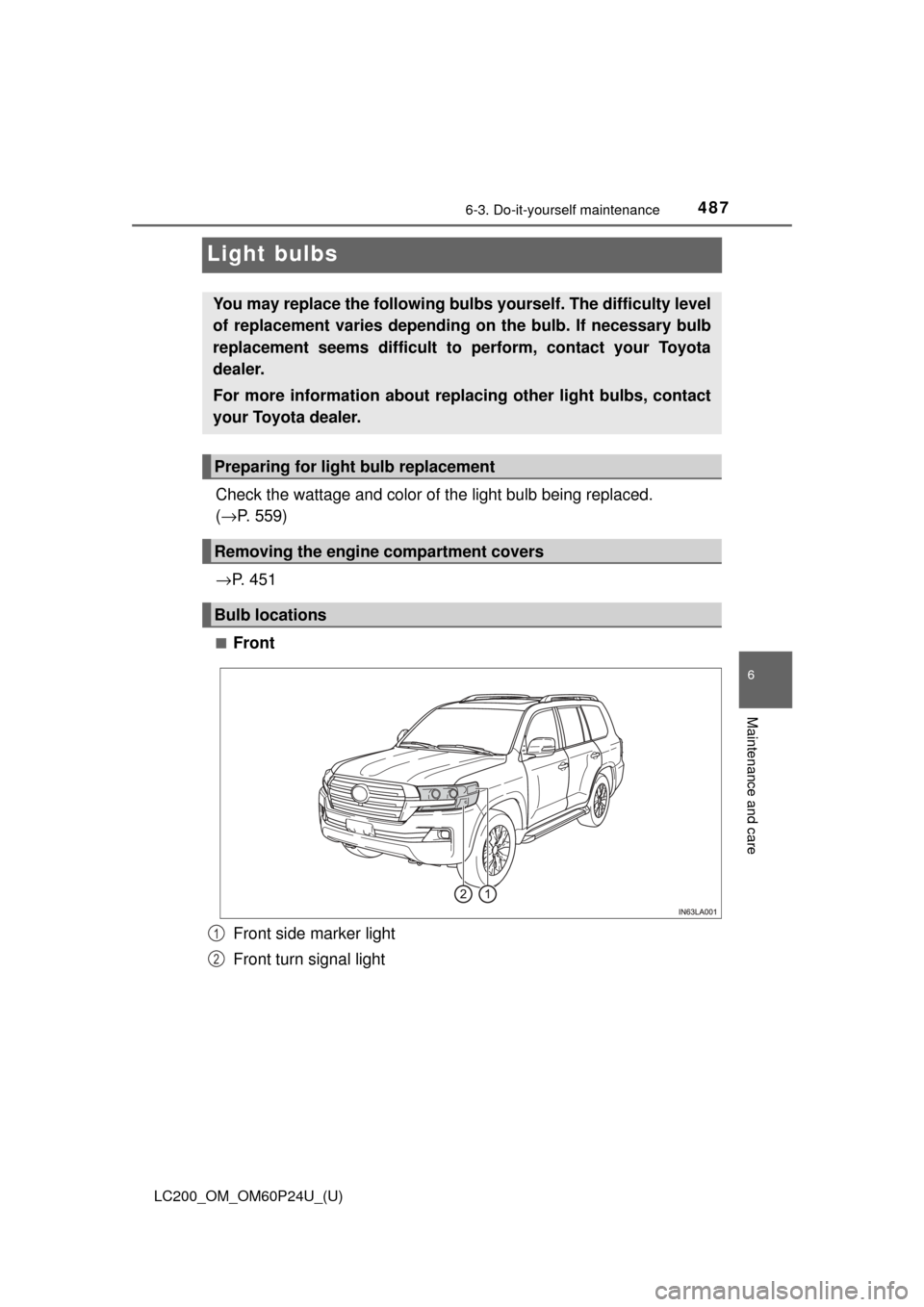
■Front
Front side marker light
Front turn signal light
You may replace the following bulb s yourself. The difficulty level
of replacement varies depending on the bulb. If necessary bulb
replacement seems difficult to perform, contact your Toyota
dealer.
For more information about replacing other light bulbs, contact
your Toyota dealer.
Preparing for light bulb replacement
Removing the engine compartment covers
Bulb locations
1
2
Page 514 of 608

5147-2. Steps to take in an emergency
LC200_OM_OM60P24U_(U)
■SRS warning light
This warning light system monitors the airbag sensor assembly, front impact
sensors, side impact sensors (rear), side impact sensors (front door), safing
sensor (rear), driver’s seat belt buckle switch, driver’s seat position sensor,
front passenger’s seat belt buckle switch, airbags, interconnecting wiring and
power sources, front passenger occupant classification system, “AIR BAG
ON” and “AIR BAG OFF” indicator lights, seat belt pretensioners, “RSCA
OFF” indicator light. (→P. 38)
■ Front passenger detection sensor, seat belt reminder and warning
buzzer
● If luggage is placed on the front passenger seat, the front passenger de\
tec-
tion sensor may cause the warning light to flash and the warning buzzer to
sound even if a passenger is not sitting in the seat.
● If a cushion is placed on the seat, the sensor may not detect a passenger,
and the warning light may not operate properly.
■ If the malfunction indicator la mp comes on while driving
First check the following:
● Is the fuel tank empty?
If it is, fill the fuel tank immediately.
● Is the fuel tank cap loose?
If it is, tighten it securely.
The light will go off after several driving trips.
If the light does not go off even after several trips, contact your Toyota dealer
as soon as possible.
■ If the low speed four-wheel drive indi cator light or the center differential
lock indicator light blinks
Take the specified steps. ( →P. 283)
If the brake system warning light or the malfunction indicator light also comes
on, or the low speed four-wheel drive indicator light or the center differential
lock indicator light continues to blink after taking the specified steps, there
may be a malfunction in the engine, the brake system or the four-wheel drive
system. In this case, you may not be able to transfer between “H4” and “L4”
modes, and the center differential lock may not be able to be locked or
unlocked. Have the vehicle inspected by your Toyota dealer immediately.
Page 515 of 608

5157-2. Steps to take in an emergency
LC200_OM_OM60P24U_(U)
7
When trouble arises
■When the tire pressure warning light comes on
Inspect the tires to check if a tire is punctured.
If a tire is punctured: →P. 524
If none of the tires are punctured:
Turn the engine switch off then turn it to IGNITION ON mode. Check if the
tire pressure warning light comes on or flashes.
If the tire pressure warning light comes on
After the temperature of the tires has lowered sufficiently, check the
inflation pressure of each tire and adjust them to the specified level.
If the warning light does not turn off even after several minutes have
elapsed, check that the inflation pressure of each tire is at the specified
level and perform initialization. (→P. 464)
If the warning light does not turn off even after several minutes have
elapsed, have the vehicle inspected by your Toyota dealer immediately.
If the tire pressure warning light flashes for 1 minute then stay on
There may be a malfunction in the tire pressure warning system. Have
the vehicle inspected by your Toyota dealer immediately.
■The tire pressure warning light may turn on due to natural causes
The tire pressure warning light may turn on due to natural causes such as
natural air leaks or tire inflation pressure changes caused by tempera-
ture. In this case, adjusting the tire inflation pressure will turn off the warn-
ing light (after a few minutes).
■When a tire is replaced with a spare tire
The spare tire is also equipped with the tire pressure warning valve and
transmitter. The tire pres sure warning light will turn on if the tire inflation
pressure of the spare tire is low. If a tire goes flat, even though the flat tire
is replaced with the spare tire, the tire pressure warning light does not
turn off. Replace the spare tire with the repaired tire and adjust the proper
tire inflation pressure. The tire pres sure warning light will turn off after a
few minutes.
■Conditions that the tire pressure warning system may not function
properly
→ P. 4 6 8
■Changing the engine oil
Make sure to reset oil change system.
1
2
Page 522 of 608

5227-2. Steps to take in an emergency
LC200_OM_OM60P24U_(U)■
If “Forward Camera System Unavaila ble” or “Forward Camera System
Unavailable Clean Windshield” is displayed. (if equipped)
The following systems may be suspended until the problem shown in the
message is resolved.
● PCS (Pre-Collision System)
● LDA (Lane Departure Alert)
● Dynamic radar cruise control
● Automatic High Beam
■ If “Engine Oil Level Low” is shown
Indicates that engine oil level is low.
Check the level of engine oil, and add if necessary.
This message may appear if the vehicle is stopped on a slope.
Move the vehicle to a level surface and check to see if the message disap-
pears.
■ If a following message is shown, take appropriate action and confirm
that the message has disappeared. (→P. 285)
●
“Crawl Not Available Select L4 and Shift to [D] or [R] Position”
●“Crawl Not Available Check System Operation Conditions”
●“Turn Assist Function Not Available Check System Operation Conditions”
●“Turn Assist Function Not Available Activate Crawl Control”
■If “Maintenance Required Soon” is shown (U.S.A. only)
Indicates that all maintenance according to the driven distance on the mainte-
nance schedule
* should be performed soon.
Comes on approximately 4500 miles (7200 km) after the message has been
reset.
If necessary, perform maintenance.
*: Refer to the separate “Scheduled Maintenance Guide” or “Owner’s Manual
Supplement” for the maintenance interval applicable to your vehicle.
■ If “Maintenance Required Visit Your Dealer” is shown (U.S.A. only)
Indicates that all maintenance is required to correspond to the driven distance
on the maintenance schedule
*.
Comes on approximately 5000 miles (8000 km) after the message has been
reset. (The indicator will not work properly unless the message has been
reset.)
Perform the necessary maintenance. Please reset the message after the
maintenance is performed ( →P. 440)
*: Refer to the separate “Scheduled Maintenance Guide” or “Owner’s Manual
Supplement” for the maintenance interval applicable to your vehicle.
Page 523 of 608
5237-2. Steps to take in an emergency
LC200_OM_OM60P24U_(U)
7
When trouble arises
■If “Oil Maintenance Required Soon” is shown
Indicates that the engine oil is scheduled to be changed. (The indicator will
not work properly unless the message has been reset.)
Check the engine oil, and change if necessary. After changing the engine oil,
the message should be reset. ( →P. 452)
■ If “Oil Maintenance Required Visit Your Dealer” is shown
Indicates that the engine oil should be changed. (The indicator will not work
properly unless the message has been reset.)
Check and change the engine oil, and oil filter by your Toyota dealer. After
changing the engine oil, the message should be reset. (→P. 452)
■ If “Visit Your Dealer” is shown
The system or part shown on the multi-information display is malfunctioning.
Have the vehicle inspected by your Toyota dealer immediately.
■ Warning buzzer
In some cases, the buzzer may not be heard due to being in a noisy location
or audio sound.
Page 526 of 608
5267-2. Steps to take in an emergency
LC200_OM_OM60P24U_(U)
WARNING
■Using the tire jack
Improper use of the tire jack may cause the vehicle to suddenly fall off
the jack, leading to death or serious injury.
●Do not use the tire jack for any purpose other than replacing tires or
installing and removing tire chains.
●Only use the tire jack that comes with this vehicle for replacing a flat
tire.
Do not use it on other vehicles, and do not use other tire jacks for
replacing tires on this vehicle.
●Always check that the tire jack is securely set to the jack point.
●Do not put any part of your body under the vehicle while it is supported
by the jack.
●Do not start or run the engine while your vehicle is supported by the
jack.
●Do not raise the vehicle while someone is inside.
●When raising the vehicle, do not put an object on or under the jack.
●Do not raise the vehicle to a height greater than that required to
replace the tire.
●Use a jack stand if it is necessary to get under the vehicle.
Take particular care when lowering the vehicle to ensure that no one
working on or near the vehicle will be injured.
■Using the jack handle
Tighten all the jack handle bolts securely using a Phillips-head screw-
driver, to prevent the extension parts from coming apart unexpectedly.
Page 541 of 608
5417-2. Steps to take in an emergency
LC200_OM_OM60P24U_(U)
7
When trouble arises
Ensure that the shift lever is in P and depress the brake pedal.
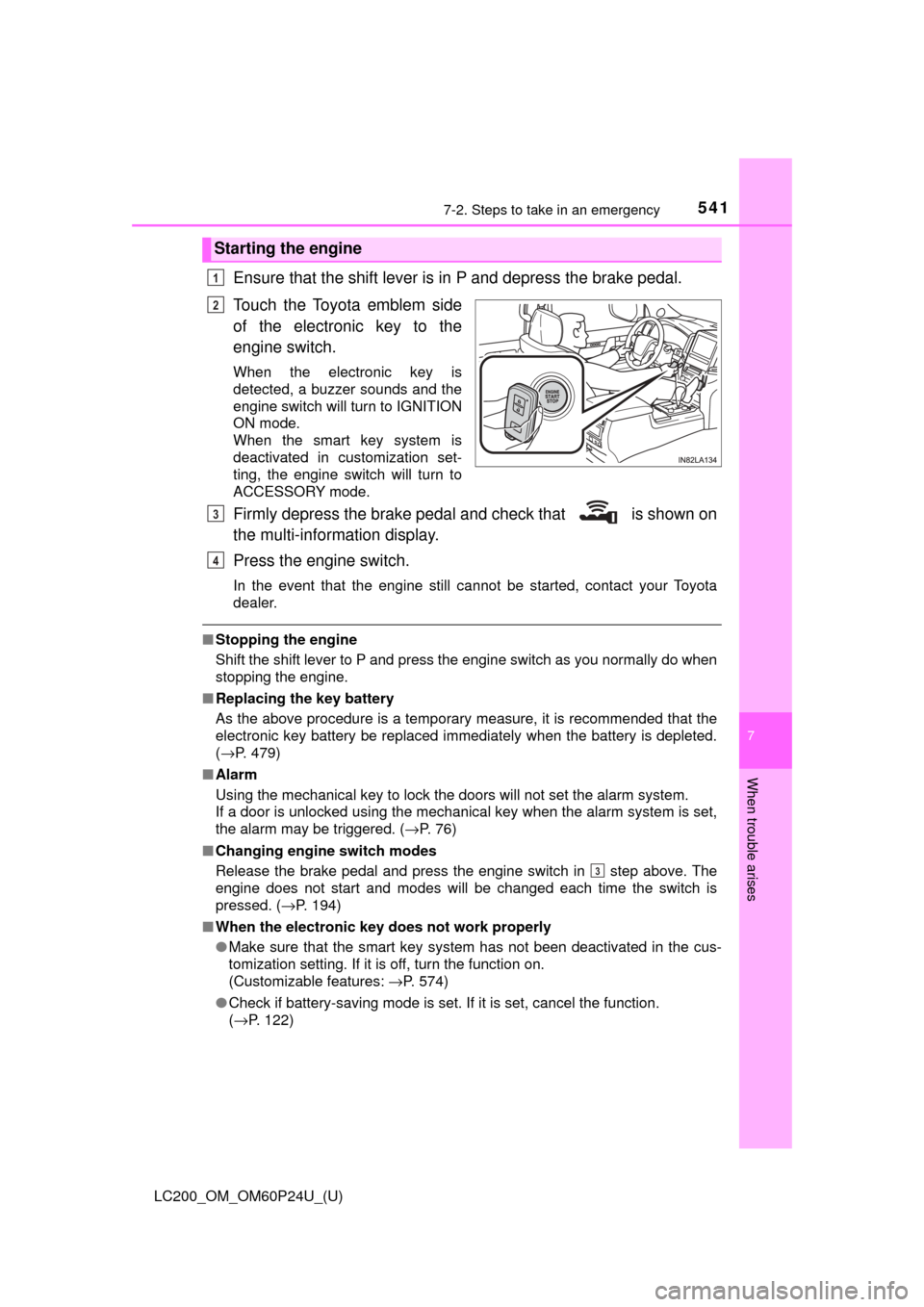
Touch the Toyota emblem side
of the electronic key to the
engine switch.
When the electronic key is
detected, a buzzer sounds and the
engine switch will turn to IGNITION
ON mode.
When the smart key system is
deactivated in customization set-
ting, the engine switch will turn to
ACCESSORY mode.
Firmly depress the brake pedal and check that is shown on
the multi-information display.
Press the engine switch.
In the event that the engine still cannot be started, contact your Toyota
dealer.
■Stopping the engine
Shift the shift lever to P and press the engine switch as you normally do when
stopping the engine.
■ Replacing the key battery
As the above procedure is a temporary measure, it is recommended that the
electronic key battery be replaced immediately when the battery is depleted.
(→P. 479)
■ Alarm
Using the mechanical key to lock the doors will not set the alarm system.
If a door is unlocked using the mechanical key when the alarm system is set,
the alarm may be triggered. ( →P. 76)
■ Changing engine switch modes
Release the brake pedal and press the engine switch in step above. The
engine does not start and modes will be changed each time the switch is
pressed. ( →P. 194)
■ When the electronic key does not work properly
●Make sure that the smart key system has not been deactivated in the cus-
tomization setting. If it is off, turn the function on.
(Customizable features: →P. 574)
● Check if battery-saving mode is set. If it is set, cancel the function.
(→P. 122)
Starting the engine
1
2
3
4
3